Until recently, it was not possible to use the Ruby language to create applications for any popular smartphone platform. RubyMotion is a toolchain that enables the development of iOS and OS X applications using the Ruby programming language. RubyMotion An implementation of the Ruby programming language that runs on the iOS and OS X platforms.
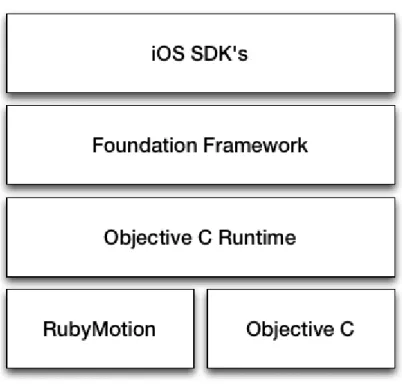
RubyMotion is a toolchain built on top of MacRuby, which enabled iOS and OS X application development using the Ruby programming language. This means that RubyMotion applications have access to all native iOS and OS X APIs and can also use 3rd party Objective-C libraries.
Environment and need
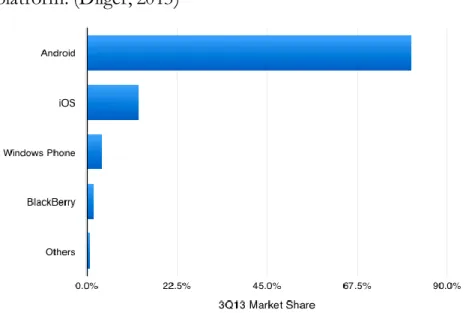
Smartphone market share and consumer behaviour
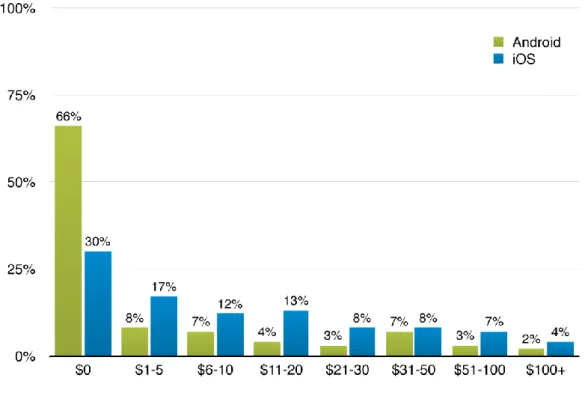
They also seem more willing to pay for their apps: Apple App Store customers report that they typically pay one for every two free apps they download. In contrast, app users visiting the Android Market and Blackberry App World stores report downloading more than 3.5 free apps for every app they purchase. As you can see in Figure 2 and in the quote above, iPhone users are more likely to pay for apps in every price range.
For iOS app developers, this means that consumers on the iOS platform are more likely to buy their app. Amount of money spent on smartphone apps in the past year (% of smartphone content consumers) (OPA, 2012, p. 30).
Mobile purchases
The Ruby programming language
Scope
The scope of this research
The success of the proof of concept application is assessed by hand and whether the goals of the research plan are achieved. It is possible that this application can be broken down into a series of smaller applications if necessary.
Excluded issues and topics
Since the application is only intended to be used for technical testing, there are no precise requirements. A proof of concept or proof of technology application will be developed to evaluate how effective the RubyMotion toolchain is for typical aspects of mobile applications. The application will also be used to test how to use third-party native Objective-C libraries.
The purpose of this application is not to be a useful or viable application in itself, but to test how or if RubyMotion can be used to develop the selected features. By developing the selected features, we will be able to form a rough picture of how RubyMotion can be used and whether it lives up to its promise.
RubyMotion
Availability of RubyMotion sources
MacRuby
The official iOS toolchain
How does RubyMotion differ from normal iOS development
The benefits of RubyMotion over the official toolchain
Research problem
Typical functionality in mobile applications
Work on an emulator/simulator Yes No Yes Yes Yes Yes Work on a real device Yes No Yes Yes Yes Yes Design and build the UI Yes Yes Yes Yes Yes Yes. Distribution of the application No No Yes Yes Yes Access to remote control APIs Yes No Yes Yes Yes Yes Figure 7: Common smartphone application features based on mobile programming books.
Requirements for the proof of concept application
Installing the tools
- Software and hardware used
- Installing Xcode
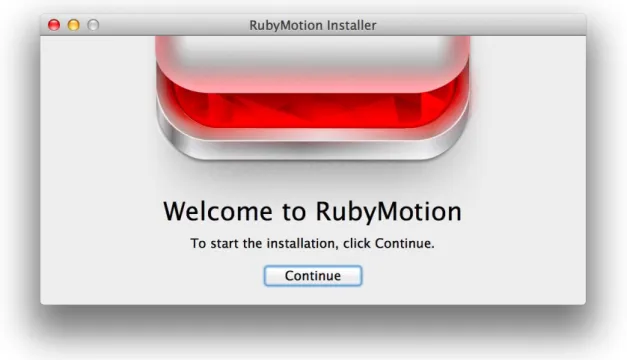
- Installing RubyMotion
- RubyMotion and text editors
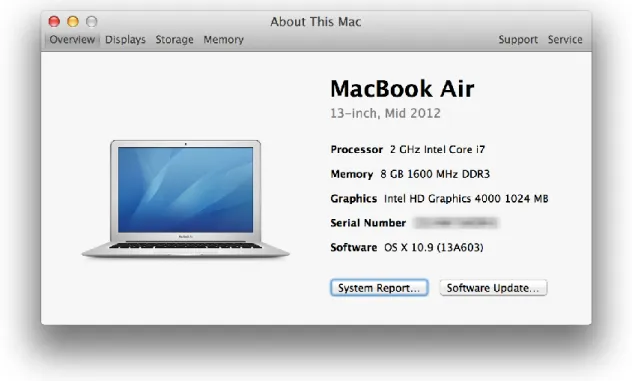
These installation procedures were tested and verified on a mid-2012 Apple MacBook Air running the latest version of OS X available at the time, OS X 10.9 Mavericks. The apps were tested on iOS 7.0.4, the latest version available, on the iOS Simulator, and on an iPhone 5 running the same version of iOS. Clicking Install will install the Xcode development environment and the latest iOS SDK (you need a free Apple ID account to continue installation).
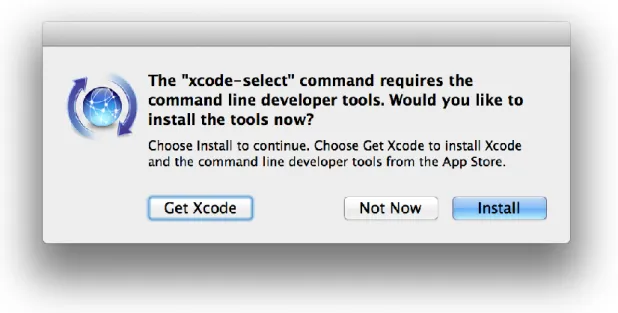
In previous versions of Xcode and OS X (prior to Xcode 5.0.1 and OS X 10.9), the command line tools could be installed from Xcode, but this has now changed (Zaph, 2013). With the latest versions of OS X and Xcode, the command line tools must be installed by executing a single command (xcode-select --install) on the CLI (Command Line Interface).
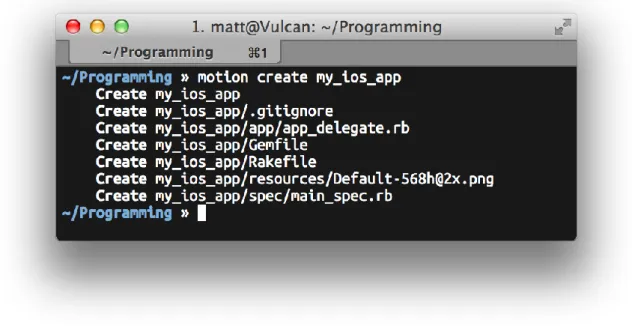
Creating a New RubyMotion Application
Running The Application
In a Simulator
On a Real Device
Building the application UI
The MVC pattern
Defining layouts programatically
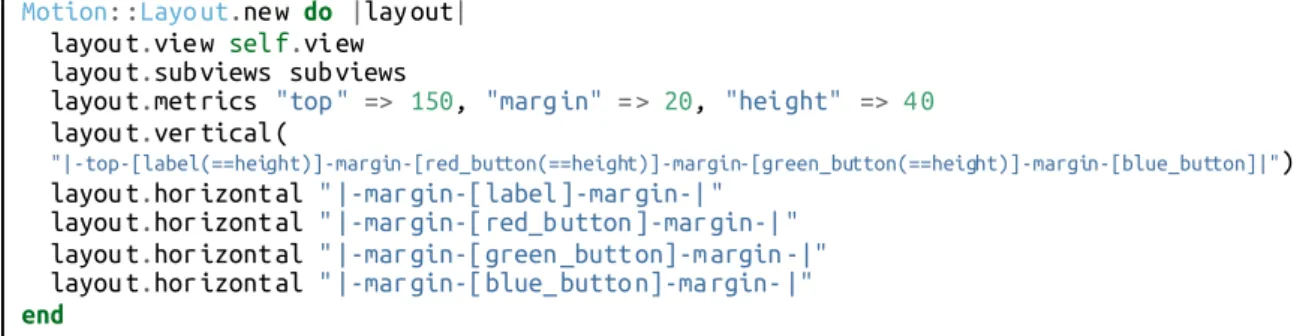
While this method of implementing views worked without problems, it can become cumbersome and tedious with more complex layouts, especially when multiple screen sizes and screen orientations (portrait and landscape) need to be considered. Autolayout is a relatively new approach that can be used to define iOS app layouts. In this example, the motion layout library1 is used to provide a more Ruby-like interface to the iOS autolayout SDK.
For the AutoLayout based experiment, the code of the "Color" application developed using the "Hardcoded" method was taken and an attempt was made to convert it to using AutoLayout. Based on the available documentation, the Autolayout based interface did not work satisfactorily at any point. While very basic layouts worked fine, anything with more than two or three subviews would throw cryptic errors and not work as it should.
Difficulties in using the automatic layout can probably be attributed to the poor level of documentation available. In theory, the automatic layout should make for a more pleasant UI development process, but in practice this was not the case.
Using Xcode's Interface Builder
Building the view in Interface Builder was a very pleasant experience and relatively intuitive due to the WYSIWYG nature of the tools. Getting the RubyMotion application to use the UI elements created in the Interface Builder was a quick and intuitive experience. Since the interface builder provided visual tools for configuring Auto Layout, Auto Layout was also used for this example.
In this case, using AutoLayout provided no additional challenges and the experience stood in stark contrast to trying to use AutoLayout programmatically.
Storing data locally
Core Data
The Core Data framework provides comprehensive and automated solutions related to the lifecycle of an object and the search and persistence functions. It can retrieve and manipulate data purely at the object level without having to worry about the details of storage and retrieval.
On-board sensors
Device location and map
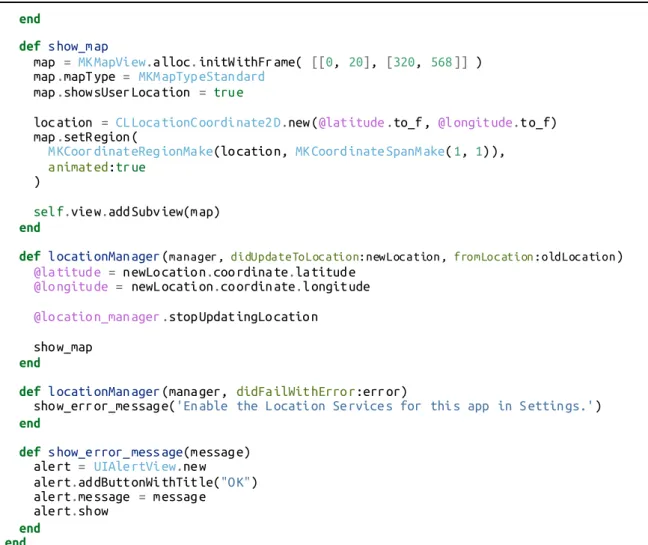
For the location test, a simple application was created to get the current location of the device and display it on a map. The app used the native iOS SDKs to get the device's location and display the map.
Using the camera
Accessing a remote API
Using 3rd party Objective-C libraries
CocoaPods
OpenWeatherMap is a project that provides a free weather data API for developers in a similar way that OpenStreetMap provides free mapping data or the way Wikipedia provides a free encyclopedia. The UIImage+PDF library allows developers to use PDF images in a similar way that they would normally use raster or bitmap images in their applications. It allows developers to easily use resolution-independent, scalable vector assets in their iOS projects.
Interactive testing
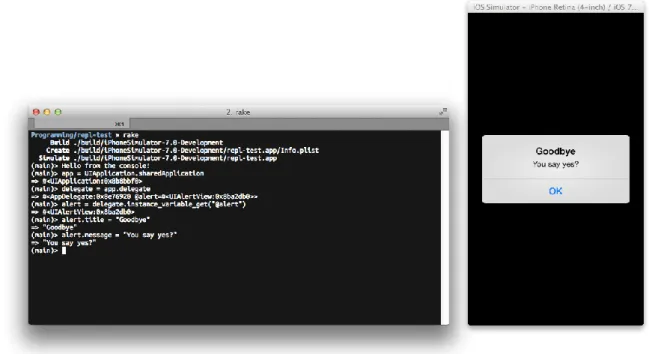
An example of changing the user interface while the application is running can be seen in Figure 29. The developer can also command (⌘ on a Mac keyboard) click views in the simulator to change the context of the REPL console. The developer can then use the self object to interact with the selected view in the REPL console.
Results
Evaluation
- Building the application user interface
- Storing data locally
- On-board sensors
- Accessing a remote API
- Using 3 rd party Objective-C libraries (via CocoaPods)
A successful test or proof of concept application was developed for each feature selected for pre-testing, although there were issues in a number of areas. Both fully programmatically defining views and using views built with the graphical Xcode Interface Builder were completely successful. Although a test case was developed using Auto Layout, this application never fully functioned as intended.
This can largely be attributed to a lack of documentation on how user interfaces should be built using Auto Layout (when Interface Builder is not used). iOS' Auto Layout features were later successfully used in both the Interface Builder test case and the CocoaPods test case. While iOS devices have a few locations where data can be stored, this test tested only the most important of these, Core Data.
In the next test case, access to the device's camera and photo library was also completely successful. In the end, this test case was successfully completed, although there were some issues as the instructions for the chosen test app had not yet been updated to reflect the changes in iOS 7 at the time of the test. In this test app the goal was to see how and how easily a developer using RubyMotion to build iOS apps could use third-party Objective-C libraries with their Ruby code.
This test was a success and it proved that using third-party libraries through CocoaPods (a dependency manager for Objective-C libraries) is very easy through RubyMotion's built-in CocoaPods integration.
Conclusions
For developers already familiar with at least iOS* or* Ruby development, the experience is less confusing, as they will have a more intuitive sense of which concepts and tools belong to which part of the underlying system. As the use of smartphones and other mobile devices around the world increases, and as we spend more and more time on our mobile devices and do more things on our mobile devices, RubyMotion can definitely be considered a valuable tool, especially for Ruby developers looking to get into creative native apps for the iOS ecosystem. The number of smartphones and mobile devices that we (as consumers) buy is increasing at an ever-increasing rate.
We also spend more time using these devices and use them for more things. What is particularly interesting is the fact that more and more money is being spent on these devices. Users are more willing than ever to buy apps for these devices and more willing to buy other products using these devices.
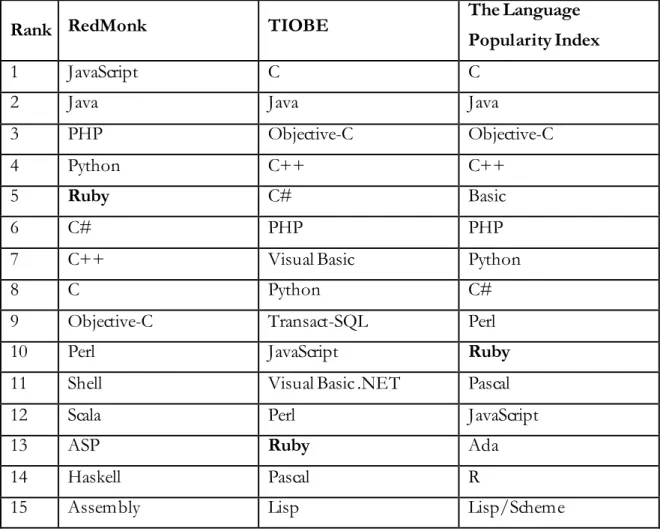
Especially iOS device users are willing to spend money on in-app purchases on their devices. The Ruby programming language has been moderately successful lately (making it in the top ten or top fifteen languages in terms of popularity). However, until recently, it was not possible to use the Ruby language to create applications for any popular smartphone platform.
While iOS application development with RubyMotion comes with its own set of difficulties compared to e.g. web application development in Ruby, this does not mean that RubyMotion is not a viable option for developers with previous experience in Ruby or iOS application development (or both). It might even be possible to share code between, say, a Ruboto application on Android and an iOS application built with RubyMotion. At this point, RubyMotion doesn't seem like a platform to recommend to budding developers, as the merging of paradigms and concepts from both the world of Ruby and the iOS SDK can be both confusing and daunting at times.
Further research questions