
However, the number of articles reporting the potential of haptic feedback for multimedia is increasing. What type of device is suitable to provide haptic feedback in a viewing scenario (cinema or user's living space, potentially separated).
Adding haptic feedback to audiovisual content
A final main aspect, complementary to the workflow, is the evaluation of the user experience that spans production, distribution and delivery. The quality of experience (QoE) has various definitions [Jai04,Kil08] but can be defined in our context as the measure of the user's subjective experience with an audiovisual content.
Thesis objectives
Creating haptic effects is often a manual process accomplished by vendors of hardware for "4D theaters" [DBO,MED]. New ways of combining haptic and audiovisual should be studied to enrich the taxonomy of haptic effects.
Approach and contributions
Therefore, we propose several techniques for designing and linking haptic effects to audiovisual content. A user study has been conducted to evaluate the impact of these haptic effects on the quality of the experience.
Production of haptic effects
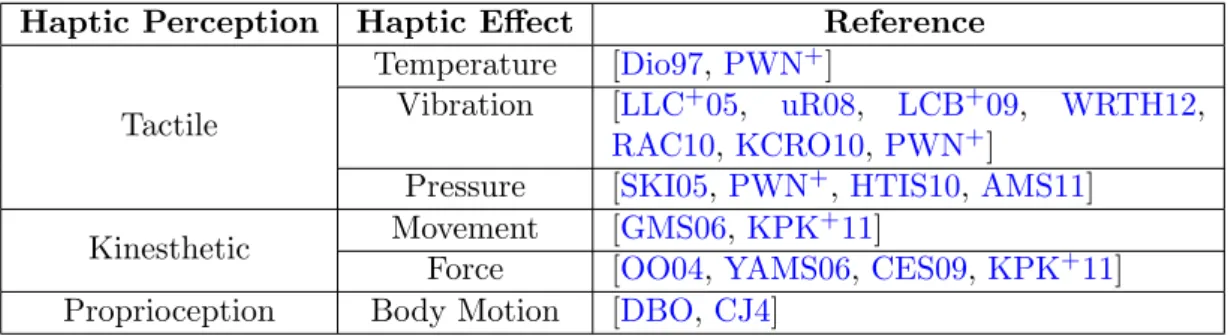
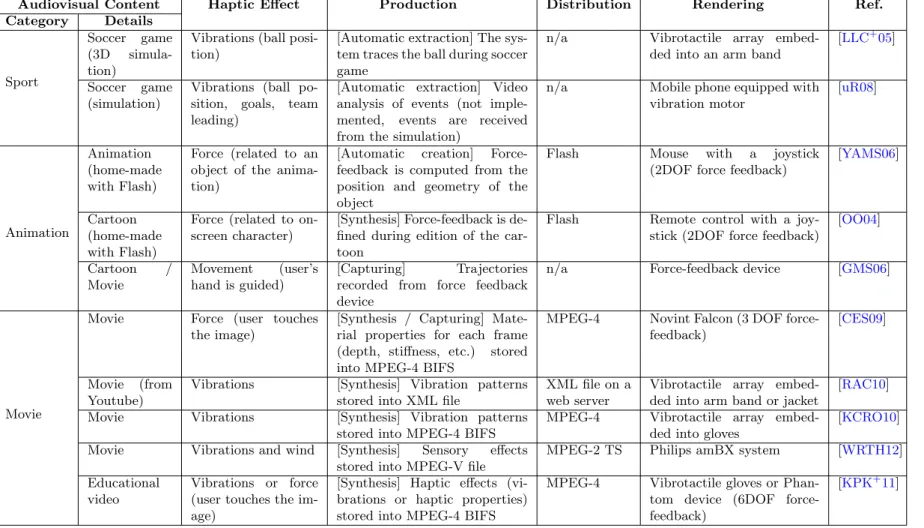
Haptic effects are mostly used to represent physical events occurring in the scene (see references in Table 2.1). In the production stage, haptic effects are automatically generated and can be modified by the creator.
Distribution of haptic effects
When he receives a message, it is rendered according to the capabilities of the devices specified in the user's Device XML file. Kim et al. have encoded a pattern in a gray-scale image where each pixel represents an actuator and the intensity of the pixel corresponds to the activation intensity of the actuator: from black (0) for idle to white (255) for maximum vibration [KCRO10 ].
Rendering of haptic effects
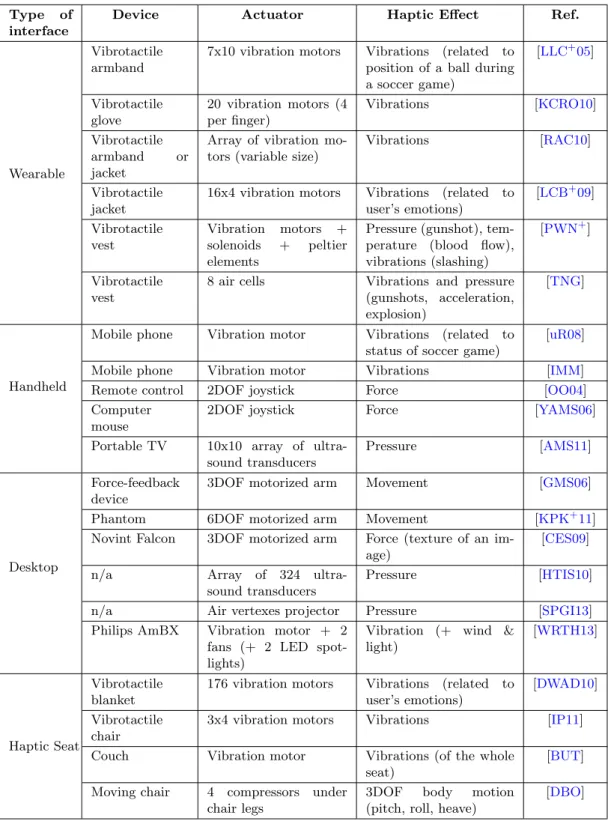
The user holds the device to perceive the audiovisual content and experiences haptic feedback through the fingers (see Figure 2.8). Other computing devices are designed to convey haptic feedback to the user without direct contact.
![Figure 2.8: Handhled haptic device. A mobile haptic TV embedding an array of ultrasonic transmitters delivering tactile cues on user’s fingers [AMS11].](https://thumb-eu.123doks.com/thumbv2/1bibliocom/463390.69164/40.892.304.654.316.618/figure-handhled-embedding-ultrasonic-transmitters-delivering-tactile-fingers.webp)
Quality of experience
Other approaches capture biosignals that provide an objective measurement of the user's physiological state from which emotional state is derived. Another approach to evaluating the quality of experience consists of measuring changes in the user's physiological state.
Discussion
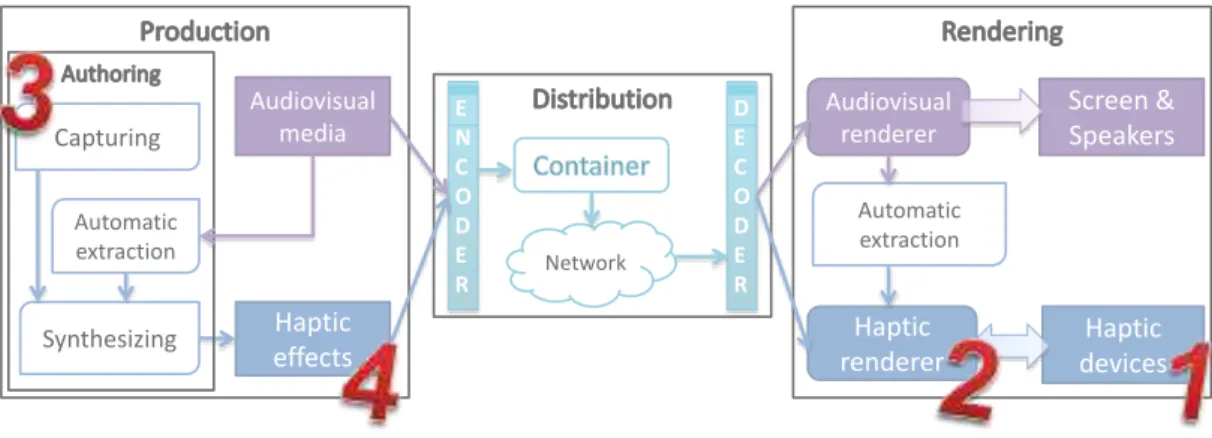
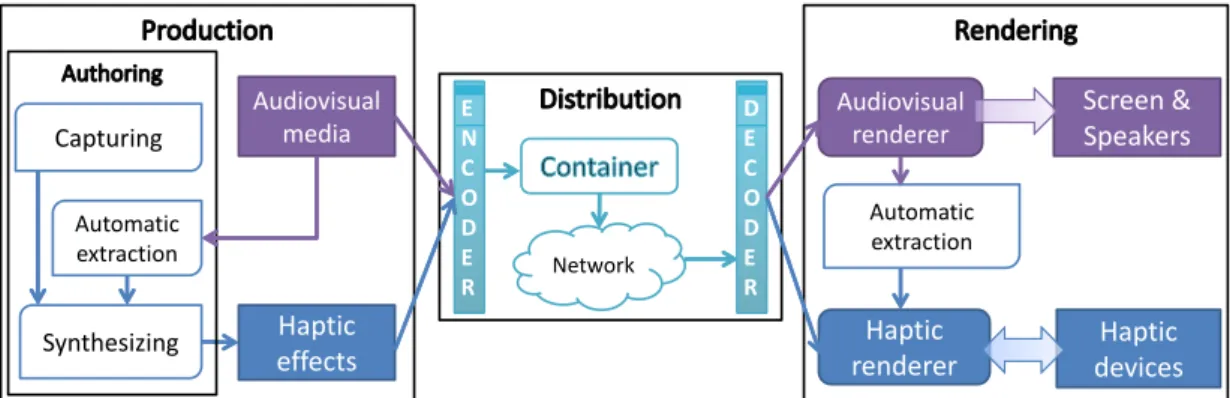
Multimedia containers that include audiovisual and haptic effects are currently being developed and standardized (MPEG-V, MPEG-4 BIFS). In most solutions, haptic effects are synthesized: authors manually create and synchronize haptic effects with audiovisual content.
Chapter conclusion
Haptic effects are mainly used in a similar way to the use of haptic feedback in virtual reality: to physically immerse the user in the audiovisual scene. A final aspect that will be discussed in this review is the quantification of the benefits provided to audiovisual content by haptic effects.
Related work on motion simulation
As the user navigates through the virtual environment, the chair moves to generate a sense of motion. The system was expected to generate an illusion of motion with force feedback: when the interface pulled on the user's hand, the user experienced a sense of forward motion.
HapSeat: a novel approach for simulating 6DoF mo- tiontion
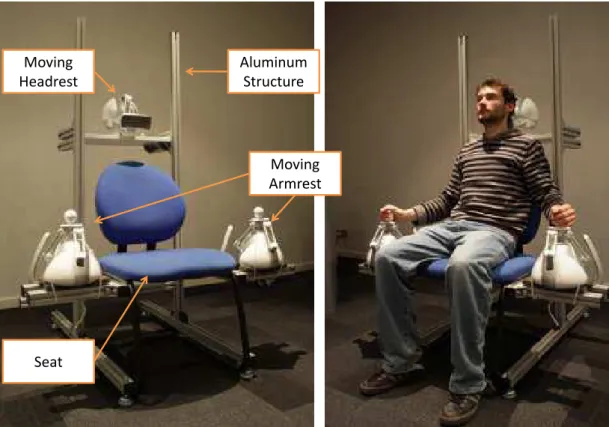
Using only one or two 3DoF force feedback devices is not sufficient to evoke a 6DoF sense of motion (translations and rotations). Expanding the approach to three 3DoF devices to apply three force-feedback stimuli to the user's body provides the opportunity to simulate a global 6DoF motion effect.
Proof-of-concept
The audiovisual content is supplemented with extra data that describes the movement in terms of the linear acceleration a(t) and the angular velocity w(t). Each actuator (H,LA,RA) moves to create the sense of 6DoF global motion, modeled by the quantities a(t) and w(t) as if the motion of the main actor is mapped onto it. The relative acceleration applied to some parts of the body of the actor (here the head, left hand and right hand) is derived from the parameters of the global motion, a(t) enw(t) and then reflected to the user by the corresponding actuators.
These scaling factors are calculated to use the actuator's working area in an optimal way. These scaling factors are calculated is a preprocessing step that consists of finding the maximum amplitude of the acceleration reproduced by the actuator. A comparison of the models' output is described in this section to highlight their key differences.
Physical Model Left Hand
Geometrical Model Left Hand
User study
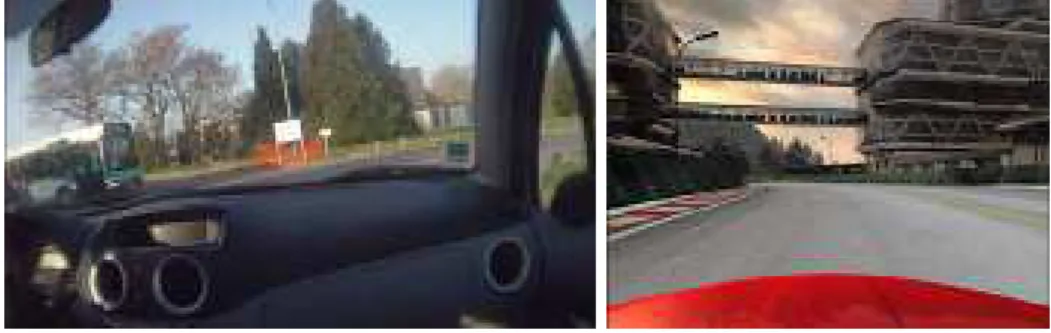
A user study was conducted to evaluate the quality of the simulated motion and to quantify its impact on the user's perceived quality of experience (QoE). We generated two 1-minute videos and the associated descriptions of the global motion in terms of a(t) and w(t). The main camera for the 3D simulation was placed inside the car to get a passenger's point of view for the race.
To evaluate the quality of the simulated motion (and of the models) and the impact of this haptic feedback on QoE, we defined four types of haptic feedback to be reproduced with each sequence. In our context, this can be stated as a measure of the user's subjective experience with haptic-audiovisual content. "Realism" describes how realistic the environment is and consistent with the user's representation of the real world.
Quality of Experience
Chapter conclusion
In this chapter we introduced the HapSeat, a new approach to simulating the 6DoF effect of motion. We hypothesized that these local stimulations, in combination with a visual stimulus, can induce a sense of movement and thus improve the quality of the experience. Results of the study show that the two control models succeed in improving the quality of the experience during passive navigation.
These new tools make it easy to design haptic effects without any knowledge of haptic device control. The haptic rendering algorithm must then adapt the effects to the device's limitations. In this chapter, we propose an enhancement of HAV haptic rendering with a washout filter based on human kinesthetic perception.
Washout filter for haptic rendering
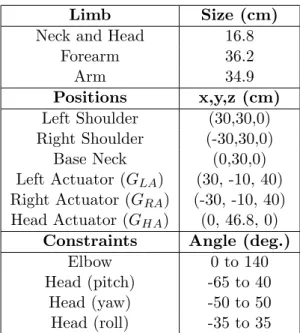
A body model and an inverse kinematics algorithm are used to determine the user's kinesthetic thresholds. The results are discussed in Section 4.4 and the application of a full video sequence is presented in Section 4.5. The washout filter eliminates these counter-effects (Perceptive Optimizer) and optimizes the use of the workplace (Workspace Optimizer).
Proof-of-concept
The scaling factors sx,sy, sz, mx,my, mz map the motion effect to the actuator's working area. The angular velocities of the joints are calculated from the actuator's current velocity v. The Workspace Optimizer ensures that these positions are compatible with the actuator's workspace.
Indeed, this kind of device is designed to sense the current position of the actuator and to provide a force feedback to the user. Second, we evaluated the impact of each profile on the amplitude of the filtered effects. We noticed that with the profile T1, from two consecutive effects, the amplitude of the effects is reduced.
User study
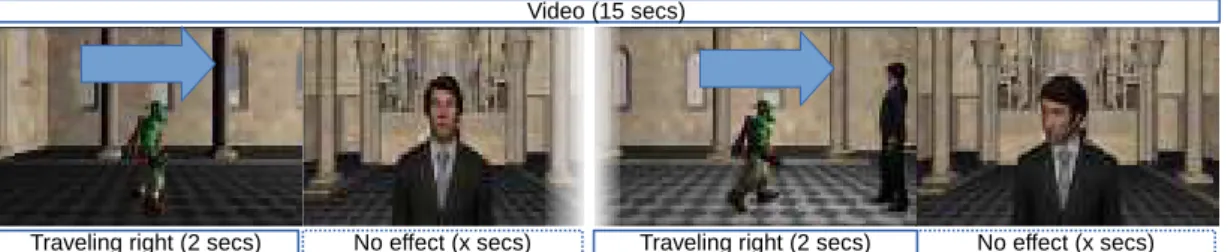
However, when considering seven effects in a sequence, the amplitude is reduced by at least 30% for each profile. To conclude on this section, we observe that the profile T1 removes the counter effects, but it has a cost on the amplitude of the actual effects. They were designed according to the structure depicted in Figure 4.6: combinations of sequences of travel images of a walking character (2 seconds) and a still image of a man (x seconds).
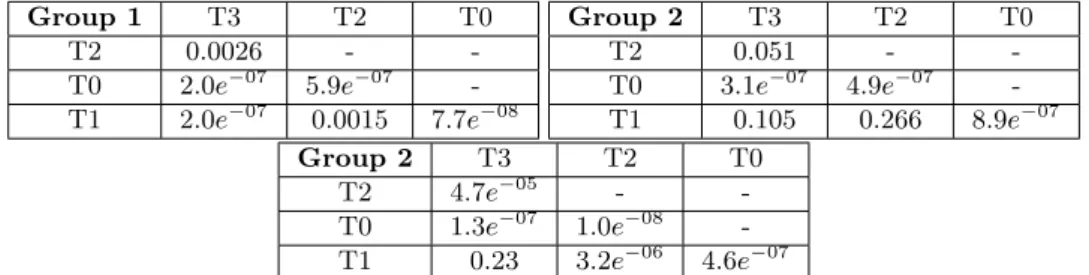
The main result of our study is that the three haptic feedbacks provided by the wash filter are preferred to the classical haptic feedbacks (see Figure 4.7, F. The ranking analysis for each video sequence gives the same results: the wash filter clearly improves the user experience , and there are still no differences between the profiles. The ranking for each sequence is also analyzed, but they follow the patterns observed for each group.
Discussion
All participants reported that one of the haptic feedbacks provided continuous movement (i.e., actuators did not move between the effects corresponding to the profile T1). This feedback was the favorite for participants of Group 1 for which the higher the perceptual threshold used, the poorer the ranking of the haptic feedback. The precise synchronization of the haptic feedback with the video appears to be a key component in the quality of experience for certain users.
If the speed of the actuator is limited so that it is not sensed, the off-center position is felt. In line with this observation, Group 3 participants classified the T2 profile as the best. With the T3 profile, the counter-effect intensities were too strong to ignore and the induced effects were not coherent with the video.
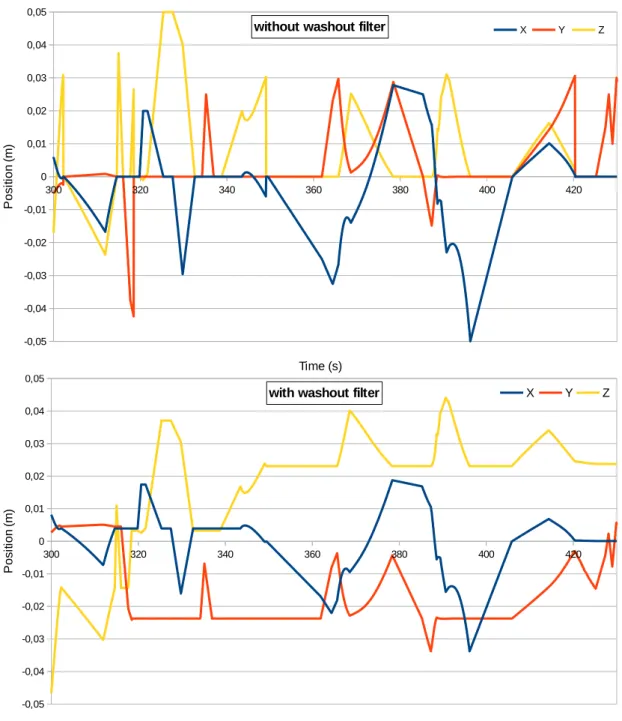
Application to a full video sequence
Haptic effects without a washout filter are shown at the top, with a washout filter and T1 profile at the bottom.
Chapter conclusion
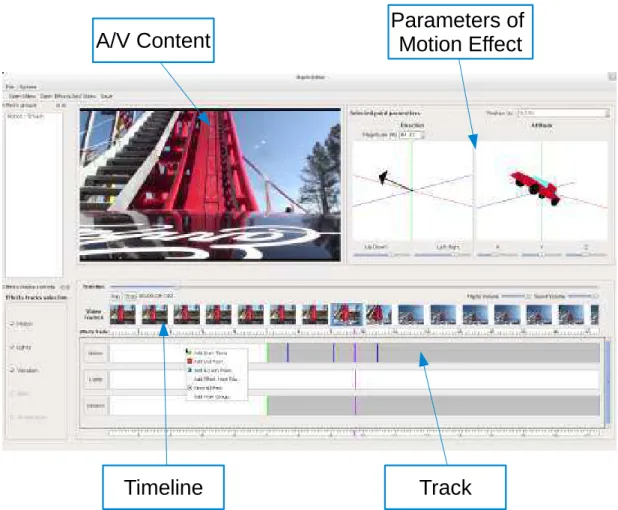
Studio: an authoring tool for adding haptic and motion effects
- The authoring tool: H-Studio
- User study
- Chapter conclusion
- Haptic cinematography
- Proof-of-concept
- User study
- Discussion
- Chapter conclusion
- Partie I - Rendu d’effets haptiques: nouvel appareil et algorithmes pour rendre des effets haptiques dans
- Conclusion
A user study was conducted to evaluate the quality of the motion effect captured by our device, and more generally the impact of the haptic feedback on the quality of the user's experience. More generally, we wanted to study the impact of the haptic feedback on the user experience (QoE [Jai04, Kil08]). In our context, the QoE can be defined as the measure of the user's subjective experience with haptic-audiovisual content.
Several participants assumed that the haptic feedback was mapped to the car's gear shift. The first one aims to make the user feel the movement of the camera (a zoom is considered a forward movement). This makes it possible to improve the haptic rendering and adapt the haptic feedback to the working area of the device.
In a first approach to evaluate the QoE, we identified several components of the QoE (Realism, Sensory, Comfort and Satisfaction). Output of the two models for each sequence (Kinematic on the left, Semantic on the right).
![Figure 2.2: Capture of visual and haptic cues [MKT + 05]. 360 ➦ images (a), shape and size (b), information about material and texture (c), and data from the haptic manipulation (d) are captured.](https://thumb-eu.123doks.com/thumbv2/1bibliocom/463390.69164/28.892.178.787.278.754/figure-capture-visual-information-material-texture-manipulation-captured.webp)
![Figure 2.4: Device-oriented graphical authoring tools - Tactile array editor [KCRO10]).](https://thumb-eu.123doks.com/thumbv2/1bibliocom/463390.69164/31.892.205.628.624.943/figure-device-oriented-graphical-authoring-tactile-editor-kcro10.webp)
![Figure 2.5: User-oriented graphical authoring tools - SEVino [WRTH12]. Haptic effects can be defined and synchronized to a video.](https://thumb-eu.123doks.com/thumbv2/1bibliocom/463390.69164/32.892.269.691.375.746/figure-oriented-graphical-authoring-sevino-wrth12-haptic-synchronized.webp)
![Figure 2.6: User-oriented graphical authoring tools - HAMLAT [EAAE08]. Haptic properties can be set for a virtual object.](https://thumb-eu.123doks.com/thumbv2/1bibliocom/463390.69164/32.892.249.713.832.1097/figure-oriented-graphical-authoring-hamlat-eaae08-haptic-properties.webp)
![Figure 2.9: Handhled haptic device. A remote control including a 2DoF force-feedback joystick [OO04].](https://thumb-eu.123doks.com/thumbv2/1bibliocom/463390.69164/40.892.284.679.704.1009/figure-handhled-haptic-device-control-including-feedback-joystick.webp)
![Figure 2.10: Desktop haptic device. User touching a video thanks to a force-feedback device [CES09].](https://thumb-eu.123doks.com/thumbv2/1bibliocom/463390.69164/41.892.123.717.499.720/figure-desktop-haptic-device-touching-thanks-feedback-device.webp)
