Fourier Transform 1:
Digital Signal and Image Processing Fourier Theory
Prof. David Marshall
School of Computer Science & Informatics
Fourier Transform
Moving into the Frequency Domain
The Frequency domain can be obtained through the transformation, via Fourier Transform (FT), from
one (Temporal (Time) or Spatial) domain to the other
Frequency Domain
We do not think in terms of signal or pixel intensities but
rather underlying sinusoidal waveforms of varying frequency,
amplitude and phase.
Applications of Fourier Transform
Numerous Applications including:
Essential tool for Engineers, Physicists, Mathematicians and Computer Scientists
Fundamental tool for Digital Signal Processing and Image Processing
Many types of Frequency Analysis:
Filtering Noise Removal Signal/Image Analysis
Simple implementation of Convolution Audio and Image Effects Processing.
Signal/Image Restoration — e.g.
Deblurring
Signal/Image Compression —- MPEG (Audio and Video), JPEG use related techniques.
Many more . . . .
3 / 66
Introducing Frequency Space
1D Audio Example
Lets consider a 1D (e.g. Audio) example to see what the different domains mean:
Consider a complicated sound such as the a chord played on a piano or a guitar.
We can describe this sound in two related ways:
Temporal Domain : Sample the amplitude of the sound many times a second, which gives an approximation to the sound as a function of time.
Frequency Domain : Analyse the sound in terms of the pitches of the notes, or frequencies, which make the sound up, recording the amplitude of each frequency.
Fundamental Frequencies D[ : 554.40Hz
F : 698.48Hz A[ : 830.64Hz C: 1046.56Hz plus harmonics/partial frequencies ....
Back to Basics
An 8 Hz Sine Wave
A signal that consists of a sinusoidal wave at 8 Hz.
8 Hz means that wave is completing 8 cycles in 1 second
The frequency of that wave is 8 Hz.
From the frequency domain we can see that the composition of our signal is
one peak occurring with a frequency of 8 Hz — there is only one sine wave here.
with a magnitude/fraction of 1.0 i.e. it is the whole signal.
5 / 66
2D Image Example
What do Frequencies in an Image Mean?
Now images are no more complex really:
Brightness along a line can be recorded as a set of values measured at equally spaced distances apart,
Or equivalently, at a set of spatial frequency values.
Each of these frequency values is a frequency component.
An image is a 2D array of pixel measurements.
We form a 2D grid of spatial frequencies.
A given frequency component now specifies what contribution
is made by data which is changing with specified x and y
direction spatial frequencies.
Frequency components of an image
What do Frequencies in an Image Mean? (Cont.)
Large values at high frequency components then the data is changing rapidly on a short distance scale.
e.g. a page of text
However, Noise contributes (very) High Frequencies also Large low frequency components then the large scale features of the picture are more important.
e.g. a single fairly simple object which occupies most of the image.
7 / 66
Visualising Frequency Domain Transforms
Sinusoidal Decomposition
Any digital signal (function) can be decomposed into purely sinusoidal components
Sine waves of different size/shape — varying amplitude, frequency and phase.
When added back together they reconstitute the original signal.
The Fourier transform is the tool that performs such an operation.
Summing Sine Waves. Example: to give a Square(ish) Wave
Digital signals are composite signals made up of many sinusoidal frequencies
A 200Hz digital signal (square(ish) wave) may be a composed of 200, 600, 1000, etc. sinusoidal signals which sum to give:
9 / 66
Summary so far
So What Does All This Mean?
Transforming a signal into the frequency domain allows us To see what sine waves make up our underlying signal E.g.
One part sinusoidal wave at 50 Hz and Second part sinusoidal wave at 200 Hz.
Etc.
More complex signals will give more complex decompositions
but the idea is exactly the same.
How is this Useful then?
Basic Idea of Filtering in Frequency Space
Filtering now involves attenuating or removing certain frequencies — easily performed:
Low pass filter —
Ignore high frequency noise components — make zero or a very low value.
Only store lower frequency components High Pass Filter — opposite of above
Bandpass Filter — only allow frequencies in a certain range.
11 / 66
Visualising the Frequency Domain
Think Graphic Equaliser
An easy way to visualise what is happening is to think of a graphic equaliser on a stereo system (or some software audio players, e.g.
iTunes).
So are we ready for the Fourier Transform?
We have all the Tools....
This lecture, so far, (hopefully) set the context for Frequency decomposition.
Past Maths Lectures:
Odd/Even Functions: sin(−x) = − sin(x), cos(−x) = cos(x) Complex Numbers: Phasor Form re
iφ= r (cos φ + i sin φ) Calculus Integration: R
e
kxdx =
ekkxDigital Signal Processing:
Basic Waveform Theory. Sine Wave y = A.sin(2π.n.F
w/F
s)
where: A = amplitude, F
w= wave frequency, F
s= sample frequency, n is the sample index.
Relationship between Amplitude, Frequency and Phase:
Cosine is a Sine wave 90
◦out of phase Impulse Responses
DSP + Image Proc.: Filters and other processing, Convolution
13 / 66
Fourier Theory
Introducing The Fourier Transform
The tool which converts a spatial or temporal (real space) description of audio/image data, for example, into one in terms of its frequency components is called the Fourier transform
The new version is usually referred to as the Fourier space description of the data.
We then essentially process the data:
E.g. for filtering basically this means attenuating or setting certain frequencies to zero
We then need to convert data back (or invert) to real audio/imagery to use in our applications.
The corresponding inverse transformation which turns a Fourier space description back into a real space one is called the inverse Fourier transform.
15 / 66
1D Fourier Transform
1D Case (e.g. Audio Signal)
Considering a continuous function f (x ) of a single variable x representing distance (or time).
The Fourier transform of that function is denoted F (u), where u represents spatial (or temporal) frequency is defined by:
F(u) = Z
∞−∞
f (x )e
−2πixudx.
Note: In general F(u) will be a complex quantity even though the original data is purely real.
The meaning of this is that not only is the magnitude of each frequency present important, but that its phase relationship is too.
Recall Phasors from Complex Number Lectures.
e
−2πixuabove is a Phasor.
Inverse Fourier Transform
Inverse 1D Fourier Transform
The inverse Fourier transform for regenerating f (x) from F (u) is given by
f (x) = Z ∞
−∞
F (u)e 2πixu du,
which is rather similar to the (forward) Fourier transform except that the exponential term has the opposite sign.
It is not negative
17 / 66
Fourier Transform Example
Fourier Transform of a Top Hat Function
Let’s see how we compute a Fourier Transform: consider a particular function f (x) defined as
f (x) =
1 if |x| ≤ 1 0 otherwise,
1 1
The Sinc Function (1)
We derive the Sinc function
So its Fourier transform is:
F(u) = Z∞
−∞
f(x)e−2πixudx
= Z1
−1
1×e−2πixudx
= −1
2πiu(e2πiu−e−2πiu)
Now (refer toComplex NumbersLectures/Maths Formula SheetHandout)
sinθ = eiθ−e−iθ 2i ,So:
F(u) = sin2πu πu .
In this case,F(u)ispurely real, which is a consequence of the original data beingsymmetricinxand−x.
f(x)is anevenfunction.
A graph ofF(u)is shown overleaf.
This function is often referred to as theSinc function. 19 / 66
The Sinc Function Graph
The Sinc Function
The Fourier transform of a top hat function, the Sinc function:
−6 −4 −2 0 2 4 6
−0.5 0 0.5 1 1.5 2
u sin(2 π u)/(π u)
The 2D Fourier Transform
2D Case (e.g. Image data)
If f (x, y) is a function, for example intensities in an image, its Fourier transform is given by
F (u , v) = Z ∞
−∞
Z ∞
−∞
f (x, y)e −2πi(xu+yv)
dx dy ,
and the inverse transform, as might be expected, is
f (x, y) = Z ∞
−∞
Z ∞
−∞
F (u, v)e 2πi(xu+yv) du dv .
21 / 66
The Discrete Fourier Transform
But All Our Audio and Image data are Digitised!!
Thus, we need a discrete formulation of the Fourier transform:
Assumes regularly spaced data values, and
Returns the value of the Fourier transform for a set of values in frequency space which are equally spaced.
This is done quite naturally by replacing the integral by a
summation, to give the discrete Fourier transform or DFT for
short.
1D Discrete Fourier transform (DFT)
1D Case:
In 1D it is convenient now to assume that x goes up in steps of 1, and that there are N samples, at values of x from 0 to N − 1.
So the DFT takes the form
F (u) = 1 N
N−1
X
x=0
f (x)e
−2πixu/N,
while the inverse DFT is
f (x) =
N−1
X
u=0
F (u)e
2πixu/N.
NOTE: Minor changes from the continuous case are a factor of 1/N in the exponential terms, and also the factor 1/N in front of the forward transform which does not appear in the inverse transform.
23 / 66
2D Discrete Fourier transform
2D Case
The 2D DFT works is similar.
So for an N × M grid in x and y we have
F (u, v) = 1 NM
N−1
X
x=0 M−1
X
y=0
f (x, y)e −2πi(xu/N+yv/M) ,
and
f (x, y ) =
N−1
X
u=0 M−1
X
v=0
F (u, v)e 2πi(xu/N+yv/M) .
Balancing the 2D DFT
Most Images are Square
Often N = M , and it is then it is more convenient to redefine F (u , v) by multiplying it by a factor of N, so that the forward and inverse transforms are more symmetric:
F (u , v) = 1 N
N−1
X
x=0 N−1
X
y=0
f (x, y)e −2πi(xu+yv)/N , and
f (x, y) = 1 N
N−1
X
u=0 N−1
X
v=0
F (u, v)e 2πi(xu+yv)/N .
25 / 66
Fourier Transforms in MATLAB
fft() and fft2()
MATLAB provides functions for 1D and 2D Discrete Fourier Transforms (DFT):
fft(X) is the 1D discrete Fourier transform (DFT) of vector X. For matrices, the FFT operation is applied to each column — NOT a 2D DFT transform.
fft2(X) returns the 2D Fourier transform of matrix X. If X is a vector, the result will have the same orientation.
fftn(X) returns the N-D discrete Fourier transform of the N-D array X.
Inverse DFT ifft(), ifft2(), ifftn() perform the inverse DFT.
See appropriate MATLAB help/doc pages for full details.
Plenty of examples to Follow.
See also: MALTAB Docs Image Processing → User’s Guide
→ Transforms → Fourier Transform
Visualising the Fourier Transform
Visualising the Fourier Transform Having computed a DFT it might be useful to visualise its result:
It’s useful to visualise the Fourier Transform
Standard tools
Easily plotted in MATLAB
0 2 4 6 8 10 12 14 16
−1 0 1
n →
a)
Cosine signal x(n)
0 2 4 6 8 10 12 14 16
0 0.5 1
k →
b)
Magnitude spectrum |X(k)|
0 0.5 1 1.5 2 2.5 3 3.5
x 104 0
0.5 1
f in Hz →
c)
Magnitude spectrum |X(f)|
27 / 66
The Magnitude Spectrum of Fourier Transform
Recall that the Fourier Transform of our real audio/image data is always complex
Phasors: This is how we encode the phase of the underlying signal’s Fourier Components.
How can we visualise a complex data array?
Back to Complex Numbers:
Magnitude spectrum Compute the absolute value of the complex data:
|F (k)| = q
F
R2(k) + F
I2(k) for k = 0, 1, . . . , N − 1
where F
R(k) is the real part and F
I(k) is the imaginary part of the N sampled Fourier Transform, F(k).
Recall MATLAB: Sp = abs(fft(X,N))/N;
(Normalised form)
The Phase Spectrum of Fourier Transform
The Phase Spectrum Phase Spectrum
The Fourier Transform also represent phase, the phase spectrum is given by:
ϕ = arctan F I (k )
F R (k ) for k = 0, 1, . . . , N − 1
Recall MATLAB: phi = angle(fft(X,N))
29 / 66
Relating a Sample Point to a Frequency Point
When plotting graphs of Fourier Spectra and doing other DFT processing we may wish to plot the x-axis in Hz (Frequency) rather than sample point number k = 0, 1, . . . , N − 1
There is a simple relation between the two:
The sample points go in steps k = 0, 1, . . . , N − 1
For a given sample point k the frequency relating to this is given by:
f k = k f s
N
where f s is the sampling frequency and N the number of samples.
Thus we have equidistant frequency steps of f N
sranging
from 0 Hz to N−1 N f s Hz
MATLAB Fourier Frequency Spectra Example
fourierspectraeg.m
N=16;
x=cos(2*pi*2*(0:1:N-1)/N)'; figure(1)
subplot(3,1,1);
stem(0:N-1,x,'.');
axis([-0.2N-1.2 1.2]);
legend('Cosine signal x(n)');
ylabel('a)');
xlabel('n \rightarrow');
X=abs(fft(x,N))/N;
subplot(3,1,2);stem(0:N-1,X,'.');
axis([-0.2N-0.1 1.1]);
legend('Magnitude spectrum |X(k)|');
ylabel('b)');
xlabel('k \rightarrow') N=1024;
x=cos(2*pi*(2*1024/16)*(0:1:N-1)/N)';
FS=40000;
f=((0:N-1)/N)*FS;
X =abs(fft(x,N))/N;
subplot(3,1,3);plot(f,X);
axis([-0.2*44100/16max(f)-0.1 1.1]);
legend('Magnitude spectrum |X(f)|');
ylabel('c)');
xlabel('f in Hz \rightarrow') figure(2)
subplot(3,1,1);
plot(f,20*log10(X./(0.5)));
axis([-0.2*44100/16max(f)...
-45 20]);
legend('Magnitude spectrum |X(f)| ...
in dB');
ylabel('|X(f)| in dB \rightarrow');
xlabel('f in Hz \rightarrow')
31 / 66
MATLAB Fourier Frequency Spectra Example Output
fourierspectraeg.m produces the following:
0 2 4 6 8 10 12 14 16
−1 0 1
n →
a)
Cosine signal x(n)
0 2 4 6 8 10 12 14 16
0 0.5 1
k →
b)
Magnitude spectrum |X(k)|
0 0.5 1 1.5 2 2.5 3 3.5
x 104 0
0.5 1
f in Hz →
c)
Magnitude spectrum |X(f)|
Magnitude Spectrum in dB
Note: It is common to plot both spectra magnitude (also frequency ranges not show here) on a dB/log scale:
(Last Plot in fourierspectraeg.m)
0 0.5 1 1.5 2 2.5 3 3.5
x 104
−40
−20 0 20
f in Hz →
|X(f)| in dB → Magnitude spectrum |X(f)| in dB
33 / 66
Time-Frequency Representation: Spectrogram
Spectrogram
It is often useful to look at the frequency distribution over a short-time:
Split signal into N segments
Do a windowed Fourier Transform — Short-Time Fourier Transform (STFT)
Window needed to reduce leakage effect of doing a shorter sample SFFT.
Apply a Blackman, Hamming or Hanning Window MATLAB function does the job: Spectrogram — see help spectrogram
See also MATLAB’s specgramdemo
MATLAB spectrogram Example
spectrogrameg.m
load( ' handel ' ) [N M] = size(y);
figure(1)
spectrogram(y,512,20,1024,Fs);
Produces the following:
35 / 66
Aphex Twin Spectrogram
Aphex Twin famously 1 embedded images in the spectrogram of a few tracks on his Windowlicker EP. His face on Track 2 “Formula”
or “Equation” (Full title:
∆Mi−1=−αPN n=1Di[n][Pσ∈C[i]Fji[n−1] +Fexti[n−1]]
!!:
1
See here for web link to other examples of embedded image Spectrograms
Matlab Code to show the Aphex Twin Spectrogram
Previous slide use the free and excellent Sonic Visualiser We of course know how to display the image in MATLAB:
37 / 66
Matlab Code to show the Aphex Twin Spectrogram
Aphex Spectrogram.m
aphex = audioread('FormulaSnippet.wav');
mono = (aphex(:,1) + aphex(:,2))/2;
spectrogram(mono,1024,120,2048,'power','yaxis');
set(gca, ' YScale ' , ' log ' );
colormap( ' winter ' );
xlabel('Time')
ylabel( ' Frequency (Log Scale) ' )
Note: we change the display of the spectrogram to a log scale, which looks better.
Audio clip here: FormulaSnippet.wav
So what does my face sound like?
Let’s embed my face in spectrogram:
It sounds like this:
0 5 10 15
x 104
−1
−0.5 0 0.5 1
Daphex
39 / 66
Image to Sound Conversion
Daphex.m
figure(1);
imshow(imread('Dave_Frame0001.jpg'));
dave_im2snd = im2sound('Dave_Frame0001','jpg',44100,40,6000,0.00002,10);
sound(dave_im2snd,44100);
figure(2);
spectrogram(dave_im2snd,1024,120,2048,'power','yaxis');
set(gca,'YScale','log');
colormap('winter');
shg;
Image used here: Dave Frame0001.jpg
Image to Sound Conversion 2
im2sound.m (Usage)
function[final_sound] = im2sound(filename, ext, f_sample, f_low,...
f_high, amp_mod, sample_t)
%INPUTS:
%'filename'- Name of the image to be encoded (not including extension
%ext'- Extension of the image (not including "." at the beginning).
%'f_sample'- Sampling frequency (Hz)
%'f_low'- Lowest frequency (Hz) (e.g. 40)
%'f_high'- Highest frequency (Hz) (e.g. 6000)
%'amp_mod'- Multiplication factor for the amplitude. Decrease until
%image is clear. Too high and the waveform clips. Too low and the image
%is very dark (e.g. 0.00002)
%'sample_t'- Duration of the sample in seconds. Longer samples have
%better quality (e.g. 10)
%OUTPUTS:
%'final_sound'- the final sound containing the image. This is
%automatically saved to a .wav file with the original image filename
2
Original Code from MATLAB Central
41 / 66
Image to Sound Conversion
im2sound.m (Code)
function[final_sound] = im2sound(filename, ext, f_sample, f_low,...
f_high, amp_mod, sample_t) ...
%INITIALISING VARIABLES:
%The waveform at each time point. This is reset at the beginning of each
%time point temp_sound =0;
%The final waveform final_sound =0;
%MAIN BODY
%Loading the sample image and calculating the image size raw_im = imread(strcat(filename,'.',ext));
size_raw_im =size(raw_im);
%Making a frequency table for the height of the image. Each row of the
%image is assigned a particular frequency from the corresponding row of
%this table. The frequencies are linearly distributed between the highest and
%lowest user-definied frequencies. "f_step" is the increment between each
%adjacent frequency
f_step = (f_high-f_low)/size_raw_im(1,1);
f_table = (f_high:-f_step:f_low);
Image to Sound Conversion
im2sound.m (Code)
%The final sound will dwell on each column of the image for a specific
%time. This time is defined by "t_start" and "t_end". It depends on how
%long the user determined the sound-clip should be and how wide (how many
%columns) the image is.
t_step = (sample_t/size_raw_im(1,2));
%Initial values for the start and end times. These will be increased at
%the end of each loop iteration (when the script moves onto the next column
%of the image).
t_start =0;
t_end = t_step;
%The loop which generates the sound file. At each iteration it generates a
%segment of the final sound file, which is temporarily saved to
%"temp_sound". This segment is built up of frequencies from that
%particular column of the image.
for j=1:size_raw_im(1,2)
%Initialising the variable (the sound for each frequency (row) is added
%to the existing sound) temp_sound =0;
%Setting the time in matrix format t = t_start:1/f_sample:(t_end);
43 / 66
Image to Sound Conversion
im2sound.m (Code)
%For each iteration of this loop, the script goes down the current
%column of the image and generates a waveform of the frequency
%specified in "f_table". The amplitude of the waveform is determined
%by the pixel intensity. This generated waveform is added to all the
%previously generated waveforms in that particular column for i= size_raw_im(1,1):-1:1
temp_sound = temp_sound+sin(2*pi*t*f_table(i))*...
double(raw_im(i,j))*amp_mod;
end
%At the end of each column the segment of sound generated is added to
%the end of the existing sound file ("final_sound").
final_sound =cat(2,final_sound,temp_sound);
%The temporary sound is cleared ready for the start of the next column clear temp_sound
%Moving to the next time frame t_start = t_start+t_step;
t_end = t_end+t_step;
end
%This saves "final_sound" to the'.wav'file of the same name as the input
%file
wavwrite(final_sound, f_sample, strcat(filename,'.wav'));
Properties of Fourier Transforms
Here are just a few of the other properties of Fourier transforms which are useful when reasoning, or computing, with Fourier transforms:
Linear Operator Shifting
Scaling Rotation
Zeroth component
Convolution Theorem (see next section applications)
45 / 66
Fourier Transform: Linear Operator
The Fourier transform is a linear operator. This means that Theorem
If f (x) and g (x) are two functions with Fourier transforms F(u)
and G (u), then the Fourier transform of af (x) + bg (x) where a
and b are constants is simply aF(u) + bG (u).
Linear Operator Simple Example
Image 1 Image 2
Image 3
47 / 66
Linear Operator Simple Example
Image 1 + Image 2 Spectra
50 100 150 200 250
50
100
150
200
250
imft3 Spectra
50 100 150 200 250
50
100
150
200
250
Inverse FT of imft1 + imft2
Linear Operator Simple Example
Fourier Transform Linear Operator Demo: FFT Linear.m
% Create a white box on a black background image M=256; N =256;
image1 =zeros(M,N);
box =ones(64,64);
%box at centre
image1(97:160,97:160) = box;
figure(1) imshow(image1) title('Image 1');
% Create another white box on a black background image M=256; N =256;
image2 =zeros(M,N);
box =ones(32,32);
%box at centre
image2(37:68,37:68) = box;
figure(2) imshow(image2) title('Image 2');
49 / 66
Linear Operator Simple Example
Fourier Transform Linear Operator Demo: FFT Linear.m
% Make composite image image3 = image1+image2;
figure(3) imshow(image3) title('Image 3');
% Compute Fourier Transforms.
imft1 = fft2(double(image1));
imft2 = fft2(double(image2));
imft3 = fft2(double(image3));
figure(4)
imagesc(abs(imft1+imft2)) title('Image 1 + Image 2 Spectra');
figure(5) imagesc(abs(imft3)) title('imft3 Spectra');
figure(6)
imagesc(abs(imft1+imft2-imft3))
title('Difference (Image 1 + Image 2) - imft3 Spectra');
figure(7)
imshow(ifft2(imft1+imft2));
title('Inverse FT of imft1 + imft2');
Fourier Transform: Shifting
Shifting the real space data through a fixed distance has the effect that
Theorem
If f (x) is a function with Fourier transform F (u), then the Fourier transform of f (x − x 0 ) is given by e −2πix
0u F (u).
Note: that the exponential term here has unit magnitude for all values of u.
Thus, the magnitude of the resulting Fourier transform is left unchanged, although the relative sizes of the real and imaginary parts are altered.
51 / 66
Shifting Operator Simple Example
Image 1 Image 2
FT of Image 1 (imft1)
50 100 150 200 250
50
100
150
200
250
FT of Image 2 (imft2)
50 100 150 200 250
50
100
150
200
250
Shifting Operator Simple Example
Inverse FT of imft3 Image 2
Both Images are the same.
FT of imft3 (imft1 shifted in Fourier Space
50 100 150 200 250
50
100
150
200
250
Residual of IFT of imft3 and image2
53 / 66
Shifting Operator Simple Example
Fourier Transform Shifting Operator Demo: FFT Shift.m
% Define Initial box x0 =97;
y0 =97;
xwidth =64;
ywidth =64;
% Create a white box on a black background image M=256; N =256;
image1 =zeros(M,N);
box =ones(xwidth,ywidth);
%box at centre
image1(x0:x0+xwidth-1,y0:y0+ywidth-1) = box;
figure(1) imshow(image1) title('Image 1');
% Define shift dx=40;
dy=0;
% Shift Image 1 image2 =zeros(M,N);
image2(x0+dx:x0+dx+xwidth-1,y0+dy:y0+dy+ywidth-1) = box;
figure(2) imshow(image2) title('Image 2');
Shifting Operator Simple Example
Fourier Transform Shifting Operator Demo: FFT Shift.m
% Compute Fourier Transfoms.
imft1 = fft2(double(image1));
imft2 = fft2(double(image2));
figure(3)
imagesc(abs(fftshift(imft1)));
title('FT of Image 1 (imft1)');
figure(4)
imagesc(abs(fftshift(imft3)));
title('FT of Image 2 (imft2)');
% Define shift in frequency domain [yF,xF] =meshgrid(-M/2:M/2-1,-N/2:N/2-1);
% Perform the shift
imft3=imft1.*exp(-1i*2*pi.*(xF*dx+yF*dy)/256);
figure(5)
imagesc(abs(fftshift(imft3)));
title('FT of imft3 (imft1 shifted in Fourier Space');
figure(6)
imshow(ifft2(imft3));
title('Inverse FT of imft3');
figure(7)
imshow(ifft2(imft3)-image2);
title('Residual of IFT of imft3 and image2'); 55 / 66
Fourier Transform: Scaling
If we scale the spacing of the real space data in distance, we have that
Theorem
If f (x) is a function with Fourier transform F (u), then the Fourier transform of f (ax ) where a is a real constant is given by |a| 1 F ( u a ).
In other words:
if we spread out the data in real space, the data is compressed into more compact region of Fourier space.
This is intuitive — if we double the spacing of a grid pattern, its spatial frequency is halved.
Note that the magnitude of the Fourier representation is
also affected.
Scaling Operator Simple Example
Image 1 Image 2
Fourier Transform of Image 1 (imft1)
50 100 150 200 250
50
100
150
200
250
Fourier Transform of Image 2 (imft2)
50 100 150 200 250
50
100
150
200
250
57 / 66
Scaling Operator Simple Example
Fourier Transform Scaling Operator Demo: FFT Scale.m
% Define Initial box xwidth =40;
ywidth =40;
% Create a white box on a black background image M=256; N =256;
x0 = M/2 -xwidth/2;
y0 = N/2 -ywidth/2;
image1 =zeros(M,N);
box =ones(xwidth,ywidth);
%box at centre
image1(x0:x0+xwidth-1,y0:y0+ywidth-1) = box;
% Define scale scalex =0.5;
scaley =0.5;
% Image 2 = Scaled Image 1 image2 =zeros(M,N);
[px,qx] =rat(scalex);
[py,qy] =rat(scaley);
Scaling Operator Simple Example
Fourier Transform Scaling Operator Demo: FFT Scale.m
in_image2 = resample(resample(double(image1),px,qx)',py,qy)'; xrange = int16(M/2-M*scalex/2:M/2+M*scalex/2-1);
yrange = int16(N/2-N*scaley/2:N/2+N*scaley/2-1);
image2(xrange,yrange)= in_image2;
figure(1) imshow(image1);
title('Image 1');
figure(2) imshow(image2);
title('Image 2');
% Compute Fourier Transfoms.
imft1 = fft2(double(image1));
imft2 = fft2(double(image2));
figure(3)
imagesc(abs(fftshift(imft1)))
title('Fourier Transform of Image 1 (imft1)');
figure(4)
imagesc(abs(fftshift(imft2)))
title('Fourier Transform of Image 2 (imft2)');
59 / 66
2D Fourier Transform: Rotation
One useful property in two dimensions is that:
if we rotate the real space data, its Fourier transform is rotated by the same angle, or more exactly
Theorem
If f (x, y) is a function with Fourier transform F (u, v ), on expressing these functions in terms of polar coordinates r, θ, ρ, φ where x = r cos θ, y = r sin θ, u = ρ cos φ, v = ρ sin φ so that f (x, y) and F (u, v ) become f (r, θ) and F (ρ, φ) respectively, the Fourier transform of f (r , θ + ω) where ω is a constant is given by F (ρ, φ + ω).
Basically this means the two-dimensional Fourier transform
is an intrinsic property of the data which is independent of
our choice of axis directions.
Rotation Operator Simple Example
Image 1 Image 2
Fourier Transform of Image 1 (imft1)
50 100 150 200 250
50
100
150
200
250
Fourier Transform of Image 2 (imft2)
50 100 150 200 250
50
100
150
200
250
61 / 66
Rotation Operator Simple Example
Fourier Transform Rotate Operator Demo: FFT Rotate.m
% Define Initial box xwidth =64;
ywidth =32;
% Create a white box on a black background image M=256; N =256;
image1 =zeros(M,N);
x0 = M/2 -xwidth/2;
y0 = N/2 -ywidth/2;
box =ones(xwidth,ywidth);
%box at centre
image1(x0:x0+xwidth-1,y0:y0+ywidth-1) = box;
% Define Rotation in degrees rot =45;
image2 = imrotate(image1, rot,'bilinear','crop');
figure(1); imshow(image1);
title('Image 1');
figure(2); imshow(image2);
title('Image 2');
% Compute Fourier Transfoms.
imft1 = fftshift(fft2(double(image1)));
imft2 = fftshift(fft2(double(image2)));
figure(3); imagesc(abs(imft1)) title('Fourier Transform of
Image 1 (imft1)');
figure(4); imagesc(abs(imft2)) title('Fourier Transform of I
mage 2 (imft2)');
Fourier Transform: Zeroth Component
A final property is that the zeroth component of the Fourier space representation is just the average data value (apart from a factor of 1/N, in two dimensions – assuming balanced FT)).
This is illustrated below for the two-dimensional DFT case:
F (u, v) = 1 N
N−1
X
x=0 N−1
X
y=0
f (x, y )e −2πi (xu+yv)/N , (1) so
F (0, 0) = 1 N
N−1
X
x=0 N−1
X
y =0
f (x, y) = Nf (x , y). (2)
63 / 66
Simple Zeroth Component Example
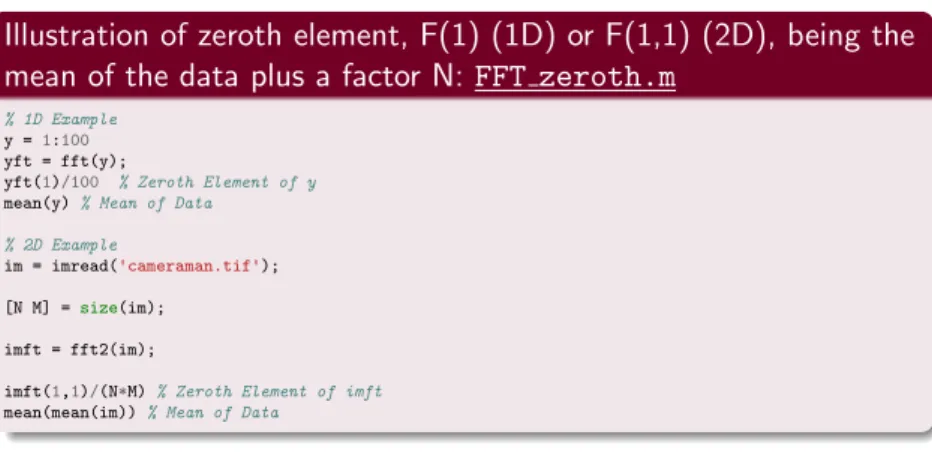
Illustration of zeroth element, F(1) (1D) or F(1,1) (2D), being the mean of the data plus a factor N: FFT zeroth.m
% 1D Example y =1:100 yft = fft(y);
yft(1)/100 % Zeroth Element of y mean(y)% Mean of Data
% 2D Example
im = imread('cameraman.tif');
[N M] =size(im);
imft = fft2(im);
imft(1,1)/(N*M)% Zeroth Element of imft mean(mean(im))% Mean of Data
FT is not balanced in MATLAB
Corollary: Shifting the Fourier Transform, fftshift()
Centring the Frequency of a Fourier Transform
Most computations of FFT represent the frequency from 0 — N − 1 samples (similarly in 2D, 3D etc.) with corresponding frequencies ordered accordingly — the 0 frequency is not really the centre.
We frequently like to visualise the FFT as the centre of the spectrum.
In 1D (Audio/Vector): swaps the left and right halves of the vector
Similarly in 2D (Image/Matrix) we swap the first quadrant with the third and the second quadrant with the fourth:
This is possible due the invariant shift property of the Fourier Transform.
65 / 66