Cost Effective RADIUS Authentication for Wireless Clients
Alexandru ENACEANU
Faculty of Computer Science, Romanian-American University, Bucharest, Romania [email protected]
Gabriel GARAIS Faculty of Computer Science,
Romanian-American University, Bucharest, Romania
Network administrators need to keep administrative user information for each network device, but network devices usually support only limited functions for user management.
WLAN security is a modern problem that needs to be solved and it requires a lot of overhead
especially when applied to corporate wireless networks. Administrators can set up a RADIUS
server that uses an external database server to handle authentication, authorization, and accounting for network security issues.
Keywords: RADIUS, WLAN, Wireless Authentication, Wireless Access Control
Introduction Corporate wireless networks are in general the primary source of hacking into the corporate systems. The risks to users of wireless technology have increased lately, as the service has become more popular. There were relatively few dangers when wireless technology was first introduced. Crackers had not yet had time to latch on to the new technology and wireless was not commonly found in the work place. However, there are a great number of security risks associated with the current wireless protocols and encryption methods.
Many early access points cannot discern whether or not a particular user has authorization to access the network. Although this problem reflects issues that have long troubled many types of wired networks (it has been possible in the past for individuals to plug computers into randomly available Ethernet outlets and get access to a local network), this did not usually pose a
significant problem, since many
organizations had reasonably good physical security. However, the fact that radio signals travel outside of buildings makes physical security largely irrelevant to hackers.
Common wireless encryption using WEP or a WPA key combined with static MAC entries is good for small offices, but
totally inadequate for a corporate wireless or a campus network. That is because a corporate wireless network has a lot of access points to reconfigure for changing the access key or adding a new MAC address to the allowed clients list.
WLAN security can be significantly strengthened by using 802.1X to control access point access and deliver dynamic keys to authenticated users. Authentication Servers based on the RADIUS protocol play a key role in 802.1X [1].
2. Authentication, Authorization, and Accounting
2.1RADIUS Protocol
The Remote Authentication Dial In User Service (RADIUS) protocol was originally defined to enable centralized authentication, authorization, and access control (AAA) for SLIP and PPP dial-up sessions. Instead of requiring every Network Access Server (NAS) to maintain a list of authorized usernames and passwords, RADIUS
Access-Requests were forwarded to an
Authentication Server, commonly referred to as an AAA Server (AAA stands for
authentication, authorization, and
accounting). This architecture made it possible to create a central user database, consolidating decision-making at a single
point, while allowing calls to be supported by a large, physically distributed set of NASs.[2]
When a user connects, the NAS sends a RADIUS Access-Request message to the AAA Server, relaying information like the user's name and password, type of connection (port), NAS identity, and a message Authenticator [3].
Upon receipt, the AAA Server uses the
packet source, NAS identity, and
Authenticator to determine whether the NAS is permitted to send requests. If so, the AAA Server tries to find the user's name in its database. It then applies the password and perhaps other attributes carried in the Access-Request to decide whether access should be granted to this user. Depending upon the authentication method being used, the AAA Server may return a RADIUS Access-Challenge message that carries a random number. The NAS relays the challenge to the remote user (for example, using CHAP). The user must respond with the correct value to prove its asserted identity (for example, encrypting the challenge with its password), which the NAS relays to the AAA Server inside
another RADIUS Access-Request
message.[2]
If the AAA Server verifies that the user is authentic and authorized to use the requested service, it returns a RADIUS Access-Accept message. If not, the AAA Server returns a RADIUS Access-Reject message and the NAS disconnects the user. [3]
2.2 RADIUS and Wireless LANs
In a wireless network that uses 802.1X Access Control, the wireless station plays the role of the Remote User and the wireless access point plays the role of the Network Access Server. Instead of connecting to the NAS with a dial-up protocol like PPP, wireless stations associate to the access point using 802.11 protocols.
If the AAA Server issues an Access-Accept message, the access point and wireless station complete a handshake to generate session keys used by WEP or TKIP
to encrypt data. At that point, the access point unblocks the port and the wireless station can send data and receive data to and from the attached network. If the AAA Server issues an Access-Reject message, the access point disassociates the station. The failed station can try to authenticate again, but the access point prevents the station from actually sending data through the access point into the adjacent network.
2.3 Cost of RADIUS servers
There are many options on the market for setting up a RADIUS server.
RADIUS server software has a price range from $400 and up to several thousand dollars, depending on your implementation, number of clients and reports.
Commercial RADIUS Servers for a campus network or mid-sized organization vary in price as following:
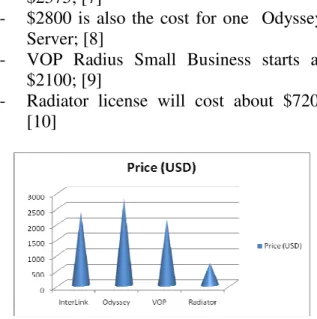
- Interlink RADIUS server cost about
$2375; [7]
- $2800 is also the cost for one Odyssey
Server; [8]
- VOP Radius Small Business starts at
$2100; [9]
- Radiator license will cost about $720.
[10]
Fig. 1. Price comparison for commercial RADIUS software
Taking into consideration the above mentioned prices and also the specifications of each software package, Radiator is the most cost-effective solution for a campus network.
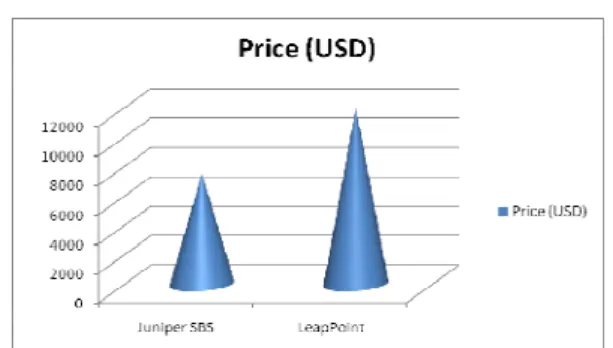
For example, a Juniper Networks Steel-Belted Radius (SBS) solution for a campus network is available for $7500. [8]
Meanwhile LeapPoint AiroPoint 3600-SE appliance starts at $12000. [9]
Fig. 2. Price comparison for commercial RADIUS combo packages
The above high priced combo solutions are least cost-effective solutions when compared to open source applications. A very cost effective RADIUS solution is FreeRADIUS. FreeRADIUS is a powerful RADIUS server on Linux from the open source community which can fit in today's distributed and
heterogeneous computing environment.
FreeRADIUS supports LDAP, MySQL, PostgreSQL, and Oracle databases and is compatible with such network protocols as EAP and Cisco LEAP. FreeRADIUS is currently being deployed in many large-scale production network systems being very efficient.
2.4 Installing and configuring FREERADIUS
Depending on your Linux distribution you can download FreeRADIUS as a binary package or as a source. Both methods are straightforward and require minimum Linux operating system knowledge.
Building from source implies the following steps:
- Download the latest archive from
ftp://ftp.freeradius.org
- Unzip and untar the archive
- Run the following commands:
./configure ; make; make install
Configuring the RADIUS server consists of configuring the server, the client, and the
user (both for authentication and
authorization). There can be different configurations of the RADIUS server for different needs; fortunately most of the configurations are similar.
• Configuring the server
FreeRADIUS configuration files are usually stored in the /etc/raddb folder. First we need to modify the radiusd.conf file and
uncomment the $INCLUDE sql.conf line.
Other options from radiusd.conf file should
then look like:
authorise {
preprocess chap mschap suffix eap files sql pap }
accounting { detail sql }
Next, we have to edit /etc/raddb/sql.conf, and direct it to the appropriate database (PostgreSQL, MySQL, etc.), by modifying the line: database = "mysql".
Also we need to edit the connection zone and specify the IP address of the SQL server we are going to use, the port and login credentials:
server = "a.b.c.d" port = 3306
login = "raduser" password = "radpass"
Database table name configuration for PostgreSQL, MySQL can be altered using the following line radius_db = "radius". If using Oracle, then the above line changes into:
radius_db=
"(DESCRIPTION=(ADDRESS=(PROTOCOL=TCP)(HO ST=localhost)(PORT=1521))(CONNECT_DATA=( SID=your_sid)))"[6]
Clients are configured in
/etc/raddb/clients.conf. There are two ways to configure RADIUS clients. You can group the NAS by IP subnet or you can list the NAS by hostname or IP address [4]:
client 192.168.0.0/24 {
secret = mysecret1 - the "secret" should be the same as configured on NAS
shortname = mylan - the "shortname" can be used for logging
nastype = cisco - the "nastype" is used for checkrad and is optional
}
- Listing the NAS by hostname or IP
address
client 192.168.0.1 { secret = mysecret1 shortname = myserver nastype = other }
• Setting up RADIUS database
First, we should create a new empty 'radius' database in SQL and a database user with permissions to that database. The user should be the same as specified above in the login credentials.
Next, we need to create the schema for your database. There is an SQL script file for each SQL type in doc/examples/ in operating system's doc directory (or where FreeRADIUS has been unzipped) [5].
Create MySQL Database
mysql –u root -p
CREATE DATABASE radius;
GRANT ALL ON radius.* TO radius@localhost IDENTIFIED BY "radpass";
exit
mysql -uroot -p radius < mysql.sql
Create PostgreSQL Database
su - postgres
createuser radius superuser --no-createdb --no-createrole -P
createdb radius --owner=radius exit
psql -U radius radius < postgresql.sql
• Populating SQL database
Creating RADIUS users is straightforward, as data need to be inserted in the below tables accordingly:
• In usergroup, put entries matching a
user account name to a group name.
• In radcheck, put an entry for each
user account name with a
'Cleartext-Password' attribute with a value of their password.
• In radreply, create entries for each
user-specific radius reply attribute against their username
• In radgroupreply, create attributes to
be returned to all group members At a minimum, only for authentication purpose with no options, the only table we need to edit is radcheck.
A simple RADIUS authentication record will look like:
Fig. 3. Simple RADIUS SQL authentication record
For ease-of-use we can build a script to add new users or we can use another open-source product, daloRADIUS.
daloRADIUS is an advanced RADIUS web management application aimed at managing
hotspots and general-purpose ISP
deployments. It features user management, graphical reporting, accounting, a billing engine and integrates with GoogleMaps for geo-locating.
Installing and configuring daloRADIUS is beyond the scope of this article.
• Test and implement
Test the configuration by reloading
FreeRADIUS and then run the following command:
radtest user passwd radius-server[:port] nas-port-number secret.
Example:
radtest Alex password123 localhost 1 testing123
will produce the following result:
Sending Access-Request of id 17 to 127.0.0.1 port 1812
User-Name = "Alex"
Configuring the access points to use the RADIUS server for accouting and access control is straightforward and the required
fields would be: server IP, server port,
shared secret.
2.5 FreeRADIUS performance test
The database containing Freeradius records is very simple, contains neither transactions,
nor triggers, nor views.
Therefore, the criteria used for the performance test is disponibility and speed will be key factors to take a decision.
MySQL and PostgreSQL both offer some solutions – similar – to answer to needs of applications requiring high disponibility. Replication seems to be a good choice as it is possible to specify different servers for accounting and authentication (write and read). Write accesses can be sent to the Master and reads to the slaves.
As both databases offer high availability options, the choice is made based on the queries speed. MySQL is popular for its
speed (especially for reads) but
PostgreSQL’s robustness in a concurrential environment would be better.
We determined the number of
transactions that each database is able to perform in a given time. Results are compared to a basic setup that gets usernames from a text file. Conditions will be strictly identical:
- We used the same machine and the same
operating system;
- Tables structure contains identical
indexes;
- Pools of 50 connections are created.
We measure the execution time to
authenticate 10000 users with the radclient
tool in concurrent access.
time /usr/local/bin/radclient -p 1000 -q -s -f radius.test 127.0.0.1 Alex password123 Results are grouped as following:
Database File Postgre SQL
My SQL
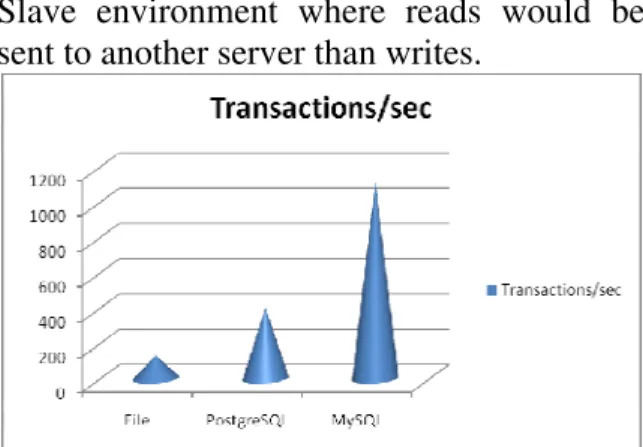
Time (sec) 76 25 9
Transactions /second
131 400 1111
Reading from PostgreSQL as well as MySQL, is much faster than in a text file. This can be explained by indexes creation within tables. This difference would be smaller for a database containing a much smaller number of users. MySQL realises excellent results processing three times more
transactions than PostgreSQL.
Results would be close to these in a Master-Slave environment where reads would be sent to another server than writes.
Fig. 4. DB performance chart
Conclusion
By following the steps outlined in this article, administrators can set up a RADIUS server that uses an external SQL server to handle authentication, authorization, and accounting for network security issues, by using a very cost-effective approach.
This article has provided the following:
• An introduction to the RADIUS and
SQL servers and to the AAA concept;
• A scenario to put the installation and
implementation into context;
• Options and cost for various
RADIUS servers;
• Instructions on installing and
configuring the RADIUS server;
• Details on configuring the network
access server;
• A sample of the detailed information
that RADIUS will provide and manage;
• DB performance test.
References
[1] Jonathan Hassell, Securing Public Access to Private Resources, O'Reilly Media, 2002
[2] RADIUS described by RFC 2865 of the Internet Engineering Task Force
http://www.ietf.org/rfc/rfc2865.txt
[3] Cisco, RADIUS configuration
http://www.cisco.com/en/US/docs/ios/12 _1/security/configuration/guide/scdrad.h tml
[4] Building a RADIUS server on Linux , IBM Software group, May 2005 http://www.ibm.com/developerworks/lib rary/l-radius/
[5] FreeRADIUS Homepage
http://www.freeradius.org
[6] FreeRADIUS with Oracle.
http://www.ioncannon.net/system- administration/136/freeradius-with-oracle/
[7] Interlink Networks,
http://www.interlinknetworks.com/
[8] Juniper Networks,
http://www.juniper.net
[9] ServerWatch,
http://www.serverwatch.com
[10] Radiator Server,
http://www.open.com.au/radiator/
Alexandru ENACEANU is assistant lecturer at Romanian American University, faculty of Managerial Informatics since year 2003 and Ph.D. student of the Faculty of Cybernetics, Statistics and Economic Informatics. Amongst his fields of interest and didactic activities are networking, security, web technologies and database management systems.