Image based Digitisation of Entomology Collections:
Leveraging volunteers to increase digitization capacity
Paul Flemons1, Penny Berents1
1 Australian Museum, 6 College Street, Sydney 2010
Corresponding author:Paul Flemons ([email protected])
Academic editor:V. Blagoderov | Received 30 March 2012 | Accepted 26 June 2012 | Published 20 July 2012
Citation: Flemons P, Berents P (2012) Image based Digitisation of Entomology Collections: Leveraging volunteers to increase digitization capacity. In: Blagoderov V, Smith VS (Ed) No specimen left behind: mass digitization of natural history collections. ZooKeys 209: 203–217. doi: 10.3897/zookeys.209.3146
Abstract
In 2010, the Australian Museum commenced a project to explore and develop ways for engaging volun-teers to increase the rate of digitising natural history collections. he focus was on methods for image-based digitising of dry pinned entomology collections. With support from the Atlas of Living Australia, the Australian Museum developed a team of volunteers, training materials and processes and procedures.
Project oicers were employed to coordinate the volunteer workforce. Digitising workstations were established with the aim of minimising cost whilst maximising productivity and ease of use. Database management and curation of material before digitisation, were two areas that required considerably more efort than anticipated.
Productivity of the workstations varied depending on the species group being digitised. Fragile groups took longer, and because digitising rates vary among the volunteers, the average hourly rate for digitising pinned entomological specimens (cicadas, leafhoppers, moths, beetles, lies) varied between 15 to 20 per workstation per hour, which compares with a direct data entry rate of 18 per hour from previous trials.
Four specimen workstations operated four days a week, ive hours a day, by a team of over 40 volun-teers. Over 5 months, 16,000 specimens and their labels were imaged and entered as short records into the museum’s collection management database.
Keywords
Digitising, image, volunteers, Australian Museum, collections
www.zookeys.org
Introduction
he Australian Museum (AM) has natural science collections dating from 1806. he collections hold more than 18 million specimens of animals, fossils, rocks and miner-als. Digitisation (in the form of databasing the text from specimen labels) of the col-lections commenced in the 1970s and in 2012 approximately 40% of the colcol-lections have a text record in the Museum’s collection database. To digitise the remainder of the collections in this way, would at comparable rates, take another 50 years at least.
Funding for digitising of collections needs to be allocated as eiciently and wisely as possible to maximise the return for the investment. However it is unlikely that fund-ing available for digitisfund-ing is ever gofund-ing to equal fundfund-ing required for fully digitisfund-ing our collections. his represents the digitising impediment.
In response to a lack of adequate resources for digitising, the Australian Museum (AM) has been exploring opportunities for engaging volunteers in image-based speci-men digitisation since 2007. Initial work (Tann and Flemons 2008) demonstrated that utilising volunteers for imaging specimens and their labels was feasible and com-pared favourably with traditional text-only data entry techniques.
In 2010 the Australian Museum obtained funding from the Atlas of Living Austral-ia (ALA) to develop a volunteer-based digitisation program (DigiVol). he aim of this project was to explore and develop methods and technologies for engaging volunteers to assist in the rapid digitisation and registration of museum specimens. he project focused on the entomology collection, in part because it is a big collection that is largely not digitised, yet it lends itself to a methodical volunteer-based digitising process.
It was considered essential to establish a clear project scope for setting bounda-ries within which to develop processes and procedures. his was particularly im-portant for the imaging process as the choice of imaging resolution would have an enormous impact on downstream use and storage of images. Computer storage costs, network bandwidth and display capabilities often lag behind the capacity for capturing high resolution images. However, the time consuming handling of speci-mens suggested maximising image resolution. Staying focused on the goal at hand simpliied this dilemma. he primary goal in this case was to obtain good quality label images that could be easily read; the secondary goal being to capture an image of the specimen at the same time. With this in mind we established the following criteria for the project:
• Maximum 5MB ile size
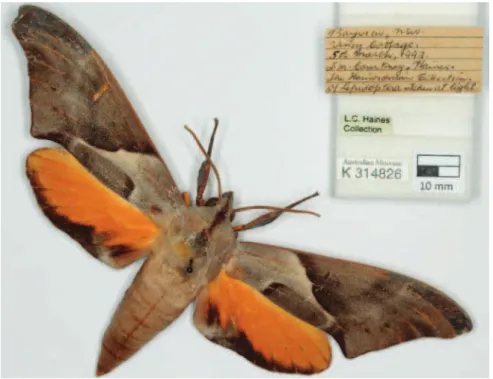
• Create an image of clearly readable text on labels, this being the priority • Produce a clear, focused image of specimens at maximum resolution allowed
by inclusion of labels in the same image – these specimens which will range in size from large cicada’s and moths (measured in many cm’s) to small beetles and lies (measured in the few mm’s) so detail that can be captured will vary. • Attach a registration number
• Create a partial record of metadata, including the species name and registra-tion number.
• Develop simple standardised processes that could be easily replicated and im-plemented on multiple workstations by volunteers
• Develop a process that would be comparable in speed to direct data entry by volunteers
• Ensure specimen safety with minimal breakages
• Maintain a harmonious working relationship with collection staf
his paper outlines the methodology of this project (for more detail on the ma-terials and methods see [AM digitisation inal report]), reports on the outputs, and discusses the issues encountered and lessons learned.
Methods
Database for storage of image metadata
An important component of digitising infrastructure was the database in which image metadata and short record information was initially entered into by the volunteers. his database was separate from the corporate collection management database for a number of reasons:
• Data Security - the corporate database had strict permissions on access for purposes of maintaining data integrity. In this project, volunteer staf, did not have data entry access
• Direct data entry into the corporate database can be slow and not as eicient or efective as using a lightweight MS Access database for data entry and vali-dation followed by bulk importing the records into the corporate database
We chose MS Access as the platform for this database because:
• here was an existing software licence for MS Access
• he database support oicer for this project has existing expertise in setting up, managing and programming in MS Access.
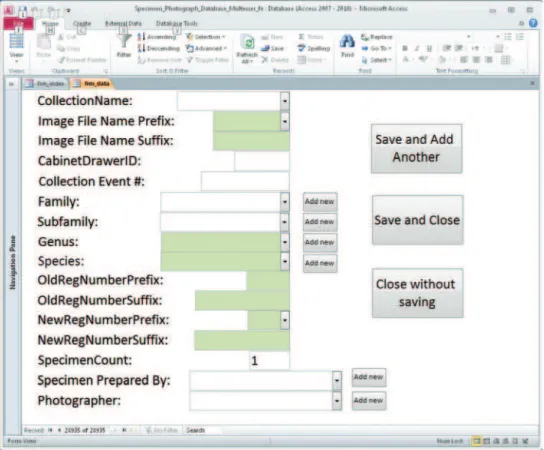
Where possible information stored in the database was made available as pick lists so that data entry required as little typing as possible, reducing input error and making the process faster.
At the time of image capture volunteers enter information through the MS Access database data entry form (Figure 1).
creation of a valid collection database record in the museum’s collection management database, EMu. his short record which consisted of catalogue number, species (or a higher taxon level) name and the images themselves were imported into EMu. he rest of the label data, once captured could then be appended to this short record at a later date. he short record in the meantime is available for audit purposes, and for some collection and data management activities, as the specimen label data can clearly be seen on the image even though it is not text searchable.
Digitisation Laboratory
he Australian Museum provided a large room in which the Digitising Laboratory was established. his space was important in establishing the sense of belonging for the vol-unteers as it was a dedicated space for the project. he room was itted out with power and network outlets and secure access. here was enough space for four specimen label imaging workstations, one register imaging station, a microscope camera workstation and three transcription workstations.
Specimen workstations
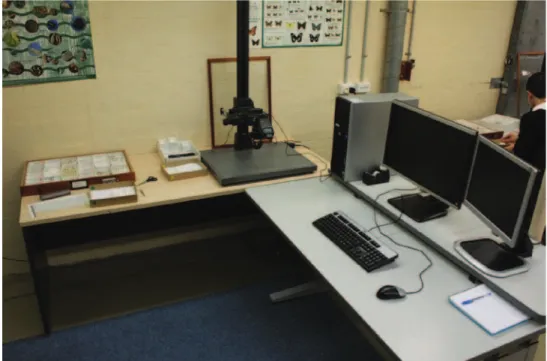
Each of the four specimen imaging workstations had the same equipment. Worksta-tions were used for imaging individual specimens and their labels.
Workstation equipment: – Two desks
– A desktop computer capable of manipulating large images – Camera, lens and light source (lash)
– Copy stand for vertical photography
– Tools for specimen handling such as tweezers
– For a full listing of equipment see [AM digitisation inal report]
Figure 2. A digitising workstation.
Process/worklow
It was a large task to ensure the supply of specimens for digitising. With four workstations operating four days per week, the rate at which specimens can be digitised put a considerable burden on collection staf. Curated drawers needed to be allocated for up to a month in advance to ensure that volunteers would not run out of specimens to digitise.
Summary of the steps in handling and imaging of specimens
(for full details see [Specimen Training guide])
• Curate specimens
Before moving drawers of specimens to the imaging laboratory, collection staf ensured they were curated to a speciied level for the project. Type specimens were re-moved, as they were considered too precious to be handled by those without appropri-ate training. Each specimen was checked to ensure it was labelled adequappropri-ately with its taxonomic name, and that drawers were not overcrowded. his workload had signii-cant resource implications for collection staf (see Discussion and Conclusion Table 1)
• Retrieve specimens
Drawers were removed from the collection by the digitisation oicer in the order that they were numbered and transported to the Digitisation Lab. Drawers were trans-ported on a trolley from the collection to the Digitisation Lab.
• Prepare specimens
At each workstation there were two volunteers: one volunteer handled the specimen (the specimen handler), the other volunteer photographed the specimen (the digitiser).
For more details of the process see [Specimen Training guide].
• Image specimens
Label information was entered into the database, and the specimen and its labels were imaged.
• Deal with damaged specimens/labels
Damaged specimens (broken parts are collected and included with the specimen), damaged labels, and specimens without labels were placed in a ‘hospital’ drawer to be returned to collection staf for assessment and repairs. Place holders were used to iden-tify where the specimens were to be returned to. he collection manager was notiied when the hospital drawer was full.
• Return specimen drawer to the collection
After a specimen had been imaged it was replaced in its drawer.
• Review image and entered data
After each drawer had been imaged the information entered in the database was re-viewed to ensure consistency and identify any obvious image or data capture problems.
• Monitoring of the process
he following information is recorded to monitor the project’s outputs, staing and volunteers:
Number of specimens digitised per day by volunteer Number of drawers digitised per day
Number of volunteer hours per day Number of damaged specimens
Number of specimens damaged beyond repair Number of collection staf hours per day
Volunteer recruitment, supervision and management
Recruitment, coordination and supervision of volunteers
he development and management of a team of well trained, productive volun-teers dedicated to the digitisation of museum collections, whether large or small, re-quired the same basic approach.
A volunteer coordinator was essential. In practice, this role and its responsibilities could have been spread across one or more people or positions. Ideally, however, we felt that a single position, which in the case of this project was shared between two individuals, was likely to produce the best outcome for the museum. he large size of the volunteer team and the high throughput of the project required a dedicated co-or-dinator resource to ensure that the workload of existing staf was not impacted greatly. he volunteer coordinators were responsible for recruiting, training, coordinating and supervising volunteers. First and foremost they needed to have excellent people management skills and a good understanding of the technical processes involved in digitisation. he extent to which they need to be technically proicient was dependent on the availability of other sources of technical expertise. Coordinators were trained in specimen handling, the extent that they assisted the collection staf in developing a video demonstrating how volunteers should handle specimens.
he major steps in the creation of the volunteer team were as follows:
• Recruitment
An expression of interest email was sent out to Australian Museum Members. Potential volunteers were asked to identify their preferred days, which could be a Sat-urday, and their availability, to volunteer for one day a week, or one day a fortnight.
• Rostering
Potential volunteers were prioritised on their day preferences according to their response time to the expression of interest.
• Induction
New volunteers were given an introduction to the working area and other volun-teers and a tour of the public exhibition within the museum.
• Training
Volunteers attended a one day training session with short videos about handling and imaging specimens. he videos were accompanied by training manuals, and fol-lowed by hands-on practice with experienced volunteers.
• Review
Digitiser volunteers undertook a six-week introductory period. At the end of this period each volunteer would complete a self-assessment review of their practice and the project.
• Ongoing Support
Results
Each specimen digitised resulted in a “short” record in EMu with taxon and registra-tion number linking with existing taxonomic informaregistra-tion in EMu, and included an image of the specimen with associated labels.
he following graphs show various statistics over the period of the project.
As the number of workstation hours per month varied (Fig. 4) so did the number of specimens digitised per month (Fig. 5). he drop of over December was due to the Christmas holiday period.
Figure 4. Workstation hours per month. Figure 5. Specimens digitised per month.
he number of specimens digitised per workstation hour (Fig. 6) was reasonably consistent throughout the project. Compared to the relatively large changes in daily productivity (see Fig. 8) when averaged over a month productivity was reasonably constant.
he number of damaged specimens per month (Fig. 7) was related to the number of specimens being processed and the fragility of the group being worked on. he highest rate of damage was with the Sphingidae moths. All damaged specimens need to be dealt with by collection staf, so an increase in the numbers damaged, meant an increase in collection staf time to remedy.
Discussion and conclusions
Why use image based digitisation?
here was a time when databasing (entry of text only data) of collection holdings was the preferred way of digitising a collection, for collection management and data access. his is now being challenged by the digitising of collections where specimens are im-aged and their associated label data entered as complementary data.
he advent of this approach has come from the realisation that having an image of the specimen and its associated labels has strong collection data management beneits including:
Figure 6. Average number of specimens per workstation hour by month.
Figure 7. Number of damaged specimens per month.
Figure 8. Number of specimens digitised per workstation hour.
• A readily accessible digital voucher of each specimen and its labels for veriica-tion and reference as a digital loan
• Reduced need for specimen handling
• A virtual specimen in the event of collection loss or damage, e.g. ire, lood, earthquake, or for when the specimen is on loan
• Remote access to original label data for review by researchers
• A capacity for using handwriting to help identify a collector in the absence of a collector name
• A limited potential for species identiication from an image
• Enabling the use of ‘non-experts’ in data entry with the beneit of knowing data quality and enabling dubious data to be checked without having to physi-cally visit a specimen in the collection.
Best practice
he processes and procedures detailed in this paper constitute best practice for the predeined goal of image based digitising of individual specimens and the associated labels. We have produced documentation and videos that detail the handling of speci-mens and registers and a handbook for volunteers involved in the digitizing project [Rapid Digitisation Project Resources].
he two most important components of this best practice are:
• the dedicated role of the digitising oicer who recruits, trains and coordinates the volunteers, liaises with collection staf and implements the technical processes
• the curation of material prior to digitisation by collection staf which makes the digitising process as efective as possible in terms of consistent identiication of dig-itised specimens, ease of handling and selection of appropriate specimens (including removal of types).
Curation of specimens by drawer in preparation for digitising
A factor that should not be glossed over is the potential resource impact of prepar-ing drawers of specimens for digitisprepar-ing. his curation involves removprepar-ing types (where it has been decided that types are not to be imaged by volunteers, as is the case in the AM project), ensuring specimens within the drawers are labelled adequately with taxonomic names and that the specimens are not overcrowded and thus diicult for volunteers to handle. hese are tasks which must be carried out by collection staf or, where appropriate, experienced volunteers.
drawers. In addition, any application for funding of digitising projects needs to factor in resources required for the curation of material to be digitised.
It is diicult to estimate how much time is required speciically for the curation of specimens for digitising (Table 1) because curation is a normal part of collection management. What is clear though is that a dedicated rapid digitising project shifts the priorities of collection staf onto curation of specimens that may otherwise not have been in their workplans. Unless efectively resourced this can lead to conlict over work priorities in the collection. All insect collections contain a mixture of groups which range from well identiied (usually because of associated input from skilled researchers) to completely unidentiied or incorrectly identiied. here may be well-identiied groups that are not suitable for digitisation because of their physical state or there may be groups which would be ideal to digitise which are not well identiied. he presence of well-identiied collection material represents an investment that should not be taken for granted.
table 1. his table gives some idea of the diiculty in estimating time required for curation. hese are igures provided by David Britton, Collection Manager at AM.
Group No. of drawers No. of specimens Curation time estimate
Notodontidae (moths) 26 ~ 1000 7 days, included some identiication
(4 drawers)
Sphingidae (hawk moths) 50 1916 8–15 days, included some
identiication (6 drawers)
Cicadas 82 4386 25 days
Scarabaeidae (beetles) 5 2204 15 days including identiication
Noctuidae (moths) 10 809 4 days
Leafhoppers etc 41 3385 20 days
Technical support for creating and maintaining databases and photographic equipment
he entry of metadata for each image captured is an important consideration as it has im-plications for resourcing, productivity and the ease in which data can be incorporated into the institutions collection management system, in the case of AM that being KE-EMu.
Technical support is required to establish and maintain the database and the various entry forms required.
Options for Capturing Full Records
he complete label information could be transcribed and entered into a spreadsheet or database at the time of image capture. However, this approach wasn’t adopted because it was felt that separating out the imaging and transcription steps has beneits for the process in terms of specialisation which is likely to result in improvements in speed, eiciency and accuracy.
Imaging the labels allows scope for unlocking and outsourcing the transcription of the complete label data to create a full record.
Two options that utilise volunteers are as follows:
• Internal Volunteers – by setting up separate computer workstations with ei-ther spreadsheets or data entry database forms, the label information could be tran-scribed by the volunteers in the DigiVol laboratory.
• Crowdsourcing with Online Volunteers – the approach chosen was to establish an online volunteer transcription site [Biodiversity Volunteer Portal] where the complete label information can be transcribed into deined database ields. his data can then be validated and imported back into the Emu collection database to create the full database record.
Funding Options
Our investigation of funding options came to the following conclusion on likely sourc-es of funding for digitising projects:
It is far easier to get funds for buying equipment and building infrastructure than it is for ‘bums on seats’.
With this in mind, some institutions may ind it worthwhile to seek funds for equipment purchase and then allocate some existing internal resources to set up the equipment and coordinate the volunteers in a manner that is amenable to their avail-able staf resources.
Short term projects of one or two years may be funded through trusts, particularly those related directly to the institutions activities, e.g. he Australian Museum Foun-dation. Such short term projects should focus clearly on delivering a speciic content such as a charismatic or high proile collection in its entirety.
Low cost digitising options
Where institutions are unable to implement best practice because of resourcing con-straints the processes and procedures outlined above can be scaled to suit available resources. For example, a single workstation could be established at minimal cost and a small team of volunteers (two to ten) trained and coordinated by an existing staf member if the workstation was located in close proximity to the staf member.
• Equipment selection
he cost of setting up a workstation is somewhat lexible in that many institu-tions will already have the necessary equipment for specimen handling and curation and also the necessary furniture. his can considerably reduce the costs of setting up a workstation, reducing it to just the cost of imaging equipment and computer software and hardware.
• Computer
A fast but standard speciication was chosen to get the best balance between price and performance. Two screens were used: a larger screen for viewing the images (as image capture is controlled through the computer) and another screen for operating the database for data input.
• Copy stands
Good quality copy stands are essential as they provide stability for the camera and a sound platform upon which the specimens can be imaged. Kaiser makes excellent stands.
• Cameras
Any number of cameras could have been chosen and would have been suitable to the task. We chose a Canon 550D as we felt it delivered good results was suicient to do the job and represented very good value for money. We felt there was no need for a more expensive camera nor a higher resolution camera because we wanted to keep the image size to a manageable 5MB jpeg.
• Storage
When capturing many thousands of images at 5Mb size per image, the impact on storage is signiicant. Images are stored on the Museums network as part of its image storage infrastructure. Funding for future image capture has been factored into the Museums overall IT planning.
Acknowledgements
data-base and imaging support, David Britton for his support and assistance with the AM Entomology collection, John Gollan and John Tann for their assistance in developing the ideas underpinning this project; the generous and dedicated volunteers involved in the DigiVol project and Isobel Kindley for assistance in establishing the Volunteer Program. he DigiVol project was made possible by the Atlas of Living Australia.
References
AM digitisation inal report. http://www.ala.org.au/wp-content/uploads/2011/10/Australian-Museum-digitisation-project-inal-report.pdf
Biodiversity Volunteer Portal. http://volunteer.ala.org.au/
Rapid Digitisation Project Resources. http://www.australianmuseum.net.au/Rapid-Digitisa-tion-Project
Specimen training guide: A Guide to the Handling and Digitising of Specimens http://www. australianmuseum.net.au/document/Specimen-Training-Compressed