Submitted 16 March 2015
Accepted 11 May 2015
Published27 May 2015
Corresponding author Ivan Baxter,
Academic editor Harry Hochheiser
Additional Information and Declarations can be found on page 9
DOI10.7717/peerj-cs.3 Distributed under
Creative Commons Public Domain Dedication
OPEN ACCESS
Zbrowse: an interactive GWAS results
browser
Greg R. Ziegler1, Ryan H. Hartsock2and Ivan Baxter1,2
1United States Department of Agriculture — Agricultural Research Service, St. Louis, MO, USA 2Donald Danforth Plant Science Center, St. Louis, MO, USA
ABSTRACT
The growing number of genotyped populations, the advent of high-throughput phenotyping techniques and the development of GWAS analysis software has rapidly accelerated the number of GWAS experimental results. Candidate gene discovery from these results files is often tedious, involving many manual steps searching for genes in windows around a significant SNP. This problem rapidly becomes more complex when an analyst wishes to compare multiple GWAS studies for pleiotropic or environment specific effects. To this end, we have developed a fast and intuitive interactive browser for the viewing of GWAS results with a focus on an ability to compare results across multiple traits or experiments. The software can easily be run on a desktop computer with software that bioinformaticians are likely already familiar with. Additionally, the software can be hosted or embedded on a server for easy access by anyone with a modern web browser.
Subjects Bioinformatics, Computational Biology, Visual Analytics Keywords GWAS, Association mapping, Data visualization
INTRODUCTION
The recent development of high-throughput phenotyping techniques coupled with the ability to genotype large populations of diverse individuals has revolutionized the way that forward genetics research is performed. Tools have rapidly become available to perform genome-wide association studies (GWAS) in a variety of species (Kang et al., 2010;Segura et al., 2012;Lipka et al., 2012) that can map traits to the genome with high enough resolution to quickly provide a tractable list of potential causal genes.
One of the first steps an analyst will take is determining what gene or genes fall under the SNP peaks that can be seen on the Manhattan plot. Unfortunately, these plots are generally not interactive. Identifying the peaks of interest usually involves sifting through the results table for the range of coordinates under the peak of interest and then using those coordinates to filter a large gene annotation file. The extra steps involved in exploring the data in this way makes it more likely that interesting associations may be missed either due to (1) mistakes made in attempting to mine the large results files or (2) the dataset not being mined deeply enough due to the difficulty of looking for genes under less significant peaks. Additionally, this method quickly becomes tedious when analyzing multiple phenotypes or relatively complex traits.
Table 1 Comparison of ZBrowse with other available GWAS visualization software packages.LocusZoom (Pruim et al., 2010), LocusTrack (Cuellar-Partida, Renteria & MacGregor, 2015), GWAS Central (Beck et al., 2014), GWAPP (Seren et al., 2012), GWASrap (Li, Sham & Wang, 2012), JBrowse (Skinner et al., 2009).
Browser Language programmed in
Is it run on local, server or web
Is the plot interactive
Display SNPs and intervals
Organisms supported
Displays multiple GWAS experiments
LocusZoom R, Python wrapper, SQLite table
Local or web No No Human No
LocusTrack R Local or web No No Human No
GWAS Central Unclear Web Partial No Human No
GWAPP Python, HTML5, Javascript Web Yes No Arabidopsis No
GWASrap Unclear Web Yes No Human No
JBrowse Perl/Javascript Local, server or web Yes Yes Any Not easily on the
same track
ZBrowse R Local, server with
some modification
Yes Yes Any Yes
resources also do not allow for easy viewing and comparison of GWAS results across phenotypes and studies, a situation that frequently arises with structured populations.
GOALS
We approached the construction of a new GWAS browser with the goal of giving the users the following tools, all of which were focused on versatility and adaptability:
1. Ability to plot multiple traits in the same panel.We wanted to enable users to find genotype-environment (GxE) interactions (e.g., those instances where an environ-mental condition causes a phenotypic effect, but only for individuals with a given allele) and loci with pleiotropic effects (the same loci affecting multiple phenotypes).
2. Ability to rapidly move between scales (thousands of bps to billions).
3. Ability to find overlaps or commonalities among datasets.
4. Ability to interact directly with the plots. We wanted the ability to look at the annotations of genes inline easily and link to additional information.
5. Ability to plot both SNPs and genetic intervals. We wanted users to be able to combine the results of quantitative trait locus mapping techniques with GWAS results.
6. Ability to download plots and gene lists.
7. Finally, we wanted all of this information and functionality to be available in one browser window using tools that are common and freely available on most personal computers.
Here, we present an interactive GWAS results viewer that is an extension of the classic GWAS Manhattan plot. It allows for the rapid comparison of GWAS results from multiple phenotyping experiments and the rapid viewing and analysis of genes under peak SNPs.
those with sex chromosomes. As a practical application of the browser’s usage, we will demonstrate it using results from a recently completed sorghum GWAS experiment in which elemental profiling phenotypes were measured in accessions grown across three separate locations (Shakoor et al., 2015).
USER INTERFACE
The ZBrowse GWAS results viewer is an interactive application that runs on a local machine using R and is rendered in any modern web browser. Because the browser runs on the user’s local machine, the data can remain private. Though the focus of the first version is a local installation, the browser display allows for easy sharing of the application. The browser is designed to be a streamlined environment that provides fast access to visualization tools for GWAS results. ZBrowse utilizes a tab-based navigation format to make accessing different aspects of the browser fast, efficient, and intuitive. There is also a sidebar panel on the left of the page that updates with a set of options specific to the tab being displayed.
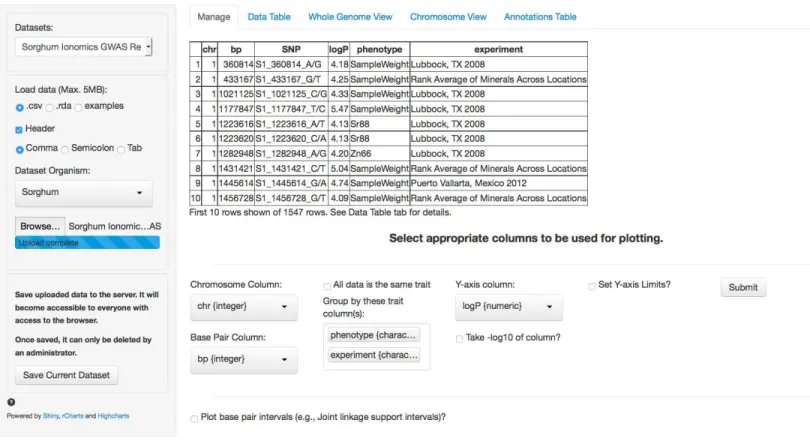
The first tab in the list, and the landing page when the application is first loaded, is the Manage tab (Fig. 1). This tab allows a new GWAS dataset to be uploaded into the application or a pre-loaded dataset from a dropdown menu can be selected. Data can be uploaded in a flat file delimited with either commas or tabs or an RData object. These flexible file formats allow any type of data to be loaded into the browser.
InFig. 1, we have loaded the results from the sorghum ionomics experiment and selected the appropriate columns to be used for plotting the results. The results file was generated by taking the most significant SNP hits from each of the 80 GWAS experiments performed (20 phenotypes measured in 3 locations and an experiment combining the location data). We added a column describing which experiment (e.g., the three locations) and which phenotype each SNP was found in.
Once uploaded, a preview of the first ten rows of the dataset will appear in the main panel. Below this table is a series of selection boxes that allow the user to specify which columns in the file to use for plotting. This selection method removes the complexity of requiring the input file to either have columns with specific names or columns in a specific order.
The user needs to select a chromosome and base pair for determining the location of each SNP in the genome. To plot base pair intervals, there is a separate checkmark box. Checking this box opens a second set of selection boxes allowing the user to select columns defining a start base pair and a stop base pair for each interval, as well as a separatey-axis column (allowing the traits to be plotted on different scales). Chromosomes expected for each organism are defined in a separate file (See Adding Organisms section). The browser supports both numeric and alphabetical chromosome names, so scaffold names (i.e., scaffold 1, scaffold 2), sex chromosomes (i.e., X, Y), or chromosome arm designations (i.e., 1S, 1L) are acceptable.
Figure 1 Landing page for ZBrowse.A sorghum GWAS dataset has been uploaded and the appropriate columns for plotting the data have been selected from the selection boxes.
data by when plotting. For example, a researcher might be interested in comparing GWAS results from multiple experiments, or in comparing results from multiple traits measured in the same experiment, or both. The user can designate as many columns as desired to subset the data that will be used to create tracks designated by different colors on the plots. Color coding in the plots for each track will match between the intervals and the single points. In our sorghum dataset, we are interested in exploring relationships between both the phenotypes measured and the effect environment may have had on our GWAS results. Therefore, we have selected the two columns that we added describing what location and phenotype from which each SNP result is derived.
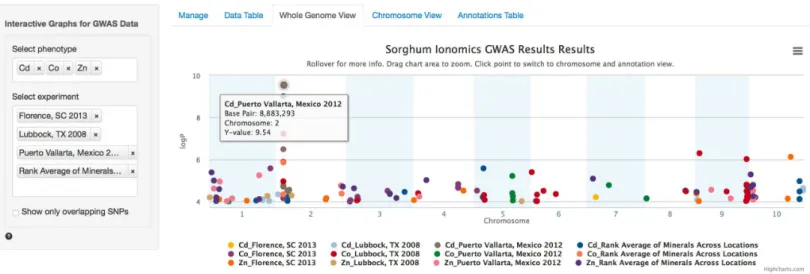
Figure 2 Genome wide view of ZBrowse manhattan plot.The plot is displaying a comparison of GWAS results from three phenotypes measured in three separate locations and one aggregate experiment (12 GWAS experiments total on one graph). The legend at the bottom of the figure displays the color of points that correspond to the combination of traits and locations selected in the sidebar on the left hand side of the figure. Clicking the points in the legend allows a user to easily show or hide points from that trait. The title of the plot is automatically generated from the filename of the dataset provided by the user. This makes it easy to determine which GWAS experiment is being plotted. The tooltip popup is displayed by hovering the mouse over points in the plot.
the subset of tracks being plotted, the browser will use they-axis column to rank the SNPs and take only the top 5,000.
After the user has selected the appropriate parameters, clicking the submit button will trigger a tab change to the Whole Genome View visualization tab (Fig. 2). Conveniently, once submitted, the software will remember the selected settings for this dataset on future visits and automatically populate the fields with the previously selected parameters. The plot on this tab is formatted as a standard genome-wide Manhattan plot. Thex-axis is ordered by chromosome and base pair within each chromosome. The background of the plot has alternating blue/white shading for the even and odd chromosomes to highlight chromosome breaks. The panel on the left contains a box for each trait column selected in the Manage tab. In the case of our Sorghum ionomics dataset, there is a box where we can select which combination of the 20 phenotypes we would like to plot and which experimental location we would like to plot. InFig. 2, we have selected all four locations and we are plotting the significant associations found for cadmium, cobalt, and zinc. There is also an option for showing only overlapping SNPs with the ability to adjust both the overlap size around each point and the minimum number of overlaps.
Figure 3 Chromosome and annotation level manhattan plots in ZBrowse.This plot was reached by clicking the peak SNP for cadmium in the Puerto Vallarta, Mexico experiment displayed inFig. 2. The blue vertical bar in the upper chromosome level plot indicates the zoomed region in the annotation level plot below. Two tracks at the bottom of the annotation level plot indicate locations of genes on the forward and reverse strands. Scrolling over these tracks displays a tooltip with a description of the gene and clicking genes in the track opens a separate browser window displaying information about the gene from an external database. The displayed gene, a heavy metal transporter, is a likely candidate for effecting cadmium accumulation in sorghum germplasm.
zoomed by clicking and dragging a zoom box anywhere in the plot. This makes it much easier to see the relationship between tightly grouped points. The displayed chromosome can be changed without returning to the Whole Genome View tab using the drop-down menu in the sidebar panel. Points can be clicked to redraw the annotation plot around new points of interest.
The annotation plot is a variable width plot that defaults to showing the region 250,000 base pairs on either side of the point of interest. The width of this region can be adjusted between 1,000 and 500,000 base pairs using the slider on the sidebar panel. The bottom of this plot has a track that shows the position of coding sequences around the SNP of interest. The tooltip for genes in this track displays information about the gene location, strand, and function, if known. For maize, arabidopsis and soybean, clicking on the gene will open a new browser tab that links to the gene description page specific to the organism being viewed. Arabidopsis links to The Arabidopsis Information Resource (TAIR) (Lamesch et al., 2011), soybean links to Soybase (Grant et al., 2010), and maize links to the Maize Genetics and Genomics Database (MaizeGDB) (Lawrence et al., 2004). In addition, clicking genes in organisms added from Phytozome (Goodstein et al., 2012) via the add organism application described below opens the Phytozome description page for that gene. ZBrowse can be easily modified to link out to other species-specific databases that can accept a query string in the URL.
Our cadmium example inFig. 3shows how quickly we can find potential leads for candidate genes. Browsing the gene track, a gene almost directly under the peak cadmium SNP is annotated as being similar to a cadmium/zinc-transporting ATPase; clicking this gene opens a new browser tab displaying the phytozome gene description page.
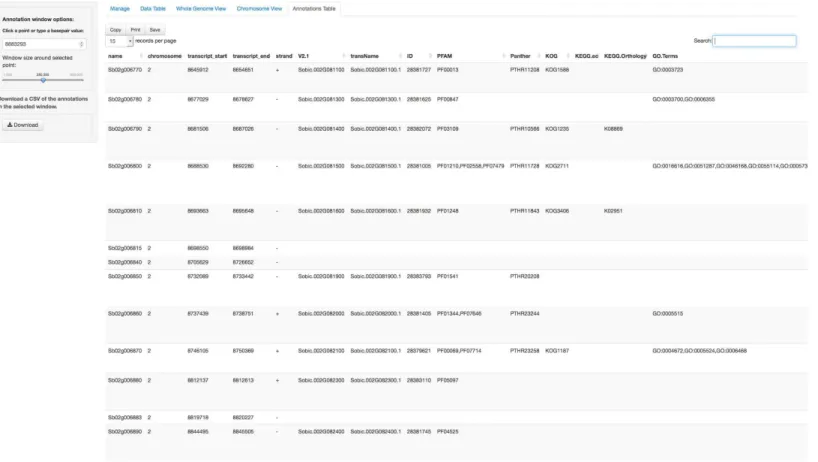
In addition to the visual browser, annotation data can be explored in tabular form in the Annotation Table tab (Fig. 4). This table provides an interactive table of the genes found in the window around the selected point. The table is sortable and searchable and can also be exported as a comma-separated file. A similar table viewer is available in the Data Table tab for analysis of the selected GWAS dataset.
ADDING ORGANISMS
Currently, maize, soybean, arabidopsis and sorghum are downloaded with the browser source package. We have developed an application to quickly add organisms to the browser from annotations downloaded from the Plant Genomics Portal (Phytozome) to the local installation of ZBrowse. Additionally, we will be formatting requested and popular organisms and releasing the files on GitHub. These will be easy to download and incorporate into your existing browser installation.
Figure 4 Annotation Table tab in ZBrowse.Tabular form of the genes found around a SNP. This table is searchable in the browser and can be exported as a csv formatted file.
have the following columns: name, chromosome, transcript start, transcript end, strand, ID, defLine, bestArabhitDefline and bestRiceHitDefline.
TECHNICAL FOUNDATION
LIMITATIONS
The browser takes a fundamentally different approach from current state of the art browsers. It is focused on the ability to quickly plot a variety of GWAS experiments on a single Manhattan plot. A caveat to this ability, however, is that it cannot plot every SNP in a genotype dataset. Due to memory, time, and plotting constraints the current browser is limited to approximately 5,000 data points per trait, which is significantly less than most genotype datasets. Of course, only the most strongly associated SNPs are typically of interest, so this problem can be easily mitigated by trimming the input file to contain only significant associations (e.g.,p<0.05). Currently, the browser will automatically
trim the number of points being plotted to only display the top 5,000 points based on the
y-axis column. Future improvements to the browser could support the plotting of more information by binning points when zoomed out to a point where over plotting is an issue and only loading individual data points asynchronously when the zoom level is sufficient to see individual points.
The generality of the browser allows for it to be used with any SNP dataset. Only chro-mosome number and base pair information needs to be provided for each SNP. However, this means that specific information about the genotype dataset being used, such as minor allele frequency or linkage disequilibrium information, cannot be displayed on the plot. Of course, the flexibility of the browser would make it easy to build personalized solutions that could display additional information for specific SNP datasets, and additional tracks could be added to display linkage disequilibrium decay around the selected SNP.
One obvious extension of the browser that would address many of the limitations listed above would be to connect it to a database designed to quickly and efficiently handle all of the data that goes into a GWAS experiment. Database support would allow custom subset-ting of entire GWAS datasets and if the GWAS genotype files are available, then summary data about each particular SNP could also be displayed. This would allow the browser to be incorporated into a much larger ecosystem that could take a GWAS experiment from phe-notypic dataset, through running a GWAS experiment, to final analysis and visualization.
While the limitations identified above may constrain the use of the browser for certain applications, there are a number of use cases that are enabled by its current functionality. Using open source tools and GitHub for the code distribution, the browser functionalities can be enhanced by the authors or by other members of the user community.
ADDITIONAL INFORMATION AND DECLARATIONS
Funding
This work was funded by the US National Science Foundation (IOS-1126950), the US Department of Energy (DOE-SC-008796), and the US Department of Agriculture— Agricultural Research Service (5070-21000-039-00D). The funders had no role in study design, data collection and analysis, decision to publish, or preparation of the manuscript.
Grant Disclosures
US National Science Foundation: IOS-1126950. US Department of Energy: DOE-SC-008796.
US Department of Agriculture — Agricultural Research Service: 5070-21000-039-00D.
Competing Interests
The authors declare there are no competing interests.
Author Contributions
• Greg R. Ziegler conceived and designed the experiments, performed the experiments,
wrote the paper, prepared figures and/or tables, performed the computation work, reviewed drafts of the paper.
• Ryan H. Hartsock performed the experiments, wrote the paper, prepared figures and/or
tables, performed the computation work, reviewed drafts of the paper.
• Ivan Baxter conceived and designed the experiments, wrote the paper, reviewed drafts of
the paper.
Data Deposition
The following information was supplied regarding the deposition of related data: GitHub:https://github.com/baxterlabZbrowse/ZBrowse
Download ZBrowse:http://www.baxterlab.org/#!/cqi0 Download ZBrowse manual:
http://media.wix.com/ugd/52737a 2a65d0deb3bd4da2b5c0190c0de343ca.pdf For support, contact:http://[email protected].
REFERENCES
Beck T, Hastings RK, Gollapudi S, Free RC, Brookes AJ. 2014.GWAS Central: a comprehensive
resource for the comparison and interrogation of genome-wide association studies.European Journal of Human Genetics22:949–952DOI 10.1038/ejhg.2013.274.
Cuellar-Partida G, Renteria ME, MacGregor S. 2015.LocusTrack: integrated visualization
of GWAS results and genomic annotation.Source Code for Biology and Medicine10:1–4
DOI 10.1186/s13029-015-0032-8.
Dahl DB. 2013.xtable: export tables to LaTeX or HTML. R package version 1.7-4.Available athttp:/ /CRAN.R-project.org/package=xtable.
Goodstein DM, Shu S, Howson R, Neupane R, Hayes RD, Fazo J, Mitros T, Dirks W, Hellsten U,
Putnam N, Rokhsar DS. 2012.Phytozome: a comparative platform for green plant genomics.
Nucleic Acids Research40:D1178–D1186DOI 10.1093/nar/gkr944.
Grant D, Nelson RT, Cannon SB, Shoemaker RC. 2010.SoyBase, the USDA-ARS soybean genetics
and genomics database.Nucleic Acids Research38:D843–D846DOI 10.1093/nar/gkp798. Kang HM, Sul JH, Service SK, Zaitlen NA, Kong S, Freimer NB, Sabatti C, Eskin E. 2010.
Variance component model to account for sample structure in genome-wide association studies. Nature Genetics42:348–354DOI 10.1038/ng.548.
Kang HM, Zaitlen NA, Wade CM, Kirby A, Heckerman D, Daly MJ, Eskin E. 2008.Efficient
Lamesch P, Berardini TZ, Li D, Swarbreck D, Wilks C, Sasidharan R, Muller R, Dreher K, Alexander DL, Garcia-Hernandez M, Karthikeyan AS, Lee CH, Nelson WD, Ploetz L,
Singh S, Wensel A, Huala E. 2011. The Arabidopsis Information Resource (TAIR):
improved gene annotation and new tools. Nucleic Acids Research40:D1202–D1210
DOI 10.1093/nar/gkr1090.
Lawrence CJ, Dong Q, Polacco ML, Seigfried TE, Brendel V. 2004.MaizeGDB, the community
database for maize genetics and genomics.Nucleic Acids Research 32:D393–D397
DOI 10.1093/nar/gkh011.
Li MJ, Sham PC, Wang J. 2012.Genetic variant representation, annotation and prioritization in the post-GWAS era.Cell Research22:1505–1508DOI 10.1038/cr.2012.106.
Lipka AE, Tian F, Wang Q, Peiffer J, Li M, Bradbury PJ, Gore MA, Buckler ES, Zhang Z. 2012. GAPIT: genome association and prediction integrated tool.Bioinformatics28:2397–2399
DOI 10.1093/bioinformatics/bts444.
Pruim RJ, Welch RP, Sanna S, Teslovich TM, Chines PS, Gliedt TP, Boehnke M, Abecasis GR, Willer CJ. 2010.LocusZoom: regional visualization of genome-wide association scan results. Bioinformatics26:2336–2337DOI 10.1093/bioinformatics/btq419.
RStudio Inc. 2013.shiny: web application framework for R. R package version 0.10.2.2.Available at
http://CRAN.R-project.org/package=shiny.
Segura V, Vilhj´almsson BJ, Platt A, Korte A, Seren ¨U, Long Q, Nordborg M. 2012.An efficient multi-locus mixed-model approach for genome-wide association studies in structured populations.Nature Genetics44:825–830DOI 10.1038/ng.2314.
Seren ¨U, Vilhj´almsson BJ, Horton MW, Meng D, Forai P, Huang YS, Long Q, Segura V,
Nordborg M. 2012.GWAPP: a web application for genome-wide association mapping in
Arabidopsis.The Plant Cell Online24:4793–4805DOI 10.1105/tpc.112.108068.
Shakoor N, Ziegler G, Dilkes BP, Brenton Z, Boyles R, Connolly EL, Kresovich S, Baxter I. 2015. Integration of experiments across diverse environments identifies the genetic determinants of variation in Sorghum bicolor seed element composition. bioRxiv PreprintDOI 10.1101/019083.
Skinner ME, Uzilov AV, Stein LD, Mungall CJ, Holmes IH. 2009.JBrowse: a next-generation
genome browser.Genome Research19:1630–1638DOI 10.1101/gr.094607.109.
Vaidyanathan R. 2013.rCharts: Interactive charts using javascript visualization libraries. R package version 0.4.5.Available athttp://rcharts.io.
Valdar W, Holmes CC, Mott R, Flint J. 2009.Mapping in structured populations by resample
model averaging.Genetics182:1263–1277DOI 10.1534/genetics.109.100727.