Guidelines for Ebook Design
Guidelines for eBook Design
Giovana Marzari Possatti, Régio Pierre da Silva, Gabriela Trindade Perry
eBook, Design, Guidelines, Publicação Digital
In this paper we intended to propose guidelines for novice designers, i.e., without prior experience with eBook design. The first step was a systematic literature review, which resulted in 1052 guidelines, which were iteratively analysed until reduced to a smaller amount. After that, 15 practicing designers evaluated the utility of these guidelines, and excluded the ones they considered not useful (to novice designers). In an effort to embed expert knowledge, we asked doctoral students to propose guidelines, which went through the same process of analysis and peer evaluation, and were added to the previous set, which resulted in 38 unique design guidelines. Finally, three doctoral students who also are practicing designers with experience in eBook design, commented each guideline and defined the final set. The result is a set of 13 guidelines.
eBook, Design, Guidelines, Digital Publishing
Neste artigo pretendemos propor diretrizes para designers iniciantes, ou seja, sem experiência anterior com o design de e-books. O primeiro passo foi uma revisão sistemática da literatura, que resultou em 1052 diretrizes, que foram analisadas iterativamente até serem reduzidas para uma quantidade menor. Depois disso, 15 designers experientes avaliaram a utilidade dessas diretrizes e excluíram as que consideraram não úteis (para designers iniciantes). Em um esforço para incorporar conhecimento especializado, pedimos a estudantes de doutorado para proporem diretrizes, que passaram pelo mesmo processo de análise e avaliação por pares, e foram adicionadas ao conjunto anterior, o que resultou em 38 diretrizes. Finalmente, três estudantes de doutorado que também são designers com experiência em design de eBooks, comentaram cada diretriz e definiram o conjunto final. O resultado é um conjunto de 13 diretrizes.
1 Introduction
The simplest definition of “eBook” is a book in an electronic support, but this leaves out its most noticeable feature: interactivity. It also does not highlight important differences in relation to printed books, such as the lack of control the designer has on how content will be displayed. Vassiliou and Rowley (2008) analyzed 37 definitions for eBook and found out that, despite the lack of consensus, there are key concepts emerging from those definitions: its electronic/digital nature, the analogy with the printed book, its interactive features. Vassiliou and Rowley (2008, 363) proposed this definition:
An eBook is a digital object with textual and/or other content, which arises as a result of integrating the familiar concept of a book with features that can be provided in an electronic environment. eBooks typically have in-use features such as search and cross reference functions, hypertext links, bookmarks, annotations, highlights, multimedia objects and interactive tools.
Ebooks may be distributed in several file extensions, such as epub, pdf, mobi, and ibook. Out of these, the mobi and ibook file extensions are device specific - belonging respectively to Amazon Kindle and Apple iPad. The pdf does not support reflowable layout, is not device specific and it is not an open format. The epub extension is vendor-independent and open format based on web standards. In this research, we decided to exclude the pdf extension as well as fixed layout formats, because having a “liquid” layout is a defining feature of eBooks. Some key characteristics of liquid layout is: not having page number, user defined font size, user defined orientation and dynamic text flow. Dynamic text flow imposes the following conditions on layout: there might be one or two columns of text (depending on the width and font size) and images have to be placed between paragraphs. In fixed layout formats, the designer always knows how the user will see the page; in reflowable layouts he/she does not.
With the production and distribution costs being lower than those of printed books, the eBook market saw a rapid growth. Two remarkable facts about such growth are the impressive sellout of the Amazon Kindle in 2007 in less than six hours after its release (Patel, 2007), and Amazon’s eBook sales in 2010, which outnumbered sales of hardcover books for the first time (Miller, 2010). According to Benhamou (2015), in 2012 eBooks represented 12% and 3% of the market in the UK and France, respectively. In Brazil, Sehn and Fragoso (2015) consider there is a synergy between eBooks and printed books, as they observed that their arrival was accompanied by an increase in the sales of printed books.
One of the scenarios eBooks have been massively adopted is Education, as publishers and authors recognized it as an efficient and cheaper way to convey content to students and teachers. Authors such as Glackin et al (2014), Siegenthaler et al (2010), Yalman (2015)
as instructional tools. The advantages are: the ease of content maintenance, wi-fi support, good legibility (especially on eReader with the eInk technology), reduce the burden of carrying heavy books, could engage students through appealing graphics. The disadvantages are: hardware maintenance and teacher difficulty with and adaptation to the technology, poor eReader usability, short battery and eye fatigue. Those researches suggest that eReaders are being well accepted by students. A relevant contribution designers could make would be list practical guidelines that would help increase the acceptance of such eBooks.
The eBook market has several stakeholders, which Gold Leaf (2003) divides into three groups: Active, Passive and Influencing. The Active group is composed of authors, publishers, librarians, software and hardware providers, and end users. We consider
designers could be considered as belonging to this group. The Passive group is composed of digital content and systems providers and the Influencing group is composed of professionals, trainers and the media. Being in the Active group, designers are directly responsible for eBook acceptance, so their role is very important. However, as in every design area, there is a need to master knowledge and practices specific to the field, which might not be readily available to the novice designer. In the case of eBook design, it would be reasonable to consider that this novice designer has education on graphic design and even on book design. This designer most likely has studied fundamentals of color theory, typography and page composition, but had never designed an eBook and could profit from a set of guidelines, especially if he/she works without supervision.
This introduction outlines the context, the audience and justifies our research. Our aim is to propose a set of guidelines for eBook design, which consolidate advice from literature and the
knowledge of practicing designers. In the next section, we present our definition of a guideline.
2 Design orientation: from requirements to guidelines
There are basically two types of design instructions: optional, such as guidelines and style guides and mandatory, such as requirements and standards. Although not mandatory, guidelines are useful design recommendations, because they summarize a large body of knowledge – both empiric and scientific – and carry the benefits of increasing design productivity, reducing arbitrary project decisions, reduce stress, and training time (Gale, 1996; Reed et al,1999; Park et al, 2011; Kim, 2010). There are no rules for writing a guideline, but they usually include a directive sentence, examples and exceptions.
Smith and Mosier (1986) and Kim (2010) argues that following guidelines might not be a simple task, because they have poor usability, even conflicting with usability principles
(according to Park et al, 2011). To prevent this situation, Campbell (1996) proposed that guidelines should be concise, directive, non-ambiguous, verifiable, and relevant for human performance. Campbell also suggested that each guideline answer the questions why?, what?, how?, to whom?. Cronhlom (2009) suggests principles for maximizing the usability of guidelines: relevance, clearly
define the target audience, language, abstraction level, precision, completeness, simplicity, and categorization. In this research, we followed Cronhlom’s guidelines for writing.
Guidelines may be used within several scopes, such as: designing persuasive interfaces (Némery and Brangier, 2014); designing web sites for the elderly (Lynch et al, 2013); designing eBooks for child leisure (Colombo et al, 2014); visual information for health systems (Ma, 2015); designing dynamic and interactive digital text (Jim, 2013); visual medical records (Zahabi et al, 2015); designing screen layouts (Ngo et al, 2000); designing serious games for Parkinson disease rehabilitation (Paraskevopoulos et al., 2014); classroom multiplayer presential games (Villalta et al, 2011); educational recommendation systems (Santos and Boticário, 2015) and banking interfaces (Gumussoy, 2016). Among the most cited are Nielsen’s 10 usability heuristics (Nielsen, 1994) and Shneiderman’s 8 golden rules (Shneiderman, 1997).
Regarding eBooks guidelines, the EBONI (electronic book on-screen interface) project – managed by Monica Landoni– stands out. The goal was to “develop a set of guidelines for designing electronic textbooks based on the results of extensive evaluations involving students and lecturers from a range of disciplines and backgrounds”. The guidelines are listed on the project’s web site - http://ebooks. strath.ac.uk/eboni/guidelines/ - and in Wilson, Landoni and Gibb (2002) and Wilson (2002). Our guidelines differ from those of the EBONI project in a number of ways: (1) ours do not cover hardware and software issues; (2) Eboni’s guidelines were elicited only from interviews with stakeholders; (3) Eboni’s suit every format, while ours do not cover fixed layout. The electronic book model proposal by Liesaputra and Witten (2012) also has to be mentioned, although their book model is very different from the most popular comercial eReaders. Their proposal was to build a software called Realistic Books, which would associate characteristics of printed books (such as page turning and annotations) with automated features such as synonyms identification and creation of an index of terms. They have based their model on desirable features and reading habits found through research review.
Our goal was to propose a concise set of design guidelines, excluding recommendations related with coding HTML and CSS. As the guidelines are aimed at [novice] designers, they should not interfere with design decisions not related to the usability of the eBook (such as font family, weight and color).
3 Method
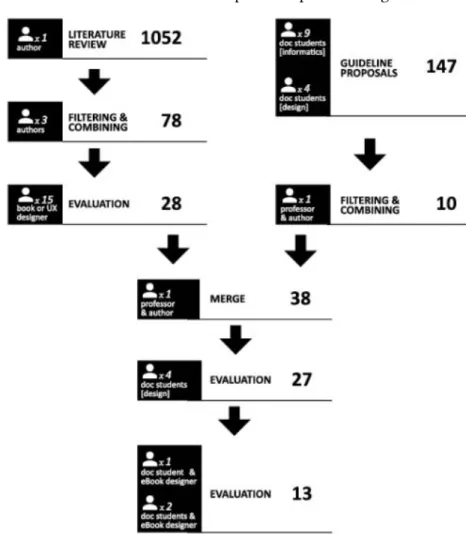
There were three main methods employed by the above cited researches to elaborate design guidelines: literature review, employed by Némery and Brangier (2014) and Zahabi et al (2015); user-centered with no literature review, employed by Colombo et al (2014); and literature review mixed with user testing, such as Jin (2013). In the present paper, the method was also mixed: it employed a systematic literature review, reviews with practicing designers and spontaneous proposition of guidelines from doctoral students. Our aim was to organize the large set of data from the literature review and systematize the collaboration of those individuals. In our view, the advantages of a literature review are collecting validated data while avoiding the pitfall of introducing personal bias in the analysis. We also considered important to include the vision of practitioners, who would provide direct answers to our research question, considering our subject and audience. The method includes the following steps: (1) elaboration of guidelines by means of a literature review; (2) proposition of guidelines by doctoral students; (3) evaluation of these two independent sets of guidelines by eBook designers. The method and its steps are depicted in Figure 1.
The Literature Review was comprised of several texts containing guidelines about digital publishing and editorial design (both printed and digital). The text items used in the review were books, research papers and theses. To add information provided by the community of practice, style guides from publishing houses and web pages, such as blog entries (when dated and undersigned) were included as sources. After analyzing the texts, we ended up using the 36 references which had explicit guidelines (listed in Appendix A). All guidelines were included as they were written – no judgment was carried out. Next, we aimed at reducing the amount of guidelines and submitting them to the evaluation of expert designers (i.e. active practitioner in the field). Twenty designers, who were/are colleagues, former students and coworkers with the authors were invited, and 15 accepted. They are (at least) graduated in one or more of the following courses: Architecture, Social Communication and Design.
The next round of elaboration of guidelines was carried out with doctoral students enrolled in the “Design, development and evaluation of eBooks” class (whose professor was the second author). This course was offered in a post graduation program on Computers and Education, and had a 40 hour of regular classes (four hours each week) and happened in 2017, from March to June. The students had different academic and professional backgrounds: 4 worked as designers and have/had professional experience as editorial designers, and are graduated in Graphic Design , while 9 were teachers and graduated in Computer Science. Every student knew the professor had the intention to use the class as a means to collect data for this study, and that they would be asked to propose and evaluate design guidelines during the class.
After these two sets of guidelines were combined, the last step was evaluating the guidelines with three eBook designers. Two are doctoral Design students (but had not participated previously in this study) with more than ten years experience with graphic and editorial design, and more than one year experience with designing a series of educational eBooks as their full time jobs. One of them worked as Design lecturer at Universidade Federal do Rio Grande do Sul. The other designer is also a doctoral design student, and is also Design professor at Universidade do Estado de Santa Catarina. He is also author of more than 10 papers on editorial design.
The reason we asked only three designers to evaluate the guidelines is because the authors did not know any other experienced eBook designer. All of the designers who took part on this study have had contact with eBook design at some point of their careers, but this is not their full time job. In the next section, the results of each of those 3 steps are described.
4 Results
§ Literature review
By searching the web with keywords related to editorial design and digital publishing, hundreds of references were found. This search was conducted by the first author, with occasional aid by the second and third authors. When compared with editorial design, the ratio of sources specifically about eBooks design was smaller. Several sources were about technical characteristics of eBooks on particular formats (ePub, Folio, mobi, etc) while most research papers and thesis were about experimenting with the production and evaluation of eBooks and book-like digital applications. Our final set of sources (36) comprised: 15 books, 12 papers/thesis, 8 web sites and 1 style guide. Thirteen out of 36 references were about digital publishing, 6 on editorial design, 5 on instructional design, 7 on information and interface design, 1 on graphic design and 2 on accessibility. At this point, it is import to highlight that 7 out of the 36 sources were related to educational matters. However, the guidelines we found had no specific educational characteristics that would justify them to be presented as such.
We consider that, as 66% of the references we gathered are not papers, the subject of eBook design has been treated empirically, with the knowledge of the community of practice being shared in less restricted forums than scientific databases (such as web sites and books). Figure 2 shows the source and area as percentages.
One thousand and fifty two guidelines were listed by the first author, who maintained the original language and phrasing. Through a process which had 9 cycles of reading, grouping, merging and deleting guidelines, 78 guidelines were elaborated. The first author was responsible for this process, but the second and third authors also participated in several sessions of grouping, combining and exclusion of guidelines. Along the process we decided to exclude guidelines that contained adverbs of frequency (such as often, sometimes,
occasionally), because they were not objective. Guidelines classified as Technical and related to Accessibility were also removed, because they would require a research of their own. Through this process, we strived to be impartial and not to judge if a given guideline would be useful to the target audience. For this reason, the final set had guidelines that some designers might consider obvious and conflicting.
Figura 2 Source type and areas.
The final step was to ask for a group of 15 experienced designers to evaluate the guidelines. For this task they received a set of 78 cards (see Figure 3), which had the guideline and a five-point scale for evaluating utility (no rewards were given). They were free to ask questions about the wording of each guideline at any time. We excluded the 50 guidelines which had an average score less than 4 (because 4 and 5 are the “above neutral” scores), thus resulting in a group of 28 guidelines.
§ Proposition of guidelines by doctoral students
In this step, 13 doctoral students (4 designers and 9 computer scientists) who were enrolled in the course “Design, development and evaluation of eBooks” proposed guidelines. The course had three assignments, as described next.
The first assignment was designed to be a point of contact for the computer scientists with the literature about editorial design and consisted in writing an essay and presenting it to the class. Four students (computer scientist) had a grade smaller than 6.00, so their data was not used as part of this study. The preparation for this assignment took approximately 24 hours of the course.
The next subject was technical information about eBooks: software for creation, programming languages, eReaders and
publishing/distribution systems. The assignment on this subject was to design and code an ePub, and it was easily carried out by all 13 students. It took them 12 hours to complete it. The softwares Sigil and Inkscape were suggested (because they are free), but every student chose to use other softwares.
The last assignment - the one which provided the data for this research - was to propose guidelines for eBook design. It is important to highlight that the students had no contact with the set of 28
guidelines from the previous steps. The assignment was carried out in the following steps:
1. Each student individually elicited guidelines based on what he/ she had learnt and also based on experience. Only data of the nine students who had a grade greater than 6.00 in the first assignment was considered in this research. The result was 147 non-unique guidelines.
2. The students evaluated whether each statement was a guideline or not (they were familiar with the definition of guideline). 3. The professor (second author) examined the statements
considered as guidelines, and after identifying the similar ones (which resulted in 29 guidelines), excluded guidelines which were obvious or out of scope, such as “Choose legible font families”. The professor also excluded 11 guidelines which were similar to some guidelines which had received an evaluation below 4 from the 15 designers. The final result was 10 guidelines. The last step of the method was asking two experienced eBook
designers to comment the guidelines, making the final evaluation of the set.
§ Evaluation with eBook designers
The combination of the guidelines generated via literature review (28) and via student proposals (10) resulted in a set of 38 guidelines (some were very similar to each other). They were printed and given to the 4 designers who were enrolled in the class described in the previous step. The reason we choose not to consider the evaluation of the computer scientist is because they cannot be considered experienced designers. Out of the 38, 11 guidelines were excluded,
because they had a score less than 4 - at the end of this step, the set had 27 guidelines.
The last step in the process was asking three experienced eBook designers to evaluate the set of 27 guidelines, commenting whether they are applicable and useful for designers who are novices to eBook design. We explicitly asked them to target this audience, considering they might have some experience designing for other media, but not for eReaders. We also asked them to freely comment and change the guidelines. Two designers met at the same time with the third author, who showed them the list. After they read the guidelines, they commented on each one. The other designer lives in a different state, so he received the list with the 27 guidelines via email, with the same instructions given to the other two designers.
This last step was considered essential because it would be a closer look on each of the guidelines, explicitly aiming at the target audience and the scope of eBook design. Appendix B shows the 27 guidelines and the comments on each one of them. The thick line after guideline 13 indicates the separation between the guidelines that remained and those that were excluded by the designers. They advised to remove 11 guidelines.
5 The guidelines
The final section of the description of the research is the presentation of the 13 guidelines, with comments. This text was reviewed by the two eBook designers who made the evaluation of the 27 guidelines.
1. Use hyperlinks to connect parts and sections of the eBook. It allows the reader to navigate the text.
This is a broad guideline, and it will be mentioned several times in this list. Hyperlinks are the only way to connect parts of the eBook, either in the same document or not. Consider some interactive elements have to be linked in a bilateral form. It allows the readers to navigate and return to where they were
Example: use hyperlinks to connect a footnote to its reference in the text (and vice versa), to point to occurrences of a word in an Index Term and to build the Table of Contents.
2. Create a table of contents
A Table of Content (TOC) is a document with the list of headings (section/chapter title) of your eBook. Usually each document has at least one heading (the <h1>, <h2>etc tags) which is listed in the TOC entry. Not all of your titles have to be listed. For example, if you have a very deep list, you can define which level will be listed in the TOC. All TOC entries have hyperlinks to the content. Although the TOC can
be created “by hand”, eBook editors have features for automatically creating the TOC.
3. Identify interactive elements, to make them look different from the non-interactive one.
In eBooks, the most common interactive elements are hyperlinks. You can make them look different from text applying a different style to the <a> tag. Do not forget styling hyperlinks’ states, so readers can tell when they clicked it. There are also video and audio players, which should have the “play” button always visible, especially when idle.
4. Footnotes should be linked with the text and vice versa.
Footnotes are small pieces of text that bring additional information but are not essential. In printed books they can be listed in the end of each chapter, in the end of each page or in the lateral margins. In eBooks is difficult to place footnotes at the end of the page, so they usually are listed in the end of the chapter. For this reason, is almost certain the reader will leave the text page if he follows the footnote link. If it does not have a link to return to the text, this action will be very difficult for the reader.
5. Provide auditory and visual alternatives for the content, such as fallback sources.
Fallback means using another location as source in case the specified is not available. It could even be an image displaying a broken link for a video that is not available anymore. It can also be used for file extensions which are not a core media type.
Example: large size files, such as audio or video, usually are not distributed with the eBook. Therefore, by the time the reader clicks to see this content, the link may be broken. If you are using HTML 5, you can specify an image of text to warn the user there was an error.
6. Place figures near the text that makes a reference to it. Always use captions for these figures.
Sometimes figures resume sensitive information presented in a lengthy text. Sometimes figures depict lots of data (such as maps and graphics) whose analysis is carried out in words. In either case, it would make it easier to understand the text if the figure is nearby. However, as eBooks have reflowable layout, it is difficult to be sure that the reader will see the figure in the same page as the text. If you can, try using the <figure> tag, which will force that figure and text be in the same page. Also place the caption or related text inside the <figure> tag.
7. All types of figures (for examples, pictures, illustrations, maps, graphics) should have proper contrast and quality, so they can be displayed clearly in eReaders with colored and black and white screens, and with and without eInk screens.
The eReaders have different look and feel, and it is important that you test your eBook using the most representative eReaders available for your main target audience. Reading in black and white is obviously different than reading in color - but it can be easily tested. However, the eInk displays are very different from regular displays. If possible create a grayscale version for monochrome screens.
8. Create a visual hierarchy
Information hierarchies are one of the most important concepts concerning Design in general, and Editorial Design in particular. When it comes to eBook design it becomes crucial - because of the layout and compositional constraints, hierarchies are the most important way to point to help the reader recognize each category of text. A well-balanced hierarchy will make the text it easier to read.
Exception: if you have many different text categories, perhaps you should evaluate the ones that are hierarchically similar and use the same style for them. Otherwise, the reader might not be able to differentiate between them.
9. Consider the white space as a compositional element in the layout.
This is another guideline which is cited in many Design areas. The white space can make text easier to read and convey subjective characteristics, such as sophistication and modernity. Remember that white space refers not only to margins and space between paragraphs, but also inside letters and between words.
10. Use few typefaces
This guideline might be familiar for the designers with a background in Typography and Editorial Design (“a few” usually means two typefaces). Using few typefaces has the extra benefit of reducing the size of your eBook file, as you need to distribute the fonts with the file. And, of course, do not distribute fonts if its license agreement does not allow it.
Example: typography and editorial design manuals advise using contrasting fonts for text and titles. For example: a typeface with small serifs for the text and a geometric typeface for the level one titles.
Exception: if you feel you are confident with your font choice, there is no reason to follow this guideline. It is much harder to make a good and balanced composition using many font families, but it is certainly possible.
11. Highlight titles.
Titles signal the beginning of new textual information. They can be thought of check points or milestones in the book. For this reason, they are very important in the hierarchy of compositional elements.
12. Define the alignments of the text, because eReaders might have different alignment defaults.
If you do not define the alignment, the eReader will do it for you. As said in other items in this list, you have lots of restrictions to your layout. Do not give up on this important compositional tool.
13. Make text and elements such as: footnotes, caption and citations look different from each other and from the text body.
eBooks do not have much room for elaborated/complex graphical and compositional layout solutions. For this reason, using the few resources available to differentiate between different types of textual data is important. For example: your reader can understand the text without reading the footnotes, but he cannot understand bypassing citations. For this reason, your composition should convey this difference visually.
Exception: if you have many different text categories, perhaps you should evaluate the ones that are hierarchically similar and use the same style for them. Otherwise, the reader might not be able to differentiate between them.
§ Sources of the guidelines
Out of the 13 guidelines that remained, 6 were from the literature review, 5 from the doctoral students and 2 were elicited by both methods. Figure 4 shows which guideline was found in each step.
We expected that the literature review would not be enough to scrutinize the majority of the guidelines, because (as stated in the description of Literature Review step), we have not found many references on eBook design. We have found several technical references and research papers about the evaluation of eBooks in different context – mainly educational. For us it is evidence that the subject is treated empirically, with designers relying on their experience to build the knowledge that supports their practice. We conclude that eBook design is not a subject cohesively structured as an area of Editorial Design.
6 Conclusion
In this research, our goal was to attain a set of guidelines for eBook design aimed at novice eBook designers. We chose to use two kinds of sources (bibliographic and professional designers) because it allowed us to capture the knowledge and practical experience of the designers– which is empirical– as well as the best practices consolidated in bibliographic sources such as papers and books, while avoiding the introduction of bias on the part of the researchers.
Out of the 13 guidelines, 6 were from the literature review, 5 from the doctoral students and 2 were elicited by both methods. For us it is an evidence that the subject is treated empirically, with designers relying on their experience to build the knowledge that supports their practice. We conclude that eBook design is not a subject cohesively structured as an area of Editorial Design. The set of guidelines is small enough to be usable, and they are grouped in sections concerning interactive elements, text layout and visual design.
Acknowledgements
The authors would especially like to thank all design students and professionals involved in this study. The author’s effort as part of this research was supported by a fellowship through Coordenação de Aperfeiçoamento de Pessoal de Nível Superior (CAPES).
References
AltinGumussoy, C. (2016). Usability guideline for banking software design. Computers in Human Behavior, 62, 277–285
Benhamou, F. (2015). Fair use and fair competition for digitized cultural goods: the case of eBooks. Journal of Cultural Economics, 39(2), p.123-131. Campbell, J. L. (1996). The development of human factors design guidelines.
Colombo, L., Landoni, M., &Rubegni, E. (2014). Design Guidelines for More Engaging Electronic Books: Insights from a Cooperative Inquiry Study. Proceedings of the 2014 conference on Interaction design and children - IDC ’14, 281-284.
Colombo, L., Landoni, M., &Rubegni, E. (2014). Design Guidelines for More Engaging Electronic Books: Insights from a Cooperative Inquiry Study. Proceedings of the 2014 conference on Interaction design and children - IDC ’14, 281-284.
Cronholm, S. (2009). The usability of usability guidelines: a proposal for meta-guidelines. Proceedings of the 21st Annual Conference of the Australian Computer-Human Interaction Special Interest Group, (2003), 233-240. Embong, A. M.; Noor, A. M.; Hashim, H. M.; Razol, M. A. &Shaari, Z. H. (2012).
E-Books as Textbooks in the Classroom. Procedia - Social and Behavioral Sciences, 47, 1802–9
FNDE.Edital PNLD 2016. (2016). http://www.fnde.gov.br/programas/livro-didatico/livro-didatico-editais/item/4889-edital-pnld-2016 Accessed 09.02.2017
Gale, S. (1996). A collaborative approach to developing style guides. In: Proceedings of the SIGCHI on Human Factors in Computing Systems. The Association of Computing Machinery, Vancouver, Canada, 362-367. Glackin, B. C.; Rodenhiser, R. W. & Herzog, B. (2014). A Library and the
Disciplines: A Collaborative Project Assessing the Impact of eBooks and Mobile Devices on Student Learning. The Journal of Academic Librarianship, 40 (3–4), 299–306.
Gold Leaf. (2003). Promoting the uptake of e-books in Higher and Further education. JISC e-Books Working Group, London.www.jisc.ac.uk/uploaded_ documents/PromotingeBooksReportB.pdf. Accessed 09.02.2017
Haslam, A. (2006). Book Design. Laurence King Publishing Ltd.
Jin, S.-H.(2013). Visual Design Guidelines for Improving Learning from Dynamic and Interactive Digital Text. Computers & Education 63, 248–58.
Kim, H. (2010). Effective organization of design guidelines reflecting designer’s design strategies. International Journal of Industrial Ergonomics, 40(6), 669-688.
Lance, C.E.; Butts, M., M.; Michels, L. C. (2006). The Sources of Four Commonly Reported Cutoff Criteria: What Did They Really Say? Organizational
Research Methods, 9(2), p.202-220.
Liesaputra, V., & Witten, I. H. (2012).Realistic electronic books. International Journal of Human Computer Studies, 70(9), 588-610.
Lynch, K.R., Schwerha, D.J. &Johanson, G. (2013). Development of a Weighted Heuristic for Website Evaluation for Older Adults.International Journal of Human-Computer Interaction, 29, (6), 404-418.
Ma, X. (2016).Developing Design Guidelines for a Visual Vocabulary of Electronic Medical Information to Improve Health Literacy.Interacting with Computers, 28 (2), 151-169.
Manning, C. D., &Raghavan, P. (2009).An Introduction to Information Retrieval. Online, 1, 1.
McLaughlin, M.E., Carnevale, P. & Lim, R.G. (1991). Professional mediators judgments of mediation tactics: Multidimensional scaling and cluster analyses. Journal of Applied Psychology, 76(3), p.465-472.
Miller, C. C. E-Books Top Hardcovers at Amazon.New York Times. (2010). http://www.nytimes.com/2010/07/20/technology/20kindle.html Accessed 09.02.2017
Némery, A., &Brangier, E. (2014). Set of Guidelines for Persuasive Interfaces: Organization and Validation of the Criteria. Journal of Usability Studies, 9(3), 105–128
Ngo, D. C. L., Teo, L. S., & Byrne, J. G. (2000). Formalizing guidelines for the design of screen layouts.Displays, 21(1), 3-15.
Nielsen J. (1994). Heuristic Evaluation. In Nielsen, J. and R.L. Mack R.L., Usability Inspection Methods, New York: John Wiley & Sons.
Paraskevopoulos, I. T., Tsekleves, E.; Craig, C.; Whyatt, C. & Cosmas, J. (2014). Design Guidelines for Developing Customised Serious Games for Parkinson’s Disease Rehabilitation Using Bespoke Game Sensors. Entertainment
Computing, 5 (4), 413–24.
Park, W., Han, S. H., Kang, S., Park, Y. S., & Chun, J. (2011). A factor combination approach to developing style guides for mobile phone user interface.
International Journal of Industrial Ergonomics, 41(5), 536-545. Patel, N. Kindle Sells Out in 5.5 Hours. Engadget.com. (2007). https://web.
archive.org/web/20071123084048/http://www.engadget.com/2007/11/21/ kindle-sells-out-in-two-days/ Accessed 09.02.2017
Reed, P., Holdaway, K., Isensee, S., Buie, E., Fox, J., Williams, J., & Lund, A. (1999). User interface guidelines and standards: Progress, issues, and prospects. Interacting with Computers, 12(2), 119-142.
Santos, O. C., &Boticario, J. G. (2015). Practical guidelines for designing and evaluating educationally oriented recommendations. Computers and Education, 81, 354-374.
Sehn, T.C.M. &Fragoso, S. (2015). The synergy between eBooks and printed books in Brazil.Online Information Review, 39(3), 401-415.
Shneiderman, B. (1997). Designing the user interface: Strategies for effective human-computer-interaction. (3rd ed.) Boston: Addison-Wesley Longman Publishing Co., Inc.
Siegenthaler, E., Wurtz, P., &Groner, R. (2010). Improving the Usability of E-Book Readers. J. Usability Studies, 6(1), 3:25–3:38.
Sireci, S.G. &Geisinger, K.F. (1992).Analyzing Test Content Using Cluster Analysis and Multidimensional Scaling.Applied Psychological Measurement, 16(1), p.17-31
Sloan, R. H. (2013). Using an Etextbook and iPad : Results of a Pilot Program. Journal of Educational Technology Systems, 41(1), 87–104.
Smith., S., L. (1986). Standards versus guidelines for designing user interface software, Behaviour& Information Technology, 5(1), 47-61.
Smith., S., L., & Mosier, J., N. (1986). Standards versus guidelines for designing user interface software, Behaviour& Information Technology, 5(1), 39-46. Vassiliou, M., & Rowley, J. (2008).Progressing the definition of “ebook.”Library
Villalta, M., Gajardo, I.,Nussbaum, M., Andreu, J. J.,Echeverría, A., &Plass, J. L. (2011). Design guidelines for Classroom Multiplayer Presential Games (CMPG). Computers and Education, 57(3), 2039-2053.
Wilson, R. (2002). The “look and feel” of an ebook: Considerations in interface design. Proceedings of the ACM Symposium on Applied Computing (pp. 530-534).
Wilson, R., Landoni, M. & Gibb, F. (2002).A User-Centred Approach to EbookDesign.The Electronic Library, 20 (4), 322–330.
Yalman, M. (2015). Preservice Teachers’ Views about E-Book and Their Levels of Use of E-Books. Procedia - Social and Behavioral Sciences, 176, 255–62. Zahabi, M.; Kaber, D. B. &Swangnetr, M. (2015). Usability and Safety in Electronic
Medical Records Interface Design: A Review of Recent Literature and Guideline Formulation. Human Factors - The Journal of the Human Factors and Ergonomics Society, 57 (5), 805-834.
Sobre os autores
Giovana Marzari Possatti
Mestre em Design pelo Programa de Pós Graduação em Design da Universidade Federal do Rio Grande do Sul - Avenida Oswaldo Aranha, nº99, 6º andar - sala 607 – Porto Alegre, RS.
Régio Pierre da Silva [email protected]
Professor Associado do Departamento de Design e Expressão Gráfica da Faculdade de Arquitetura da Universidade Federal do Rio Grande do Sul. Professor permanente do pelo Programa de Pós Graduação em Design UFRGS - Avenida Oswaldo Aranha, nº99, 6º andar - sala 607 – Porto Alegre, RS
Gabriela Trindade Perry
Professora adjunta do Departamento de Design e Expressão Gráfica da Faculdade de Arquitetura da Universidade Federal do Rio Grande do Sul. Professora permanente do Programa de Pós Graduação em Informática na Educação, UFRGS - Av. Paulo Gama, 110, Anexo III (Prédio 12105) - 3º andar – Porto Alegre, RS.
Artigo recebido em 28/08/2018 Artigo aceito em 27/09/2018