Faculdade de Ciˆencias
Departamento de Inform´atica
ADAPTATION OF MULTIMODAL OUTPUTS
David Filipe Ribeiro da Costa
MESTRADO EM ENGENHARIA INFORM ´
ATICA
Especializac¸˜ao em Sistemas de Informac¸˜ao
2011
Faculdade de Ciˆencias
Departamento de Inform´atica
ADAPTATION OF MULTIMODAL OUTPUTS
David Filipe Ribeiro da Costa
DISSERTAC
¸ ˜
AO
Projecto orientado pelo Prof. Doutor Carlos Alberto Pacheco dos Anjos Duarte
MESTRADO EM ENGENHARIA INFORM ´
ATICA
Especializac¸˜ao em Sistemas de Informac¸˜ao
2011
I would like to show my gratitude to my family for supporting me throughout all my studies at University. Specially I owe my deepest gratitude to my brother who since day one helped me to surpass the difficulties of this demanding course, without him I couldn’t be here writing this work.
This thesis would not have been possible without my advisor Prof. Dr. Carlos Duarte who always supported my work and gave great advices and guidance during this project. I would like to thank you the opportunity to work in this ambitious European project.
It is a honour to me to work in LaSIGE with the group AbstInt. I would like to thank this great group for providing the support and equipment I needed to develop my work.
I am grateful to all my friends made in college specially Bruno Neto, Pedro Feiteira, Joana Neca, Jo˜ao Ludovico, N´adia Fernandes, Tiago Gonc¸alves and Jos´e Coelho. Thank you all for support and the good moments we had together. Finally I would like to thank my good old friends Nelson Dias, Ricardo Constantino, Bruno Ribeiro and Lu´ısa Cabral.
Este documento centra-se em sistemas multimodais adaptativos mais especificamente nas suas t´ecnicas de adaptac¸˜ao das sa´ıdas, ou seja, cis˜ao de diferentes modalidades de sa´ıda de forma a permitir uma melhor adaptac¸˜ao ao utilizador.
O primeiro cap´ıtulo faz uma pequena introduc¸˜ao `as interfaces multimodais e as suas vantagens, tais como ao possibilitarem o uso de modalidades alternativas, e oferecerem aos seus utilizadores opc¸˜oes de interacc¸˜ao naturais. Ao recorrer a modalidades como a voz ou gestos, ´e poss´ıvel ter uma interacc¸˜ao mais pr´oxima daquilo a que as pessoas est˜ao habituadas na sua interacc¸˜ao di´aria com outras pessoas.
Este aspecto ´e ainda mais relevante quando o grupo de utilizadores alvo ´e composto por pessoas idosas, o que ´e o acontece no ˆambito do projecto GUIDE, em que o trabalho relatado neste documento se insere. A motivac¸˜ao e os principais objectivos deste projecto est˜ao descritos neste primeiro cap´ıtulo e passam por desenvolver uma framework para os programadores de software integrarem facilmente caracter´ısticas de acessibilidade nas suas aplicac¸˜oes de TV.
O foco deste projecto ´e a televis˜ao e as suas mais recentes capacidades de processa-mento (Set-top boxes). Estas plataformas tˆem o potencial para se tornarem nos disposi-tivos de media mais usados devido `a sua f´acil aceitac¸˜ao e especialmente quando se trata de utilizadores idosos que podem ter `a sua disposic¸˜ao aplicac¸˜oes de conferˆencia audiovisual, controlo remoto da casa entre outras aplicac¸˜oes que tˆem como base simplificar a sua vida quotidiana e afastar da solid˜ao, um problema muito presente nesta faixa et´aria.
Os utilizadores podem assim empregar modalidades com que j´a est˜ao familiarizados e optar por aquelas com que s˜ao mais eficazes. Utilizadores com limitac¸˜oes de audic¸˜ao podem optar por modalidades visuais, por exemplo. A adaptac¸˜ao envolve assim v´arias ´areas do sistema humano como as capacidades f´ısicas do utilizador, ou seja, a sua capaci-dade de movimentar os seus brac¸os ou m˜aos, a sua percepc¸˜ao t´actil, as limitac¸˜oes visuais tais como miopia, daltonismo ou vis˜ao em t´unel, capacidades auditivas e tamb´em as cog-nitivas, ou seja, a capacidade de se concentrarem, perceberem o ambiente ao seu redor ou recordarem. As poss´ıveis soluc¸˜oes face a estes problemas est˜ao tamb´em descritas no documento.
Esta flexibilidade proporcionada pelas interfaces multimodais, n˜ao significa que estes sistemas n˜ao necessitem de operac¸˜oes de selecc¸˜ao e configurac¸˜ao, de natureza t´ecnica,
considerar.
Ainda neste cap´ıtulo ´e descrito o papel que a Faculdade de Ciˆencias da Universidade de Lisboa desempenha neste projecto e mais especificamente as minhas responsabilidades e os meus objectivos definidos para este projecto. Ao longo do desenvolvimento deste projecto surgiram v´arias ideias, estudos e desenvolvimentos que culminaram na escrita de alguns artigos e tamb´em aplicac¸˜oes que est˜ao descritas na secc¸˜ao de contribuic¸˜oes. Na secc¸˜ao de planeamento ´e discutido o que estava inicialmente planeado e as alterac¸˜oes que surgiram.
Com este projecto pretende-se encontrar um mecanismo de adaptac¸˜ao que seja capaz de melhorar o desempenho da cis˜ao multimodal por diferentes sa´ıdas. O mecanismo de adaptac¸˜ao de sa´ıdas multimodais ´e respons´avel por decidir qual a melhor estrat´egia para, primeiro, seleccionar as melhores modalidades para apresentar conte´udo (baseado no per-fil do utilizador, as caracter´ısticas do conte´udo e as modalidades dispon´ıveis), segundo, distribuir o conte´udo pelas modalidades seleccionadas (usando estrat´egias de redundˆancia e/ou complementaridade) e, terceiro, ajustar o conte´udo a cada modalidade. Para o estudo dessas mesmas estrat´egias a serem usadas foi realizado um trabalho de pesquisa a projec-tos relacionados com sistemas multimodais e consequentemente cis˜ao multimodal (parte constituinte de uma arquitectura multimodal adaptativa). Descrito ao longo do segundo cap´ıtulo est˜ao as arquitecturas usadas e t´ecnicas de cis˜ao e adaptac¸˜ao da informac¸˜ao ap-resentada.
No terceiro cap´ıtulo s˜ao apresentados estudos realizados aos utilizadores alvo deste projecto, com o objectivo de conhecer e entender como estes interagem com um sis-tema capaz de oferecer diferentes modos de interacc¸˜ao e de apresentar conte´udo. Padr˜oes de comportamentos, caracter´ısticas e preferˆencias dos utilizadores foram resgistadas de modo a encontrar uma correlac¸˜ao e agrup´a-las em diferentes perfis de utilizador. Para este efeito foi concebido uma aplicac¸˜ao multimodal que gera ecr˜as a partir de um ficheiro XML de modo a facilmente se criar, modificar ou remover testes. Os utilizadores po-diam interagir por gestos (apontando para o ecrˆa), usando um controlo remoto ou por voz, podendo combinar estas modalidades diferentes. O conte´udo era apresentado atrav´es de elementos visuais (texto, bot˜oes, imagens e videos), ´audio (sintetizadores de voz) e recor-rendo a um avatar. Esta aplicac¸˜ao regista o sucesso ou n˜ao na realizac¸˜ao dos testes como tamb´em o percurso de interacc¸ao do utilizador em cada teste (a ordem em que os elemen-tos foram selecionados e o tempo que demorou a realizar as tarefas). Os resultados e as conclus˜oes retiradas deste estudo est˜ao descritas no final do cap´ıtulo.
Depois de definidos os perfis de utilizador concluiu-se que ´e necess´ario que o sistema GUIDE consiga ligar novos utilizadores a um perfil. Com essa finalidade foi desenvolvida uma aplicac¸˜ao que serve de inicializac¸˜ao ao sistema. Essa ferramenta, descrita no cap´ıtulo
tarefas, a ferramenta ´e capaz de atribuir um perfil ao utilizador que mais se adequa ao mesmo. Sendo as caracter´ısticas do perfil gen´ericas, o perfil vai sendo moldado e actual-izado conforme o utilactual-izador vai interagindo com o sistema GUIDE.
O cap´ıtulo 5 comec¸a por apresentar a arquitectura do sistema GUIDE e descreve to-dos os seus principais componentes. Neste cap´ıtulo ´e demonstrado como funciona o m´odulo de cis˜ao multimodal comec¸ando por definir diferentes n´ıveis de profundidade na adaptac¸˜ao das interfaces das aplicac¸˜oes e cujo n´ıvel ´e selecionado de acordo com as necessidades do utilizador. A cis˜ao ´e responsavel ent˜ao por decidir em que modalidades apresentar o conte´udo da apresentac¸˜ao. Depois de atribu´ıdas as modalidades a usar, a informac¸˜ao ´e enviada aos respectivos dispositivos de sa´ıdas para gerar a apresentac¸˜ao. A gerac¸˜ao da apresentac¸˜ao ´e coordenada e gerida pelo m´odulo de cis˜ao que est´a em con-stante comunicac¸˜ao com os dispositivos de sa´ıda de modo a garantir uma apresentac¸˜ao coerente. No fim do cap´ıtulo ´e descrito um prototipo do modulo de cis˜ao onde tenta na pr´atica realizar todo o processamento definido nas secc¸˜oes anteriores.
Como forma de conclus˜ao do documento s˜ao distinguidas as contribuic¸˜oes desta tese para o projecto bem como o trabalho futuro a realizar na continuac¸˜ao deste trabalho.
Palavras-chave: Sistemas Multimodais, Adaptac¸˜ao,Cis˜ao Multimodal, Sa´ıdas
This document main focus is on multimodal adaptive systems more specifically in its techniques for adjusting the outputs, i.e., split the information by different output modes to allow the best adaptation to the user. By using modalities such as voice or gestures, it is possible to have interaction closer to what people are used in their interaction with others. This is even more relevant when the target user group consists of elderly people, which is the case with the GUIDE project described in the document. This project aims to develop a framework for software developers to easily integrate accessibility features into their TV based applications. Users can thus use modalities that are more familiar and choose the ones that are most effective when interacting. Users with limited hearing can choose visual modes, for example. Adaptation involves so many areas of the human system as the physical capabilities of the user, i.e., its ability to move their arms or hands, their tactile sense, the visual limitations such as low vision, blindness or tunnel vision, hearing and cognitive capabilities, i.e., the ability to concentrate, remember or understand. Possible solutions that address these issues are also described in the document. This flexibility afforded by multimodal interfaces, does not mean that these systems do not require oper-ations of selection and configuration of a technical nature, which is not expected that users perform due to its complexity. In order to accomplish these operations, the use of adap-tive interfaces is a solution to consider. The aim of the work reported in this document is to find an adaptive mechanism that is capable of improving the performance of multi-modal fission for different outputs. The mechanism of adaptation of multimulti-modal outputs is responsible for deciding the best strategy to first select the best means to present con-tent (based on user profile, the characteristics of concon-tent and modalities available) second, distribute the content by the modalities selected (using strategies for redundancy and / or complementarity) and third, adjust the contents of each modality. To perform the correct adaptation the system needs to know its users, thus user trials were carried out to under-stand their characteristics, behaviours and interaction patterns and to group different type of users into clusters. This document presents an application developed to assist in those trials. A prototype of an initialisation application to tutor users and match them with a user profile is also described on this document.
Keywords: Multimodal Systems, Multimodal Fission, Outputs, Adaptive
List of Figures xvii
List of Tables xix
1 Introduction 1
1.1 Elderly people use of machines . . . 2
1.2 GUIDE - Gentle User Interfaces for Elderly People . . . 2
1.2.1 Role of FCUL in GUIDE . . . 5
1.2.2 My role in GUIDE . . . 5 1.3 Goals . . . 6 1.4 Contributions . . . 6 1.5 Planning . . . 7 1.6 Document Structure . . . 8 2 Related Work 11 2.1 General Definitions . . . 11
2.2 Assistive technologies and techniques . . . 12
2.3 Multimodal Systems . . . 13 2.3.1 Architecure . . . 15 2.4 Output Fission . . . 18 2.4.1 Message Construction . . . 19 2.4.2 Modality Selection . . . 21 2.4.3 Output Coordination . . . 23
3 User Trials Application 25 3.1 Introduction . . . 25
3.2 Architecture . . . 26
3.2.1 XML interface approach . . . 27
3.2.2 Wizard-of-oz approach . . . 28
3.2.3 Input and Outputs . . . 28
3.3 First User Trials . . . 29
3.3.1 Setup . . . 29
3.3.4 Discussion . . . 34
3.4 Second User Trials . . . 34
3.4.1 Setup . . . 35
3.4.2 Tests implemented . . . 36
3.4.3 Analysis . . . 37
3.4.4 Discussion . . . 42
3.5 Conclusion . . . 42
4 User Initialization Application 45 4.1 Introduction . . . 45
4.2 Architecture . . . 46
4.3 Tutoring the user . . . 47
4.4 Tests implemented . . . 48 4.4.1 Visual . . . 48 4.4.2 Audio . . . 49 4.4.3 Motor . . . 49 4.4.4 Cognitive . . . 49 4.5 Conclusion . . . 50 5 Multimodal Fission 51 5.1 GUIDE core Architecture . . . 51
5.1.1 Input Adaptation . . . 52
5.1.2 Multimodal Adaptive Fusion . . . 52
5.1.3 Dialogue Manager . . . 52
5.1.4 Multimodal Adaptive Fission . . . 53
5.1.5 User Model . . . 53 5.1.6 Context Model . . . 54 5.2 Output Features . . . 54 5.2.1 Video rendering . . . 55 5.2.2 Audio rendering . . . 55 5.2.3 Haptic Feedback . . . 56 5.3 Fission Process . . . 56 5.3.1 Adaptation Level . . . 56
5.3.2 Modality Selection and Evaluation . . . 58
5.3.3 Coordination . . . 59
5.3.4 Communication Events . . . 60
5.4 Fission Prototype . . . 63
5.4.1 Architecture . . . 63
6 Conclusions 69
Glossary 71
Bibliography 77
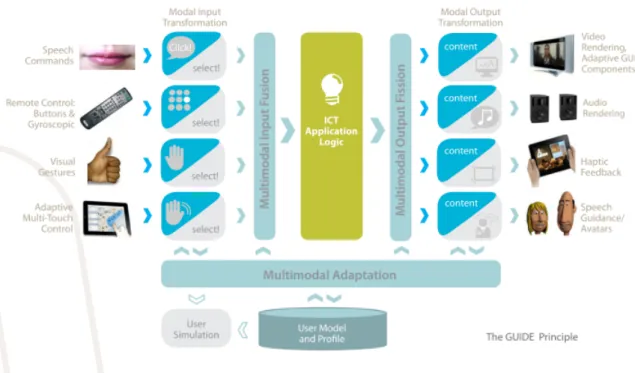
1.1 GUIDE’s conceptual view . . . 3
2.1 The architecture of a multimodal system and its generic components [19] 15 2.2 High-level architecture of a multimodal dialogue system [23] . . . 17
2.3 WWHT conceptual model for context aware and adaptive interaction [38] 20 2.4 Presentation planner of WIP [45] . . . 21
2.5 Example of an election rule [39] . . . 22
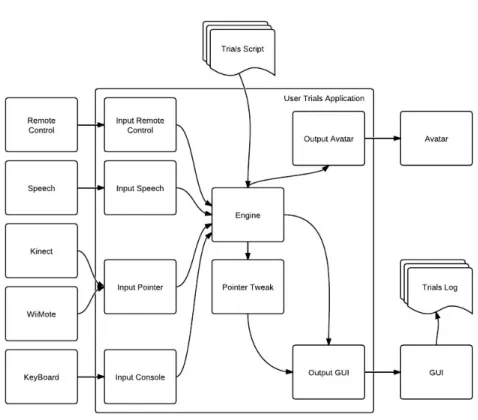
3.1 Architecture of the User Trials application . . . 26
3.2 XML example describing test screens . . . 27
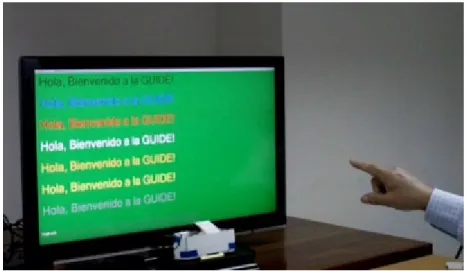
3.3 User performing a task . . . 30
3.4 Errors made in audio tests . . . 38
3.5 Percentage of success in the cognitive tests . . . 40
4.1 Architecture of the User Initialization prototype . . . 46
4.2 Tutorial screen example . . . 47
4.3 Visual perception task on UIA . . . 48
4.4 Audio perception task on UIA . . . 49
4.5 Cognitive skill task on UIA . . . 50
5.1 Conceptual diagram of GUIDE core . . . 51
5.2 Time sharing phases . . . 53
5.3 Information for modality selection during multimodal fission . . . 57
5.4 Multimodal fission presentation generation process . . . 58
5.5 Example of rendering synchronization . . . 59
5.6 Synchronization between multimodal fission and rendering devices . . . . 59
5.7 Example of an UI representation in UIML . . . 62
5.8 Architecture of the Fission Module prototype . . . 63
5.9 Example of a User Model . . . 66
5.10 Example of a button in UIML before adaptation . . . 66
5.11 Example of a button in UIML after adaptation . . . 66
5.12 Output events resulted after running fission module prototype . . . 67
3.1 I/O modalities available . . . 28 3.2 Tests, tasks and modalities . . . 31 3.3 Participants’ preferences regarding text color (in rows) for different
back-ground colors (columns) . . . 32 3.4 Tests, tasks and modalities . . . 36 3.5 Participants’ preferences regarding text color (in rows) for different
back-ground colors (columns) . . . 37 3.6 Participants’ preferences regarding target positions using free hand
point-ing and WiiMote . . . 39 3.7 Participants’ preferences regarding output modalities in different contexts 40 3.8 Participants’ preferences regarding output modalities versus avatar . . . . 41 5.1 List of events published and subscribed by Fission Module . . . 60 5.2 Selection of modalities to complement impairments and adapt . . . 64
Introduction
In our everyday lives, we use multiple ways to communicate with each other using speech, gestures, expressions and vision. The modalities we use for natural conversations are not the same as the ones we use during human-computer interaction and the main reason is that application developers force users to adapt to the computer’s form of functioning and not the other way. When interacting with a computer we normally use a keyboard for typing and a pointer device for pointing or clicking, therefore the interfaces are not focused in the use of multimodalities.
Over the last two decades a new form of interfaces arisen, called “multimodal user interfaces”, prepared to recognize human language and behaviors. These interfaces inte-grate recognition technologies such as speech and gestures, relegating the keyboard and mouse to a second plan of input interaction. Of course this will bring some issues as we no longer have the simplicity of graphical user interfaces (GUI) that expect an input as an atomic form and an unequivocal order of events [1].
With multimodal interfaces, users are offered a set of more natural interaction op-tions because it provides alternative modes of input and output other than the usual in human–computer interaction. Resorting to modalities like gesture and/or voice, it is pos-sible to have an interaction closer to what users are used to do in a human to human normal interaction. Even though this sounds interesting for any age group, it turns out to be more compelling to focus on elderly people due to their disabilities or limitations inherent to advanced aging and their lack of experience with graphical user interfaces. Therefore these users can make use of modalities which they are accustomed to or more effective with. For instance a user with visual impairment can choose audio or haptic modalities or even a combination of various modalities to overcome their interaction problems.
The adaptability provided by this type of systems needs indeed some operations of configuration and selection that by any means are not made by the users due to their lack of technical knowledge or familiarity with the system. Adaptation can be very difficult and tedious for the user unless resorting to an adaptive interface solution.
This work is focused on finding that mechanism of adaptation that is able to improve
and refine the performance of multimodal fission of different outputs. This mechanism is responsible for the decision making of the best strategy, firstly to bring out the content using the best available modalities suitable to the user’s profile and the content features, secondly to distribute that content through the selected modalities (using strategies of re-dundancy and/or complementarity), finally to adjust that content for each modality chosen [19].
The work was developed under the scope of an European project named Gentle User Interfaces for Elderly people (GUIDE) which is described further.
1.1
Elderly people use of machines
As people grow older, health problems may appear from ageing, which may be physical but also mental. These impairments are an obstacle to a proper interaction with a com-puter because it is very difficult, for instance, to someone with upper limbs movement limitations to use a mouse and keyboard to give an input.
Using a unimodal system is also restricting the presented information into a single modality excluding persons whom suffer from an impairment of that sensory needed to interact (a blind person cannot see graphical information and a deaf person cannot hear sounds).
The social exclusion and e-exclusion made by these systems is a serious problem as it restricts the actions, the information received and the interaction by users with sensorial impairments that otherwise wouldn’t have any problem interacting with them.
Multimodality tries to resolve this issue as it offers the possibility of presenting the same information in different ways (sound, visual, haptic), compensating some sensorial impairments. Presenting information using different modalities isn’t new but they are used in most cases to distribute different content in different modes [41].
1.2
GUIDE - Gentle User Interfaces for Elderly People
As stated before this work is being developed in the scope of the European project GUIDE1 (”Gentle user interfaces for elderly people”) which has the goal of developing a frame-work for developers to efficiently integrate accessibility features into their applications.
GUIDE puts a dedicated focus on the emerging Hybrid TV platforms and services (connected TVs, Set-Top Boxes, etc.), including application platforms as Hybrid Broad-cast Broadband TV (HbbTV) as well as proprietary middleware solutions of TV man-ufacturers. These platforms have the potential to become the main media terminals in the users’ homes, due to their convenience and wide acceptance. Especially for users of the elderly society applications such as home automation, audio-visual communication or
continuing education can help to simplify their daily life, stay connected in their social network and enhance their understanding of the world.
Ageing and accessibility are two subjects that are highly correlated in several contexts, like interacting with electronic devices such as computers, nomadic devices or set-top boxes. Approximately 50% of the elderly suffers of some kind of (typically mild) disabil-ity such as visual, auditory or cognitive impairments, which poses several problems and challenges to social interaction. For such end-users, accessible Information and Commu-nication Technologies (ICT) can make much more of a difference in living quality than for other citizens: it enables or simplifies participation and inclusion in their surrounding private and professional communities.
When adapted in the right way, recent advances in human-computer interfaces such as visual gestures, multi-touch as well as speech, or haptics could help to let disabled or elderly users interact with ICT applications in a more intuitive and supportive manner.
Despite these positive trends, implementation of accessible interfaces is still expensive and risky for developers of ICT applications, as the integration of accessibility requires time, knowledge and money. Among others, they have to cope with user-specific needs and limitations (including lack of ICT proficiency) as well as with technological chal-lenges of innovative UI approaches, which require special experience and effort. There-fore, today many ICT application implementations simply neglect special needs and lock out a large portion of their potential users.
Figure 1.1: GUIDE’s conceptual view
accessi-bility features they don’t offer intelligent adaptation capable of addressing users with different kinds of impairments. Also current accessible ICT applications only provide user interface adaptation resorting to manual configuration.
GUIDE is being conceived to fundamentally change this situation by providing an open framework for developing accessible user interfaces. This framework would be able to integrate state-of-the-art accessibility features into developers’ applications without the need to change their functionality.
GUIDE is expected to work with different sensorial channels adapted for best user’s usability, so as figure 1.1 shows, visual, audio and haptic modes will be the main output form of feedback. Visual content like video and the graphical user’s interface will be suited to user’s profile, adapting the content to his or her visual, auditive or other type of disabilities. Audio from sounds or speech will be available through speakers. Haptic feedback will take advantage of the user’s tactile capability to inform him of some no-tification, normally acting together with other modalities. To guide the user through the system’s interface, there will be an avatar, developed by CCG (Centro de Computac¸˜ao Gr´afica) that will be responsible to maintain the user on the right direction.
Aims
As mentioned before GUIDE’s main target population are the elderly people though the benefits of such an adaptable system can be applied to every range of population. There are two major concerns when aiming for this target population, their resistance to learn new technologies and how to interact with them, and the capacity of those technologies to be used by users with a wide range of impairments. So one of GUIDE’s goals is to implement the use of more human like ways of communication employing voice and gestures as a mean of interaction with the system, not requiring a long learning curve which is one of the reasons that keeps away new users. Additionally the use of TV as the main media channel will ease the acceptance of this system in their homes.
As aforementioned, GUIDE aims to offer its users additional interaction modalities, like speech, pointing and gesturing, besides the traditional remote control. GUIDE must adapt the operation of these modalities to benefit the user experience. GUIDE must be able to render the application content in the most appropriate modality for a given user and therefore provide alternative ways of displaying that content. GUIDE must enable the possibility to adapt its features and settings automatically demanding no skills or techno-logical knowledge of users to configure the system, providing thus the best interaction and performance possible.
In order to offer an adapted multimodal interaction experience, GUIDE must collect information about the user such as his capabilities, characteristics and preferences. To do so, GUIDE will have to gather that information explicitly by requesting it directly from the user, and implicitly by analysing the user’s behaviour and actions when interacting
with the system. This user related data must be maintained and updated by GUIDE in order to be consulted by all components responsible to apply adaptation mechanisms.
On the ICT applications’ developers point of view, it is understandable that they won’t change their programming fashion when building TV based applications and neither have the knowledge to develop adaptive multimodal applications. In order to address these issues GUIDE won’t require any changes from developers but instead introduce a middle layer between the application and the user, responsible to provide multimodal interac-tion and adaptive features by adjusting the user interface and providing alternative output modalities for the generated content. Thus developers will still implement their appli-cations considering a normal TV environment, also the TV consumers will be presented with a variety of input and output modalities and with adapted content presentation.
Another goal of this project is to be able not only to deal with TV based applica-tions (HTML) but any kind of application languages (e.g., Java, C#, etc.). GUIDE must somehow have a language independent representation of the user interface and an API to perform the communication between many different application environments.
Additionally another concern about developers and companies relates with the possi-bility of GUIDE being able to adjust their applications’ UI changing their original visual properties into something more favourable to the user. So GUIDE must be capable of offering different levels of adaptation.
1.2.1
Role of FCUL in GUIDE
The GUIDE consortium is composed by several Universities and companies, each one with their speciality functions. FCUL is a technical member of the group and therefore it plays a major part in the development of this European project. FCUL has the re-sponsibility to design an adaptive multimodal architecture system that follows the project requirements and implement some of the core components of that system. Those com-ponents to be implemented are the Multimodal Fusion module, Dialogue Manager, and Multimodal Fission module. In order to accomplish the goal of developing such a com-plex system centred on users’ specificities and preferences, user trials must be realized in order to study and collect requirements. FCUL assists in the designing and preparation of these studies which involves the creation of an application to conduct and help to record the studies. Multimodal systems provide many different ways of interaction. FCUL is also integrating various input devices into the system (e.g. WiiMote, Kinect and remote control).
1.2.2
My role in GUIDE
My contribution to the GUIDE project is mainly to develop from the design to the im-plementation a multimodal fission component to be integrated in the GUIDE framework.
Using GUIDE a user centred design approach, trials with end-users are certain and there-fore it’s my incumbency to implement a multimodal prototype to perform those tests. The results of the trials will be analysed to take conclusions on how the multimodal fission can best adapt the content displayed. In order to adapt those contents the system must know the user, thus an application to assess the user’s characteristics must be developed.
1.3
Goals
Understand the fundamentals of Multimodal Systems To conceive a multimodal fis-sion component, it is my first goal to do research on how multimodal systems work and what types of adaptation there are.
Specialize in Adaptive Multimodal Fission Learn techniques and methods of multimodal fission adaptation from existing systems and develop those techniques in order to meet GUIDE requirements.
Contribute to User Studies Multimodal prototypes must be built to test with end-users in order to analyse and get some findings on users’ reactions with such systems. From those findings, results a better understanding on creating a first prototype of a multimodal fission module capable to adapt content to each user.
Contribute to the process of User profiling Without registering characteristics of users, GUIDE can’t adapt successfully to a specific user. Thus a tool capable to gather that information is critical to guarantee that fission module performs adaptation in a ac-curate way.
Integration Developing a prototype of the fission module being capable to be integrated with the other GUIDE’s core components is another goal.
1.4
Contributions
From this project and thesis resulted various contributions such as articles, studies and prototypes.
Multimodal systems provide users natural ways of interaction modes, which also means different users may interact differently, combining different modalities. Studing user’s behaviours and interaction patterns could increase performance and effectiveness of multimodal interaction by adapting those systems to user’s abilities. To characterize user abilities we proposed an approach that resorts to a Wizard of Oz based system ca-pable of simulating input and output actions without using any recognition technology. More information about this approach is described in ”Support for inferring user abilities for multimodal applications” [18] paper.
Based on that approach and the need to realize user studies to acknowledge user’s reactions, behaviours and patterns, an multimodal application was developed. The User Trials Application is able to generate interfaces from a XML description of the UI. Input interaction was guaranteed by input pointers (e.g. Motion capture devices, Kinect and Wiimote), remote control and Speech (simulated by Wizard of Oz approach). Ouput content was presented trough text, buttons, images and videos.
From the User studies findings, user’s characteristics were grouped into different clus-ters and user profiles defined. When a new user is presented to GUIDE it needs to gather information from him and match to one of the defined profiles. The User Initialisation Application has the aim to tutor the user on how to interact with GUIDE and test his abilities to identify his profile.
”Adapting Multimodal Fission to Users’ Abilities” [14] was a result from researching information on multimodal systems. This paper describes the state of the art regarding multimodal output fission. It shows some systems capable of using the best channels to present the content taking into account user’s impairments and environmental context. Also introduces GUIDE’s goals to make this adaptation easier to TV based applications’ developers.
After the completion of the first user trials a paper was written with the analyses and conclusions on users’ reactions, preferences and abilities when interacting with differ-ent modalities (gestures, speech commands, etc.) and receiving feedback from visual elements, speech synthesizers and Avatar. User trials findings are found in ”Eliciting Interaction Requirements for Adaptive Multimodal TV based Applications” [17].
A small study was also conducted in order to find a standard UI description language independent of the application’s language. Abstract and concrete representations of user interfaces were taken into account. This representation is used in GUIDE to adapt and update elements’ properties, gather content to present in other modalities and infer speech vocabulary. The results of this study are presented in chapter 5.
The final contribution is the prototype of a multimodal fission module capable to de-cide, based on user profile and environmental context, what modalities to use, what con-tent to split in each modality and coordinate the generated presentation.
1.5
Planning
The first scheduled task planned for this project was to create some multimodal applica-tions prototypes from an existing framework (MMX2). This framework was developed by a university colleague and our goal was to verify its re-usability on GUIDE project. This process took two months and it’s main value was the acknowledgement of the communica-tion system based on publish / subscripcommunica-tion of events implemented on MMX framework.
Simultaneously and in the next four months research on multimodal systems and par-ticularly on multimodal fission was made to learn the basics on this area such as the architecture, techniques and guidelines.
In the end of last year it was planned to conceive a first prototype of the multimodal fission component but unfortunately it was not achieved and postponed for a later stage of the project. The reasons were due to GUIDE member’s indecisions over the hardware and software requirements of the set-top-box and consequently in the programming language to use. Also in these meetings was stated the importance of building an application for user studies in order to collect user’s behaviours and preferences when interacting with multimodal systems. This new task would take several months to complete and update while receiving feedback from the first trials.
Planned for the beginning of this year was the selection of adaptation strategies re-sulting from the prototype development. But due to the aforementioned reasons it was also delayed. Instead it was decided in a new GUIDE meeting the necessity to have a tool capable of detecting new users and learn their abilities and impairments for adaptation purposes. The responsibility to make this application fell to FCUL.
GUIDE’s original architecture suffered from constant modifications resulting from new meetings. These changes were made mostly due to set-top box limitations and the need to make GUIDE more scalable regarding language environments. Thus the delayed tasks only started on the beginning of Summer. From the user trials findings and re-search done, the development of the first prototype begun but it suffered a setback as I was diagnosed a cancer and had to be operated, postponing one more month those tasks. Completing the writing of this document originally set to end of July was delayed and finished only in September due to my radiotherapy treatments.
1.6
Document Structure
The remainder of this document is structured as follows:
Related Work This chapter describes some research done in assistive technology and in multimodal areas. The advantages and disadvantages of multimodal systems over the standard ones are presented. The highlight of this section is the techniques and architectures used to divide and adapt content by existing adaptive multimodal systems (output fission).
User Trials Application In this chapter it is described the studies done on users to iden-tify interaction patterns, behaviours and preferences on multimodal output modali-ties. To do these studies (two different trials were done) an application was devel-oped and its description is written in this same chapter.
User Initialisation Application This chapter describes an application designed to tutor and evaluate the user. It has the main goal of matching his abilities to a profile according to user’s characteristics to perform the best adaptation possible.
Multimodal Fission This chapter describes the GUIDE’s architecture and its compo-nents, output requirements and the description of the fission module processing. A prototype of that component is also described and analysed.
Conclusion This chapter ends the document with the main conclusions draw from this project.
Related Work
This chapter presents some of the research literature related to Assistive technologies and Multimodal Interfaces, and more specifically work related to the multimodal fission of output modalities.
2.1
General Definitions
When we talk about multimodal interfaces there are a few definitions that need to be learnt for a proper understanding of the theme.
Modes are the sensorial system of a human with which he perceives the world. A modality is defined by the structure of the information that is perceived by the user (text, sound, vibration, etc.) and medium is a channel or the mean used to express the modality, i.e., the peripheral devices such as monitor or TV screen, sound columns and so on. All these three components are dependent of each other’s [38].
“Multimodal interfaces process more than one combined input mode such as speech, manual gestures and head and body movements in a coordinated manner with multimedia output”[31] which can be adaptive, enabling a more natural and effective interaction whichever mode or combination of modes are best suitable to a given situation, context and according to user’s preferences and abilities (user profile).
Interacting with a multimodal system means to provide input using one or multiple modalities such as speech, key pressing with keyboard or mouse, gestures, etc. and receiv-ing information and feedback from the system by a modality or combination of modalities such as visual, audio or other output modality.
There are two types of inputs: active and passive ones. Active inputs are issued delib-erately by the user, e.g., speech, text, while passive inputs are inputs that are monitored by the system without requiring explicit command from the user, e.g., facial expression or manual gesturing.
With the capacity of parallel or sequential input modalities, these systems can combine various modalities in the recognition process, this is called multimodal fusion. These
combinations can be made at several different levels in the recognition process. To present the information there’s also a concept named multimodal fission which divides or selects the output channels to distribute that information throughout the available outputs and usually according to the user profile and context.
2.2
Assistive technologies and techniques
Assistive technologies are technologies that have the goal to provide accessibility for disabled people. By making usable what is not, these add-ons provide specialized input and/or output capabilities for a person with impairments. Users with disabilities do not always use assistive technologies, but, nevertheless can benefit from small design changes [41].
Physical disabilities affect the ability to move, manipulate objects, and interact with the physical world. When interacting with software, no matter the cause (ageing, congen-ital conditions, accidents, etc.) users with physical impairments have hardware add-ons that bypass these problems like head tracking (e.g. SmartNAV1), joystick (e.g. 3M Er-gonomic Mouse2) and other alternative pointing devices (e.g. BIGtrack3). There’s also Screen Keyboards which provide the keys and functions of a physical keyboard and are normally used in conjunction with alternative pointing devices. To enhance the perfor-mance when typing there are predictive dictionaries that predict and offer a list of words. In the output point of view and of course GUIDE’s view, with ageing the tactile percep-tion capability diminishes due to degenerapercep-tion of the peripheral nervous system, which means if haptic modality is to be used it must be adapted (strength level, duration, etc.) to user’s abilities.
Low vision and blindness (color blindness, tunnel vision, etc.) limits the field of view as users need large fonts or have to magnify the screen aided by hardware or software, reducing the amount of information visible at one time. Users with these impairments usually lose context as their lack of field view causes the loss of events that may occur out of their field of view. Also color blind users are not capable of interpreting information that depends on colors. Blind people, who don’t use visual displays at all, use Braille dis-plays or listen to a speech synthesizer, which give them feedback about their navigation. GUIDE only features a TV screen so for this extreme visual impairment only speech and simple haptic components will help blind people to navigate through the system.
For the less extreme types of impairment it is recommended the usage of redundant information (audio, symbols, text) and customizable graphic interfaces that help users to be notified about new information and to better interpret that information. For blind users, software developers should have more attention in naming the objects for a better
1SmartNav hands-free cursor control - http://www.naturalpoint.com/smartnav/ 2Ergonomic Mouse - http://www.3mergonomicmouse.com/
description when that object is being read by screen readers (e.g. WebAnywhere [4]) and also provide a description for all non-text objects like images, graphics or icons.
Hearing disability may not be a big issue when interacting with software applica-tions as they rely heavily on visual presentation although this situation may change with the continually integration of computer, telephones and video. However with GUIDE’s project, sound plays a more relevant role as this project is centred on TV. When possi-ble, sound should be redundant with visual information and not used alone as we cannot assume that sounds will be heard. Examples of assistive technology are Telecommunica-tions Device for the Deaf (TDD) that offers the capability to communicate over telephone using text terminals, Closed Captioning that provides text translation of spoken material on video media and ShowSounds4 that provide visual translation of sound information. GUIDE’s visual translation can be done via subtitles or visually transmitted sign patterns (sign language) using the avatar. Ju-Hwan Le et al study [28] also shows the importance of haptic feedback coupled with sound.
Cognitive disability is a general concept, having to do with impairments in the way humans concentrate upon, remember, plan, perceive and understand.GUIDE focus on elderly people and one disease that affect this age group (change of getting it increases with age) is Alzheimer. This disease gradually or quickly deteriorates memory and has effect on other cognitive areas too. After some cognition related tests, GUIDE is capable of assuring that users with cognitive disabilities will not be lost in their navigation as cues (text, speech, images, etc.) will be frequently presented and the avatars can also play an important role to guide the user.
Although these technologies seem to be very interesting to deliver accessibility fea-tures, GUIDE aims to use more common technologies to present the content to any user despite of his impairments. Thus we opted to develop a module capable to divide and combine that content into different modalities (visual, auditory, haptic, etc.) with its role described in the next sections.
2.3
Multimodal Systems
Multimodal systems are defined in [19] as “computer systems endowed with multimodal capabilities for human-computer interaction and able to interpret information from vari-ous sensory and communication channels.” These systems offer users a set of modalities to allow them to interact with machines and “are expected to be easier to learn and use, and are preferred by users for many applications” [31].
As stated before, these systems use a different approach when compared with the clas-sical WIMP (Window, Icon, Menu and Pointer) interfaces because multimodal interfaces make use of more ways of communication and more natural to humans. Systems like
these tend to help users by supporting and adapting the interaction to their perceptual and communicative capabilities bringing interaction advantages to both human and machine.
As opposed to unimodal systems where the interaction had to be adapted to a given application, the Multimodal User Interfaces (MUI) are flexible and offer users the capa-bility to change between different modes for expressing different types of information. The advantages are obvious, users with different skills, age, native languages and physi-cal or cognitive impairments are able to interact more effectively with computer systems that are able to adapt to different situations and to a context in constant evolution [30].
The flexibility in these systems allows them to adapt not only to users but also to the environment (context awareness). For example, in a birthday party where there are a lot of people and noise in the living room, it is wise not to force speech recognition as a form of information input to the system. As for the system it will be better to raise the volume or show the information needed by text and notify the user using haptic feedback. Other example is the usage of speech to warn or present information in an eyes-busy situation.
Systems that combine outputs evolved since the early nineties where text and graph-ics were combined (e.g. COMET [22]). More recent systems combine speech, haptic, graphics, text, 2D/3D animations or avatars (e.g. SmartKon [35]; MIAMM [36]). Al-though most applications use few output modalities and consequently straightforward fis-sion techniques, dealing with the above-mentioned combination of outputs can make the presentations more complex and difficult to coordinate and make them always coherent.
There are also studies which conclude that unimodal feedback alone is not enough unless combined with other modalities, i.e., visual interface combined with haptic or au-ditory feedback have shown to improve performance of users. Although the performance differs from computer experienced users and less experienced ones, auditory-haptic feed-back was the most effective [20].
Oviatt and Cohen [32] states that the combination of multiple modalities on the input and output side of a multimodal system makes it more robust, reducing errors in the communication.
There are not only advantages when using multimodal interfaces, because adding sev-eral modes and mixing them increases the complexity of the application as each modality has its own interface and distinct human behavior.To know how to make them work to-gether, their properties and the amount of information that is transmitted in each modality must be learnt.
Cognitive studies on users have shown that there are different integration patterns when interacting with multimodal systems and have identified two types of users (se-quential vs. simultaneous). Those who have se(se-quential patterns interact not overlapping inputs and with an interval between them. Those who have simultaneous patterns produce multimodal signals that overlap. As a consequence by learning from users mistakes and adapting thresholds for different user groups it is possible to increase integration accuracy
and speed [19, 33].
Multimodal capability brings new issues as a MUI receives different input streams of modalities. These inputs must be first interpreted by probabilistic recognizers (HMM, GMM, SOM, etc.) [19], then, as mentioned above, a simple temporal event line isn’t ex-pected as we must consider synchronized parallel processing of these continuous streams in order to perceive the intention of multimodal combination or separated use of modes. So time sensitivity plays an important role to determine the order of commands and if they are processed in parallel or in sequence. To ensure the synchronization and efficiency of computation, normally a distributed architecture is used to deal with these issues.
In the next section these and other architectural issues and solutions will be covered.
2.3.1
Architecure
This section describes what components should be present in a multimodal architecture. The first multimodal systems, like the 80’s “Put that there” [5] system, worked on a ba-sis of a control structure where multimodal integration took place during the process of parsing spoken language. But while this is doable for processing a multimodal point and speak system it isn’t for more complex inputs like the use of gestures or facial expres-sions. In such complex systems the control structure used in the first multimodal systems is not capable of interpreting complex unimodal or combined multimodal inputs.
As [19] describes, the generic components for handling multimodal integration (inte-gration committee) are a fusion engine (combination of modalities), fission module (di-vide information through active outputs), a dialogue manager and a context manager.
Figure 2.1 illustrates the components and the processing flow between these compo-nents. The various input modalities are all first perceived by their respective recognizers which each of them sending to the fusion module the results of their processing. This module is responsible for interpreting the information given by the recognizers and mak-ing its decision through fusion mechanisms. The computed fusion result is communicated to the Dialogue management that identifies the dialogue state and the action to perform and communicates it to an application and/or the fission module. This module returns the information to the user using the most adequate and available modality or combina-tion of modalities according to the user profile and context. These are responsibility of the Context manager, which must be aware of the user profile and environmental context changes.
Multimodal fusion
As stated before multimodal fusion is the combination of various input modalities and that is an important difference between unimodal and multimodal interfaces. Extracting a meaning from a set of input modalities is the fundamental reason of this engine’s exis-tence. There are three main architecture types for multimodal systems:
Early fusion – this type fuses input signals at early stages or at feature level. This archi-tecture is good for input signals that are highly dependent and closely synchronized such as speech and lip movements. This type of fusion is computationally complex and has a high training cost [40, 5].
Examples of this architecture can be found in Pavlovic [34] and Bregler, et al [7].
Late fusion – Also known as semantic level fusion, it is in contrast used for loosely coupled input signals. These signals provide different but complementary data that has been preprocessed. Late fusion systems use independent recognizers to train each input mode (unimodal data) which makes it easier to collect and scale up the number of inputs [43].
However, when using this architecture, it is assumed that each input mode is indepen-dent of the others modes and each mode is equally reliable, which is an issue that must be considered. A system using this architecture is Cohen et al. Quickset [13].
Hybrid fusion – This approach combines statistical feature fusion methods with unification-based methods to process inputs from different modalities. The hybrid tech-nique is capable of achieving a more robust performance than the above mentioned archi-tectures and a proof is that the system presented in [46] achieved 95% correct recognition performance.
Dialogue Manager
Dialogue management is one of the most important features of a multimodal system ar-chitecture (figure 2.2) as it is responsible for coordinating the dialogue between human and machine. According to [44] Dialogue management has to comply with some tasks regarding the update of the dialogue context on the basis of interpreted communication. It also must provide context-dependent expectations for interpretation of observed signals as communicative behavior. Dialogue management must also communicate with task / domain processing to coordinate dialogue and non-dialogue behavior and reasoning. Fi-nally it decides what content to express based on interpreted events and when to express that content.
Figure 2.2: High-level architecture of a multimodal dialogue system [23]
P.Cohen [12], WeiqunXu et al.[47], M.McTear [29],R. Catizone et al. [42], have all classified and categorized strategies and approaches for dialogue management. According to Bui [8] there are four categories :
• Finite state-based and frame-based approaches – this model is the simplest model used to develop a dialogue management. It uses a state machine structure to represent the system’s utterances. Although this approach lacks flexibility (frame-based models which are an extension of state-(frame-based models overcome this disad-vantage using a slot-filling strategy in which a number of predefined information sources are to be gathered), naturalness, and applicability to other domains, it is most suitable for well-structured tasks.
• Information state-based and probabilistic approaches – These approaches try to describe human-machine dialogue making use of information states, divided in four main components [44]– a description of informational components such as partici-pants, linguistic and intentional structure, beliefs, intentions, etc., formal represen-tations of that components, a set of dialogue moves that initiate the modification to
an updated information state and an update strategy for deciding which rule(s) to apply at a given point from a set of applicable ones.
• Plan-based approaches – These approaches are based on the plan-based theories of communicative action and dialogue which claim that the speaker’s speech act is part of a plan and that it is the listener’s job to identify and respond suitably to this plan [8].
• Collaborative agent-based approaches – these approaches are based on viewing dialogues as a collaborative process between intelligent agents that work together with the goal of obtaining a mutual understanding of the dialogue.
Context Manager
The context manager has the responsibility to keep track of the location, context and user profile maintaining a continued communication with the fusion module, fission module and dialogue manager to update them with any changes that may influence the under-standing, interpretation and generation of communicative behavior. H. Bunt [9] grouped the different information dimensions into five categories:
• Linguistic context – Surrounding linguistic material, “raw” as well as analyzed. • Semantic context – State of the underlying task; facts in the task domain.
• Cognitive context – Participants’ states of processing and models of each other’s states.
• Physical and perceptual context – Availability of communicative and perceptual channels; partners’ presence and attention.
• Social context – Communicative rights, obligations and constraints of each partic-ipant. The context manager should have a set of data with a log of the recorded dialogue steps of decisions and interpretations made, a representation of the infor-mation to be gathered in the dialogue, general background inforinfor-mation that supports any commonsense reasoning required by the system, a set of specific information, user’s model information about his age, gender, preferences, user goals, beliefs, intentions and physical and mental states.
2.4
Output Fission
A multimodal system should be able to flexibly generate various presentations for the same information content in order to meet the individual user’s requirements, environ-mental context, type of task and hardware limitations. Adapting the system to combine
all this time changing elements is a delicate task (e.g. SmartKom[?]). The fission module and fusion engine are crucial to making possible the usage of multimodal applications for all users, as it takes advantage of multimodalities to overcome sensory impairments that users may have. When considering this in the scope of GUIDE’s vision and elderly people, its target user group, that is the issue number one to be treated.
In other words this module is responsible for choosing the output to be presented to the user and how that output is channeled and coordinated throughout the different available output channels (based on the user’s perceptual abilities and preferences). To do this according to the context and user profiles, the fission engine follows these three tasks that will be described further: Message construction; modality selection; output coordination. Based on the What-Which-How-Then (WWHT) conceptual model of Cyril Rousseau et al. [38], who created this model to offer the capability to make adaptive and context aware presentations, the fission module will be described along the following three sec-tions. The authors define three main components as being the means of communication (physical and logical) between human and machine: Mode, Modality and Medium.
It is also important to refer that there are primary and secondary relations between components. Primary relations are for example in haptic systems the “vibration” created by the system and the user’s tactile mode, but as a side effect you can hear the vibration, making a secondary relation between the audio mode and vibration modality.
The WWHT model is based on four basic concepts and they will be described in detail in sections 2.3.1 , 2.3.2 and 2.3.3:
• What – What information to present
• Which – Which modality(ies) to choose to present that information
• How – How to present that information using that modality(ies)
• Then – How to make the presentation change
2.4.1
Message Construction
The presentation content to be included must be selected and structured, i.e., it is nec-essary to decompose the semantic information issued from the dialogue manager into elementary data to be presented to the user.
As it’s shown on figure 2.3 the information is divided into n basic elements.This phase is called by the authors as “Semantic Fission” (What).
There are two main approaches for content selection and structuring that can be em-ployed - schema-based or plan-based [16]. However, in some systems, selecting and
Figure 2.3: WWHT conceptual model for context aware and adaptive interaction [38]
structuring the content is done before the fission module process begins. An example of that is MAGPIE [24].
In [16] the author states the Schema-based approach “encodes a standard pattern of discourse by means of rhetorical predicates that reflect the function each utterance plays in text. By associating each rhetorical predicate with an access function for an underlying knowledge base, these schemas can be used to guide both the selection of content and its organization into a coherent text to achieve a given communicative goal”. Schema-based systems like COMET [22] or PostGraphe [21] determine from a set of existing schemas the best suitable for the user’s intentions assigning a weight for each intention using heuristics. From that step results a list of schemas ordered by efficiency. Next stage is the generation of elementary information. If a listed schema fails to generate the data then the next best efficient schema is tested. This is where it fails against plan-based approaches, because it is impossible to extend or modify a part of the schema.
Plan-based approaches use a goal-driven, top-down hierarchy planning mechanism which receives communicative goals and a set of generation parameters, such as user’s profile, presentation objective, resource limitations and so on. Systems that use this approach then select parts of a knowledge base and transform them into a presentation structure. The structure’s root node is the communicative goal, i.e., a somewhat complex presentation goal (e.g. describing a process like the TV programming) and its’ leafs are elementary information to present (e.g. text, graphics, animation, etc.) [26]. WIP [45] is a presentation generation system that follows this approach receiving as input a presen-tation goal and then it tries to find a presenpresen-tation strategy which matches the given goal. A refinement-style plan is then generated in the form of a directed acyclic graph (DAG). Figure 2.4 shows the presentation planner which generates the DAG where its leafs are
specifications for elementary acts of presentation which are then sent to the respective module that is capable of handling them.
The advantage of this approach over schema-based approach is that it is able to repre-sent the effects of each section of the prerepre-sentation. Also, mode information can be easily incorporated and propagated during the content selection process. Plan-based approaches facilitate the coordination between mode information and content selection process as mode selection can run simultaneously with content selection and not only after.
Figure 2.4: Presentation planner of WIP [45]
2.4.2
Modality Selection
After the message construction, the presentation must be allocated, i.e., each elemen-tary data is allocated to a multimodal presentation adapted to the interaction context as presented on figure 2.3 (“Election phase” or Which). This selection process follows a behavioral model that specifies the components (modes, modalities and medium) to be used.
The available modalities should be structured according to the type of information they can handle or the perceptual task they permit, the characteristics of the information to present, the user’s profile (abilities, skills, impairments and so on) and the resource limitations. Taking this into consideration is necessary for optimal modality selection. For the compliance of this goal there are some approaches:
Composition
The system tries to combine selected primitives or operators, using predefined compo-sition operators.The first criterion of modality selection is how efficiently and accurately
each modality is likely to be perceived by the user. Depending on the modality(ies) chosen it will decide how the presentation is presented. The second step is to choose and combine a complete set of modalities that follows the specified message structure [10, 21].
Rules
A set of election rules allocate the components of the presentation among the modalities using simple instructions ( if . . . then . . . ).
The premise of a contextual rule describes a state of context interaction environment (e.g. Noise level superior to 100 dB) and the contextual rule’s conclusion is based on the weight of each premise.
Other type of rules is criterion-referenced ones. These rules allow a selection of rules based on global criterion (language, age, abilities, etc.) [3, 22, 38].
Figure 2.5 is an example of an election rule of ELOQUENCE [39] where the premises test the battery levels when an incoming call is triggered. If the battery is low, if the premises are true the conclusion is to decrease the vibration levels and restrict the use of photography modality to save more battery.
Figure 2.5: Example of an election rule [39]
Coutaz et al [15] define some rules which allow the allocation of presentations with multiple pairs of modality-medium under redundancy and/or complementarity criterions. These rules follow four properties: Equivalence, Assignment, Redundancy and Comple-mentarity.
Equivalence expresses the availability of choice between two or more modalities but does not impose any of temporal constraint on them (e.g. to show the same information message we can use text or speech synthesizer). Assignment expresses the absence of choice, which means there’s no other modality choice or it is defined to use one and only modality for that specific case. Redundancy and Complementarity consider the use of combined multiple modalities under temporal constraints. Redundant express the equiv-alence between two or more modalities (same expressive power) and are used within the same temporal window (repetitive behavior) without increasing its expressive power. Re-dundancy includes sequential and parallel temporal relations. Parallelism puts restrictions on the types of modalities that can be used simultaneously as a human mode cannot be activated in parallel.
Complementarity is used when one modality isn’t enough to reach the goal of the presentation and therefore more modalities are combined to reach the intended goal. Ex-amples of systems that use CARE properties are MATIS [15], MEMO [6] or Rousseau’s platform [37].
Agents
Competitive and cooperative agents plan the presentations. MAGPIE [24] system imple-ments a set of agents that communicate with each other in order to reach a presentation goal. This system enables the dynamic creation of modality-specific agents needed to select and integrate basic components of the data presentation.
2.4.3
Output Coordination
Once the presentation is allocated, it needs to be instantiated, which consists in getting the lexical-syntactic content and the attributes of the modalities (How). First a concrete content of the presentation is chosen and then attributes such as modality attributes, spatial and temporal parameters, etc., are fixed.
For a coherent and synchronized result of the presentation, all used output channels should be coordinated with each other’s. The consistency of the presentation must be ver-ified as structural incoherencies (some modalities are indeed chosen to express multiple basic elements in one single presentation but that isn’t always possible) and instantiation incoherencies (problems in the defined modality attributes) may occur. Output coordina-tion abides by the following aspects:
• Physical layout – When using more than one visually-presented modality, the in-dividual components of the presentation must be defined [22, 24].
• Temporal Coordination – When using dynamic modalities like voice synthesiz-ers, videos or sounds, these components must be coordinated in order to achieve the
presentation’s goal. Because the order and duration of actions are different, the dy-namic modalities used need to be synchronized and coherent. SMIL, HTML+TIME and HTIMEL are some of the languages built to ensure spatial and temporal syn-chronization of multimedia presentation where there is a structured temporal com-position (sequential, parallel, exclusive) with time-based operations like timing (be-gin, end, duration) or repeating (repeat count, repeat duration) control.
• Referring expressions – Some systems will produce multimodal and cross-modal (interaction between two or more sensory modalities) referring expressions. This means making references using multimodalities or referring to another part of the presentation which need some coordination work [22, 2, 27].
Coordination and consistency are also necessary through the presentations as user’s and environmental context may change along the evolution of the presentations output. This is important to not get outdated content, and if so invalidating it and get an updated version of the presentation (Then).
User Trials Application
This chapter describes the user trials conducted in order to achieve a better knowledge about the users and how they interact and also their preferences on visual parameters. The chapter describes two user trials accomplished by implementing an user evaluation application for that effort. The following sections will describe the goals of the trials and the user trials application itself, the architecture of the application and of course the analyses and results of these trials on the adaptive multimodal output focus.
3.1
Introduction
Being the elderly people the main target for this project, GUIDE has to define its devel-oping strategy following a user centred methodology to offer the best adaptive experience for this specific age range. This methodology aims to meet the users’ requirements, be-haviours and specificities studying and analysing their interaction with a multimodal sys-tem in the most likely end user environment. To meet this design approach a multimodal application (as GUIDE will be) had to be developed in order to extract useful data about users’ interaction requirements, how they interact and combine different modalities, and most important, perceive how their different abilities and impairments can affect their per-ception with such systems. Therefore this application must have the capacity to provide different modes of input interaction and also multiple ways of giving feedback.
To use non technological materials (low fidelity prototypes) was out of the question as we need to get the most authentic reactions from the users as possible when using a multimodal system and the advantages inherited of this technology. Thus instead we have implemented a hybrid system with some fully working functionalities and other more complex functionalities were developed resorting to a Wizard of Oz approach.
The user trials consisted in set of scripted tests, where the users are introduced to a multimodal system and are able to experiment every device and every individual or combined modality available for navigating and selecting items in different menus, as well as giving opinions about their preferences on visual configurations of the UI (e.g.
text sizes, background colors,color contrasts and several more interface and interaction aspects) and what modalities are more appreciated to present the content to the user (e.g. visual and audio, only visual, only audio, etc.).
These trials had the goal to collect information about the end-users interaction and find common patterns, behaviours, skills (e.g. visual, audio, motor and cognitive impairments) and preferences in order to group and identify different clusters (each cluster has the characteristics that define the type of user) and to understand how target users interact with a system offering multimodal capabilities. The clusters will help to conceive a user model for GUIDE while the interaction understanding will assist in the development of guidelines for TV based multimodal applications.
To gather that data the User Trials Application has the aim of providing the users all possibilities of a more natural interaction by experimenting different devices and different ways of interaction with a TV based system and record those interactions for further analysis.
3.2
Architecture
Figure 3.1: Architecture of the User Trials application
The figure 3.1 shows the architecture of the User Trials Application and all its compo-nents. The input devices that were available and implemented are many and they all work
![Figure 2.1: The architecture of a multimodal system and its generic components [19]](https://thumb-eu.123doks.com/thumbv2/123dok_br/18161244.872865/37.892.190.703.639.1080/figure-architecture-multimodal-generic-components.webp)
![Figure 2.2: High-level architecture of a multimodal dialogue system [23]](https://thumb-eu.123doks.com/thumbv2/123dok_br/18161244.872865/39.892.161.741.404.629/figure-high-level-architecture-multimodal-dialogue.webp)
![Figure 2.3: WWHT conceptual model for context aware and adaptive interaction [38]](https://thumb-eu.123doks.com/thumbv2/123dok_br/18161244.872865/42.892.159.746.114.435/figure-wwht-conceptual-model-context-aware-adaptive-interaction.webp)
![Figure 2.4: Presentation planner of WIP [45]](https://thumb-eu.123doks.com/thumbv2/123dok_br/18161244.872865/43.892.201.700.311.606/figure-presentation-planner-of-wip.webp)
![Figure 2.5 is an example of an election rule of ELOQUENCE [39] where the premises test the battery levels when an incoming call is triggered](https://thumb-eu.123doks.com/thumbv2/123dok_br/18161244.872865/44.892.273.620.555.953/figure-example-election-eloquence-premises-battery-incoming-triggered.webp)