
Dissertation submitted in partial fulfillment of the requirements for the degree of
Master of Science in
Computer Science and Engineering
Adviser: Artur Miguel Dias, Auxiliar Professor, NOVA School of Science and Technology
Co-adviser: António Ravara, Associate Professor, NOVA School of Science and Technology
Examination Committee Chair: Doutor Jorge Cruz, FCT-NOVA Rapporteur: Doutora Nelma Moreira, FCUP
Last but not least, my heartfelt thanks to my Family for always supporting my choices - even when I have decided to change from Arts to Computer Engineering - and for
watching them work step-by-step, through typical examples pre-loaded or built by the user (an original aspect of our platform). The tool should therefore enable the creation and edition of an automaton or a regular expression, as well as execute the relevant classical algorithms such as word acceptance, model conversions, etc. Another important feature is that the tool has a clean design, in which everything is well organized and it is also extensible so that new features can be easily added later.
This tool uses theOcsigen Framework because it provides the development of complete
and interactive web tools written in OCaml, a functional language with a strong type
checking system and therefore perfectly suitable for a web page without errors. Ocsigen
was also chosen because it allows the creation of dynamic pages with a singular client-server system.
This document introduces the development of the tool, its design aspects that enable showing different conversions and processes as well as the development of the several functionalities related to the mechanisms already presented.
Keywords: Formal Languages, Automata, OCaml, Ocsigen, Teaching applications, Inter-active Web Pages.
observando-os passo a passo, através de exemplos típicos pré-carregados ou construídos pelo utilizador (um aspecto original desta plataforma). A ferramenta deve, portanto, permitir a criação e edição de autómatos e expressões regulares, bem como executar os algoritmos clássicos relevantes, como aceitação de palavras, conversões de modelos etc. Outro foco importante é o design limpo da ferramenta, bem organizada e extensível para que novos mecanismos possam ser facilmente adicionados.
Esta ferramenta usa oFramework Ocsigen, pois este proporciona o desenvolvimento de
ferramentas web completas e interactivas, escritas emOCaml, uma linguagem funcional
com um forte sistema de verificação de tipos e, por isso, perfeita para se obter uma pá-gina web sem erros. OOcsigen foi, ainda, escolhido porque permite a criação de páginas
dinâmicas com sistema de cliente-servidor único.
Este documento apresenta o desenvolvimento da ferramenta, os aspectos de design que permitem mostrar diferentes conversões e processos, assim como as diversas funcio-nalidades relacionadas com os mecanismos já apresentados.
Palavras-chave: Linguagens Formais, Autómatos, OCaml, Ocsigen, Aplicações para en-sino, Páginas Web Interactivas.
1.2 Objectives . . . 2 1.3 Contributions . . . 2 1.4 Document Organization . . . 3 2 Related Work 5 2.1 FLAT Libraries . . . 6 2.1.1 Awali . . . 6 2.1.2 FAdo . . . 7
2.2 FLAT Visualization tools . . . 8
2.2.1 JFlap . . . 8
2.2.2 Automaton Simulator. . . 9
2.2.3 FSM simulator, Regular Expressions Gym, FSM2Regex. . . 10
2.2.4 Automata Tutor v2.0 . . . 12 2.2.5 AutoMate . . . 13 3 Development Tools 15 3.1 Ocsigen Framework . . . 16 3.1.1 Component Description . . . 17 3.1.2 Usage . . . 17 3.2 Cytoscape.js Library . . . 19 3.2.1 Usage . . . 19 4 Page Architecture 23 4.1 Page Design . . . 23
4.2 Architectural Pattern . . . 27
4.2.1 Model. . . 28
4.2.2 View . . . 28
4.2.3 Controller . . . 29
4.3 Generating the page and importing files . . . 30
4.3.1 Generating the page. . . 30
4.3.2 Importing . . . 31
4.4 MVC by Example . . . 37
5 Finite Automata 41 5.1 Functionalities and its presentation . . . 41
5.1.1 Automata representation . . . 41 5.1.2 Accept . . . 43 5.1.3 Type of states . . . 44 5.1.4 Generation . . . 46 5.1.5 Convert to Deterministic . . . 47 5.1.6 Minimize . . . 48
5.1.7 Clean the Useless States . . . 48
5.1.8 Convert . . . 48
5.2 Implementation . . . 50
5.2.1 Definition of the Automaton . . . 50
5.2.2 Load file . . . 50 5.2.3 Creation . . . 51 5.2.4 Eliminating a state . . . 54 5.2.5 Creating a transition . . . 55 5.2.6 Eliminating a transition . . . 56 5.2.7 Accept . . . 57
5.2.8 Type of the states . . . 62
5.2.9 Generate . . . 63
5.2.10 Convert to deterministic . . . 64
5.2.11 Minimize . . . 65
5.2.12 Clean useless states . . . 66
5.2.13 Convert. . . 67
6 Regular Expressions 69 6.1 Functionalities and its presentation . . . 69
6.1.1 Regular Expression Representation . . . 69
6.1.2 Accept . . . 70
6.1.3 Generate . . . 71
6.1.4 Convert . . . 72
8 Testing 89
8.1 Program Tests . . . 89
8.2 User Tests. . . 90
9 Conclusions and Future Work 93
9.1 Conclusions . . . 93
9.2 Future Work . . . 94
9.3 Final Remark . . . 94
Bibliography 95
Appendices 99
2.6 Example of an exercise resolution in Automata Tutor [4] . . . 13
2.7 Example of two pages in Automate [5] . . . 13
4.1 Initial Page . . . 24
4.2 Minimization - Functionality that assumes two boxes. . . 24
4.3 Acceptance of a work in an Automaton where there are two results, a right and a wrong one . . . 25
4.4 Two different menus experimented . . . 26
4.5 Model-View-Controller State and Message Sending as seen in [27] . . . 28
4.6 Example of the representation of an Automaton . . . 39
5.1 Example of a Finite Automaton . . . 42
5.2 Verification of the acceptance of a word - accepted word . . . 43
5.3 Verification of the acceptance of a word - non-accepted word . . . 43
5.4 Verification of the acceptance of a word where there is no transitions with given symbol . . . 44
5.5 Indication of the productive states. . . 45
5.6 Indication of the reachable states . . . 45
5.7 Indication of the useful states . . . 46
5.8 Generating accepted words with maximum size 4 . . . 46
5.9 Transforming the Automaton in a Deterministic one . . . 47
5.10 Minimization of the Automaton . . . 48
5.11 Clean the Useless States. . . 49
6.1 Representation of a Regular Expression. . . 70
6.2 Example of an accepted word . . . 70
6.3 Example of a non accepted word . . . 71
6.4 Generating accepted words with maximum size 4 . . . 72
6.5 Conversion of a Regular Expression to a Finite Automaton . . . 72
6.6 Left sub-tree that matches “a” with “(a+b)*(cd)*” . . . 78
6.7 Right sub-tree that matches “b” with “((a+b)*(cd)*)*”. . . 79
6.8 Left sub-tree that matches “a” with “(a+b)*” . . . 79
6.9 Sub-tree that matches “b” with “(a+b)*(cd)*” . . . 79
6.10 Right sub-tree that matches “c” with “((a+b)*(cd)*)*” . . . 80
6.11 Sub-tree that matches “c” with “((a+b)*)(cd)*” . . . 80
6.12 Sub-tree that matches “c” with “cd” . . . 81
7.1 Representation of an Exercise . . . 83
4.6 Method that defines the type of mechanism to be draw . . . 35
4.7 Server-side functions to access the list of files on the server . . . 35
4.8 Client-side functions to access the list of files on the server . . . 36
4.9 Function that makes the list of the server examples . . . 36
4.10 Function to create the buttons . . . 37
4.11 Code for the creation of the Automaton in module Controller . . . 38
5.1 Example of a file with the representation of an automaton . . . 51
5.2 Controller method that handles the creation of the automaton . . . 52
5.3 JS module functions to call JavaScript. . . 52
5.4 Method to call the drawing of the states of the automaton . . . 52
5.5 Method to call the drawing of the transitions of the automaton . . . 53
5.6 Controller method to create initial state . . . 54
5.7 Controller function to eliminate a state . . . 55
5.8 Controller function to create a transition . . . 56
5.9 Controller function to eliminate a transition . . . 56
5.10 Handler of the Accept Button . . . 57
5.11 Accept function of the Controller module . . . 57
5.12 Automaton’s accept in the Controller module . . . 57
5.13 Delay function . . . 58
5.14 Main method to animate the automaton . . . 58
5.15 Method that calls the painting function for each state. . . 59
5.16 Method that decides which color the state is painted with . . . 59
5.18 FiniteAutomatonAnimation method and function to paint the productive
states . . . 60
5.19 FiniteAutomatonAnimation method to start the accept step-by-step func-tionality. . . 60
5.20 FiniteAutomatonAnimation method to go forward on the accept function-ality . . . 61
5.21 FiniteAutomatonAnimation method to go back on the accept functionality 62 5.22 Controller function to paint the productive states . . . 63
5.23 FiniteAutomatonAnimation method and function to paint the productive states . . . 63
5.24 FiniteAutomatonAnimation method and function to paint the productive states . . . 64
5.25 HtmlPageClient function to create two boxes . . . 64
5.26 Controller function to define which colors to be used in the minimization 65 5.27 Controller function to minimize the automaton . . . 65
5.28 Controller function to clean the useless states . . . 66
5.29 FiniteAutomatonAnimation method to clean the useless states . . . 66
5.30 Controller functions to make the conversion from Automaton to Regular Expression . . . 67
5.31 FiniteAutomatonAnimation method to convert into Regular Expression . . 67
6.1 Example of a file with the representation of a regular expression . . . 73
6.2 Functions to create the Regular Expression . . . 74
6.3 Method to parse the string to create the syntax tree . . . 75
6.4 Type created to do the list of trees . . . 75
6.5 Methods to generate all the derivation trees . . . 76
6.6 RegularExpressionAnimation method to define a list with all the accepted trees . . . 77
6.7 Method to create the string that will result in the accept graphical tree . . 77
6.8 Functions to generate an Automaton from the Regular Expression . . . . 81
7.1 Example of a file with the representation of an exercise. . . 85
7.2 Controller method that organizes the Exercise rendering . . . 86
7.3 HtmlPageClient function to display the exercise on the screen. . . 86
7.4 Method that organizes the presentation of the Exercise result . . . 87
RE Regular Expression
Given the mathematical and formal character of the topics covered in subjects such as lan-guages and automata, its teaching and learning processes are demanding and challenging. Several studies have confirmed these difficulties and evaluated the use of applications to study this theme [14,17,36,43]. It is important to support students’ autonomous work with interactive tools that allow them to view examples and solve exercise. However, most applications are in English and, because they have different focuses, they do not always meet all needs. While some are quite complete, but areDesktop, and not always
available in different kinds of devices, others are easy to access via browser, although they are underdeveloped.
In the Portuguese context, in terms of the programs and bibliographies of most Theory of Computation subjects (or equivalents) at the main universities, it is noticeable that most of the material is theoretical sometimes missing the use of practical tools. It is also understood although the material used in class may be Portuguese the bibliography is mostly in English. Therefore, there is room for an interactive tool, in Portuguese, which is capable of complementing the theoretical study that is already done in class today.
This thesis arises in the context of a project, called FACTOR, which aims to promote the use of OCaml in the Portuguese-speaking academic community, namely by supporting teaching approaches and tools. In particular, it aims to expand and consolidate the user bases of software and teaching materials in OCaml in Portuguese language for subjects in the area of Computational Logic and Computer Fundamentals in IT courses.
1.2
Objectives
The objective of this project is to develop an application, in Portuguese, that facilitates the study of Theory of Computation subjects for students of Computer Science, avail-able through a browser. The idea is to create a tool, OFlat (OCaml - Formal Languages and Automata Theory), that represents and animates graphically Formal Languages and Automata Theory algorithms to allow students to visualize the mechanisms and its pro-cesses to more easily understand them. The FLAT algorithms were created in the context of another thesis, where it was developed a library called OCaml-FLAT. We intend for our tool, in the future, to support all topics within Theory of Computation, such as fi-nite deterministic and non-deterministic automata, stack automata, regular languages, context-independent languages, LL languages [26] and all the features inherent to these topics, such as conversions, minimizations and tests. This means that the tool needs to be extensible, to allow the addition of the new functionalities, easily and effectively. It is also intended that this tool should be, firstly, adapted to the course of Theory of Computation [38] taught at FCT-UNL and ready to use in the next edition and also that it includes not only exercises evaluated automatically and with given feedback, but also allowing students to create their own exercises.
Due to the project in which this thesis is inserted and the fact that the OCaml-FLAT library is written inOCaml we decided, as a proof of concept, to try to create a web tool
completely inOCaml. The goal is to develop the application using the Ocsigen Framework,
that allows the creation of interactive web systems, entirely written inOCaml. By using
the features ofOCaml, it is possible to obtain fully functional and less error-prone web
pages. Ocsigen also facilitates the creation of web tools, as it allows to write client and
server in the same language, thus facilitating system programming. The use ofOCaml
also enables the algorithms to be the most similar to the FLAT mathematical definitions given in class, which follow the classical literature [30,44].
1.3
Contributions
The key contributions of this dissertation are the following:
• The development of an extensible application, called OFLAT, achieved through an organization of the code that allows the easy addition of new mechanisms.
• A web tool developed almost exclusively inOCaml that is simple, interactive, and
user friendly.
• Graphical representation and animation of several functionalities related to Finite Automata and Regular Expressions, even if not yet fully animated.
This document is divided into 9 Chapters and it works at the same time as a User Manual, a presentation of the application and a code documentation. To do so, we start by doing two types of contextualization: the first in Chapter2, addresses the emergence of FLAT tools and highlights a few that distinguish themselves for some of their characteristics; the second in Chapter3summarizes the elements needed for development of web tools and its usual languages, and exposes the framework and library used for the development of the application and specifies their usage. Once the context is finalized we make an in-depth explanation of the application, starting with a general description of the ap-plication and its code structure in Chapter4, followed by an analysis of each one of its mechanisms in Chapters5,6and7. These follow the same structure: first they analyze the presentation of the application or functionality and its usage and then explain the related code. Furthermore in Chapter8we explain the testing that the application went through to make sure that it is not only usable but correctly implemented. Finally, in Chapter9we present our conclusions and the work that is planned (for the future).
theme that revolves around processes and abstract machines, the best way to understand this problem would be through pedagogical tools. The development of these tools has been done since the beginning of the 1960’s [11]. The articleFifty Years of Automata Simu-lation: A Review [11] also argues that although there are already many tools, the scientific community continues to receive new ones because each one is different, having its own principles and often new uses. In addition, each tool is influenced by the development tools currently available.
There are textual tools, such as the Prolog Toolkit described in [55], which allows the creation and testing of automata using text or code, without these being graphically visible, and tools based on graphical visualization [4, 6,21, 23]. Some of these will be analyzed later, in greater depth, because they have similarities with the theme of this project.
In the research work carried out, many examples of applications were found that, in some way, aim to overcome the difficulties mentioned by making use of differentiated solutions. As an example, we can refer the following tools: FSM Simulator [48] a Java program that makes it possible simulate the acceptance of a word in a finite automata;
Language Emulator [51] a tool that allows working with different concepts within
Au-tomata Theory and that has been used by students at the University of Minas Gerais in Brazil; jFAST [32] a graphic software that allows the study of finite state machines;
RegeXeX [10] an interactive system for studying Regular Expressions;Forlan [47] tool em-bedded in the Standard ML language that allows the experimentation of formal languages and Automata.
probably the first to be developed in the area. Many others are referred in the articleFifty Years of Automata Simulation [11].
One can also speak of libraries developed for Formal Languages and Automata, such as Awali [7] (evolution of Vaucanson [12,31] and Vaucanson 2 [19]), Grail [39], written in C++; and FAdo, written in Python. Awali and FAdo are also examples of libraries that are evolving into graphic applications.
It is also worth mentioning applications such asTANGO [46],JAWAA [35],GUESS
[2] and VisualAlgo [52], for their purpose of animating algorithms or data structures, being related with this project because of their strong interactive component. Finally, the platformLearn OCaml [29] stands out for allowing teachers to create different types of exercises not only for classes but also for evaluation, giving studentsfeedback about their
resolutions.
In the remainder of this chapter some FLAT libraries and visualization tools are going to be analyzed in terms of ease of installation and access, forms of visualization (including if it allows the comparison of results), step-by-step execution of algorithms (and if it allows going forward and backwards), exercises and feedback and comprehensiveness.
2.1
FLAT Libraries
As this project aims at creating an interactive application for working with Regular Ex-pressions and Automata Theory, it is important to highlight Libraries that in some way already try to visually represent them. Table2.2shows a comparison of the characteristics analyzed in each Library.
Table 2.1: Evaluation of the criteria for each of the highlighted Libraries Awali FAdo
Easy access and installation 7 7
Visual representation X– X–
Comparison of conversions X X
step-by-step 7 7
Exercises and feedback 7 7
Comprehensiveness X– X
2.1.1 Awali
Awali [7] is a Library written in C++ that is the evolution of two other platforms: Vau-canson and VauVau-canson2, which allow representing and working with different kinds of Automata and Rational Expressions (Regular Expressions).
Awali is divided into three layers called static, dynamic and interface. The static layer is the core of the platform, it is where the data structures and the algorithms are
order to be able to compare the results. It also does not allow the testing if a word is accepted by the automaton or the Regular Expression.
Since the documentation is still in development, there are probably some mechanisms that are yet to be documented and for that reason, a common user does not know they exist.
2.1.2 FAdo
FAdo [20] is a software library written inPython for the symbolic manipulation of
Reg-ular Expressions and Automata. Its main purpose is to be used as a research tool and not so much as a teaching mechanism even though it has most of the mechanisms and functionalities taught in subjects like Theory of Computation.
It allows two types of installation, one easier than the other and like Awali it expects that the user has installed a large set of components. After the installation it can be used through a Python 2 command line. This means that this library is mainly used as textual tool but allows to graphically representing automata as a static image.
This library is very complete and allows working with Regular Languages, Finite Languages, Transducers and Codes. It allows the creation of models of computation, like DFA, NFA, Regular Expressions, Context Free Grammars and many others (that are not mentioned in the context of this thesis) and grants most of the conversions and transformations, and also enables the testing of the acceptance of a word but only returns true or false (not showing the acceptance step-by-step).
Automata can be generated graphically. For this reason, if the user saves the graphical representation and then makes a conversion, when he opens the two images side by side he can compare the results.
FAdo has a very complete documentation which not only describes thoroughly its API but also teaches how to use it through some examples.
For a student to use these two platforms he must download them into a computer, install them and then he has to have a Python console to work on. For this reason they
are not usable in all types of devices and are not as easy to access and experiment like a web application.
2.2
FLAT Visualization tools
As stated earlier in the introduction of this chapter, it is understood that there are many tools that could have been mentioned here. However, we decided to develop a little further on a few that stand out for different specificities: JFlap, because it is probably the most complete tool available;Automaton Simulator for being a tool that allows the study
of FA, verifying the acceptance of sentences;FSM Simulator, Regular Expression Gym and FSM2Regex for being a web applications and allowing the study of FA and RE and their
conversions;Automata Tutor v2.0 because it has an evaluation and feedback system; and Automate because it is a tool which has objectives that are similar to the purpose of this
project and it is being developed at the same time.
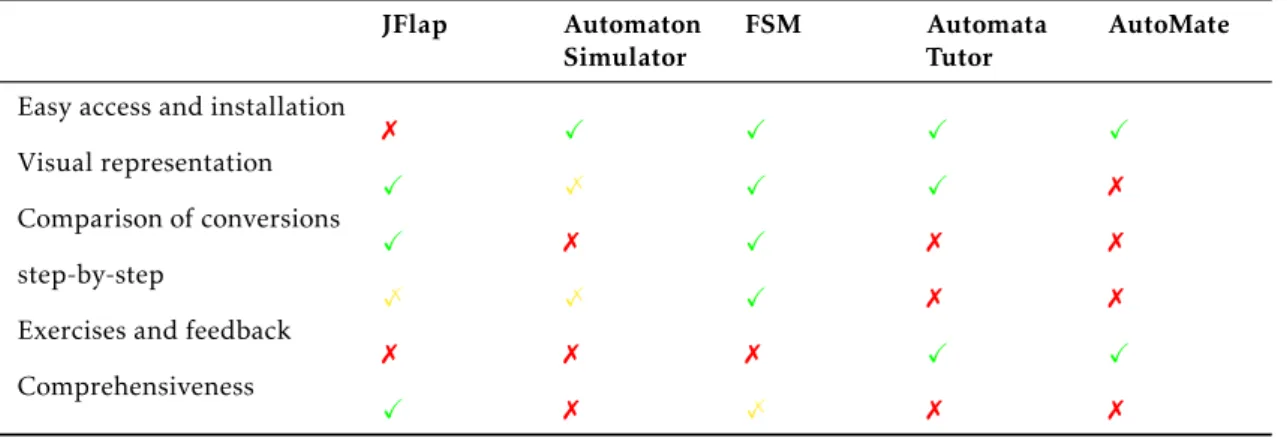
Table2.2shows a comparison of the characteristics analyzed in each platform. Table 2.2: Evaluation of the criteria for each of the highlighted Visualization Tools
JFlap Automaton Simulator
FSM Automata
Tutor
AutoMate Easy access and installation
7 X X X X Visual representation X X– X X 7 Comparison of conversions X 7 X 7 7 step-by-step X– X– X 7 7
Exercises and feedback
7 7 7 X X
Comprehensiveness
X 7 X– 7 7
2.2.1 JFlap
It is a desktop tool that is being developed since 1990 [23]. It stands out for being one of the most complete tools for the study of Formal Languages and Automata Theory. It is the result of the work of Susan H. Rodger and a few of her students who, over time, have developed new functionalities [24, 25]. Although it was initially written in C++
andx windows, it was later rewritten in Java and swing in order to improve the graphical
interface. The source code is available on the web page [23] andGitHub, allowing any
user to modify it.
This software is complemented by a web page that provides explanations and resolu-tions of exercises and by a guide book for the application usage, which is out of date.
JFLAP has been used for over 20 years in various universities all over the world, and
(a) Automata Editor (b) Page to test words step-by-step Figure 2.1: JFLAP examples [5]
In terms of features, it is possible to work interactively with Finite Automata (convert NFAs in DFA, NFAs in Regular Expressions or Grammars, minimize DFAs, testing if they accept words and visualize the acceptance process); Mealy Machines; Moore Machines; Push-down Automata (creation from context-free languages e vice-versa); three types of Turing Machines (One Tape, Multi-Tape and with Building Blocks); Grammars; L-system; Regular Expressions (creation of DFAs, AFAs, Regular Grammars and Regular Expressions); Regular Pumping Lemma; and Context-free Pumping Lemma.
Despite all of its good points,JFLAP is a desktop application, which means that it is
not accessible in all circumstances (it is necessary to have a computer and the software downloaded and installed on it to be able to use it). Note that these days students use mostly mobile equipments.
In JFLAP any conversion process, minimization or of acceptance can be visualized step-by-step but it does not allow to go a step back. The application is made for the student to be able to perform the processes on their own, but sometimes, even with instructions, it may be difficult to understand the rules that are being used for each step of the process.
Although the functionalities have evolved, the design has become a bit outdated and its usage is not always intuitive. Very often the support of the online page is needed to fully understand the correct usage of the program.
2.2.2 Automaton Simulator
TheAutomaton Simulator [6] is a very simple web tool, with one single web page (Figure
2.2). It was written inJavaScript, jQuery and jsPlumb by Kyle Dickerson, Software
Devel-oper and Technical Leader at the National Laboratory of Lawrence Livermore. The source code is available at GitHub under the MIT license.
Figure 2.2: Automaton Simulator Web Page [6] with examples of words to be accepted and words to be rejected
In this page one can draw graphically three different types of automata - Deterministic finite automata, Non Deterministic Finite Automata and Pushdown Automata. Neverthe-less, it is neither possible to generate automata from a regular expression, nor to convert from NFA to DFA.
After the creation of the automaton it is possible to test the acceptance and rejection of words, as well as the step-by-step recognition of a word by the automaton. Yet, it only allows going forward and never backward.
Despite its simplicity, this page is not very intuitive, since it is drawn with the help of icons, which do not include any type of explanation. Besides that, it has only a few features.
2.2.3 FSM simulator, Regular Expressions Gym, FSM2Regex
TheFSM Simulator [21],Regular Expression Gym [40] andFSM2Regex [22] are three com-plementary tools that enable the study of Regular Expressions and Automata Theory. Each of these tools is a web page developed since 2012, by Ivan Zuzak, Web Engineer and a former professor at the University of Zagreb, and Vedrana Jankovic, Software Engineer at Google. They are developed inNoam - a JavaScript library that let you work with finite
state machines and regular grammars and expressions, Bootstrap, Viz.js e jQuery. The
source code is available in GitHub, under the Apache v2.0 license.
TheFSM Simulator (Figure2.3) is used for the creation and testing of automata. The Automata can be generated through regular expressions or text. However, it is not possible to create them graphically. The user may visualize the processes of recognition of a word by the automaton, step-by-step, and also move forward or backward whenever necessary.
Figure 2.3: FSM Simulator Page [21] with an example of an Automaton
Despite this, the states are painted always in the same color, not indicating whether the word is accepted or not. The user looking at the last state has to make his own conclusions.
Figure 2.4: Regular Expression Gym Page [40] with an example of a Regular Expression simplification
TheRegular Expressions Gym (Figure2.4) is a very simple web page that lets the user visualize the simplification of a regular expression, all at once or step-by-step. For each step of the simplification, in both options, the rule used to simplify is indicated.
TheFSM2Regex (Figure2.5) is used to convert a regular expression in an automaton and vice versa, but it only gives the final solution, without allowing the visualization of the steps required to reach it.
These three pages are very simple and intuitive tools, but it would be more useful if they could be integrated in the same page. This way, it would be easier to add new
Figure 2.5: FSM2Regex Page [22] with an Automaton and its corresponding Regular Expression
functionalities.
UnlikeAutomaton Simulator referred to in2.2.2these three pages use too much text to explain the functionalities, which is unnecessary since they are quite intuitive.
2.2.4 Automata Tutor v2.0
TheAutomata Tutor [4,18] is a web tool that stands out because it provides a system for evaluating exercise of Finite Automata and Regular Expressions, thus facilitating the task for teachers. This tool has gone through three phases of development and several user tests [17,18], aimed at improving the application.
The page allows the registration and login into the system as two different kinds of users: the teacher, to whom is given the possibility of creating a course with his own exercises and visualize the grades at the end of the course; and the student, who can sign in to a specific course or do the exercises available on the page outside the courses. The focus of this page is the resolution of exercises of creation of Regular Expressions and Finite Automata corresponding to a sentence given in English. When a student submits a solution, he receives as an answer the grade and some feedback, enabling him to understand what he did wrong and make corrections if necessary (an example can be seen in Figure2.6).
Despite being a very complete application regarding the evaluation of exercises, its purpose is to give feedback, not allowing the user to experiment solutions freely in order to understand why it is right or wrong (for example the verification step-by-step of the acceptance of a word).
Figure 2.6: Example of an exercise resolution in Automata Tutor [4]
2.2.5 AutoMate
AutoMate [5] is a very recent web page, launched in 2019, which is still at a very early state. It is, however relevant to talk about it, since it is being developed at the same time as the one described in this paper. The main goal of this tool is to support the study of computer science students by helping to solve exercises on Finite Automata and Regular Expressions.
In terms of functionalities, this tool is, for now, very simple, mostly focusing on the verification and correction of exercises (Figure2.7a). The resolution of the exercises is done through text, not being possible to see the automata graphically.
The tool allows the user to carry out exercises on different topics within the Theory of Computation - Regular Expressions, creating DFAs, transforming NFAs into DFAs and transforming DFAs into regular expressions. After submitting the resolution of the exercises the user receives an automatic feedback, in pdf, which is relevant for the student to know how to improve. However the tool has a limited number of exercises and does not allow the user to create his own.
(a) Page to solve and see exercises (b) Page to draw the Automaton Figure 2.7: Example of two pages in Automate [5]
This tool also contains a page where an automaton can be drawn (see Figure2.7b), through text, so that it may be viewed it through an image. However, it is not possible to perform any type of action on the created automaton.
All of the mentioned tools have their own characteristics. A number of these are in some way common to the project developed but, excluding theAutomataTutor none of
them allows the lecturers to create exercises in order to use the tool both in class and as a student assessment system. Our tool stands out because it is prepared to in the future integrate the Learn OCaml system1 and for this reason, it will allow teachers to create classroom and assessment exercises that are integrated into the discipline they teach in Automata Theory.
of how they work. The next chapter will explain the design and code structure of the application. To provide some background, the current chapter offers a brief summary of general web technologies and presents the tools selected for the development of the application.
Typically, a web tool assumes two or three layers, also called tiers: client, server and database. These are normally developed in different languages, and therefore, to allow the sharing of data it is necessary to write them in a predefined format.
The client side is the part of the web application in which the user interacts. In each interaction a request is sent to the server, that responds with an action execution or some information from the database. This side is mainly developed using three languages: HTML, CSS and JavaScript.
The server side is the part of the application that determines how it works. The server receives requests from the client and returns the requested information or the action that can be executed. The server may be written in several different languages like C, C++, C#, PHP, Python, Java or even JavaScript.
For the client to communicate with the server, a communication protocol, like HTTP, is used. The message must also be in an agreed format, the most common being HTML, XML or JSON. And for the server to be able to communicate with the database it is also necessary to know how to write queries, normally in SQL or XQuery. Actually, it is not easy to link all three and make sure that the communication is always correct.
With the need to create more dynamic web pages, and since it is necessary to learn many languages and components, different frameworks and libraries have started to ap-pear in order to facilitate the work of the programmer. Some aim to ease the development
of the page design, like Bootstrap, with the purpose of creating responsive web pages.
Others intend to facilitate the creation of single page web applications, i.e., reactive. We have, as examples,AngularJS, a framework that extends the HTML language; and React,
a JavaScript library. Also worth mentioning is jQuery a library JavaScript that aims to
simplify the writing of queries of the language, and frameworks that intend to facilitate the development of servers with many accesses to the database and that assume code reuse, likeDjango and Ruby on Rails.
Despite the emerging of so many frameworks and libraries, the programmer, to create web applications, always needs to know at leastHTML, CSS, JavaScript (or a
correspon-dent) and a language for the server.
With that in mind, other languages and Frameworks started to appear, called tierless, which means that they aim to allow the creation of websites without having to program three separate layers. Examples of those are Links and Ocsigen Framework.
Links [50] is a functional programming language for web applications that, when compiled, generates code for all three tiers from a single source file. It translates into JavaScript the part to run in the browser, into bytecode the server parts and into SQL the parts to run in the database. [15].
Ocsigen Framework [34] allows writing web applications completely in OCaml, which like Links, is a functional programming language. The aim in Ocsigen is for the program-mer to be able to write Client and Server code as a single layer. When compiled the client code is translated to JavaScript. It also allows the creation of databases using MaCaQue (or macaque) that is a DSL for SQL Queries in Caml.
Both Links and Ocsigen seemed like viable options for this project but Ocsigen was chosen for two main reasons: (1) The library that this project is built on top of is already written inOCaml; (2) Links is a programming language used for academic purposes, with
a small number of users and active projects, thus more likely to suffer transformations between versions. Ocsigen is already in use, and there are relevant projects online created with it.
3.1
Ocsigen Framework
TheOcsigen Framework is a very complete tool that stands out mainly for allowing the
creation of interactive web pages written entirely inOCaml. This framework arises from
the idea that functional programming is an elegant solution to some interaction problems on web pages [9]. It tries to respond to the new challenges of web pages, that is, the need for them to behave increasingly like applications [8]. One of its great advantages is to compile the client’sOCaml code for JavaScript, which makes it possible to work together
with this language and thus use a wide number of libraries, which would otherwise not be available.
variables, as the support system implements this mechanism transparently. Another important advantage results from the use of static typing ofOCaml, making it possible
to check errors and bugs at the time of compilation, making sure that correct web pages are obtained, with no problems with links or client-server communication. In addition,
Eliom automatically solves frequent security problems on web pages. The Eliom is also
based on the assumption that complex behavior is written in a few lines of code [34]. The applications developed in this tool run on anybrowser or mobile device, with no need for
customization.
Js_of_ocamlis the compiler ofOCaml bytecode to JavaScript. It is the component of Ocsigen that allows running the application written in OCaml in JavaScript environments
like browsers [34] [53]. It also enables the integration ofJavaScript code in the OCaml
program.
Lwtis the cooperativethreads library for OCaml that allows to deal with data
concur-rency anddeadlocks problems. It is the standard way of building competing applications.
It allows to place orders asynchronously, through promises. These are simply references that will be filled out asynchronously when the answer arrives.
Tyxml is the library that allows the construction of statically correct HTML docu-ments. Tyxml provides a set of combiners, which use theOCaml type system to confirm
the validity of the generated document.
Ocsigen-startis the library andtemplate of an Eliom application with many typical
components of web pages, which aims to facilitate the construction of interactive web applications.
The Ocsigen-toolkit is the library ofwidgets that, like Ocsigen-start, aims to facilitate
the rapid development of interactive web applications. 3.1.2 Usage
In order to make the proof of concept - that it is possible to create a web application almost only in OCaml -,OCaml and Ocsigen are the languages used to program the core
of the application. This is where the page is created, every modification is decided and every algorithm calculated.
Since the main objective of this project was to animate the OCaml-FLAT library, most of the algorithms are inherited and are written in OCaml. To be able to animate them sometimes they suffered a few modifications or were remade to fit a purpose.
Every component of the Ocsigen Framework was used in some way. Eliom, since it’s the core of the framework was used to develop the top layer of the application. This is basically the use of OCaml language with extra components, like the creation of services to generate the page or create internal or external links. An example of the creation of a service can be seen in Listing3.1. This service allows the creation of a link to access the Cytoscape.js Library. A service is created through three components: the prefix (line4), the main link; the path (line5), that specifies the path to the page; and themeth (line6), that specifies the HTTP method and the HTTP parameters of the service. In the example we obtainhttps://unpkg.com/cytoscape/dist/cytoscape.min.js. 1 let script_uri1 = 2 Eliom_content.Html.D.make_uri 3 (Eliom_service.extern 4 ~prefix:"https://unpkg.com" 5 ~path:["cytoscape";"dist"] 6 ~meth: 7 (Eliom_service.Get
8 Eliom_parameter.(suffix (all_suffix "suff")))
9 ())
10 ["cytoscape.min.js"]
Listing 3.1: Creation of a service to access theCytoscape.js Library
Lwt is used for the animation of the automata, this is going to be developed further in Chapter5but in short it is used to allow the page time to make animated changes to the automaton.
Tyxml was used to write the page correctly, not only in the initial generation but also every time a change occurs in it. An example is the creation of an input box that can be seen in Listing3.2, this defines theHTML element input with id ’box’ and the input type
as text.
1 let inputBox = input ~a:[a_id "box"; a_input_type ‘Text]() Listing 3.2: Input box creation
Js_of_ocaml is not only used to compile the program but also to make the dynamic
changes in the page (Listing3.3) and to communicate with theCytoscape.js Library (as
explained in the Section 3.2). In the example of the Listing 3.3 we use theDom_html
Module of theJs_of_ocaml Library to access HTML elements and change its characteristics.
As normally happens when using a new and different framework, the usage of Ocsigen was not always easy. Throughout the development of the application some difficulties
3.2
Cytoscape.js Library
Cytoscape.js [16] is a graph network library written in JavaScript. It was designed to make it easier for programmers and scientists to use Graph Theory in their applications, whether to do analysis on the server or to create complete interfaces.
Cytoscape.js is the evolution of another project called Cytoscape web and is an open-source project created at the Donnelly Center at the University of Toronto in 2011, which is still under development to this day, through the contribution of more than 49 different collaborators. It is part of the Cytoscape Consortium, a non-profit organization that promotes the use of this software (and others) in the areas of Bioinformatics. This project is funded by the United States National Institute of Health.
It is a very complete library that lets you easily display and manipulate interactive graphs and that may be used both in desktop browsers and in browsers of mobile systems, which in addition contains many functions for graph analysis.
Cytoscape.js is an intuitive, easy to use and very complete library, which also contains a very developed API, well explained and with examples. Its website also includes several explanations about the library and a vast set of demos that the user can use as a basis for his projects.
3.2.1 Usage
Since the Ocsigen Framework allows the joint work of OCaml with JavaScript, for the graphical part of drawing automata and the syntax trees, we decided to use Cytoscape.js graph library. The main reason was that while having a complete and easy to use library do draw the graphs we could focus on other main issues of the project, like how to animate, how to show and how to organize all the information and not just about the representation of the graphs.
This library is used in a very simple way. The JavaScript file that creates and changes the graphs has no power of decision. All the decisions are made in the Ocsigen code and
the JavaScript functions are only called in with all the information, to change or create the representation on the screen.
Listing3.4represents the creation (without states and transitions) of an automaton in the Cytoscape.js library. It defines the division in the page in which the automaton
is going to be drawn (Line 4) and then defines the layout (Lines 5to9) and the style (Lines10to47) of the automata elements, the states (nodes), the transitions (edges) and its information (names and symbols). If a state is final it will be defined as being part of the classSUCCESS, which means that it will have double border (defined in Lines41to
45). In Line51we can see an example of the creation of an element (in this case a node). Through this code we can also see that it is possible to define new characteristics of a node, like its position or if it can be moved by the user, using itsid (Lines55to57).
1 function start () { 2 number = 0;
3 cy = window.cy = cytoscape({
4 container: document.getElementById(’cy’), 5 layout: { 6 name: ’grid’, 7 rows: 2, 8 cols: 2 9 }, 10 style: [ 11 { 12 selector: ’node[name]’, 13 style: { 14 ’content’: ’data(name)’, 15 ’width’: ’40px’, 16 ’height’: ’40px’, 17 ’text-valign’: ’bottom’, 18 ’text-halign’: ’center’ 19 } 20 }, 21 { 22 selector: ’edge[symbol]’, 23 style: { 24 ’content’: ’data(symbol)’ 25 } 26 }, 27 { 28 selector: ’edge’, 29 style: { 30 ’curve-style’: ’bezier’, 31 ’target-arrow-shape’: ’triangle’ 32 } 33 }, 34 { 35 selector: ’#transparent’, 36 style: {
50 nodes: [
51 {data: { id: ’transparent’, name: ’transparent’ }}
52 ]
53 }
54 });
55 cy.$(’#transparent’).position(’y’, 200); 56 cy.$(’#transparent’).position(’x’, -200); 57 cy.$(’#transparent’).lock();
58 }
Listing 3.4: Creation of a graph inCytoscape.js
In this chapter we made a resume of the different tools that could have been used to create the OFlat application. We clarified the framework used to make the proof of concept and how it was going to be used and explained the library used to draw the graphs in the application and why its usage was not going to disrupt the proof of concept.
Now that the reader is aware of the tools used to develop the application we can move forward and demonstrate how it works.
explain details of the code that the different functionalities make use of.
Section 4.1starts by explaining the structure of the page and its design. It gives a general idea on how it works and defines why we chose the presented organization of the elements, we also explain which different types were tested for the menu and why we kept the one in use. In the end we explain the color scheme and why some color were chosen for specific functionalities.
After the explanation of the general page, in Section4.2, we define the Architectural Pattern used as a basis to organize the code, we describe how it was applied and how it had to be adapted in order to work with the usage ofOCaml.
Furthermore, and now that the reader has a broad sense of how the application works and is organized, in Section4.3we go deeper into the code and explain how the page is generated inOcsigen so that the reader has better sense on how this type of programming
works and how the file importing was developed, a functionality that all the mechanisms make use of.
In the end to better demonstrate how the system works an example is given.
4.1
Page Design
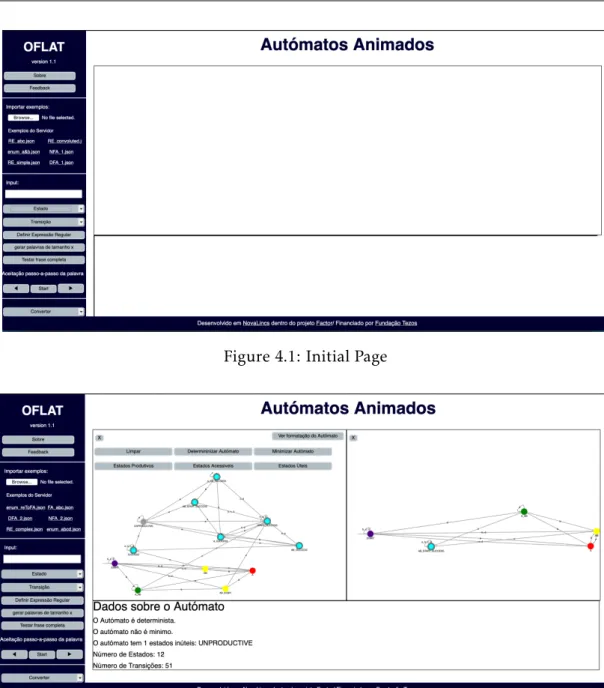
As far as the user interface is concerned, the OFlat application is a very simple web page with a menu on the left side and a white box on the rest of the page (as it can be seen in Figure4.1).
Since users tend to focus their attention on the center of the page, we decided that this part of the screen should be reserved for the representation of the mechanisms like
Figure 4.1: Initial Page
Figure 4.2: Minimization - Functionality that assumes two boxes
Automata or Regular Expressions. In this central page we attempt a reuse of the space in some functionalities. In general when a mechanism is created it is formatted to use the whole central box, but this can be divided into two smaller ones when a functionality demands it. The mechanism is set to readjust to the size of the box. For example, if the user is working with an Automaton and minimizes it, the minimization appears on the right side as shown in Figure4.2. The main reason for this is that it is important for the user to be able to compare the two automata in order to understand the mechanism. This is a process that will happen with all the mechanisms that imply a transformation or to show extra information. After making the transformation and analyze it the user can choose to work with either mechanism, left or right, by clicking the “x” on the top left of the box with the mechanism to close.
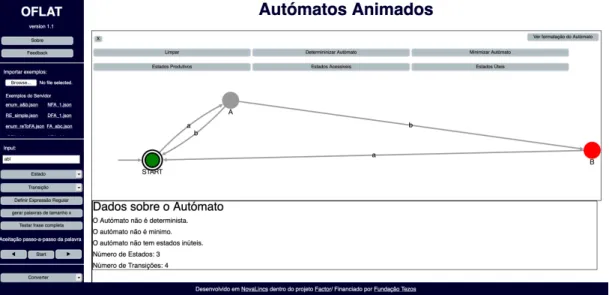
Figure 4.3: Acceptance of a work in an Automaton where there are two results, a right and a wrong one
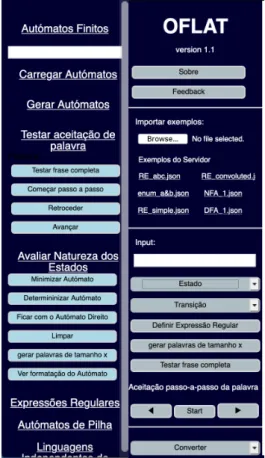
For the menu different options were experimented: A dropdown menu on the top, a dropdown menu on the left (Figure 4.4a) and a button menu as it is right now (Figure
4.4b).
The dropdown menu on the top did not work out because, as the user was clicking, there were so many options, that those would open on the top of the figure represented on the central box.
The dropdown menu on the left looked good but, actually, when the user was working it would become tiresome to always have to think and look for the button we would want to use. For example, if the user had an automaton and wanted to test the acceptance of a word he would on click“Autómatos Finitos -> Testar aceitação da palavra” and choose the
button (Figure4.4a).
In the end, the menu with just the buttons (Figure4.4b) worked better. With this menu the user can easily scan for the buttons, and in terms of code the buttons can be used for different mechanisms that have the same functionalities.
The menu is divided in four parts. The first is the title and the buttons that are related to the general application. The second part is the one were the user can import pre-defined examples, from the server or from the filesystem. The third and fourth are the ones related to the mechanisms, they are divided in two because in the first one all the buttons depend on the input box and in the second one they are independent. The
(a) Left menu as a dropdown
(b) Left menu with only buttons
Figure 4.4: Two different menus experimented
concept here was to put things that are related close to each other in order to help the user [54].
In Figures4.2and4.3it can be seen that, when an automaton is represented, there are also buttons inside the central or left box. Except the one that is meant to close the box, all the other buttons correspond to transformations that are only related to finite automata. For this reason it was decided that it would make more sense if they only appeared when this mechanism was being used, keeping together what belongs together.
In terms of colors, the ones used for the general page are blue and white. Blue because it is a color associated with harmony and calmness and therefore it cannot be connoted with or does not produce negative feelings. When used with grey (color of the buttons) it is also associated with the practical and functional, which are two fundamental charac-teristics of this web page. [49]
For the acceptance of words and the evaluation of exercises, green and red were chosen (Figure4.3). The main reason is their general significance in our day to day life, as they are generally associated with right and wrong, go and stop, etc. [49] and thus are self-explanatory when on screen. For functionalities in which we needed to use more than one color but these did not have to be associated with any particular significance, we tried
with them.
OCaml-FLAT is an OCaml library that supports various FLAT concepts, namely finite automata, regular expressions and grammars context-free. The most important goal is for the library code to be understandable to students, meaning that students are able to recognize the relationship between class definitions and implementation code. The original class definitions are free of requirements related to computability. It was required a high level of sophistication to obtain computable and very readable versions those definitions. Dealing with non-determinism and ensuring termination were the biggest challenges.
The code organization pattern chosen for this project was the Model-View-Controller. To maintain this pattern the project is organized in two files from the OCaml-FLAT library, and twoEliom files, OFlatGraphics and OFlat and one JavaScript file, graphLibrary, that is
required to program the graph library and define theJavaScript functions that create or
modify the graphs. TheEliom files are separated because of their functionalities, the OFlat
file contains all the functions and methods related to the web page and its generation and theOFlatGraphics has all the methods that can be reused in other applications, for
example if we want to integrate theLearn OCaml system.
MVC or Model-View-Controller is a classic architectural pattern typically used to organize user interfaces. The purpose is to divide the system in three logical components that interact with each other [45], the presentation, the interaction and the system data. Since it separates the components, it allows an efficient reuse of the code [1] and each part can change without affecting the others [45]. In this project each file mentioned above corresponds to one of the logical parts, except theOFlat that has modules corresponding
to controllers and to views, which will be covered later in this chapter.
We use the MVC pattern for conceptual orientation even though, at some rare points, we decided not to apply it strictly to the modular organization of the program. This happens in some specific point, first when we need to separate the view in different files and second in some algorithm animations like the acceptance of the word when we need to turn the methods into a hybrid of the model and the view. What happens in this case is that the code had to be copied to the view file and modified. The new “animated” version
Figure 4.5: Model-View-Controller State and Message Sending as seen in [27] of the code, instead of just giving a result, now changes the image of the automaton while the operation is being processed.
4.2.1 Model
The model is the application’s central structure, as it contains the main functionalities [27]. Since this project is made on top of the OCaml-FLAT library, the model was inherited.
The files used on this project that represent parts of the model are: • OCamlFlatSupport is where the data structures are defined.
• OCamlFlat is where all the manipulation algorithms are developed.
4.2.2 View
The view is the component of the system that deals with the graphical part. It’s where the aspects of the model are displayed for the user to see [27]. It is in this component that the mechanisms are drawn, and the algorithms are graphically shown to the user.
In this project the view is organized in different modules that are distributed between three files:
• OFlatGraphics.eliom is where all the code is related to the graphical representation
or animation and also the hybrid methods explained before.
• oflat.eliom which has two different modules that are part of the view, one that makes
the dynamic modifications of the elements of the page and the other that generates the initial page.
• theJavaScript file graphLibrary.js that draws and modifies the graphs on the specific
InOFlatGraphics there are four modules:
• JS is a module with js_of_ocaml functions to make logs or alerts.
• Graphics is the module with functions that call the functions on the JavaScript file.
• FiniteAutomatonAnimation is the module with the animation of all the Automata
algorithms, thus being an extension of the moduleFiniteAutomaton from the library,
it inherits all its class methods.
• RegularExpressionAnimation which, like the previous module, it is the one with
the all the methods that animate the Regular Expressions and extends the module
RegularExpression from the library.
InOFlat there are two view modules:
• HtmlPageClient which is the module that draws the changes on the page, puts
but-tons and text inside the boxes or cleans them. This module is part of the client side of the application.
• HtmlPage that is the module which has all the HTML elements, such has buttons
and input boxes, that are put on the page when it is generated. Since the page is generated on the server, this module is on the server side of the page.
The generation of the page is also considered part of the view. 4.2.3 Controller
Controllers are the part of the code that handles the input from the user [1]. Controllers contain the interface between their associated models and views and the input devices. [27].
The Controller is activated by callbacks that are registered ason_click and on_change
decides which system information is changed and what View functions are going to be called.
There are two controller modules and they can be found on theOFlat file:
• Module Controller is the main controller which indicates to the Views the changes that are going to happen according to the user input.
• Module FileReaderController that is in charge of the actions taken when reading a file from thefilesystem.
• Module StateVariables that, as the name convenes, is where all the state of the page is stored and changed. The variables that represent the mechanisms, (automata, regular expressions and exercises) are handlers for the model (the object represents the model or the view on top of it but the variables are in the controller).
4.3
Generating the page and importing files
Now that the reader has a general sense of the organization of the application, how the page is designed and how the code is organized, we can go further deep into explaining more specific parts of the code.
We start by defining how the page is generated, demonstrating how we connect the
Javascript library Cytoscape.js, and how we use Tyxml to create and HTML page.
Afterwards we explained the two different methods of importing files that are used to import the different types of mechanisms.
4.3.1 Generating the page
InOcsigen the generation of the page must be done on the server side and implies the
creation of services. These are entry points to a website and are generally associated with an URL [34]. For the generation of the page we need to create a registration module and the main service as seen in Listing4.1. The main service is where we define the path for the main page and its parameters (Line10and11).
At the point of the creation of the main page we register the service with the registra-tion module (Listing4.2). It is at this point that through theTyxml Library we define the
aspect of the main page. Starting on Line17and until the end we define different HTML divisions where the main elements of the page are inserted, like the buttons of the menu and the titles of the page.
As it can be seen in Listing4.2there are scripts imported at lines9to16. These scripts are used to access not only theCytoscape.js library but also the code Javascript and CSS
codes. Like is customary in Eliom these scripts and the links used on the footer of the
page were created as services. An example of a service used to generate a link for an external service can be seen in Listing4.3. As explained in Chapter3, to create a link we
define its prefix, its path and the meth. In this case we also define how it is presented in the page usingTyxml (Line10).
4.3.2 Importing
4.3.2.1 Import from filesystem
The first option of the menu is to import examples from the local filesystem. The imported files must be JSON files.
The big question was how to access the file system withOcsigen? For security and
privacy issues web apps do not have direct access to the files on the user’s device. Direct access would allow any JavaScript app to steal or erase documents. To read one local file, we need to use the FileReader API that JavaScript provides. This API is secure because it requires the user to interactively select the particular file to be read. The FileReader API functionality is available inEliom, although with details adapted to the way Eliom
works. The FileReader usage is demonstrated in Listing4.5and will be explained in the remainder of the section.
First, for the user to access the filesystem, it is necessary to create the input box with its input type as a file (Listing4.4line2) and link to it an action to it, in this case
fileWidgetEvents.
fileWidgetEvents is, actually, a function that associates an action to a change on the
input box through theJs_of_ocaml module Lwt_js_events which programs mouse events
with the use ofLwt (Listing4.5line38). When there is a new input on the box, the new input is read (Listing4.5line37) and the functionfileWidgetHandle is called.
fileWidgetHandler makes used of the Js_of_ocaml module Js.Optdef to manipulate
pos-sible undefined values. This is used for the cases in which the user ends up canceling the input of the file and there is no file to be read. With the use of the functioncase (Listing
4.5line23), that makes pattern matching on optional values, first the files are read from the input box (Listing 4.5 line24), if there is no file the function fileWidgetCanceled is
1 let () =
2 OFlat_app.register
3 ~service:main_service
4 (fun () () →
5 let open Eliom_content.Html.D in
6 Lwt.return
7 (html
8 (head (title (txt "Autómatos Animados"))
9 [script ~a:[a_src script_uri1] (txt "");
10 script ~a:[a_src script_uri5] (txt "");
11 script ~a:[a_src script_uri7] (txt "");
12 script ~a:[a_src script_uri8] (txt "");
13 script ~a:[a_src script_uri9] (txt "");
14 css_link ~uri: (
15 make_uri (Eliom_service.static_dir ()) ["codecss.css"]) ();
16 script ~a:[a_src script_uri] (txt "");])
17 (body [div ~a:[a_class ["sidenav"]] [
18 div [h2 ~a: [a_id "title"] [txt "OFLAT"];
19 p ~a: [a_id "version"][txt "version 1.1"]];
20 div [HtmlPage.about];
21 div [HtmlPage.feedback]; hr();
22 div ~a:[a_id "fromFilesystem"][HtmlPage.fileWidgetMake ()];
23 hr();
24 div [HtmlPage.serverExamples];
25 div ~a:[a_id "examplesServer"] []; hr();
26 div ~a: [a_id "inputTitle"] [txt "Input:"];
27 div ~a: [a_id "input"] [HtmlPage.inputBox];
28 div [HtmlPage.selectNode];
29 div [HtmlPage.selectTransitions];
30 div [HtmlPage.defineRegExp];
31 div [HtmlPage.words];
32 div [HtmlPage.completeSentence];
33 div [p ~a:[a_id "passo"] [
34 txt "Aceitação passo-a-passo da palavra"]];
35 div [HtmlPage.backwards;
36 HtmlPage.step_by_step; HtmlPage.forward]; hr();
37 div [HtmlPage.selectConvert];];
38 div ~a:[a_class ["main"]][
39 div ~a: [a_id "mainTitle"] [h1 [txt "Autómatos Animados"]];
40 div ~a: [a_class ["test"]][
41 div ~a:[a_id "Box1"] [
42 div ~a:[a_id "buttonBox"] [];
43 div ~a: [a_id "regExp"] [];
44 div ~a:[a_id "cy"][]];
45 div ~a:[a_id "Box2"] [
46 div ~a:[a_id "buttonBox1"] [];
47 div ~a: [a_id "textBox"] [];
48 div ~a:[a_id "cy2"] []];
49 div ~a:[a_id "infoBox"][]]];
50 footer ~a: [a_class ["footer"]] [txt "Desenvolvido em "; lincs_service;
51 txt " dentro do projeto "; factor_service;
52 txt "/ Financiado por "; tezos_service]
53 ])))
1 let fileWidgetMake () =
2 let filewidget = input ~a: [a_id "file_input"; a_input_type ‘File] () in
3 let _ = [%client (
4 Lwt.async (FileReaderController.fileWidgetEvents ~%filewidget): unit
5 )] in filewidget
Listing 4.4: Creation of the File button
file, theJs.Opt module is used to try and read the file. This module allows to work with
optional values. If the file could not be read it activates the functionfileWidgetCanceled
mentioned above.
To read the file the functiononFileLoad is used (Listing4.5lines11to20). If there is no file or the file could not be read it returns a boolean value false, if the file was read the functionfileWidgetAction is used to start the display of the model represented in the file.
This function calls two others,createText and printErrors.
TheprintErrors is a simple Controller function that upon the verification of the model
gives an alert to the user if the representation has some kind of flaw.
ThecreateText is used to verify which type of mechanism is going to be drawn and
then call the functions that are going to do it. First it makes a series of transformations, from JavaScript string to OCaml string (Listing4.6line2) and from string to the JSon type (Listing4.6line3). Then it reads the element “type” of the representation and afterwards it creates an Automaton, a Regular Expression or an Exercise (defined in the model as enumeration).
4.3.2.2 Import from server
The second option to create an automaton that is given to the user is to choose an example from the server. The general idea is that at the moment of the generation of the page all the files on the example folder are read and is created a button to access each of them individually. The question here was how to access a server folder and then a file from that specific folder. To make this possible it was necessary to use the OCaml moduleSys
1 module FileReaderController 2 = 3 struct 4 let fileWidgetCanceled () = 5 JS.alert "Canceled" 6 7 let fileWidgetAction txt = 8 Controller.createText txt; 9 Controller.printErrors () 10 11 let onFileLoad e = 12 Js.Opt.case 13 (e##.target)
14 (fun () → Js.bool false)
15 (fun target →
16 Js.Opt.case
17 (File.CoerceTo.string target##.result)
18 (fun () → Js.bool false)
19 (fun data → fileWidgetAction data; Js.bool false)
20 )
21
22 let fileWidgetHandle filewidget =
23 Js.Optdef.case 24 (filewidget##.files) 25 (fileWidgetCanceled) 26 (fun files → 27 Js.Opt.case 28 (files##item 0) 29 (fileWidgetCanceled) 30 (fun file →
31 let reader = new%js File.fileReader in
32 reader##.onload := Dom.handler onFileLoad;
33 reader##readAsText (Js.Unsafe.coerce file)
34 ) )
35
36 let fileWidgetEvents filewidget () =
37 let fw = Eliom_content.Html.To_dom.of_input filewidget in
38 Js_of_ocaml_lwt.Lwt_js_events.changes
39 fw
40 (fun _ _ → fileWidgetHandle fw; Lwt.return ())
Listing 4.6: Method that defines the type of mechanism to be draw
that gives a system interface, as seen in Listing4.7 and theload_file function from the OCaml module Yojson.basic.util (Listing4.7line19). But there is a catch: theSys module
can only be used in the server side of the code which means that the methods that use it must be in a server module only (Listing 4.7). This also means that the buttons, that have client side functions, could not access this functions. To overcome this problem an intermediate client module was created (Listing4.8), this one has its methods called by the buttons and in its turn accesses the necessary server functions.
1 module%server Server =
2 struct
3 let examplesDirPath =
4 Sys.getcwd () ^ "/static/examples/"
5
6 let log (str: string) =
7 print_string (str^"\n"); 8 flush stdout; 9 Lwt.return () 10 11 let getExamplesList () = 12 let fileList = 13 try
14 Array.to_list (Sys.readdir examplesDirPath)
15 with _ → [] in
16 Lwt.return fileList
17
18 let getExample fname =
19 Lwt.return (Util.load_file (examplesDirPath ^ fname))
20 end
Listing 4.7: Server-side functions to access the list of files on the server
The functionexamplesDirPath (Listing4.7lines3and4) provides the directory where all the files are stored thanks to the function from theSys module getcwd (Listing4.7line

![Figure 2.2: Automaton Simulator Web Page [6] with examples of words to be accepted and words to be rejected](https://thumb-eu.123doks.com/thumbv2/123dok_br/15481080.1037988/32.892.131.766.130.473/figure-automaton-simulator-page-examples-words-accepted-rejected.webp)
![Figure 2.4: Regular Expression Gym Page [40] with an example of a Regular Expression simplification](https://thumb-eu.123doks.com/thumbv2/123dok_br/15481080.1037988/33.892.262.630.588.889/figure-regular-expression-page-example-regular-expression-simplification.webp)
![Figure 2.5: FSM2Regex Page [22] with an Automaton and its corresponding Regular Expression](https://thumb-eu.123doks.com/thumbv2/123dok_br/15481080.1037988/34.892.270.618.147.425/figure-fsm-regex-page-automaton-corresponding-regular-expression.webp)
![Figure 2.6: Example of an exercise resolution in Automata Tutor [4]](https://thumb-eu.123doks.com/thumbv2/123dok_br/15481080.1037988/35.892.221.670.149.470/figure-example-exercise-resolution-automata-tutor.webp)
![Figure 4.5: Model-View-Controller State and Message Sending as seen in [27]](https://thumb-eu.123doks.com/thumbv2/123dok_br/15481080.1037988/50.892.189.716.176.442/figure-model-view-controller-state-message-sending-seen.webp)
