Cross-platform mobile development
using Web Technologies
Diogo Costa
Mestrado Integrado em Engenharia Informática e Computação Supervisor: Rui Maranhão (PhD)
Technologies
Diogo Costa
Mestrado Integrado em Engenharia Informática e Computação
Approved in oral examination by the committee:
Chair: António Miguel Pontes Pimenta Monteiro (PhD) External Examiner: José Maria Amaral Fernandes (PhD) Supervisor: Rui Filipe Lima Maranhão de Abreu (PhD)
There are many different mobile platforms nowadays that share the same applications, at least their name and brand. The differences between each of these mobile platforms make it very hard to build a single code base that runs in all platforms. However, efforts are being made to turn this into a possible scenario.
Since almost all major platforms provide a web engine that supports HTML5, CSS3 and Javascript, these technologies have become the base for most cross-platform development frame-work efforts. Using HTML5, Javascript and an application wrapper, such as PhoneGap, it is possible to make a web application that runs just like a native one. One of the major drawbacks of this approach is developing the user interface. Each platform has its user interface guidelines and designing an interface for each platform can be time consuming.
This dissertation addresses the implementation of framework that aims to simplify the devel-opment of cross-platform applications using HTML5, CSS3 and Javascript, including a library that auto-adjusts to the look and feel of the platform the application is running on. A demo application will also be described, showcasing the developed framework.
Atualmente existem diferentes plataformas móveis que partilham as mesmas aplicações, ou pelo menos o mesmo nome e marca. As diferenças entre estas plataformas móveis tornam muito difícil a utilização do mesmo código fonte para a geração de executáveis para cada uma das plataformas. Contudo, estão a ser feitos esforços no sentido de tornar este cenário uma realidade.
Visto que as grandes plataformas móveis disponíveis atualmente suportam HTML5, CSS3 e Javascript, estas tecnologias tem vindo a tornar-se a base da maior parte dos esforços para criar uma framework para desenvolvimento de aplicações móveis multiplataforma. Através da utiliza-ção de HTML5, Javascript e um wrapper como o PhoneGap é possível criar uma aplicautiliza-ção web que se assemelha e se comporta como uma aplicação nativa. No entanto, um dos grandes entraves neste momento a este tipo de solução é o desenvolvimento da interface gráfica do utilizador. Cada plataforma tem os seus próprios “guidelines” gráficos e desenvolver uma interface por plataforma é uma tarefa que consome bastante tempo.
Esta dissertação endereça a implementação de uma framework que tem por objetivo a simpli-ficação do desenvolvimento de aplicações móveis multiplataforma, recorrendo para isso às tec-nologias HTML5, CSS3 e Javascript. A framework inclui uma biblioteca para desenvolvimento de interfaces gráficas do utilizador que ajustam a sua aparência e comportamento consoante a plataforma em que a aplicação está a ser executada. É descrita também uma aplicação de demon-stração, cujo objetivo é mostrar como utilizar a framework desenvolvida e mostrar do que é capaz.
I would like to say thank you to my family, particularly my grandparents, for supporting me during the past year, when I worked and studied at the same time. Their contribute was crucial for me to be able to finish this dissertation.
I would also like to thank my parents, for believing in me and their unconditional support, and my girlfriend Marisa for fighting so that we can both have a good life in the future.
At last, but by no means least, I would like to thank my supervisor Rui Maranhão, for ac-cepting to guide me throughout this dissertation and providing his support and expertise, and my colleagues at Novabase for their friendship and support.
1 Introduction 1
1.1 Context and Motivation . . . 2
1.2 Goals . . . 2
1.3 Dissertation’s Structure . . . 3
2 State of the Art 5 2.1 Mobile Operating Systems . . . 5
2.2 Approaches to Mobile Development . . . 6
2.2.1 Native . . . 6 2.2.2 Web . . . 7 2.2.3 Hybrid . . . 8 2.2.4 Publishing applications . . . 8 2.3 Web technologies . . . 9 2.3.1 The appearance of HTML5 . . . 9 2.3.2 Advantages of HTML5 . . . 10
2.4 Frameworks for developing mobile web applications . . . 10
2.4.1 jQuery Mobile . . . 10 2.4.2 xui . . . 11 2.4.3 jQTouch . . . 11 2.4.4 Sencha Touch . . . 12 2.4.5 Wink toolkit . . . 12 2.4.6 Jo . . . 12 2.4.7 Kendo UI . . . 12
2.4.8 jqMobi and jqUI . . . 13
2.4.9 Comparison between frameworks . . . 14
2.5 Conclusions . . . 15 3 Case Studies 17 3.1 Facebook . . . 17 3.2 LinkedIn . . . 17 3.3 Exfm . . . 19 3.4 Conclusion . . . 20
4 Market Study and Analysis 23 4.1 Experience . . . 23
4.1.1 How many years of experience in software development do you have? . . 23
4.1.2 How many years of experience do you have in developing for mobile? . . 23
4.1.4 What kind of mobile apps do you develop? . . . 24
4.1.5 Do you target one platform at a time, or do you have a team per platform? 24 4.2 HTML5, Javascript and CSS3 . . . 25
4.2.1 What’s your skill level in Javascript? . . . 25
4.2.2 What’s your skill level in HTML5 and CSS3? . . . 25
4.2.3 Do you prefer HTML5 or Javascript for implementing user interfaces? . . 25
4.3 Features . . . 25
4.3.1 Analytics . . . 26
4.3.2 Hardware acceleration . . . 26
4.3.3 Configurable effects . . . 26
4.3.4 UI Widgets . . . 26
4.3.5 Data bindings between views and models . . . 26
4.3.6 Cross-platform support . . . 27 4.3.7 Full SDK . . . 27 4.3.8 Documentation . . . 27 4.3.9 Internationalization (I18n) . . . 28 4.3.10 Extensions . . . 28 4.3.11 Monetization . . . 28 4.4 Conclusion . . . 28
5 The Meems Framework 31 5.1 Goals . . . 31 5.2 Concepts . . . 32 5.2.1 Widgets . . . 32 5.2.2 Model-View-ViewModel . . . 33 5.2.3 Observables . . . 34 5.3 Architecture . . . 35
5.3.1 AMD - Asynchronous Module Definition . . . 36
5.3.2 Meems-events . . . 37
5.3.3 Meems-utils . . . 38
5.3.4 Meems-scroll . . . 42
5.3.5 Meems-ui . . . 46
5.3.6 Building user interfaces . . . 51
5.3.7 Effects . . . 54
5.3.8 Icons . . . 55
5.4 Documentation . . . 56
5.5 Conclusions . . . 57
6 RSS Reader: Demo Application 59 6.1 Requirements . . . 59 6.1.1 Functional Requirements . . . 59 6.1.2 Non-functional Requirements . . . 60 6.2 User Interface . . . 61 6.2.1 Login Screen . . . 62 6.2.2 News Screen . . . 62
6.2.3 Manage Feeds Screen . . . 62
6.2.4 News Detail Screen . . . 63
6.3 Architecture . . . 63
6.3.2 Mobile Application . . . 65
6.3.3 Deployment and Packaging . . . 70
6.4 Conclusions . . . 72 7 Conclusions 75 7.1 Future Work . . . 76 References 77 A Survey Results 79 A.1 Experience . . . 79
A.1.1 How many years of experience in software development do you have? . . 79
A.1.2 How many years of experience in software development do you have? . . 79
A.1.3 What platforms have you developed native applications for? . . . 80
A.1.4 What kind of mobile apps do you develop? . . . 80
A.1.5 Do you target one platform at a time, or do you have a team per platform? 81
A.2 HTML5, Javascript and CSS3 . . . 81
A.2.1 What’s your skill level in Javascript? . . . 81
A.2.2 What’s your skill level in HTML5 and CSS3? . . . 81
A.2.3 Do you prefer HTML5 or Javascript for implementing user interfaces? . . 81
A.3 Features . . . 82
A.3.1 Classify the functionalities/characteristics below according to their impor-tance to you . . . 82
2.1 Kendo UI . . . 12
2.2 Kendo UI on iPhone, Android and BlackBerry . . . 13
2.3 jqMobi . . . 13
3.1 Native Android Facebook application (left) and Fastbook (right). Credit: Sencha 18 3.2 Earlier version of LinkedIn mobile. Credit: LinkedIn . . . 18
3.3 Exfm iPhone application (hybrid). Credit: Exfm . . . 20
3.4 Exfm Android application (native). Credit: Exfm . . . 20
5.1 The Meems Framework logo . . . 31
5.2 Model-View-ViewModel design pattern . . . 33
5.3 Dependencies between the libraries that constitute the Meems framework . . . . 36
5.4 Page structure . . . 47
5.5 Page in Android . . . 47
5.6 Page in iOS . . . 47
5.7 Menu closed . . . 48
5.8 Menu open . . . 48
5.9 Menu always visible . . . 48
5.10 A button group in Android (left) and iOS (right) . . . 48
5.11 A form example in Android (left) and iOS (right) . . . 49
5.12 A simple list (left) and a list with ordering and multiple selection (right) . . . 50
5.13 Example of switches, sliders and text fields in Android (left) and iOS (right) . . . 51
6.1 Simplified use case diagram . . . 60
6.2 Low fidelity mockup. From top-left to bottom right: login screen, empty news screen, feeds screen, manage feeds screen, news screen, news detail screen . . . . 61
6.3 Flow between the screens . . . 62
6.4 Architecture overview . . . 64
6.5 RSS Reader running on Android 4.2.2 . . . 70
ADT Android Developer Tools
API Application Programming Interface CSS Cascading Style Sheets
GPS Global Positioning System HTML HyperText Markup Language
IDE Integrated Development Environment NDK Native Development Kit
SDK Software Development Kit SPA Single Page Application UI User Interface
W3C World Wide Web Consortium
Introduction
Smartphones are changing the way we live our lives. Checking emails, listening to music, sending texts, video chatting, GPS navigation, watching movies or taking notes are just a small subset of the tasks most smartphone owners perform. The practicality of these small but powerful devices that fit in a pocket is attracting more people every day.
In 2007 and 2008, the two major mobile operating systems were released to the market: Ap-ple’s iOS and Google’s Android. Together they power the largest group of smartphones, making them the most popular mobile operating systems. Others have appeared meanwhile, like Windows Phone, BlackBerry OS or Bada, each with relative success.
The success of smartphones has been also directly related to its application ecosystem. The ability to download third party applications allows users to power up their phones with new func-tionalities without being tied to the operating system’s provider. This also created opportunities for companies and developers to profit by developing new applications. Many have taken this opportunity and today there are thousands of mobile applications available for download.
Developing for a mobile platform, however, has brought new challenges compared to the traditional development of desktop applications. Smartphones have different specifications and capabilities than desktop computers and require good planning and implementation to build an application that is easy to use and useful for the final users. Some guidelines and general co-herence is therefore necessary to reduce fragmentation and provide users with an excellent user experience on their usually small-sized-screen smartphones. Every mobile operating system has its own development, graphics and user interface guidelines. Following these guidelines ensures that third-party applications integrate well with the rest of the platform.
However, this fragmentation also means that in order to build applications for several plat-forms, one must develop different applications, one per platform. The advent of HTML5 and its growing support in mobile browsers has put the development of cross-platform web applications as an alternative to native development. Web applications do have limitations, but with the in-creasing popularity of this approach, people have been turning to hybrid applications, mixing web and native code to produce cross-platform applications.
1.1
Context and Motivation
This dissertation was born from my personal necessity to build mobile applications that look native as fast as possible and without spending too much money. After a quick survey of the available tools in market, I wasn’t satisfied with the fact that no good free/open-source solutions were avail-able. PhoneGap looked like a great starting point, enabling the packaging of web applications for six different platforms, but, although there are many frameworks and libraries for the development of mobile web applications, none would provide a native look and feel according with the platform it was running on.
Developing mobile applications for different platforms requires different programming lan-guages and tools. Using web technologies, one can use HTML5, CSS3 and Javascript to build applications that run across all major operating systems, thus saving time and money while pro-ducing more. This only applies to certain types of applications, of course. There are cases when a native application is not only desirable but required, like those that need to interface directly with the phone’s hardware.
With this dissertation, I intend to develop a framework that help developers build their mobile applications faster and cheaper, but still looking good on each mobile operating system, focusing on Android and iOS at first.
1.2
Goals
The main goal of this project is to produce a framework that enables developers to build mobile web applications that look native on Android and iOS platforms using web technologies, namely HTML5, CSS3 and Javascript. The developed framework will use open-source and will also be available entirely as open-source, as a contribution to the community that has offered, and continues to offer, me so much, in terms of knowledge, support and free technology. This will also enable other people to contribute to the project, allowing it to grow and be useful to other people. But first, a study over the existing and most popular technologies must be performed in order to identify their most attractive aspects and those they are lacking, so that they can be included in the framework. The necessities of the market and developers is also to be taken into account, so a survey must also take place.
The definition of the user interface must be extensible, allowing the developer to create its own component when necessary, and must adapt itself to the look&feel of the platform it is running on, allowing, however, the developer to override the default behaviour if needed.
The framework must use existing, approved and popular libraries and tools, like PhoneGap and require.js, to be built over good practices and to appeal to as much developers as possible.
After developing the base framework, a demonstration application will also be developed. This application, being for demonstration purposes only, will showcase the framework and how to use it. The application must run on Android, iOS and the most common web browsers. A server-side
component must also be developed in order to demonstrate how to build an application end-to-end using Javascript as the base programming language.
1.3
Dissertation’s Structure
This dissertation has 5 main chapters: “State of the Art” (chapter2), “Case Studies” (chapter3), “Market Study and Analysis” (chapter4), “The Meems Framework” (chapter5) and “RSS Reader: Demo Application” (chapter6).
After the introductory chapter (chapter 1), different approaches when developing for mobile devices will be shown in chapter2, along with general information on the mobile operating sys-tems available nowadays and how to web applications can be published in the stores of the vendors of the platform. Then, the main web technologies this dissertation focus on are presented, namely HTML5, CSS3 and Javascript. In this chapter, a subset of the existing frameworks, tools and li-braries that enable developers to build web mobile applications will also be presented, along with a comparison between them.
In chapter3, some interesting and famous mobile web applications are exposed, along with a short analysis of the patterns used in the user interface and general trivia about the development of each application. Some conclusions about developing for mobile and the advantages of using web technologies for such task are drawn.
Chapter4reveals the main results of a survey that was conducted in the context of this disser-tation are presented and interpreted.
Chapter5describes the development of the main framework that was born from this disserta-tion. The goals and main concepts of the framework are discussed first, followed by a description of the architecture and functionalities developed. The difficulties and challenges in developing this solution are presented at the end of the chapter, together with conclusions about the development. Besides the main framework, a demonstration application was also developed, as described in chapter6. The requirements of the application, its user interface and architecture of both mo-bile client and back-end are described in this chapter. Some conclusions about the development experience are drawn.
Finally, chapter7closes this dissertation, with overall conclusions about the work developed and its goals, a personal opinion about the future of the world of mobile development and some ideas about what work could be developed in the future to improve the Meems framework.
State of the Art
The development of mobile applications is a recent field and has been growing in the past few years. The appearance of more powerful smartphones and operating systems is causing this field to evolve and grow exponentially.
In this chapter, a brief history of recent mobile operating systems is presented, along with a description of the common approaches taken to develop third-party software to these platforms, with special focus on web technologies, particularly the HTML5 standard. Some mobile web application development frameworks and libraries are also presented and analyzed.
Finally, the results of the survey performed in the context of this dissertation are presented and interpreted, closing off this chapter with a few conclusions about the gaps this dissertation intends to fill.
2.1
Mobile Operating Systems
Smartphones have become an important tool in our life. They’ve become practical, powerful and extensible. The evolution in hardware and software is intertwined, better hardware enables better software, and better software makes the user want more, leading to better hardware.
In the past few years, a revolution in the mobile fields has took place. The advent of modern operating systems like Android and iOS has changed the way people use smartphones.
2007 and 2008 were the years Google’s Android and Apple’s iOS were presented to the world. The iPhone, by Apple, was first revealed in January 2007, running the “iPhone OS”, re-branded in 2010 to iOS. Later, in September 2008, the first phone running Google’s Android operating system was presented: the T-Mobile G1.
The iPhone started this revolution, bringing to users a powerful phone designed to do more than just communicate. It included multitasking and graphics capabilities and sported a multi-touch screen, accelerometers, camera and other hardware components that contributed to a rich user experience. People were very receptive to this device, as sales have proven: 6.1 million 1st generation iPhones were sold over five quarters.[App09]
The T-Mobile G1, also known as HTC Dream, the first phone powered by Android, was quite as successful as the iPhone, but Android has been evolving and gaining lovers all over the world.
In the first quarter of 2013, Android was the leader operating system in the market, with a 75% market share, followed by iOS’s 17.3% and Windows Phone’s 3.2%.[IDC13]
One of the differentiating aspects that contributed to the success of these platforms over the dominant operating systems when they appeared, was the creation of a whole ecosystem around applications. Both Apple and Google created an online store to enable third-party vendors to distribute their applications and to allow users to download applications from a common and safe place. The possibility to extend the native platform with new applications meant that whenever an user feels a feature is missing, he can complement the platform with a third party application. This way, operating system vendors can focus on the platform, other companies and indie developers can build and distribute their own applications and make money, and the final user gets the benefits of a powerful multitasking device.
The next section describes how developers can build applications for these platforms.
2.2
Approaches to Mobile Development
When developing for mobile platforms, there are three possible approaches: native, web and hy-brid.
The native approach consists of using solely the platform’s software development toolkit to build an application that is compiled to the platform’s native language.
The web approach consists of using web technology, such as HTML5, Javascript and CSS, to build a web application, accessible through the smartphone’s browser and that the user can bookmark for later access.
Finally, the hybrid approach tries to combine the native and web approaches seamlessly, pro-viding the final user with an application that seems native while allowing the developer to mix native and web technologies.
2.2.1 Native
Most, if not all, modern mobile operating systems provide developers with the necessary tools to develop applications that can later be installed by users to extend the smartphone capabilities. Each vendor provides developers with different tools, but the basics include a compiler and a debugger. These tools enable the developer to build native applications, with access to all the capabilities of the smartphone, such as camera, GPS, sensors, hardware acceleration, etc. Taking advantage of this capabilities, the developer can build very interesting applications that integrate with the platform and provide an excellent user experience.
For instance, two of the most prominent platforms, Android and iOS, provide several tools for application development.
Android tools allow developers to build applications for Android on Windows, Linux and Mac platforms, using the Android SDK Tools, an Android system image emulator, platform-specific tools and, optionally, the ADT plugin for the Eclipse IDE. Applications developed with this tools will be compiled to bytecode and run over Android’s optimized virtual machine named Dalvik.[Goo13b] For developing applications that need extra performance, the Android NDK is available. It is a toolset that allows developers to use C or C++ to build native code.[Goo13a]
For developing applications for the iOS platform, which means targeting the iPhone, iPod and iPad devices, it is mandatory to use Xcode, Apple’s integrated development environment, which already includes the iOS SDK. It is only available for Mac platforms, a restriction that makes developing for this platform an expensive investment if the developer doesn’t own a Mac device already. Application logic is specified using Objective-C and a screen and flow designer is included in the toolkit. Applications can be tested by running in the included simulator. [App13]
2.2.2 Web
The idea of using a single code base for targeting several platforms has been the main motivation for using web technologies such as HTML5, CSS3 and Javascript to develop applications. And with access to the Internet and navigating through websites being a common functionality on smartphones, web applications for mobile devices have become popular.
Recent smartphones include powerful Web browsers and Javascript engines, capable of ren-dering complex websites and with a very good support of the HTML5 and CSS3 standards. The default browsers in Android, iOS and BlackBerry 6+ use the WebKit layout engine to render web pages. This toolkit is well known for its HTML5 and CSS3 support. Other layout engines are also used by other platforms: Internet Explorer Mobile uses Trident, Opera Mobile and Mini use Presto, Firefox Mobile uses Gecko. Although the standards are the same, their implementation may vary from an engine to another. This changes may mean that the same page will be rendered a bit different in distinct browsers. Therefore, in order to provide a cross-platform experience, the developer must be aware of the differences between each engine and try to accommodate them.
Besides the layout engine, most mobile browsers also incorporate a Javascript engine, respon-sible for handling all the scripted logic of the web pages. There are also different engines, which can cause different behaviour, even in the same platform. For instance, the default browsers of dif-ferent smartphones with the Android operating system, known for its fragmentation, can use the JavascriptCore or Google’s V8 Javascript engines, depending on the capabilities of the smartphone and its vendor. Although the programming language is the same, the performance of each engine is different, and this can cause different behaviours in different browsers, sometimes compromising the user experience.
To deal with these differences, developers often use code libraries and frameworks that provide an abstraction layer and deal with the particularities of each platform, speeding up the development task and ensuring a consistent user experience.
2.2.3 Hybrid
The downside of web applications is that the user does not perceive them as native, as they must run inside the browser. Another downside is the access to the capabilities of the phone that are not exposed to the web application by the Javascript engine, such as the accelerometers or access to the file system.
To circumvent this situation, a thin native wrapper can be used to hold the web application. This wrapper is a native application that is customized with the application’s branding, such as its name and icons, and, when opened, uses a web browser view to show the web application. It can also be used to extend the Javascript API that is exposed to the application.
A very famous example of this is PhoneGap. PhoneGap, now owned by Adobe, “is an open source solution for building cross-platform mobile applications with standards-based Web tech-nologies like HTML, Javascript, CSS”. PhoneGap supports several platforms (iPhone (3G and newer), Android, Blackberry OS, WebOS, Windows Phone 7, Symbian and Bada) and exposes through Javascript many APIs to access the smartphone’s features: accelerometer, camera, com-pass, contacts, file, geolocation, media, network, notifications and storage. And its functionality can be extended through the plugin system.
Another solution that enables the use of web applications as native ones is appMobi. It pro-vides developers with an HTML5 IDE, device emulation, debugging tools, game acceleration and build services for iOS, Android and other platforms. AppMobi Cloud Services extends HTML5 with features like in-app purchasing, push messaging, analytics, authentication and more.
Other solutions take this approach a step further. Appcelerator’s Titanium Mobile allows the development of native applications using Web technologies the same way PhoneGap does, but it exposes a Javascript API that allows the creation of native UI components. So, the developer can choose either to design the app with HTML and CSS or to use the API to build a native UI.
2.2.4 Publishing applications
After developing an application, the developer can distribute it in the vendor’s application store, for instance, Google Play for Android applications, Apple Store for iOS applications or Window Phone Apps+Games Store for Windows Phone applications. Each store has its own publishing policy, but usually a fee must be paid to publish applications in these stores, be it one-time only (Google Play) or yearly (iOS App Store). These policies can also restrict which applications can be published, based on their look and feel, if they are native or not, if they add new functionalities to existing applications and if they are compliant with the platform’s guidelines. [Wik12][Goo13c] Web applications cannot apply for publishing in some application stores, most notably in Google Play and Apple Store. These stores require applications to be native, or at least, to look like a native application. This is one of the most frequent uses of webview containers like Phone-Gap: to allow web applications to be published to application stores, targeting several platforms with a single code-base.
2.3
Web technologies
Developing mobile applications using web technologies can bring great benefits to the develop-ers in terms of cross-platform support and cost reduction. The promise of “write once, run ev-erywhere” is very tempting and is what motivates the use of HTML5, CSS3 and Javascript for building mobile applications.
In this section, we focus on how and why HTML5 appeared and how useful it can be to develop cross-platform mobile applications.
2.3.1 The appearance of HTML5
The HTML5 standard began to be written in 2004 by the Web Hypertext Application Technology Working Group (WHATWG), while the World Wide Web Consortium (W3C) was working on XHTML 2.0. This standard was born from the disagreement between browser vendors and the W3C on how the Web could be fixed. XHTML 2.0 was too strict and wasn’t backwards compatible with HTML, making it harsh for developers to build cross-browser websites. In 2008, WHATWG released to the public the first draft of the specification and, despite not being finished at the time, parts of HTML5 had already been implemented in web browsers. Later, in 2009, the W3C decided to drop the development of XHTML 2.0 and teamed up with the WHATWG to help developing HTML5.
HTML5 is the evolution of HTML4, a standard that adds many new functionalities and APIs to web browsers, trying to supersede external plugins like Flash, Silverlight and Java. These include audio and video support, scalable vector graphics, drag-and-drop, history management, web storage, geo-location and many others.
Enabling sites to store data larger than a cookie in the client’s web browser is also a functional-ity included in the standard. It enables the developer to cache files, images or data manually. This is a subject that browser vendors have disagreed on, leading to four different APIs: web storage, web SQL database, IndexedDB and filesystem.[Mah13] Their support is very different, but hope-fully this will change in the future. Besides these method for storing data, HTML5 also provide offline caching, where the resources of the web site can be cached and used for running it when no connectivity exists. This is very useful. Take, for instance, the Gmail Offline1web application. It allows the user to connect with his Gmail account and download his emails to the browser’s offline storage and the application itself to the offline cache. This way, when the internet connection is down, the user is still able to open the application and view the emails he downloaded previously. Browsers are not for sharing only text anymore. Loads of videos and audio are downloaded each day, especially since the appearance of video sharing sites like YouTube. Have gained such importance, the HTML5 standard introduces native support for reproducing video and audio with-out external plugins, like Adobe Flash, which are often missing in mobile. The supported formats are not yet specified, but “Ogg Theora” and “H.264” are the most likely to be supported since
they are both widely used open standards. At the moment, Internet Explorer and Safari support “H.264”, while Firefox and Opera support “Ogg Theora” and Chrome supports both.
Besides video and audio, graphics are also very important in a web site nowadays. HTML5 introduces thecanvaselement. It is a drawing area that the developer can fill using the Javascript API. It supports different context renderers; at the moment, only 2d and 3d (WebGL) are sup-ported. It can be used for games and advanced graphics.
HTML5 exposes many more features to enable developers to build advanced web sites and applications. However, HTML5 alone does not enable a developer to build rich applications. Using Javascript, developers can manipulate the DOM, build business logic rules and use several APIs the browsers provide to interact with the page and therefore engage the user. The use of cascading style sheets (CSS) enables the styling and manipulation of DOM elements, allowing a developer to customize the web page as he desires.
2.3.2 Advantages of HTML5
HTML5 is indeed bringing many new features to web browsers, including the mobile ones. The standard is not yet finished, but when it does and the most common browsers implement it com-pletely, web applications based on it will truly be cross-platform. At the moment, most browsers already implement most parts of the standard, especially the mobile browsers of Android and iOS. Each mobile operating system provides its own software development kit. For instance, they differ in programming languages: Java is used to build applications for Android while Objective-C must be used for developing applications for iOS. Other platforms also use other programming languages. This means that an application developed for one platform, can not be used in another without the code being ported.
This is where HTML5 has the upper hand. Using HTML5, CSS3 and Javascript, developers can target several platforms were the code once. There are already many frameworks and libraries that enable developers to use these technologies to build mobile applications, as is shown in the next section.
2.4
Frameworks for developing mobile web applications
In order to speed up the development of web applications, developers often use third-party frame-works. There are many frameworks available, the next subsections will focus on some of the most used, exploring their features, advantages and disadvantages.
2.4.1 jQuery Mobile
JQuery Mobile2 is a framework for developing user interfaces for mobile devices based on the famous jQuery and jQuery UI libraries.
JQuery Mobile provides a unified user interface system that works seamlessly across all pop-ular mobile device platforms. It focus on being feature-rich, lightweight, with a flexible theming system and ThemeRoller tool. Including an Ajax navigation system, page transitions and a core set of UI widgets (pages, dialogs, toolbars, listviews, buttons with icons, form elements, accordions, collapsibles, and more), jQuery Mobile is one the most used frameworks for developing web apps. It is easy to learn, thanks to its simple, markup-based system to applying behavior and theming. More advanced developers can use the API of global configuration options, events, and methods to apply scripting or generate dynamic pages.
JQuery Mobile supports many devices, with the full compatibility list available in its website. “To make this broad support possible, all pages in jQuery Mobile are built on a foundation of clean, semantic HTML to ensure compatibility with pretty much any web-enabled device. In devices that interpret CSS and JavaScript, jQuery Mobile applies progressive enhancement techniques to un-obtrusively transform the semantic page into a rich, interactive experience that leverages the power of jQuery and CSS. Accessibility features such as WAI-ARIA are tightly integrated throughout the framework to provide support for screen readers and other assisting technologies.”[jF+12]
2.4.2 xui
Xui3is a micro library DOM library for building HTML5 mobile applications. It provides methods
for manipulating DOM objects, handling events and effects, AJAX and styling, but, unlike jQuery, it does not provide a UI toolkit, so the developer is responsible for that.
Being a micro library and not a full framework, its second place on the rank can be explained by its inclusion in the PhoneGap framework. Xui was developed along with PhoneGap out of necessity for a framework that was mobile-oriented.
2.4.3 jQTouch
JQTouch4 is a “Zepto/jQuery plugin for mobile web development on the iPhone, Android, iPod Touch and other devices”.[Kan13a]
It is an open-source library sponsored by Sencha and has the following features: easy setup, flexible themes (using SASS), native WebKit animations, callback events, swipe detection, exten-sions, small file size and iOS5 scrolling.
To build an user interface the developer uses HTML and applies classes and identifiers to
divelements which will be processed by jQTouch and transformed into pages with headers and navigation when the page loads. The interface can be themed, but is does not provide a native look&feel.
3http://xuijs.com/ 4http://www.jqtouch.com/
2.4.4 Sencha Touch
Sencha Touch5is a high-performance HTML5 mobile application framework that enables devel-opers to build cross-platform applications using Javascript that work on iOS, Android, BlackBerry, Kindle Fire and other devices. It features smooth scrolling and animations, more than 50 widgets, fast adaptive layout engine, native packaging, advanced lists and much more.
The designing of the user interface is done via Javascript, using the provided API. The gen-erated UI can be themed, but it does not adapt itself to the look&feel of the platform. It is well documented, has a large community and many demo and real-world applications to learn from, making it one of the most successful frameworks for web mobile development.
2.4.5 Wink toolkit
The Wink toolkit6 is also a Javascript framework for developing mobile web applications. It is lightweight, provides touch events handling, DOM manipulation, CSS transforms and several UI components. The interfaces are designed using Javascript to invoke their API. Available for free, it currently supports iOS, Android, BlackBerry, Bada and Windows Phone 7.
Like other frameworks described above, the generated user interface can be customized using CSS or by using one of the provided themes. And once again, it does not adapt the interface to the platform’s look&feel.
It is highly modular and the existing demo applications, tutorials and community are good starting point for starting to use this toolkit.
2.4.6 Jo
Jo7is another framework that allows a developer to build mobile applications using Javascript and CSS. The generated UI is supposed to look native, but only on iOS. It takes full advantage of CSS3 to style the screens making it easy to customize. The documentation is good and there are a few demos, but it does not seem to be used by many applications so far.
2.4.7 Kendo UI
Figure 2.1: Kendo UI
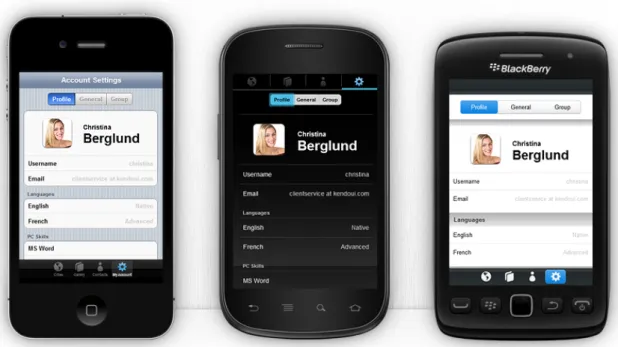
Kendo UI Mobile8is a complete framework for developing cross-platform web applications that look native in Android, iOS and BlackBerry devices. Differences between platforms are
5http://www.sencha.com/products/touch/ 6http://www.winktoolkit.org
7http://joapp.com/ 8http://www.kendoui.com/
automatically dealt with by the framework, adapting the user interface to comply with the platform standards.
The framework promotes the separation between the application’s logic and the user interface. Three central concepts define an app: application logic, which is written in Javascript, layouts and views, both written with HTML. The application logic layer manages all navigation, application history, loading views and other essential mobile app tasks, besides the logic associated with the app’s business logic. Layouts define reusable portions of the application, similar to templates. Its often used to promote maintainability by defining common view areas used across multiple views. Finally, views are individual pages of the app. Most applications will have at least one view.
Currently, Kendo UI only supports iOS, Android and BlackBerry OS. Besides the native-like theming and layout system, it is also a complete mobile application framework, handling navigation, views, templates, animations and history. It can be downloaded for a 30-day trial, after which a license must be bought.
Figure 2.2: Kendo UI on iPhone, Android and BlackBerry
2.4.8 jqMobi and jqUI
Figure 2.3: jqMobi
JqMobi9 is a small Javascript library for mobile HTML5 application development that can
replace jQuery in mobile devices. JqUI is a UI toolkit for building user interfaces for mobile applications using HTML5.
Using HTML5 elements such as header, nav and footer and some custom data- at-tributes, jqUI allows a developer to specify the user interface of a whole application and customize it through CSS and Javascript. It targets mobile WebKit browsers, so it works on iOS and Android platforms. It has a small footprint of only 22kb when gzipped and supports plugins for extending functionality.
The generated user interface can be styled using themes, but, unlike Kendo UI, it does not adapt itself to the platform’s look and feel. It does provide an overall design that works nicely on mobile devices, which consists of a fixed header and footer, a content area in the middle and a menu on the side that collapses and expands on user command on small screens or is always visible in larger screens.
Through the use of plugins, the developer can extend the framework with new functionalities like sub-panels, internationalization, advertisement or maps.
JqMobi and jqUI are both open-source projects.
2.4.9 Comparison between frameworks
Despite not being a listing of all available frameworks, the list above includes enough frameworks to analyze the current state of the art.
HTML5 is still under development and the difference between platforms and their different implementations of HTML5 caused many frameworks to appear, each with its way of tackling the problem, trying to provide developers with the tools for developing better applications that run on as many devices as possible, are cost effective and user friendly.
Although all these frameworks leverage the power of HTML5, there are clearly two different approaches as to how the developer designs the applications. JQuery Mobile, jQTouch, Kendo UI and jqMobi try to extend HTML, allowing the user to write the application’s screens in HTML and then applying custom identifiers, CSS classes ordata-attributes to provide context and meaning to a specific part of the HTML so that the framework can than transform it into a part of the final application. On the other hand, Sencha Touch, Wink and Jo force the developer to design all the screens in Javascript through the use of their own API. Each approach has its advantages and disadvantages. In the first approach, the traditional HTML file and structure is maintained, the developer just has to make sure that it is structured the correct way so that the framework can interpret the file correctly. However, it is less flexible when compared with Javascript and there is the initial overhead of processing the file to prepare the user interface each time the application is loaded. In the second approach, although it is much more flexible, it requires the user to learn a whole new API. Also, the design of the screens is not as well structured as in the first approach, making it harder to be maintained by a designer that doesn’t know Javascript.
As far as look&feel goes, all frameworks provide a consistent user experience across several platforms, mostly because its design and behaviour is the same on every platform. Most frame-works do support theming, but this is not enough to emulate the native look&feel of a platform.
Name Type HTML5-based UI JS-based UI Cost Native looks
jQuery Mobile Library Yes No Free No
jQTouch Library Yes No Free No
Sencha Touch Framework No Yes Free/Paid No
Wink Framework No Yes Free No
Jo Framework No Yes Free No
Kendo UI Framework Yes No Paid Yes
jqMobi Library Yes Yes Free No
Table 2.1: Comparison between frameworks
The exception to this is Kendo UI. Of all the frameworks above, it is the only one that tries to adapt the user interface to the platform’s look&feel, for instance, tabs will be placed on top in Android phones, on the bottom with labels in iOS or on bottom without labels in BlackBerry. Also, the theme color and images are automatically changed to themes specific for each platform. Although it still cannot pose as a real native application, it does a better job than any other framework.
2.5
Conclusions
The smartphone world continues to evolve at an accelerated pace and developers are constantly looking for new ways to speed up the development process of their applications. Web technolo-gies have a good support on recent mobile platforms, making them a good investment for cross-platform development, depending on the kind of application that is being developed. And com-bined with products like PhoneGap, web applications can pose as native applications and gain access to hardware features that otherwise they wouldn’t have. This enables developers to build powerful applications using only HTML5, CSS3 and Javascript.
There are already many frameworks and libraries that aim to make it easier for the developer to build mobile web applications. However, most of these frameworks and libraries don’t provide a native look&feel, rather providing themes that stay consistent across platforms. If a web applica-tion wishes to truly integrate with the platform it is running on, then the user interface should look native. However, this should be achieved without requiring the user to define multiple interfaces, one per platform.
As so, there is an opportunity and necessity in creating a tool that builds user interfaces that are automatically adjusted to the look&feel of the platform the application is running on, and it is precisely this that I propose to do in this dissertation.
Case Studies
In this chapter, some known hybrid applications are analyzed to better understand the type of applications that employ web technologies and the design patterns that were used.
3.1
The Facebook mobile application is very popular, with around 470 million mobile users, where 140 million people use the iPhone app and 176 million use the Android app.[Eva13].
Until the end of 2012, beginning of 2013, Facebook’s mobile application was powered by HTML5. However, Facebook decided to change to native development, saying that betting too much on HTML5 was a mistake.[Ola12]
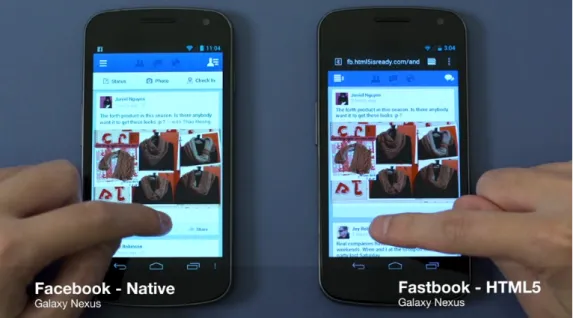
The developers of Sencha Touch, however, did not believe that the problem was HTML5, but rather the techniques used by the developers of Facebook, so they developed Fastbook, a proof-of-concept web application that implements the basic features of Facebook, implemented using the Sencha Touch framework. The Fastbook application even managed to beat Facebook’s native Android application in terms of performance.[JA12]
In terms of user interface (see figure3.1), both applications use a top bar with action buttons and the rest of the screen is filled with a list component, which contains the posts. A navigation drawer is also present on both applications. Swiping from the left edge or clicking on the top-left button reveals the navigation drawer, allowing the user to explore through other parts of the application.
Both the native applications (iOS, Android) and the Fastbook application use their own appear-ance, without adjusting to the looks of the platform, therefore looking the same on iOS, Android and even Windows Phone.[Thu13]
3.2
LinkedIn is a social networking website, used mainly for professional networking, with more than 200 million members as the beginning of 2013.[Nis13]
Figure 3.1: Native Android Facebook application (left) and Fastbook (right). Credit: Sencha
In mid 2011, LinkedIn launched its mobile application for Android and iOS. This application was actually a hybrid application, leveraging the power of HTML5 for 95% of the graphical inter-face. Later, in May 2012, they also launched an iPad application, again also powered by HTML5. Both applications were well received, for its performance and design, which was pleasant and a great improvement when compared to the web site version, which was the only interface available to mobile users before the launch of the applications. It’s also worth noting that the company mi-grated their back-end code from Ruby on Rails to node.js, which led to an increase of performance and scalability. [O’D11,O’D12]
Figure 3.2 shows the first mobile application that LinkedIn launched for Android and iOS. It shows a slick design, which seems like a variant of the native design of iOS, a top bar with a centered title and action buttons on each side, with a few quirks, like the arrow beneath the title of the screen indicating that it is possible to interact with the title to navigate through the application. In terms of content, lists and tiles are common across the application, similar to many other mobile applications. However, the interface of the application doesn’t adapt itself to the native look of the platform, looking the same regardless of where it runs.
Later, in April 2013, LinkedIn announced new versions of their mobile applications. The nov-elty in these new versions is that they are completely native. LinkedIn stopped using HTML5 for building the user interface, because their users were spending more time inside of the application, leading the application to be out of memory eventually. Another major reason invoked by Kiran Prasad, LinkedIn’s senior director for mobile engineering, was the HTML5 ecosystem and its lack of good developer and operations tools.[O’D13]
3.3
Exfm
Exfm is a social music discovery platform that was founded in 2010. It is powered by many music sites and, besides a web site, provides iPhone and Android applications.
Recently, the CEO of Exfm, Dan Kantor, wrote an article documenting the team’s experience porting their native iPhone application to a hybrid application, using HTML5 and PhoneGap.[Kan13b] In this article, Kantor describes the key factors that led to this transformation and then presents a few technical details and their implementations.
Before changing to a hybrid application, Exfm existed in three flavors: iPhone application, Android application, web application for mobile and desktop. The Exfm team is very small, consisting of only six people, which do most of the development. However, it contracted out a lot of the native mobile application work, which has costs evidently. Discussing Exfm’s future with Lucas Hrabovsky, the Chief Technical Officer (CTO) of Exfm, together they analyzed the products current state (mobile applications, Python back-end and Javascript front-end) and their hiring needs for the future. Since the six members of the team are well familiarized with Javascript, they decided to use it for everything. So, they ported the back-end to node.js and used PhoneGap for the mobile applications.
As a result of this transformation, their iOS application, which was initially rated 4 stars, went up to 4.5 stars and has more daily installs than the former native application. It also allowed the company to reduce costs by not having to hire work out. At the moment of writing, the hybrid version was only released for iPhone. The iPad and Android versions are still native applications, but the new versions are expect to be out soon.
In terms of user interface, the new iPhone application (figure3.3) shows a different design from the Android application (figure3.4), but also different from the native look of iOS applications. Overall, it shows a top bar with a title and action buttons on the side. The button on the left side of the title takes the user to a menu screen, allowing him to quickly navigate throughout the
Figure 3.3: Exfm iPhone application (hybrid). Credit: Exfm
Figure 3.4: Exfm Android application (native). Credit: Exfm
application. This menu screen shows tabs that reveal lists of songs, people, sites and genres. When playing music, a footer with player controls is shown.
Since the Android is native, one can notice the use of native components, like the tab host that contains the applications primary screens and allows the user to quickly change between them, or the lists with the native arrows on the right side. Only when the Android version of the new hybrid application is released will it be possible to see if it maintains the native look of the native application or if it will look the same as the iPhone application.
3.4
Conclusion
There are many more mobile applications available, but from these three examples some conclu-sions can be drawn.
First, it is very interesting to see how companies and small teams bet on new technologies as HTML5. Facebook and LinkedIn are both big companies and both initially betted in HTML5 for developing their mobile applications, later migrating to native applications due to complications encountered. On the other hand, the small team behind Exfm initially betted in developing native
mobile applications, beside their main web application, and later migrated to HTML5, since they had to contract work out for developing the major part of the mobile applications. This was solution because all members of the team knew Javascript. And as result of this migration, the number of downloads increased and they managed to reduce costs. Also, the major reason for abandoning HTML5 was the lack of experience with it, memory issues and the lack of good developer tools, all factors that are expected to improve in a near future as browsers perfect their implementation of the HTML5 standard.
Another interesting and relevant fact is that these applications use basically the same look on every platform, even native ones, like Facebook’s. This makes the applications stand out from an user’s point of view, because the user is not familiarized with the interface components. This can be either good or bad. It can help the application distinguish itself from its competitors by promoting a different and consistent look across platforms, but it can also cause the user to look for another application that integrates better with his phone. For instance, earlier versions of Facebook for Windows Phone 8 showed a native look and feel. But when a new beta version with the same look and feel as the iOS and Android applications was released, users complained about the lack of integration with the operating system, because they are accustomed to have a native rich experience.[Thu13]
Finally, the applications share a common design pattern: top bar with title and action buttons, a menu with options that is opened when the button on the left of the title is pressed and content presented using lists and tiles. These characteristics seem to be popular with most iOS and Android applications and are a basis for the framework that was developed in this thesis.
Market Study and Analysis
In order to better understand the needs of developers that develop for mobile platforms, a survey was distributed to college students and professionals.
The survey counts with a total of ninety nine (99) responses and was separated in three parts: experience; HTML5, Javascript and CSS3 and, finally, features.
The full results of the survey are available in appendixA.
4.1
Experience
The purpose on the first part, experience, was to understand the profile of the people answering the survey in terms of their experience in developing mobile applications and software in general. It comprised of five questions:
4.1.1 How many years of experience in software development do you have?
As the question states, its purpose is to collect how much experience the people answering the survey have developing software in general.
73% of the participants stated to have 1 or more years of experience, where 10%, 14%, 12% and other 10% stated to have 4, 5, 6 and 10 years of experience, respectively. We can therefore conclude that the vast majority of the participants has experience developing software in general.
4.1.2 How many years of experience do you have in developing for mobile?
This question intends to evaluate the experience of the participants in developing for mobile plat-forms.
38% stated to have no experience developing for mobile platforms. The rest 62% stated to have between 1 and 3 years of experience. This trend is in conformance with the rising of the importance of mobile platforms in the past years and how easy developing software for those platforms has become.
4.1.3 What platforms have you developed native applications for?
This question allows to determine the platforms the participants have developed for and, therefore, are most comfortable with. This was multiple choice question, so the sum of totals can be greater than 100%.
The platform participants have worked more with is Android, with 59% of votes, followed by Windows Phone/Mobile with 19% of the votes. The iOS platform had 8% of votes.
The fact that Android had the most votes can be explained by its vast availability in the market and the fact that the tools for developing native applications for it are free, bringing no costs in the development phase.
Although the Windows Phone platform is recent, Windows Mobile has been around since 2003, which could explain the higher number of votes when compared with the iOS platform, one of the most platforms nowadays. However, no participant stated to have more than 3 years experience developing for mobile platforms, and the Windows Mobile platform has seen its last stable update in 2010, 3 years ago, when Windows Phone first appeared. It is, therefore, impossible to determine which of the platforms the participants wanted to refer to and this is definitely an aspect to improve in future surveys.
The low vote count for the iOS platform can be explained by the high costs of developing for this platform. It requires a device capable of running MacOSX, such as a MacBook, and a developer license which costs around $99 (≈e 77) per year.
4.1.4 What kind of mobile apps do you develop?
How the developers approach the development of their mobile applications is also important, since a hybrid approach is proposed in this dissertation.
87 participants answered this question. The majority of participants (53%) claim to develop native applications, while 32% claim to develop web applications. The rest 15% are familiar with hybrid applications.
A hybrid approach will most definitely interest the 32% that develop web applications, since they’ll be able to use technologies they’re used to to provide a better experience for the end user. The majority which develops native application can also be interest in an hybrid approach as a way to target multiple platforms at once, reducing development costs. The next question approaches this point of view.
4.1.5 Do you target one platform at a time, or do you have a team per platform?
The participants were confronted with three choices, regarding their approach when targeting more than one platform: one platform at a time, a team per platform or targets only one platform. Not answering this question, its assumed that the programmer targets more than one platform at a time. Of the 65 participants that answered this question, 54% targets one platform at a time, while 40% target only one platform. 6% use one team per targeted platform.
Targeting only one platform at a time has its advantages from a managers point of view: target one platform with a small team and see if it is successful and, if it is, use the same team to port it to other platforms. And using more than one team to target several platforms is costly, although the delivery time is shortened. Through a hybrid approach, however, the application would only have to be developed once by a single team to target several platforms.
4.2
HTML5, Javascript and CSS3
The purpose of this part was to assess the familiarity and preferences of the participants towards the HTML5, Javascript and CSS3 technologies.
4.2.1 What’s your skill level in Javascript?
Participants were asked to qualify their skill level in Javascript from a scale of 0 to 5, where 0 means “No skill” and 5 means “Advanced”.
From the 99 participants that answered this question, 23% stated to have no knowledge of Javascript. 35% stated theirs skills to be average and above.
The adoption of the Javascript language is important for developing hybrid applications, so the fact that the votes for the levels average and above are low can be an issue. But Javascript is de factoprogramming language of the web, so there are lots of resources available for training.
4.2.2 What’s your skill level in HTML5 and CSS3?
This question follows the same principle as the previous answer, but now regarding HTML5 and CSS3.
All 99 participants answered this question; 23% claimed to have no knowledge of HTML5 nor CSS3 and 44% evaluate their skills as average or better.
4.2.3 Do you prefer HTML5 or Javascript for implementing user interfaces?
There are two ways of creating a user interface using web technologies: using HTML or using Javascript. This question aims to determine the popularity of each of these approaches among the participants.
35% of the participants prefers to use HTML5 while 10% prefers to use Javascript. The majority 55% indicated to prefer to mix both technologies. Developing web applications normally involves mixing Javascript, HTML and CSS, so the results of this question are actually satisfactory.
4.3
Features
The participants were asked to rate a set of features according to their usefulness, from “Not important” to “Deal breaker”.
4.3.1 Analytics
Analytics are important to know more about who uses the application and how they use it. Services like Google Analytics make this easy.
Results show that 36% of the 75 participants that answered this question consider analytics to be an useful feature. 28% consider supporting it a must, while only 3% consider it to be a deal breaker.
The developed framework will be supporting analytics indirectly through PhoneGap, since it has plugins for this.
4.3.2 Hardware acceleration
In mobile devices, hardware acceleration is very important to give the user the best experience possible, as animations and rendering in general will be smoother.
37% of the 76 participants that answered this question consider hardware acceleration to be useful, 29% consider it a must, while 8% consider it to be a deal breaker.
Through the use of CSS3transitionandtransform, the developed framework will take advantage of hardware acceleration whenever it is supported.
4.3.3 Configurable effects
Smooth animations ensure a richer user experience. Using CSS3, the user can configure the ani-mations.
Of all the participants, only 76 answered this question. 42% of the participant consider this feature to be useful, 18% consider it to be a must and 3% consider it a deal breaker.
Since the developed framework has all design stated in external stylesheets, the developer can easily extend them with new effects or configure existing ones.
4.3.4 UI Widgets
Graphical user interfaces are built using widgets, which are small components the user can interact with.
39% of the 74 that answered this question considered widgets to be useful. 27% find it to be a must and 8% considered it a deal breaker.
The developed framework provides a basic set of widgets, which will be discussed later in this document.
4.3.5 Data bindings between views and models
In the Model-View-ViewModel design pattern, it is useful to use some sort of data binding mech-anism. This mechanism allows layers to detect changes in objects and automatically update them-selves. What this means to the developer is that he can just update a value in the view model
and the user interface will be automatically update. Likewise, when the user interacts with the interface, the binded values are updated and the view model is notified.
41% of the 75 people that answered this question find data bindings to be useful. 31% find it to be a must, while 8% consider it a deal breaker.
The developed framework includes a data binding mechanism called “Observables”, which will be presented later on.
4.3.6 Cross-platform support
The purpose of this dissertation is to propose a framework that enables cross-platform development of applications. This question intends to clarify if developers really feel the need for cross-platform technologies.
75 people answered this question, 32% consider cross-platform support to be useful, other 32% consider it to be a necessity and 21% consider it to be a deal breaker.
Comparing to other features, this one has a high number of “deal breaker” votes, which means people do want cross-platform technologies.
4.3.7 Full SDK
A full SDK provides developers with all the necessary tools and libraries they need to build a full application.
Of the 72 people that answered this question, 35% find it to be useful while 29% and 18% find it to be a must and a deal breaker, respectively.
The developed framework will not provide a full SDK initially, but since all the necessary dependencies of the library will be compiled and minified together with the library, the developer only needs to use his favorite Javascript IDE. The demonstration application that was developed can also be used as a quick start project.
4.3.8 Documentation
A project’s documentation is very important, as it sometimes the only resource available that describe the inner works of the project and how to use it.
The responses to this question show how important documentation really is, as it was the question with more “deal breaker” responses: of the 74 participants that answered this question, 22% find it useful, 35% see it as a must, and 23
This dissertation will be used as documentation for the inner works of the developed platform. Besides this, the code will be documented and an automatic documentation tool will be used to generate the API documentation. A demonstration application was also developed in the context of this dissertation and will serve as practical example.
4.3.9 Internationalization (I18n)
Internationalization, sometimes abbreviated to i18n, refers to the ability to translate the textual content of the application to a predefined set of languages and switching between them according a setting.
37% of the 75 participants that answered this question consider support for internationalization to be useful, 31% consider it to be a must and 16% consider it to be a deal breaker.
Although the developed framework doesn’t support internalization directly, Require.js, one of the core components of the framework, can be extended with a plugin1 that allows the developer to load language bundles and use them in the application.
4.3.10 Extensions
Extensions allow the user to add a certain functionality to the framework if it is missing.
Of the 75 people that answered this question, 51% consider it to be useful, 16% and 3% consider it to a must and a deal breaker, respectively.
Since the developed framework uses Require.js, the developer can inject custom modules when necessary. The main factory method of creating widgets also allows the definition of custom widgets.
4.3.11 Monetization
Monetization is the method through which developers gain profits from their applications. One of the most common ways of monetization is through the use of advertising, embedded in the application.
Of the 71 people that answered this question, 46% consider it to be useful, 15% and 4% consider it to be a must and a deal breaker, respectively.
The developed framework has currently no standard way to show advertising or support for other monetization techniques. However, using the Html widget, developers can inject custom HTML, thus making it possible to inject code that shows ads.
4.4
Conclusion
The purpose of this survey was to see if the goals for this dissertation are aligned with the neces-sities and desires of its intended target audience. Although the number of participants was low, the responses that were obtained showed that most of the goals and proposed features where well accepted by the participants.
Most of the feedback received was taken into account when developing the framework. De-cisions to drop some of the functionalities were made, mostly due to time constraints, but also because the core products that the framework can be extended through plugins to include them.
This was the case for internationalization, analytics, monetization and providing a full SDK. An-other decision that was taken is to support only the use of Javascript to define the user interface. Since the Javascript layer is a necessity, it was decided to leave out the support of HTML5 in-terfaces. However, in the future, a translator of HTML5 or any other specification language to Javascript could be developed atop of the Javascript API.
The next chapters describe the framework that was developed and the core functionalities it provides.
The Meems Framework
Meems
Figure 5.1: The Meems Framework logo
As stated before, most of the current mobile web development frameworks don’t really address the cross-platform look&feel of user interfaces in a way that keeps both the user and the developer happy.
5.1
Goals
The Meems framework is an attempt at making the life of developers easier, while trying to pro-vide the final user with the best user experience possible, emulating the look&feel of his mobile platform, by using the power of HTML5, CSS3 and Javascript, available in most modern mobile operating systems.
Using the Meems framework, developers are able to put together user interfaces fast, without the need to tweak each detail for each mobile platform. A single code base for all platforms, but with a native-like look&feel on each of them.