2011/2012
Tiago Salgado de Magalhães Taveira Gomes
ALERT® STUDENT. A Platform for Medical Education
Mestrado Integrado em Medicina
Área: Educação Médica
Trabalho efetuado sob a Orientação de:
Doutor Jorge Guimarães
E sob a Coorientação de:
Profª Doutora Maria Amélia Ferreira
Trabalho organizado de acordo com as normas da revista:
International Journal of Medical Informatics
Tiago Salgado de Magalhães Taveira Gomes
ALERT® STUDENT. A Platform for Medical Education
Projeto de Opção do 6º ano -
D
ECLARAÇÃO DEI
NTEGRIDADEEu, Tiago Salgado de Magalhães Taveira Gomes, abaixo assinado, nº mecanográfico 060801150, estudante do 6º ano do Mestrado Integrado em Medicina, na Faculdade de Medicina da Universidade do Porto, declaro ter atuado com absoluta integridade na elaboração deste projeto de opção.
Neste sentido, confirmo que NÃO incorri em plágio (ato pelo qual um indivíduo, mesmo por omissão, assume a autoria de um determinado trabalho intelectual, ou partes dele). Mais declaro que todas as frases que retirei de trabalhos anteriores pertencentes a outros autores, foram referenciadas, ou redigidas com novas palavras, tendo colocado, neste caso, a citação da fonte bibliográfica.
Faculdade de Medicina da Universidade do Porto, 17/03/2012
Projeto de Opção do 6º ano – DECLARAÇÃO DE REPRODUÇÃO
Nome: Tiago Salgado de Magalhães Taveira Gomes
Endereço eletrónico: [email protected] Telefone ou Telemóvel: 914167777 Número do Bilhete de Identidade: 13379827 5
Título da Dissertação/Monografia
ALERT® STUDENT. A Platform for Medical Education
Orientador:
Jorge Guimarães
Ano de conclusão: 2012
Designação da área do projeto:
Educação Médica
É autorizada a reprodução integral desta Dissertação/Monografia para efeitos de investigação e de divulgação pedagógica, em programas e projetos coordenados pela FMUP, mediante consentimento expresso do autor.
Faculdade de Medicina da Universidade do Porto, 16/03/2012
Dedicatória
Ao Doutor Jorge Guimarães, por acreditar na minha vontade e me ter desafiado a
encetar a maior aventura da minha vida,
À Professora Amélia Ferreira, por orientar este trabalho, que espero vir a ser apenas
o primeiro de muitos em conjunto,
À Professora Raquel Soares e à Professora Rita Negrão, pela oportunidade
concedida em dar os primeiros passos na investigação científica,
Ao Manuel e ao Delfim, que mais de longe ou mais de perto, sempre me
acompanharam nos meandros da investigação.
... a todos os meu reconhecimento e profunda estima.
Aos meus Avós, por todo o carinho e suporte que me deram para ultrapassar os
momentos mais difíceis,
Ao meu irmão, por constantemente me fazer repensar as prioridades... a primeira, as
Pessoas,
Aos meus Pais, pelo seu apoio incondicional e pelo seu exemplo,
MESTRADO INTEGRADO EM MEDICINA
Ano letivo: 2011/2012
Nome do Estudante: Tiago Salgado de Magalhães Taveira Gomes
Orientador: Jorge Guimarães
Coorientadora : Maria Amélia Ferreira
Área do Projeto: Educação Médica
Título do Projeto: ALERT® STUDENT. Uma plataforma para a educação médica.
Resumo:
A educação médica constitui uma área de crescente complexidade não apenas em virtude do
constante desenvolvimento das ciências da saúde mas, também, devido à evolução da
tecnologia associada a programas de ensino e aprendizagem orientados para estudantes e
profissionais da saúde. Assim, a aprendizagem médica eficaz, necessitando de um considerável
investimento de tempo, configura atualmente uma questão de grande relevância entre
docentes e discentes.
Neste contexto, e tendo em consideração as diretivas no âmbito da educação de profissionais
de saúde, nomeadamente no ciclo pré-‐graduado de educação médica, o presente estudo tem
como objetivo o desenvolvimento de ferramentas para gestão do estudo, as quais permitam
aos estudantes atingir os objetivos de aprendizagem otimizando o seu tempo da melhor
forma.
Nesse sentido, foi desenhado um sistema que alavanca tecnologias web e mobile. Foram
criadas entidades de Instituição e de Grupo para representar disciplinas e turmas. A entidade
Sebenta foi criada para representar composições customizadas de materiais de estudo,
construídas com base em blocos denominados Flashcards, os quais podem ser agrupados por
Tópicos. Os Flashcards são divididos em Componentes de Flashcard que codificam
Conhecimento e Questões.
O sistema permite o estudo e a avaliação do conhecimento, utilizando um ambiente orientado
para a aprendizagem, o qual disponibiliza ferramentas que facilitam a navegação do conteúdo,
permitindo sublinhar texto, tomar notas, gerir tempos de estudo e filtrar conteúdo de acordo
com o conhecimento prévio do utilizador. Os dados adquiridos são disponibilizados utilizando
diferentes visualizações info-‐gráficas.
Este sistema constitui um passo importante para permitir a futuros médicos ultrapassar os
desafios da gestão de informação e da aprendizagem contínua, competências centrais do
médico do século XXI. As ferramentas disponibilizadas podem ser usadas para gerir, planear e
definir objetivos de estudo baseado na evidência do desempenho pessoal e coletivo. Estas
ferramentas podem ser úteis para melhorar o desempenho científico e prático dos
profissionais no futuro.
Palavras-‐chave:
Educação médica; Gestão da informação;Retenção de memória
; E-‐learning; Aprendizagem baseada na evidência; Aprendizagem customizada; Aprendizagem centrada no estudante;ALERT® STUDENT. A Platform for
Medical Education
Tiago Taveira-Gomes
Corresponding author
Faculty of Medicine of the University of Porto Center for Medical Education
Alameda Hernâni Monteiro 4200-319 – Porto, Portugal Phone 00 351 22 551 36 11 E-mail [email protected]
Keywords
Medical education; Information management; Memory retention; E-learning; Evidence-based learning; Tailored learning; Student-centered learning
Abstract
Medical education is an area of increasing complexity due both to the increasing data achievement in Health Sciences and also to the technology associated with programs of teaching/learning towards the education of medical students and professionals. Successful medical learning requires a considerable time investment and is now a matter of profound concern among educators and professionals.
In this context and taking into account the education directives of health professionals, namely in undergraduate medical education, this study is aimed to develop study management tools that are able to provide students with ways to achieve learning goals with optimized time investment.
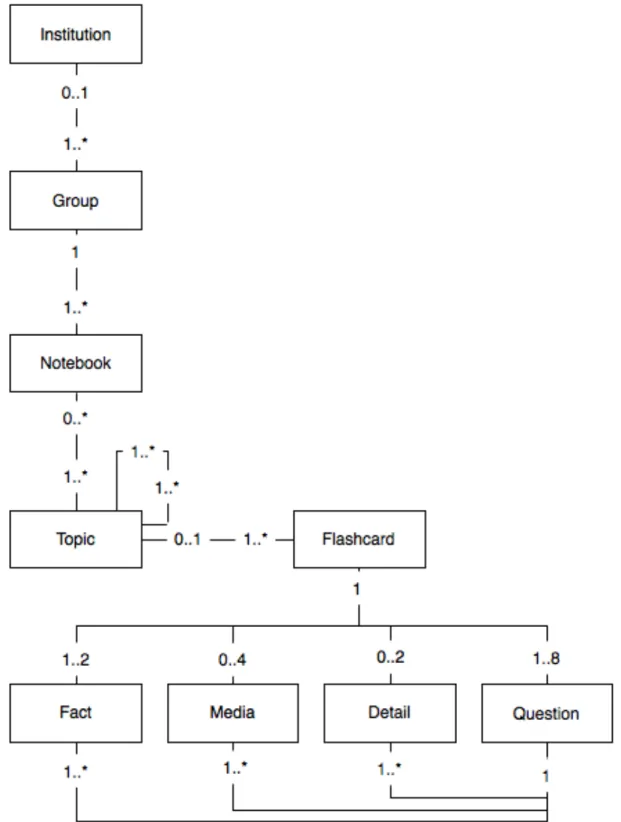
A system that leverages web and mobile technologies has been devised - ALERT® STUDENT. We used Institution and Group entities to represent courses and classes. A Notebook entity was created to represent custom compositions of learning material, built using blocks named
Flashcards that are grouped by Topic entities. Flashcards are split into Flashcard components
that encode Knowledge and Questions.
The platform allows study and assessment of knowledge using a learning-oriented environment providing tools to easily navigate content, highlight text, take notes, track study time and filter content based on user previous knowledge and defined objectives of the course. Collected data is displayed using different info-graphic views.
This application is an important step to help future physicians meet the challenges of information management and continuous learning, core competences for the physician of the XXI century. The tools provided can be used to manage, plan and set study goals based on personal and peer performance evidence. Additionally, they may be beneficial to help students become better scientifically prepared and skilled clinicians in the future.
Introduction
Medical education is an area of increasing complexity, considering the view of education of health professionals for the XXI century [1] [2]. Successful medical learning requires a considerable time investment to be achieved, not only in the development of core and specific competencies, but also in the ability to transfer basic competencies namely at the cognitive level to the clinical setting by integration of multiple information sources [2] [3]. The Institute for
International Medical Education Core Committee (IIME) has defined a set minimum essential
core competences and grouped them under seven broad educational domains: professional values, attitudes, behavior and ethics, scientific foundation of medicine, clinical skills, communication skills, population health and health systems, management of information, and critical thinking and research [4]. A culture of long-life learning, that demands a regular commitment, is now identified as a role towards the achievement of clinical competence and a requisite for professionalism [5]. The present work focus on how information management can be optimized to improve student knowledge outcomes through the development of a online application that aims to answer those requests and improve learning in the field of undergraduate medical education.
Information management
Considering the incremental pace of knowledge achievement, it is important to note that for future clinicians, meaningful clinical performance may require preparation in addition to the one delivered in medical school. Without disregarding experience, skill and general knowledge acquired, students are investing a part of their time into learning materials that may be partially outdated by the time they start clinical practice. Thus, medical education need not only to focus on the development of theoretical, technical and human competences, but also in instilling a culture of continuous self-improvement that considers effective management of information [6]. This is an important point, since over commitment to meet learning demands may decrease ability to cope with other life activities and negatively affect professional performance [7] [8].
This is why it is important to develop tools that are able to provide undergraduate students with ways to achieve the defined learning goals at smaller time expense. From our perspective, this can be achieved through personal study management tools that guide the learning process, pinpoint difficulties, optimize study time and comprehensively encompass the medical curriculum, in such a way that the student may attain a beneficial effort-reward balance [8]. To our knowledge, tools used nowadays to aid in learning still do not fully encompass these goals [9].
Content delivery and variation
There are tools that address specific learning needs through the leverage of technology, as it is the case of systems built for the study of anatomy using 3D visualizations [10] [11], or for the study of cardiac sounds through audio recordings with visual feedback [12]. Moreover, some applications deliver content through the use of web and mobile technologies, making it easily accessible in a variety of settings [13] [11]. Despite the great value of presenting of information in meaningful and convenient ways, it is usually difficult to adapt pre-existing solutions to more specific learning requirements, leading to the development of custom solutions in some environments [14].
Variations in medical curricula
Even though scientific knowledge is of universal application, the relative importance of knowledge may vary depending on epidemiological, cultural or local context [15]. Additionally, medical schools and teachers may emphasize knowledge differently, depending on school tradition, clinical experience, school research lines, areas of interest or resource constraints [15]. These factors may influence medical teaching and the selection of learning resources [14].
Memory retention
Medical knowledge is vast and requires a significant amount of effort to learn and retain. The hardships required for such feat often drives students to learn and retain knowledge enough
tools that may help them retain knowledge for longer periods and easily identify harder to learn materials [17].
A few tools are concerned with the problem of memory retention. Available general memory retention tools, used for memory intensive tasks such as learning a new language can also be used by medical students [18]. These tools are based in flashcard systems that associate questions with specific answers [19]. Study sessions are oriented by the questions that the student is required to mentally answer and then grade according to his/her perception of knowledge. These systems use this input to schedule content-specific review sessions, thereby allowing knowledge to be retained at a decreased expense. [19].
There are also tools that encompass memory retention software and pre-made content, together with tools to manage study and track progress [20]. However, these are proprietary tools built to meet specific goals, such as the United States Medical Licensing Examination, and therefore may be used only to small extents to meet the specificities of the different medical curricula [21] [22].
Additionally, increasing the number of learning resources shifts learning to an exploratory approach, which leads to a decrease in performance by virtue of increased content variance. In contrast, limited-learning approaches bring focus upon a smaller amount of resources that reduces material variance and stimulates insight deepening. [23]. Thus, students would benefit from a centralized learning environment that can become a main stay for their studies.
E-learning environments and evidence based learning
The application of new learning technologies has emerged as a main stream in medical education [24]. Many schools today adopt e-learning solutions, that are known to simplify document management and sharing, communication, as well as student evaluation and grading [25]. However, these tools focus mainly on maximizing efficiency of management tasks related to the process of teaching. In this context, there are solutions that allow free access to online learning environments composed by lecture videos, notes and exams [26]. Even though these
systems may act as a central content reference, they still do not provide students with useful analytical data that can be used to take decisions regarding study sessions and personal learning progress. Successful study management will be possible through the creation of tools that are able to analyze and track student progress in detail [27].
Providing students with such tools would be an important step towards the implementation of the IIME guidelines regarding information management [6]. Tutor participation in blended-learning environments, beyond the limits of traditional classes and blended-learning sources would also be beneficial. Teachers could track student progress and difficulties, meaningfully steering learning sessions and student assessment through gathered performance evidence, as recent tools are starting to allow. [28] This would represent a move towards blended-learning environments that are known to positively affect student and teacher engagement [29].
Understanding this situation a novel system was devised aiming to address these issues, so that students may be able to better manage time needed for successful learning and personal achievement. This system was developed by ALERT Life Sciences Computing, a Portuguese medical information technology company. It was released as a new version of a previously existing application named ALERT® STUDENT. All the functionalities presented are new and were not part of the previous application.
Methods
Technologies
The present application was built in accordance to current web standards. The user interface was built over HyperText Markup Language (HTML) [30], Standard Vector Graphics (SVG) [31],
JavaScript (JS) [32] and Asynchronous JavaScript and XML (AJAX) [33] technologies providing
database layer was built using ORACLE database systems [36]. A representational state transfer (REST) interface for mobile clients was created, and a simplified client application for apple iOS5 over the iPhone was developed.
The Medical Subject Headings (MeSH) [36] standard from the United States National Library of
Medicine [37] was used for content coding.
Content catalog mechanism
Content was organized by theme. To achieve this the entity Topic was created, representing medical concepts and themes related to a medical area. Each Topic can have a single type, multiple terms and multiple relationships of various types with other topics. This way, each
Topic is intended to represent a theme in which content is created.
Content internal structure
Content was divided into small blocks that can be studied and understood independently, by using the concept of flashcards. Each Flashcard entity has a front with learning content and a back with questions regarding that content. The Flashcard entity can be composed using four different Flashcard components: (a) Fact - a short and meaningful declaration or assertion; (b)
Detail - an explanation, description or example that illustrates in detail the content of a Fact; (c) Image - an image that holds relevant learning material; and (d) Question - an open-ended
question that can be linked to another Flashcard component containing content to answer the
Question. A Flashcard component may have multiple Questions. Each Flashcard has a
category, such as treatment and diagnosis, among others.
Notebooks • Adaptation to learning requirements
In order to adapt to specific learning goals, an entity called Notebook was created, which is an ordered collection of Topics and Flashcards. Topics can be added to Notebooks and can be positioned in any order. Topics can be linked recursively to represent sub-Topics. Flashcards from Topics can also be added in a custom order to compose a Notebook.
Groups • Localization of content
The entities Institution and Group were created to aggregate knowledge within the context of a medical school and allow sharing of content within institutions. An Institution represents a medical school. Groups aggregate users, Notebooks, Topics and Flashcards. Multiple Groups can belong to an Institution or they may exist independently. For example, a Group may represent a class, a course or a study group. Groups have roles and access rules. The member role allows communicating within the Group and grants access to Notebooks. The administrator role allows member and Notebook management.
Topics and Flashcards created within Institution Groups are made available to all other Groups
within the same Institution and can be included in other Notebooks. Editing Flashcards from other Groups is not possible unless a user is an administrator of both Groups. Groups can also be created independently of an Institution. Materials created in such a Group will not be shared by other Groups. A default un-editable set of Topics and Flashcards was provided to be used by all Groups.
Study Mode & Quiz Mode • User performance data
A Study-oriented environment was devised where a Notebook is visualized in an ordered
Flashcard column segmented by Topics. For each Flashcard and for each user, time taken to
study, number of study times, user notes and user text highlights are recorded. Additionally, a
Quiz-oriented environment was created to assess student perception of retained knowledge.
Through this environment time taken to answer and Question percept-knowledge (QPK) were recorded for each user and Question. QPK is classified on a Likert scale from 1 (full knowledge) to 4 (no knowledge). Computed Flashcard knowledge (CFK) can then be given by considering recorded QPK for Flashcard components.
System usability and adoption surveys
System usability and feature usefulness were assessed. 48 students used the Study Mode, the
Quiz Mode and notebook info-graphic views during two sessions of one hour to study a Notebook on molecular biology. In the end of each session students filled two online surveys. A
survey on system usability and tool usefulness was applied in both sessions. Another survey regarding willingness to adopt the system as a reference tool was used in the last session. Student agreement to each item was assessed using a 4 grade likert scale: 1 - complete disagreement; 2 – partial disagreement; 3 – partial agreement; 4 - full agreement. Paired sample t-test was used to compare differences in the system usability and tool usefulness survey answers between the two sessions. Significance level was fixed at 0.05.
Results
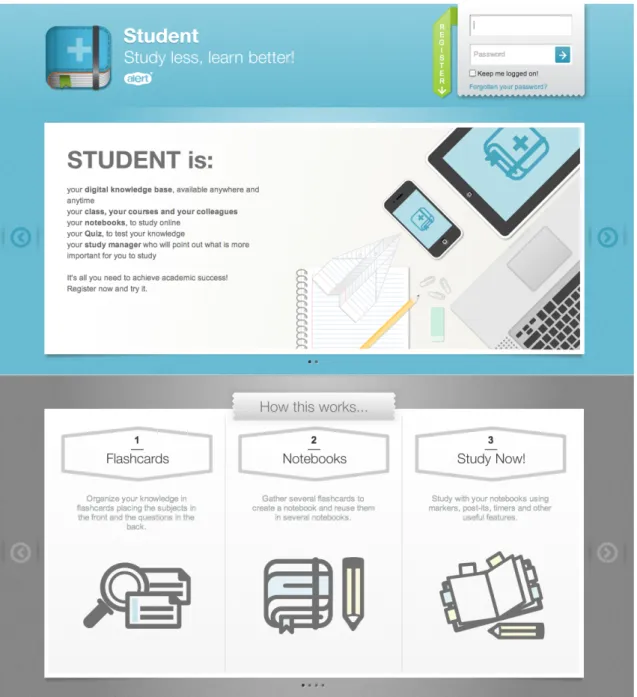
A final solution was implemented as web application (Figure 2) with a mobile client extension for iPhone. The website structure (Figure 3) was divided into core areas that match identified needs.
Figure 2 - ALERT® STUDENT Homepage
Figure 3 - Application main menu with links to the main application areas. The header also lists the last studied Notebook as well as study status. The 'Study now' strap allows to return the place the last Notebook was previously left.
Groups
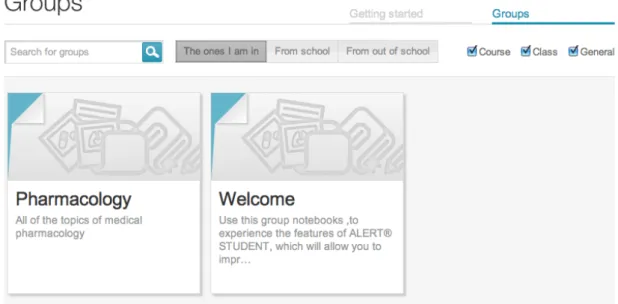
An area for Groups (Figure 4) where users can search, subscribe and request invitation for
Groups was created. Groups were split into 3 categories: (a) Groups to which the user belongs;
(b) Groups from the user Institution; (c) Groups from outside the Institution. The scope for searching Groups from outside the Institution was limited to the user language.
Figure 4 - Group list page where the user can search for existing Groups. A search bar and filters are provided to narrow search results
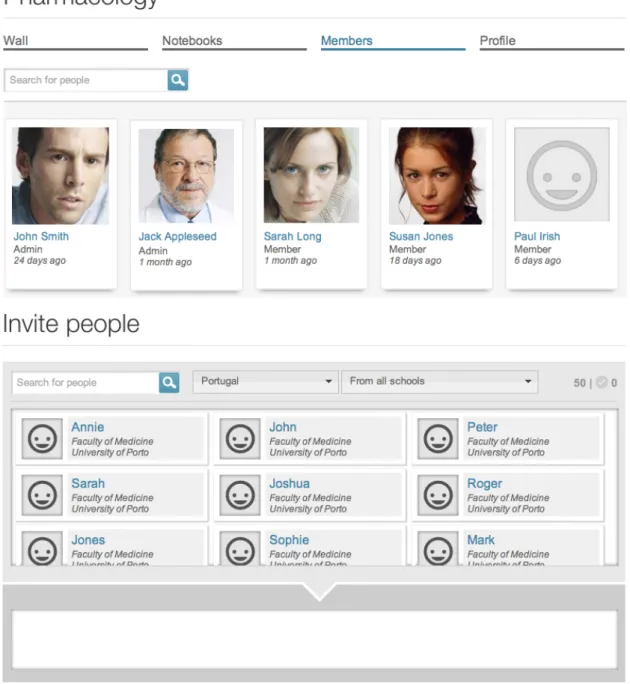
Groups were divided into 4 sections: (a) a wall for posting and commenting where users can
communicate (Figure 5); (b) a searchable member list, where administrators can additionally invite, approve invitations, block and promote members (Figure 6); (c) a Notebook area where members can access and subscribe Notebooks and administrators can create or edit them (Figure 7); (d) a Group profile section where users can see a summary of Group contents (Figure 8).
Figure 5 – A Group wall. The title indicates the Group name and the menu bar indicates the
Group pages sections. A list of user posts is presented.
Figure 6 – A Group Notebook list. Notebooks can be searched using the search bar and the
Figure 7- Group users. Members are shown on the first list. Administrators can manage users and they can additionally use the lower list to search and invite users to the Group.
Figure 8 – A Group profile page. This page summarizes the Group purpose, content and activity. Non-member user can reach this page and ask for permission to join the Group
Notebooks
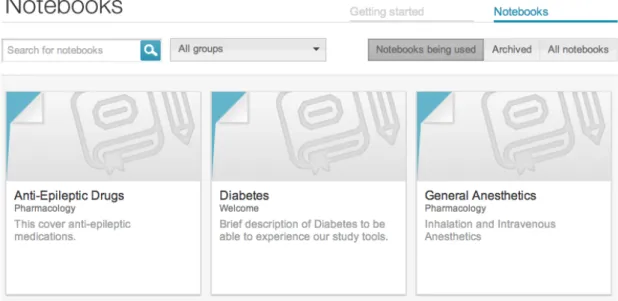
A Notebook section where users can access Notebooks from the groups they have subscribed was created. Notebooks were grouped into 3 sections for: (a) subscribed Notebooks; (b) archived Notebooks; (c) all user accessible Notebooks. Results for each section can be filtered by subscribed Group (Figure 9).
Figure 9 - Notebook list. Notebooks can be searched using the search bar and the Notebook status filters plus they can be filtered according to the subscribed Group selection.
Each Notebook has its own screen that shows information regarding the Notebook structure as well as personal and collective progress. It displays the total number of Topics and Flashcards that compose the Notebook, as well as the number of users subscribed and the number of sessions the Notebook has been studied by the user (Figure 10).
Figure 10 – The Notebook page header. Notebook content and usage are depicted as well as an outline of the Topics covered. Each Topic icon represents a type of topic.
This information is also displayed using a Sunburst info-graphic visualization from d3.js library [38] [39]. It allows the user to understand the relationships between Topics and sub-Topics as well as the relative size of each Topic based on the number of Flashcards each contains (Figure 11).
Figure 11 – The Notebook Sunburst chart representing Topics and Flashcards distribution. The toggle button switches the graphical configuration between relative content size (based on
Flashcard count) and proportion of time spent studying each Flashcard.
Additionally, this chart can be adapted to reflect the proportion of time the student has spent on each particular Flashcard. In this context, Flashcards where most time was spent will grow and
Flashcards where less time was spent will shrink.
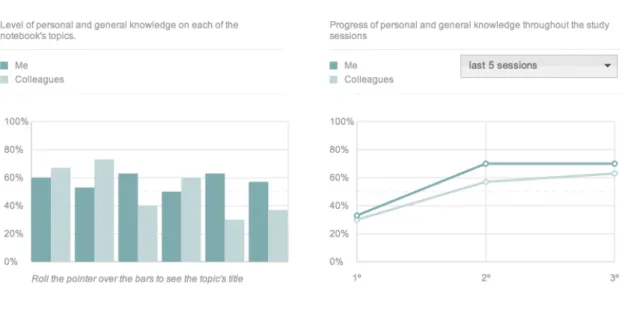
Another section charts CFK per topic in a grouped bar chart. Topics are plotted on the x axis and CFK is expressed on the y axis. A set of bars represents the student CFK and the other set of bars represents mean Group CFK (Figure 12).
Finally a line chart to view CFK per Quiz session was developed. Sessions are plotted on the x axis and CFK is presented on the y axis. A line represents student performance and another represents mean Group CFK (Figure 12).
Figure 12 – Notebook performance charts. The diagram on the left depicts charts CFK per
Topic in a grouped bar chart. The diagram on the right is a line chart representing CFK per Quiz
session.
A single screen to allow search, addition and ordering of Topics to the Notebook as well as creation, addition and ordering of Flashcards was devised. This system also allows users to edit the Notebook simultaneously. Two separate lists for searched Topics and Topics added to the
Notebook, which are accessible through tabs, were also created (Figure 13). Plus, a
force-directed visualization built with d3.js to expose relationships between topics that could not be clearly expressed in nested-list views was implemented [38] [39] (Figure 14).
Figure 13 – The Notebook editing environment. Topics can be browsed on the left column on the search tab. Topics can then be checked in order to become part of the Notebook. Those
Topics can be accessed on the Notebook tab next to the search. The right column will display Flashcards for the selected Topic. Checked Flashcards will become part of the Notebook.
Figure 14 – Notebook full screen view. This view allows Topics to be visualized using both the nested-list and force-directed graph views. On the force-directed chart on the right, blue boxes correspond to the topics that compose this Notebook. Boxes in gray represent topics that have been searched for but still have not been added to this Notebook.
Study Mode
A Study mode where Notebooks can be studied on a learning oriented environment was created. This mode implements the Topic and Flashcard column visualization in a dark environment to improve focus on the content. A Navigational Index of Topics to aid positioning and navigation was implemented. All tools were created in collapsible menus, in order to allow removal of possibly distractive elements. For the same reason, all Flashcard actions are displayed only on mouse over. Flashcards can be flipped one at a time or altogether. (Figure 15)
Figure 15 – Study Mode. The navigation bar on the left is in collapsed mode. The blue circle represents the current topic displayed in the Flashcard column. The top bar houses the content filters, progress status, the clock and the timer. On the right is the action bar. Flashcard column is represented on the center. Topics permeate the Flashcard column whenever they change. The first Flashcard is facing the front with study content, and the second Flashcard is facing backwards, showing Questions. The Flashcard component for the first Question is shown. Each Flashcard has a button that sets a time lap and increments the time from that lap to the time already taken studying the Flashcard. Flashcards can also be marked for later by folding the top left corner. Flashcards marked as such will not be assessed in the Quiz mode. Additionally, Flashcards have a colored bar on the side that expresses CFK. (Figure 15)
Flashcards can be filtered according to CFK or by category. A timer can be set directly by
clicking or by incrementing additional time from the options on the menu. A text highlighter is available using four colors that match the same four colors used to CFK. Each Flashcard has an
attached note where students can write. The system also provides a way to create PDF documents from Notebooks that can then be printed. (Figure 15)
Additionally, all major actions such as highlighting text, taking notes and adding time to the
Flashcards and flipping them, can be accessed through keyboard shortcuts.
On the header bar and bottom of the Flashcard column the student finds the statistics regarding the percentage of Flashcards studied, number of study sessions, time taken per session, total time spent and time spent last session. On the bottom, the student can also mark the Notebook as studied so that the system increments the number of study sessions by one and resets the studied Flashcard percentage. (Figure 15, Figure 16)
Figure 16 – Study Mode statics and actions on the end of the Flashcard column.
The system automatically pauses after two minutes of inactivity, either when the user leaves the window, or through a pause button on the options bar. The pause screen provides a clock that measures the time that the student has been on pause, and automatically brings focus to the window after ten minutes. When the user leaves the Study mode and then comes back, the system will automatically position the screen on the last studied Flashcard automatically.
Quiz Mode
The mode for assessment of QPK was built providing a minimum of interactivity to decrease the number of variables that may possibly bias assessment. The student is presented a Question at a time. The only action available is to show the answer. After selecting this option, the
Flashcard component containing the answer is shown along with a set of buttons used to grade QPK on a 4 level scale. The student also has the option of reporting the card to the
administrators when inaccuracies are found. After the evaluation step, another card is shown. The system displays student progress and the number of Questions rated per grade. The time spent is also tracked and the pause system available. (Figure 17)
When the user finishes the Quiz, statistics about the time spent on each session are presented in addition the ones already stated (Figure 18). Furthermore, the student can review the
Flashcards for the Questions with lowest QPK. Each Flashcard is shown under the respective Question with the answer Flashcard component highlighted (Figure 19).
Figure 17 – Quiz Mode. A Question card is represented along with the answer. QPK is graded using the set of four buttons shown. The rightmost button allows the Flashcard containing this
Question to be reported to Group administrators. The column on the right tracks student
Figure 18 – Quiz mode statistics. After Question cards have been answered, a set of statistics regarding time spent and performance are displayed.
Figure 19 – Quiz mode Flashcard review. Questions marked as hardest can be reviewed in the context of the full Flashcard that is displayed below the Question. The answer Flashcard
component is highlighted in blue.
System usability and adoption surveys
The score for all items on the survey regarding system usability and tool usefulness (Table I) showed means above 3 in both sessions. There were no significant differences between both sessions with exception of survey items 1, 4 and 14. Items 1 and 4 mean value increased while item 14 mean value decreased. Regarding the survey on willingness to adopt the system as a study tool (Table II) the mean of every item was approximately 3 (partially agree).
Table I – System usability and tool usefulness survey.
System usability and tool usefulness
Nº Item Session Mean SD* p
1 It was easy to study using the computer 1 3,21 0,69
0,04
2 3,38 0,61
2 The Study Now mode was easy to use and understand 1 3,68 0,52
0,06
2 3,81 0,40
3 The division of content using Topics and Flashcards was easy to understand
1 3,64 0,53
0,60
2 3,68 0,47
4 The division of Flashcards into Facts, Details, Images and
Questions was easy to understand 1 2 3,60 3,77 0,58 0,43 0,04 5 The division of Flashcards into Facts, Details, Images and
Questions helped to understand the key information to
memorize
1 3,43 0,58
0,84
2 3,45 0,72
6 The information on the Flashcards was simple and clear 1 3,62 0,49
0,80
2 3,60 0,54
7 The Flashcards were presented in a logical sequence that
facilitates learning 1 2 3,34 3,43 0,67 0,65 0,29 8 It was easy to find the Flashcards I wish to study using
the Flashcard filters
1 3,38 0,61
1,00
2 3,38 0,61
9 The highlighter and the notes are useful features 1 3,66 0,64
0,41
2 3,72 0,54
10 The Questions on the Flashcards were easy to understand
1 3,34 0,73
0,37
2 3,45 0,65
11 The Questions were helpful to help me assess my
knowledge about each subject 1 3,62 0,61 1,00
2 3,62 0,53
12 I could easily find the matching Answer to the Question in the Flashcard Component box.
1 3,53 0,58
0,20
2 3,66 0,48
13 The order in which the Questions were presented did not
affect my focus on answering 1 2 3,34 3,32 0,70 0,69
0,86
Table II – Willingness to adopt the system as a reference tool.
Willingness to adopt the system as a reference tool
Nº Item Mean SD*
15 I think this system could be used in other basic science
subjects 3,77 0,43
16 I think this system could be used in clinical science subjects 3,32 0,75 17 I see an advantage in using this system as a tool in my
daily study 3,26 0,71
18
I think this system would allow me to obtain results similar or better than my average results while investing less time studying
2,96 0,83
19 I wish this system would encompass the content in the
way I am taught at school 3,51 0,62
20 I would like to create content to take advantage of it using
this system 3,40 0,71
21 I would like to collaborate in real time with my colleagues
to build useful content fast 2,94 0,63
22 I would like to be able to print the notebooks from the
system 3,74 0,57
23 I would rather use this system instead of my regular
notebooks provided all the required content is available 3,11 0,84 24 I would rather use this system instead of lecture materials
provided all the required content is available 3,19 0,80 25
I would rather use this system instead of the recommended bibliography provided all the required content is available
3,11 0,89 26 I would recommend this system to my colleagues 3,68 0,52
* SD – Standard Deviation of Mean
Discussion
The results obtained in this study demonstrate that overall the system responds to the issues raised even though there are particular aspects that need continuous improvement. To our knowledge, no other systems take such an approach to distribute materials and manage study. Other systems are only mentioned and contrasted in respect to specific features that display overlap.
Groups
The Institution Groups support localization of knowledge since each Institution can represent an isolate learning environment. Allowing created Topics and Flashcards within Institution Groups to be available to other Groups facilitates sharing within the Institution. This helps to reduce content redundancy since the same Flashcards and Topics can be reused over other Groups, without the need to create new material.
However, independent Groups are only visible according to the language the user has defined. Therefore, for instance, English users will have difficulty in subscribing Spanish Groups. This may become a hindrance in situations where English Groups, as a main spoken language, may become important references for other students from other countries that could eventually find useful material in those Groups. Even though this may decrease content sharing and increase redundancy at an overall level, we understood that focusing on the particular learning environment of each school would be a beneficial approach as it would reduce the exploratory component involved in the learning process and therefore increase value over student performance [23].
Notebook creation is only allowed within the context of Groups, preventing users to create their
own personal Notebooks and Flashcards. This may decrease the level of tailored learning the system could provide to students. While such feature would be of great advantage to effectively address student needs, we understood that creating content on a user basis in the early phase of the project would lead to content duplication. Therefore, allowing content creation from within
Groups avoids this problem since only a limited number of users can create and manage
content that can then be distributed to a broader amount of students. This stimulates content reuse and promotes content sharing between courses for each Institution.
Notebook
The Notebook allows content to be created and reused in ways that match specific learning goals and can be reused with little effort to match other learning requirements. Because the
system keeps track of individual information about the performance of each student over a
Flashcard, reusability of Flashcards may not only increase learning material coherence within
schools, but also allow students to use content they are accustomed along with CFK. They are this way in accordance to the definition of learning objects [40], abiding to the principles of stand-alone, reusability, interactivity and aggregation [14], which are further implemented through the Notebook entity.
Because Flashcards are small chunks of content, their use is supported by research in cognitive theory showing that human beings learn more effectively when content is presented to them in such a way [9]. Reusing Flashcards in different contexts along the curriculum can be beneficial according to cognitive load theories. Revisiting Flashcards to further deepen knowledge allows the usage of long-term memory schemata acquired on the previous contacts with such
Flashcards and reduce the amount of elements that will be dealt with using working memory,
thus reducing cognitive load and speeding the learning process [41]. Furthermore, revisiting is extended by refactoring of multiple Notebooks into summary Notebooks, that may be helpful to fulfill study requirements in a review phase, leveraging the same cognitive load principles [41]. Performance data for overlapping Flashcards can be used to optimize further study sessions in a new Notebook setting, once more subscribing the principles of learning object reusability, interactivity and aggregation [41].
Even though the technology and the principles of adaptive learning are well set, to our knowledge this approach is still a relatively new trend in e-learning [9].
The info-graphic charts allow the student to take action on their study sessions based on evidence of personal and Group CFK. There are however concerns in the interpretation of such information on charts regarding CKF, because CFK is derived from QPK, which is a subjective measure. Additionally, because QPK is computed from student self-assessment, it is prone to reflect both affective and cognitive factors and therefore may decrease the system ability to accurately tailor learning needs in situations that affective factors may play a main role [42].
Using the Sunburst chart that represents content distribution, students can easily understand how their time was distributed on the learning material, so that they may better plan further study sessions based and better manage time. However, for this representation, Flashcards should not be considered as fixed-size units. Flashcard size should be proportional to the size of its content. Considering Flashcards as fixed-size units may bias the representation of relative content size as well as the size computed by time spent.
Although being useful, these tools only provide visualization of static data sets and are still far from more dynamic interfaces that allow performance data filtering and segmentation implemented by other tools [20] [28].
The Topic browsing system using simultaneous list and force-directed visualizations allows the creation and cataloguing of content over a searchable interconnected mesh of Topics that express meaningful relationships. These combined representations may be as well suited for explorative learning approaches since it clearly exposes relationships between entities, thus fostering knowledge integration [43].
Study mode
The Study mode allows study in an adequate digital environment, which minimizes sources of distraction. The dark colors used on the interface contrast with the white Flashcards, creating focus on the area of interest. Combined with spaced lines with mean 70 characters in length and large window height these factors increase reading speed, comprehension, and reduce fatigue from screen reading [44] [45]. Additionally, the ability to hide tools in combination with the keyboard shortcuts allows the student to improve focus even more while still being able to make use of most tools. The possibility to filter Flashcards according to priority or type further allows study sessions to be objective-oriented by showing only content that meets individual needs. According to cognitive load theories, this approach may be useful to reduce intrinsic cognitive load as the learning process can be oriented in a simple-to-complex strategy and reduce extraneous cognitive load through minimizing splitting of attention over content that is not required for particular study goals [41] [46]. The Navigational Index of Topics combined with
the Notebook progress meters provide a sense of position and progress, which can decrease extraneous cognitive load [41] as well and help to build motivation based on the visual feedback of progress [8] (Figure 15). Flipping the Flashcard column allows content-oriented and
Question-oriented dynamic study environments that further tailor learning needs. Finally, the
ability to resume study sessions from the point that they were last left also helps to decrease extraneous cognitive load by reducing the distance to the point of focus [41] [46].
Quiz mode
The Quiz mode is essential for the system to compute CFK and QPK. Because each Flashcard
component may have more than one Question, the Quiz mode is able to show the Question for
each Flashcard component with lower QPK. Not only it reduces memorization through mnemonics, but provides a means to assess knowledge using Questions that are most difficult tailoring memory retention needs [19]. This is also in accordance to the intrinsic cognitive load strategy of low-to-high fidelity tasks because as the student progress, Questions representing harder tasks will be preferentially selected [41]. However, the system does not take into account higher CFK or QPK to exclude Flashcard components, therefore each Quiz session will always go over all the material that composes a Notebook. This may difficult focusing on harder
Questions since the system will not filter the content that has been successfully learnt.
Moreover, the system does not take into consideration time spent on Flashcards to compute
CFK, nor does it schedule tailored study sessions based on these inputs, as other tools allow
[18] [19] [28]. Although the aim is to provide such functionalities, still, the only way to partially overcome these difficulties requires the student to mark Flashcards to study later; this increases
Quiz value at the cost of manual management.
As mentioned, the way the user grades QPK is subject to affective factors that may decrease the beneficial effect of the system [42]. The goal is to deliver tools to objectively assess student knowledge in ways that can reflect performance in unbiased ways.
System usability and adoption surveys
Both surveys have shown that students generally agreed that the tools provided were useful and simple and were willing to use them as a privileged element for their medical education. Survey items 1 and 4 regarding studying online and the Flashcard structure showed a significant increase from the first to the second session. This may be due to competencies developed during the first session, that made studying online and understanding the Flashcard
components better on the second session. Survey item 14 showed a significant decrease, but
still within the partially agree range. On the first usage of the system the student realized the benefit it had over its previous learning experience. As the students became accustomed to the system, their perception of the acquired gain versus its previous experience that now considers experience of using the system led the students to feel less benefit from its usage. On the other hand it would also be possible that the benefit from using the system is maximal on the first study sessions and gradually decreases over time, therefore explaining the result.
Final remarks
Overall the application brings in a new set of tools that may be helpful to organize knowledge in meaningful ways [14] as well as to manage study sessions, based on personal performance to optimize study time. The system takes into consideration the main principles behind learning object design: (a) stand-alone; (b) reusability; (c) interactivity; (d) aggregation; (e) accessibility; (f) interoperability [14]. Assessment of student performance over content presented through this system and compare learning outcomes against other learning tools and methods will be studied in the near future. The development of these features is an important step into bringing evidence-based learning to students. Combined with tools to easily manage and share content, and to help guide study sessions, the system may be helping future physicians to meet the challenge of information management [4], instilling a culture of continuous learning, as well as providing the possibility to invest more time developing the other core medical competences outlined for XXI century physicians [1] [2].
Authors’ contributions
Tiago Taveira-Gomes
Conceptualization, analysis, design and development of the system Literature research and paper writing
Acknowledgements
Project funding sources
Programa Sistema de Incentivos à Investigação e Desenvolvimento Tecnológico (SI I&DT),
project nº 6576
The funding source had neither intervention on any phase of the development of this system nor in the writing of this work.
Statement on conflicts of interest
The author of the study hereby states that there are no conflicts of interest in the present work. The system and the ways in which it helps to solve raised issues on medical education are described in a clear and unbiased way. The truthfulness or adequateness of all statements and considerations can be assessed by directly consulting the system, which is fully accessible and free of charge on the website at http://student.alert-online.com. The photographs depicted in the images are model photographs that ALERT® Life Sciences Computing S.A. has permission to be used for illustrative purposes.
Summary table
What was already known on the topic
• There is a recognized need to develop tools that are able to provide students with ways to achieve learning goals without consuming as much time.
• Students need tools that may help increase return from learning investment by retaining knowledge for longer periods, and ways to rapidly identify harder to retain materials and to swiftly re-memorize them.
• Students are in need of performance evidence based systems with which they can analyze personal and peer performance data and take insightful decisions regarding their study.
What this study added to our knowledge
• A system has been developed to allow content to be created and used in ways that match specific learning goals and reused with little effort to match variable learning requirements. • This system gathers individual and collective performance data over studied content that is used to tailor learning process by guiding study sessions, pinpointing difficulties, managing and optimizing study time and filtering material based on objectives
References
[1] Horton R. A new epoch for health professionals’ education. [Internet]. Lancet 2010 Dec;376(9756):1875-7.[cited 2012 Mar 16] Available from:
http://www.ncbi.nlm.nih.gov/pubmed/21112621
[2] Frenk J, Chen L, Bhutta Z a, Cohen J, Crisp N, Evans T, Fineberg H, Garcia P, Ke Y, Kelley P, Kistnasamy B, Meleis A, Naylor D, Pablos-Mendez A, Reddy S, Scrimshaw S, Sepulveda J, Serwadda D, Zurayk H. Health professionals for a new century: transforming education to strengthen health systems in an interdependent world. [Internet]. Lancet 2010 Dec;376(9756):1923-58.[cited 2012 Mar 6] Available from:
http://www.ncbi.nlm.nih.gov/pubmed/21112623
[3] Patel VL, Cytryn KN, Shortliffe EH, Safran C. The collaborative health care team: the role of individual and group expertise. [Internet]. Teaching and learning in medicine 2000 Jan;12(3):117-32.[cited 2012 Mar 17] Available from:
http://www.ncbi.nlm.nih.gov/pubmed/11228898
[4] Schwarz MR, Wojtczak A. Global minimum essential requirements: a road towards competence-oriented medical education. [Internet]. Medical teacher 2002 Mar;24(2):125-9.[cited 2012 Mar 17] Available from: http://www.ncbi.nlm.nih.gov/pubmed/12098430
[5] AAMC. Implementing the vision: group on educational affairs responds to the IIME Dean’s Committee report. Washington, DC: 2006.
[6] Global minimum essential requirements in medical education. [Internet]. Medical teacher 2002 Mar;24(2):130-5.[cited 2012 Mar 17] Available from:
http://www.ncbi.nlm.nih.gov/pubmed/12098431
[7] Karasek R, Brisson C, Kawakami N, Houtman I, Bongers P, Amick B. The Job Content Questionnaire (JCQ): an instrument for internationally comparative assessments of
Oct;3(4):322-55.[cited 2012 Mar 17] Available from: http://www.ncbi.nlm.nih.gov/pubmed/9805280
[8] Siegrist J, Starke D, Chandola T, Godin I, Marmot M, Niedhammer I, Peter R. The measurement of effort-reward imbalance at work: European comparisons. [Internet]. Social science & medicine (1982) 2004 Apr;58(8):1483-99.[cited 2012 Mar 17] Available from: http://www.ncbi.nlm.nih.gov/pubmed/14759692
[9] Clark R, Mayer R. E-Learning and the Science of Instruction: Proven Guidelines for Consumers and Designers of Multimedia. San Francisco: Jossey-Bass; 2002.
[10] John NW. The impact of Web3D technologies on medical education and training [Internet]. Computers & Education 2007 Aug;49(1):19-31.[cited 2012 Mar 17] Available from: http://linkinghub.elsevier.com/retrieve/pii/S0360131505000825
[11] Trelease RB. Diffusion of innovations: smartphones and wireless anatomy learning resources. [Internet]. Anatomical sciences education [date unknown];1(6):233-9.[cited 2012 Mar 17] Available from: http://www.ncbi.nlm.nih.gov/pubmed/19109851
[12] de Giovanni D, Roberts T, Norman G. Relative effectiveness of high- versus low-fidelity simulation in learning heart sounds. [Internet]. Medical education 2009 Jul;43(7):661-8.[cited 2012 Mar 17] Available from: http://www.ncbi.nlm.nih.gov/pubmed/19573189
[13] Garrett BM, Jackson C. A mobile clinical e-portfolio for nursing and medical students, using wireless personal digital assistants (PDAs). [Internet]. Nurse education today 2006 Dec;26(8):647-54.[cited 2012 Mar 17] Available from:
http://www.ncbi.nlm.nih.gov/pubmed/17011674
[14] Ruiz JG, Mintzer MJ, Issenberg SB. Learning objects in medical education. [Internet]. Medical teacher 2006 Nov;28(7):599-605.[cited 2012 Mar 17] Available from:
[15] Cumming A, Ross M. The Tuning Project for Medicine--learning outcomes for undergraduate medical education in Europe. [Internet]. Medical teacher 2007 Sep;29(7):636-41.[cited 2012 Mar 17] Available from: http://www.ncbi.nlm.nih.gov/pubmed/18236249
[16] Kerfoot BP, Baker H, Jackson TL, Hulbert WC, Federman DD, Oates RD, DeWolf WC. A multi-institutional randomized controlled trial of adjuvant Web-based teaching to medical students. [Internet]. Academic medicine : journal of the Association of American Medical Colleges 2006 Mar;81(3):224-30.[cited 2012 Mar 17] Available from:
http://www.ncbi.nlm.nih.gov/pubmed/16501262
[17] Kerfoot BP, DeWolf WC, Masser BA, Church PA, Federman DD. Spaced education improves the retention of clinical knowledge by medical students: a randomised controlled trial. [Internet]. Medical education 2007 Jan;41(1):23-31.[cited 2012 Mar 10] Available from:
http://www.ncbi.nlm.nih.gov/pubmed/17209889
[18] Elmes D. Anki [Internet]. 2012;[cited 2012 Mar 17] Available from: http://ankisrs.net/ [19] A.Wozniak P. Optimization of learning [Internet]. 1990;Available from:
http://www.supermemo.com/english/ol.htm
[20] Gunner Training [Internet]. 2012;[cited 2012 Mar 17] Available from: http://www.gunnertraining.com/
[21] Ellaway R, Dewhurst D, Cumming A. Managing and supporting medical education with a virtual learning environment: the Edinburgh Electronic Medical Curriculum. [Internet]. Medical teacher 2003 Jul;25(4):372-80.[cited 2012 Mar 17] Available from:
http://www.ncbi.nlm.nih.gov/pubmed/12893547
[22] Masters K, Ellaway R. e-Learning in medical education Guide 32 Part 2: Technology, management and design. [Internet]. Medical teacher 2008 Jun;30(5):474-89.[cited 2012 Mar 17] Available from: http://www.ncbi.nlm.nih.gov/pubmed/18576186
[23] McGrath RG. Exploratory Learning, Innovative Capacity and Managerial Oversight [Internet]. The Academy of Management Journal 2001;44(1):118-131.Available from: http://www.jstor.org/stable/3069340
[24] Harden RM. The virtual learning environment in medical education – past, present and future. In: Salerno-Kennedy R, O’Flynn S, editors. Medical Education: The State of the Art. Nova Science Publishers Inc.; 2010 p. 1-10.
[25] McKendree J. Understanding Medical Education [Internet]. Oxford, UK: Wiley-Blackwell; 2010.[cited 2012 Mar 16] Available from:
http://doi.wiley.com/10.1002/9781444320282
[26] Massachussets Institute of Technology [Internet]. 2012;[cited 2012 Mar 17] Available from: http://ocw.mit.edu
[27] Martinez M. Designing learning objects to personalize learning. Bloomington IL: D.Wiley (Agency for Instructional Technology and Association for Educational Communication and Technology); 2002.
[28] Khan Academy [Internet]. 2012;[cited 2012 Mar 17] Available from: http://www.khanacademy.org/about
[29] Woltering V, Herrler A, Spitzer K, Spreckelsen C. Blended learning positively affects students’ satisfaction and the role of the tutor in the problem-based learning process: results of a mixed-method evaluation. [Internet]. Advances in health sciences education : theory and practice 2009 Dec;14(5):725-38.[cited 2012 Mar 17] Available from:
http://www.ncbi.nlm.nih.gov/pubmed/19184497
[30] HTML [Internet]. 2012;[cited 2012 Mar 17] Available from: http://www.w3.org/TR/html4/
[31] SVG [Internet]. 2012;[cited 2012 Mar 17] Available from: http://www.w3.org/Graphics/SVG/
[32] ECMAScript [Internet]. 2012;[cited 2012 Mar 17] Available from: http://www.ecmascript.org/docs.php
[33] AJAX [Internet]. 2012;[cited 2012 Mar 17] Available from: http://www.w3.org/TR/XMLHttpRequest/
[34] JAVA [Internet]. 2012;[cited 2012 Mar 17] Available from: http://www.java.com/en/about/
[35] Play framework [Internet]. 2012;[cited 2012 Mar 17] Available from: http://www.playframework.org/
[36] Oracle Corporation [Internet]. 2012;[cited 2012 Mar 17] Available from: http://www.oracle.com/
[37] Medical Subject Headings [Internet]. 2012;[cited 2012 Mar 17] Available from: http://www.ncbi.nlm.nih.gov/mesh
[38] Bostock M. d3.js Data-Driven Documents [Internet]. 2012;[cited 2012 Mar 17] Available from: http://mbostock.github.com/d3/
[39] Bostock M, Ogievetsky V, Heer J. D3: Data-Driven Documents. IEEE Trans. Visualization & Comp. Graphics (Proc. InfoVis) 2009;
[40] Smith R. Guidelines for Authors of Learning Objects. Austin TX: New Media Consortium; 2004.
[41] van Merriënboer JJG, Sweller J. Cognitive load theory in health professional education: design principles and strategies. [Internet]. Medical education 2010 Jan;44(1):85-93.[cited 2012 Mar 18] Available from: http://www.ncbi.nlm.nih.gov/pubmed/20078759
[42] Sitzmann T, Ely K, Brown KG, Bauer KN. Self-Assessment of Knowledge: A Cognitive Learning or Affective Measure? The Academy of Management Learning and Education 2010;9(2):169-191.
[43] National Library of Medicine [Internet]. 2012;[cited 2012 Mar 17] Available from: http://www.nlm.nih.gov/
[44] Dyson M. Exploring the effect of layout on reading from screen [Internet]. Electronic Publishing, Artistic Imaging, and Digital 1998;[cited 2012 Mar 18] Available from:
http://www.springerlink.com/index/K44N3J9L22777K1X.pdf
[45] Dillon A, McKnight C. Reading from paper versus reading from screen [Internet]. The Computer Journal 1988;[cited 2012 Mar 18] Available from:
http://comjnl.oxfordjournals.org/content/31/5/457.short
[46] Mayer RE. Applying the science of learning to medical education. [Internet]. Medical education 2010 Jun;44(6):543-9.[cited 2012 Mar 18] Available from:
Anexos
Normas da revista International Journal of Medical Informatics
Guide for Authors
All submissions should be made through Elsevier's Editorial System (EES) via http://ees.elsevier.com/ijmi). Authors should carefully select the editor that will manage their submission:
• Authors invited to submit a paper for a special/topical issue of IJMI should select the designated editor for that issue
• Review papers and book reviews should be send to the editor for reviews
• Papers on nursing informatics should be send to the editor for nursing informatics
• All other submissions should go to the editor in charge for the region where the corresponding authors resides (either the Americas including Canada and the Latin-American countries, or the rest of the world)
General Considerations
IJMI has adopted the guidelines of the International Committee of Medical Journal Editors (ICMJE). Below, some of the important issues are highlighted. Visit http://www.icmje.org for more details.
Authorship
content, (3) final approval of the version to be submitted. Note that all authors should qualify for authorship and all that qualify should be authors.
Acknowledgements
All contributors who do not meet the criteria for authorship as defined above should be listed in an acknowledgements section. Examples of those who might be acknowledged include a person who provided purely technical help, writing assistance, or a department chair who provided only general support. Authors should disclose whether they had any writing assistance and identify the entity that paid for this assistance. Financial support like grants should also be mentioned in the acknowledgements section.
Conflict of interest
At the end of the text, under the heading "Conflict of interest statement" all authors must disclose any financial and personal relationships with other people or organisations that could inappropriately influence (bias) their work. Examples of potential conflicts of interest include employment, consultancies, stock ownership, honoraria, paid expert testimony, patent applications/registrations. Also relations other than of financial and personal nature can be a potential conflict of interest, for example in an evaluation study where the evaluators are also the developers of the system tested. Such potential conflicts of interest should be disclosed as well.
Role of the funding source
All sources of funding should be declared in an acknowledgement at the end of the text. Authors should declare the role of study sponsors, if any, in the study design, in the collection, analysis and interpretation of data; in the writing of the manuscript; and in the decision to submit the manuscript for publication. If the study sponsors had no such involvement, the authors should state so.
Randomised controlled trials
All randomised controlled trials submitted for publication in the Journal should include a completed Consolidated Standards of Reporting Trials (CONSORT) flow chart. Please refer to the CONSORT statement website at http://www.consort-statement.org for more information. The Journal has adopted the proposal from the International Committee of Medical Journal Editors (ICMJE) which requires, as a condition of consideration for publication of clinical trials, the registration in a public trials registry. Trials must register at or before the onset of patient enrolment. The clinical trial registration number should be included at the end of the abstract of the article. For this purpose, a clinical trial is defined as any research project that prospectively assigns human subjects to intervention or comparison groups to study the cause-and-effect relationship between a medical intervention and a health outcome. The use of an information system is considered to be a medical intervention even when it mediates its effects on patient care through a physician or nurse.
Ethics
Work on human beings that is submitted to the Journal should comply with the principles laid down in the Declaration of Helsinki, recommendations guiding physicians in biomedical research involving human subjects. (see http://www.wma.net/e/policy/b3.htm). The manuscript should contain a statement that the work has been approved by the appropriate ethical committees related to the institution(s) in which it was performed and that subjects gave informed consent to the work. Also, studies that involve non-patient humans, like observations of physicians' and nurses' behaviour with and without IT, should safeguard the well-being of the subjects studied and hence being submitted for approval by an ethics committee or institutional review board.
Studies involving experiments with animals must state that their care was in accordance with institutional guidelines. Studies on patients or volunteers require ethics committee approval and informed consent which should be documented in your paper. Patients have a right to