MOG
-
A
SMART
MOBILE
SYSTEM
FOR
INTERACTIVE
MUSEUM
VISITS
Bruno Coitos, Carlos Serrão1 and Nuno Garrido2
ISCTE – Instituto Universitário de Lisboa
1Information Sciences, Technologies and Architecture Research Center (ISTAR-IUL) 2Instituto de Telecomunicações (IT-IUL)
Ed. ISCTE, Av. das Forças Armadas, 1649-026, Lisbon, Portugal
ABSTRACT
In this work we propose an integrated system to manage and enhance the museums visiting experience for the general public, providing a more comfortable, intelligent and interactive way to visit multiple museums without the need for several mobile applications, whilst giving a tool to museum curators that allows them to easily manage and extend the content displayed to each individual visitor. For that purpose, our approach was to develop a single mobile application, a module to an open-source Content Management System (CMS), namely Drupal 8, and incorporate location information inferred by the capture of BLE’s signals (beacons). The proposed prototype features an Android application that will be used by the visitors where they can access the available information about several museums, and combined with BLE’s, will display information about the museum and spaces of the museum where the visitor is (or is planning to visit). This application gives the option to choose from several languages that are provided and managed by each museum.
KEYWORDS
Smart Museum, Smart places, BLE, Android, Beacons, Indoor Location System
1. INTRODUCTION
The increasing number of local and foreign tourists with multiple specific interests and contexts increases the need to provide personalized and interactive touristic information with multilanguage support. Museums are one of the main places that receive millions of foreign visitors each year - e.g. in Portugal, the museums had 15.5 million visitors, of which 6.7 million were foreigners, in 2016 (Lusa, 2017).
Nowadays, the usage of mobile devices (smartphones, tablets and others) to perform many of daily tasks is on the rise and tourism may benefit from the use of this type of technology. Tourists use their mobile devices to get more information about what they are visiting and what they plan to visit. Mobile devices are used to plan and prepare their visiting experience, but also to augment it.
Since there are a large number of museums and most of them offer their own mobile guiding application to the visitors, if a tourist wishes to visit multiple museums he needs to download several applications, with different functionalities and interfaces, to take advantage of their features. This is something that can bring discomfort and usability problems to the tourist, undermining the purpose of developing and offering a mobile application to enhance the museum visiting experience.
To provide interactive touristic information to visitors, we decided to use an Indoor Location System (ILS) taking advantage of IoT devices, namely Bluetooth Low Energy (BLE) beacons, which allows the system to detect when a visitor enters a zone of interest, making it possible to show more relevant and tailored information considering its current location. Also, to avoid the need to download multiple applications we developed an adaptable mobile application that provides a way for tourists to have access to information about several museums and exhibitions in a single application. In addition, we focused on the development of a low-cost prototype to financially satisfy a larger number of museums.
To enhance the tourist visiting experience, providing him with a smart, interactive and personalized visiting experience, we developed an integrated system that includes a mobile smart guide application named My Own Guide (MOG) integrated with IoT BLE devices and a Content Management System (CMS) module, that allows
visiting experience and queries, as well as providing museum curators with valuable information about the interaction of the visitors with the museum.
The next section presents a short state of the art overview including some existing methods of smart museum visits. The architecture of the prototype and the way each component interacts with the others is shown in the following section. In the last two sections, we compare the presented prototype with the available literature solutions and draw conclusions for future work that needs to be explored.
2. STATE OF ART
Throughout our research, we have found several approaches that present smart and interactive visiting experiences for museums. Alletto et al. (2016) presented a system where the visitor must install the museum mobile application and answer a questionnaire to generate a QR code. After that, when the user goes to the museum, he shows the QR code that is read by a wearable device (Odroid-XU). This device stays with the visitor recording the whole visit and when he enters a BLE zone the device detects the object observed by the visitor and along with the position of the visitor (obtained through the information sent by the BLE’s) the object is identified, and the information is shown. This method besides being complex is very expensive for the museums.
Chianese and Piccialli (2014) proposed another system where beacons and Wi-Fi areas are used. In this method, one application connects to the Wi-Fi network and, together with the information from the beacons, generates information about the neighboring pieces of art. The application shows texts, audios, images and videos with relevant information but only in Italian.
In Bae, E.S. et al. (2013) approach is proposed that could be implemented a system with a single application that brings together a group of museums, in this case, a group of museums from the Jongno district, in South Korea. Each of them could contribute to the creation of a “Unified App” by providing information about themselves, and that could attract more visitors to these museums.
Another solution, but in this case applied to a Zoo was T. Ishida et al. (2016). In this study, one application was developed and notifies the visitor when the signal of a beacon is captured. Each beacon has an ID that matches with an animal ID and with that, the application shows the desired information. Moreover, there was also developed a tool to assist museum curators in the management of the contents shown to the visitors.
Lakmal G.K.U et al. (2016) also uses BLE technology and the mobile application provides a verbal guide to the visitors, suggestions based on the visitor information, like “National or Passport ID number, Name, Date of Birth, Occupation, Ambition, Time duration, Country” and allow the user to collect a copy of audio files used during the tour.
Besides those approaches, we also found proprietary products that seek to meet the needs mentioned before, such as izi.TRAVEL Help (2019) and Locatify (2019). The first consists of a mobile application that provides information in different formats, such as audio, video and text, and a CMS to help museum curators uploading information to the mobile application. This product instead of using IoT devices to turn the visits more interactive uses QR codes making it necessary for the visitor to read the codes placed physically in the museum. The second product, Locatify, is similar to the first but uses IoT devices to enhance the visiting experience and in the mobile application, it is possible to choose from two languages, English and Icelandic.
In order to make it easier to museum curators to manage their contents, is usual to use CMS’s aimed at museums, so we explored and found three interesting systems. Two of them are proprietary, named TMS and
Proficio, that are collection management systems, where the first is web-based and enables multilingual
collections management, dynamic reports and forms, configurable design and secure access. Proficio is a software that has a set of available modules: collections module, library module and archaeology module.
Besides these two systems, we found the Omeka (2019), that is an open-source system, that allows the creation of Item objects that can have types, named Item Types, and associate them to Collections. Omeka also provides a REST API making possible to access the information from outside of the system.
After analyzing the state of the art, we realized that there were gaps in the systems available to museums and their visitors, not covering all needs. So, we decided to develop this prototype to cover the existing gaps and to be an easily adaptable and low-cost system for different museums.
3. SMART MOBILE SYSTEM ARCHITECTURE
As we mentioned in the previous sections, this system prototype has the objective of giving the museums a quick and easy way to manage and deliver their information to visitors enhancing their experience of visiting a museum or exhibition, but also giving the visitors a practical way to access information of several museums in just a single mobile application.
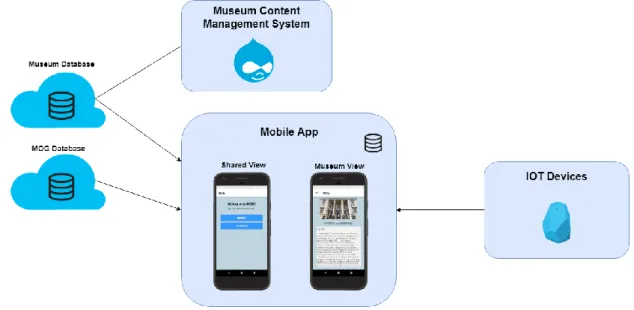
Figure 1 shows an overview of the architecture with all the elements that are relevant to the prototype, and how they are connected.
Figure 1. Smart Mobile System Architecture
The next sections describe each component and its role in the system as well as its relevance and connection with the other components.
3.1 Data Model
One of the main components of this prototype is the database. This prototype is built on top of the MOG main database, but for each museum have total control of their available contents, the prototype also uses a database for each museum. For the sake of easiness of development, we opted to use the Firebase (2019) storage services that enable a fast development solution for the prototype since it provides the required services, including a simple way to connect to different databases.
The MOG database is used to store information about the museums that are registered and available for the mobile application users, so the following information will be stored for each museum: Museum Id, Museum name, Museum address, Schedule, Price, Logo image, Location (link for Google Maps), Rating (calculated based on the different inputs made by the mobile application users), Default language and Museum database info (Database URL, Storage Bucket, Application Id, API Key).
Figure 2. Data Model
This data model was based on existing museums CMS and was adapted to satisfy the needs that we identified previously, such as the multilinguistic needs of the museums' visitors. The most relevant information to a visitor, when inside a museum, is the Exhibition, Zone and Item, and each of these can have information about its location at the museum, meaning that if the museum wants to provide the possibility to see, e.g. a visited exhibition, then it should fill the MapInfo for that Exhibition specifying the pixel coordinates and radius which will be used to draw on the map. The History object is the information that will be shown on the main screen of the application and the News objects will be shown as a list. On the Mobile Application section, more details about how each of these objects is displayed to the visitor are presented.
3.2 Museum Content Management System (MCMS)
In this section, we explain with more detail the decisions made in the development of the Museum Content Management System (MCMS). As we mentioned previously, the museum curator needs a quick way to manage the information displayed to the visitors, so to make this possible while avoiding a big learning curve, we studied the applicability of some existing CMS. First, we researched CMS’s aimed at museums, but most of them are proprietary systems, that would bring additional costs and our approach is to provide a prototype affordable for most of the museums, so we explored CMS’s that are open-source and found the Omeka system, that is aimed at museums, and Drupal, that is a more generic CMS. Between these two systems, we opted by Drupal, since it is more customizable, flexible and has a huge support community.
This MCMS allows and assists the museum curators in the database configuration where the information displayed in the Android front-end application is stored, ensuring that all the information stored in the database, has the correct structure and that all the dependencies between them are coherent. This system will help to configure the available languages, museum map, beacons location (to draw in the map showed to the visitors), general information of the Museum, list of exhibitions and their synopsis, zones of each exhibition and items on display and relevant news for the visit.
Besides this configuration of the database, this MCMS will allow the Museum to see some detailed visitors’ analytics such as the number of visitors per exhibition, the most visited exhibitions, zones and items, the total number of visitors, and much other detailed information. So, in the MCMS the museum curators will have three main options, “Manage App”, “Back-Up” and “Statistics”.
The option “Manage App” provides to museum curators a way to manage the content that is displayed in the mobile application. This option allows the deletion, creation and updates of the content, ensuring all the dependencies of the data model and those defined in the system. If a museum curator makes several changes and wants to revert to a previous version of the database, he can use the option “Back-Up”. Here he can see the previous versions of the database and choose to what version he wants to revert. As we mentioned above, the museum curators can see museum performance through the MCMS using the option “Statistics, where is possible to see some performance indicators.
3.3 Mobile Application
To make possible to the visitor to access information about several Museums the mobile application scan for the IoT devices, so the user must enable the Bluetooth on the mobile device and give permissions to access Bluetooth and Location information, and, after that, the visitor will receive a notification whenever a BLE signal is intercepted. Otherwise, the visitor can use the application but will be limited to the general information and will not have access to exhibitions, zones and items information.
As we shown in Figure 1 the application has a Shared View and a Museum View, that we explain next.
3.3.1 Shared View
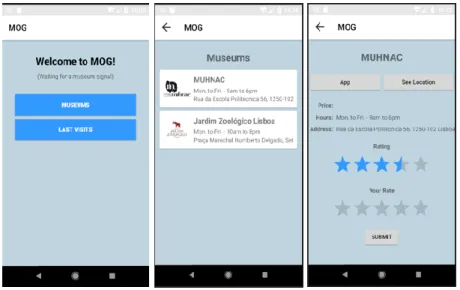
When the mobile application is opened, the visitor sees the Shared view, that is connected to the MOG database. In this view, the visitor has the possibility to see a list of museums that are available in the application but also the last visits realized, that is stored locally in the user mobile device.
The Museums available are listed with their schedule and address. After choosing one of them, is displayed more information such as price, schedule, address/location (opened in Google Maps), the rate of the Museum (0-5 stars) with the option to give a rate and option to open the Museum View.
Figure 3. Shared View
3.3.2 Museum View
In this view the mobile application connects to the database of the chosen Museum and is possible to see the history, news and the museum map (see Figure 4: Museum View). The remaining information, like exhibitions, zones and items, will only be shown when the visitor intercepts a BLE signal (see Figure 5: Exhibition, Zone and Item screens).
the language defined in the mobile device is one of the defined languages by that museum. If it is, the information of that museum will be shown in that language, but if the language is not one of the available, the mobile application will redirect the visitor to a screen where will be asked to choose from one of the available languages having the possibility to change it later.
Figure 4. Museum View – General information
Figure 5. Museum View - exhibition, zone and item screens
3.4 BLE Devices
As mentioned in the previous sections, we used IoT devices to infer the location of the mobile application user through the BLE’s signal to create a more interactive experience of visiting a museum. This signal contains keys that will be used to identify what the Beacon represents, this means, if the beacon is identifying an Exhibition, Zone or Item, and which of them, e.g. exhibition ‘X’.
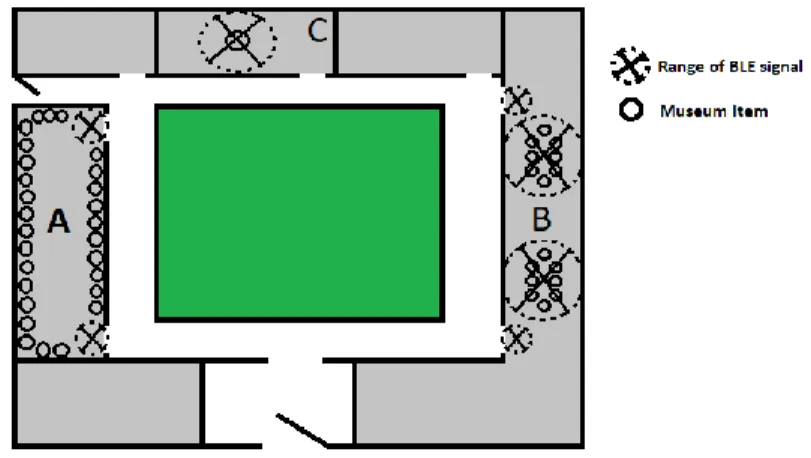
In our prototype, we defined these 3 possible “spaces” (exhibition, zone and item) to have a more flexible prototype since different museums have different needs. For example, if a museum has dozens of items displayed in a room, is much simpler and affordable to put one or two beacons in the room entries and configure them to identify that room instead of associate one beacon per item. In this example, if the beacons identify one room, the configuration of the beacon can be, for example, to represent one zone. In Figure 6: Beacon
placement example is represented examples of beacon placement, which in room A we represent the example mentioned above, where two beacons were placed at the room entries, representing the same zone. The room B are representing a space where exists an exhibition, that is split into two zones, so the two beacons in the room entries identify an exhibition, and the other two beacons are zone identifiers. Room C shows an example where in a room are just one item, and in this case, one beacon represents one Item.
Figure 6. Beacon placement example
So, this makes that each Museum must analyze their needs as well as their budget to create a network of beacons that satisfy their needs and comply with the defined budget.
4. SYSTEM COMPARISON AND DISCUSSION
In this chapter, we will make a discussion and comparison between our approach and the ones mentioned in the state of art chapter.
Starting with the approach in Alletto et al. (2016), their approach brings some functionalities that our approach does not, such as communication to social networks, in this case, Facebook. However, it is a very complex approach for most museums and our objective was to create something simple and affordable, that every Museum could use in a simple manner.
On the other hand, the Chianese and Piccialli (2014) approach only provide information in Italian, while our solution brings to the visitor a way to choose from a set of languages defined by each Museum.
In our approach, one big difference is the centralization of information from different museums, allowing the users to plan their visits without the need to install several applications. This idea of centralization was already mentioned in Bae, E.S. et al. (2013) but was limited to a geographical area and since it was not developed we cannot make a comparison between the technologies.
Another approach mentioned was the T. Ishida et al. (2016), but it’s specific to a Zoo and all the information is limited to one language. The last one was Lakmal G.K.U et al. (2016) that also take advantage of the use of BLE devices, but in our opinion have the disadvantage of needing personal information of the visitor to make suggestions, since this can bring discomfort to the visitor.
We also analyzed some products available in the market and the first mentioned was izi.TRAVEL but we consider a disadvantage the fact that does not use IoT devices to turn the visits more interactive. Another product is the Locatify that use BLE’s but like the other product and technologies, is one application per each museum, bringing to the visitors the need to download one application per Museum that wants to visit.
Table 1 shows a summary of the comparison between the products and approaches considering the factors: Centralization – Capacity to centralize several museums information in one mobile application; Multiple Languages – Allow the user to choose from a set of languages; Simple and affordable – Does not bring many costs to museums and has a tool to help in the management; Indoor Location System – Support ILS for more interaction.
MOG Alletto et al. (2016) Chianese and Piccialli (2014) Bae, E.S. et al. (2013) T. Ishida et al. (2016) Lakmal G.K.U et al. (2016) izi.TRAV EL (2019) Locatify (2019) Centralization ✔ - - ✔ - - - - Multi-Language ✔ - - ? - - ✔ ✔
Simple and cheap ✔ - ✔ ? ✔ ✔ ✔ ✔
ILS ✔ ✔ ✔ ? ✔ ✔ - ✔
5. CONCLUSIONS AND FUTURE WORK
In this paper, we described the developed prototype whose main objective is making the experience of visiting museums more interactive for the visitors while keeping it simple and affordable. The prototype database design is aimed at flexibility so that it can easily adapt to different museums.
To help the museum curators upload data coherent with the defined data model, an MCMS module was developed. This module allows him to manage the contents displayed to the visitors through the mobile application and provides statistics of the museum performance.
The prototype uses a single mobile application to interact with the visitor in a common interface design usable in various museums. The mobile application makes the visits more interactive since the information displayed on the device considers the location of the visitor near each particular item, zone or exhibition of each museum. It also allows the visitor to access additional relevant information complementary to the physically available in the visited museum.
ACKNOWLEDGEMENT
The authors would like to acknowledge the FCT Project UID/MULTI/4466/2016.
REFERENCES
Bae, E.S. et al., (2013). Smart museum based on regional unified app. International Journal of Software Engineering and Its Applications, Vol. 7, No. 4, pp. 157-166.
Beacons. (2019) What is a beacon? Available from: https://kontakt.io/beacon-basics/what-is-a-beacon/
Chianese, A. and Piccialli, F. (2014). Designing a Smart Museum: When Cultural Heritage Joins IoT. 2014 Eighth International Conference on Next Generation Mobile Apps, Services and Technologies, pp. 300-306.
Drupal 8. (2019) Build something amazing. Available from: https://www.drupal.org/8
Firebase. (2019) Firebase helps mobile app teams succeed. Available from: https://firebase.google.com/ izi.TRAVEL Help. (2019). [online] Available at: https://academy.izi.travel/help/production/cms-for-museums/
Lakmal G.K.U et al., (2016). Museum 360: Automated Guiding System for a Museum. International Journal of Scientific and Research Publications, Vol. 6, No. 11.
Locatify. (2019). Automatic Museum Guide. [online] Available at: https://locatify.com/automatic-museum-guide/ Lusa (2017). “Museus aumentam número de visitantes em 2016 com ajuda dos estrangeiros”, PÚBLICO, 12 December. Omeka. (2019) Omeka provides open-source web publishing platforms for sharing digital collections and creating
media-rich online exhibits. Available from: https://omeka.org/
S. Alletto et al., 2016. An Indoor Location-Aware System for an IoT-Based Smart Museum. In IEEE Internet of Things Journal, Vol. 3, No. 2, pp. 244-253.
T. Ishida et al., (2016). Development of a Zoo Walk Navigation System using the Positional Measurement Technology and the Wireless Communication Technology. Journal of Internet Services and Information Security, Vol. 6, No. 4, pp. 65-84.