Licenciado em Ciências e Engenharia Informática
An Online Crowd-video service for collaborative
event recording
Dissertação para obtenção do Grau de Mestre em
Engenharia Informática
Orientador: João Magalhães, Professor Auxiliar, Faculdade de Ciências e Tecnologia Universidade NOVA de Lisboa
Co-orientador: Nuno Correia, Professor Catedrático, Faculdade de Ciências e Tecnologia Universidade NOVA de Lisboa
Júri
Presidente: Professor Doutor Pedro Manuel Corrêa Calvente Barahona Arguente: Professora Doutora Maria Teresa Caeiro Chambel
Copyright © Rui Filipe Monteiro Queirós, Faculdade de Ciências e Tecnologia, Universi-dade NOVA de Lisboa.
A Faculdade de Ciências e Tecnologia e a Universidade NOVA de Lisboa têm o direito, perpétuo e sem limites geográficos, de arquivar e publicar esta dissertação através de exemplares impressos reproduzidos em papel ou de forma digital, ou por qualquer outro meio conhecido ou que venha a ser inventado, e de a divulgar através de repositórios científicos e de admitir a sua cópia e distribuição com objetivos educacionais ou de inves-tigação, não comerciais, desde que seja dado crédito ao autor e editor.
Este documento foi gerado utilizando o processador (pdf)LATEX, com base no template “unlthesis” [1] desenvolvido no Dep.
I want to start to thank Faculdade de Ciências e Tecnologia, NOVA that helped me to grow individually and professionally since the first day I stepped the university. I also want to express my deep thanks to professors João Magalhães and Nuno Correia for their patience, help, advices and availability during the realization of this work.
I also want to thank my colleagues Rafael, Diogo, Ricardo Monteiro, Guilherme, Leonardo, Alexandre, Albert, Luís, André, Ricardo Pinto, Marta, Mário and Gonçalo for sharing with me all those amazing years during the course. I want to give a special thanks to Henrique which was not only my roommate, my partner in most of the gradua-tion courses but which always gave me amazing help and support. I want to also thank all my friends who accompanied me before and during this journey with special thoughts to Rosa (you could have cooked more often), Rita Paulino, Rita Vieira, Daniel, João Silva, Diogo Santos, Inês Barbosa, Vítor, Pedro Alves, Tiago, Nuno Pereira, Nuno Rodrigues, Gonçalo, João Simões, Rita Pereira, Patrícia, Sofia and Leonor, I am very lucky and proud to have known you all. I want to thank Accenture and Ocidental clients where I worked during this year and KCS IT, where I am employed, for their opening and comprehension for my delays due to morning meetings in college.
Each day, technological evolution allows access to information in new ways. Tradi-tional text-based newspapers were, in times past the main source of information, but now there is more and more options. First, with radio transmissions, then with the television, and more recently with the Internet. Nowadays, it is easy to get access to information and multimedia through images and video which can be accessed anytime, anywhere. This new source of information is gaining more and more fans, not only because it is easy to reach, but also because it offers the information needed in quick and effective ways.
This technological evolution does not stop, so now mankind wants to be more than mere receptors, they also want to take an active part in this process as a source, sharing their own information through those new technologies, with people from all over the world.
In this dissertation, we developed a collaborative system where users will share their own videos and collaborate between themselves to develop events related to a particular event. Our intention is to engage users into contributing to grow the available data regarding that event.
With this solution we want to offer, not only some features that similar and already
ex-isting systems like Youtube and Vimeo present, that we assume to be basic and necessary, but also some new like timelines and the possibility to every user contribute to them..
A evolução tecnológica está a permitir a cada dia que passa o acesso a informação através de diferentes formas. Os tradicionais jornais à base de texto escrito que em tempos eram a principal fonte de informação foram ganhando cada vez mais novos concorrentes inicialmente com a rádio através da transmissão do som, mais tarde a televisão e agora a internet. Nos dias que correm há uma enorme facilidade de acesso à informação e a multimédia através de imagens e vídeos que podem ser consultados a qualquer altura começam a ganhar cada vez mais adeptos, não só porque causa da sua facilidade de acesso, mas também por oferecerem a informação pretendida de forma rápida e eficaz.
Mas essa mesmo evolução tecnológica não para, e hoje em dia o ser humano não quer ser um mero receptor, mas também quer fazer parte ativa deste processo. Adquire a função de fonte, partilhando a sua própria informação através dessas novas tecnologias com pessoas de todo o mundo.
Nesta dissertação vamos desenvolver um sistema colaborativo onde os utilizadores poderão fazer a partilha de vídeos próprios e colaborando depois entre si para o desen-volvimento de eventos relacionados com um determinado evento. A intenção é incentivar os utilizadores a contribuirem positivamente para o crescimento desse mesmo evento de forma a que o conjunto de vídeos que o representa seja o mais vasto posível.
Com esta solução queremos oferecer não apenas algumas funcionalidades que são oferecidas por sistemas semelhantes e já existentes como Youtube e Vimeo e que assumi-mos que são básicas e necessárias, mas também algumas funcionalidades novas como a criação de timelines e a possibilidade de os utilizadores contribuirem para o crescimetno das mesmas.
List of Figures xvii
List of Tables xix
1 Introduction 1
1.1 Scope and Objective . . . 1
1.2 Proposed Framework . . . 2
1.3 Challenges . . . 3
1.4 Contributions . . . 4
1.5 Document Organization . . . 4
2 Related Work 5 2.1 Collaborative Video Systems . . . 5
2.1.1 Event Detection In Social-media. . . 5
2.1.2 Events Visualization . . . 6
2.1.3 Collaborative Media and Video Annotation . . . 9
2.1.4 Quality Through Engagement . . . 11
2.2 Public Solutions . . . 12
2.2.1 Platforms With Video Visualization. . . 12
2.2.2 BBC Have Your Say . . . 19
2.2.3 Google Photos . . . 19
2.3 Summary . . . 20
3 Livetime 23 3.1 Requirement Analysis. . . 23
3.1.1 Use Cases. . . 23
3.1.2 Other Requirements . . . 27
3.1.3 Future Features . . . 27
3.2 Architecture . . . 28
3.3 Background Technologies. . . 30
3.3.1 User Interface . . . 30
3.3.2 Web Development Framework. . . 31
3.3.4 Video uploads . . . 32
3.3.5 Twitter API . . . 32
3.3.6 Leaderboards . . . 32
3.4 Development . . . 33
3.4.1 Domain Model. . . 33
3.4.2 Application . . . 34
4 Building Better Timelines 41 4.1 Timelines . . . 41
4.1.1 Event Storylines . . . 41
4.1.2 Microblog Contribution . . . 42
4.1.3 Visualizing Timelines. . . 43
4.1.4 Detecting Storygaps. . . 46
4.2 Collaborative-Competition . . . 47
4.2.1 Rewarding . . . 47
4.2.2 Involving End-Users . . . 48
5 Evaluation 53 5.1 Methodology . . . 53
5.2 Test Scenario . . . 55
5.3 Request Videos. . . 58
5.4 Conclusion . . . 59
6 Conclusion and Future Work 61 6.1 Conclusion . . . 61
6.2 Contributions . . . 62
6.3 Future Work . . . 62
Bibliography 65
A Usability Tests Guide 69
B Usability Tests Questionnaire 73
2.1 Example of the interface created by Boreczky [4] (left) and Balabanovic [2]
(right) . . . 7
2.2 A set of screenshots from Meerkat interface . . . 13
2.3 A set of Periscope screenshots that shows application interface . . . 14
2.4 A set of Snapchat screenshots that shows application interface . . . 17
2.5 A collage example using a selection of photos at Google Photos . . . 19
3.1 Livetime architecture model . . . 29
3.2 Current domain model already developed for Livetime application . . . 33
3.3 An Example of A Sequence of Actions in Livetime Application . . . 35
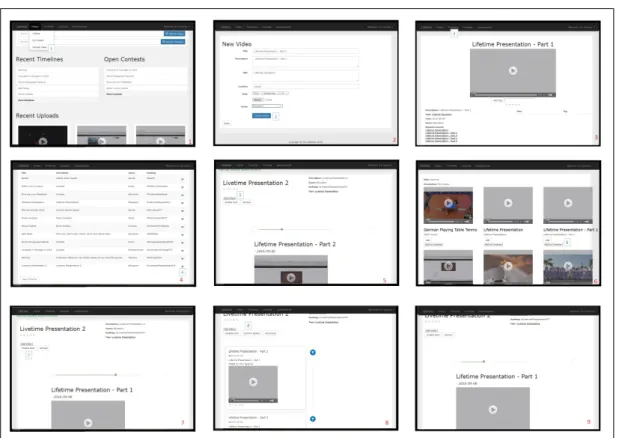
3.4 Livetime Homepage . . . 36
3.5 Livetime Page For Video Upload . . . 37
3.6 Video Page in Livetime Application . . . 38
3.7 Livetime Commentary Section . . . 39
3.8 Livetime Listings . . . 39
4.1 Livetime Horizontal Timeline . . . 42
4.2 Livetime Horizontal Videos Sequence. . . 43
4.3 A Twitter Contribution Made By a Livetime User To Twitter . . . 44
4.4 Livetime Vertical Timeline Inside A Contest . . . 45
4.5 An Example of A Storygap Found in Livetime . . . 46
4.6 Form Of A Contest About To Be Created . . . 47
4.7 Livetime Contest Leaderboard . . . 48
4.8 Livetime Global Leaderboards . . . 50
4.9 Livetime Twitter Account With Automatic Tweets. . . 51
5.1 System overall experience classification . . . 56
5.2 Usefulness of timelines . . . 57
5.3 Usefulness of contests . . . 57
5.4 Usefulness of competitions . . . 58
5.5 Usefulness of twitter . . . 58
2.1 Comparison between described systems - Part 2/2 . . . 18 2.2 Comparison between described systems - Part 1/2 . . . 18
C
h
a
p
t
1
I n t r o d u c t i o n
Each day, technology keeps evolving in different ways with new pieces of hardware and
software providing users with new ways of interacting among themselves and with media. With our solution, we explore some of the existing work in the area of social-media collaborative UHD video and finding and filling the gaps where new features can be researched. This thesis focus on the work of a new web platform system called Livetime which focuses on user collaboration for sharing videos and event creation depicting real-world events, and at the same time exploring ways to encourage users to participate with quality contributions.
1.1 Scope and Objective
Thanks to the evolution of technology which made storage cheaper and cameras spread into almost every handheld device (e.g. laptops and smartphones), Internet is now being flooded with videos from everywhere and by everyone. Now, more than ever due to applications like Youtube, DailyMotion or VIMEO, companies and people in general are uploading videos to reach out larger communities of users. It is an easy way to try to promote a movie, a video game or a song, so in these web applications we can find almost everything and thanks to these applications there are also plenty of other growing web pages that are using content made mainly to these web applications. These applications are prime examples of Internet’s importance and it is still spreading into other directions like video streaming which is getting widely adopted thanks to applications like Twitch, Twitter Periscope or Meerkat where people connect to real-world live videos broadcasts.
applications normally have and also it is necessary to have a good, simple, clear and intuitive interface that point users right to what new features bring. In our solution we want to deliver a new framework with new features but maintaining some well known and more than proved basics to be easy and familiar for the users that are having their first contact with our framework. At the same time is also important to offer our experience in
smartphones and tablets which represents nowadays a big slice of users across the web. In this thesis also have the goal to support 4K/UHD video, a recent digital video format that takes video quality to the next level with an aspect ratio of 16:9 and a minimum resolution of 3840x2160 pixels. This technology was first seen back in 2003 [1] with the first release of a cinematographic camera launched by Dalsa Origin but it was in 2010 when YouTube started to support 4K technology in their videos that it really started to "come out". YouTube support was fundamental for the spreading of this technology, but it was only four years later, back in 2014, that the first 4k television screen was launched. Nowadays it is getting more mainstream but it is still an expensive technology. However, we believe that in the future with the reduction of production costs and driven by market demand it will become the main technology used for video distribution.
The objective of this thesisis to research how to at the same time build a platform to deliver an amount of features that offer a collaborative experience to gather videos from
a specific event, at the same time we aim to reduce video redundancy and to gather better contributions. To do it we explore new social experiences where users can share their videos and build video logs of real-world events collaboratively using all source of high-quality videos. Since Video gathering is the main goal of our goal, we want to encourage users to contribute with their videos with the best quality and correctness possible. To achieve that the system we need more than what we have just described and to do so we will explore a few already studied solutions like the reward mechanism by Rokicki et al. [26] to apply to our system.
1.2 Proposed Framework
The proposed solution is an on-line platform to be deployed to host User Generated Content of video with support for different devices.
We want to ensure collaboration from different users not only in basic features like
video upload, but also adding video annotations and the creation of a timeline for a given event where other platform users can contribute to with their own videos. This is our solution main focus, to have timelines from different events with different videos
that were uploaded from different persons to make a more complete timeline for a given
Apart from that, we also want to offer some social and more basic features like the
possibility to comment and rate timelines and videos or to search videos and timelines and find related information to it.
We want the solution to also support different types of video with a special interest to
Ultra High Definition video which is now growing, , although we will not treat it directly during our work. We will also host a competition system based on leaderboards to try to keep users interested and challenge them to participate with more quality contributions.
Finally, we also want to have a good Twitter integration. Twitter will be another important element of our work and we want to allow our users to use this application to interact with Livetime.
1.3 Challenges
The main and first challenge of a solution like this one is to deliver a new way to users collaborate among themselves and at the same time trying to find the missing piece of the puzzle to offer in our system and which would be different from other already available
systems. It is an extremely competitive world with thousands of developments being made each day. Is pretty hard to find a feature that others do not yet have. But there are other challenges. In a collaboration system it is important to maintain coherence in the whole platform. Livetime is a web application and by that it can be accessed by multiple users at the same time, and at that exactly same time they can do a lot of things like editing some video information, commenting or upload a video. By that reason, avoiding data loses and data incoherence is naturally important.
Also since we are talking about video files, we are talking about big data files. It is true that they are being made smaller each day and like it was said in section 1.1data storage is not that expensive nowadays. It is important to have a simple database that responds fast to its queries so it will not take to much time to access videos which would eventually frustrate the users.
Also important is to have a simple, clear and user friendly interface. Since what we are building is completely direct to users interaction, it is important to have a simple platform where anyone can easily look and understand how to use. At the same time we want to guarantee support to different devices and to retrieve data from different sources.
1.4 Contributions
Throughout this work we made a series of contributions:
Collaborative storylines a new way to create storylines with different people
contribut-ing to them. We let our users create their own events where everyone can contribute with their videos to gather a bigger amount of user generated content for that same event.
Reward contributions a competition system with rewards associated to engage users into making better contributions among with individual competitions for specific events with the goal to fill some event gaps.
Livetime the full development of the system that makes all these ideas possible with an experience different from what we can find in other existing platforms with
new forms of presenting information and where users can create their events and making their collaborative contributions to grow the information regarding them.
Short-Paper was also written but it was not yet published.
1.5 Document Organization
The presented document follows the following structure:
Chapter 1 - Introduction. In this chapter, we provided an introduction to the problem we are addressing in this thesis and what are our goals.
Chapter 2 - Related Work. In this chapter, we discuss concrete examples of Web appli-cations that fall into the scope of collaborative video and identify their main con-tributions and gaps. The chapter finishes with a critical summary listing the best approaches used by the related work and where novel contributions can be made.
Chapter 3 - Livetime. This chapter presents our foundational implementation that will serve as the base system where novel contributions will be implemented, tested and evaluated. We cover the system architecture and also the background of technolo-gies used in the development process.
Chapter 4 - Building Better Storylines. This chapter describes the main contribution of our work. We will discuss our timelines, what they represent and how we engage users into makign better and more contributions.
Chapter 5 - User Tests. In this Chapter, we will provide information from the feedback received by the users interaction with Livetime.
C
h
a
p
t
2
R e l at e d Wo r k
In this chapter, we will study a few academical investigations and solutions in section2.1, and we will also present a few interesting commercial solutions in section 2.2, ending this chapter with a summary in section2.3.
2.1 Collaborative Video Systems
Building a platform for viewing and sharing video content is not something particu-larity innovative. In fact, there are plenty of services already available like Youtube, DailyMotion or Vimeo and surely more to come in the near future. There is continuous investigation in the multimedia field to keep building new services to help day to day life or to simply find new innovate and fun ways of interacting. That is why to build Livetime we investigated about some of the work already done in the area and what they do. We studied different researchers and ideas from event detection to video annotation to grab
different ideas that we could use to make Livetime different from what already exists.
2.1.1 Event Detection In Social-media
Event detection has the goal to detect a specific event using the available data like titles or descriptions and to build a story or to use information from different sources to compose
new event detection algorithm, but we will use the idea of comparing information like video titles and genre to find related content within the videos and timelines.
In the work of Liu et al. [21] they tried to solve the problem of the rapidly growing so-cial media data posted on the web. To do it they purposed a new framework that extracts and illustrates social media events automatically for a given query. They use a natural language algorithm which parses the input query to extract related news from a social news web service. With the given query they try to extract some relevant information like event location, topic or time information to search directly through a social news service provided by Digg1. After they divide the query and they use Twitter API to re-trieve some relevant tweets regarding the topic cleverly filtering the search from the date that the news were posted on Digg to the current date to get more accurate and relevant tweets. They also use Google to retrieve related pictures to illustrate the content. Their big advantage using a services provided by others, in this case Google, is that they save a lot of resources in data storage or processing time. It is another example of how event detection is being used to facilitate the process of present information. Another work regarding this problem was studied by Bian et al. [3] which applied event detection and summarize techniques to answer the quick growth of microblogging services. This type of services are changing the way that information is exchanged and this work introduces a new framework to generate visualized summaries for trending topics. Basically what they do is to analyse the context of the topic and to divide it into sub-topics, then the system uses a set of images to automatically select representative images to illustrate the given topic.
Also interesting and regarding the same problem is the work of Kennedy et al. [15]. In their work, they build a species of a timeline focusing on video concerts. Their goal is to ease the search of concert videos since usually after a concert there will be plenty of videos regarding that same concert across the web. With their work, they gather a collection of videos regarding that concert uploaded by different users, and then they
run an algorithm which compares them to find points in common. With that, they can achieve things like reducing the redundancy and they can even go further choosing the best quality videos instead of the poorest ones. With our solution we also aim to reduce video redundancy since the creation of events will help to store in the same place all videos regarding that same event. With that, users can check which videos are already uploaded or not. The automation of this process is a really interesting but that will not be addressed in the context of this work.
2.1.2 Events Visualization
Delgado et al. [10] studied similar problems like the ones that we just discussed, but with a bigger focus on visualization and on ways to present information to the users. In their work, they give another example of news interaction with assisted news which tries to
Figure 2.1: Example of the interface created by Boreczky [4] (left) and Balabanovic [2] (right)
solve the problem of people’s distraction who forget for instance what they just read a few moments ago. With their mechanism they try to illustrate news in a way to facilitate what is being read. The application developed provided an interface where users can select through a series of dialog boxes to fill the required information like news subject and localization. Then a new article will be created and it will be presented like a slideshow presentation where the news sentences will be associated with a picture. To finalize their work, they also have conducted a study to see if users prefer to read news without the help of illustrations or with it and they come to the conclusion that most of them prefer this new system they used. Our timelines will also use a similar system since a timeline will represent an event and will gather different information from different sources to present
it into one place. Also they use dialog box and forms to fill the information regarding the news. That is the kind of interface presentation that we will also use.
Newsmap2is another great example of how information presentation can be achieved and was developed by Li et al. [19] as a new social-media news browsing system where users can search for the news using a browsing map or retrieving news using a location in the query. The goal was to develop a location-based organized news system. Along with it, they also added a similar system very similar to the one by Delgado et al. [10], since they also associate pictures to their news. To infer about the location they use text processing answering three fundamental questions: Who, Where and What. The answer of this questions help them to find other related news to facilitate the process of discovering news location. That way of visualizing information shows one possibility that we could adopt. In Livetime we will also use approximate locations for videos uploaded. Although, at least for now, we will keep it simple and it is just thought as query or sort filter.
Throughout this chapter, the word timeline already came up a few times, that is not a coincidence since timelines will be the very important in Livetime. In Livetime, Timelines will be a way to tell a story of an event or a memory and will use video to compose it. However, the idea of using multimedia information to build this kind of stories is not new since in 2000, Balabanovic et al. [2] started working with a similar idea using digital photographs. Since technology back then was not as much evolved as nowadays, their work included a device similar to what we call today a tablet but with a few buttons and no touch screen options. Their main focus on developing system’s interface was to keep it simple to use and with a very easy learnability. With this device they want to approach two different directions, first the possibility of sharing stories locally in the presence of
other persons and after to share it remotely. Their device allows pictures upload which are automatically rearranged by date and can be seen as slideshow presentation with the very important feature that users could record their own voice to narrate the pictures that are currently being presented. So in the first scenario users basically slide through the album and tell the picture story face to face with other persons watching. The second is the possibility to record users own voice into the device and send it to someone elsewhere that could then also see the pictures while listening to the recorded voice. For each story they upload a set of pictures, this pictures can make part of different stories and also
other pictures can be uploaded later on by other person. The right picture on the figure 2.1shows the created device among with a few pictures uploaded into it. Our idea with the timelines is almost the same, but now using videos from many different sources to
also build a story/Livetime event. The idea of recording a narrator voice to accompany the slide show is also great, but we think it is unnecessary in our solution since the users can talk directly to their uploaded video.
position of this thirty seconds in the array are incremented by one since they consider that the click of the button may correspond to the favourite parts of the video. In the end their algorithm chooses the three seconds/array positions with the highest counter to generate the corresponding thumbnails. As the second part of they work, whenever a button it is pressed that interaction is saved to VideoSkip database among with video ID, time and which button was clicked. With this information they came to the conclusion that the most used buttons were play and fast forward while GoBack button was one of the fewer clicked, which does not help the process of generating the best thumbnails based on user preferences. After VideoSkip they continued their work [8], this time not focusing on thumbnails generation but more on the second part of their work that is analysing user activity in a web video player. In this solution called SocialSkip 3 they reduced the number of buttons available, maintaining VideoSkip architecture. The goal was to explore more the relation between video content and user interaction and to allow collaborative contributions to analyse user activity data.
But there are other examples regarding visualization that we found interesting like the work done by Boreczky et al. [4] which uses frames from video to summarize them. The goal is to facilitate the process of finding specific parts in videos, specially when we are before a large set of videos. Their system automatically selects relevant frames from video and combines them into one comic book like presentation. Then the user can select one of that frames, which are different in size (bigger frames are more relevant than small
ones), to a video and start playing a video right from that frame. It is a clever approach that allows us to have an idea of what we can find on it before we start actually watching a video. The left image on the figure2.1shows a picture summary of a video from the developed system which gives a good idea of what was created and how it was presented.
2.1.3 Collaborative Media and Video Annotation
Like it was previously mentioned, collaboration is key in our work. It is very important to have a collaborative system where different users can contribute in different ways to
make it evolve and to deliver a better experience overall. Following that idea we decided to study a few systems that use collaboration between users like Vannotea which is a collaborative video indexing, annotation and discussion system for broadband networks developed by Schroeter et al.[27]. The project main goal is to allow real time and col-laborative annotations. This solution uses MPEG-24content and users are able to make editions to description templates that are automatically generated for each video in the system. The generated template uses a mechanism to easily convert it to other types of information like MPEG-7. The main challenge but also the goal of this work was to guarantee that every user using the application and annotation would not affect other
users work and the system would maintain a correct state for all accesses. But there is
more work done in the collaborative area for video annotation like the one developed by Kavasidis et al. [14] called Multimedia Tools Api, a web-based collaborative platform similar to Vannotea but that differs in the way that annotations are built. For each video
available, the platform offers a set of utilities through its interface to make a set of
anno-tations using Microsoft technologies. This annoanno-tations can be applied directly to a frame and can be used in different ways like a piece of text or drawings. Using the available
toolbox users can pick up a pencil or an eraser and start drawing the contours around the frame and select parts to be annotated. One of the examples used during test phase was a video with fish where users had the goal to draw the contour. They also came to the conclusion that contours precision would increment proportionally to the number of users annotating. That is because they use an algorithm with a few math functions like euclidean distance to automatically approximate the best contour for each element of the picture having as base all the contours made by all members for a given video or frame. This also proved that users collaboration can improve data quality.
IBM Efficient Video Annotation (EVA) developed by Volkmer et. al [30] and
Informe-dia Image Classifier developed by Christel et al. [9] are two more examples of applications for video annotation. EVA like Vannotea or Multimedia Tools Api also uses the power of collaboration to annotate a set of videos. A user who is going to make annotations will initially configure a set of parameters to set how much frames he wants to see for each page. Then there will be available four quick label options to label the whole page or individual frames with positive, negative, skip or ignore. The goal is to facilitate the process of making video annotations. EVA is also an available web application optimized for collaborative work. Informedia Image Classifier5 is different since it is a windows
application and by that reason, it works offline and all the users need to have the
com-plete set of data to work, the main advantage is the fact that it does not need Internet connection to be accessed.
All the previous examples regarding collaboration have common points which is video annotation. In our solution we will also make use of simple video annotations, not so elaborated as Multimedia Api Tool for instance, but text annotations to a frame, a set of frames or a specific part of the frame. This annotations will be made collaboratively and will also be made available through the interface. But this are not the only way that users can collaborate among themselves in Livetime, in fact the main source of collaboration will be content uploaded to fill our timelines.
Moving away from video annotation we found a system that uses user crowd-sourced sensing and Twitter to deliver a collaborative system with many applications [11]. Their work is divided in three parts which includes Asktweet, Twitter and Sensweet. Basically Twitter acts as a middleware between all the systems, and users can create a question using Asktweet. They gave an example which is to infer about the current and future weather prevision to other users will respond to it through Sensweet. Sensweet works
using sensors to infer about the conditions in question. Crowd-sourced sensing allows the application to receive information from different users and with that reducing the
errors of the results.
2.1.4 Quality Through Engagement
Finally, our solution needs to have users and even more important we want to have users participating and contributing to Livetime with quality to facilitate our goal of data gathering. To do it we decided to study a few ideas to improve users participation like rewarding users, a method studied by Rokicki et al. [26]. This rewards mechanism is a large-scale experimental evaluation and they use different approaches like paying
for each task completed, competitive strategies where they use ranks rewarding users in higher positions or just the winner in a "Winner-Takes-It-All" competition. They have also used random scenarios inspired by lotteries where users receive lottery tickets where winners would be drawn. They also studied questions like what information should they make available for instance in a competition which reveals to play a crucial role in keep users interested and how that affects their performance and motivation. For instance, in
a ranking system some users will start to gain more points than others. Generally the users with more points are also the users with better or at least most contributions to the systems which will reduce the noise and consequently it will improve data quality. Their work also showed us that users generally enjoy and strive to win well balanced competitions especially when exponential rewards are involved.
Larson et al.[16,29] are other main investigators in this area. They have been present in many ACM Multimedia Conferences editions building workshops about crowd sourc-ing with the goal to improve systems data quality ussourc-ing people contributions. So they study how to formulate tasks, but also received input so then they could improve their methods and crowd sourcing techniques that would eventually result in a better quality data contributions made by users.
In multimedia, crowd sourcing is just recently being explored so there is still a lot to grow and explore. Although there are already a few applications and platforms that use this type of rewards systems to make users collaborate among themselves to improve the quality of the media available, like for instance the m-Dvara project [23] that was applied to museums where users can leave their media and comments to the art pieces and new visitors will be able to read that information left by other visitors to get for instance museum recommendations. To develop this platform, they inferred about a few use cases that they wanted to offer and started from there, a system similar to what we use
system and since participants will be participating in a contest against other users they will try to improve their work as much as they can to win.
The popularity of crowd sourcing gained investigators interest and there are already some work made regarding it, like Blevis et al.[24] who defines Crowd Sourcing asa new paradigm that relies on the intelligence of "crowds" of people to solve a specific problem or
com-plete a task-sometimes with a monetary reward. In their work they divided crowdsourcing
into multiple sectors as crowdsourcing for enterprises, for academics and for social net-works who vary in the type of challenges and motivations that should be presented to the users, since for instance an enterprise crowdsourcing environment should be more about making profit while an academic one is more innovation related. They also define a few roles through different variables to use in crowdsourcing like role-oriented
crowdsourc-ing which is more task oriented, behavior-oriented crowdsourccrowdsourc-ing which focus more on users reputation and quality, and media-oriented crowdsourcing. Lastly they also define a set of motivation models that goes from social connection, fun, self-value, altruism, learning or profit for instance. In our work our the application of crowdsourcing will be focused on both behavior-oriented and role-oriented techniques and we offer as
motiva-tion aspects like a funny system classified by Blevis et al. as personal incentives, social connection classified as social incentives, and also monetary incentives. In Chapter4we will discuss more about the ideas adopted like the hosting of competitions to keep users interested and to try to improve their participation’s quantity and quality and other forms of enganging to receive better contributions.
2.2 Public Solutions
Video sharing is growing every day and it is now becoming more and more mainstream as a way to share information. People from all over the world are now sharing and streaming video to other people, videos of entertainment, news or simply day-to-day life. Allied to this growth are new technologies that facilitate the process like Meerkat, YouTube or Twitter Periscope. We studied some of these technologies to learn more about them and to try to figure out if it can be combined with Livetime. We will present some of those solutions next.
2.2.1 Platforms With Video Visualization
2.2.1.1 MeerKat
Meerkat6was launched during the year of 2015 and can be found through Google Play or AppStore available for the Android and iOS. It acts as a social network where registered users can live stream video through twitter to all their followers spread all around the globe at the distance of a click of a button by just using their mobile application and
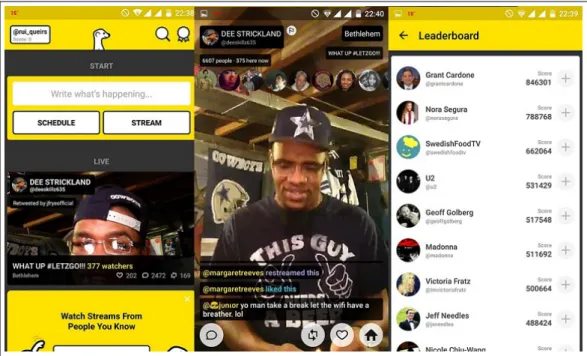
mobile camera [20]. The following picture 2.2 has some screen captures of Meerkat which demonstrates some parts of the interface.
Figure 2.2: A set of screenshots from Meerkat interface
The first screenshot from the left shows the application when we enter it with a couple of information and buttons to users schedule or start their streams or to watch a currently live and trending stream. It is a very simply designed interface with the most important information popping out right at the first contact so users can get used to it in a simple and fast way. The screenshot in the middle shows a live stream. As we can see in the picture, there are plenty of buttons and information on the screen. At the top we can get info about the stream and right below it users who are currently watching it. Then at the bottom we can see comments made live through the click of the button with the balloon form icon, but we can also like or share the stream. The application also offers
other features like a leaderboard which we can see in the last screenshot at the right. Streamers gain points not only by streaming videos, but also by having viewers watching their streams. Leaderboards shows the user with most points and also have a few options for us to start watching their streams or following them.
Finally, Meerkat has an API7 available through JSON format, this API that can be integrated with any system and it is possible to access all the currently live streams, a list of scheduled streams and other information regarding the viewers or comments made. Also, through the Meerkat website it is possible to embed our own stream. We just need to add our user name to the Meerkat Embed page and with a couple of some customizable options, the website will generate an HTML5 code to use in other webpages.
2.2.1.2 Periscope
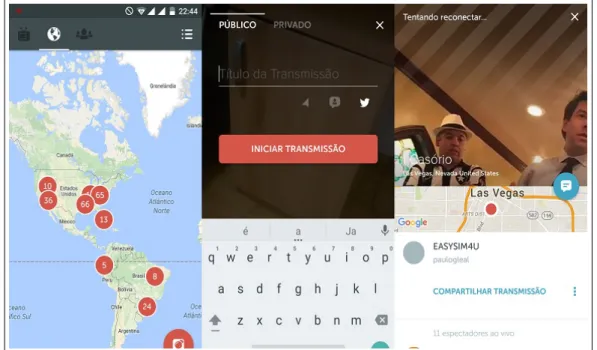
Periscope 8 is another example of a live streaming application. Like Meerkat, it was also developed to Android and iOS and allows users to stream video from their mobile phone or tablet to Twitter instantly. The following picture2.3has some screen captures of Periscope.
Figure 2.3: A set of Periscope screenshots that shows application interface
The first picture from the left shows the application menu when it starts. As it is possible to see there are four buttons at the top. The first one with television icon is to see the users that we follow that are currently streaming. The icon in the middle send us to the world map that aggregate streamers by location. In this map, we can zoom in and out to start watching their streams. Finally, there is the last icon which gives us trending streams. At the bottom right there is the button to start our own stream which leads us to the picture in the middle in figure2.3. We can pick a name, choose if it is a public or private stream, if we want to share our currently location, and then we will start streaming live across the world. Periscope, like Meerkat also has plenty of features like liking and commenting a stream. However, they work in a different way since when we
are watching a stream, the screen is almost completely clear, which can be good because we have a screen with much less information. But also is a bit harder to share or comment, since we need to return to the previous menu like the one we show on the last picture counting from the left in the figure2.3. In this picture we can see some more information about the streamer like the exact point from where he is streaming. Other feature that Periscope offers is the easy way share our own stream to our Twitter account which will
allow our followers to watch live every move that our camera makes.
Regarding Periscope API we found a major difference between this one to Meerkat.
Like it was presented in 2.2.1.1Meerkat has a public API9available. The API permits developers to have full access to Meerkat features using them to build new products and forms of interaction. Although, there have been some independent advancements around Periscope by Gabriel Gironda [25] who is building a Ruby on Rails Client using Periscope, there is not yet available an API for other users to use and integrate in their own applications which can also explain why MeerKat is currently leading by far in the mobile department of live streaming.
2.2.1.3 YouTube
YouTube10 was founded in February 2005 and is currently part of the Google Group. YouTube is also the largest video shared repository available on-line in the whole world with millions and millions of videos from every corner of the planet, sent from many different people and companies and it keeps growing everyday with more and more
videos being uploaded to its database. [31]
Since the beginning that Youtube has been evolving to offer their users new ways of
sharing their videos, like for instance the creation of channels for each of the YouTube users. That way, YouTube users have their own channel with all their videos. But that is not all, because after that came video annotations which we discussed in section2.1.3and that gave to video new information to supplement the one that it already had. Youtube never stops and to remain on top needs to embrace the changes of the world. Changes like the ones we just discussed in sections2.2.1.1and2.2.1.2: streaming. So now, Youtube also has available streaming through its platform, allowing users to start live streaming from their channels to all over the world just like Meerkat and Twitter Periscope. The big difference is their API11which can be easily integrated in many different applications
thanks to its amazing support which explains all the requests that we can do with it. In the Youtube API, we can also find some links for some API samples 12 in different
programming languages like Java, PHP, Python or Javascript. This YouTube Live API is for instance being used with the Playstation 4 system which allows users to live stream their gaming sessions directly to their Youtube channels. But there are many other examples of other companies like the Euro Hockey League or some universities that live stream to Youtube or even Hangouts which can also be used to live stream directly to Youtube. And since we are only in a BETA phase for this new Youtube Service, it is probable that the service will keep growing more and more. Besides the Youtube Live API, Youtube also offers Youtube API13which is used for instance in VideoSkip system discussed in section
2.1.2. This API allows the access to Youtube videos and some of its features.
9http://developers.meerkatapp.co/api/ 10https://www.youtube.com/
11https://developers.google.com/youtube/v3/live/getting-started 12https://github.com/youtube/api-samples
2.2.1.4 Vimeo
Vimeo14is another web application for video sharing very similar to Youtube. It is an application where users can upload, share and view videos. The biggest difference is that
Vimeo is more restricted than Youtube in the accepted content and it is more focused in high quality videos. In fact, Vimeo was the first video sharing site to support High Definition video back in 2007. The fact that Vimeo has also a smaller and more focused community allows that the contributions made have more quality in general and less uninteresting videos.
We think the solution we want to build and we will present in Chapter3is closer to Vimeo, since we will work with a smaller group of members and we want our solution to focus more on high quality content.
2.2.1.5 Facebook
According to Statista [17] Facebook15is the most popular existing social network. It has been this way for years and it will probably continue to be for the next years to come. It all started with an application from Harvard University but it quickly spread worldwide. The main reason is because they just did not stop evolving from a very simple platform with easy interaction to a platform where we can find videogames, create groups, chat with other users and share all kind of posts from text to photos to our friends or worldwide. In Facebook we can do almost anything and more recently video is also becoming a big part of the social network since users can now start recording and sharing video directly to their Facebook accounts and even launch live streaming in the social network.
From Facebook we can learn a lot like the importance of interaction simplicity that makes users enjoy using the platform and also that users really like to share all kinds of information across the web, something that our platform will contribute to expanding this type of information sharing and presentation.
2.2.1.6 WhatsApp
WhatsApp16is another social network where users can contact with other users indi-vidually or in groups. In this application, users can send text, pictures and of course video.
It is really easy to start conversations with other users in WhatsApp and that is prob-ably the main reason why this application is getting so popular. Statistics from Statista [17] shows that it is already the second most popular social network. WhatsApp main goal is to facilitate communication between people and it is mainly used in smartphones.
2.2.1.7 Snapchat
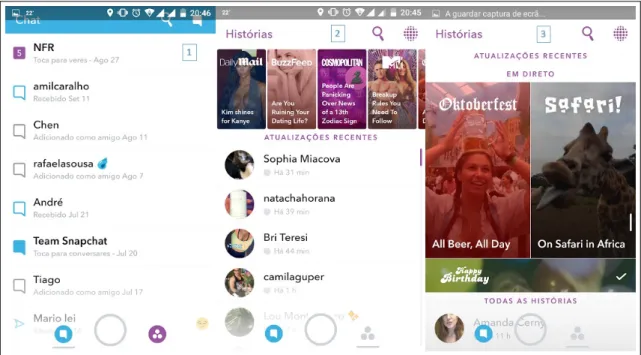
Launched in 2009, Snapchat had one main goal: send a picture to another user that would be deleted after read. The idea gained success and now it is not only possible to send pictures, but it also incorporated a very simple chat in screenshot number one from figure 2.4and also the possibility to send small videos up to ten seconds like we show.
Figure 2.4: A set of Snapchat screenshots that shows application interface
Apart from that, Snapchap also offers stories that are very similar to the timelines
that we use in our application. A story in Snapchat is a collection of snaps (videos and pictures). Each user can create his own story and only he can contribute to it. In picture number two from figure2.4, we have a set of stories from Snapchat users. In Livetime a story is a collection of videos. The difference remains, apart from the presentation form,
in two aspects: In Snapchat each snap that composes a story is only available for twenty four hours, and in Livetime it will be always available, also a user story in Snapchat will only have contributions from the story creator while in Livetime everyone can contribute to.
2.2.1.8 Instagram
Another popular social network is Instagram17with the goal of sharing video and photos to other users. The main differentiating feature that Instagram brought was the possibility
to add filters to the pictures taken which leads to more artistic photos.
Instagram is a very simple application with very few features but it also conquered the audience. Recently like Snapchat in2.2.1.7, they also added the possibility to create time limited stories with videos or photos that added a new feature to the application. Apart from that it offers connectivity with others social networks, the possibility to add
locations using mobile GPS, to like or to comment the posts made to the social network.
2.2.1.9 Comparison Between Solutions
Feature Meerkat Periscope Youtube Vimeo
Streaming X X X
-Public API X X X X
Video Storage Temporary - X X
Quality Filter Small Small Small High
Web Application - - X X
Mobile Support X X X X
Timelines Support - - -
-Table 2.1: Comparison between described systems - Part 2/2
Feature Facebook WhatsApp Snapchat Instagram
Streaming X X -
-Public API X - - X
Video Storage X X Temporary X
Quality Filter Small Small Small Small
Web Application X X - X
Mobile Support X X X X
Timelines Support X - X X
Table 2.2: Comparison between described systems - Part 1/2
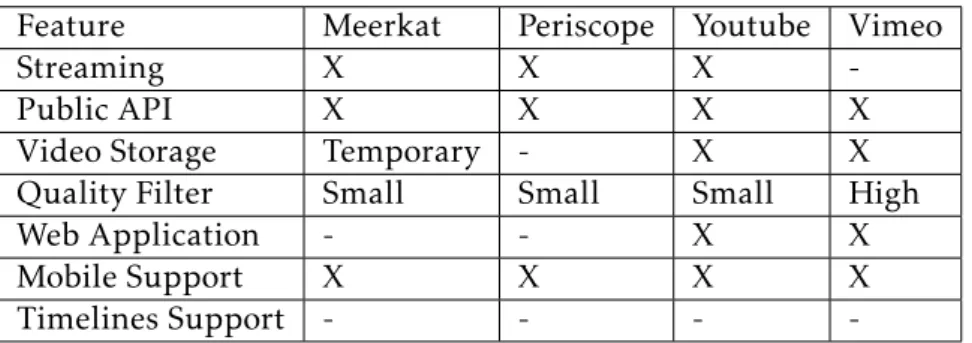
The following tables2.1and2.2makes a comparison between the systems described in subsection 2.2. This comparison is done between elements that we think that are relevant to compare between all the applications like public Api or video storage and allow us to have a more concrete idea of what they have and do not have to offer. To
facilitate the reading process an "X" means that it has the feature and an "-" means that it does not have.
2.2.2 BBC Have Your Say
BBC 18is one of the biggest and oldest radio and television public broadcasters of the world, broadcasting for all over the planet. But even companies like BBC are trying to find better ways to reach the audience and to involve users. Internet expanded circum-stantially the ways to communicate and like we have previously discussed users want to take an active part of this new types of communication.
With that in mind, BBC News launched a new service calledBBC Have Your Say 19, a service that calls for users to contribute with their own stories, news and events.
BBC made available a few means of communication through messaging, e-mail or Twitter specialized to BBC Have Your Say giving people the power to contribute to the news world. With people’s shares BBC can create stories that they were not aware about or they can complete their own stories with information brought from people that were at the events in question.
Similarly to Livetime, BBC launched a service to ask for people collaboration to im-prove their stories. Clearly, all contributions made by people will be reviewed before being published, something that we will not do.
2.2.3 Google Photos
Figure 2.5: A collage example using a selection of photos at Google Photos
Another application that we consider important to discuss is Google Photos20. Google Photos is not new, but some of its recent features are, and it is in these new features that
18http://www.bbc.com/
19http://www.bbc.com/news/have
yoursay
we will focus on.
Despite being able to be used as an web application, Google Photos Application main advantage is its mobile application [12] which allows us to upload photos or videos to Google Cloud Storage and to easily create some really great stuffwith our own generated
content.
Figure2.5shows a simple example of what we can do with it. In the mobile application or through the web application we can access our data stored in Google Photos and then we can create a new collage that will automatically generate an image like the one we just presented. But we have more features available since we can create for instance an animation using once again a set of pictures where we can add a few effects. Also we can
use the application to build a story using a set of pictures the story will be automatically organized into an album by date. Google Photos also has a feature that automatically creates a new collage or presentation using the photos available in our account and the users does not need to do anything to do it except having a set of content in the gallery.
Despite all of that, the best feature is the possibility of building our own video using that same uploaded data. We just need to select all the videos and photos that we want to add and it will automatically generate a video with the selected set, also automatically adding an adequate song regarding the content used.
2.3 Summary
As has been discussed previously, there are already a lot of work and solutions developed in this area. We have studied a very wide set of scenarios like event recognition, multime-dia presentation or ways to guarantee quality content. Since we want to build a very wide platform, our goal with these readings was in general to drink a bit of all that ideas to build our own ideas and not necessarily to fix or improve something that is already done.
That is why we also explored some of the already existing solutions not only to see what they offer and how we could use them, but also to try to figure out what we could
do different.
is important for us to have high quality contributions. Specially because we aim for Ultra High Definition videos, but also because we want to gather good samples of data to our system, we studied some ways to do it that we will integrate in our platform and at the same time that may help to maintain user interest among our system and contributing.
We have explored a few commercial solutions in section2.2. Our first goal was to try to learn a way to integrate them with our system, but we came to the conclusion that or they do not offer what we are looking for like2.2.1.1or2.2.1.2or that they will not add
that much great value to our solution like 2.2.1.4or2.2.1.3so we just studied them to learn what they offer, what they do and what we can we can do that they already do and
what we can do different focusing on features that are not already explored by them. With
this study we also come to the conclusion that new applications that are emerging have two main focus, first a good mobile adaptation since applications like2.2.1.7and2.2.1.8 where developed entirely with mobile users in mind, second simplicity. New applications offer one or two features different from what we can find in other applications and then
C
h
a
p
t
3
L i v e t i m e
In this chapter we will introduce our solution. First in section3.1, we discuss about all the requirements using concrete use cases. In the section3.2, we present and discuss the solution architecture and how the technologies referenced in section3.3are used. Finally we have section3.4to present the solution.
3.1 Requirement Analysis
Livetime is the proposed name to the solution we have built. Our solution main goal is to become a new video visualization service which offers features to create life stories and
different ways of interacting. These life stories are called timelines and basically they
represent an event in time. Besides that we also offer a set of features from the most basic
ones and which we consider essential to an application of this kind, to some other new and more complex features.
3.1.1 Use Cases
In the following subsections, we will make use of some use cases to extract Livetime requirements. These are requirements that we have already available in Livetime and some that are thought for the future.
3.1.1.1 Use Case 1: New User Creates Account, Creates Channel, Uploads Video and Adds Video Tag
Primary actor:User, Livetime Basic Flow:
2. The user creates the account. User will be automatically logged in
3. Livetime stores the new account information in the data store
4. User creates video channel
5. User fills the form to create his channel and the channel is created
6. Livetime stores the new channel information in the data store
7. User uploads a new video to Livetime
8. User fills the video form with all the information and uploads it to Livetime
9. Livetime stores the new video in Livetime store
10. The user goes to an uploaded video location and starts watching the video
11. At a given time, the user manually adds a new tag to the video associated with the current video time
12. Livetime stores the new video tag information in the data store
Requirements With the basic flow described in this section we can find a few require-ments that are available in Livetime:
Create Account Users have the possibility to create their own accounts. For that we will ask through the filling of a form for some basic information like e-mail and pass-word to make authentication, birth date, name and country of origin. It is required to have an account to access some of Livetime features like directing uploading videos, comment or participate in the timelines.
Create Channel To upload their videos to Livetime a user needs to create his channel. This option will be made available the first time that a user tries to upload a video. The channel creation is very simple and again it is through the filling of a form where the user can choose the channel name and also give it a description. Channel and videos are connected since all users have their own channel with their videos.
Upload Video Every registered user also has the possibility to make a direct upload of a new video to Livetime. Once again, to do it we present a form that needs to be filled with some information like title, description, genre selection, date, a set of tags and of course the video file location.
3.1.1.2 Use Case 2: A User Creates a Timeline and Adds Videos To It, Another User Uploads a Video And Also Adds It to the Created Timeline
Primary actor:User A, User B, Livetime Basic Flow:
1. User A decides to create a new timeline in Livetime.
2. User A then adds videos from his channel to the newly created timeline
3. Livetime stores all the information regarding the timeline
4. User B enters Livetime and decides to upload a video
5. Livetime checks its database to see if there are already existing related timelines
6. Livetime suggests the User B to add his new video to the timeline created by User A
7. User B adds his video to the timeline
8. Livetime stores the new video in the User’s A timeline
9. User’s A timeline now has videos from User A and User B
Requirements With the basic flow described in this section, we find another set of requirements available in Livetime:
Create timeline The user have the opportunity to create their own timeline. This time-lines will have a genre like sports, education, politics for instance and can be created through the filling of a form. Every timeline will also have a set of tags associated with it and also an hashtag.
Collaborative timeline Users can not only create timelines but they can also help them build it. Imagine the following scenario: User A went to a concert of the band X and recorded three songs which after uploaded to his Livetime account and created a new timeline with the songs he recorded. But Livetime has also another user, User B who also went to the same concert and recorded three different videos and also
upload them to his Livetime account. User B will also have the opportunity to share his videos to timeline created by User A and now that timeline will not have just three concert videos from User A, but six from both User A and B which will create a bigger and more complete timeline. This can be achieved using Livetime.
3.1.1.3 Use Case 3: A User Will Search, Comment and Rate a Timeline and a Video
Primary actor:User A, Livetime Basic Flow:
1. User A searches for a timeline
2. User A gives timeline a classification
3. User A also comments the timeline
4. Livetime stores new timeline classification and commentary
5. User A searches for a video
6. User A gives video a classification
7. User A also comments the video
8. Livetime stores new video classification and commentary
Requirements With the basic flow described in this section we can find another set of available features:
Commentary sections For each video and timeline is available a commentary section. In this section users can leave a text comment that will be associated with their account and which everyone will be able to read. Only registered users have access to this possibility.
Rate timeline and videos For each video and timeline, a rating section is available . In this section users can rate the timeline or the video with a 1 to 5 star classification. This information will be stored in Livetime application.
Search Video and Timeline Users can search videos and timelines using keywords. Af-ter the search, it will be retrieved a list of related videos and timelines.
3.1.1.4 Use Case 4: A User Searches a Timeline and Opens a Contest, Another User Uploads a Video to Contest Using Twitter
Primary actor:User A, Livetime, User B, Twitter Basic Flow:
1. User A searches for a timeline
2. User A opens a contest for an already existing timeline
3. Livetime stores new contest information
5. Twitter stores the tweet
6. Livetime grabs the tweet and stores it in the contest
Requirements With the basic flow described above, we present another set of require-ments:
Contests Contests are a very important feature of Livetime. Every user has the possibility to open a contest. In this scenario, imagine the following: User A arrives to a searched timeline, he founds that there are a part of the timeline that has very low contributions and he decides he wants more, so he opens a contest for that timeline portion. Basically, a contest is just another timeline with a reward system. Much more about it will be discussed in chapter4.
Twitter Upload This is one of the features that uses Twitter that we have available in Livetime. Like the previous requirement, it will be much more detailed in chapter 4, for now we leave the basic idea: Since each timeline as an hashtag associated, when a user Tweets using that hashtag Livetime uses the Twitter API referenced in subsection3.3.5to grab the video and add it to the timeline.
3.1.2 Other Requirements
Related videos and Timeline When users are inside a timeline or a video, they can see a set of related timelines and videos.
Leaderboards Solution has leaderboards available which are divided in different
cat-egories like top video uploaders, top timeline creators, best rated timelines and videos and a combination of all of them. They are also absolutely essential to the contests available since they will determine the winners.
Timeline Presentation There are two ways to present timelines. The first form works like a slideshow where videos will be disposed horizontally. The other is vertical with all videos that compose a timeline will be shown at the same time.
3.1.3 Future Features
The following requirements have been thought but they are not yet available we will present them but they will be more discussed in Chapter6where Future Work will be approached.
Timeline Intelligence Timelines will also have some intelligence on its data. Imagine again a scenario where Livetime User A goes to a concert of the band X and he records three videos and starts a timeline for that concert. With the timeline name and description plus video name, description and tags, we will have plenty of information regarding the timeline. Imagine now that User B wants to add videos to the timeline, our application will also be able to compare the new video information to the current timeline and its videos information to make a validation to check if the video makes or it does not make sense to the existing timeline. If a user adds the video to the timeline, but Livetime does not think the video is appropriated to the Livetime in question, the user will be alerted to remove it and will also alert the timeline creator.
Timeline Summary For each timeline we will also provide a video summary of all the videos that compose it. This video summary will be generated automatically.
Closed, Protected and Open Timeline categories Timeline categories are responsible to add restriction to timeline. Each timeline will be divided into one of these categories that will be chosen by timeline creator. Closed category is a the most restricted one and will only allow users with access from the creator to upload videos to it. Protected category which will allow everyone to upload their videos to the timeline but only its creator will be able to accept them. Finally there will be an Open category which will allow every user to edit and add new videos directly into the timeline.
3.2 Architecture
The proposed solution consists of a web application based in a client-server architecture which uses Bootstrap for the client presentation and Ruby on Rails and its MVC (Model, View, Controller) pattern.
This pattern separates data representation from user interaction and consists in three components:
Model is responsible for data storage and it has PostgreSQL as its bases. It notifies all associated views and controllers when a state change occurs, so that way we will always have up to date data in our storage.
View is the layer responsible to generate results to clients through model solicitations
Controller is responsible to send model commands to update data and also to the view to change presented information.
Figure 3.1: Livetime architecture model
Our model is basically divided into seven components. In figure3.1we can find all of them. First we have the clients. The clients are the users that will interact with Livetime application using their devices like mobile phones, computers or laptops. It is there where the users are able to perform all the functions referenced in the previous section 3.1like create an account, upload or watch a video, create a timeline, watch a timeline, comment or rate.
Bootstrap described in the section3.3.1is the technology chosen to build user inter-face. That way, we hope to deliver the users a modern looking and dynamic application which can be used in every device like if it was native.
the seven components spoken about this architecture and that Ruby on Rails brings to us. Controllers are responsible to make the first connection to user interaction and the rest of the application. All user requests are made to the controllers and the controller will redirect them to the Active Record. The Active Record is then responsible to retrieve or to store the data in the database like a simple request reply system. Active record facilitates the communication between our controller and database since it automatically adds features as insert, update or remove new data with proprieties that correspond to the database table.
Our database is another one of the seven architecture components. It uses PostgreSQL referenced in section3.3.3to store data information. That data information includes user accounts information, channels information, videos information and basically every infor-mation necessary to fulfil our system requirements and also the videos location. Videos will not be stored in our database but in a file system, another of the seven components. Finally there are two other components. First the Redis Server discussed in section 3.3.6. Our controller is responsible to send notifications to the Redis Server everytime we want to make a change to the rankings. Controller is also responsible to retrieve data from the Redis Server to show clients the rankings. Second there is Twitter. Clients can interact directly with Twitter. Clients can post their tweets to Twitter and our application is responsible to gather Twitter information to store in our database to be shown to every client that uses Livetime.
3.3 Background Technologies
The following subsections introduce the used technologies in the development of our solution applied to our system components.
3.3.1 User Interface
The User Interface is a key point in a web based application. Having a clean, simple and user-friendly interface is essential and nowadays, since the growing of mobile devices in the web, building a responsive web page is also a top priority to facilitate mobile users interaction. To do it, there are a few guidelines to be followed which can be applied for instance with pure HTML5 technology. Fortunately and to facilitate this developing process, there are already plenty of open-source frameworks like Zebra 1, Skeleton 2, Foundation3and Twitter Bootstrap4.
We decided to use Twitter Bootstrap because of previously experience with the frame-work and also because it is a very popular frameframe-work which can be easily adapted to many
![Figure 2.1: Example of the interface created by Boreczky [4] (left) and Balabanovic [2]](https://thumb-eu.123doks.com/thumbv2/123dok_br/16521332.735664/27.892.135.759.150.470/figure-example-interface-created-boreczky-left-balabanovic.webp)