Configuring Cisco
Voice Over IP
Copyright 2000 by Syngress Media, all rights reserved
Table of Contents
CHAPTER 1: Cisco Voice Solutions and Business Justification
Introduction to Voice Over IP Concepts
General Overview of Voice Technologies
Juicy Possibilities
A Little Dreaming
Back to Reality
What Can you do Now?
Basic Toll-Bypass Designs
Tie Line Replacement
Where The Money Is
What About Data
Using Frame Relay for Toll-Bypass
Using Point-to-Point T1 For Toll-Bypass
Looking at Return On Investment
Reviewing Current Expenses
Designing the Solution
Building the Return On Investmentand Payback Period
The Network PBX
Replacing the Traditional PBX
Call Routing
Dial Plan
Interactive Voice Response
Unified Messaging and the Amteva System
Savings Analysis Example
Advanced Features and Integration Possibilities
TAPI Integration
Web Click-to-Talk
Transfer, Forward and Conference Capabilities
Faxing
Call Detail Recording and Data-Mining
Voice Over Frame Relay
Growth Curve Of Frame Relay
When Does VoFR Make More Sense Than VoIP?
Toll-Bypass Opportunities
Voice Over ATM
Where To Use It?
QOS vs. Availability
Summary
FAQs
CHAPTER 2: Introduction to Telephony
Introduction
Analog Signals and Systems
Basic System Operation
Dial Pulse Signaling
Dual-Tone Multi-Frequency
Analog Network Components
Loop and Ground Start
Voice Encoding: Standards and Techniques
Waveform Encoding
Source Encoding
Analog Signal Composition
Analog Signaling
Analog-To-Digital Conversion
Modems
Summary
FAQs
CHAPTER 3: IOS Voice Protocols
Overview of IP Networks
Voice over IP Signaling, Addressing, and Routing
H.323 Family of Standards
Introduction to H.323
H.323 Components
H.323 Terminals (Endpoints)
H.323 Gateways
H.323 Gatekeepers
Multipoint Control Units (MCUs)
H.323 Protocol Stack
H.323 Call Stages
H.323 Discovery and Registration
Call Placement (Intra-Zone)
Call Placement (Inter-Zone)
Logical Channel Setup
Media Stream and Media Control Flows
Call Termination
H.323 Endpoint-to-Endpoint Signaling
Session Initiation Protocol (SIP)
Key Benefits of Session Initiation Protocol
Session Initiation Protocol Components
Session Initiation Protocol Messages
Media Gateway Control Point (MGCP)
Summary
FAQs
CHAPTER 4: Basic Voice Over IP Configuration
Different Types of Voice ports
Foreign Exchange Station Interface (FXS)
Foreign Exchange Office Interface (FXO)
Ear and Mouth Interface (E&M)
T1 Voice Connectivity (2600/3600/7200/AS5300)
Voice Network Modules and Voice port Modules
Voice Network Modules (VNMs)
Different Types of Voice Interface Cards (VIC)
VIC-2FXS
VIC-2FXO
Connecting VNMs and VICs to the Router
2600 Series Router Configurations
3600 Series Router Configurations
Voice Port Cabling and Configuration
Voice Numbering on the 2600 and 3600 series
LED Status
Configuring Voice Ports on the 2600/3600
Configuring FXO or FXS Voice Ports
Configuring E&M Voice Ports
Voice Port Tuning Commands
Concepts of Delay and Echo
Fine Tuning FXS/FXO Ports
Fine Tuning of E&M Ports
The Connection Command
Direct Voice Trunking vs. Dial – Digit Interpretation
Standard Dialing Analysis—Digit Interpretation
Supervisory Disconnect
Wink Start Signaling vs. Immediate Start Signaling
Dial Peers
Call Legs
POTS vs. Voice Network Dial Peers
Creating and Implementing Dial Plans
Number Expansion
Basic Syntax of the Dial-Peer Command for POTS
Basic Syntax of the Dial-Peer Command for VoIP
Direct Inward Dialing (DID)
VoIP QOS over Leased Lines
IP Precedence
Data Network Queuing Algorithms
Queuing on Voice/Data Networks and Real-Time Transmissions
Class Based Weighted-Fair Queuing (CBWFQ)
IP RTP Priority
Resource Reservation Protocol (RSVP)
RSVP Configuration
IP Precedence vs. RSVP
Multilink PPP (MLPPP) and Interleaving
Compressed Real-Time Protocol (CRTP)
CODEC and Voice Activity Detection (VAD)
Configuration of FRF.12 Fragmentation
Frame Relay Traffic Shaping
VoIP Troubleshooting
Case Study 1
Case Study 2
Summary
FAQs
CHAPTER 5: H.323 Configuration: Gateways and Gatekeepers
Introduction
H.323 Version 1 vs. Version 2
Lightweight Registration
Improved Gateway Selection Processes
H.323 RAS and Gatekeepers
Gatekeepers
Zone Management
Gatekeeper Functionality on Cisco Platforms
Configuration of a Cisco Gatekeeper
Configuring an H.322 Gatekeeper on Cisco Platforms
Directory Gatekeepers and Location Requests
Gateways
Gateway Discovery
Configuring an H.322 Gateway on Cisco Platforms
Configure Gateway Interface Parameters
AAA and Call Detail Records
Acct-Session-Id Field
NTP Time Format
Interactive Voice Response
IVR Scripts
Fax Hop On/Off
Procedure for Creating Audio (AU) Files
Store-and-Forward Fax
On-Ramp and Off-Ramp Gateway Concepts
Configuration of Store-and-Forward Faxing
Redialer vs. Direct Inward Dialing
Configuring the On-Ramp Gateway
Configuring the Called Subscriber Number
Configuring the Sending Mail Transport Agent
Configuring the On-Ramp POTS Dial Peer
Configuring the On-Ramp MMoIP Dial Peer
Configuring the Off-Ramp Gateway
Configuring the FAX Transmission Speed
Configuring the Receiving Mail Transport Agent
Configuring the Off-Ramp POTS Dial Peer
Configuring the Faxed Header Information
Configuring the Fax Cover Page Information
Advanced Troubleshooting
Show Gateway
debug ras
debug h225
Show Call Application Voice
Summary
FAQs
CHAPTER 6: AVVID (Architecture for Voice, Video and
Integrated Data) Introduction
Introduction
AVVID IP Phones
Phone Features
Cisco Call Manager
Call Manager Features
Access Devices
Analog Gateway
Digital Gateway
AVVID Equipment Initialization and Registration
Phone Initialization and Configuration
How AVVID Works
Placing an IP-to-IP Phone Call
Placing an IP-to-PSTN Call
Placing an IP-to-IP Call over the Wide Area Network
Plug-in Applications
Directory Services
Virtual Phone
CiscoValet
Manual Attendant
Conference Bridge
Media Termination Point
SUMI
TAPI Interface
Web Help
The Future is Near…
Summary
APPENDIX A: IPv6 Addressing
IPv6 Addressing Basics
IPv6 Addressing Scheme Characteristics
Version
Traffic Class
Flow Label
Payload Length
Next Header
Hop-by-Hop Options Header
Destination Options Header I
Routing Header
Fragment Header
Authentication Header
Encrypted Security Payload Header
Destination Options Header II
Hop Limit
Source Address
Destination Address
More Bits!
A More Flexible Hierarchical Organization of Addresses
FP: Format Prefix
RES
NLA ID
SLA ID
Interface ID
Minimizing the Size of Routing Tables
Global Addresses for the Internet and Local Addresses for Intranet
IPv6 Benefits
Increased IP Address Size
Increased Addressing Hierarchy Support
Simplified Host Addressing
Simpler Autoconfiguration of Addresses
Improved Scalability of Multicast Routing
The Anycast Address
The Need for Further Development
The Multihoming Problem
The 6Bone
Summary
FAQ
APPENDIX B: The IPv6 Header
Introduction
Simplified Header
Improved Support for Extensionand Option
Flow and Flow Labeling
Authentication and Privacy
IPv6 Header
IPv4 Header
Extension Headers
Hop-by-Hop Option Header
Routing Header
Fragment Header
Authentication Header
Encapsulating Security Payload
Destination Options Header
Upper-Layer Protocol Issues
Summary
FAQs
Return to Table of Contents
Chapter 1
Cisco Voice Solutions and Business Justification
Introduction to Voice Over IP Concepts General Overview of Voice Technologies
Juicy Possibilities A Little Dreaming Back to Reality
What can you do now? Basic Toll-Bypass Designs
Tie Line Replacement Where The Money Is What About Data Combining Networks
Using Frame relay for Toll-Bypass Using Point-to-Point T1 For Toll-Bypass Looking at Return On Investment
Reviewing Current Expenses Designing the solution
Building the Return On Investment and Payback Period The Network PBX
Replacing the traditional PBX Call routing
Dial Plan
Interactive Voice Response
Unified Messaging and the Amteva System Savings Analysis Example
Advanced Features and Integration Possibilities TAPI Integration
Web Click-to-Talk
Transfer, Forward and Conference Capabilities Faxing
Call Detail Recording and Data-Mining Voice Over Frame Relay
Where To Use It
When Does VoFR Make More Sense Than VoIP? Toll-Bypass Opportunities
Voice Over ATM Where To Use It QOS vs. Availability Summary
FAQs
Introduction to Voice Over IP Concepts
Welcome to the brave new world of packetized voice! Although the idea of packetized voice may not be new, we are finally getting the tools to make it happen. This text will provide you with a thorough understanding of Cisco's current voice solutions, with an emphasis on current! The VoIP industry is a rapidly evolving one, perhaps even faster than the Internet. Keep this guide as a
reference for voice integration possibilities but always keep abreast of the latest technologies. What is hot today is commonplace tomorrow.The objectives for this chapter are:
• Establish the basic differences between circuit switched and packet switched networks.
• Build a needs and cost justification for toll-bypass solutions.
• Explore the opportunities for replacing or enhancing the traditional PBX with a networked PBX.
• Review software integration possibilities such as TAPI integration.
• Understand the alternatives to VoIP such as VoFR and VoATM
Scattered throughout this chapter are several diagrams of network design concepts. Later in this book we will delve into much greater detail regarding specific equipment and configuration issues. This first chapter will focus on the opportunities that arise from moving to a packetized voice architecture. Along with management and maintenance enhancements we will also look at the all-important dollar. Most companies have spent exorbitant amounts of money to install and maintain their PBXs. Packetizing voice allows for tremendous cost savings now and in the future. As more standards are ratified, the cost of setting up a VoIP network continues to drop. This is quite a
different model from the traditional PBX cost trends of the last few decades. We will explore how to go about building a Return On Investment (ROI) proposal that in most cases will justify a
conversion to packetized voice. Although this is a VoIP manual there is still room in the network for Voice over Frame Relay (VoFR) and Voice over ATM (VoATM). In some cases, these two
alternatives may be the desired combination. This is just the tip of the iceberg. As VoIP becomes more widespread and ubiquitous we will begin to see applications that we can't even imagine yet. Moving voice from a closed proprietary system to an open standards-based architecture will revolutionize the phone industry and the world as much as the Internet has.
General Overview of Voice Technologies
There is a difference between dreaming about something and actually seeing it happen. That
Today’s reality is the inspiration for our dreams. As we learn about new technologies we must consider where we are today in a realistic sense but also keep thinking about where we will be tomorrow.
Juicy Possibilities
For this revolution to occur we need people to come up with ideas that capitalize on new technologies. Consider the following scenario.
A Little Dreaming
Imagine a sunny day sometime in the near future. You wake up, roll out of bed, get dressed and stroll into the kitchen for some coffee. While you sit there sipping your coffee you see the
"Messages" icon blinking on your kitchen Internet terminal so you reach over and tap it. Up pops a list of all of your emails, voice mails and daily news info. You see at the top of the list a voice mail from mom who happens to live on the other side of the world. It looks like the message came in around 1AM. Apparently mom didn't realize that all calls after 10PM automatically get diverted to voice mail. You tap on her message and hear her carry on for 15 minutes about the weather as you silently curse the day "long distance" calls became a thing of the past. But that's okay because you want to talk to her about visiting anyway. So you tap "Reply" and you immediately hear a ringing tone from your kitchen terminal. Mom picks up on the other end and gives you a hard time about interrupting dinner. You talk to her for another hour while her dinner gets cold. You're not
concerned though because there's no extra charge on your network bill no matter how long you talk. You also left your house 45 minutes ago! While you were talking to mom you grabbed your mobile phone on the way out. Once it notified your service that it was the primary phone your call to mom was rerouted to it. So you hopped into your car and popped the phone into the cradle to talk to your mom on the speakerphone. Halfway to the office your phone service, by using GPS to track you, goes into business mode. Mom keeps talking but now all of your business calls are being forwarded to you instead of going into your voice mail. You hear a chime and see that your boss is calling so you need answer. You tell mom to hang on a second and pick up your boss’s call. He just wanted to remind you of the 9AM meeting. You arrive at the office, grab your mobile phone and wrap up with mom as your walking in. At your desk your PC phone senses the proximity of your mobile phone and takes over as your primary phone. For the rest of the day, as you move about the office, your mobile phone and your PC phone continue to trade roles.
This is just the tip of the iceberg when it comes to the possibilities that VoIP presents when combined with other transport and service options. As wireless technology becomes cheaper and more mainstream these ideas are bound to be implemented. By studying VoIP now and
understanding the concepts, you place yourself in an ideal position to benefit from the next huge shift of the information age. VoIP may not appear as exciting as the Internet is to the public, but it will be the driving force behind more technology jobs than even the Internet has provided. This may seem like a bold statement but think about how many people are on the Internet compared to how many people have phones. Everyone has a phone!
Back to Reality
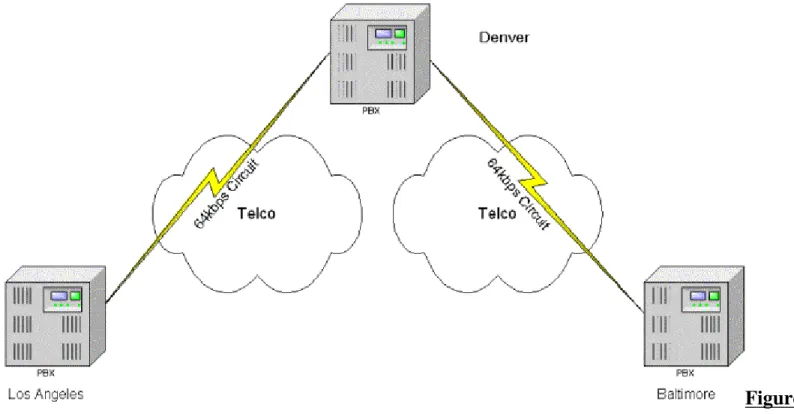
Figure 1.1 Simple circuit switched call.
When you place a call, the circuit switched network essentially dedicates a 64 Kbps circuit for the duration of your call. This means if you are calling from New York to Los Angeles, a dedicated circuit is set up from one end to the other (see Figure 1.1). When you talk, it is 64 Kbps, and when you are silent it is still 64 Kbps. No matter what you do, you are tying up 64 Kbps as long as you’re on the line. If a switch goes down or someone cuts a fiber your call ends.
The phone companies have gone a long way towards providing services such as call waiting, call back and voice mail systems. But if you ask how to integrate those services into your home or business network, you can’t. Those services are stuck on their switches.
Here's where VoIP comes in. VoIP provides open standards. If you wanted to you could write your own application for handling voice calls in a particular way. This would not be possible on your home phone or on a PBX at work. The traditional phone systems are closed systems which do not allow for easy programming of third party applications.
Open standards reduce costs. Ask any CFO what their company spends on the PBX and be prepared for the groaning. PBXs are the gifts that keep taking with high maintenance fees, lack of
interoperability, expensive adds/moves and closed APIs (Application Programming Interface). Do you have a great idea for an application that you would like to see in a call center? With VoIP it is easier and cheaper. You have access to documentation on open standards so you can write code safely. On a PBX and you're looking at steep fees for becoming an application partner as well as having to code to their proprietary APIs (i.e. no portability for your application, you're stuck with that PBX). Do you want to move the accounting department to a new floor? How about a new
building? How about a new city? With VoIP you simply move the phones and watch as they join the network and register with the Call Manager. All of the voice mail services as well as phone
Figure 1.2 Simple VoIP call.
What can you do now?
You're probably thinking "This is incredible! Where do I buy this?" Right now much of it is in an evolving stage, including the Cisco Call Manager. It is possible to replace the PBX right now. In fact, Cisco is in the process of switching several of their locations to multi-service networks utilizing Cisco Call Manager as well as IP phones. Within six months a sizable amount will be very possible in a corporate environment. The pace that this technology is moving rivals the Internet industry! What can you implement right now? Toll-bypass is a good way to start. Later in this chapter we will look at the basic toll-bypass setup and discuss how it can be an effective introduction to VoIP, and how attractive it is from a Return On Investment (ROI) standpoint. Ultimately though, toll-bypass is a foot in the door. The real excitement is in replacing the PBX. We will see how Cisco Call Manager can help with this as well as with using the Amteva unified messaging system to enhance the voice mail system.
Basic Toll-Bypass Designs
One of the most attractive ways to get into a packetized voice solution is the lowering of long distance phone costs. Lets explore the different methods of doing this.
Tie Line Replacement
Many multi-site businesses have a PBX at each office. Quite often there is a connection between these PBXs in order to allow people in both locations to use intercom dialing. These tie lines require dedicated connections that must always be available. Even though there may be no one speaking the lines are still unavailable for any other use. This situation presents an opportunity for packetizing voice.
Where The Money Is
this cost. Regardless, it can still be a high expense if there is any substantial amount of traffic
between offices. Not only does the business incur an expense for every long distance call but it also gets charged for every call that goes to the Public Switched Telephone Network (PSTN). Unlike your home phone , businesses must pay for every call they make. Obviously this can add up quickly if the call volume increases. Later in this section we will look at some sample ROIs.
Figure 1.3 Example of tie lines between multiple offices.
The other option was to set up a dedicated connection among PBX sites. This is typically done with a tie line. A tie line is used for signaling among PBXs as well as transferring calls between them. Many companies already use this method. Tie lines are a fairly simple method for avoiding the per-call charges you run into when using the PSTN or long distance carriers. They allow you to make as many calls as you like, provided the capacity is available on the tie line, without incurring any added expenses. Tie lines are typically implemented over T1s. If the T1 is local the cost is probably going to be fairly reasonable. If the T1 has to go through a long distance carrier or Inter-Exchange Carrier (IXC) the costs can be quite high. In addition, every two offices that you want to have connected must have a tie line running between them (see Figure 1.3). There may be ways around this if you have PBXs that are capable of handling advanced dial-plans. In Figure 1.3 you can see that calls between Baltimore and Los Angeles could pass through Denver but you would be tying up two circuits for every coast-to-coast call. The alternative is to run a dedicated tie line between Baltimore and Los Angeles.
What About Data
Figure 1.4 National network with separate voice and data networks running between all offices.
The data network can support many functions such as email, Internet and file sharing. With proper monitoring any Network Administrator should know what the load is on these data circuits.
Depending on the applications there is a good chance that there is room to spare. This isn’t always the case so good monitoring and tracking tools will help make the case for packetized voice.
Combining Networks
Imagine the cost savings from turning off the tie lines. Even if data circuits need to be increased, the incremental cost of the bandwidth increase is going to be less than installing an entirely separate circuit. This would also allow calls to be made directly from Baltimore to Los Angeles through Denver (Figure 1.5). After all, at this point we are only dealing with data. Let’s look at some of the different ways we can do this.
Using Frame relay for Toll-Bypass
Voice over Frame Relay (VoFR) has actually been around for several years, so the standards are more mature and the interoperability is a little more stable then VoIP. For simple toll-bypass networks VoFR can be a very attractive alternative. VoFR allows voice to be compressed and transferred across a frame relay Permanent Virtual Circuit (PVC). Take a look at our example
network (Figure 1.5). For the traffic between Baltimore and Denver we have a 768 Kbps Committed Information Rate (CIR) frame relay circuit. As you will see in Chapter 6, Configuring Voice over Frame Relay, choosing the proper CIR on frame circuits is of critical importance.
At each site you have a data network as well as a PBX which already has a digital T1 port for implementing the tie line. In our example we might use a Cisco 3810 or 2600/3600 series router at each location. All of these routers support VoFR and can interoperate with each other. The 3810 has the capability of interfacing directly with the PBX via the digital T1 card that is available for it. The 3810 can also connect directly to the frame circuit through either the Multi-Flex Trunk (MFT) or through a DSU attached to its serial interface. At this point there are a number of options
available. With our example network you will most likely forward calls to the far side PBX. In this situation you will have the PBXs manage call routing while the 3810s compress and transfer the calls. Using the compression algorithm G729A you can squeeze voice calls down to about 8 Kbps. With overhead they end up taking up about 10.13 Kbps. Although this is not a lot of bandwidth it can add up if you have multiple calls active at the same time. Furthermore, with the 768 Kbps circuit and G729A encoding you could theoretically support 70 concurrent calls. There are a few problems with that number; first of all the 3810 can support encoding on a maximum of 24 calls at any one time. This is because each compressed call utilizes half of a Digital Signal Processor (DSP). Also, if you are connecting the 3810 to a PBX it is likely that the connection will be with a digital T1
thereby limiting you to 24 channels. The realistic number of calls that could potentially be supported is 24. This is just as well because the typical deployment will require saving some bandwidth for data.
Most typical installations will require that data run over the same PVC as the voice traffic. If the maximum number of voice calls are active they will take up 24 times 10.8 Kbps which is
approximately 260 Kbps. On our example network we have a 768 Kbps CIR PVC. Frame Relay works on the principle of having a CIR that is guaranteed and a port speed that you can burst to. Different Frame Relay providers are different when it comes to the relationship between the CIR and port speed. The important thing to remember is that any frames that stray into the burst area are tagged and could be dropped. That leaves 508 Kbps of bandwidth before we exceed the committed rate. What happens if the data traffic starts pushing the bandwidth into the burst area? The voice traffic will mix in with the data traffic and it could be tagged for discard. Imagine how a
conversation might sound if every other second was dropped. Quality Of Service (QOS) issues are of critical importance when it comes to packetizing voice. Implementing QOS on VoFR is easier than with VoIP. However, if it is not done right you could end up with a very expensive project as everyone starts calling long distance just to have a coherent conversation.
Using Point-to-Point T1 For Toll-Bypass
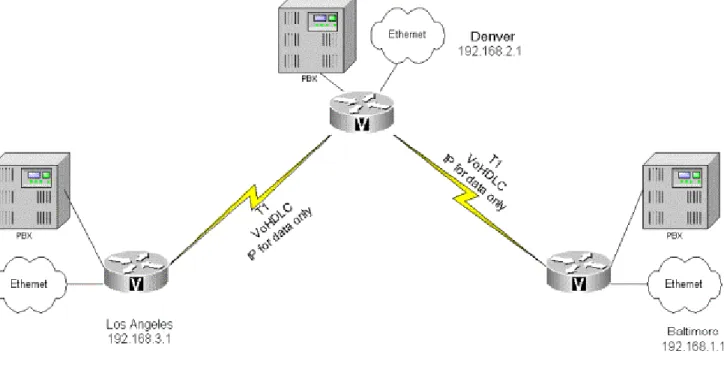
instance of tie line replacement using a T1 and Cisco equipment it can be an attractive alternative. One of the major drawbacks to VoHDLC is that it has very limited scalability. It is designed strictly to be used for a point-to-point connection between Cisco routers (Figure 1.6). Chapter 3 will cover this in greater detail.
Figure 1.6 VoHDLC configuration.
The second option is to use VoIP, because where VoHDLC and VoFR fail is in their scalability, resulting in encoding and then decoding voice calls multiple times. VoIP can scale with the network; anywhere IP can reach is a possible destination for a voice call. Obviously there are serious QOS issues. In theory and in practice VoIP will work across the Internet, only at best it will sound like you are talking on a CB radio. In the private network where QOS can be closely monitored and controlled VoIP can have a far reaching impact. In our simple example network (Figure 1.1) let’s start by looking at the connection between Baltimore and Denver. If the connection is a point-to-point T1, Cisco’s AS5300 could be used at either end for providing a digital T1 trunk to the PBXs. However, if only a few calls will be active at any time it may be prudent to look at a 2600 or 3600 series router. A simple 2600 series router can support up to two voice slots. Moving up to the 3640 and 3660 allows for much greater growth and expandability. The 3640 can support up to 12 analog voice calls and the 3660 can support up to five T1s for digital connectivity to a PBX.
Each slot can hold two FXO, FXS or E&M ports. Each port can support a call. Specific details about what these ports are used for will be addressed in Chapter 2.
A 2600 can support four analog voice calls at a time, which may be enough for a remote office. Keep in mind that the number of users in the remote office might be more than four, the question is how many concurrent calls will they make to the central office. Predicting call volumes is a magical art and is done using something known as Erlangs’ calculations. An Erlang is simply a
representation of a continuous one-hour voice call. Hardly anyone makes a one-hour call; it is just a method for estimating the appropriate number of ports to have available. For a software based Erlang calculator visit www.erlang.com.
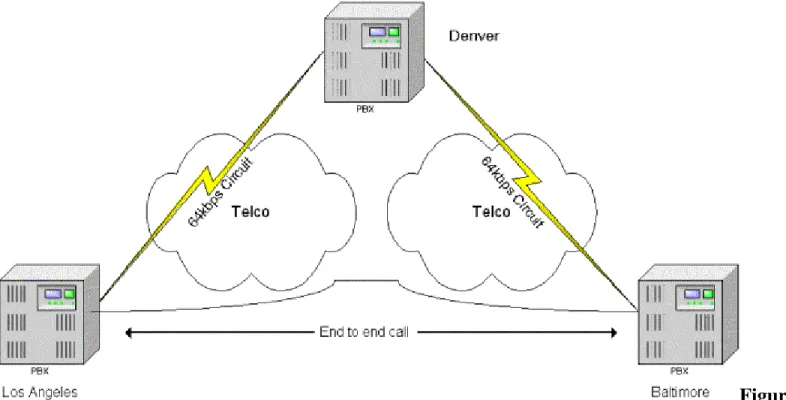
When users in Baltimore wish to make a call to Los Angeles it is ideal for the packetized voice to travel from one location to another along the most direct path possible. The traditional method would be to have a tie line between the two cities or a tandem PBX performing the call switching in Denver. As was discussed earlier this would lead to multiple encodes and decodes thereby degrading call quality.
If we look at the data network though, it can travel through Denver first before getting routed to Los Angeles. Because VoIP is carried over IP it follows the same path as any other data going between two locations. Calls can be placed between Baltimore and Los Angeles and get routed through Denver just like any other data (Figure 1.7). The call is only encoded and decoded once and QOS measures can be managed easily because of the internal network. This eliminates the need for the tie line between the two cities. It also allows for future expansion into other cities. As you will see later in this chapter, VoIP can also be used for expanded functionality. Combined with the signaling protocol H.323, VoIP can assist in building a solution to replace the traditional PBX.
Figure 1.7 VoIP call routing between Baltimore and Los Angeles.
Looking at Return On Investment
Nothing can help sell a solution more than a good Return On Investment (ROI). Creating an ROI can also help you make sure that you have covered all of the possible issues.
Reviewing Current Expenses
When building an ROI the first thing to look at are the current phone bills (Table 1.1). Most phone bills contain a wealth of information, but they can be quite long and will take a fair amount of time to get through. This section primarily covers justifying tie line replacement. Building an ROI for other services such as PBX replacement will be dealt with later in the chapter. One of the things to look for on the phone bills are calls that are placed between offices. This might seem obvious but it is important to make sure you get all of them. The next thing to look for is calls that are placed to locations that are local to the remote office. Taking our example network again we will look at calls from Baltimore to Denver (Figure 1.8). While many calls may be placed to the Denver office there may be a high number of calls that are placed to the Denver area. In our example network we can see that the Denver office is making local calls to customers in the Denver area. At a later time the Baltimore office calls the same customers in Denver over long distance circuits. These calls are expensive and are very important to building the ROI report. Check to see if there are any 800 service lines. Perhaps the customers in Denver are calling the Baltimore office through an 800 number in order to avoid paying long distance charges. Having these calls placed through Denver and then routed to Baltimore could allow for significant reductions in the number of calls to the 800 lines. These are all important items when building an ROI for tie line replacement.
For IT Managers Only
Key points on phone bills
• Get organized first.
• Separate calls going to:
o Remote offices.
o Local calling areas around remote offices.
o 800 service line.
o Random and disbursed.
o Understand the business model.
o Quantify the impact of losing discounts for bulk calling plans.
There are a few things to be careful of when looking over the phone bill. First of all, don’t get overwhelmed. Try to arrange the bill into a simpler format by sorting different parts of the bill into separate sections. Incidentally, this is another selling point to keep in mind. Wouldn’t it be nice to have a short understandable phone bill? Random dispersed calls are items to quickly scan past. There will always be a number of long distance calls that go to uncommon areas. By uncommon I simply mean uncommon to the particular business. There is not much that can be done with those calls at this time. It is important to understand what those calls are for. If the business model is that all calls are geographically uncommon then building an ROI will be more difficult but not
impossible. There may be a way to change the business model in order to lower costs. As packetized voice becomes more pervasive there will be no uncommon geography. However, for now it is
difficult to find a method for lowering those costs.
bulk discount pricing plan. As we will see later it can affect the ROI significantly if the remaining long distance calls are priced much higher due to the loss of the discount. Typically this will not be significant enough to overturn the justification for packetizing voice but it may have enough of an impact to extend the ROI quite a bit.
Figure 1.8 Long distance calling patterns.
Table 1.1 Analyzing current phone costs. Calls from
Baltimore
Calls to Denver Calls to local Denver area
Calls to 800 line from local Denver area
Total per month cost of
replaceable calls
Dollars $713 $1691 $1963 $4367
Minutes 10182@
$.07/minute
15376@ $.11/minute
12268@ $.16/minute
Designing the solution
Understanding the current calling patterns and bills will help to build an effective solution. Since we are only looking at tie line replacement at this point the configuration would probably be relatively simple; perhaps a 2600 series router with a digital T1 card to interface with the PBX. Whether using VoFR, VoHDLC or VoIP between routers it is still a simplistic configuration. Later chapters will delve into much greater detail regarding planning of capacity and equipment issues properly. The key issue now is determining the bandwidth needed to support the predicted call volume. Although up-front costs for equipment may be high, the long-term impact of circuit costs is what will matter the most. Accurately predicting bandwidth can be the key in making sure the recurring costs are low enough to pay for the new equipment in a short period of time. There are many tools for predicting call volumes and the necessary number of phone lines or trunks to support them. A popular tool is an Erlang table. Entire books have been written on this topic and the phone industry has perfected the process over the decades. For more detailed information as well as software based Erlang calculators please refer to www.erlang.com.
speed of the circuit. In order to build an effective ROI, real world pricing for circuits must be included (Table 1.2). Notice how the pricing on the 800 line has increased. This is due to losing the discount from the greater number of calls.
Table 1.2 New solution pricing Calls from
Baltimore
Off-net calls to Denver
Off-net calls to local Denver area
Calls to 800 line from local Denver area
Cost of new frame circuit
Total per month cost after upgrade
Dollars $0 $0 $226 $1637 $1863
Minutes 0 0 1256@
$.18/minute
Building the Return On Investment and Payback Period
There are three steps to building the ROI and payback period. The first step is reviewing current expenses. The second step is detailing the costs involved in a new solution including the new circuit costs. The third step is combining the two and showing the time-frame for the payback period. Always include business reasons as well as the numbers in the justification. Usually the numbers will speak for themselves but it doesn’t hurt to throw in some good ideas about how packetized voice can help to move the organization forward. Don’t forget to include hardware costs (Table 1.3).
Table 1.3 Building the complete ROI
Item Cost Total cost
Current monthly phone calls $4367 Recurring costs after upgrade $1863
Total monthly savings $2504
Cost of 2 new 2610s w/voice $22390 Labor for installation $1200 Installation costs for frame
circuit
$1000
Total upgrade costs $24590
Payback Period 9.82 months
In the example the payback period is only 9.82 months with an ROI of 122%. Of course every network will be different but this is a great example of what makes packetized voice so attractive. In nearly all situations where there is a high volume of calls to a single office or area a short payback period will be common. Keep in mind that geographic proximity makes a difference. This model quickly falls apart when the calls are widely disbursed. What makes this work is the ability to eliminate a large number of public calls and place them on the private network.
The Network PBX
tie line replacement is that it is fairly straightforward.
Replacing the traditional PBX
When looking towards replacing the PBX there are many more factors that need to be considered. Instead of calls only passing across a single WAN link they may be traveling all over the network. This can have an impact on bandwidth although it would probably be a minor problem on a LAN. However, there are several other issues that can have an impact on the design. For instance is the current IP allocation clean and are there available IP ranges? Every new phone, unless it is a PC based phone, will require its own IP address. That would probably mean the need for twice as many IPs available to a network. That could be a problem for a large organization. Where should the Call Manager servers be placed in order to perform the best? Where will Public Switched Telephone Network (PSTN) connections be made for outbound calls? What third-party services will be implemented on the phone system? As you can see there are many questions that can arise when replacing the PBX.
Call routing
When you begin talking about placing the PBX on the network you need to look at how calls will transit the network. The calls will be from one IP host to another so it is critical that the routing on the network is stable. It is also important to make sure that a sufficient number of IP addresses are available. Network Address Translation (NAT) may not help in this situation for adding IP addresses later. Currently NAT is supported in H.323 but the implementation requires use of a Proxy and Gatekeeper. It is functional but can be difficult to setup. However, NAT is not supported when using Cisco’s Skinny protocol. The Skinny protocol is used by Cisco’s IP phones.
For IT Professionals Only
H.323
H.323 is a standard that defines how voice and video devices can communicate. It specifies both signaling characteristics and host-to-host communication protocols. H.323 has rapidly become the protocol of choice for call setup on voice communications. Several Cisco products implement H.323 Gateways for connecting to the PSTN as well as other features such as their IP phones. Microsoft’s NetMeeting is an H.323 compliant program that uses not only voice but video as well.
There may not be a problem with using a separate private range of IP addresses for the VoIP system as long as the entire range is in the same IP range. This may cause a problem if you decide to use PC based virtual phones. The virtual phone resides on the PC and inherits the IP address of the PC. If the PC is on a real Internet IP and the rest of the phone system is on private IPs then you might think about using NAT. Once again, this can work but it complicates the design (Figure 1.9). It is
Figure 1.9 Call failure through a router performing NAT.
As you will see the Cisco Call Manager (CM) combined with the Cisco Multimedia Conference Manager (MCM) provide much of the functionality of a traditional PBX. The purpose of the CM is to provide registration of IP phones as well as directory services for them.
It is also a point where Telephony Application Programmers Interface (TAPI) programs can
interface to the network. We will discuss TAPI applications shortly. It is important to place any CMs in the right locations on the network. The CMs should be placed in a location that can provide a high level of QOS as well as easy access for repairs and upgrades. Ask yourself how often does the PBX fail? The CMs must maintain that level of performance through diligent monitoring and appropriate backup systems such as redundant servers. Call Manager 2.2 provides for a primary and backup CM. Calls that are in-progress will continue. Any transfers, conferences or calls on hold will fail because the CM is actively managing them. Any idle phones will find the fail-over CM. Version 3.0 of CCM will support redundant load-sharing servers.
Cisco’s MCM provides for management of H.323 conferencing as well as controlling bandwidth for those applications. These may not be considered typical PBX functions but it is part of the expanded functionality of a network-based PBX. MCM is a software enhancement for the 2500, 2600, 3600 and 3810 series of routers. It has the ability to require a log-in for H.323 conferencing using Radius or TACACS+ accounts. MCM can provide Call Detail Recording (CDR) for tracking usage and possibly for billing purposes. For call routing MCM can act as an H.323 Gatekeeper.
Dial Plan
Taking the time to devise the right dial plan is the key to allowing for growth and ease of
manageability. In many cases the current dial plan can be transitioned to the new system. If the old plan is used, then it should be reviewed for growth potential as well as the ability to meet the unique requirements of VoIP. There are a number of extra items that should be accounted for:
• Voice mail extensions.
• Call parking.
• Reserved or pre-planned voice conferencing.
• Special outbound gateways.
• Third-party TAPI applications that may require dialing numbers.
digit. In Denver local inside calls start with 3. The CM in Baltimore knows that if it sees a call that starts with 3 it will forward it to Denver. There are a few numbers that should be reserved for other uses such as 0 and 9. If you have more than eight sites you would need to move to a two digit prefix plan instead of one. The total number of digits in an extension also depends on how many people there is the potential for at each office. If that number will never go over 100 at any office then a 3 digit plan would work. In order to avoid headaches down the road make sure that the company will not grow beyond 100 people in each site. In other words, plan for more. Using a four digit plan to start with is not too taxing on the users and will solve many potential headaches down the road (Figure 1.10).
Figure 1.10 A simple dialing plan between Baltimore and Denver.
Interactive Voice Response
At some point or even on a daily basis a call to a business that uses Interactive Voice Response (IVR) systems will be required. We have all had the painful experience of pressing our way through ten menus before the finally system hangs up, our call unresolved. Obviously there is a right way to set up an IVR, but as we have all experienced, there is definitely a wrong way. In most typical situations there is an IVR on any public incoming lines. IVRs are useful for routing calls to the appropriate person or department, and are less expensive than having an individual do it. Many of Cisco’s products now support IVR internally, including the 2600, 3600 and AS5300. This is done with Tool Command Language (TCL) scripts and voice files which are referenced in the
configuration on the router. When a call comes into the router and matches a set of criteria the script is queried. The script resides on the routers flash. The script runs and depending on the digits it captures plays an audio file. This audio file is also stored on the routers flash and is loaded into memory. Cisco provides several standard audio files but it is recommended that you create your own. The audio files use the standard au format. The scripts also have the capability of rerouting a call.
Unified Messaging and the Amteva System
• Configuration parameters are stored in LDAP, a standards-based directory structure for
organizing information.
• Voice mail and faxes can be accessed through an IMAP email client. IMAP is a common
standard for email retrieval.
• Email can be retrieved through any phone.
• Supports numerous types of notification for incoming email, voice mail and faxes.
• Fax headers can be retrieved through any phone.
• Faxes can be delivered directly to an email inbox, viewed from there and transferred as email.
• Single number reachability.
• Web-based management interface.
• Excellent scalability.
Configuration parameters are stored in Lightweight Directory Access Protocol (LDAP). LDAP is a standards-based architecture that has excellent scalability characteristics. It is rapidly growing in popularity due to its capabilities and open standards-based architecture. Using LDAP will also allow other applications to have access to some configuration parameters, opening the door even more for third party programmers.
Voice mail and faxes can be accessed through any IMAP compliant email system. UMS uses these open standards protocols to convert voice mail and faxes to an SMTP/MIME email format.
Voice mail recordings are stored as wav files and faxes are stored as tiffs. With Internet connected machines popping up everywhere this literally allows anyone to access their voice mail and faxes without having to make a long distance call to the PBX. You could sit down at any multimedia Internet terminal and listen to your voice mail. You could also check to see if your customer faxed back the signed contract. Once you have looked over your email and faxes you can send them back out just like email. Consider how many keys it takes to send a voice mail to someone else with a traditional PBX system. Then consider how easy it is to forward an email. Instead of having paper copies of faxes floating around you could just forward them to the appropriate people. And there is no reason the email can’t be forwarded to any email address. Using standard file formats the emails can be read by anyone.
Email can be retrieved from any phone. Let’s say you are in the airport and you want to check your email before getting on the plane. You can call into the UMS and have your email read back to you. You can even listen to the headers of any faxes you have received.
UMS can be configured to send a notification when a new email, voice mail or fax is received. These notifications are configurable for the different types of incoming messages. Notifications can be sent to a pager or to a phones message indicator light.
Because the system is based on IP, a web interface has been designed to allow for remotely
managing all configuration parameters. Even voice mails can be accessed directly from the system using the web interface. Configuration parameters for how the mailbox behaves can be setup there as well.
phone. It could be argued that being reachable at all times may not be the best thing but there is no doubt that more and more people need that kind of access. The problem is that you have to give all of your numbers out to everyone and they have to try each number when they call you. UMS allows you to configure a list of numbers and the times to try them.
When a caller calls your office number and you are not there they get message. The message states that you did not answer your phone and that they have the option of waiting while the system tries to locate you. They can also decide to go directly to voice mail at this time. If they decide to wait, the system starts down the list you have established. If it can’t reach you it still puts them into voice mail. If you are at one of the numbers on your list the call is patched through. This means only one number needs to be given out and phone numbers like your home number remain private.
Driving the growth of many of these systems is the promise of relatively inexpensive scalability. As we will see in the ROI example, upgrading PBXs can be very costly. IP based PBXs and voice mail systems such as Amteva’s bring the exciting opportunity for rapid inexpensive growth. Through its use of distributed systems and architectures it can support from 50 to 5000 users and beyond. In today’s market of rapid growth this can be a key factor in deciding between upgrading/replacing PBXs and installing a packetized voice system
Savings Analysis Example
Working out a Savings Analysis for PBX replacement is often easy to do. The problem lies in the timing. After looking at the numbers it is often very cost effective to go with an IP PBX alternative. Many CFOs are unwilling to replace a PBX system if it is working even if they are paying more for it. However, there may be a rush of upgrades before Y2K hits. This is because many voice mail systems are not Y2K compliant. This presents an excellent opportunity to propose an IP PBX. Otherwise, if you are reading this book after January 1, 2000 it may be more of a waiting game. As the world moves towards packetized voice more companies will want to convert. Much like the adoption of the Internet in the business world, common use in the market place will start driving more companies towards packetized voice. In the mean time there is still one key area where opportunity exists.
Many lower end PBXs are supplied with a fixed number of ports. This is especially true for small offices that are just getting started. They may purchase a 48 port PBX and outgrow it. Nearly all of these systems have fixed port sizes. When the company expands to the 49th person they have a problem. They can either not give that person a phone, which is unlikely, or they can do a forklift upgrade. In a forklift upgrade the old PBX comes out and a new one goes in. Although many PBX vendors have trade-up programs this can still be very expensive. What is worse is that they may need just a few more ports. The next size PBX might have 250 ports as a minimum. The cost would be outrageous for the benefit of getting a few more people phones. Another large source of cost is the maintenance fees. PBX vendors typically charge hefty maintenance fees that are proportional to the size of the PBX. Now a company that just wanted to add a few more people is paying maintenance fees on a PBX that has far more capacity than they will use.
This is a prime opportunity to replace the system with an IP PBX. The advantage is that they can keep the existing system and gradually migrate in an IP based unified messaging system. This solves the short-term concerns of getting phone service to the few extra people they have, and allows them to start growing towards the future.
Using truly IP based phones the user simply takes their phone with them when they move offices. Configuration is done through a central configuration point for new users, and users can facilitate administration of their own phones through a web interface. This user administration will be much simpler than trying to read through the thick manuals provided by traditional PBX vendors.
Table 1.4 A sample Savings Analysis for PBX replacement
Item Cost Total costs
Cost of upgrading to new PBX $75,000 Rebate on old PBX -$5000
$70,000
Call Manager $14,000
Difference $56,000
Annual maintenance fee on new PBX
$15,000
Software upgrades for CM $2000
Difference $13,000
The last thing that sets IP PBXs apart from traditional PBXs is open standards. As IP telephony becomes more prevalent the costs associated with equipment and software will continue to drop. This is completely opposite from the traditional solution. PBX prices have hardly dropped at all over the last decade. With open standards anyone can go down to their local computer store and purchase a $100 USB camera and not only can they talk across the Internet, they can videoconference. The quality across the Internet can vary but performing this across a private network is not a problem. For example; I had a videoconference with a gentleman in The United Arab Emirates; the speech and video were a little stuttered but it was nothing less than I would have expected from a satellite phone. The best part was that it was free using a low-end eyeball type camera and the sound card in my laptop. This rapid level of growth is sure to make packetized voice incredibly inexpensive over the coming years.
Advanced Features and Integration Possibilities
What makes the transition to packetized voice so revolutionary is its openness. With the growth and adoption of open standards new possibilities become available. Instead of paying exorbitant fees to a single PBX manufacturer in order to create a value added service, programmers can create
applications based on these open standards with confidence that their program will work with many different systems. This simple concept will open the floodgates to applications and services that haven’t even been considered yet. It will also make higher end features more affordable to the small business.
TAPI Integration
applications on the system. This interface has benefits on the workstation and server platforms for different types of applications. On the server the benefits include diverse types of value added services allowing them to integrate with each other. Different applications such as voice mail, IVR and call detail recording information can be enabled through TAPI. TAPI facilitates new
applications to be designed that could not have been dreamed of with the traditional proprietary PBX programming interfaces. As the standards grow and systems become more robust TAPI can grow with them.
The other place where TAPI will have an impact is at the workstation. Some of the TAPI
applications that exist now are as simple as phone dialers. Some of the more advanced applications use TAPI for enabling screen pop-ups. As a call comes into the workstation it registers certain items like the calling number. With an application that is TAPI enabled these dialing numbers could be passed through. This is a good application for a call center environment where an operator can get information about the caller before answering the phone. With a well thought out application a sales call center could instantly have information about the name of the person calling, their buying habits, the last time they purchased something, what kind of shipping they prefer and if they prefer blue over yellow. In a help desk environment the operator could instantly have information
regarding the nature of past problems, the level of the service contract and even the typical
demeanor and knowledge level of the person calling. Then, as they pass the call to the next level of support the next person gets a pop-up with the same information as well as new information about the particular case. It is quite obvious that the sky is the limit for creative programmers. As the market continues to grow new ideas will come out of the availability of the open standard TAPI.
Web Click-to-Talk
You’ve seen the commercials. A mom is looking at some clothes on the web and she gets her son to come over and take a look at them. He isn’t happy about wasting his time shopping. She sees a shirt she likes and wonders if it is available in other colors, so she clicks on the link to customer support. A window pops up with a videoconference to a lady who can help. Until the entire phone system is packetized and IP based this may seem like a remote dream. For home consumers it will be a dream, but for business this could happen now. Imagine a large corporation with an entire department
dedicated to human resources. An employee decides to take a look at some 401k options so she pulls up the company Intranet on her browser. She clicks over to the 401k section and starts reading. She gets about halfway through and realizes she has more questions than answers. What does she do now? In the traditional sense she would pull out the company phone list and search for someone in HR. She finds a number and calls and no one answers, so she calls another. That person doesn’t handle the 401k, so she calls another. This person doesn’t even work in HR anymore. Now imagine a different ending where she clicks on a link at the top of the page. This link automatically dials her phone. She picks up the phone and waits for the other end to start ringing. At the other end is the exact person she needs to talk to. The applications are limitless and the kinds of ideas that have been tossed around regarding web click-through have just scratched the surface.
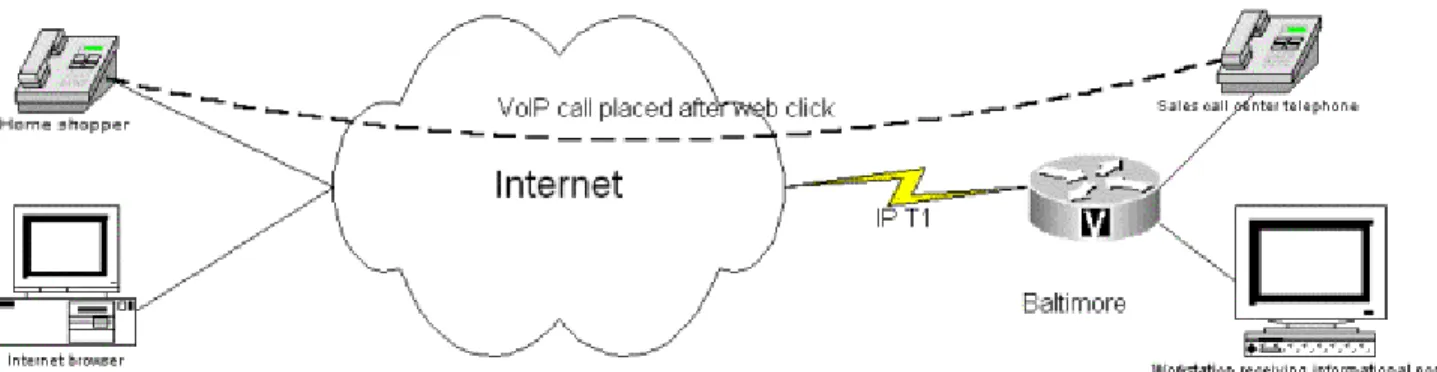
Once a phone is IP enabled it is simply a destination address on the IP network. Web click-through is one exciting use for this feature. The hyperlink is configured in a such way that a TAPI
Figure 1.11 Web click-through call process.
Transfer, Forward and Conference Capabilities
Transfer, forward and conference calls are all features found on a typical PBX. Due to the direct point-to-point nature of IP calls a software solution needs to be implemented.
When calls are placed from one IP phone to another using the CM, the CM is only used for call control purposes. Once the addressing has been established the phones communicate directly between each other using Real Time Protocol (RTP). The phones themselves are not particularly smart. They have the ability to encode and decode calls and they can establish a call to a remote phone using the addressing that has been provided to them. They can also store templates for autodialing numbers. That is about all they can do right now. As the technology matures they may be able to do more. Presently, in order to have those three services a software based server must be implemented. This is the conference bridge software which works with CCM, and it serves two purposes. The first purpose is for impromptu conferencing; the call has to go through the conference bridge at that point and the voice traffic is redistributed to all of the endpoints. The second function is meet-me conferencing which is for establishing a prearranged conference call. This might be used for a weekly meeting in which all of the managers around the country dial in. There are many uses of this type of functionality.
As for the transferring and forwarding of calls, the CM has the ability to handle these features but the phones have to signal back to the CM to make this happen. Refer to the Appendix for a more detailed description of the Cisco AVVID system.
Faxing
Faxing can experience the benefits of packet telephony in a number of different ways, such as integration with email. The Amteva UMS can provide a conduit for an incoming fax to be placed into an email box. This can then enable the fax to be transported anywhere email travels as a tiff file. With this type of technology there is no need to be at the fax machine in order to receive a fax. Typical paper faxes also degrade in quality after getting faxed multiple times. Once a fax is in email it can be forwarded to as many people, as many times as is necessary with no degradation.
Call Detail Recording and Data-Mining
Even with the lowered costs associated with using IP based telephony systems there exists a desire to have complete accounting records. This is true for the business user, as in the smaller company that wants to track where calls are being placed. This is a proactive strategy that emphasizes
managed growth. Without understanding where calls are being placed it is impossible to determine where bandwidth may need to be increased. Accounting records are also a major part of business for companies reselling phone services. A good accounting strategy involves Call Detail Recording (CDR) as well as bandwidth analysis obtained from the network. Without both there is no way to determine if bottlenecks are being caused by voice calls or data traffic.
Many of the various pieces of the Cisco voice solution include the ability to capture call detail records. The Multimedia Conference Manager software can track a number of details and report them to a Radius or TACACS+ server. Those details include:
• Calling number
• Called number
• Call start time
• Call end time
• Bandwidth utilized
Cisco Call Manager also supports output of its CDR to either a Microsoft Access database or an ODBC database such as SQL (Figure 1.12).
Figure 1.12 Call detail from Cisco Call Manager.
Once the data has been compiled to a database, a front-end interface can be designed to format the data in a useful way. In a simple business environment, graphing of the call trends over a one-month time period could prove very valuable. This would allow you to determine such things as whether or not the circuits that are available are being utilized. It could show what departments are making more calls than others, even down to the individual. A trend analysis could be set up to show the duration of calls during a certain time of day. If the CM is being used in a call center environment then the records could show average hold times, dropped calls, and duration of completed calls among other things. No doubt, if there is not an application that is currently using the call record data from CM, then there soon will be.
Voice Over Frame Relay
Frame Relay (FR), at least in the eastern part of the United States, is becoming a very commonplace circuit. This makes it a good candidate for replacing traditional voice circuits.
Where To Use It
Earlier in this chapter we looked at the advantages of implementing a toll-bypass solution. Voice over Frame Relay is probably the single best way to implement this simple task. FR networks are growing at an increasing rate and are quickly becoming the circuit of choice for most interoffice connections. As was shown earlier, the cost of long distance frame circuits continues to drop, and unlike VoIP, there have been standards for VoFR in place for several years. As always, open standards allow for vendor interoperability and usually a better-tested product.
Growth Curve Of Frame Relay
Frame Relay has been growing at an incredible rate, and if we look at the benefits it is easy to see why.
• Costs related to FR are relatively low compared to other types of circuits.
• Once a port is purchased, adding PVCs (Permanent Virtual Circuits or the virtual connection
between two FR ports) is simple and usually inexpensive.
• FR can be oversubscribed. This allows more bandwidth to be mapped to a port than it would
theoretically allow. The principal being that the remote sites would not all be sending at the same time. Although this is a great feature for data traffic it can have a severe impact on voice traffic. • It is available just about everywhere.
• It can support a wide range of bandwidth from 56K on up.
There is no question that FR will be the circuit of choice for wide area networks at least for the foreseeable future. This makes it an excellent transport for voice applications.
When Does VoFR Make More Sense Than VoIP?
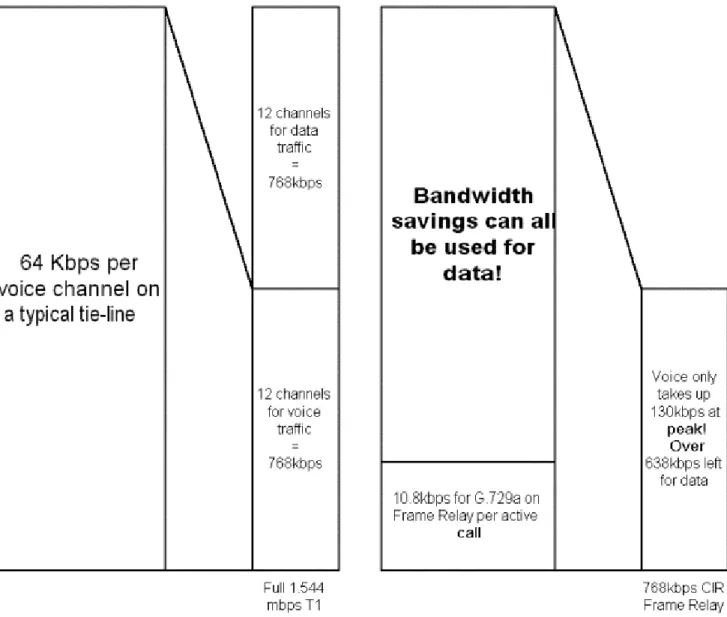
The single most useful aspect of VoFR is taking advantage of existing or low cost circuits to provide tie line functionality between PBXs. Where it can exceed VoIP is in minimizing bandwidth usage on the WAN connections. The header for FR takes up only a little more bandwidth. A call that has been compressed using G.729A uses about 8 Kbps. FR overhead bumps that to about 10.8 Kbps.
Figure 1.13 Bandwidth savings with VoFR.
Toll-Bypass Opportunities
One of the most important things to avoid when packetizing voice is compressing and
Figure 1.14 Encoding and decoding of a voice call.
This is great news for the CFO because of the savings earned from avoiding long distance calls. Refer to the Payback Period analysis that was detailed if Table 1.3 for information on just how happy the CFO will be. Because Denver is the central site, the same scenario can be illustrated between Donna in Denver and Lewis in Los Angeles. Hopefully most of the calls are between the remote sites and the central office. What happens when there are calls between remote sites? Let’s say Bob in Baltimore wants to call Lewis in Los Angeles. While it may be possible to configure the router in Denver to forward the calls back out to Los Angeles there are still several problems that would make this unfeasible, and this is where VoFR starts to fall apart. To begin with you would be encoding and decoding the calls twice.
As the call leaves Baltimore it gets encoded and when it arrives in Denver it gets decoded. Once again it gets encoded as it leaves Denver and gets decoded as it enters Los Angeles. This introduces all sorts of problems as far as quality and delay are concerned. The call would also occupy two CODECs on the Denver router. That alone is an inefficient usage of hardware. The exception would be if you were using Cisco Switched VoFR, which would allow the call to be passed through
without multiple codings. FRF.11 would require multiple codings.
Figure 1.15 Encoding and Decoding of a call between Baltimore and Los Angeles.
When end-to-end calls are needed across multiple locations it becomes a better opportunity for VoIP. VoFR has the edge from an ease of implementation and management standpoint as well as long-term cost savings for point-to-point calls only.
Voice Over ATM
ATM has the unique ability to provide multiple levels of QOS. While the engineers work frantically trying to implement some QOS measures in IP, ATM has had these features all along. One of the big drawbacks to ATM is availability.
Where To Use It
QOS capabilities will allow ATM to outperform IP solutions in many bandwidth intensive, time-sensitive applications such as voice and video. ATM will always have a speed advantage over Ethernet and Fast Ethernet.
The obvious place to use VoATM is where you have ATM networks already installed. If you are lucky enough to have ATM to the closet then VoATM becomes an excellent means of transporting voice. Or perhaps you are carrying ATM service to a remote office. In order to transport voice to the desktop it helps to have the ATM network as close to the desktop as possible. A prime example of where it doesn’t work is where ATM is used only in a backbone in a headquarters. If ATM is not extended to the remote offices in this situation, it cannot carry the voice to them. Let’s look at our example network again.
With a Cisco 3810 in each office we can terminate ATM circuits as well as peel off voice calls. Using ATM also has the advantage of to providing end-to-end calls (Figure 1.17).
Figure 1.16 ATM network providing end-to-end calls.
Figure 1.17 QOS queuing with voice and data traffic.
Many IP QOS measures that are currently being implemented are router specific. This is one of the major hurdles that IP engineers face. The current IP packet does not include detailed information about QOS other than the IP Precedence bits. Some headway is being made with enhancing these QOS tags but this is still one of the major drawbacks to using VoIP in congested networks.
When utilizing ATMs’ QOS measures the tagging information is carried for the life of the cell. A cell is ATMs equivalent of a frame. We will discuss the advantages and disadvantages of this in a moment. As long as the voice call is carried through the ATM network it can keep the higher QOS tag. This is also true for video as videos’ needs on a network are very similar to those of voice, the significant difference being the bandwidth needed. The bandwidth requirements for video are significantly higher. However, managing the efficient transport of video by using QOS measures is very similar to that of voice.
ATM is a completely different method of handling data flow. One of the major differences between ATM and other frame based networks is that ATM breaks data into cells. A cell is 53 bytes long and contains a 5 byte header. This header contains all of the ATM specific information regarding source and destination address. This is one way that ATM can potentially gain a speed advantage.
Figure 1.18 ATM cell and potential overhead.
QOS vs. Availability
As we’ve discussed the main advantage to using ATM is its built in QOS measures. The ability to classify a voice call from end-to-end is a great advantage. In a campus-wide environment, using ATM is as simple as running fiber between buildings. This scenario allows ATM to be extended as close to the desktop as the budget allows and would be an ideal solution for a school that has buildings spread over a large campus area. A single set of fibers can connect each building in order to enable data and voice across an ATM network (Figure 1.19). This allows for growth in data speeds and the ability to provide a level of QOS to voice traffic.
Figure 1.19 Campus ATM network utilizing voice and data.
Figure 1.20 Adding a remote site can be a problem with ATM.
Using FR to get to a location like Billings may not be so far fetched. One of the nice things about using ATM in part of the network is that it has some similarities to FR and converting from ATM to FR and back again is not too complicated. Although QOS tagging would not carry through the FR network it could be a means of extending voice to those remote sites.
ATM may become available everywhere at some point in the near future. When this happens there may still be one drawback. The costs associated with ATM are still somewhat higher than FR. Equipment costs have come down quite a bit and in a campus environment ATM can be a very attractive solution. However, ATM service provider circuits are typically more expensive than FR circuits. This may make it difficult to justify ATM as opposed to FR. Keep in mind the following advantages that VoATM has over VoFR:
• Complete and detailed QOS measures.
• End-to-end call routing without multiple encoding and decoding.
• ATM popularity is still growing and services will be available everywhere in the near future.
• ATM in the backbone as well as the WAN means one network topology throughout.
Summary