Laura Sofia Martins Oliveira
Licenciada em Engenharia InformáticaInterfaces for Television Content Sharing
and Annotation
Dissertação para obtenção do Grau de Mestre em Engenharia Informática
Orientador :
Professor Doutor Nuno Manuel Robalo Correia, Prof.
Catedrático, Universidade Nova de Lisboa
Júri:
Presidente: Prof. Doutor José Augusto Legatheaux Martins
Arguente: Prof. Doutora Maria Teresa Caeiro Chambel
iii
Interfaces for Television Content Sharing and Annotation
Copyright cLaura Sofia Martins Oliveira, Faculdade de Ciências e Tecnologia, Univer-sidade Nova de Lisboa
Acknowledgements
The contributions of several people and entities have made this thesis possible and I would like to extend my appreciation especially to the following.
Foremost, I would like to express my gratitude to my supervisor Prof. Nuno Correia for the opportunity to work and explore this theme and for his guidance and support. Also, for the encouragement to take this project beyond the scope of this dissertation.
Furthermore, I would like to thank the Departamento de Informática da Faculdade de Ciências e Tecnologia da Universidade Nova de Lisboa (DI - FCT/UNL) and the project ImTV (On-Demand Immersive-TV for Communities of Media Producers and Consumers), that includes this dissertation, with the reference UTA-Est/MAI/0010/2009, funded by Fundação para a Ciência e a Tecnologia.
Also, I like to thank the participants in my survey, who have willingly shared their precious time for evaluating the application.
A special thanks goes to my dearest friend Inês, who volunteered for the tedious task of being my proofreader and whose critiques and comments improved the composition of this thesis.
Abstract
The ways of television consumption and production are changing significantly, with the viewers moving away from the traditional linear model. The various devices for ac-cessing content have a significant role in these changes and suggest new paradigms of access. Social experience has also changed and takes on new forms molded by technol-ogy. Content sharing and production from users are some of the trends that globally influence how we relate to audiovisual content.
Therefore the aim is to develop ways to access television content, that allow com-menting and sharing, through multimodal annotations. These annotations include text, sketches, handwriting and images. Our solution provides users a way to watch and an-notate television content, in real-time and in a collaborative environment. Using a mobile device, users can annotate content together with other users, while watching both content and annotations on a TV. These annotations can also be shared through social networks or saved on other platforms. Finally, the system also uses content provided by the users to search and link to television content.
Resumo
As formas de consumo e produção de televisão estão a mudar de forma significativa, com os espectadores a afastar-se do modelo linear tradicional. Os diversos dispositivos para aceder a conteúdos contribuem para estas alterações e sugerem novos paradigmas de acesso. Também a experiência social se alterou e assume novas formas mediadas pela tecnologia. A partilha de conteúdos e a produção por parte dos utilizadores são algumas das tendências que influenciam globalmente a forma como nos relacionamos com conteúdos audiovisuais.
O objectivo é assim desenvolver formas de acesso a conteúdos de televisão que permi-tam a partilha e comentário, através de anotações multimodais. Estas anotações incluem texto, desenho (sketches) e imagens. A nossa solução irá permitir aos utilizadores visu-alizar e anotar conteúdo televisivo, em tempo real e em ambiente colaborativo. Através de dispositivos móveis, os utilizadores podem anotar conteúdo em conjunto com outros utilizadores, enquanto visualizam o mesmo conteúdo e as anotações na televisão. Esta anotações podem ser partilhadas através das redes sociais ou guardadas em outras plata-formas. Finalmente, o sistema também utiliza conteúdo disponibilizado pelo utilizador de forma a procurar e estabelecer uma ligação com conteúdos televisivos.
Contents
1 Introduction 1
1.1 Problem Description and Context . . . 2
1.2 Presented Solution . . . 2
1.3 Contributions . . . 3
1.4 Document Structure . . . 3
2 Related Work 5 2.1 Image Matching and Object Recognition . . . 5
2.1.1 SIFT . . . 7
2.1.2 SURF . . . 7
2.1.3 FAST . . . 7
2.1.4 Discussion . . . 8
2.2 Television Content Annotation and Applications . . . 9
2.2.1 WeOnTV . . . 9
2.2.2 Automated Moving Picture Annotator (AMOPA) . . . 10
2.2.3 Electronic Program Guide (EPG) . . . 11
2.2.4 BluTV . . . 12
2.2.5 Discussion . . . 13
2.3 Video and Photo Annotation . . . 14
2.3.1 TKB. . . 14
2.3.2 The Family Video Archive . . . 15
2.3.3 Caliph & Emir . . . 16
2.3.4 Discussion . . . 17
2.4 Collaborative Annotation and Proximity Interaction . . . 17
2.4.1 CWaCTool . . . 18
2.4.2 Vannotea . . . 19
2.4.3 CoVidA . . . 19
xiv CONTENTS
2.4.5 Discussion . . . 21
3 Television Content Annotation 23 3.1 Concept. . . 23
3.2 Requirements . . . 24
3.2.1 Design Requirements . . . 24
3.2.2 Functional Requirements . . . 25
3.3 Solution . . . 25
3.3.1 Technologies. . . 26
3.3.2 Interface . . . 27
3.3.3 Functionalities . . . 31
4 Prototype Development 39 4.1 Architecture . . . 39
4.2 Types of Annotation . . . 42
4.3 Play Mode . . . 44
4.4 Playback Mode . . . 45
4.5 Stored Information . . . 45
4.6 Image Matching . . . 47
5 Evaluation 51 5.1 Preliminary Tests . . . 51
5.1.1 Description . . . 52
5.1.2 Observation Analysis . . . 52
5.1.3 Questionnaire and Analysis of the Results . . . 53
5.2 Final Tests . . . 58
5.2.1 Description . . . 59
5.2.2 Questionnaire and Analysis of the Results . . . 59
5.3 Preliminary Tests vs Final Tests . . . 64
6 Conclusion and Future Work 67 6.1 Conclusion . . . 67
6.2 Future Work . . . 68
Bibliography 69
A Questionnaire 73
B Questionnaire Results from the Preliminary Tests 81
List of Figures
2.1 Features or keypoints detected on an image [Lag11] . . . 6
2.2 Image matching results [Lag11] . . . 6
2.3 WeOnTVTV mode[AAPN09] . . . 10
2.4 WeOnTVChat mode[AAPN09] . . . 10
2.5 Selecting video clips using emotion tags [KKKRBHE11] . . . 11
2.6 Virtual channel creation on the PC [OMAHT09] . . . 12
2.7 Recommendation on the EPG [OMAHT09] . . . 12
2.8 BluTVMediaPlayer in a set-top box [SJBdLVL12] . . . 13
2.9 TKB insuspendedmode. On the left it is presented the current video cap-ture. On the right is represented the selected frame for future annotation. [Val11] . . . 15
2.10 TKB: timeline view and the current video capture with different types of annotations [Val11]. . . 15
2.11 The Family Video Archive annotation interface [AGL03] . . . 16
2.12 Caliph: editor for MPEG-7 semantic descriptors [Lux09] . . . 17
2.13 CWaCTool ink annotation mode. User can share videos (A), accept invita-tions (B) and make annotainvita-tions (D) [JGCP10] . . . 18
2.14 The FilmEd application is used by the system so the users can annotate, view and search videos [SHK03] . . . 19
2.15 CoVidA: collaborative video annotation [ZWLS12] . . . 20
2.16 CoVidA: outlining the shape of an object with a pen [ZWLS12] . . . 20
2.17 Proxemic Media Player: different responses depending on the user posi-tion [BMG10] . . . 21
3.1 Mobile application: main menu . . . 27
3.2 Mobile application: selecting a video to annotate . . . 28
3.3 Mobile application: selecting a session for playback . . . 28
xvi LIST OF FIGURES
3.5 Mobile application: search videos . . . 29
3.6 Player inPlayback mode . . . 30
3.7 Mobile application: ink annotation . . . 31
3.8 Mobile application: text annotation . . . 32
3.9 Mobile application: dialog to add new images . . . 32
3.10 Player: ink and image annotations being displayed on the player interface 33 3.11 Mobile application: canvas filled with the current frame. . . 34
3.12 Mobile application: dialog for joining current session . . . 34
3.13 Player inPlayback Mode . . . 35
3.14 Mobile Application: share dialog window, after pressing thesharebutton. 36 4.1 System architecture . . . 40
4.2 Server Architecture . . . 41
4.3 Structure of an openFrameworks application [Ofs] . . . 42
4.4 Annotations class diagram . . . 43
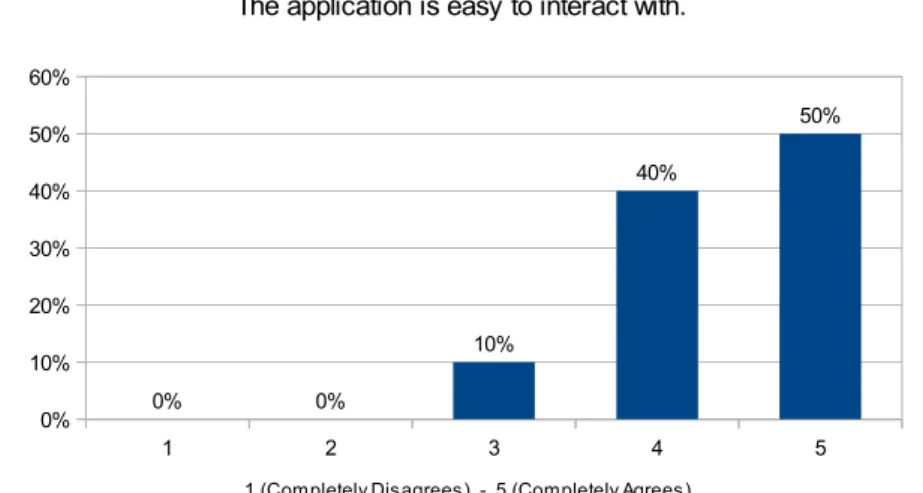
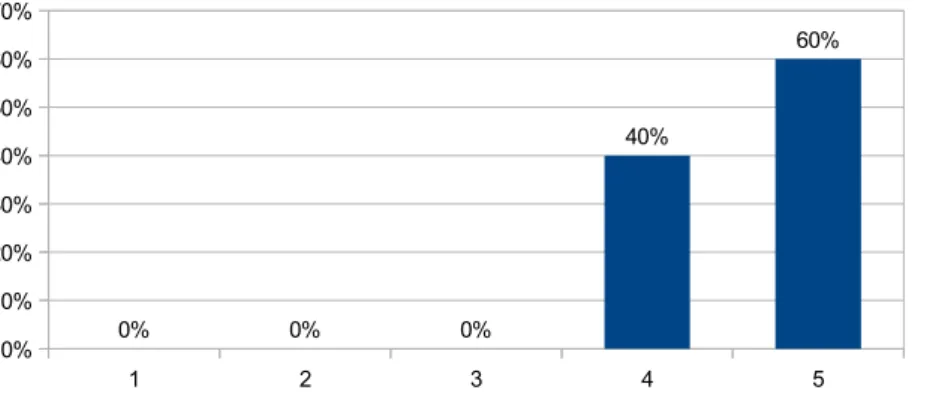
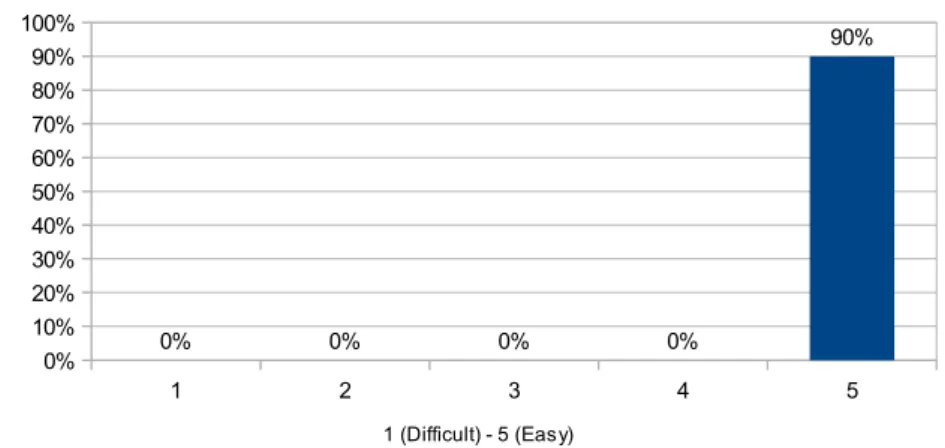
5.1 Question CI1 : The application is easy to interact with. . . 54
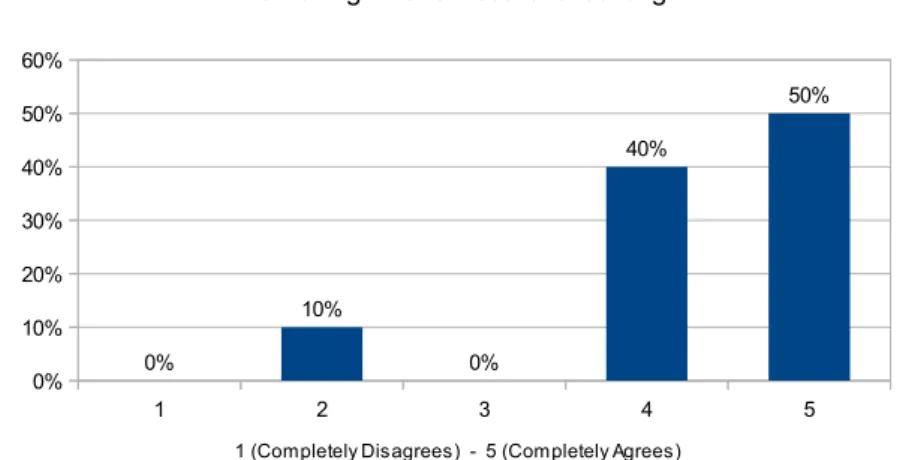
5.2 Question CI3 : The application responds quickly. . . 54
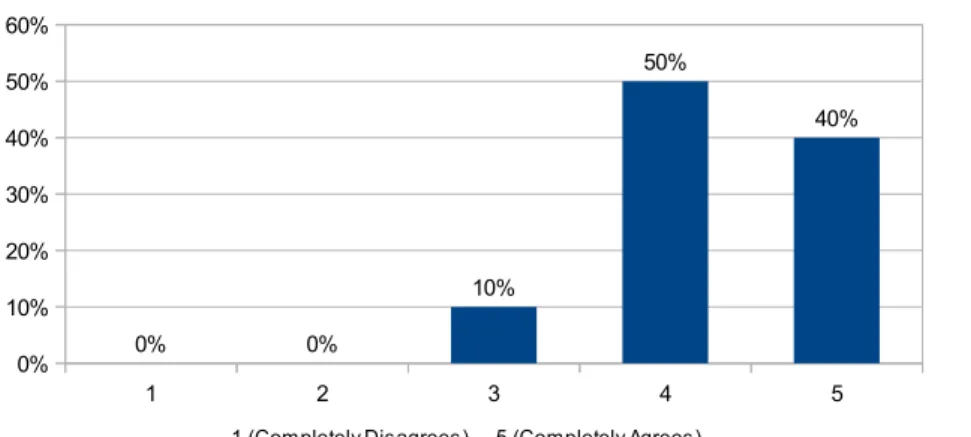
5.3 Question CII 1c) : There is a clear need to select the “save” button, so the annotations can be viewed in the player. . . 55
5.4 Question CII 2a) : Being able to review my annotations is important. . . . 55
5.5 Question CII 3c) : The waiting time for results is too long. . . 56
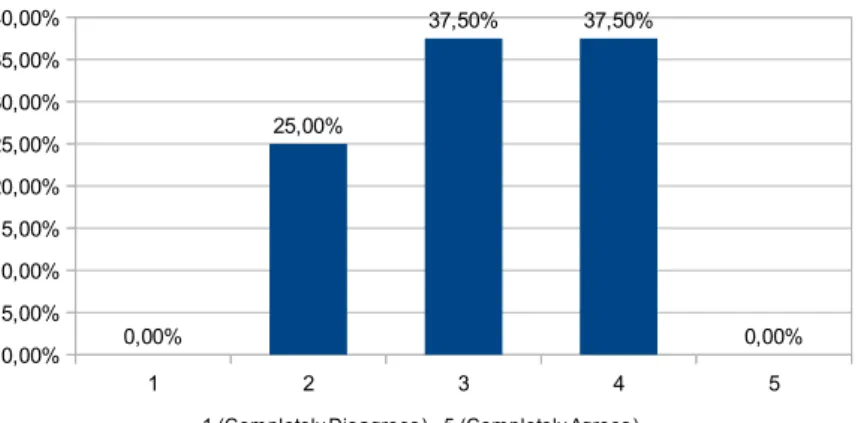
5.6 Question CII 3d) : The results are strongly related to the chosen image. . . 56
5.7 Question CII 4b) : The time that the annotations remain visible on the screen is appropriate. . . 57
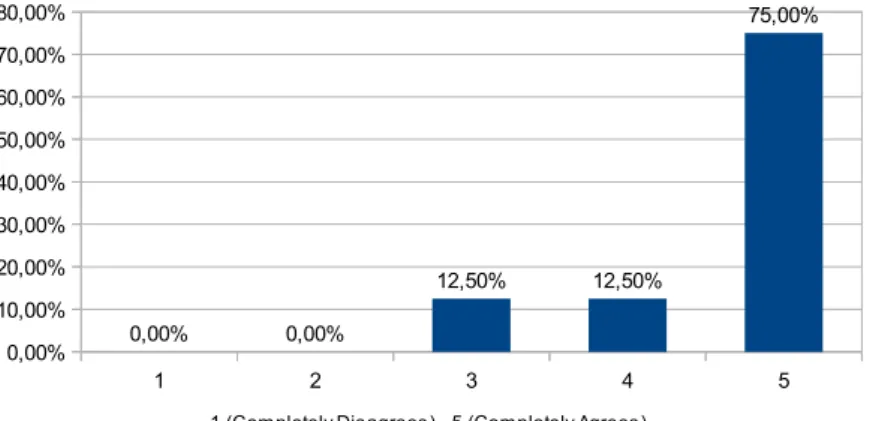
5.8 Question CIII 3 : Using the pen for annotating is essential. . . 57
5.9 Question CIII 8 : Overall satisfaction with the application. . . 58
5.10 Question Q30 (from the comparison questionnaire) : Which application would you use? . . . 58
5.11 Question CI1 : The application is easy to interact with. . . 60
5.12 Question CI3 : The application responds quickly. . . 60
5.13 Question CII 1c) : There is a clear need to select the “save” button, so the annotations can be viewed in the player. . . 61
5.14 Question CII 2a) : Being able to review my annotations is important. . . . 61
5.15 Question CII 3c) : The waiting time for results is too long. . . 62
5.16 Question CII 3d) : The results are strongly related to the chosen image. . . 62
5.17 Question CII 4b) : The time that the annotations remain visible on the screen is appropriate. . . 63
5.18 Question CIII 3 : Using the pen for annotating is essential. . . 64
5.19 Question CIII 8 : Overall satisfaction with the application. . . 64
LIST OF FIGURES xvii
B.2 Question A - Gender . . . 82
B.3 Question BI: Are you comfortable with new technologies? . . . 82
B.4 Question BII: Have you ever tried drawing oriented interfaces? . . . 82
B.5 Question BIII: If yes, in which device? . . . 83
B.6 Question CI1: The application is easy to interact with. . . 83
B.7 Question CI2: The application is easy to learn. . . 83
B.8 Question CI3: The application responds quickly. . . 84
B.9 Question CI4: In the mobile application, the content is well organized. . . 84
B.10 Question CI5: In the mobile application, the transition between sections is fluid. . . 84
B.11 Question CI6: The buttons have an adequate size. . . 85
B.12 Question CII 1a) : The tools are easily recognizable. . . 85
B.13 Question CII 1b) : The settings of each tool are easily accessible. . . 85
B.14 Question CII 1c) : There is a clear need to select the “save” button, so the annotations can be viewed in the player. . . 86
B.15 Question CII 1d) : The ability to attach images as annotations is clear. . . . 86
B.16 Question CII 1e) : The possibility of getting the current frame of the video, for annotating (and share it on social networks), is clear.. . . 86
B.17 Question CII 1f) : How do you assess the difficulty of drawing in the ap-plication with a pen? . . . 87
B.18 Question CII 1g) : And without a pen? . . . 87
B.19 Question CII 1h) : Satisfaction with this section. . . 87
B.20 Question CII 2a) : Being able to review my annotations is important. . . . 88
B.21 Question CII 2b) : Being able to review other users’ annotations is important. 88 B.22 Question CII 2c) : It is easy to distinguish my annotations from other users’ annotations. . . 88
B.23 Question CII 2d) : It is easy to access the desired annotations/sessions in the mobile application. . . 89
B.24 Question CII 2e) : It is easy to access a specific annotation (text, ink, image), from the session previously chosen, in the player. . . 89
B.25 Question CII 2f) : Satisfaction with this section. . . 89
B.26 Question CII 3a) : The objective of this section is clear. . . 90
B.27 Question CII 3b) : Search for videos related to my pictures is useful. . . 90
B.28 Question CII 3c) : The waiting time for results is too long. . . 90
B.29 Question CII 3d) : The results are strongly related to the chosen image. . . 91
B.30 Question CII 3e) : The two different types of search are clear. . . 91
B.31 Question CII 3f) : The instructions on how to perform the video search are sufficient. . . 91
B.32 Question CII 3g) : Satisfaction with this section. . . 92
xviii LIST OF FIGURES
B.34 Question CII 4b) : The time that the annotations remain visible on the
screen is appropriate. . . 92
B.35 Question CII 4c) : The functions of each button are easily identifiable. . . . 93
B.36 Question CII 4d) : The texts are legible. . . 93
B.37 Question CII 4e) : The images are visible. . . 93
B.38 Question CII 4f) : The annotation markers on the timeline are visible (play-back mode). . . 94
B.39 Question CII 4g) : The labels are appropriate (playback mode). . . 94
B.40 Question CII 4h) : Satisfaction with this section. . . 94
B.41 Question CIII 1 : The application provides the necessary tools for video annotation. . . 95
B.42 Question CIII 2 : Rate the application’s utility.. . . 95
B.43 Question CIII 3 : Using the pen for annotating is essential. . . 95
B.44 Question CIII 4 : The font size is (in the mobile application). . . 96
B.45 Question CIII 5 : The font type is (in the mobile application) . . . 96
B.46 Question CIII 6 : Help is necessary for navigating in the application. . . . 96
B.47 Question CIII 7 : I recommend using this application. . . 97
B.48 Question CIII 8 : Overall satisfaction with the application. . . 97
B.49 Question Q26 (from the comparison questionnaire) : Which application is easier to use? . . . 97
B.50 Question Q27 (from the comparison questionnaire) : Which application is more straightforward? . . . 98
B.51 Question Q28 (from the comparison questionnaire) : Which application is more appealing?. . . 98
B.52 Question Q29 (from the comparison questionnaire) : Which application would you recommend to a friend?. . . 98
B.53 Question Q30 (from the comparison questionnaire) : Which application would you use? . . . 99
C.1 Question A - Age . . . 101
C.2 Question A - Gender . . . 102
C.3 Question BI: Are you comfortable with new technologies? . . . 102
C.4 Question BII: Have you ever tried drawing oriented interfaces? . . . 102
C.5 Question BIII: If yes, in which device? . . . 103
C.6 Question CI1: The application is easy to interact with. . . 103
C.7 Question CI2: The application is easy to learn. . . 103
C.8 Question CI3: The application responds quickly. . . 104
C.9 Question CI4: In the mobile application, the content is well organized. . . 104
C.10 Question CI5: In the mobile application, the transition between sections is fluid. . . 104
LIST OF FIGURES xix
C.12 Question CII 1a) : The tools are easily recognizable. . . 105
C.13 Question CII 1b) : The settings of each tool are easily accessible. . . 105
C.14 Question CII 1c) : There is a clear need to select the “save” button, so the annotations can be viewed in the player. . . 106
C.15 Question CII 1d) : The ability to attach images as annotations is clear. . . . 106
C.16 Question CII 1e) : The possibility of getting the current frame of the video, for annotating (and share it on social networks), is clear.. . . 106
C.17 Question CII 1f) : How do you assess the difficulty of drawing in the ap-plication with a pen? . . . 107
C.18 Question CII 1g) : And without a pen? . . . 107
C.19 Question CII 1h) : Satisfaction with this section. . . 107
C.20 Question CII 2a) : Being able to review my annotations is important. . . . 108
C.21 Question CII 2b) : Being able to review other users’ annotations is important.108 C.22 Question CII 2c) : It is easy to distinguish my annotations from other users’ annotations. . . 108
C.23 Question CII 2d) : It is easy to access the desired annotations/sessions in the mobile application. . . 109
C.24 Question CII 2e) : It is easy to access a specific annotation (text, ink, image), from the session previously chosen, in the player. . . 109
C.25 Question CII 2f) : Satisfaction with this section. . . 109
C.26 Question CII 3a) : The objective of this section is clear. . . 110
C.27 Question CII 3b) : Search for videos related to my pictures is useful. . . 110
C.28 Question CII 3c) : The waiting time for results is too long. . . 110
C.29 Question CII 3d) : The results are strongly related to the chosen image. . . 111
C.30 Question CII 3e) : The two different types of search are clear. . . 111
C.31 Question CII 3f) : The instructions on how to perform the video search are sufficient. . . 111
C.32 Question CII 3g) : Satisfaction with this section. . . 112
C.33 Question CII 4a) : The video occupies an adequate portion of the screen. . 112
C.34 Question CII 4b) : The time that the annotations remain visible on the screen is appropriate. . . 112
C.35 Question CII 4c) : The functions of each button are easily identifiable. . . . 113
C.36 Question CII 4d) : The texts are legible. . . 113
C.37 Question CII 4e) : The images are visible. . . 113
C.38 Question CII 4f) : The annotation markers on the timeline are visible (play-back mode). . . 114
C.39 Question CII 4g) : The labels are appropriate (playback mode). . . 114
C.40 Question CII 4h) : Satisfaction with this section. . . 114
C.41 Question CIII 1 : The application provides the necessary tools for video annotation. . . 115
xx LIST OF FIGURES
Listings
4.1 Session XML . . . 45
4.2 Ink annotation XML . . . 46
4.3 Text annotation XML . . . 46
4.4 Image annotation XML . . . 46
4.5 Capturing and saving frames . . . 47
4.6 Extracting descriptor from frame . . . 48
1
Introduction
The television experience is changing everyday. Long gone are the days where people stood by a television and just watched a broadcasted program. New technology and new ways of consuming and sharing content affected not only television but also the social experience. Sharing, commenting and receiving feedback became an essential part of our daily lives. Being such a common thing nowadays we would expect it to be quite simple. Instead, we see ourselves sometimes struggling to find what we need and to keep track of all the different content being posted in all the different sharing platforms. The act of sharing by itself is relatively simple, as there are several platforms and social networks at our disposal for that matter. However, finding exactly what we want, and making that content accessible to those we want, independently of where we are or what devices we have at our disposal, is a whole different problem. To solve this problem we must begin by understanding the importance of annotations.
An annotation is something that is added to a document, photo or video, with an in-tent of improving organization, memory, search and sharing. An annotation can be plain text, an audio note, a tag or even a drawing. The main motivations for annotating are organization and communication [AN07]. Annotations can be useful for organizing con-tent, for oneself or for others, which then can also improve searching. Annotations can also give context and help someone recall where a video, or photo, was taken and when. Focusing on the social part, annotating enhances the sharing experience by facilitating the search of content by others and thus easily exposing what we intent to [AN07]. It also gives context to someone who has never seen the content.
1. INTRODUCTION 1.1. Problem Description and Context
1.1
Problem Description and Context
As previously mentioned, there is much to be done in the television content sharing area. Social experience and content sharing have continuously been improved but mainly for the web, so there is a need to bring that experience to television.
Television is a social experience, as people like to comment and share what they watched with others [WUMCKB11]. Providing means for users to share fragments of television content, and to enrich them, enhances this experience. The idea of creating personal bookmarks and sharing fragments of video with family and friends seems to be something that users are looking for, and that they will probably use if it is available for the television as well [CBGJKS08]. Making annotations and sharing content through the TV can be a hard task for now, so it is also important to think of ways and what technology to use for making this possible.
This project aims to create a system that allows users to share, annotate and retrieve television content. The proposed system will be divided into three components with the following objectives:
• Multimodal annotation of video, focusing on television content;
• Collaborative annotation within groups of users;
• Integration with social networks by sharing content and annotations;
• Offering a social TV experience to the users.
1.2
Presented Solution
The aim is to provide a system that allows for sharing television content and comment-ing through multimodal annotations. The idea is to have a collaborative and interactive environment where several users annotate and watch the same media content.
For annotating content, the user will be able to retrieve a frame or a fragment of the video being watched to their smartphone and then proceed to making annotations. These annotations can be free text, drawings, handwriting writing with the use of a pen, links to other videos or photos, and possibly audio notes. Once the user has finished, the annotations will be stored in the system. When annotating the usage of a pen is preferred, since it provides a more natural interaction for the user being very similar to human-paper-pen interaction.
1. INTRODUCTION 1.3. Contributions
The technology used to develop this solution is a smarthphone with the Android sys-tem and a television set. Currently we are using the Samsung Galaxy Note as it has sup-port for ink based writing. The system was developed in C++ using the openFrameworks platform [Of], which is a library dedicated to creative programming. The openCV (Open Source Computer Vision) [Ocv] library was used for image processing and image-based matching.
1.3
Contributions
The main contributions of this thesis are:
• Multimodal Annotation for the TV: A model and a mobile application for annota-tion of television content, either with text, handwriting, drawing and links to other files;
• Collaborative Annotation: A system that manages annotations from several users on several videos or on the same video;
• Television Experience and Content Viewing: A system for presenting on a TV, or other visual display units, the content with the respective annotations;
• Integration with Social Networks: A system that is integrated with social networks and cloud storage services, allowing to share and save annotations on other plat-forms.
• Video Search based on Image Matching Techniques: A system for searching videos using images or photographs belonging to the user. For matching images with videos, image matching techniques will be used.
• User Evaluation: Usability tests of the system to evaluate both the interface and the application itself. After evaluating the system through a questionnaire and by gathering suggestions from the users, an analysis of the results will follow.
1.4
Document Structure
This document is structured in six chapters: introduction, related work, television content annotation, prototype development, evaluation and conclusion and future work.
1. INTRODUCTION 1.4. Document Structure
2
Related Work
This chapter presents the necessary concepts and techniques for the development of our solution. In the following sections several systems and algorithms related to this thesis will be presented. This chapter is divided into four main sections. The first section is dedicated to algorithms used for image matching and object recognition. The second section will cover systems for television and television content annotation. The third section will present systems that provide tools for video and photo annotation. The last section addresses collaborative annotation systems and proximity interaction between devices and the environment.
2.1
Image Matching and Object Recognition
2. RELATEDWORK 2.1. Image Matching and Object Recognition
Figure 2.1: Features or keypoints detected on an image [Lag11]
Feature detection and matching is useful for object recognition and image-based match-ing, as well as other fields of computer vision. By using this kind of techniques it is pos-sible to discover if, for example, two pictures match,i.e., if they were taken in the same place or even if they were both taken during the night. The first step to accomplish this is to detect features of an image, as illustrated in the figure above. Sometimes detecting features produces too many keypoints and there are several algorithms to eliminate "bad" points, that involve imposing a minimum distance between two interest points. The sec-ond step is to describe features by extracting the descriptors of each feature. A descriptor describes different characteristics of a feature, such as color, texture and shape. Having the descriptors from each feature from both images we can now match them, compar-ing the feature descriptors in the first image to all the feature descriptors in the second image. The best matches are the results of the matching of the two images. The follow-ing figure (2.2) shows the match results and each match is a line that links a point to its corresponding image point on the other image.
2. RELATEDWORK 2.1. Image Matching and Object Recognition
Since matching content of images and video will be a part of this thesis, there is a need to explore different techniques related to this subject. There are several feature detectors and in this section three of them will be discussed: SIFT [Low99], SURF [BTG06], and FAST [RD06].
2.1.1 SIFT
Scale Invariant Feature Transform (SIFT), developed by David Lowe [Low99], is an algo-rithm created for image matching and object recognition. The SIFT descriptor is invariant to translations, rotations and scaling transformations. It is also robust to changes in illu-mination, noise, and minor changes in viewpoint. In addition, SIFT features are highly distinctive and generally allow for a correct object identification with low probability of mismatch.
The SIFT algorithm consists of four key stages: scale-space extrema detection, key-point localization, orientation assignment and keykey-point descriptor. The first stage is where the keypoints, or points of interest, are detected. Scale-space extrema detection produces many keypoints candidates and some of them are not desirable. So, the next stage is used to eliminate keypoints that have low contrast (therefore sensitive to noise) or are badly localized alongside an edge. In the orientation assignment step, each key-point is assigned one or more orientations based on local image gradient direction and thus achieving invariance to rotation. In the final stage, a descriptor vector is computed for each keypoint.
2.1.2 SURF
Speeded-Up Robust Features (SURF), presented by Herbert Bayet al.[BTG06], is similar to SIFT. However, SURF is faster than SIFT, thus enabling real-time applications such as tracking and object recognition. The algorithm is composed of three main steps: interest point detection, interest point description and feature matching. Like the SIFT method, the first two steps rely on scale-space representation and first and second order differen-tial operators. These operators are speeded-up in SURF which leads to faster results.
2.1.3 FAST
2. RELATEDWORK 2.1. Image Matching and Object Recognition
2.1.4 Discussion
2. RELATEDWORK 2.2. Television Content Annotation and Applications
2.2
Television Content Annotation and Applications
Television always involved a social component, as people like to comment what they watched with other people and share their experience [WUMCKB11]. Interactive tele-vision came to address this issue and to make the teletele-vision experience more than a va-riety of uncontrollable streamed programs. The first generation of interactive television brought several interactive web-based models, that focused on the interests of content producers and could only be experienced in an individual way. The new generation fo-cuses on the role of the user and to make interactive television a shared experience. The objective is to make possible for a user to communicate with others while watching TV, leave notes and comments, and share fragments of the content being watched [ WUM-CKB11].
In this chapter, several systems that implement this concept will be presented. The first system is WeOnTV [AAPN09], that allows viewers to watch the same channel to-gether and to chat. Then, AMOPA [KKKRBHE11], which was designed for the purpose of annotating and organizing television content. Also, the EPG [OMAHT09], a system for creating virtual channels and making recommendations, using both the TV and the PC. Finally, the BluTV [SJBdLVL12], which is a platform for set-top boxes, where other widgets and applications can be installed on top of it.
2.2.1 WeOnTV
WeOnTV [AAPN09] is a social TV application that was developed on a staging platform of PT Inovação IPTV infrastructure. This application relies on the features of Instant Mes-saging (IM) and allows users to know what the other users are viewing, to recommend channels and to chat in multiple formats. It runs on a regular IPTV set-top box and offers a variety of social features, such as to personalize the content of messages and organize them by categories (family, sports, love, etc.), integration with a public IM service, multi-ple simultaneous IM sessions, privacy management and TV channel recommendation.
2. RELATEDWORK 2.2. Television Content Annotation and Applications
Figure 2.3: WeOnTVTV mode[AAPN09]
If a user accepts an invitation to "go to chat" from a friend, or if he chooses to, he will be redirected toChat mode. Here, the TV content is secondary and the social features of WeOnTV take the leading part. The user is able to manage friends and conversations and to change his or hers status.
Figure 2.4: WeOnTVChat mode[AAPN09]
2.2.2 Automated Moving Picture Annotator (AMOPA)
As part of the sachsMedia research initiative, that focuses on enterprises that produce TV content, the developers created a framework that facilitates the process of video pro-duction and distribution. As human annotation is very time-consuming and the existing computer-automated annotation lacks quality, this framework aims to find balance be-tween both problems.
2. RELATEDWORK 2.2. Television Content Annotation and Applications
an OCR system and other techniques to find relevant text in the video materials. Speaker change recognition methods are also implemented in this framework. The feature extrac-tion algorithms can be individually configured so that they can match the requirements of each user/client.
Mobile annotation was also considered by the authors as a way to make annotations on the user end [KKKRBHE11; KBE10]. Users’ lack of time and concentration, as well as the difficulty in describing the content and using the adequate keywords, created the need to find a solution. The idea was to create a concept for a mobile application, for transferring and publishing videos that were annotated by the user itself. And thus the problem of meaningful tags arises. The solution was to divide tags by categories like "Who?","How?","Where?","What?" and "When?". Tests conducted by the authors re-vealed that users prefer tags based on emotions, meaning that the most used category was the "How?" category. Having videos tagged into different categories by the previous annotations of other users enables filtering and better search results in future searches and browsing.
Figure 2.5: Selecting video clips using emotion tags [KKKRBHE11]
2.2.3 Electronic Program Guide (EPG)
The EPG [OMAHT09] concept allows users to browse and create media content with the TV and the PC. The content may come from different sources such as a connected external device, other devices with WIFI connectivity, on-line content and broadcasts. Besides the normal interactive TV services, the EPG offers social networking features for the TV environment, such as recommendation features. As the users can both access and share their content, or UGC (user generated content), the authors thought that adapting the interface to support such features would not work. So they assumed that the users would perform their settings using their computers.
2. RELATEDWORK 2.2. Television Content Annotation and Applications
Figure 2.6: Virtual channel creation on the PC [OMAHT09]
The user is also able to share the TV content with friends. Users can publish a short extract of what they are watching and that extract is automatically published on a blog, where then other users can add it to their channels and watch it later on. A user can also rate content, and by doing so is recommending it to other users. When a video is highly recommended, a message will be automatically posted on the user’s blog. This recom-mendation feature helps users to find content that they will be very likely interested on.
Figure 2.7: Recommendation on the EPG [OMAHT09]
2.2.4 BluTV
The BluTV [SJBdLVL12] is a platform that has been used to develop applications for the Brazilian Terrestrial Digital Television System. Building applications for Digital Televi-sion can be difficult for people that have interest on televiTelevi-sion systems but do not have the necessary knowledge and do not dominate the existing software tools to build those applications. The BluTV solves that problem by allowing the development of interactive television applications.
The BluTV was used for creating an interactive service guide that is composed by nine applications, fully functional and tested. The available applications cover different areas such as information and news, health and education.
2. RELATEDWORK 2.2. Television Content Annotation and Applications
data and to process and present data information. The interactive service guide can be embedded in set-top boxes and thus reaching the viewers’ homes. New applications can also be developed and added to the guide.
Figure 2.8: BluTVMediaPlayer in a set-top box [SJBdLVL12]
2.2.5 Discussion
Comparing the four systems, they serve different purposes but have some characteris-tics in common. WeOnTV and EPG, both have channel recommendation, although it is achieved in distinct ways. EPG allows for content recommendation, and then other users can watch the content later, while WeOnTV allows for a user to recommend content being broadcasted at the moment. On EPG, users can share content but that content can only be videos found in a previous search. AMOPA is not entirely television driven. Although its main purpose is to organize, search, and annotate television content, that can only be done on a PC. Of all four, AMOPA is the only one that uses object and face recognition techniques. The authors of AMOPA also address the problem of mobile annotation with the usage of tags, but only with the objective of organizing content and to encourage users to annotate. The BluTV is completely different from the other mentioned systems, but has an important role because it is a system made for set-top boxes and thus being relevant for this work.
2. RELATEDWORK 2.3. Video and Photo Annotation
2.3
Video and Photo Annotation
As previously mentioned, an annotation is content that a user attaches to a document, video or picture, thus enhancing comprehension and interpretation of that content [ GC-CGIGCP04]. Annotations are mostly used for organization and communication purposes [AN07]. Organization can be for both the user and others, and it also improves searching. Regarding communication, annotations can be useful for sharing content and to give con-text to others who are not familiar with the content [AN07]. The most common forms of annotation, for videos and photos, are free text, tags, semantic information, handwriting and audio.
Regarding video annotation, there is MPEG-7 [Mpe], which is a multimedia content description standard. MPEG-7 improves metadata management and allows for faster and more efficient searching. The description is separated from the video content, but they are related.
There are several systems for multimedia annotation, providing the user with a tool for creating annotations, searching and organizing content. This section will only focus on systems that provide these features, where the user makes their own annotations with-out collaborative annotation. Collaborative annotation will be addressed in the following section. The TKB system [Val11] focus on the capture and annotation of dance videos. In TKB, the annotation can be done in real-time, with a delay or added in post-production. The Family Video Archive [AGL03] is a system that provides the user an environment to manage and annotate his own videos. Finally, Caliph & Emir [Lux09] are two tools that allow for annotation and searching collections of photos.
2.3.1 TKB
The TKB (Transmedia Knowledge Base) project was envisioned to document, annotate and support creation of contemporary dance choreography [Val11; CVSAaFC11]. For that purpose, a tool that supports the capture and multi-modal real-time annotation of video was created.
This system supports the capture of two video streams from two different sources. It is possible to display both streams simultaneously or one at a time. It is possible to annotate on top of the video streams with different types of annotations.
In TKB, there are four different kinds of annotations - digital ink, text/hyperlinks, audio notes, and "marks" (bookmarks). The type of annotation that stands out from other annotation systems is the bookmark concept. Each "mark" is represented by an icon and it is associated with a keyword. After creating annotations, the user can then edit, view or delete them.
The user can annotate video in three different modes:continuous,delayedorsuspended.
On continuousmode, video capture is visualized synchronously with the live scene and
2. RELATEDWORK 2.3. Video and Photo Annotation
what is being presented to the user has delay relatively to the live scene. Annotations will also fade with time, as incontinuous mode. Finally, in suspended mode, the video capture will be suspended and annotations will be associated with the current frame.
Figure 2.9: TKB insuspendedmode. On the left it is presented the current video capture. On the right is represented the selected frame for future annotation. [Val11]
This system also provides a timeline view that is composed by two main tracks, the video stream track and the annotation track. The annotation track splits into several tracks, each one corresponding to a different type of annotation.
Figure 2.10: TKB: timeline view and the current video capture with different types of annotations [Val11].
2.3.2 The Family Video Archive
2. RELATEDWORK 2.3. Video and Photo Annotation
possible to watch it and control it like in a normal video player. There is also a timeline which is used to indicate the boundaries of a scene. A scene can be defined as a part of the video that is meaningful to the user and can be manipulated separately from the rest of the video. This system only supports the annotation of the current viewed scene. There are three different kinds of annotations - date, free text and metadata tags. The tags are created by the user and are organized into a hierarchy. The user is responsible for cre-ating this hierarchy and can divide the tags into categories and subcategories. These tags can be used as search parameters.
Figure 2.11: The Family Video Archive annotation interface [AGL03]
This system also provides automatic annotation. When a scene is tagged with a tag from a certain category, all the tags from the level bellow that tag will be automatically associated with that scene too. Also when a user inserts a free text annotation, the system runs a matching algorithm over the text to provide a list of possible tags for that scene. The free text annotation can also be used to suggest new tags for the hierarchy.
2.3.3 Caliph & Emir
Caliph & Emir [Lux09] are two different tools resultant of the same project and they provide a user interface for MPEG-7 photo annotation and retrieval.
2. RELATEDWORK 2.4. Collaborative Annotation and Proximity Interaction
when annotating an image. This information is stored using MPEG-7 XML.
Figure 2.12: Caliph: editor for MPEG-7 semantic descriptors [Lux09]
Emir allows to search in MPEG-7 documents and focuses on the information created by Caliph. It is possible to search by keywords, retrieve semantic descriptors, and retrieve content-based images using low-level features.
2.3.4 Discussion
Although The Family Video Archive and Caliph have different targets, one is for video annotation and the other for photo annotation, they have some similarities. Although both support annotation by tags, in Caliph the tags are organized in a structured text description, with categories such ashoworwhen. TKB also supports textual annotations, among others, but the main focus is the handwritten annotations. Of the three systems, TKB is the only one that allows real-time annotations.
In this section, only three systems were mentioned since video and photo annotation per se are not the main focus of this thesis. However, there are other systems that were taken into account, such as [GCCGIGCP04] and [DE06].
2.4
Collaborative Annotation and Proximity Interaction
As mentioned, annotation can help improve organization, memory and communication. The systems addressed in the previous chapter fully fulfill these intents except for com-munication. Although annotation by itself can help sharing and bringing context to oth-ers, the user still had to make their annotations in an individual way and could only share their work through other platforms.
2. RELATEDWORK 2.4. Collaborative Annotation and Proximity Interaction
media or scientific [SHK03]. In the following section, we will present CoVidA [ZWLS12], a collaborative interface for video annotations, Vannotea [SHK03], a system for real-time annotation and discussion of video content, and the CWaCTool [JGCP10], that allows users to share annotations synchronously in a P2P network.
In this chapter, besides collaborative annotation, it will also be discussed proximity interaction. In our daily lives, our actions are binded to how we interpret spatial rela-tionships [BMG10]. However, this kind of interaction is still rarely used to manage our relationship with digital devices. Devices with knowledge of their surroundings, such as people, objects and other devices, can bring new forms of interaction and improve communication and sharing.
2.4.1 CWaCTool
TheWatch-and-Comment(WaC) paradigm proposes to capture user-made multimodal
an-notations while they watch and comment a video. The results are interactive videos, that mashup the original videos with annotations. The tool CWaCTool [JGCP10] is an extension of that paradigm with theContext Aware Peer-to-Peer Architecturemodel, thus allowing users to annotate on a P2P network and share those annotations synchronously. This tool allows context sharing, such as the user personal preferences, collaborative digital ink annotations, access to video streaming (from Youtube), audio notes, text notes, chat, P2P groups and integration with social networks. There are three possible types of annotations - digital ink, text and voice. Collaborative mode is not available for voice annotations.
The CWaCTool allows users to visualize and comment on Youtube videos. The user can both see their own comments and the comments made by users in the CWaCTool net-work. There is also integration with the social networks, namely with the Orkut netnet-work. This allows CWaCTool to suggest new contacts, prioritize suggestions from friends and recommend groups.
2. RELATEDWORK 2.4. Collaborative Annotation and Proximity Interaction
2.4.2 Vannotea
Vannotea [SHK03] is a system that enables real-time collaborative indexing, browsing, annotation and discussion of video content. Users can work collaboratively as a group to segment, browse and annotate a particular video of interest.
The system is divided into four components: a search and retrieval database, an anno-tation database, an application server and a MPEG-2 video streaming server. The search and retrieval database enables the search and browsing of video files and only stores ob-jective and reliable metadata, provided by the video itself and by trained catalogers. The annotation database is used to store personal and subjective metadata, such as free text annotations made by users. The application server is responsible for coordinating events between clients using the same server-application. In this case, users in a collaborative group are connected to the same server and use an application called FilmEd to view and annotate their videos. In this system, at any given time there must be a client that was chosen to be the client-master. The server is responsible for replicating the events of the client-master through the rest of the clients, thus creating a collaborative environment.
Figure 2.14: TheFilmEdapplication is used by the system so the users can annotate, view and search videos [SHK03]
The annotation system allows annotations of segments, shots, frames and specified regions within frames. Users can make and share their own annotations and can browse for annotations made by other users. It is possible to see by who and when each annota-tion was made.
2.4.3 CoVidA
2. RELATEDWORK 2.4. Collaborative Annotation and Proximity Interaction
Figure 2.15: CoVidA: collaborative video annotation [ZWLS12]
The users use a digital-pen for outlining objects and for writing annotation terms. The authors defined two types of annotations,frame annotationandobject annotation. Aframe
annotationis associated with the whole frame and anobject annotationis associated with
the outline drawn by the user. The system can automatically distinguish between both types of annotation. Later on the user can edit or delete the annotations and can search them using handwriting. The annotation information is stored in XML and can be reused by other applications or on other videos.
Figure 2.16: CoVidA: outlining the shape of an object with a pen [ZWLS12]
2.4.4 Proxemic Interaction
Proxemics is the way we interact with the world by interpreting spatial relationships [BMG10;Mar11;GMBDMW11]. Devices with proxemic interaction are supposed to have knowledge of nearby people and other devices, and to accomplish that they need to be aware of theirposition,identity,movementandorientation.
Positioncan be described in two ways: absolute or relative. For the absolute position
we have to have a fixed point in space. On the other hand, relative position can be defined as the spacial relationship between two entities that do not necessarily have to be fixed, so there is no fixed point. Orientation is simply the direction that an entity is facing.
Movementis the change of position and orientation over time. Theidentityproperty it is
2. RELATEDWORK 2.4. Collaborative Annotation and Proximity Interaction
For an interactive system with interaction like this, there is a need to distinguish what is fixed (walls, windows, chairs) and what is not (people). So the authors define two kinds of features: fixed features and semifixed features [BMG10]. Fixed features are fixed aspects like walls and semifixed featuresinclude objects that are normally fixed but that can change over time, like chairs and tables.
There are different features that can be added to this concept of proxemic interaction. The authors discuss the use ofmobile tokens [BMG10], which are objects that explicitly interact with the system, like a mobile phone being used as a pointer. Other valuable feature is recognizing different people, which brings us back to the concept of identity. Thus, it is possible to have notion of history, which allows a user to continue activities that were previously started by himself, and also personalization and security.
The proxemic media player application is the example that is used to demonstrate this
kind of interaction. There are different kind of interactions. First, when someone enters the room at position (a’) the display is activated. Then when the person moves closer (b’) to the display the video previews will continuously shrink. When the person is finally very close to the surface (c’) they can select a video directly by touching the surface. When the person moves away to position (d’), the selected video track starts playing.
Figure 2.17: Proxemic Media Player: different responses depending on the user position [BMG10]
2.4.5 Discussion
The CWaCTool and Vannotea provide the users a collaborative environment where they can annotate videos and share those annotations synchronously. Both systems enable real-time annotation, browsing and discussion of video content.
2. RELATEDWORK 2.4. Collaborative Annotation and Proximity Interaction
Of all presented systems, CWaCTool is the most similar to our solution. Besides pro-viding real-time annotation and sharing on a collaborative environment, it also has the concept of groups and integration with social networks. The CWaCTool also offers digital ink and text annotations. However, in this system users annotate on a P2P network and can only access the system through a PC. CWaCTool focuses on video streaming, coming from sources like Youtube, contrarily to our system which focuses on television content and user-generated content.
CoVidA is very useful for a work environment providing collaboration on the same device. However, the users have to be at the same location of the device, which is not desirable for our system. Nevertheless, CoVidA’s difference between frame annotation and object annotation can have some relevance to this work.
3
Television Content Annotation
The study of related systems and techniques, such as those presented in chapter two, pro-vided a better understanding of this particular field and the motivation behind it. Also, new skills and knowledge were obtained and new ideas emerged, thus creating means for developing the proposed system. This chapter presents the concepts and technologies used for the development of the system, as well as the main requirements.
The first section of this chapter focuses on the context of the problem. To solve this problem the system has to fulfill several requirements, which is the subject of the next sec-tion. Finally, all the necessary procedures to achieve such requirements will be exposed in the last sections. These procedures will include the technologies used for developing the solution and both the system’s functionalities and a description of the interface.
3.1
Concept
The goal of this project is to create tools that allow users to annotate television content in a collaborative way. The proposed system provides support for annotation of video content by multiple users at the same time, re-watching both the user annotations as well as other users’ annotations, and sharing and searching content.
3. TELEVISIONCONTENTANNOTATION 3.2. Requirements
adding funny comments to a specific part of the movie and then publish that content on Facebook or Tumblr. The system also provides a way for users to add more meaningful annotations. For example, a football coach who watches the games of his team or games of his opponents and takes notes, which can later be used to improve his team’s tactics.
As the aim of our solution is to create a system that users can use to annotate tele-vision content, our system will be divided into two main parts: the video player on the TV side and a mobile application, for users to annotate. For the annotation, we chose a smartphone, a device that nowadays most people possess and that provides a more natu-ral way for users to draw and add content to videos. Using a smartphone also gives more independence to the users, as each user can annotate independently from the others and walk freely around the room.
This system is different from other presented systems, because it provides users a platform for annotating television content while watching it on a TV. Unlike other sys-tems, users fully annotate using a smartphone together with other users on the same room. It also integrates social features, such as sharing annotations on social networks.
3.2
Requirements
The requirements are defined by features and conditions imposed by users and the project team, that must be fulfilled so the solution may be adequate and closer to what is de-sired. Some features and conditions were defined at the beginning of the project, others were adapted and added throughout the development according to circumstances found along the way. In this chapter, two types of requirements will be presented: design and functional. Design requirements are related to certain characteristics and rules that the interface must oblige. Functional requirements are the operations and features that the solution must implement.
3.2.1 Design Requirements
The interface must be user-friendly and respect the principles of usability. The system is to be used by any kind of user, so having an interface that is easy to learn, well organized and can easily be recalled is of extreme importance. The design of the interface was developed considering two different levels of human-computer interaction: Hardware (physical interfaces - smartphone and TV) and Software (virtual interface). These types of physical interfaces promote the use of digital pens, touch and even motion triggered features.
3. TELEVISIONCONTENTANNOTATION 3.3. Solution
application. There must a section where the user can annotate, another section where the annotations can be browsed and replayed and yet another section for searching con-tent. The drawing environment and its tools must follow the standard of other drawing interfaces and promote the use of a digital pen.
For the TV interface all the elements must be designed to fit large screens and also to adapt to different screen sizes. As the main feature of the TV interface is to play videos, it is to important to have an interface that follows the standard of video players. Being the video the most important element on the screen, the video must occupy the majority of the TV interface area. The interface must also contain an area for the player controls, the video timeline and another area for displaying the image annotations.
3.2.2 Functional Requirements
The system’s main requirement is the ability to annotate video collaboratively. Collab-orative annotation is a feature that poses different challenges. Firstly, the system must allow collaborative but independent annotation, i.e., not sharing the same device. Since the users will be sharing the same room, such as the living room in their houses that do not have support for big devices (figure2.15), or even be in different locations apart from each other, it is important that they can work independently from one another. Secondly, it is necessary to coordinate events, giving the users the feeling that they are working together.
As for types of annotations, they must be useful, easy to learn and take advantage of the mobile platform. Also, annotations must be stored apart from videos and apart from other users’ annotations, so the original content is not modified, less storage space is used and each user can re-watch his own annotations or others’ separately.
As mentioned before, the system must also provide the users the possibility to re-watch their annotations in an easy and straightforward way. When replaying annota-tions, being able to access them easily or access specific moments is also of importance.
Finally, since the system aims to provide the users a social TV experience, there must be some integration with social networks, offering the users the opportunity to share annotations with friends, family and the rest of the world.
3.3
Solution
3. TELEVISIONCONTENTANNOTATION 3.3. Solution
requirements, describing the technologies used and the system’s interface and function-alities.
3.3.1 Technologies
The software technologies used for developing the solution were the openFrameworks platform for developing the player and related functionalities, the OpenCV library for image processing, the POCO library for creating the server, the Android Development Tools and the Android SDK for creating the mobile application, and the S Pen SDK for creating the drawing environment on the mobile application side.
The openFrameworks platform is an open source C++ toolkit designed to aid devel-opers in the creative process by providing a simple framework. This framework inte-grates different libraries such as OpenGL, QuickTime and OpenCV, resulting on a pow-erful tool for accessing and manipulating audio, video, image and text.
OpenCV is an open source library for computer vision and machine learning. This library provides several algorithms for recognizing faces, identifying objects, processing images, tracking objects and much more.
POCO is an open source C++ library for building network-based applications and it is included in the openFrameworks package.
The Android SDK includes several tools and API libraries necessary for developing applications for Android. These tools together with the Android Development Tools (ADT), a plugin for the Eclipse IDE that extends the IDE’s capacities, provide an inte-grated environment for creating Android applications.
The S Pen SDK, available by Samsung, provides a set of tools for developing appli-cations that take use of the S Pen (input tool similar to conventional pens but more ad-vanced, supplied with the Galaxy Note series devices) features, such as pen pressure and hover events. It also provides additional features such as a drawing environment with pen, eraser and text property settings. The version used for the drawing environment of our mobile application is the 2.3, released in February 2013.
The hardware technology for developing and testing the mobile application is a Sam-sung Galaxy Note. The specifications for this smartphone are a 1.4GHz Dual Core pro-cessor, 16GB of internal memory, a 5.3 WXGA (1280 x 800) screen, USB 2.0, Wi-Fi connec-tivity, a standard battery Li-on 2500 mAh, S Pen features and the Android 4.1 (Jelly Bean) platform. For testing the player it was used a Samsung ME46A LED display with a 1920 x 1080 resolution and a 46” Touch Overlay.
3. TELEVISIONCONTENTANNOTATION 3.3. Solution
3.3.2 Interface
As mentioned before, the solution is divided into two main parts and for each one of them an interface was developed. In this section, the two interfaces will be presented: (1) the player interface for the TV and (2) the interface for the mobile application.
3.3.2.1 Mobile Application Interface
To solve the problem of each user adding their own content independently, a mobile application was created. The mobile application interface was built for smartphones with the Android platform and provides the means for controlling the system. The users can choose what to watch and annotate through the mobile application.
The application is divided into three main sections, as seen in figure3.1(from top to bottom):
1. Play Video and Annotate: in this section the user is able to create a new session, after choosing a video to annotate, or join an ongoing session, thus annotating col-laboratively with another user. The current video being played and the annotations will be displayed on the TV interface.
2. Playback Video and Annotations: here the user can browse through previous ses-sions and re-watch them on the TV player. The chosen video will be played from the beginning and the annotations previously added will also be displayed at the appropriate moment.
3. Search Videos: this section corresponds to a different kind of search from the one users are used to. Instead of searching videos with keywords, the user can search videos using their own photos. The search will return videos that are related to the selected picture or photo.
3. TELEVISIONCONTENTANNOTATION 3.3. Solution
In both section1 and section2, the user begins by choosing a video. The available videos are shown as in figure3.2, in a single choice list.
In the first section (1), after selecting a video the application will lead the user to a drawing environment where is possible to annotate content. The drawing environment consists of a canvas and a set of tools, as shown in figure 3.4. On the left side of the canvas are the tools for drawing purposes which, from top to bottom, are the following: brush/pen, eraser, text, color picker, clear, undo, redo and save. Clicking twice on one of the first four tools (brush, eraser, text, color picker) will open the settings window corresponding to the selected tool. The clear button cleans the canvas completely, the undobutton undoes the last canvas’ action and theredobutton redoes the last action. The save button will save all annotations. The application’sAction Bar1 contains additional options such as adding attachments, sharing annotations and getting frames from the current video playing.
In the second section (2), after selecting a video the user can browse through the pre-vious sessions and select one for re-watching. The sessions are presented as shown in figure 3.3 and each session has a name, a date and the user to whom the annotations belong. Sessions can be filtered using the top right button. It is possible to see all annota-tions or only the annotaannota-tions belonging to the current user.
Figure 3.2: Mobile application: se-lecting a video to annotate
Figure 3.3: Mobile application: se-lecting a session for playback
3. TELEVISIONCONTENTANNOTATION 3.3. Solution
Figure 3.4: Mobile application: drawing environment when annotating a video
Finally, in the third section (3) the user can search videos using photos or pictures from the phone’sGallery. As shown in figure3.5, this section contains a button for adding a new picture and an area for previewing the select picture. There are two possible types of search: search all videos or search only the select ones. When the last option is chosen a dialog will appear so the user can choose the videos. As this type of search is uncon-ventional, a help button was also added (top right), with a brief explanation of what is expected of this kind of search. The results of the search will be displayed as a simple single choice list similar to the one on figure3.2.
3. TELEVISIONCONTENTANNOTATION 3.3. Solution
3.3.2.2 Player Interface
The player interface is designed for the TV and it is responsible for displaying the current video playing, the annotations being added at the moment, a timeline and the control buttons. This interface changes according to the current mode being used. The system has two different modes for the player: (1) Play mode and (2) Playback mode.
Figure 3.6: Player inPlayback mode
In Play Mode, the majority of the interface’s area is occupied by the video display.
Regardless of the screen size, the area assigned for displaying the video is always 80% of the total width and 75% of the total height. Below the video display there is a timeline, which tracks the progress of the video. The timeline is clickable, allowing the user to easily jump from one position of the video to another. For controlling the video, as in any other video player, there are control buttons, located at the bottom of the interface. It is possible to pause, play, fast forward, rewind and stop the video. If the video is stopped, clickingplaywill play the video from the beginning. The annotations will be displayed in the same area as the video, scaled to appear in approximately the same place where the user drew them before. However, this only applies for ink and text annotations. Image annotations will be displayed in a different place, as they will appear to the right of the video. Each image annotation has exactly the same size, 100 pixels for width and 100 pixels for height, and it is followed by a caption that describes which user has sent that specific image.
InPlayback Mode, the interface is almost identical to the one mentioned above, with the
3. TELEVISIONCONTENTANNOTATION 3.3. Solution
time in the timeline. That time corresponds to the time at which the user has added an annotation. The color of the marker changes according to the type of annotation: red for ink, blue for text and green for images. The labels for each color will be indicated at the bottom right of the interface, as shown in figure3.13.
3.3.3 Functionalities
In response to the requirements, the solution must have a set of functionalities that sat-isfy those requirements and solve the problems that were described in previous sections. This chapter depicts the main functionalities of the system, such as types of annotation, sharing content through social networks and searching content.
3.3.3.1 Types of Annotation
Taking advantage of the drawing environment of the mobile application, the digital pen and other content the user may possess in his phone, three types of annotations were created: digital ink, text and image. The following section presents the three types of annotation, explaining the concept behind them and their ways of insertion.
Digital Ink: A digital ink annotation is a path of ink with time and space dimensions. The digital ink can be used for drawing or writing on the video, using an input pen or simply the user’s finger. The digital ink annotation is the quickest to insert and it is where the user can be more creative. To add an ink annotation the user must choose the penbutton on the tool bar and then start drawing on the canvas. Each ink annotation has a timestamp that will correspond to specific a time on the video. The moment the user releases the pen or finger and an ink annotation is added, meaning when the ink path is completed, a timestamp is also added. The timestamp corresponds to real time and only when the annotations are saved (pressing thesavebutton), will the timestamp be converted to the actual video time. Thus, each ink annotation will be associated to a specific moment in the video.
Figure 3.7: Mobile application: ink annotation
3. TELEVISIONCONTENTANNOTATION 3.3. Solution
detailed comments. Inserting annotations in the form of text is advantageous as it pro-vides better readability for users, either in Play mode or for future reading inPlayback mode. To add a text annotation the user must press the textbutton on the tool bar and then press the desired location on the canvas. After tapping the canvas, a virtual key-board and a text area will appear at the same location the user touched before. The keyboard also has handwriting recognition, which allows the user to use the digital pen. When the user has finished writing the annotation, touching anywhere outside the text area will complete the annotation. Text annotations also have timestamps, that are added after the user has completed the annotation and converted to video time when thesave button is pressed. When a text annotation is pressed on, the text area, the keyboard and a delete button will appear, allowing the user to edit or remove the annotation.
Figure 3.8: Mobile application: text annotation
Image/Photo: Nowadays, smartphones come bearing a camera and it is common for people to possess several photos in their phones or even images they have downloaded from the web. Video content can be enriched by adding other types of content like pho-tographs or some other kind of image. Ergo, it is appropriate to have images as a form of annotation, not only for enriching the content but also for sharing photos with other users. To add an image annotation the user must press the attached mediabutton in the action bar. A pop-up window will appear and the user can add one or more images by pressing theadd imagebutton. It is also possible to delete more than one image by select-ing them from the list and pressselect-ing thedeletebutton. After closing the pop-up window, the images will be added as annotations. Similarly to the other annotations, image anno-tations also have timestamps that are added when thesavebutton is pressed.
![Figure 2.10: TKB: timeline view and the current video capture with different types of annotations [Val11].](https://thumb-eu.123doks.com/thumbv2/123dok_br/16534328.736471/37.892.241.693.680.965/figure-timeline-current-video-capture-different-types-annotations.webp)