F
ACULDADE DEE
NGENHARIA DAU
NIVERSIDADE DOP
ORTOA retail conversational interface to
naturally capture unstructured
information triggering high value
analytical and operational business
actions
Rui Gomes
Mestrado Integrado em Engenharia Informática e Computação Supervisor: Miguel Pimenta Monteiro
A retail conversational interface to naturally capture
unstructured information triggering high value analytical
and operational business actions
Rui Gomes
Mestrado Integrado em Engenharia Informática e Computação
Abstract
The retail work environment is frantic at times and there is little to no time to write something down or use the appropriate processes to pass information down to the right recipient. This lack of streamlined processes causes information to be lost or processed slowly, which is troublesome for retail businesses.
Actions that could be taken instantaneously can take up to several weeks to be processed, and non-critical but important data can be lost, which can definitely be improved by using a better process.
The recent breakthroughs in modern voice recognition technologies and natural language pro-cessing can be adopted to create a voice user interface that is able to process spoken commands, providing an overall better experience for retail businesses, trigger customizable actions in real time, help in inventory replenishment, expedite maintenance operations and increase customer satisfaction levels.
The data input step goes from a slow and cumbersome one, such as writing down a note, to just speaking to a system that is intelligent enough to not only convert the user’s voice to text, but also understand the meaning of said words. That data can then be stored and analysed, empow-ering retail businesses by providing high value analytical information and triggempow-ering operational business actions. These actions can be customized to fit the needs of different businesses.
Resumo
O ambiente operacional de retalho é por vezes bastante agitado e nem sempre há tempo para usar os processos apropriados para guardar informação, ou o processo é inexistente. Esta falta de processos otimizados faz com que a informação seja processada de forma ineficiente ou mesmo que não seja processada de todo.
Ações que poderiam ser tomadas automaticamente podem demorar várias semanas a ser com-pletadas e muitos dados acabam por ser perdidos, o que pode definitivamente ser melhorado através de um processo otimizado.
Os mais recentes avanços em tecnologias de reconhecimento de voz e processamento de lin-guagem natural podem ser adotados para a implementação de uma interface de voz, capaz de processar diversos tipos de comandos, fornecendo assim uma melhor experiência aos negócios de retalho, despoletando ações concretas com base em regras totalmente parametrizáveis, auxiliar na reposição de stocks, agilizando operações de manutenção e aumentado a satisfação do cliente.
O processo de captura de dados num ambiente operacional de retalho evolui de um de pro-cesso incómodo e lento, como a escrita manual de notas, para um sistema inteligente, que não só é capaz de criar notas através da voz, como também entender o significado das notas. Estas notas são armazenadas de forma segura e analisadas de forma a acrescentar valor através da apresen-tação devidamente estruturada da informação recolhida e despoletando ações parametrizáveis que respondem a situações emergentes num ambiente operacional de retalho.
Acknowledgements
First and foremost, I would like to thank my parents, not only for their relentless support and dedication, but also for inspiring me to be the best version of myself.
I would also like to thank Sérgio Bessa and the Ideavity team for making this project possible, for their support, insights and expertize, which have been invaluable during the development of this dissertation.
Finally, I would like to thank Professor Miguel Pimenta Monteiro for his guidance and advice which have been a tremendous help.
“When Henry Ford made cheap, reliable cars people said: ’Nah, what’s wrong with a horse?’. That was a huge bet he made, and it worked.”
Contents
1 Introduction 1
1.1 Context . . . 1
1.2 Motivation and Goals . . . 2
1.3 Document Structure . . . 2
2 Literature Review 5 2.1 Voice User Interface . . . 5
2.1.1 Challenges . . . 5
2.1.2 Opportunities . . . 6
2.2 Speech Recognition . . . 6
2.2.1 Speech Fingerprinting . . . 7
2.2.2 Probability Mapping and Selection . . . 7
2.2.3 Tools . . . 8
2.3 Natural Language Processing . . . 9
2.3.1 Lexical Analysis . . . 9 2.3.2 Syntactic Analysis . . . 10 2.3.3 Semantic Analysis . . . 10 2.3.4 Contextual Interpretation . . . 11 2.3.5 Tools . . . 11 2.4 Conclusions . . . 12
3 Designing a Voice User Interface for Retail 15 3.1 Tools Comparison . . . 15
3.1.1 Speech Recognition . . . 15
3.1.2 Natural Language Processing . . . 16
3.2 Proposed Solution . . . 16 3.2.1 Mobile Application . . . 17 3.2.2 Server Application . . . 18 3.3 Chapter Summary . . . 18 4 Implementation 21 4.1 Technologies Used . . . 21 4.1.1 PHP . . . 21 4.1.2 Laravel . . . 22 4.1.3 Vue.js . . . 24 4.1.4 Android . . . 25 4.2 Application Architecture . . . 25 4.2.1 Server Application . . . 25
CONTENTS
4.2.2 Mobile Application . . . 36
4.2.3 Chapter Summary . . . 39
5 Experiments & Results 41 5.1 Experiment . . . 41 5.1.1 Procedure . . . 41 5.1.2 Scenarios . . . 42 5.1.3 Results . . . 42 5.2 Chapter Summary . . . 43 6 Conclusion 45 6.1 Accomplished Objectives . . . 45 6.2 Future Work . . . 46 References 47 A Experimental Procedure 49 A.1 Scenario #1 . . . 49 A.2 Scenario #2 . . . 50 A.3 Scenario #3 . . . 50 A.4 Scenario #4 . . . 50 A.5 Scenario #5 . . . 50 A.6 Scenario #6 . . . 50
A.7 Additional Questions . . . 50
A.7.1 Age Group . . . 50
A.7.2 How difficult was it to register the voice commands? . . . 51 A.7.3 How difficult was it to retrieve pending tasks using the voice user interface? 51
List of Figures
2.1 Example of a Syntactic Parse Tree [Tuc] . . . 10
3.1 Proposed application flow . . . 17
4.1 General application architecture . . . 26
4.2 Database Schema . . . 27
4.3 Dashboard . . . 28
4.4 Registration Screen . . . 29
4.5 Create New Location . . . 30
4.6 Command Information . . . 31 4.7 Store Operations . . . 31 4.8 Create Action . . . 32 4.9 Edit Entity . . . 33 4.10 Analytics Overview . . . 34 4.11 Authenticate Application . . . 37
4.12 Main Application Screen . . . 38
5.1 Participants Demographics . . . 44
LIST OF FIGURES
List of Tables
3.1 Speech Recognition Tools Comparison Table . . . 16 3.2 NLP Tools Comparison Table . . . 16 5.1 Experiment Results . . . 43
LIST OF TABLES
Abbreviations
API Application Programming Interface CFG Context-Free Grammar
DOM Document Object Model
HMAC Hash-based Message Authentication Code HTTP Hypertext Transfer Protocol
KPI Key Performance Indicator
LPCC Linear Predictive Cepstral Coefficients MFCC Mel-Frequency Cepstral Coefficients NLP Natural Language Processing ORM Object-relational mapping
RASTA-PLP Relative Spectra Filtering of Log Domain Coefficients Perceptual linear pre-dictive
REST Representational State Transfer RNN Recurrent Neural Networks RPC Remote Procedure Call SDK Software Development Kit SMS Short Message Service SR Speech Recognition STT Speech to Text VUI Voice User Interface
Chapter 1
Introduction
1.1
Context
The retail industry has been around for a very long time and it has become deeply entrenched in most humans way of life. Large retail chains have hundreds of stores spread throughout the world, thousands of employees and millions of products being sold every single year.
Businesses are constantly striving to increase their bottom line by optimizing all processes that support their stores. These processes range from training their employees, optimizing stocks, rec-ognizing user behavior in order to enhance store layouts [LGK15], improve customer satisfaction with loyalty programs and collecting feedback to better understand their needs.
Despite the constant focus on bettering the processes, the day-to-day operations are still bound to be improved. The lack of streamlined processes causes retail employees to resort to simply writ-ing down notes that reflect the customers opinions and preferences, issues with the store itself, such as a defective bulb or even issues regarding the store layout, such as the inability for a customer to find a given item.
These notes are often processed in a slow and cumbersome process, which involves the store manager handling them individually and taking the appropriate action that will fix the underlying problem, without any kind of automation or even saving the customer request for future reference. Physical notes are also bound to be lost or mishandled before they can even go through the previously described process, which is not only inconvenient for the customer, since his request will be ignored, thus significantly reducing his satisfaction, but it is also data that the retail business will never have.
This dissertation is done in partnership with Ideavity, a company focused on the creation of web and mobile applications, with an extensive portfolio of successful projects for a wide variety of clients.
The main goal of this project is to design, implement and test a prototype of a voice user interface that provides value to businesses by aiding in stock reposition, expediting maintenance operations and increasing customer satisfaction.
Introduction
1.2
Motivation and Goals
The lack of a sharp process to handle day-to-day issues and customer preferences is an issue that impacts the customer satisfaction rates, decreases employees productivity and it can definitely be improved by adopting new technology.
A voice user interface is a perfect fit for this problem. By enabling retail businesses to use voice as the primary interface with the platform, we can ensure that operations run smoothly with a hands and eyes free user interface, which not only saves time but also allows for the messages to be processed dynamically.
The latest breakthroughs in voice recognition and natural language processing enable the cre-ation of a modern voice user interface that allows notes to be taken using speech, store them securely for future reference and provide value for retail businesses by extracting meaning from the notes, which can then be used to enhance the decision-making process or automatically trigger actions that respond to emerging situations in retail operational environments.
The goal of this dissertation is to develop a prototype that can register voice commands and convert them to text, create an appropriate semantic that can extract meaning from the commands, feed them into a rules engine that can trigger customizable actions and display all collected infor-mation in a dashboard.
In order to attain the previously described goals, the project was split into four phases. First, an extensive research of existing technology that is available to tackle this problem was performed. Next, those technologies were used to design and develop a functional prototype that is capable of correctly capture and process commands in a retail environment, according to a specified grammar and ruleset. Then, the prototype was tested in a real operational medium, which provided essential data that was used to complete the last phase: analyze all the obtained information to confirm or contradict the previously made assumptions and make adjustments to the prototype.
1.3
Document Structure
Besides the current introduction chapter, this document contains five other chapters. Chapter 2 contains the state of the art on current technology available that can be implemented to solve the presented problem. It covers the intricacies of creating a modern Voice User Interface and the state of the art on speech recognition and natural language processing algorithms. It also compares some of the available tools that expose APIs for both speech recognition and natural language processing.
Chapter3describes how a voice user interface can be implemented as a solution to the de-scribed problem. The proposed implementation is explained in detail, including how a mobile application can be used together with a server application to achieve a flexible and powerful solu-tion.
Introduction
Chapter4contains a brief description of the programming languages and frameworks used to develop the VUI and why they were chosen, a description of the application architecture and also relevant implementation details about each component of the developed solution.
Chapter5describes an experiment that was performed to confirm the viability of the imple-mented solution. Several simulated scenarios were presented to the experiment participants, who then used the VUI to handle the situations. The results were then analyzed and described, validat-ing that without extensive trainvalidat-ing the platform can be used to handle a multitude of scenarios in a retail context.
Chapter 6 is the final chapter of this document. It contains a brief description of the ac-complished objectives, comparing the implemented solution with the objectives proposed in this chapter and it also covers possible additions to the platform to further enhance its capabilities.
Introduction
Chapter 2
Literature Review
This chapter describes the intricacies of a modern Voice User Interface, describing how they evolved over time, their challenges and opportunities, and also how recent improvements in speech recognition and natural language processing technologies can be used to implement a VUI that ac-complishes the goals described in section1.2.
2.1
Voice User Interface
A Voice User Interface is what a regular user interacts with when using his voice to communicate with software [CCGB04].
They were initially named interactive voice response (IVR) in the early 2000s, being very simple voice systems that required the user to press keys in their phones or use their voice for simple inputs. With the breakthroughs in voice recognition technology, IVRs turned into full fledged voice user interfaces, that are applied to a variety of industries and businesses.
VUIs present a unique set of challenges that need to be tackled in order to provide the user with a good user experience, while offering a wide-range of opportunities that can be capitalized upon if implemented correctly.
2.1.1 Challenges
One of the most important aspects of defining a clear, pleasant to use voice user interface is to set very clear expectations for the user [O’R]: will it have a graphical representation that gives the user a visual confirmation of his actions? Will users be able to interrupt the VUI at any time and issue a new command? Will it always be listening, or will it be push-to-talk?
If there is a graphical representation for the VUI, it is crucial that both visual and voice in-terfaces are coherent and consistent between themselves. The two media are part of the same conversation the user is having with the system, so it is very important that they work in tandem. If no graphical representation is used, the VUI has an additional challenge to overcome: there is no opportunity to review the system’s output or the state they are currently in. After a message is read by the system, it is gone. This is often known as a transient, or non-persistent message. This
Literature Review
places an additional cognitive load on the user, and there is a fine line that must not be crossed in order not to overload the user or bore him with an unnecessarily slow pace of interaction.
Always-on, always-listening VUIs are a great way to ease the process of initiating a conver-sation with the interface, but it also raises some privacy concerns, while push-to-talk requires the user to take an extra step, but it erases the privacy problems the application might have.
Spoken communication plays a very important role in human beings life. Even without realiz-ing it, humans show that they possess a lot of assumptions and expectations, from pronunciation, the use of words, the speaker’s emotional state, and turn taking in conversations. The speaker does not usually explicitly choose which words he will use, nor how he pronounces them. In order to implement a VUI that feels seamless to the user, it is essential that these conventions are well understood. Not complying with them will very easily lead to interfaces that feel uncomfortable to use, lack a clear flow and are harder to understand.
2.1.2 Opportunities
Given all the challenges, it is important to also mention the opportunities that come with the use of a voice user interface.
One of the most appealing advantages of a voice user interface is the ability to create a unique user experience that is just not possible to recreate using visual means. A speech system is capable of drawing on the user’s innate skills of conveying their thoughts through spoken word, which means it is a more natural and efficient way of interacting with a software system.
A voice user interface can also be very useful when it comes to branding. When engaging in a spoken interaction, the user is communicating in such a natural way that it will naturally trigger judgments on various levels, from the speaker’s emotional state, friendliness, among others. This means a VUI connects with the user in a way that other kinds of interfaces just are not able to, presenting itself as a great branding opportunity for companies.
It is also a hands and eyes free means of interaction, which is crucial for systems that require interaction while the user is occupied with something that requires either his eyes or hands. Speech is ideal solution in this situation.
Finally, a VUI allows for a unique conversational interface, in which the system can prompt for more information according to a previously defined dialog flow. This means that the user can interact with the system in a more human, natural way, which plays right into the branding aspect of VUIs.
2.2
Speech Recognition
Speech Recognition, also known as Speech to Text (STT), is a sub-field of computer linguistics that enables a computer to translate spoken language into text.
Some of the currently available Speech Recognition systems need previous training, which is accomplished by having an individual speaker reading either text or individual words into the system. This training is then used to fine-tune the recognition of that specific person’s speech.
Literature Review
These systems are called "speaker dependent". If no previous training is needed, the system is called "speaker independent".
The process of translating speech to text is rather complex, but it can be broken down into a couple of processing blocks. Initially, the voice input is converted to a digital signal and its key features are extracted in order to create what is known as the speech fingerprint. This fingerprint is then passed into a word selector, which is responsible for selecting which word was said based on the observed input. Selecting each word can be done using Hidden Markov Chains or Neural Networks. After this process is completed we have the recognized speech output that can be fed into a feedback loop to improve the word selection process.
2.2.1 Speech Fingerprinting
Speech fingerprinting, also known as speech feature extraction, is one of the most important steps in automatic speech recognition software. They transform a raw speech signal, which contains un-necessary data and has a high dimension, to a characteristic feature vector with a lower dimension. There are many different algorithms that perform speech fingerprinting, each one of them with advantages and disadvantages, ranging from being easy to implement but with a small vocabulary size, to harder implementations with larger vocabulary sizes.
The lowest end of the feature extraction methods is Linear Predictive Cepstral Coefficients (LPCC). This approach requires a low level of resources and it is easy to implement. It has some disadvantages, such as only allowing a single speaker in a single language, with a small vocabulary size.
Mel-frequency cepstral coefficients are one of the most popular feature extraction methods. It requires a moderately low level of hardware resources and although harder to implement than LPCC, it is still not too complex. This method can be found in multi-speaker with multi-languages systems with a moderate to large vocabulary sizes.
In the highest-end of the speech fingerprinting processes there is RASTA-PLP. It is a more ro-bust and accurate process than the previous ones, but it requires a high level of hardware resources and it is harder to implement.
2.2.2 Probability Mapping and Selection
The speech fingerprinting step, described in section 2.2.1, maps the spoken words to a given probability. Those probabilities are then passed through to Hidden Markov Chains or Neural Networks.
Hidden Markov Chains are simpler than Neural Networks and their implementations can be found in many devices, not only for processing speech, but also recognizing handwriting or faces. Up until recently, they were the most used technique in speech recognition systems.
Neural Networks have been used in combination with hidden Markov models for quite some time but the latest improvements in acoustic modelling have resulted in a lot of gained attention for this method of recognizing speech. It is possible to train deep neural networks end-to-end for
Literature Review
speech recognition [GMH13]. In fact, in May 2012 Google has first launched their first Android speech recognizer using recurrent neural networks (RNNs) [Goo15].
2.2.3 Tools
There are several different tools available on the market that offer speech recognition as an API. They offer a wide variety of features, such as REST interfaces, multiple available languages, ability to stream the recognition results in real-time and use noise-reduction technology to improve accuracy in noisy environments.
2.2.3.1 Google Cloud Speech API
Google Cloud Speech API [Goob] empowers developers by enabling them with a powerful Speech Recognition API, using neural network models.
This API supports over 80 languages, it is able to stream the recognition results in real-time, it is accurate in noisy environments and it is highly configurable with context-aware recognition, allowing developers to provide the API with word hints to increase the accuracy of the word recognition.
It is also very flexible, working across multiple apps or devices, as long as they are able to send REST or gRPC requests.
2.2.3.2 Bing Speech API
Bing Speech API [Mic] converts spoken audio to text. It is able to recognize audio being recorded with a microphone in real-time and also audio from a file.
The API also supports real-time streaming, as the audio is being sent to Bing Speech API, partial recognition results are being sent back to the client, exposes a REST API as well as a client library with additional features, such as intent recognition and results streaming.
2.2.3.3 Watson Speech to Text
Watson Speech to Text [IBMb] is part of the IBM Watson set of APIs and it allows the conversion of audio voice into written text.
It supports eight different languages, broadband or narrowband audio models, audio streaming, limited to 100 MB chunks. It can also identify different speakers, keywords and it has profanity filters in some of the supported languages.
2.2.3.4 Speechmatics
Speechmatics [spe] is a speech recognition platform supporting almost 20 languages and has both a Cloud API available and an on-premises deployment version that allows customers to run their own speech recognition platform. It provides confidence scores for each output word, recognizes
Literature Review
speaker changes and also punctuation. It exposes a REST API and also a Web console for an easy integration with Speechmatics.
The platform has a unique time alignment technology, that allows transcribed text to be auto-matically synchronised with a provided audio or video source file, by providing with timestamps for each word or line.
2.2.3.5 CMU Sphinx
CMUSphinx [Uni] is a collection of speech recognition systems developed at Carnegie Mellon University.
Sphinx4, the latest addition to this collection, developed by Carnegie Mellon University, Sun Microsystems laboratories, Mitsubishi Electric Research Labs, and Hewlett-Packard’s Cambridge Research Lab, uses newer search strategies and accepts various types of grammars and language models, which makes it more flexible than its previous versions.
It is available in the form of a Java application, which means it can be ran in a variety of platforms without any significant changes. The program is language-independent, and there are over ten different pre-built language models available for use.
2.3
Natural Language Processing
Natural Language Processing (NLP) is a way of analyzing, understanding and deriving meaning from human language.
John Rehling, an NLP expert at Meltwater Group, explained NLP using a simple description: “Apart from common word processor operations that treat text like a mere sequence of symbols, NLP considers the hierarchical structure of language: several words make a phrase, several phrases make a sentence and, ultimately, sentences convey ideas. By analyzing language for its meaning, NLP systems have long filled useful roles, such as correcting grammar, converting speech to text and automatically translating between languages. ” [Reh].
Some of the common uses of NLP are deep analytics, summarizing blocks of text, creation of chat bots, identifying types of entities, identifying the sentiment of a given string of text or automatically translating text from one human language to another.
Generally, there are a number of subproblems that make up natural language processing: lexi-cal analysis, syntactic analysis, semantic analysis and contextual interpretation.
2.3.1 Lexical Analysis
Lexical Analysis, also known as tokenization, is the process of identifying and analyzing the structure of words. Simply put, in this step the main goal is to transform a stream of text into words and symbols, which are referred to as tokens.
The typical Lexical Analysis algorithm works at a word level, which is usually done by sepa-rating the tokens by whitespace characters or by punctuation.
Literature Review
2.3.2 Syntactic Analysis
Syntactic Analysis, which is one of the most well-developed area of NLP, deals mostly with the syntax of the language. A grammar is used to determine which sentences are legal, by producing a structure representation, also known as a parse tree.
The generated parse tree for the phrase "The cat eats the rice" can be seen in figure2.1. This parse tree breaks down the sentence into a series of structure parts that a machine is able to easily understand and process. Usually a Context-Free Grammar (CFG) is used to power the algorithm [Tuc].
Figure 2.1: Example of a Syntactic Parse Tree [Tuc]
Context-Free Grammars are simply a set of rules with a single symbol on the left-hand side of the rewrite rules. They are simple to define and they have been widely studied and adopted by many NLP systems.
It is important to note that sentences which are syntactically correct but make no semantic sense, such as "the rice eats the cat" are still acceptable at this stage.
2.3.3 Semantic Analysis
The goal of Semantic Analysis is to extract an initial representation of the meaning of the sentence being processed. Given the inherent complexity of natural language - a simple sentence can be interpreted in different ways - semantic analysis is often one of the most complex problems in NLP.
Literature Review
By completing this step it is possible to disambiguate word sense - e.g. distinguish "jaguar", the animal, from the luxury car or even the Apple Operating System Mac OS X 10.2 Jaguar - and also extract meaning from the combination of words.
2.3.4 Contextual Interpretation
Contextual Interpretation is the last stage of the text analysis. As the name implies, the context of the various sentences are used to extract meaning. The main goal is to find out references in a single sentence or even in a multi-sentence context.
As an example, Contextual Interpretation allows a program to understand that the pronoun “he” in the second sentence refers to John, given the following two sentences:
“John left for school”
“He packed his lunch before leaving”
2.3.5 Tools
Similarly to Speech Recognition, described in section 2.2, there are also a wide range of tools available that offer natural language processing capabilities as an API.
With features ranging from sentiment detection, to information about people, places or events, or even parsing intent, NLP tools are definitely an invaluable resource. Whether available for free or through a commercial license, these tools can help applications to immediately adopt and integrate state of the art natural language processing and understanding without having dedicated resources to it.
2.3.5.1 Cloud Natural Language API
Google’s Cloud Natural Language API [Gooa] is a state of the art NLP API with a multitude of features:
• Syntax Analysis - allows the extraction of tokens, sentences and parts of speech and also the creation of parse trees.
• Entity Recognition - Identify entities, such as a person, organization, location, event or product.
• Sentiment Analysis - Understand the overall sentiment expressed by a given block of text. This API supports text analysis in multiple languages and it exposes a REST API.
2.3.5.2 AlchemyLanguage
AlchemyLanguage [IBMa] is a collection of natural language processing APIs. It exposes a REST API that provides a number of pre-trained features and can be further customized with custom models.
Literature Review
Some of the features supported out-of-the-box by AlchemyLanguage are: Entity Extraction, Sentiment Analysis, Keyword Extraction, Relation Extraction, Taxonomy Classification, Author Extraction and Language Detection.
2.3.5.3 wit.ai
wit.ai [wit] is a complete natural language understanding solution, that uses machine learning and deep neural networks to analyse text inputs and retrieve the meaning behind them.
The platform was acquired by Facebook and it is both open and free, allowing developers to turn speech and text into actionable data by simply configuring it through an online dashboard. By simply providing the platform with examples and giving it information about said examples, wit.ai is capable of recognizing the intent behind text that comes into the platform. Additionally, the platform allows for real-time clarification for requests that are unable to be recognized, and it learns by itself using deep neural networks.
It supports fifty languages and has official SDKs for Node.js, Python and Ruby, a well docu-mented HTTP API and several unofficial SDKs supported by the community.
2.3.5.4 api.ai
api.ai [api] is not only a NLP solution, but a complete natural language understanding platform, designed to handle different conversation scenarios and interactions with the end-user. Using machine learning, the platform learns from real-world examples of conversations with the users and also with examples provided by the developers.
It supports fourteen different languages, it provides SDKs for more than ten different platforms and is deeply integrated with services such as Alexa, Cortana, Facebook Messenger and Slack.
2.4
Conclusions
After reviewing the state of the art on technology available related to the problem in hand, we can conclude that there have been tremendous advances during the last years that have vastly increased the speed and reliability of speech recognition and natural language processing algorithms.
These two technologies can be used in cooperation to enable the creation of an advanced voice user interface which, as previously described in section2.1, allows for a conversational experience for the end user, which has a number of advantages, such as being a natural interface that users can use without much guidance, and also providing a hands and eyes free experience.
The latest advancements in speech recognition, namely the use of deep neural networks, have decreased the error rate of the algorithms to single-digit levels. Sundar Pichai, current CEO of Google, said in Google I/O 2015 [Gooc] that the company’s voice recognition error rate has de-creased from 23% to just 8%.
Finally, when it comes to Natural Language Processing it is clear that is also evolving at a remarkable speed. In 2016, Google has open-sourced SyntaxNet [Good], a library for training
Literature Review
and running syntactic dependency parsing models. One of the available models within SyntaxNet, Parsey McParseface, achieves over 94% accuracy, at around 600 words per second.
Literature Review
Chapter 3
Designing a Voice User Interface for
Retail
The current chapter will go into detail on how a voice user interface can serve as a solution to the issues described in section1.1.
The first section covers the different tools described in chapter2 by comparing their advan-tages, disadvantages and essential features. The second section explains how a voice user interface can be designed in a way that complies with all the intricacies of a retail operational environment and how the selected tools can be used to create a seamless experience for the users that are inter-acting with the VUI on daily basis.
3.1
Tools Comparison
3.1.1 Speech Recognition
As previously described in section2.2there are a wide range of tools available in the market that allow developers to easily integrate Speech Recognition into any platform. They all have different features, support different languages and expose either client libraries or REST APIs.
In order to choose the best tool to implement a VUI for retail, it is important that not only it supports the widest gamut of languages, so that the platform can be used in the retail employees native language, and is as accurate as possible, to prevent misunderstood commands. Another important aspect is that it should allow for some customization, such as word hints, that further improve the accuracy of the tool.
As we can see in table3.1, Google Cloud Speech API is by far the best contender. It supports over 80 different languages and it is the only tool that allows for context-based word hinting. This can be used to provide the API with a list of words that are used in retail so the returned results are accurate.
Designing a Voice User Interface for Retail
Table 3.1: Speech Recognition Tools Comparison Table
Tool Name # of Supported Languages Supports Word Hints
Google Cloud Speech API 88 Yes
Bing Speech API 28 No
Speechmatics 19 No
CMU Sphinx 10 No
Watson Speech to Text 8 No
3.1.2 Natural Language Processing
There are also many available tools that can be used for natural language understanding, such as the ones described in section2.3. When it comes to a VUI, one of the most important features of a NLP tool is that the ability to capture intent and the entities related to that intent. It is also crucial that it supports a wide variety of languages for the same reasons as described in section3.1.1.
By analyzing table3.2, its clear that wit.ai is the tool that best matches the requirements. Not only does it support the widest gamut of languages but it also supports intent analysis which is essential to the creation of a voice user interface.
Table 3.2: NLP Tools Comparison Table
Tool Name # of Supported Languages Intent Analysis Entity Analysis
wit.ai 50 Yes Yes
api.ai 15 Yes Yes
AlchemyLanguage 8 No Yes
Cloud Natural Language API 3 No Yes
Using wit.ai to its full extent allows not only the extraction of intent from users commands and mapping of entities using synonyms, but also continuous training of the agent responsible for the processing of the voice commands, by using the platform’s advanced machine learning algorithms.
3.2
Proposed Solution
Although a voice user interface could technically be implemented in a multitude of devices, from dedicated hardware to a mobile app, in order to achieve a flexible system that can serve a wide variety of retail businesses, the main interface with the user should be easy to setup, update and maintain. The simplest way to achieve all three of these goals is to implement a mobile application that can be installed in any Android device, that can either be a smartphone or a tablet. The mobile application is responsible for capturing voice commands and transfer those to an application server which will then parse the voice commands, store them securely and trigger any rules that are adequate for a given command.
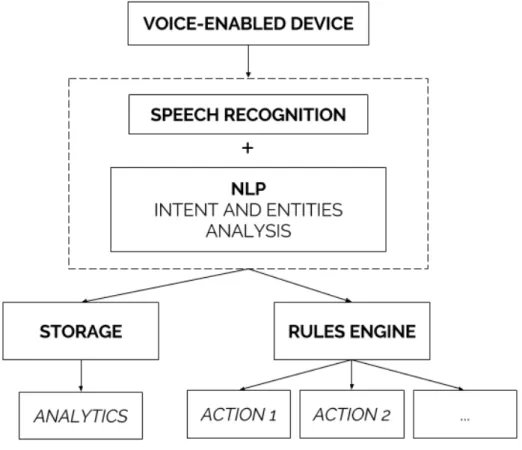
The main data flow can be described as follows: Firstly, the voice is captured in a voice-enabled device and sent to an application server responsible for all the following steps. The speech is then converted to text using a speech recognition tool, and the intent behind the spoken words
Designing a Voice User Interface for Retail
must be understood by using NLP. The result of the previous operation is then fed into a database for analytical purposes and it is simultaneously passed through a rules engine which will decide if the command needs to trigger any operational action. This is represented graphically in figure3.1.
Figure 3.1: Proposed application flow
The proposed data flow is simple, can be easily customizable to fit different businesses needs and it can be as powerful as demanded by a retail operational environment.
3.2.1 Mobile Application
The mobile application should be able to capture the users voice, process it and be flexible enough to work even in the event of a network outage, by either storing the audio for later processing, or using a more rudimental speech recognition algorithm and store the text until it has network access again.
By using the smartphone or tablet exclusively as voice-capturing devices the system can make use of cloud computing to perform even the most computing intensive tasks, upgrade, remove or add system parts without having to replace hardware in retail stores and maintain control over the actual business logic behind the system.
Designing a Voice User Interface for Retail
The interface shown to the user should be simple, containing a push-to-speak button and visual confirmation of the recognized commands.
3.2.2 Server Application
The server application supports a series of different purposes. A REST API to be used by the mo-bile application, a dashboard that displays analytics and allows for customization of the platform and a rules engine that is able to trigger custom actions.
The API should be used by the mobile application as the destination of the recorded voice, either sending the whole recording as a file, or stream the data as it is being recorded. In both cases the received data will be processed through Google’s Cloud Speech API which will return its best guess as to what has been said in the recorded voice clip. That guess will then be forwarded to wit.ai, which will extract the entities and intent from that given voice clip. The result will be a command that can be stored securely in the server’s database and passed through a rules engine that will trigger any appropriate actions for that given command.
The dashboard is where businesses can customize their own application settings, such as in-puting specific vocabulary, to be used as context by the speech recognition and natural language processing tools, and setting custom rules that will feed the rules engine. It is also where analytics are displayed in the form of charts that aggregate quantifiable information, a list of commands that were processed using the VUI and any additional information that can be extracted from the collected data.
The rules engine powering the application is customizable to fit each businesses needs. Every command that goes through the system will be fed through this rules engine, which will then decide if an action is necessary for that specific command. A example of a rule can be, for instance, determining which entity to contact given a specific command, and communicate the command via email, phone call or SMS.
3.3
Chapter Summary
The proposed solution allows for maximum flexibility when it comes to upgrading the system and adding new functionality. By having a single source of business logic that can be updated on the fly without any external constraints, new functionality can be added in a transparent way for the end user, as the mobile application remains the same. It is also flexible in the sense that it allows retail businesses to use their own existing devices or buy new affordable ones, which lowers the barrier to entry for businesses to adopt the platform.
The solution also makes use of the most recent breakthroughs in modern speech recognition and natural language processing. By integrating tools such as Google Cloud Speech API (2.2.3.1) and wit.ai (2.3.5.4), the platform can easily have state of the art speech recognition and natural lan-guage processing capabilities that not only are the best in class but also are constantly improving over time.
Designing a Voice User Interface for Retail
Finally, by allowing businesses to create their own rules that power the rules engine, as well as providing the vocabulary that serves as context for both the speech recognition and the natural language processing, the solution can be extremely malleable, being easy to adapt it to different retail contexts.
Designing a Voice User Interface for Retail
Chapter 4
Implementation
4.1
Technologies Used
4.1.1 PHP
PHP [php] is a scripting language originally created in 1994 by Rasmus Lerdorf. It is one of the most popular programming languages for the creation of web platforms, being used by multi-billion dollar businesses such as Facebook, Wikipedia, Yahoo or Flickr.
With the performance improvements of its latest version 7, released in 2015, PHP is on par, if not faster than most of its alternatives for quick bootstrapping of web applications with modern object-oriented programming capabilities. PHP is also readily available and easy to set up in most common operating systems.
Since the introduction and popularization of Composer, an application-level package man-ager for PHP that handles dependencies, it has fundamentally changed the way PHP applications are developed. Developers are now able to easily pick libraries that are battle-tested and widely adopted in the community to handle common tasks, such has API integrations, HTTP routing or query builders, amongst others, which speeds up the development process of an application tremendously.
Last but not least, testing tools for PHP have been constantly improving and it is now trivial to setup unit, integration and acceptance testing using popular tools such as PHPUnit or PHPSpec. Being able to easily set up a testing suite is a feature that is an absolute must when it comes to the development of a web application. It not only provides developers with peace of mind when it comes to changing code requirements on the fly, but it can also be used as a source of documentation for new developers to make use of when first contacting the code base of an application.
For all these reasons, PHP is a top tier language when it comes to the development of a web application, and thus being the chosen language for the implementation of the server-side part of a Voice User Interface.
Implementation
4.1.2 Laravel
Laravel [lar] is a modern PHP framework that enables developers to prototype applications using expressive syntax that improves code elegance, simplicity and readability.
At its core, Laravel is a toolkit that makes use of modern PHP features to provide developers with all the tools needed by a common web application.
4.1.2.1 Routing
Routing is an essential part of a modern web application. It is the routers responsibility to guaran-tee that a HTTP request that gets through the web server gets to the appropriate controller that is supposed to handle that request.
Laravel provides developers with a fully featured router, with support for middleware, which is code that runs before the request hits the desired target, useful for authenticating users or even logging certain requests.
Additionally, Laravel’s router is also able to read either required or optional parameters directly from the URL and binding those parameters to real models in our PHP application.
1 Route::get(’profile/{user}’, function (App\User $user) {
2 //
3 });
Listing 4.1: Example of explicit model binding in Laravel’s router In the above example,4.1, Laravel’s router will bind all {user} parameters to the App
User model, and so an instance of that model will be injected automatically into the route. For example, a request to profile/1 will inject the User instance from the database which matches the ID of 1.
4.1.2.2 ORM
ORM stands for Object-relational mapping, a technique widely adopted in computer science that converts data in a database to actual object-oriented objects representing that data.
In Laravel, which implements the Active Record pattern, in which each database table is wrapped into a class, and each single table row is wrapped into an object, the ORM is named Eloquent.
Using Eloquent is straightforward and it is also configuration free if all conventions are fol-lowed, such as using the correct table names and primary keys. These conventions can also be overridden by manually updating the model with the appropriate variables.
Eloquent is also deeply integrated with Laravel’s query builder feature, which translates func-tions such as where(’transcription’, ’some text’) to the appropriate SQL query, making it easy to fluently express intent instead of writing SQL queries that often do not express the same intent in such a clear way.
Implementation
1 $command = Command::where(’device_id’, 1)
2 ->latest()
3 ->first();
Listing 4.2: Example of a simple use case of Eloquent
In the above example, 4.2, we are fetching a command, from the commands table in the database, where the device_id is equal to 1. We are also specifying that we want the records to be organized by their creation date in descending order.
The command variable will then old a Command object that matches the appropriate column in the database.
Eloquent is also able to make changes in the objects and persist them to the database in a similar fashion.
1 $command->transcription = "New transcription";
2 $command->save();
Listing 4.3: Example of persisting changes in Eloquent
As can be seen in example 4.3, by simply setting the object properties to the new ones and calling the save() method, we are able to persist the changes made to the object in the database. 4.1.2.3 Queues
It is very common for web applications to have the need to process jobs asynchronously, such as sending emails, processing large batches of data or interacting with slow APIs.
Laravel offers a simple and fluent queueing interface that interacts with a wide variety of queueing APIs, such as Beanstalkd, IronMQ, Amazon SQS and Redis.
By extending the Job class, which is a Laravel class definition of a process that needs to be dispatched onto a queue, a developer can easily define the code that will be executed when that job is to be processed, and Laravel will automatically handle all data serialization and deserialization, dispatching the job onto the appropriate queue and executing it.
4.1.2.4 Templating System
Another common requirement for a web application is the ability of outputting dynamic data in the form of HTML.
Laravel makes this process a breeze with Blade, Laravel’s templating system, which allows developers to create template files that are automatically compiled into plain PHP code and cached until they are modified.
Templates can inherit from or extend other templates, making it easy to create dynamic layouts and they can even use regular PHP code within said templates to dynamically output data. They can also use control structures, such as if statements or loops.
Implementation 1 @extends(’layouts.app’) 2 3 @section(’title’, ’Commands’) 4 5 @section(’content’) 6 @if (count($$commands) === 1)
7 There is one command.
8 @elseif (count($commands) > 1)
9 There are multiple commands.
10 @else
11 There are no registered commands yet.
12 @endif
13 @endsection
Listing 4.4: Example of Blade template
In the above template, shown in listing4.4, the layouts.app template is being extended and an if control statement is being used to dynamically output the quantity of commands registered in the system.
4.1.3 Vue.js
For the frontend part of the server application, Laravel Blade could be used on its own. However, using Javascript can greatly enhance the user experience of the platform, and thus it should be used wherever appropriate.
Vue.js [vue] is a progressive Javascript framework that is not only versatile but also performant. Being designed from the ground up to be incrementally adopted, meaning there is no need to use all features of the framework from the get go, Vue.js proved to be an excellent choice for manipulating the DOM to create a responsive user experience for the main dashboard, without the need for page refreshes and with real-time capabilities.
One of the most powerful features on Vue.js is the ability to easily set two-way binding be-tween HTML form inputs and the Javascript application state.
1 <div id="app">
2 <p>{{ message }}</p>
3 <input v-model="message">
4 </div>
5
6 var app = new Vue({
7 el: ’#app’,
8 data: {
9 message: ’Hello Vue!’
10 }
11 })
Implementation
Listing 4.5: Example of a HTML form
In the above example, listing 4.5, the form input is binded to the message variable in Vue. Whenever the variable is updated, so is the input form field and when the form field is updated, so is the variable.
Vue.js also offers a powerful component system, which allows developers to create encapsu-lated and reusable HTML elements.
4.1.4 Android
Android [and] is a widely adopted mobile operating system and most devices that run it have Wi-Fi and a microphone, two crucial features to implement a Voice User Interface. By developing a native Android application, an usable prototype that uses the server API can be created. Android applications are also very easy to deploy, whether they are hosted in the Google Play Store, or downloaded directly from a server.
Being a part of the Google ecosystem, the voice recognition can also run directly on the device, which returns results on par with Google Cloud Speech API, already mentioned in section2.2.3.1, enabling the application to provide feedback on the captured voice faster and more efficiently.
4.2
Application Architecture
As described in chapter3, the architecture behind the Voice User Interface is split in two parts. On one hand a server application is responsible for handling the voice commands, allowing for user configuration and displaying analytics on the registered voice commands. On the other hand, a mobile application is responsible for capturing the user voice and sending it to the server, showing visual feedback after the command is registered.
The application architecture should also be flexible, allowing the mobile application to be replaced easily by any device that can record voice and send HTTP requests, meaning that there should be no hard dependency on a specific Android feature.
Figure4.1shows a broad overview of how the application was designed and how each com-ponent interacts with one another. The server application contains three comcom-ponents, described further in section4.2.1: a dashboard, an API and a rules engine. The mobile application interacts with the platform through the server API, using HTTP requests.
4.2.1 Server Application
The server application has several responsibilities, being a crucial part of the system.
It serves as a bridge between the voice capture in the device, in this case a mobile Android application, and the services and APIs used to convert the voice into text and extract the meaning behind the text.
Implementation
Figure 4.1: General application architecture
It will also store all voice commands in a database to allow for analytical data extraction. Finally, the server application is also responsible for triggering actions according to the re-ceived commands, which are fully customizable within the user dashboard.
4.2.1.1 Database
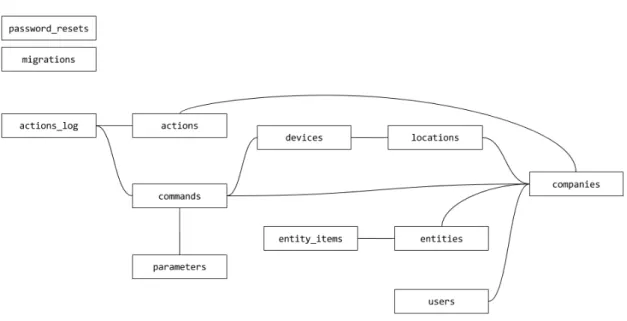
A MySQL database is used to store all the information regarding companies, users, voice com-mands, along with some additional information about actions and entities. In order to better un-derstand the data structure powering the server application, figure4.2represents the schema used in this application.
4.2.1.2 Natural Language Understanding
To extract the meaning of the voice commands that go into the platform API, all commands are processed using wit.ai’s (2.3.5.3) natural language understanding capabilities.
When processing a command, Wit.ai will try to extract the intent of that command and also additional entities that provide the application with the command context.
The intents can be one of the following:
• Request - A request for a non-existing product or line of products. Example: "Client asked for a blue sweater".
• Stock - Indicates a problem regarding the stock of a product. Example: "Potatoes need to be replenished".
• Ticket - A problem that needs third-parties to be fixed. Example: "The air conditioning unit needs fixing".
Implementation
Figure 4.2: Database Schema
• Workforce - An employee is needed in a given section. Example: "Reinforce cashiers". • Layout - A problem regarding store layout. Example: "Clean up the fruit shelf".
• Compliance - A task that needs to be performed in store. Example: "Verify the price of strawberries".
• Task - Retrieves a pending compliance task. Example: "Next task".
Entities, specific words or group of words that represent something relevant in the context of the voice command, can be one of the following:
• Item • Place • Color • Size • Person
Each voice command that comes in to the server is sent to Wit.ai, which will make an edu-cated guess at which intent that command represents and also which entities are present in that command.
Implementation
4.2.1.3 Dashboard
The dashboard is where companies can register accounts, configure their own instance of their company’s Voice User Interface, control the state of pending tickets, view analytics related to the registered voice commands and create rules to trigger customized actions.
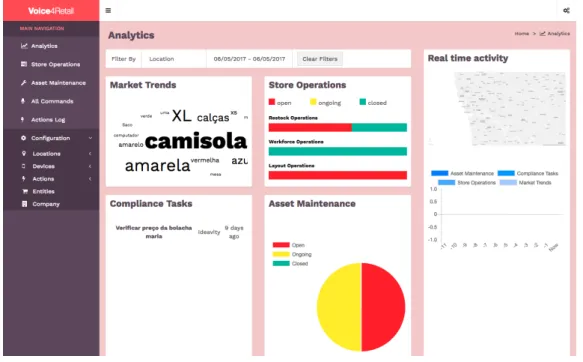
Figure 4.3: Dashboard
The figure above,4.3, is a representation of the dashboard. On the left there is a collapsable sidebar with quick navigation links to all relevant pages and on the right the page content is dis-played. All pages have a breadcrumb on the top right to help with navigation within sections.
4.2.1.3.1 Company Registration
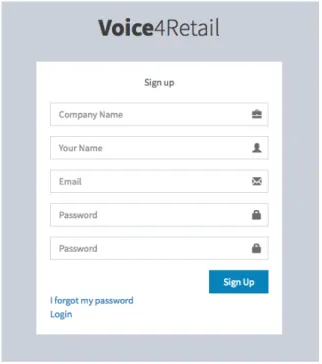
By accessing /register companies can register themselves in the platform. Registration is straight-forward and requires only some basic information about the company and the user that is register-ing the company.
There is an alternative registration screen, accessible through /register/companyHash, which is used to register a different user in that same company. This URL can be found in the settings screen of the application. Users that belong to the same company can access all information of the application regarding it.
After signing up, the user is automatically logged in. Alternatively, the user can access /login and fill the form to login to their account.
Implementation
Figure 4.4: Registration Screen
4.2.1.3.2 Password Recovery
In the event of losing their credentials, users can access /forgot to recover them. This is a two step process. First, the user must enter his email address in the form present in the password recovery page.
If the email matches a registered user, a unique token will be created and stored in a pass-word_resets table. That token is then emailed to the user.
The user can the access /reset/token to set a new password. If the password is successfully reset, the token is then deleted from the database to prevent unintended use.
4.2.1.3.3 Locations
Users can register locations, which represent a geographical location, like a physical retail store or warehouse.
By accessing /locations/create, the user can create a new location, which is described by a name and a map location. The name can be written in the appropriate input, whereas the geo-graphical location is chosen by clicking in the displayed map.
The location is then stored in the database in a locations table. Users can access a listing of all locations at /locations.
4.2.1.3.4 Devices
Devices are entities that are able to connect to the API that will be described in a subsequent section.
Implementation
Figure 4.5: Create New Location
Most devices represent physical devices, such as a mobile phone running the developed mobile application, but they can also represent different entities, such as a custom software that uses the platform API to update commands on the fly.
To register a new device, users can access /devices/create. In that page a simple form is shown, where the user can chose a name and assign a location for that device.
The device is then stored in a devices table and a secret hash is associated with that device. This secret hash is needed to enable the device to login in the mobile application or login manually in the API.
A list of all devices with their corresponding secret hashes can be found in /devices.
4.2.1.3.5 Voice Commands
All devices can send voice commands through the API. Those commands are then processed and saved in the database. A listing of all commands is available at /commands. This listing includes the command IDs, transcription and some metadata.
To access specific data about a command, users can access /command/commandID or simply select the appropriate command from the commands listing.
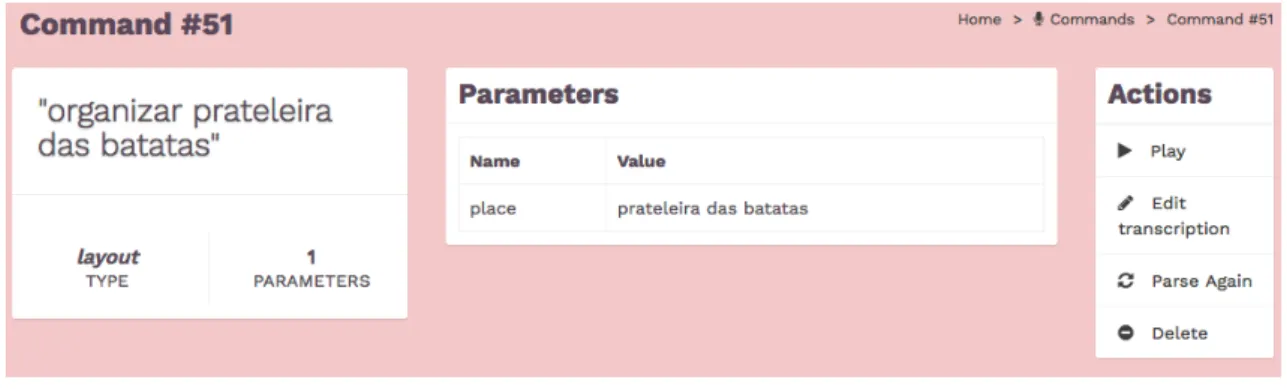
This page contains not only the voice command transcription, but also which corresponding type was identified and the list of parsed parameters.
Implementation
Figure 4.6: Command Information
In the above figure, 4.6, the transcription is "organizar prateleira das batatas", which trans-lates to "organize potatoes shelf". This is identified as a layout type, meaning the command was identified as being related to a layout issue in the store. Additional metadata was also extracted, mapping "prateleira das batatas" ("potatoes shelf") as a place.
This page also contains actions that the user can take. The voice command can be played directly in the browser, which is accomplished by using FFmpeg [ffm] to convert the audio file from its original format to MP3 on the fly so it can be played in a modern browser. The user can also manually edit the transcription and even reparse the command to extract information from the voice command again through the natural language solution being used in the server application. Finally, the command can also be deleted to remove it from the commands listing.
4.2.1.3.6 Store Operations & Asset Maintenance
Some voice commands - the ones identified with one of these types: stock, ticket, workforce, layout or compliance - have a "status" that can either be "open", "closed" or "ongoing". This means that these commands require some kind of action to be done in order to be completed.
Implementation
The status of these commands can be updated through the appropriate pages, either /tickets or /operations, according to their type. In these pages, which are structurally similar, the ID of the command along with the command transcription is displayed, with a select input in which the status of the command can be dynamically updated by the user. The new status is saved instantly using Javascript, without requiring any page reloads or form submissions.
4.2.1.3.7 Actions
Actions are a parameterizable set of rules that will be matched against all commands that are sent to the system and can then trigger the sending of an email, a SMS or perform an HTTP request to a given URL.
Figure 4.8: Create Action
By accessing /actions/create, users can give a descriptive name to an action, select which command type triggers it and optionally select parameters that must be matched to activate the trigger.
For example, an action can be created so that it is triggered whenever the air conditioning unit needs fixing. A descriptive name can be "Text A/C Technician". The selected type should be "ticket" and a custom parameter can be configured so that it only triggers when the parameter name is set to "item" and the parameter value is "a/c unit", ensuring all other commands that have a "ticket" type do not trigger this action.
Finally, the action can be configured to send an email, SMS or to perform an HTTP request. If the action is to send an email or an SMS, the recipient must be entered in the form of an email address or a phone number, respectively, and the content of the email or SMS may be entered
Implementation
in the content text box. If the action is to perform an HTTP request, an URL must be entered. Whenever the action is triggered, a POST HTTP request will be made to that URL containing the ID, transcription and type of the command.
A list of all configured actions is available at /actions and the log of all triggered actions is can be seen at /actions/log.
4.2.1.3.8 Entities
Users can provide a list of entity items in order to improve the reliability of the natural language understanding system. A list of available customizable entities can be accessed at /entities.
Figure 4.9: Edit Entity
The user can then choose an entity and edit it in order to add new entity items. The items can be added through the form present in the edit page or a CSV can be uploaded in order to facilitate the process of importing items from other systems.
4.2.1.3.9 Analytics
A real-time analytics panel is available at /analytics, which is also the default page upon login. Figure4.10shows a broad overview of the analytics page.
The filter widget, at the top of the analytics dashboard, allows the user to select a specific location and/or a date range. This filter will be applied to all widgets. By clearing the filter, all locations will be shown and the date range will default to the current year.
Aside from the filter widget, there are five other different widgets in this page, which give users the ability to check a wide variety of statistics regarding the commands that are coming in to the system through the various devices and locations.
The Market Trends widget represents the most requested items through a visual world cloud, so that the user can quickly verify at a glance what items are being requested the most.
Implementation
Figure 4.10: Analytics Overview
The Store Operations shows a visual representation of open, ongoing and closed operations, divided between stock, workforce and layout commands. A visual color code was used to ease the process of checking which kind of operations needs the most attention. The larger the red bars are, the more pending operations there are in the system.
The Compliance Tasks widget shows all commands that represent pending tasks to be per-formed in a given location. These are tasks that need to be fetched and responded to with either voice or visual confirmation by the mobile application.
The Asset Maintenance widget represents operations to be performed by a third-party and their status is visually represented by a pie chart with a color code that is similar to the one used in the Store Operations widget.
Finally, the Real time activity widget gives the user a real-time activity overview of all com-mands. This widget is divided in two different sections. In the upper section the user can find a map with circles representing the location of commands sent within the last hour. The circle scales according to the number of commands, meaning that locations with a larger number of sent commands will be represented by a larger circle. In the bottom section, a chart shows the last 12 hours of activity, with each hour being represented by a bar that uses a color code to differentiate between different types of commands.
Implementation
4.2.1.4 API
4.2.1.4.1 Authentication
The server application exposes an API that is consumed by the mobile application. All API calls must be authenticated using a JSON Web Token, JWT, [Aut], which uniquely identifies the device that is connecting to the API. The token is passed using the Authorization header, a common way of authenticating users using HTTP.
To get this authentication token, the device must call the /api/login endpoint and pass in the device secret, which can be obtained in the company’s dashboard. The API will then return the token, through a response that will look similar to the one shown in listing4.6.
1 {
2 "token": "eyJ0eXAiOiJKV1QiLCJhbGciOiJIUzI1NiJ9.eyJ1aWQiOjV9. ZFJDaH8KICu0i4LvIOKMnITyUb9JbLYIvwLrmytUnsg"
3 }
Listing 4.6: Example of a API authentication response
This token uniquely identifies the device that is connecting to the API and should be passed in in all subsequent API calls.
To ensure that this token cannot be faked by a malicious third-party, it is encrypted using HMAC SHA256 and a secret kept securely at the server.
4.2.1.4.2 Voice Commands
Voice commands are sent from the voice capturing device over HTTP to the /api/voice endpoint. This endpoint is responsible for storing the audio file that is sent into a file in the local filesystem and sending that file to Google Cloud Speech API.
Google Cloud Speech API will then return a result with the transcript of the voice message, along with a confidence score. That transcript is stored into a database table, along with the device that made the request, the filename of the stored audio file and a timestamp.
The transcript is then sent over to Wit.ai, which will then extract the meaning behind the input text. There are several possible intents, which will be further described in a later section, that can be extracted from the text: compliance, task, request, workforce, stock, ticket or layout. The intent will then be attached to the command that was previously stored in the database.
The server will now respond to the device with the command ID and the transcript of the voice. A special use case of this endpoint is to retrieve a task. Whenever the intent of the voice command is "task", the response will be the transcript of the oldest open task that is registered for the device’s location, along with it’s command ID.
Asynchronously, the command will be fed into a rules engine, which will fetch all configured rules for the company associated with the device and trigger any rules that match the ruleset.
Implementation
4.2.1.4.3 Photos
Certain voice commands require visual context to be usable. For this reason, the mobile applica-tion gives the user the ability to take a photo and attach it to a command.
To upload the photo, the device must send a request to /api/photo, which is responsible for storing the photo in the local filesystem and attaching it to the device’s latest command.
4.2.1.4.4 Answers
Whenever a user retrieves a task using the special "task" intent, the mobile application will ask the user for an answer, which will close the task at hand. This answer can either be a photo, a voice clip or both.
To store the answer, the mobile application should send a request to either /api/photo/commandId, if the answer is a photo, or /api/voice/commandId, if the answer is a voice clip.
The server application will then fetch the command that matches the command ID and attach the answer to that command.
4.2.2 Mobile Application
The mobile application interacts with the server application through the previously described API and is responsible for capturing the users voice commands.
The application is able to retrieve tokens to authenticate itself before the system, send voice commands, attach photos to said commands, retrieve pending compliance tasks and respond to those compliance tasks.
4.2.2.1 Authentication
When first launching the application, the user will be prompted to enter the secret that corresponds to that device. This secret is fetched in the dashboard as described in a previous section.
As shown in figure4.11, the secret is a numerical six digit code and it can be easily entered in the appropriate input field by using the numeric pad. After entering the correct secret, the user can click the "Confirm" button, which will send an authentication request to the API. If this request is successful, the API will respond with a JWT token, described with more detail in a previous section.
The token is then stored locally in the device. This token is then used for all further requests done to the API, uniquely identifying this device.
Whenever the application is launched again, it will automatically use the stored token without requiring the secret to be introduced again.
![Figure 2.1: Example of a Syntactic Parse Tree [Tuc]](https://thumb-eu.123doks.com/thumbv2/123dok_br/18799047.925742/30.892.165.687.388.740/figure-example-syntactic-parse-tree-tuc.webp)