Universidade Nova de Lisboa
Faculdade de Ciências e Tecnologia
Departamento de Informática
Mobile and Web Tools for Participative Learning
Por
Diogo Nuno Crespo Ribeiro Cabral
Dissertação apresentada na Faculdade de Ciências e Tec-nologia da Universidade Nova de Lisboa, para a obtenção do grau de Mestre em Engenharia Informática.
Orientador: Professor Doutor Nuno Manuel Robalo Correia
Universidade Nova de Lisboa
Faculdade de Ciências e Tecnologia
Departamento de Informática
Mobile and Web Tools for Participative Learning
by
Diogo Nuno Crespo Ribeiro Cabral
Dissertation submitted at the Faculty of Sciences and Tech-nology, New University of Lisbon, in partial fulfillment of the requirements for the degree of Master of Science in Computer Science Engineering
Supervisor: Professor Doctor Nuno Manuel Robalo Correia
Agradecimentos / Acknowledgements
Gostaria de agradecer ao meu orientador, Prof. Doutor Nuno Correia, pelos seus conselhos e
incansável apoio, ao designer António Maneira pela sua contribuição no projecto VideoStore,
à Prof. Doutora Teresa Romão e a todas as pessoas que participaram nos testes de usabilidade
e aos colaboradores e ex-colaboradores do Interactive Multimedia Group (IMG), pelas suas
sugestões e contribuições. Gostaria de agradecer especialmente aos meus pais pela sua ajuda e
apoio.
I would like to thank to my supervisor, Prof. Dr. Nuno Correia, for his advices and
immeasur-able support, to the designer António Maneira, for his contribution on the VideoStore project, to
Prof. Dr. Teresa Romão and to all people who have participated on the evaluation process and
to members and ex-members of the Interactive Multimedia Group (IMG), for their suggestions
Resumo
A combinação de diferentes tipos de media tem sido crucial para os processos de ensino e
aprendizagem. Os recentes desenvolvimentos das tecnologias multimédia baseadas em
Inter-net de banda larga e em dispositivos móveis podem melhorar a comunicação entre professores
e estudantes, e permitir aos estudantes estudar em qualquer local e em qualquer momento,
progredindo ao ritmo que desejarem. A utilização destas novas plataformas e a facilidade de
partilha de material multimédia em ambientes educativos, permite um ensino mais participativo
e torna o estudo de interfaces um aspecto crítico nos sistemas multimédia de aprendizagem.
O trabalho apresentado explora interfaces e ferramentas para aprendizagem participativa,
com recurso a sistemas multimédia educativos baseados em Internet de banda larga e
disposi-tivos móveis. Neste trabalho foi desenvolvido um sistema educativo para a Web, que permite
armazenar, transmitir, procurar e partilhar conteúdo de aulas gravado em vídeo e a sua
exten-são para suportar Tablet PCs. O sistema Web, desenvolvido no âmbito do projecto VideoStore,
explora interfaces de vídeo e anotações de vídeo que incentivam o trabalho participativo. A
utilização de Tablet PCs, através do projecto mEmLearn, procura incentivar o trabalho
partic-ipativo, permitindo aos estudantes enriquecer os materiais de ensino e partilhá-los com outros
estudantes e professores.
Abstract
The combination of different media formats has been a crucial aspect on teaching and
learn-ing processes. The recent developments of multimedia technologies over the Internet and uslearn-ing
mobile devices can improve the communication between professors and students, and allow
students to study anywhere and anytime, allowing each student progress at its own pace. The
usage of these new platforms and the increase of multimedia sharing applied to educational
environments allow a more participative learning, and make the study of interfaces a relevant
aspect of existing multimedia learning systems.
The work done in this dissertation explores interfaces and tools for participative learning,
using multimedia educational systems over Internet broadband and mobile devices. In this
work, a Web-based learning system was developed, which enables to store, transmit, search and
share the contents of courses captured in video and its extension to support Tablet PCs. The
Web system, developed as part of the VideoStore project, explores video interfaces and video
annotations, which encourage the participative work. The usage of Tablet PCs, through the
mEmLearn project, has the aim to encourage the participative work, allowing the students to
augment the course materials and to share them with other students or instructors.
Acronyms
API Application Programming Interface
CD Compact Disc
CSS Cascading Style Sheet
DOM Document Object Model
IIS (Microsoft) Internet Information Server
ISDN Integrated Services Digital Network
JPEG Joint Photographic Experts Group
HP Hewlett-Packard
HTML HyperText Markup Language
HTTP HyperText Tranfer Protocol
MPEG Moving Pictures Experts Group
MS Microsoft
PC Personal Computer
PHP PHP: Hypertext Preprocessor
PDA Personal Digital Assistant
POSI Programa Operacional para a Sociedade da Informação
SDK Software Development Kit
SOAP Simple Object Access Protocol
SMIL Synchronized Multimedia Integration Language
SMS Short Message Service
SMTP Simple Mail Transfer Protocol
SQL Structured Query Language
TV Television
VCR VideoCassette Recorder
WAP Wireless Application Protocol
WMV Windows Media Video
Contents
Chapter 1 Introduction 1
1.1 Motivation 1
1.2 Solution Overview 4
1.3 Context and Background Work 5
1.3.1 VideoStore 5
1.3.2 mEmLearn 6
1.4 Contributions 6
1.5 Document Structure 7
Chapter 2 Related Work 9
2.1 Video Interfaces and Annotation 9
2.1.1 Video Interfaces 10
2.1.1.1 VideoStreamer and CollageSpace 10
2.1.1.2 Físchlár TV 10
2.1.1.3 uBase 11
2.1.1.4 Discussion 12
2.1.2 Video Annotation 12
2.1.2.1 Experimental Video Annotator (EVA) 13
2.1.2.2 Annotations in Video (AntV) 13
2.1.2.3 Microsoft Research Annotation System (MRAS) 14
2.1.2.4 VAnnotator 15
2.1.2.5 Intelligent Video Annotation Server (iVAS) 16
2.1.2.6 LEAN 17
2.1.2.7 Discussion 19
2.2 Multimedia E-Learning Systems 19
2.2.1 Classroom 2000 19
2.2.2 Authoring on the Fly (AOF) 20
2.2.4 Östlund & Svensson Study 24
2.2.5 Discussion 24
2.3 Mobile Learning 25
2.3.1 iPods 25
2.3.1.1 Stanford on iTunes 25
2.3.1.2 Duke University iPod First-Year Experience 26
2.3.1.3 Ketter, Mertens, Morisse & Vornberger Study 27
2.3.1.4 Discussion 27
2.3.2 Tablet PCs 27
2.3.2.1 MIT iCampus 28
2.3.2.2 Moovl 28
2.3.2.3 Classroom Presenter & Ubiquitous Presenter 29
2.3.2.4 Discussion 31
Chapter 3 Architecture & Implementation 33
3.1 System Overview 33
3.2 VideoStore 34
3.2.1 Video Interfaces 36
3.2.1.1 VideoLog 36
3.2.1.2 Slide Thumbnail 37
3.2.1.3 VideoMosaic 37
3.2.1.4 VideoSpot 39
3.2.2 Video Annotation 40
3.2.3 Video Podcast 42
3.2.4 VideoStore Architecture and Modules 43
3.3 mEmLearn 45
3.3.1 Ink Annotations over Images 45
3.3.2 Ink Annotations over Video 46
3.3.3 mEmLearn Architecture and Modules 47
Chapter 4 Evaluation 49
4.1 Students Evaluation 49
4.2 Global Evaluation 52
Chapter 5 Conclusions and Future Work 59
Bibliography 63
Appendix A Annotation Schemas 69
Appendix B Students Evaluation Questionnarie 71
Appendix C Students Evaluation Results 73
Appendix D Global Evaluation Questionnarie 75
List of Figures
1.1 Drawings Combined with Text 2
1.2 Photographs Combined with Text 2
1.3 Video Screen Shots 2
1.4 Digital learning system 3
1.5 YouTube 4
1.6 iTunes/iPod 4
1.7 iPod Device 5
1.8 Tablet PC 5
2.1 Stacking Frames as a 3D Block 10
2.2 VideoStreamer Interface 10
2.3 Frame Selection for Video Thumbnail 11
2.4 Físchlár Thumbnail Interface 11
2.5 uBase Frame Selection by Categories 12
2.6 uBase Frame Selection by Similar Content 12
2.7 Antv Video Player and Annotation Editor 14
2.8 MRAS Add Annotation Interface 14
2.9 MRAS System Overview 15
2.10 iVAS Annotation Editing Page 16
2.11 iVAS Impression Annotation 16
2.12 LEAN System Running on a Tablet PC 17
2.13 Film strip mode of TLslider Interface 17
2.14 S-shape mode of TLslider Interface 18
2.15 A LEAN Session with Annotations 18
2.16 Classroom 2000: Web Interface with Annotations and Audio Links 20
2.17 Elastic Panning Approach 22
2.18 Lecture Player with Elastic Panning Interface 22
2.20 ePresence Archived Interface 24
2.21 Stanford on iTunes 26
2.22 Moovl Interface 29
2.23 Moovl Running on a Tablet PC 29
2.24 Classroom Presenter Interface 30
3.1 System Overview 34
3.2 VideoStore Initial Interface and Features 35
3.3 MS Producer 2003 36
3.4 VideoLog Interface 37
3.5 Slide Thumbnail 37
3.6 VideoMosaic Composition 38
3.7 VideoMosaic Interface: Initial Prototype 38
3.8 VideoMosaic Interface: Improved Version 38
3.9 VideoSpot composition 39
3.10 VideoSpot Interface: Initial Prototype 39
3.11 VideoSpot Interface: Improved Version 40
3.12 VideoAnnotation Interface 40
3.13 Unsynchronized Video Annotations 41
3.14 Synchronized Video Annotations 41
3.15 Video Annotations Search: Text Box 42
3.16 Video Annotations Search: Results 42
3.17 Lecture Podcast: The Lecturer 43
3.18 Lecture Podcast: Slide Image 43
3.19 Podcast Video Composition 43
3.20 VideoStore Architecture 44
3.21 Ink Annotation Over an Image 46
3.22 Ink Annotation Over a Video 47
3.23 mEmLearn Architecture 48
4.1 VideoStore Usage on the Multimedia Computing Course 49
4.2 Why Did the Students Use the System 50
4.3 Features Used by Students 50
4.4 Network Access 51
4.5 VideoStore Impact on Student Studies 52
4.6 Selected Interfaces to Find a Specific Information 53
4.7 VideoMosaic to Find a Specific Information 53
4.8 Slide Thumbnail to Find a Specific Information 54
4.9 Selected Interfaces to Find Highlights 54
4.10 VideoSpot to Find Highlights 55
4.11 Log Analyzer to Find Highlights 55
4.12 Evaluation of Keyboard Annotations 56
Chapter 1
Introduction
The work featured in this dissertation applies recent multimedia developments, using
In-ternet and mobile devices, to educational environments. The developed work is composed by
a Web-based learning system to broadcast, search and add information to recorded video
lec-tures. Video interfaces and tools were developed allowing the access from different platforms:
regular desktops, iPod devices and Tablet PCs. These platforms reduce temporal and physical
constraints and increase the users interaction.
1.1 Motivation
Communication can be defined as “the activity or process of expressing ideas and feelings or
of giving people information” [44] and plays a crucial role on teaching and learning activities
[20]. Consequently, the media (medium), “the way of communicating information”, [44], can
not be ignored on educational contexts. Nevertheless, there is a number of ways to present
information for communication [2]. Multimedia can be presented as the usage of two or more
information representations or presentation modes [29]. The use of multimedia as part of the
human cognitive process has been studied and developed for a long time. The combination
of different media content can eliminate information and cognitive gaps caused by using a
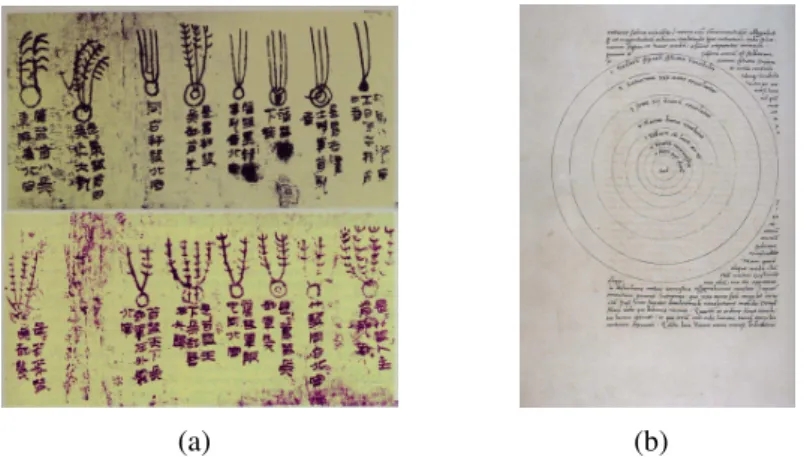
single media format [29] and one of the oldest examples of this approach is the combination of
drawings with text (Figure 1.1).
With time, multimedia has been changing and the appearance of new technologies allowed
new media formats. The usage of photographs, reproducing real representations of places,
(a) (b)
Figure 1.1 Drawings Combined with Text: (a) Comets with chinese characters on silk, China, circa 300BC1(b) Solar system from Nicholas Copernicus Manuscripts, circa 1520-15412
(Figure 1.3), with the aim to communicate, to share ideas and knowledge, can be considered
examples of those changes.
Figure 1.2 Photographs Combined with Text: Photographs of Halley Comet, 19113
(a) (b)
Figure 1.3 Video Screen Shots: (a) Recorded lec-ture of Richard P. Feynman at Cornell University, 1964 4 (b) Galaxy animation from Carl Sagan TV series, Cosmos, 19805
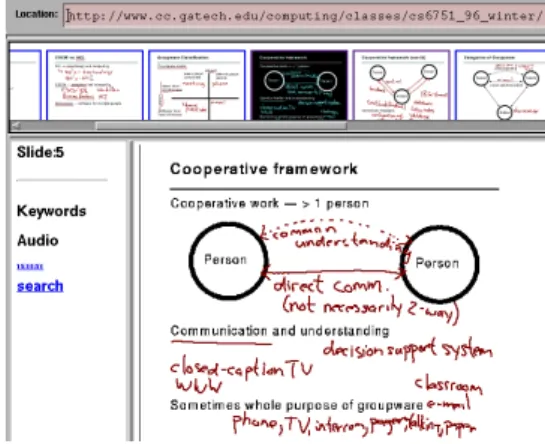
The appearance of digital platforms allowed new compositions of media content, new ways
of sharing it, and therefore, new ways for multimedia interaction (Figure 1.4). The digital
platforms also promote active, collaborative and participative learning [33], activities that
con-tribute to improve the learning process [17]. These platforms transformed the communication
between professors and students, and concepts like computer-based training, online learning
and e-Learning (electronic Learning) were introduced. The first multimedia learning systems
increased the participation of students on their learning process, reenforcing the need to study
1Fromhttp://www.nasa.gov/mission_pages/deepimpact/media/f_ancient.html, Jan.,
2008
2Fromhttp://www.bj.uj.edu.pl/bjmanus/revol/titlpg_e.html, Jan., 2008
3Fromhttp://adsabs.harvard.edu/abs/1911LowOB...2....3S, Jan., 2008
4Fromhttp://www.youtube.com/watch?v=ozF5Cwbt6RY, Jan., 2008
5Fromhttp://www.youtube.com/watch?v=j7jqlKuFf84, Jan., 2008
and improve multimedia interfaces and access tools, applied to educational environments [1].
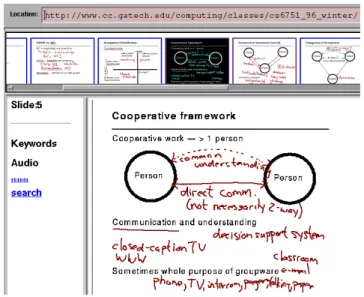
Figure 1.4 Digital learning system screenshot: Web interface of the Classroom 2000 project, one of the first multimedia learning systems, 19966
Currently, the Internet and the increase of network bandwidth help people to share media
content, particularly digital video [26]. In addition, mobile devices are also popular, their usage
is increasing as multimedia record/playback devices [9, 34] or as tools to promote collaborative
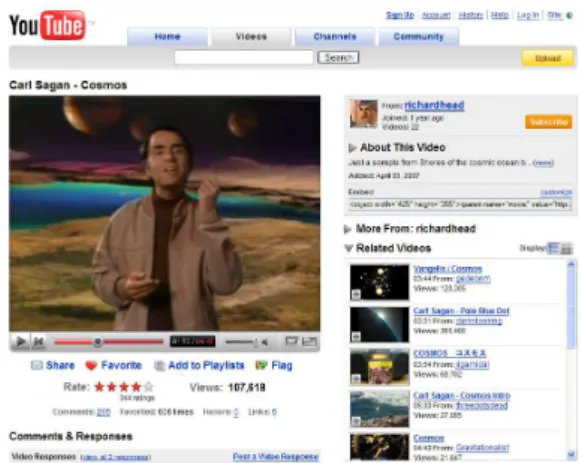
and social activities [34]. The YouTube system (Figure 1.5) and the iPod device (Figure 1.6) are
well known examples of existing platforms for multimedia sharing and broadcast, using these
recent technologies. Broadband Internet and mobile technology also motivated new paradigms
for multimedia interfaces and access tools, such as, video browsing and navigation; video and
image display in small screens; portable pen-based technology, which allows to write and draw
over a screen with a pen, in the same way that a person can write on paper with traditional
stylus; and touch screens, which responds to human touch [24, 25, 26].
These latest developments can also be applied to learning environments, helping professors
and students to share ideas and knowledge [34]. Mobile technology promoted a new concept,
Mobile Learning, which can be expressed in a simple way as learning through mobile devices
[35]. With remote and mobile access to learning materials, students can study anywhere and
anytime, and each students can progress at its own pace [43]. Additionally, mobile devices
can provide students other information about their location in space and time [35]. Mobile
devices combined with Pen-based technology can also improve and foster creative learning
[5]. The usage of these new platforms and the increase of multimedia sharing on educational
environments allow a more participative learning and make the study of interfaces and access
Figure 1.5 YouTube screenshot: Excerpt from Carl Sagan TV Series, Cosmos7
Figure 1.6 iTunes/iPod: screenshot from Stan-ford on iTunes, the video can be transfered to iPod device8
tools a relevant aspect of current multimedia learning systems [24, 25, 26].
1.2 Solution Overview
The described work explores interfaces and tools for participative learning, using multimedia
learning systems over Internet broadband and mobile devices. The work explores interfaces
and tools based on synchronized multimedia presentations, with a main focus on video format,
including video interfaces and video annotation, applied to educational environments.
Some of the mobile technology paradigms are also studied in this dissertation, exploring
multimedia interfaces and tools for iPod devices (Figure 1.7) and Tablet PCs, laptops equipped
with Pen-based technology (Figure 1.8). These devices allow to study and explore different
paradigms of mobile technology, such as, media browsing and visualization on small screens
and portable Pen-based technology.
7Fromhttp://www.youtube.com/watch?v=FxoQTt-UiJw, Jan., 2008
8Fromhttp://itunes.stanford.edu/, Jan., 2008
Figure 1.7 iPod Device Figure 1.8 Tablet PC
1.3 Context and Background Work
The work described in this dissertation is part of two projects, the VideoStore and the
mEm-Learn. The VideoStore project started in 2005, as a sub-project of the main project “A
Univer-salidade dos Saberes”(POSI), and was concluded in 2007. The mEmLearn project started in
2006, with the award of the HP Technology for Teaching Grant Initiative 2006, and is still in
progress.
1.3.1 VideoStore
The main goal of the VideoStore project was to develop a Web-based learning system to store,
transmit, search and share the contents of courses captured in video. The wide distribution of
media documents through the Internet, using broadband, allows for new approaches in
learn-ing systems. The VideoStore explored new possibilities by providlearn-ing different interfaces for
learning.
The VideoStore [10, 11, 13, 14]9 was initially developed during the author’s BSc diploma
project. In the end of the diploma project, a first prototype was concluded and the system
archi-tecture had reached a final form. The prototype included video, Power-Point slides and HTML
synchronization with the authoring tool MS Producer 2003; video annotations, using PHP5
features and XML databases; two video interfaces and video streaming. Both, video
annota-tions and interfaces, were integrated into the Web presentation generated by MS Producer. The
project also involved recorded lectures, and therefore, hardware equipment for video and audio
recording was tested and chosen. Nevertheless, the VideoStore development continued and the
system was tested and improved. This project was part of the project “A Universalidade dos
Saberes”10, funded by POSI (Programa Operacional para a Sociedade de Informação) with the
aim to develop Internet Broadband Contents.
1.3.2 mEmLearn
The mEmLearn project [10, 11] 11 departs from the VideoStore framework to support Tablet
PCs. This project has the aim to define tools that enable students to augment the course materials
in an interactive way, during or after the classes, to retrieve these materials at a later stage and
to share them with other students or instructors. The system includes a Web drawing interface
that allows students to annotate and share course materials with the Pen-based technology. The
project was initially funded by the HP Technology for Teaching Grant Initiative 2006, and
among other equipment, the grant included 21 HP Tablet PCs.
1.4 Contributions
This thesis provides the following contributions:
• A Web-based system to broadcast video recorded lectures synchronized with slides.
• Interfaces and tools for video browsing and navigation, using the Internet and mobile
devices.
• Interfaces and tools for video annotation, using a keyboard or a pen.
The work was published the in the following conferences:
• Mobile and Web Tools for Participative Learning. Diogo Cabral, Nuno Corrreia. IADIS,
International Conference on e-Learning 2007, Lisbon, Portugal, July 6-8 2007.
10http://www.fct.unl.pt/universalidade-dos-saberes/
11http://img.di.fct.unl/mEmLearn/
• An Environment for Mobile Learning Supporting Video Lectures and Annotations. Diogo
Cabral, Nuno Correia. IADIS, International Conference on Mobile Learning 2007,
Lis-bon, Portugal, July 5-7 2007. (poster)
• Interfaces for Video Based Web Lectures. Nuno Correia, Diogo Cabral. ICALT 2006,
The 6th IEEE International Conference on Advanced Learning Technologies, Kerkrade,
The Netherlands, July 5-7 2006.
1.5 Document Structure
This document is divided in five chapters. Chapter 1 has presented the importance of multimedia
to communication, how it is changing in time and how it can be applied on educational
envi-ronments. This chapter also summarizes the work developed, context and contributions. The
projects and studies that inspired this dissertation are reported on Chapter 2, which is divided
in three main areas: (1) Video Interfaces and Annotation, (2) Multimedia E-Learning Systems,
and (3) Mobile Learning. The system architecture and the implementation of the projects are
described in Chapter 3 and the system evaluation is reported in Chapter 4. In Chapter 5, the
Chapter 2
Related Work
The first Web-based multimedia learning systems appeared in the early 1990s. Among
other conclusions, they showed the need to improve multimedia authoring tools and to provide
better multimedia interfaces and access tools. Since that time, better multimedia interfaces were
developed and multimedia authoring tools were also improved, facilitating the combination of
media elements and creating new challenges for media interfaces.
Currently, the broadband Internet and mobile technology increased the sharing of
multime-dia content, particularly digital video. Digital video has gained popularity and has an important
role on today multimedia applications. These new platforms also require new paradigms for
multimedia interfaces and tools.
The usage of the most recent digital technologies in learning environments started recently.
Nevertheless, a lot of work should continue to be developed in the future, particularly, focused in
interfaces, which should be improved to take full advantage of these new platforms. Therefore,
the presented work considers three main areas: Video Interfaces and Annotation, Multimedia
E-Learning Systems, and Mobile Learning. Different projects inspired this work each one of
the referred areas.
2.1 Video Interfaces and Annotation
Digital video introduced new video interfaces for browsing and searching information on video
content. In addition, video annotations allow to combine other media formats with digital video,
adding more information to the video content. These topics can be applied to educational
2.1.1 Video Interfaces
The transformation from analogical to digital video introduced new ways to explore, browse
and retrieve video content. These changes improved users search for video content information,
which can be useful for educational videos. In the last years, this topic was quite studied and
developed but there is a lot of work still going on.
2.1.1.1 VideoStreamer and CollageSpace
The VideoStreamer and CollageSpace [18] project tries to eliminate the constraints imposed by
the traditional button interface for video navigation (play, pause, stop, backwards and forwards)
and explores a new interface based on a 3D visualization of the video. This interface, the
VideoStreamer, is formed by stacking the video frames and composing a three dimensional
block, as shown on Figure 2.1 and provides a good way to visualize camera shot changes on
the video (Figure 2.2). The CollageSpace project inspired a set of innovative work, which
developed new video interfaces, associating visualization and navigation of video content with
frame composition and layout.
Figure 2.1 Stacking Frames as a 3D Block1 Figure 2.2 VideoStreamer Interface1
2.1.1.2 Físchlár TV
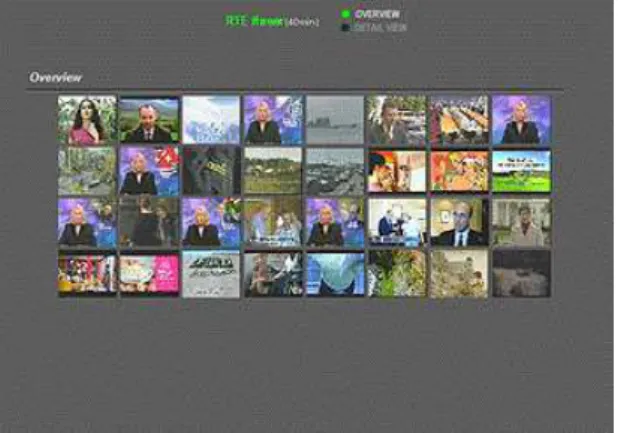
Físchlár TV [26] is a Web-based digital video system, which allows the recording of TV
pro-grams and has a set of interfaces for video browsing and navigation. A storyboard view of the
1Fromhttp://lightmoves.net/videostreamer/index.html, Jan., 2008
video is one of the simplest and most useful of them. With this interface, the user can have
a global idea of the content of the video by showing a set of frames, selected by regular time
intervals (subsampling), as presented on Figure 2.3, or by detection of different camera shots
(automatic video segmention). The selected frames can be shown as a set in chronological order
(storyboard) (Figure 2.4), one by one (slide-show) or in a drill-down mode with different levels
of hierarchy (hierarchically) .
Figure 2.3 Frame Selection for Video Thumbnail Figure 2.4 Físchlár Thumbnail Interface
Besides the set of interfaces, other features were developed, such as, personalization and
program recommendation, automatic recording, Short Message Service (SMS)/Wireless
Ap-plication Protocol (WAP)/Personal Digital Assistant (PDA) alerting, searching, summarizing,
among others. The system is available at the Dublin City University campus (computer labs
and residences) since early 2000 and has the capability of streaming to over 200 users
simul-taneously. In 2002 the system had more than 1500 registered users. This project uses
Mov-ing Pictures Experts Group (MPEG) video encodMov-ing, eXtensible Markup Language (XML)
and MPEG-7 video descriptors. The client was developed using Cascading Style Sheet (CSS),
Javascript, Java Applets and the streaming video player plug-in Oracle Video Player.
2.1.1.3 uBase
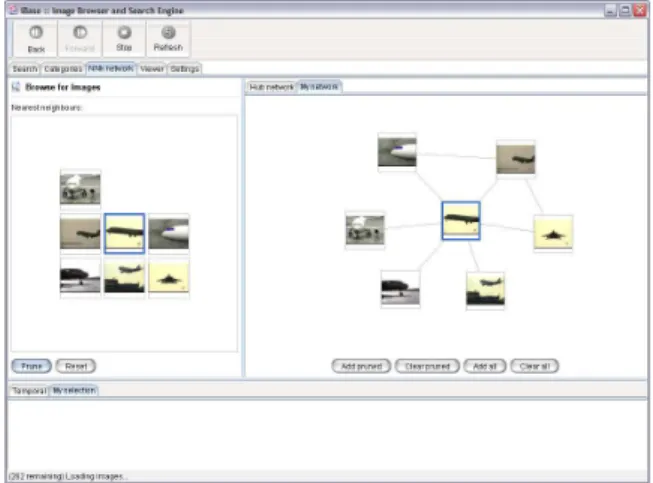
The video storyboard interface is also included in the uBase project (Web-based Image and
Video Navigation) [28], but in a more advanced perspective, introducing other methods of frame
selection besides the order in which they appear on the video. The defined methods are frame
2.6). This project had the aim to develop a web-based image and video browser for a
content-based image retrieval (CBIR) system, integrating several types of video interfaces, including
relevance feedback based navigation and hierarchical browsing. The system was tested by six
users, with ages between 21 and 23, with an average experience of search engines. The tests
showed that users would like to have more control over the system to have better results, which
remarked the trade-off between simplicity of use and the excess of features giving more power
to the users. The system uses Java Applets and Java Servlets, which form a Web client-server
architecture.
Figure 2.5 uBase Frame Selection by Categories Figure 2.6 uBase Frame Selection by Similar Content
2.1.1.4 Discussion
The availability of digital video foster the development of video interfaces and methods to
browse information. Some projects have an approach based on frame content and video
pro-cessing, others explore semantic concepts included in the video stream. This dissertation
ex-plores frame based interfaces, some of them combined with information about users behavior,
in order to reduce users participation in classification tasks.
2.1.2 Video Annotation
The ability to combine different media elements in digital platforms, resulted in a new
perspec-tive for digital video, the video annotation. This concept of augmented video, with different
types of media associated, and made by one or multiple users, has been developed on different
projects in the last decade.
2.1.2.1 Experimental Video Annotator (EVA)
The EVA (Experimental Video Annotator) [27] system is one of the oldest digital systems with
the ability to combine annotations and video. The system had the aim to solve the need to
capture and record researchers impression of events as they occurred. EVA uses a NTSC video
source, camera or player, and a workstation developed as part of the project Athena, which
gives the ability to tag video segments, with keywords or time stamps, in real-time or after the
event. The workstation was composed by a DEC MicroVax or a IMB PC/RT systems running
either Unix or X Window System. The system was developed in the Athena Muse language, for
interactive multimedia applications. In addition, the Argus system allows to write simples rules
to identify different tags, among other features.
2.1.2.2 Annotations in Video (AntV)
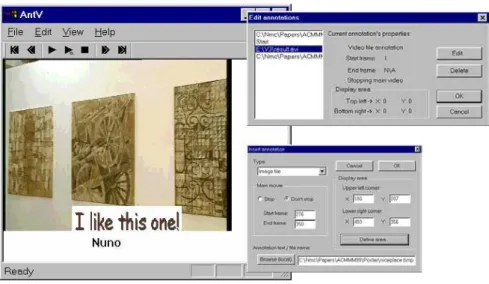
The AntV (Annotations in Video) [15] is a video annotator that can be used to add or edit
annotations in video streams. The annotations can be text, images, or even video. It is possible
to link the annotations to a video using time intervals or space positions, and each user has
associated a set of annotations. The system is composed by an annotation video player and an
annotation set editor. The main purpose of the project is to enrich existing materials with new
content, made by users. The Figure 2.7 shows the different components of the system.
The AntV [15] was partially developed in the scope of the Unibase [12] project, which had
the aim to provide a distance multimedia interactive environment, at the Universidade Aberta
(Portuguese Open University) and at the Universidade de Lisboa (University of Lisbon), that
Figure 2.7 Antv Video Player and Annotation Editor
2.1.2.3 Microsoft Research Annotation System (MRAS)
The Microsoft Research Annotation System (MRAS) [8] is based on a client-server Web
frame-work, which allows the association of a segment of a media element with an other segment of
any other media element. Therefore, with this system it is also possible to create annotations
linked to different types of media formats (Web pages, 3D virtual reality simulations or audio
recordings). The MRAS interface was specifically designed for streaming video annotations
(text or audio annotations) on the Web. A user can access a web page, which contains the
video, and send annotations to the system server, using an ActiveX interface and the Simple
Mail Transfer Protocol (SMTP), as shown on Figure 2.8.
Figure 2.8 MRAS Add Annotation Interface
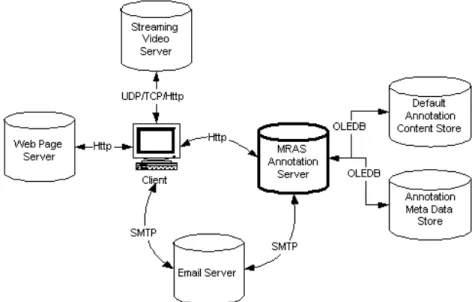
The MRAS Annotation Server manages the Native Annotations Content Store and the
An-notation Meta Data Store, where the anAn-notations and the meta data associated with it are
re-spectively stored, using the Microsoft SQL Server 7.0. The MRAS Annotation Server retrieves
the annotations to the users using the HyperText Transfer Protocol (HTTP), through Microsoft
Internet Information Server (IIS). Figure 2.9 presents an overview of the system architecture.
Figure 2.9 MRAS System Overview
The MRAS was tested in two ways. In the first one, six intermediate and advanced Microsoft
Windows users used the system for personal note-taking and all preferred MRAS over
pen-and-paper. The second, added more eighteen users to the first test and was focused on the benefits of
sharing notes (Text-Only, Audio-Only and Text-and-Audio notes). In this second test, fourteen
of eighteen subjects made more comments and questions using the system then in a live lecture.
The precise position of annotations was not a real problem and the annotation tracking was quite
used by the users for shared notes.
2.1.2.4 VAnnotator
The VAnnotator [16] application has a different perspective of a video annotator, as it allows to
describe the content, by adding metadata to it. To each video stream, a set of descriptors can
be added. The layers of annotation are stored accordingly to the MPEG-7 standard, allowing
lenses to provide interpretations of the multimedia content and give different perspectives of
the information. The VAnnotator [16] was developed in the scope of the Vizard [40] project,
which had the aim to define a new paradigm for video navigation, annotation, editing and
re-trieval. The Vizard [40] project had the contribution of users from production/archiving and
consumer electronics areas, which helped to define and validate the annotation requirements
and functionality.
2.1.2.5 Intelligent Video Annotation Server (iVAS)
An other approach for a video annotation system is presented in Intelligent Video Annotation
Server (iVAS) [47]. The system analyzes video content to acquire cut/shot information and
color histogram. Then, it automatically generates a Web document that allows the users to edit
the annotations (Figure 2.10), which are stored in an Annotation XML database.
Figure 2.10 iVAS Annotation Editing Page
The annotations are divided in two categories, text and impression annotations (Figure 2.11)
and an automatic evaluation method of annotation reliability was implemented on this system.
The project also presents two application systems based on the annotations: video retrieval and
video simplification.
Figure 2.11 iVAS Impression Annotation
The system was tested by thirty college students and the video content included news,
drama, variety and cooking programs. The subjects considered the application “easy-to-use”
and wished to use the system in the future.
2.1.2.6 LEAN
The LEAN [38] project explores video browsing, visualization and annotation using Pen-Based
technology. This system explores the Pen-Based interface, including sketches, gestures and
pressure features, as tools for video navigation and video annotation. The Figure 2.12 shows
the system running on a Tablet PC.
Figure 2.12 LEAN System Running on a Tablet PC
The PVslider is an interface that explores video navigation, changing the playback velocity
with the distance between the video window and a tapped point with the pen. The playback
velocity is directly proportional to the defined distance. An other developed interface was the
Twist Lens Slider or TLslider, which was based on the fish-eye lenses and has two modes. One
mode (Figure 2.13) enlarges the current frame in a film strip, focusing the attention on that
particular frame.
Figure 2.13 Film strip mode of TLslider Interface
The other (Figure 2.14) morphs the linear layout of the frame strip to an s-shape, which
depends on the pressure applied by the pen to the screen. This interface focus the attention not
Figure 2.14 S-shape mode of TLslider Interface
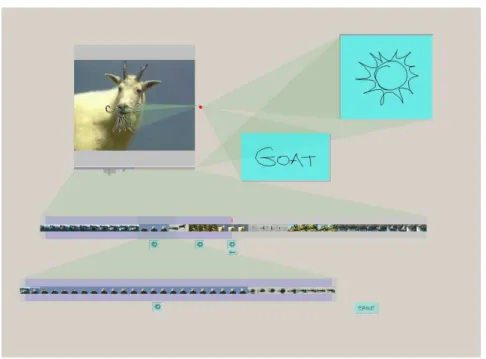
The LEAN [38] system also allows to draw annotations, using the pen, in a workspace
around or over a video frame, and video navigation by linking the same note to different frames,
as presented on Figure 2.15.
Figure 2.15 A LEAN Session with Annotations
Due the hardware limitations of the Tablet PCs, the system was tested using higher-end
workstations equipped with digitizer tablets. Six users tested the system, some had previous
experience with pressure sensitive digitizer tablets and all were inexperience users of video
editing systems. After fifteen minutes of use, trying to understand the pressure and gesture
controls, all users easily became familiar with the features of the system. The most natural and
useful interface tested by the users was the PVslider.
2.1.2.7 Discussion
Video annotations can help video analysis and browsing. The first projects had a simple
ap-proach by associating keywords, written using a keyboard, to a particular instant of a video
stream. After, other approaches were tried, such as annotations placed over the video content,
collaborative annotations and annotations rating. More recent work uses pen-based annotations
over video content. Similar approaches are studied and implemented in the scope of this thesis.
2.2 Multimedia E-Learning Systems
The ability to combine different media elements and the possibility to share it using computer
networks, particularly over the Internet, increased the use of multimedia in education. Some
research projects studied and explored these abilities in learning environments.
2.2.1 Classroom 2000
The Classroom 2000 [1] project integrates different media elements used and recorded during
lectures and puts it available on the World Wide Web. This three-year research project
intro-duced automated support for lecture capture in a learning and teaching university environment.
The project had two main goals, (1) to study the design issues of an ubiquitous computing
application with the ability of capture and access rich live experiences, and (2) to study the
effort needed to produce a robust, ubiquitous computing application whose impact can be
eval-uated for a long period of time. The system was used to capture parts or all of sixty courses at
the Georgia Institute of Technology, which included graduate and undergraduate courses, from
Computer Science, Electrical Engineering and Mathematics.
The first prototype of Classroom 2000 was composed by a Xerox Live Works LiveBoard,
pen-based computer with a 67-inch screen, and regular Tablet PCs, all using a Visual Basic
application, called ClassPad, which had the aim to show slides enriched by lecturer notes to the
the slides. These annotated slides were converted to HTML, using Perl scripts, and together
with an audio recorded lecture. The lecturer annotated slides were available on the Web, after
the class (Figure 2.16).
Figure 2.16 Classroom 2000: Web Interface with Annotations and Audio Links
The second prototype was improved with video lecture recordings. It was also used the same
Liveboard but with a different application, the Zen* (zen-star), client-server Java application to
support multiple and simultaneous captured sessions, in different locations. A post-production
application, the StreamWeaver, was also developed with the aim to generate an HTML interface,
linking individual pen strokes to audio.
On the final report [1] of the project it is mentioned the need to integrate student notes with
public lecture notes to encourage students to take more notes in the class. On this report it is
also shown the importance to study and explore the access tools and interfaces on this type of
systems.
2.2.2 Authoring on the Fly (AOF)
The main goal of the Authoring on the Fly (AOF) [31] project is to “capture the live
experi-ence” of an event. All the media elements are captured in a way to reproduce the live sensation
to be in an auditorium. This project combines three main tasks: teaching in the class,
telep-resentation and multimedia authoring. The AOF [31] replays, on real-time, audio, video and
whiteboard action streams captured during a presentation. The system introduces the notion of
SRM Media, sets of media streams which are synchronizable, allow random access and
con-tain a master stream. The multimedia documents are automatically integrated into SRM Media,
making all system streams instances of SRM Media. The system is composed by a set of tools,
the AOFwb for preprocessing (preparation of presentation-related materials), the aofSheel for
presentation and recording (annotation and verbal explanation), MBone net and tools for
telep-resentation (transmission and remote ptelep-resentation of all captured media streams), the aofpack
for postprocessing (final editing) and aofSync for replay (playback and navigation). The
sys-tem was mainly used for university lectures of algorithms and data structures (forty lectures,
with twenty-ninety minutes length) from the computer science area, but other experiences were
tried, such as the exchange of lectures between universities and lectures from other areas, like
chemistry and history, forcing the integration of 3D models in the system. The feedback from
students was positive and, even though the resulting documents of the system were not as good
as other documents produced by regular authoring systems, they can capture the classroom
ex-perience as much as possible with the highest possible quality. The AOF [31] was developed in
the context of the the research initiative V3D2 (“Distributed Processing and Delivery of Digital
Documents”).
V3D2 also supported a technology [21] which explores access tools and interfaces for
recorded lectures (audio) and presentations (slides with pen strokes), presenting an improved
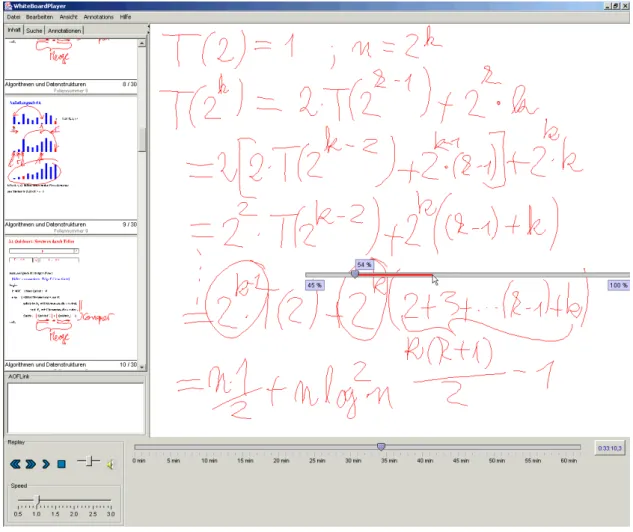
time line interface calledelastic panning. The original interface of the system offers two ways
of lecture navigation, one by slides thumbnails and an other by a time-based slider. Both of
these interfaces are limited to show information on linear or static modes. Theelastic panning
explores a more realistic approach for media browsing, by studying a non-linear navigation
in-terface. This interface adds the possibility to click in any point of a time line, moving the time
marker from its initial point to the clicked point with different velocities. The distance between
the time marker and the clicked point changes the marker velocity: with a long distance the
marker goes fast and with a short one the marker goes slow, as shown on Figure 2.17.
This interface allows to replay the recorded content in a non-linear way, faster if it has
Figure 2.17 Elastic Panning Approach
users about interaction and visualization experiences was very positive. The subjects highly
valued the smooth scrolling behavior compared to the original interface. The ability to browse
a document at any speed is an advantage for recorded lectures with handwritten annotations.
Figure 2.18 Lecture Player with Elastic Panning Interface
2.2.3 ePresence
The ePresence [6, 7, 39], a recent project, allows to participate interactively in real-time
We-bcasted (Web-based streaming) events and gives the possibility to view archived events. This
last feature also permits user to browse and search for a specified content. The system is
im-plemented in .NET technology and is based on a client-server architecture. The server
soft-ware runs under Windows or Linux (using the Mono softsoft-ware application). The client can use
Linux, Windows or Mac and the Web browsers developed for these platforms (Internet Explorer,
Mozilla or Safari). The live streams can be seen using Real Media or Windows Media and the
archives may be produced in Real Media, Windows Media and MPEG4 formats. The system
uses a mobile station, called ePresence Mobile Station, for live media capturing and encoding.
The recorded streams (video, slides or event data) can be updated and published for CDs or for
the Web, using the ePresence Producer application. The live webcast interface (Figure 2.19)
al-lows one to watch the video (with audio) and slide live streams, and to chat, in public or private,
using written text.
Figure 2.19 ePresence Live Cast Interface
The archived events interface (Figure 2.20) shows also the video, audio and slide streams,
but replaces the chat interface by a navigable table of contents and a time-line interface.
The ePresence [6, 7, 39] was tested in conferences (University of Toronto), computer
sci-ence learning (University of Trento and Instituto Superior Técnico) and in medical learning
Figure 2.20 ePresence Archived Interface
2.2.4 Östlund & Svensson Study
In [42], the authors propose an inductive approach to bridge the gap between information
sys-tems design theory and the educational context where the design is to be implemented. The
study used the DISCO system, which divides a course into modules, and a recording studio
equipped with a Sony DV camera, a microphone, a document camera and a computer with MS
Windows XP. The Microsoft Producer authoring tool was also used in this work, which
inte-grates, captures, synchronizes and publishes (for the Web, local computer or CD) video, audio,
MS Power-Point slides and HTML documents. This application uses CSS to define the
Web-Lecture final layout. Some courses had Teacher On-Line (TOL) sessions to answer students
questions, either via e-mail or using the groupware application Marratec. Some lectures were
broadcasted, in real-time, using Integrated Services Digital Network (ISDN) video conferencing
and others were only published later on the Web. This study was conducted at the department
of Economics and Informatics of a Scandinavian university college with approximately 1000
students and 500 staff members. This study provided a clear view of the problems, that can be
found presently, on using and developing a multimedia e-learning system.
2.2.5 Discussion
The use of multimedia can help students and teachers to share knowledge and ideas. The support
provided by digital platforms improves the combination of media elements, like, images or
presentation slides, sound and video. The Internet allow distance sharing of these elements,
which can be done in an after event scenario or in a real-time situation. The work reported in
this dissertation explores the sharing of presentation slides and recorded video lectures.
2.3 Mobile Learning
Currently, mobile technology is very common and popular worldwide. Mobile learning applies
this technology to learning environments, giving the ability to learn everywhere and at anytime.
Devices like mobile phones, PDAs and iPods are very small and light, therefore, very easy to
carry out but have some constrains, such as short battery duration, small screen size and limited
computational power. Tablet PCs and laptops, are less mobile but still portable, particularly
because the overweight and the oversize, and have more computational power. This dissertation
focuses on the use of iPods and Tablet PCs, combining both paradigms.
2.3.1 iPods
Besides the popularity of the iPod devices and their mobile characteristics, they can be
con-sidered excellent devices to playback multimedia formats, like digital audio, photographs and
video.
2.3.1.1 Stanford on iTunes
The Stanford on iTunes [36] project broadcasts, on the iTunes system, audio and video lectures
(Figure 2.21), formal meetings and debates, that happened in this university. This project allows
common users to download and play the recorded events, freely, on their own PCs or iPod
devices. This project was made in collaboration between Stanford University and Apple, and
shows the relevance that podcasts and broadcasted video are gaining in education and in the
Figure 2.21 Stanford on iTunes: The video can be transferred to iPod devices
2.3.1.2 Duke University iPod First-Year Experience
The Duke University initiative [9] to massively distribute iPod devices to students and
pod-cast university courses had quite positive results. The project distributed iPod devices, each
equipped with Belkin Voice Recorders, to over 1600 entering first-year students. The students
academic uses of these devices include course content dissemination, classroom recording
(au-dio data), field recording (au(au-dio data), study report and file storage/transfer. The project
in-cluded a diverse set of courses, such as English, Music, Spanish, Info Science/Info Studies,
Theater Studies, among others. The final year report [9] comments the benefits and the
difficul-ties of using this technology on a wide population of university students, with a very positive
feedback. The benefits include, more independence of physical course materials, spatial and
time access independence to the materials, effectiveness and easiness on using digital audio
recording, student engagement and interest in discussions and enhanced support for individual
learning. On the other side, the barriers included difficult integration of multiple broadcast
sys-tems with some particular infrastructure, software license limitations, limitations of the iPod
device, limited documentation, insufficient quality of the recordings for some contexts and lack
of knowledge about device functionalities.
2.3.1.3 Ketter, Mertens, Morisse & Vornberger Study
The advantages and disadvantages of using mobile technology in learning environments are
discussed in this interesting study [25]. The study describes a prototype implementation of
a workflow to support e-learning content on different mobile devices. The article presents a
set of requirements and facts for e-learning on mobile devices, which includes the short usage
times, the fast and precise access to learning material, the easiness of use, the media support
and the additional benefit perspective, by augmenting e-learning environments. The study also
describes three main purposes for using mobile devices on education, which can be
organiza-tional, communication and learning purposes. The article presents a media production chain
using the Web as a medium to broadcast high quality lectures and as a platform to broadcast
lectures for different mobile devices. The study combines the virtPresenter, PowerPoint-based
application for recording lectures, with podcast technology, creating an automated workflow for
a multi-channel lecturer recording.
2.3.1.4 Discussion
The iPod and other mobile devices can help students learn by allowing them to access lecture
material when and where they want. This material can be recorded audio or video, or
presenta-tion slides. The small screens, which is a characteristic of theses devices, lead to improvements
of multimedia interfaces and visualization. This dissertation explores how can the iPod devices
can be used to view video recorded lectures.
2.3.2 Tablet PCs
The Tablet PCs (using Pen-Based technology) are not new, but presently have the same design
2.3.2.1 MIT iCampus
The MIT iCampus [22] project is a partnership between MIT and Microsoft Research with the
aim of transforming the high education practices using and developing information
technolog-ical tools. The use of Tablet PCs on the International Design Contest (IDC) [30] and the two
sub-projects, the iLabNoteBook [23] and MagicPaper [3, 37, 41], from the iCampus [22]
initia-tive, are good indicators that this technology has a lot to explore and contribute. The IDC [30] is
a robot design competition, that in the 2002 edition gave 100 Acer TravelMate Tablet PCs to the
participants, helping them in the collaborative and creative design process. The iLabNoteBook
[23] project had a similar aim by using Tablet PC technology on laboratories, giving scientists
and students an easy way to access and record digital media, including sketches made with
Pen-based technology, on their workspace. In a different perspective, the MagicPaper [3, 37, 41]
is a software tool to understand natural interaction, such as sketching, gesturing and talking
in a natural way. In this project, traditional digitizing tablets were used, a Wacom tablet with
an LCD-display drawing surface, and a Mimio whiteboard system. The system was tested by
thirteen individuals, including computer science graduate students, computer programmers and
an architecture student. The users evidenced that the system was easy to use, efficient and has
a more intuitive approach. A positive aspect reported by the subjects was the ability to draw
shapes with curves and lines without changing tools, while the system successfully recognized
basic shape forms.
2.3.2.2 Moovl
The Moovl [32, 46] project shows that Tablet PCs are not restricted to university educational
environments. This is an online drawing application with dynamic properties, allowing images
to move according to simple rules of physics, as presented on Figure 2.22.
This application was programmed in Java and was tested in a primary school in inner-city of
Bristol, by thirty one children of Year 3 (aged 7-8) and by thirty children of Year 1 (aged 5-6).
The application was used to teach science and to develop “problem solving” skills in children.
The children were highly engaged and motivated by using this application and delighted with
Figure 2.22 Moovl Interface
the possibility to animate their own drawings. The system interface was easy to understand,
however, it needed some small corrections and all of the subjects recognized how to use the
stylus on the Tablet PC. This prototype was developed for younger children and demonstrates
the new possibilities open by the use of Tablet PCs in education (Figure 2.23).
Figure 2.23 Moovl Running on a Tablet PC
2.3.2.3 Classroom Presenter & Ubiquitous Presenter
The Classroom Presenter [4] and Ubiquitous Presenter (Web version) [45] applied the
Pen-based technology on University educational environments for mobile and collaborative learning
practices. Using the Classroom Presenter [4] students and professors can share solutions and
an-swers during lectures, both using Tablet computers. The problems are presented to the students
receives all students responses and selects one or more to show to the classroom, and the
lec-turer has also the possibility to annotate the answers using the Pen-Based Technology. The
sys-tem was tested on junior and senior undergraduate Computer Science courses, which included,
Algorithms, Data Structures, Software Engineering, Digital Design and Human-Computer
In-teraction, and on one graduate level seminar. On the experience 20 HP TC1100 Tablet PCs were
used. Most of the students gave a very positive feedback of the system, especially considering
the ability to participate and contribute for the problem solving in a anonymous way, reducing
the fear of being wrong.
Figure 2.24 Classroom Presenter Interface Showing Exercises Solved by Students on Slides
Since the Classroom Presenter works over a specific network protocol, this causes a very
restrict usage of the system. Therefore, the Ubiquitous Presenter [45] was developed with the
aim to use a Web based network protocol which allows a wider access to the system. This
Web extension allows one to access and annotate Classroom Presenter [4] materials using a
Web browser. This application is based on a client-server architecture, programmed in PHP and
Javascript, and can be accessed using the most popular browsers including, Internet Explorer,
Netscape Navigator and Mozzila. Both applications, Classroom Presenter and Ubiquitous
Pre-senter are synchronized using Simple Object Access Protocol (SOAP) remote procedure calls
and the PHP GD library is used for composing ink with the slides. This application allows
the students to make their slides submission via HTTP POST commands. In a recent article
[19] related to the Ubiquitous Presenter, the Web is also presented as a mean to cross different
platforms, like personal computers, laptops, Tablet PCs, PDAs, mobile phones and whiteboards.
2.3.2.4 Discussion
The Tablet PCs allow a more free and natural interaction with computer technology, particularly
for computer sketching or writing. Pen-based technology helps students on tasks that involve
problem solving, creative skills and on the understanding of their environment. This thesis
explores pen-based annotations, using Tablet PCs, associated with media elements, like images
Chapter 3
Architecture & Implementation
The system has a client-server architecture and allows different ways of access and interaction,
with the aim to reduce temporal and physical constraints and foster the user participation. The
implementation is divided in two projects, the VideoStore and the mEmLearn, both with Web
and mobile developments. This chapter resumes both projects, describes the developments
made on the different phases of each project and how the two are combined.
3.1 System Overview
The developed work has a client-server architecture complemented with a data module (Figure
3.1). The data module is composed by three submodules: (1) presentation slides, (2) video
content and (3) annotations. The server is a single module to process the data. The client
module is also divided in three submodules: (1) desktop, (2) iPod and (3) Tablet PC. All the
client submodules are Web-based, with the aim to have an easier and wider access by the users.
The Tablet PCs can give more freedom of writing and foster the interaction by the usage of
pen-based technology. In addition, the iPod permits more temporal and physical independence
by allowing the students to watch video lectures where and when they want. The desktop and
iPod modules were developed on the scope of the VideoStore project and the Tablet PC as part
of the mEmLearn project.
The annotations linked to video content, can be made using a desktop or a Tablet PC. The
pen-based annotations, developed on the scope of the mEmLearn project, are divided in two
Figure 3.1 System Overview
was integrated with the VideoStore system and the second, due to technological constraints (see
Section 3.3.3), were developed in a separated way. The video annotations and some of the video
interfaces integrates information provided by the users promoting their interaction with system
and fostering participative learning.
3.2 VideoStore
The VideoStore [10, 11, 13, 14] project had the aim to develop a Web-based learning system
to store, transmit, search and share the contents of courses captured in video. The project was
initially developed in the scope of the author BSc diploma project. In the end of the diploma
project, a first prototype was concluded and the system architecture has reached a final form.
The prototype included video, Power-Point slides and HTML synchronization done with MS
Producer 2003, an authoring tool which generates a Web presentation; video annotations,
us-ing PHP5 features and XML databases; two video interfaces, VideoMosaic and VideoSpot;
and video streaming. Both, video annotations and interfaces, were integrated, using PHP and
Javascript, into the Web presentation generated by the MS Producer (Figure 3.2).
(a) (b)
(c)
Figure 3.2 VideoStore Initial Interface and Features: (a) Video Annotations (b) VideoMosaic (c) VideoSpot
Other technologies, like SMIL or the Camtasia Studio, were tested with the aim to integrate
slides and video on the Web. The tools to produce SMIL material were complex and limited
to expert users. The Camtasia Studio had a different approach by converting the slides into a
video stream, which was not a flexible solution. The MS Producer 2003 proved to be the best
solution, allowing to synchronize video, slides and HTML to integrate the system features on
a final Web presentation, using Javascript. This tool also had a user friendly interface allowing
less expert users to produce their own presentations (Figure 3.3).
The project also involved recorded lectures, and therefore, hardware equipment for video
and audio recording was tested and chosen. With the aim to record lectures, a Canon MVX35i
digital video camera and a wireless microphone pack Sony UWP-S1 were used. The wireless
microphone had the aim to reduce the physical restrictions on the teaching process. A server
machine, a Pentium 3,6GHz, with 4 GigaBytes of Ram and two harddisks with 250 GigaBytes
Figure 3.3 MS Producer 2003
3.2.1 Video Interfaces
The traditional VCR controls, like “rewind/fast-forward”, are hard to use and do not provide any
hints to find the content, therefore, an important focus was given to the video interfaces during
the development of the system. Two interfaces were developed, the VideoLog and the Slide
Thumbnail and an other two were improved, the VideoMosaic and the VideoSpot. The first two
allow to browse the video based on external information, which can be related to its content, and
the last two use frame content. All interfaces are synchronized with the video and the presented
slides, which allows a user to click on the interface, corresponding to a particularly part of the
video and to play it from that moment.
3.2.1.1 VideoLog
The VideoLog interface shows a graphical representation of the most watched moments of
a video. When a user watches a video lecture, the streaming server registers which part of
video the user watched. An application was developed to parse the log files generated by the
server and retrieve the videos access times. A numerical map with the most watched seconds
of the video is created and transformed to a graphical representation (Figure 3.4). The colored
columns represent the most watched parts of the video and the black columns the less watched.
This interface allows a user to browse the video based on the content visualized by other users.
Figure 3.4 VideoLog Interface
3.2.1.2 Slide Thumbnail
The Slide Thumbnail interface shows all the slides presented in lecture. This interface displays
a preview of the presented slides and allows to browse the video content based on the moments
that each slides appears on the video (Figure 3.5).
Figure 3.5 Slide Thumbnail
An application was developed to parse the Javascript files generated by MS Producer 2003
and retrieve the instants when each slide appears on the video. The Slide Thumbnail
inter-face is generated by matching the slide, in the JPEG format, and the times retrieved from the
Javascript files, using the images filename and their system path. In addition, an horizontal
scroll mechanism with the images was developed, allowing the users to browse the slides from
the beginning to end (right-to-left) and vice-versa, at two different speeds. This mechanism has
the aim to provide to the users a more comfortable visualization of the interface.
3.2.1.3 VideoMosaic
The VideoMosaic interface is composed by sampling the video frames with equal time intervals,
Figure 3.6 VideoMosaic Composition
The VideoMosaic was improved from the initial prototype (Figure 3.7) by the possibility
to change the number of frames of the sample and by the changing the frame format, from the
uncompressed BMP to the JPEG compressed format.
Figure 3.7 VideoMosaic Interface: Initial Prototype
These changes allow a better exploration of the video content by increasing the number of
frames in the sample, reducing the occupied harddisk space and recuding the amount of data
to transfer through the Web. In addition, the horizontal scroll mechanism referred in Section
3.2.1.2 was also implemented with the still images (Figure 3.8).
Figure 3.8 VideoMosaic Interface: Improved version
3.2.1.4 VideoSpot
The VideoSpot interface was inspired by the VideoStreamer[18] and has the goal to improve the
visualization of video content changes. This interface is composed by a set of columns taken
from the middle of each frame and placed together side by side (Figure 3.9).
Figure 3.9 VideoSpot composition
The VideoSpot was improved from the initial prototype (Figure 3.10) by reducing the size
of the columns to a width of 1 pixel and the final image was saved on JPEG compressed format.
Figure 3.10 VideoSpot Interface: Initial Prototype
Due to image processing library constraints of creating images with large dimensions, the
final image was divided in a small set of images and displayed together side by side. In addition,
the horizontal scroll mechanism referred in Section 3.2.1.2 was also implemented with the final
Figure 3.11 VideoSpot Interface: Improved Version
3.2.2 Video Annotation
The Video Annotation system allows the users to make notes and link each note to a specific
moment of a video. The annotations are HTML based, allowing also annotations with images
and hyperlinks, and are associated with a video by a time period (Figure 3.12). In addition,
other features were introduced, including documents upload, sharing of annotations among
system users and the ability to remove annotations.
Figure 3.12 VideoAnnotation Interface
The interface is composed by a Javascript/Internet Explorer feature that allows to create
HTML documents on Internet Explorer browser and by three sets of buttons, (1) to define an
annotation time period, (2) to upload documents and images and (3) for text editing. The begin
time of the period is set by default with the value of the video current time. The system has
two modes to visualize the video annotations: unsynchronized and synchronized. With the
unsynchronized mode, the system shows all the annotations associated with the current video
(Figure 3.13).
Figure 3.13 Unsynchronized Video Annotations
The synchronized mode shows the video annotations associated with the different moments
of the video, while it is playing (Figure 3.14).
It is possible to search information on the video annotations using keywords (Figure 3.15
and Figure 3.16). The annotation system also support annotations associated with a lecture or a
course, allowing the users to create notes independently of the video and linking to it at a later
time. All annotations are associated with a given user and stored on native XML databases.
Figure 3.15 Video Annotations Search: Text Box Figure 3.16 Video Annotations Search: Results
3.2.3 Video Podcast
The Video Podcast is a mobile approach of the VideoStore project and has the aim to podcast
recorded video lectures. This feature allows the users to transfer recorded video lectures to
an iPod device and watch them anywhere and anytime. However, the simple conversion of
the recorded videos to the podcast format would cause an information loss, particularly of the
slides presented by the lecturer (Figure 3.17), thus, an application was developed to combine
the presented slides and the video stream (Figure 3.18).
The application uses the timestamps and the images of the slides, provided by the Slide
Thumbnail interface (Section 3.2.1.2), and integrates the slides into the video. When a slide
change occurs, the image slide appears on the video replacing the original video frames, during
a certain period of time (Figure 3.19). Due to the usage of the WMV (Windows Media Video)
format there were some constraints on the video editing process, which caused frame and audio
gaps on the iPod video format.
Figure 3.17 Lecture Podcast: The Lecturer Figure 3.18 Lecture Podcast: Slide Image
Figure 3.19 Podcast Video Composition
3.2.4 VideoStore Architecture and Modules
The VideoStore architecture is stable and it has enough flexibility to introduce future changes
and new features. The system has a client-server architecture and the server has four
mod-ules: (1) data (video data, slides presentations and annotations databases), (2) data processor
(authoring tool, hypertext generator and video processing applications), (3) web server and (4)
streaming server. The videos and slides presentations are provided by the system administrator,
which also manages the data processor module. The client has two modules: a web browser, a