Mestre em Engenharia Informática
Video Interaction using Pen-Based
Technology
Dissertação para obtenção do Grau de Doutor em Informática
Orientador :
Professor Doutor Nuno Manuel Robalo Correia,
Professor Catedrático,
Universidade Nova de Lisboa
Júri:
Presidente: Professor Doutor Luís Manuel Marques da Costa Caires
Arguentes: Doutor Pablo Cesar
Professor Doutor Joaquim Armando Pires Jorge
Video Interaction using Pen-Based Technology
Copyright c Diogo Nuno Crespo Ribeiro Cabral, Faculdade de Ciências e Tecnologia, Universidade Nova de Lisboa
Acknowledgements
I first wish to thank to my supervisor, Prof. Dr. Nuno Correia, for his advice and im-measurable support. A special thank you goes to the Creation-Tool development team João Gaspar Valente, João Silva and Urândia Aragão, for their important contributions. I would also like to thank to the rest of the TKB project team and collaborators, particular-ity to Dr. Carla Fernandes, Stephan Jürgens, Carlos Oliveira, Filipe Cruz, David Santos Rui Horta, the staff from "O Espaço do Tempo" and the dancers from "Forum Dança PEPCC 2010/2012", for their help, support and comments.
I would like to thank my present and former colleagues at the Interactive Multimedia Group (IMG) at CITI/FCT/UNL, Rui Nóbrega, Rui Jesus, Sofia Reis, André Sabino, Filipa Peleja, Bruno Cardoso, Rossana Santos, Pedro Centieiro and Rui Madeira, for their help, suggestions and support. I also would like to thank to Prof. Dr. Carmen Morgado for her presence in the IMG group coffee breaks with awesome cakes and cookies.
I would like to thank to Prof. Dr. Sharon Strover, Prof. Dr. Luis Francisco-Revilla and Prof. Anne S. Lewis, form University of Texas at Austin, for their comments and suggestions.
I also would like to thank Ricardo Mano, Nuno N. Correia and Pedro Maurício Costa for sending me important material for this research work as well as all the participants in the usability tests.
I am especially grateful to my parents and sisters for their help and support. A special thank you to my lovely spouse for her support and patience.
This work was partially funded by the UTAustin-Portugal, Digital Media, Program (Ph.D. grant: SFRH/BD/42662/2007 - FCT/MCTES); by the HP Technology for Teaching Grant Initiative 2006; by the project "TKB - A Transmedia Knowledge Base for contem-porary dance" (PTDC/EAT/AVP/098220/2008 funded by FCT/MCTES); and by
Abstract
Video can be considered one of the most complete and complex media and its manip-ulating is still a difficult and tedious task. This research applies pen-based technology to video manipulation, with the goal to improve this interaction. Even though the human familiarity with pen-based devices, how they can be used on video interaction, in order to improve it, making it more natural and at the same time fostering the user’s creativity is an open question.
Two types of interaction with video were considered in this work: video annotation and video editing. Each interaction type allows the study of one of the interaction modes of using pen-based technology: indirectly, through digital ink, or directly, trough pen gestures or pressure. This research contributes with two approaches for pen-based video interaction: pen-based video annotations and video as ink.
The first uses pen-based annotations combined with motion tracking algorithms, in order to augment video content with sketches or handwritten notes. It aims to study how pen-based technology can be used to annotate a moving objects and how to maintain the association between a pen-based annotations and the annotated moving object
The second concept replaces digital ink by video content, studding how pen gestures and pressure can be used on video editing and what kind of changes are needed in the interface, in order to provide a more familiar and creative interaction in this usage con-text.
Resumo
O vídeo pode ser considerado um dos media mais completos e complexos e sua mani-pulação ainda é uma tarefa difícil e aborrecida. Esta pesquisa aplica tecnologia baseada em caneta para a manipulação de vídeo, tendo como objetivo melhorar esta interação. Apesar da familiaridade humana com dispositivos baseados em caneta, como estes po-dem ser utilizados na interação de vídeo de modo melhorá-la, tornando-a mais natural e ao mesmo tempo estimulando a criatividade do utilizador é uma questão em aberto.
Dois tipos de interação com vídeo foram considerados neste trabalho: anotação de vídeo e edição de vídeo. Cada um dos tipos de interação permite o estudo de um dos modos de interação da tecnologia baseada em caneta: indiretamente, por meio de tinta digital, ou diretamente, usando gestos ou pressão. Esta pesquisa contribui com duas abordagens para interação com vídeo baseada em caneta: anotações de vídeo e caneta e vídeo como tinta.
O primeiro usa anotações feitas com caneta e combinadas com algoritmos de dete-ção de movimento, a fim de aumentar o conteúdo de vídeo com desenhos ou anotações manuscritas. Procura estudar como a tecnologia da caneta pode ser usada para anotar objetos em movimento e como manter a associação entre as anotações feitas com caneta e o objeto dinâmico anotado.
O segundo conceito substitui a tinta digital por conteúdo de vídeo, estudando assim como os gestos e pressão feitos com a tecnologia da caneta podem ser usados em edição de vídeo e que tipos de mudanças são necessárias na interface, de modo a proporcionar uma interação mais familiar e criativa neste contexto.
Contents
1 Introduction 1
1.1 Motivation . . . 1
1.2 Research Questions . . . 7
1.3 Research Overview . . . 8
1.4 Contributions . . . 8
1.5 Publications . . . 10
1.6 Thesis Organization . . . 11
2 Background and Related Work 13 2.1 Pen-based Technology . . . 13
2.1.1 Discussion . . . 18
2.2 Video Annotation . . . 19
2.2.1 Pen-based Video Annotations . . . 23
2.2.2 Discussion . . . 25
2.3 Video Editing . . . 27
2.3.1 Pen-based Video Interaction and Editing . . . 32
2.3.2 Discussion . . . 34
3 Pen-based Video Annotations 37 3.1 Pen-based Video Annotations: The Concept . . . 37
3.2 Pen-based Video Annotations: Proof-of-Concept Prototype . . . 39
3.3 Creation-Tool using Multimodal Video Annotation - A Case Study . . . . 41
3.3.1 Implementation Technologies . . . 42
3.3.2 Video Annotation Modalities . . . 42
3.3.3 Motion Tracking . . . 46
3.3.4 Annotations Storage . . . 50
3.3.5 Annotation and Video Modes . . . 51
3.3.6 Interface Design & Development Process . . . 53
3.4 Discussion . . . 73
4 VideoInk 77 4.1 Video as Ink: The Concept . . . 77
4.2 Video as Ink: Proof-of-Concept Prototype . . . 78
4.2.1 Implementation Technologies . . . 79
4.2.2 The Canvas . . . 79
4.2.3 Painting Video: Video Frames vs Video Segments . . . 80
4.2.4 Video Editing Features . . . 82
4.2.5 Selecting Elements . . . 83
4.2.6 Pressure-based Zoom . . . 85
4.2.7 Evaluation . . . 86
4.3 Discussion . . . 98
5 Conclusions and Research Status 101 5.1 Research Summary and Findings . . . 101
5.2 Limitations and Future Work . . . 103
5.2.1 Collaborative and Shared Pen-based Video Annotations . . . 103
5.2.2 Pen-based Hyperlinks . . . 103
5.2.3 Attaching Anchors and Annotations: Selection vs Line Connectors 103 5.2.4 Annotations Methods for Live Annotation . . . 104
5.2.5 Bimanual Pen + Touch Video Interactions . . . 104
5.2.6 More Pen-based Gestures . . . 104
5.2.7 Bidirectional Video Segments . . . 105
5.2.8 Pen-based Sound Editing . . . 105
5.3 Final Remarks . . . 106
Bibliography 107
A Appendix: Creation-Tool Questionnaire 125
B Appendix: Creation-Tool and Motion Tracking Questionnaire 131
List of Figures
1.1 Video interaction . . . 4
1.2 Child using pen and paper. . . 5
1.3 Pen: paper and computer. . . 6
2.1 Telautograph transmitter. . . 14
2.2 Light pen from Sketchpad. . . 15
2.3 Wacom digitizer tablet connected to a laptop computer. . . 15
2.4 Pen interaction modes. . . 16
2.5 Tablet computers. . . 17
2.6 Anoto Pen: Regular ink pen and camera. . . 17
2.7 Smartboard. . . 18
2.8 The EVA system [Mac89; MD89]. . . 19
2.9 AntV annotator [CC99]. . . 20
2.10 Anvil annotator [Kip01]. . . 21
2.11 Galatea system: sketches combined with film projection [PS76]. . . 23
2.12 Pen-based annotations on the LEAN system [RB03]. . . 24
2.13 Selecting a region for tracking using point and group particles [GGCSS08]. 25 2.14 First scene of Porter’s film: The Life of an American Fireman. . . 27
2.15 Film editing equipment. . . 28
2.16 Editing software: professional vs non-professional. . . 29
2.17 Editing software: linear timeline vs multiple rows. . . 30
2.18 The Hitchcock system interface [GBSBW01]. . . 31
2.19 TLSlider interface on LEAN system [RB03]. . . 33
2.20 Videotater timeline [DE06]. . . 34
2.21 I/O Brush [RMI04]: Painting with video content. . . 34
3.2 Pen-based video annotations: proof-of-concept prototype - annotating on
a live stream, using a webcam. . . 39
3.3 Motion tracking based on frames difference. . . 40
3.4 Pen-based video annotations: proof-of-concept prototype - annotation prop-erties . . . 40
3.5 The Creation-Tool running on a Tablet PC. . . 41
3.6 Changing annotations time interval using the pen. . . 43
3.7 Creation-Tool: Pen annotations. . . 43
3.8 Creation-Tool: Annotation marks. . . 44
3.9 Creation-Tool: Audio annotations with visual feedback (waveform). . . . 44
3.10 Creation-Tool: Text annotations. . . 45
3.11 Creation-Tool: Annotations as hyperlinks. . . 46
3.12 Tracking with CAMSHIFT . . . 47
3.13 Tracking with FAST and BRIEF. . . 48
3.14 Tracking with Kinect. . . 49
3.15 Tracking with TLD. . . 49
3.16 Tracking with Kinect and TLD. . . 50
3.17 Continuous mode: annotation gradually disappears. . . 51
3.18 Suspended mode. . . 52
3.19 Hold and Overlay method. . . 53
3.20 The Creation-Tool main interface. . . 54
3.21 Creation-Tool navigator: time intervals of the different pen-based video annotations. . . 55
3.22 Creation-Tool timeline. . . 55
3.23 Creation-Tool Hardware. . . 56
3.24 Choreographer testing the tool. . . 57
3.25 Creation-Tool Design Process . . . 57
3.26 Motion tracking: indoor and outdoor tests. . . 58
3.27 Motion tracking interface improvements. . . 59
3.28 User experimenting the Creation-Tool during the test. . . 60
3.29 Work Recording . . . 60
3.30 Work Annotation . . . 61
3.31 Work Sharing . . . 61
3.32 Results for the two different usage scenarios: during a rehearsal and after a rehearsal. . . 62
3.33 Results for the usage of the different annotation types, during a rehearsal.. 63
3.34 Results for the usage of the different annotation type after a rehearsal. . . 64
3.35 Results for the perceived difficulty of the different annotation type during a rehearsal. . . 65
3.37 Results for the perceived difficulty the different annotation modes:
contin-uous and suspended. . . 67
3.38 Results for the usage of the different video visualization modes: real-time and delayed. . . 68
3.39 Classification with Microsoft "Product Reaction Cards". . . 69
3.40 User task: select (Kinect) and make (TLD) the anchor around the person and make an annotation - the circle . . . 70
3.41 Work Annotation . . . 70
3.42 Results for trackers’ performance. . . 72
3.43 Results for annotation method preference. . . 73
3.44 Results for the perceived difficulty for using each tracker and considering each annotation method. . . 74
3.45 Classification with Microsoft "Product Reaction Cards". . . 75
4.1 Inking with video frames. . . 78
4.2 The matrix that composes the canvas. . . 79
4.3 Frame mode. . . 80
4.4 Segment mode. . . 81
4.5 Painting frames by dragging the pen. . . 81
4.6 Move a frame by dragging . . . 82
4.7 Hit area to add content (hovering the pen). . . 82
4.8 Transition: fade effect (horizontal and vertical). . . 83
4.9 Paint selection on frames. . . 84
4.10 Lasso selection on frames. . . 84
4.11 Selecting segments . . . 85
4.12 Pressure-based zoom. . . 85
4.13 A user experimenting videoink prototype. . . 86
4.14 Device that participants usually use to record videos. . . 87
4.15 Results for the perceived difficulty for adding video frame, a video seg-ment and a transition (the fade effect). . . 88
4.16 Results for the usage of the two methods for mode switching: pressing on top of the selected clip or tapping on the switch button. . . 89
4.17 Results for the perceived difficulty for two methods for mode switching. . 90
4.18 Results for the perceived difficulty for different ways of generating a new video stream: no selection, paint selection and lasso selection. . . 91
4.19 Results for the usage of the selection modes: paint selection and lasso se-lection. . . 92
4.20 Results for the perceived difficulty of the two pressure-based mechanisms: mode switch and zoom. . . 93
4.22 CSI factor means used for index calculation. . . 96 4.23 CSI means: non-expert, expert and overall. . . 96 4.24 Classification with Microsoft "Product Reaction Cards". . . 97
List of Tables
1.1 Affordances of paper and of digital technology for reading [SH03]. . . 6
2.1 Pen-based Video Annotation Systems . . . 26
2.2 Pen-based Video Interaction Systems . . . 35
Acronyms and Notation
CD Compact Disc CRT Cathode Ray Tube CSI Creative Support Index DVD Digital Videodisk GUI Graphical User Interface HD High-Definition
IP Internet Protocol OSC Open Sound Control PC Personal Computer PDA Personal Digital Assistant PNG Portable Network Graphics UDP User Datagram Protocol URL Uniform Resource Locator VJ Video-Jockey
Wi-Fi Wireless Local Area Network XML eXtensible Markup Language
¯
x Mean
σ Standard Deviation ˜
x Median
1
Introduction
The motivation, problem statement, solution overview and the main contributions of this work are presented in this chapter.
1.1
Motivation
Video can be considered one of the most complete and complex media, as Yeo and Ye-ung [YY97] discuss in their research about video database management systems and as Goldman [Gol07] mentions in his research about video annotation, visualization and in-teraction. The use of digital platforms not only changed video editing and visualization processes but also proven to be necessary to improve video content browsing and search-ing [MD89; YY97; Cha04; Dan11; Cha12]. Nonetheless, manipulatsearch-ing digital video is still a difficult task [GBCDFGUW00; CLMBSDYC02; RB03; Cha04; DE06; Cha12]. Recent developments in digital video technology, like video sharing platforms (e.g., YouTube1, Vimeo2) or the integration of video cameras in mobile devices3, have increased the pro-duction, distribution and access of video content, making video manipulation not only an important issue for professionals, but also for non-expert users. Therefore, it is crucial to find more natural ways to interact with video content.
Video manipulation and interaction, by a single user (i.e., excluding group sharing tasks), can be divided in three main tasks, besides the regular playback: video browsing or navigation; video data analysis, which includes different subtasks, like video browsing or video annotation; and video editing.
1http://www.youtube.com/, with 4 billion hours of video [You]. 2http://vimeo.com/
• Video Browsing or Navigation: Yeo and Yeung [YY97] defined video browsing as “a technique users employ to view information rapidly in order to decide whether the content is relevant to their needs”. Video browsing or navigation is implicitly linked to video visualization and the playback of video segments. Video browsing can be used on video data analysis, on video editing, or by someone who simply wants to re-watch his favorite film scene. Video browsing has been a fairly studied research topic, with plenty of published literature presenting a full range of solu-tions [SHMBJ10] depending on the video content [ED94; TMDSK98; DRBNBS08; KWLB08], interaction input (including pen-based interactions) or device [RB03; RB05; HG08; WMYL12].
• Video Data Analysis: Ratcliff [Rat03] defines video data analysis as the process of making the video information meaningful. Video data analysis is useful in different areas, like social and design studies, education, performative arts, medicine, media production or sports. Video allows one to capture and re-watch a version of an event as it happens and extract useful information from it, which depends on the subject of study and its context [HHL10]. Different subtasks, such as video brows-ing; video annotation; information extraction combined with quantitative measure-ments (e.g, measuring the time of a recorded process or task, counting the number of repeated scenes) and slow motion or frame-by-frame playback can be involved in video data analysis. All these subtasks can be performed by humans or com-puters, depending on the objectives and context of analysis. Video annotation is a useful feature of video analysis, saving time [Mac89; MD89; WP94] and foster-ing a process that combines watchfoster-ing and critical thinkfoster-ing, named active watchfoster-ing [CC99].
activity; a visible trace of the reader’s attention and as incidental reflections of the material circumstances. Later, Marshall [Mar10] defined three elements which compose an annotation: a body, an anchor, and a marker. The annota-tion body is any content that the user wants to add to it; the anchor delimits the scope of an annotation, i.e., the content of the original document associated with the annotation, and the marker defines how the anchor should be ren-dered when it is displayed. These issues combined with video dynamic prop-erties, generate an additional level of complexity, when trying to link other media to dynamic visual content [Bux07; Gol07].
• Video Editing: In the Dictionnaire mondial du Cinèma [VBGLS+11] is defined that “film editing is the phase of the manufacture of a film in which are assembled and arranged images and sounds of the film”. Dancyger [Dan11] mentions that “what can be said about the craft and art of film editing can also be said about video editing”. This idea is reinforced also in the Dictionnaire mondial du Cinèma
[VBGLS+11], by claiming that digital technology made the editing process equal on film and video. Therefore, it is possible to use the same definition of film edit-ing for video: editing is the phase of the manufacture of a video in which are assembled and arranged images and sounds of the video. Editing not only allows to shoot differ-ent scenes in a non-linear order, which can be properly selected and arranged on a post-production process, but can also be used for narrative purposes. Dancyger [Dan11] refers as goals for editing: narrative clarity (e.g., narratives with multiple characters); dramatic emphasis (e.g., the combination of close-ups in a scene); sub-text (e.g., imposing a particular pace, in order to transmit an idea to the audience) and aesthetics (e.g., providing an intentional aesthetic). This idea is also reinforced by Thompon and Bowen [TB09], in their definition of editing: "Editing for motion pictures is the process of organizing, reviewing, selecting, and assembling the pic-ture and sound "footage" cappic-tured during production. The result of these editing efforts should be a coherent and meaningful story or visual presentation that comes as close as possible to achieving the goals behind the original intent of the work -to entertain, -to inform, -to inspire, etc."
Dancyger [Dan11] also considers three aspects of the editing process: thetechnique, the physical joining of two disparate pieces of film; the craft, the joining of two pieces of film together to yield a meaning that is not apparent from one or the other shot and theart, when the combination of two or more shots takes meaning to the next level-excitement, insight, shock, or the epiphany of discovery. As previously mentioned, recent technology developments, like video sharing platforms and mo-bile devices with integrated cameras, made the editing process important not only for film industry professionals but also for regular consumers.
annotation and for video editing as well as the tasks involved in both topics (Figure 1.1), make them natural candidates for the usage of pen-based technology, which can be considered a familiar computer input interface for humans [Mey95]. In the context of video annotation, it is possible to find a wide set of solutions but still remains the need of a fluid video annotation method, which incorporates the dynamic dimension of the content [RB03; Bur06; Bux07; SLCL11]. Whereas, video editing misses solutions that make the process more efficient [GBCDFGUW00; CLMBSDYC02; RB03; DE06], easier to learn [Cha04; Cha12], but at the same time foster the user’s creativity [Dan11].
(a)
(b)
Figure 1.1: Video interaction. (a) Annotating a video. (b) Editing a video.
even be arranged so that he can do this by a stylus scheme, such as is now employed in the telautograph seen in railroad waiting rooms, just as though he had the physical page before him.". More than 50 years later, a field study about reading and writing on a Tablet computer [MPGS99] observed this interaction familiarity with pen-based tech-nology on note taking tasks. Moggridge, in his 2006 bookDesigning Interaction[Mog06] discusses the familiarity of pen-based technology with Bert Keely, former responsible of tablet developments of Silicon Graphics and Microsoft, "you can sketch and enter text with one hand with a fluency that you have been developing since childhood" (Figure 1.2). In addition, pen-based technology has the advantages that can give a more accurate positioning and avoid dirty screens, compared to touch [DFAB04].
Figure 1.2: Child using pen and paper.
In order to cover the two modes of pen-based interaction, this work uses digital ink for video annotations and pen gestures and pressure as input commands for video edit-ing. Although, in this research these topics were studied separately they can be com-bined: annotations, made by professionals, can be used during the video editing process [MP94; Cha04; Bux07]; video segments can be automatically generated and combined based on annotations [MD89; CLMBSDYC02; Dav03; VDJ03; VD04; GCSS06] and pen-based commands can be useful for annotation tasks [PGS98; SGP98; BM03; HZSBCST07; LGHH08] as well as for video browsing [RB03; RB05; HG08].
advantages in the digital context." (Figure 1.3).
Figure 1.3: Pen: paper and computer.
Although there is not a clear definition of electronic paper [HDYK11], it can be con-sidered as a combination of paper and digital technology. The affordances of each are described by Sellen and Harper in the bookThe Myth of the Paperless Office[SH03] and shown on Table 1.1.
Affordances of Paper
Quick, flexible navigation through and around documents Reading across more than one document at once
Marking up a document while reading Interweaving reading and writing
Affordances of Digital Technology
Storing and accessing large amounts of information Displaying multimedia documents
Fast full-text searching
Quick links to related materials
Dynamically modifying or updating content
Table 1.1: Affordances of paper and of digital technology for reading [SH03].
pens [BFWHS08] as well as to the different mode switching techniques of pen-based user interfaces [LHGL05]. Nonetheless, Vogel and Balakrishnan [VB10], in their study about the difficulties of direct pen interaction with a conventional graphical user interfaces (GUI), alerted for the need of improvement of hardware, base interaction and widgets behavior. This need of user interface adaptations for pen-based interactions was also ex-pressed by Marshal [Mar10] in her book about reading and writing on electronic books. Considering these issues, it is possible to conclude that pen-based interactions should be applied to video manipulation, in order to achieve more familiar video interactions.
1.2
Research Questions
Considering the complexity of video data and the difficulty of its manipulation, this re-search has the aim to improve it by using pen-based technology as an input interaction device. Even though the human familiarity with pen-based devices makes this technol-ogy a potential candidate for video interaction improvement, how it can be used remains an open question. Therefore, the main research question of this work is:
How pen-based technology can be applied to video interaction, in order to improve it, making it more natural and at the same time fostering the user’s creativity?
As mentioned in the previous section, pen-based technology can be used indirectly, through digital ink. The use of pen as an input technology (physical or digital) for an-notations is usually associated with activities that involve static content, like writing or sketching, linked to static media, e.g., text and images. The usage of pen-based technol-ogy for note taking actions associated with video content presents different challenges: Regarding the video annotation using pen-based technology two main research question can be made:
How to annotate a moving object using pen-based technology?
How to maintain the association between a pen-based annotation and the annotated moving object?
Although the recognition of handwritten annotations is a relevant research topic and important for the pen usefulness, it is independent from the type of media, static or dy-namic, associated with the annotations. Therefore, the recognition of handwritten anno-tations is not considered as a focus of this thesis.
How to improve video manipulation and editing using pen gestures or pressure?
What kind of changes are needed in a video editor interface, in order to achieve this improvement?
1.3
Research Overview
This research presents two approaches for pen-based video interaction: pen-based video annotations and video as ink. The first one is focused on adding pen-based annotations to video content, which can also be used for video navigation or for the generation of a new video stream. The second approach replaces the digital ink by video frames or segments, which are used for video editing.
In the context of pen-based video annotations two applications were developed. The first one was a proof-of-concept prototype and the second a more complete video anno-tator. The later was implemented and applied to contemporary dance as a Creation Tool. This application, developed for Tablet PCs, includes annotations in the form of ink, text, audio, hyperlinks and marks. The tool was conceived to assist the creative processes of choreographers, working as a digital notebook.
The development followed an iterative design process involving two choreographers, and a usability study was carried out, involving international dance performers. The de-velopment and evaluation of the video annotator was made as part of the "TKB: A Trans-media Knowledge Base for contemporary dance" project [FJ09], in collaboration with the School of Social Sciences and Humanities (FCSH), Universidade Nova de Lisboa (UNL). In the context of the TKB project, two master students collaborated in this research: João Gaspar Valente and João Silva. João Gaspar Valente focused his thesis on the develop-ment of the multimodal video annotator [Val11], whereas João Silva focused his work on motion tracking algorithms applied to video annotation [Sil12]. In addition, the de-signer Urândia Aragão contributed in the graphical proposal and helped in the design interaction of the tool.
In the context of the second approach, video as ink, a pen-based proof-of-concept prototype was also developed. The prototype also uses a Tablet PC as a platform for video editing. The editing features include operation features such as add, move and erase video content. Transitions effects, like fade, and two selection modes, one using pen gestures and the other using a lasso tool, were also developed. In addition, zoom features based on pen pressure were implemented.
1.4
Contributions
This research work provides the following contributions:
– A familiar method for human-based video analysis and annotation.
– The usage of motion tracking methods, in order to maintain the annotation context, i.e., the association between annotations and the annotated video fea-tures.
– Augmentation of video content with digital ink and using with real-time mo-tion tracking algorithms, in order to move the ink strokes according the move-ment of video objects.
• The concept of video as ink, in which digital ink is replaced by video content. This concept can be characterized by:
– Applying the paint metaphor to video editing.
– The canvas, in which the frames or segments are painted, works as 2D timeline and allows non-linear video editing.
– The concept can also be applied to other video editing features, such as erasing frames and content selection.
– Pen pressure is used for zooming features.
• A proof-of-concept prototype of pen-based video annotations for Tablet PCs, pre-senting the following features:
– Sketches over a video stream (live or pre-recorded).
– Annotations following motion video features detected by the difference of frames.
– Replay of annotations in the same order that they were made.
• A multimodal video annotator for Tablet PCs and applied to contemporary dance, which exploits:
– Bimanual pen and touch interaction, in which touch is mainly used for mode and tool switching, exploiting the non-preferred hand.
– Video annotations that can be annotation marks, audio, text, ink strokes or hyperlinks.
– Annotations that can be made in real-time, using a live video stream, or post-event, using a pre-recorded video stream.
– Two annotations modes: (1) continuous, associating annotations to a video segment, and (2) suspended, which associates annotations to a video frame.
– Two video visualization modes: (1) real-time, showing the recorded video syn-chronized with the live event, and (2) delayed, in which the video recording is showed to the user with a time delay.
– The integration with real-time state-of-the-art motion tracking methods, in or-der to maintain annotations context.
• A proof-of-concept prototype of video as ink for Tablet PCs, presenting the follow-ing features:
– Video editing operations, such as adding, moving and removing video con-tent, following the inking principle.
– Transitions effects, like fading.
– Two selection modes: one using pen gestures, called selection by inking, and the other using a lasso tool.
– Zoom feature based on pen pressure.
• The integration of openFrameworks and Qt frameworks using Microsoft Visual Studio 2008 & 2010.
• The Microsoft Visual Studio 2010 update of the bbTablet library.
1.5
Publications
Different aspects of the work are included in the following publications:
• [CC09] Diogo Cabral and Nuno Correia. Pen-based video annotations: A proposal and a prototype for Tablet PCs. In Proceedings of the 12th IFIP TC13 Human-Computer Interaction International Conference, Part II, volume 5727 of Lecture Notes in Computer Science, INTERACT’09. Uppsala, Sweden: Springer, 2009, pages 17-20.
• [CCSVFC11] Diogo Cabral, Urândia Carvalho, João Silva, João Valente, Carla Fer-nandes, and Nuno Correia. Multimodal video annotation for contemporary dance creation. In Proceedings of the 2011 annual conference extended abstracts on Hu-man factors in computing systems, CHI EA ’11. Vancouver, BC, Canada: ACM, 2011, pages 2293-2298.
• [CV11] Diogo Cabral and João Valente. Programmer’s Guide for QT Gui + open-FrameWorks(of) in C++ (Visual Studio 2008 & 2010). Technical report, CITI and DI, FCT/UNL, 2011.
• [CVAFC12] Diogo Cabral, João G. Valente, Urândia Aragão, Carla Fernandes, and Nuno Correia. Evaluation of a multimodal video annotator for contemporary dance. In Proceedings of the 11th International Working Conference on Advanced Visual Interfaces, AVI’12. Capri, Italy: ACM, 2012 pages 572-579.
• [CC12] Diogo Cabral and Nuno Correia. VideoInk: A pen-based approach for video editing. In Adjunct proceedings of the 25th annual ACM symposium on User in-terface software and technology, UIST Adjunct Proceedings ’12. Boston, MA, USA: ACM, 2012, pages 67-68.
• [SCFC12] João Silva, Diogo Cabral, Carla Fernandes, and Nuno Correia. Real-time annotation of video objects on tablet computers. In Proceedings of the 11th In-ternational Conference on Mobile and Ubiquitous Multimedia, MUM ’12. Ulm, Germany: ACM, 2012 pages 19:1-19:9.
1.6
Thesis Organization
The literature review of the different approaches regarding pen-based technology, video annotations and video manipulation is presented and discussed in Chapter 2.
In Chapter 3, it is presented the concept of pen-based video annotations and it is discussed how it can be implemented. In this chapter it is also described a case study of a multimodal video annotator applied to contemporary dance, which implements, compares and evaluates different input modalities and annotations methods.
Chapter 4 discusses how pen-based technology can be applied to video editing and presents the concept of video as ink as well as its implementation and application on video editing operations. In Chapter 4, it is also described the users’ feedback on the implementation of the video as ink concept.
2
Background and Related Work
In the first section of this chapter, it is shown how important pen-based technology can be for human interactions as well as a summary of its different approaches. In the other two sections, two topics related to video interaction are discussed: video annotation and video editing. In each one, different approaches are described as well as how they led to pen-based interactions, i.e., pen-based video annotation and pen-based video editing. The first presents approaches that augment video content with annotations, particularly those made with pen strokes or digital ink. The second summarizes how video edit-ing was changed by digital technology and its different perspectives, particularly those involving pen-based technology.
2.1
Pen-based Technology
The usage of hand tools for painting or writing is a natural human behavior, since prehis-toric times. In this period, hand tools were used for bones engraving and cave painting. Among these tools are flint blades; chunks of charcoal and mangenese used as crayons; wooden sticks, bone splinters and animal-hairs brushes used with ink [Whi03]. These prehistoric tools can be considered the ancestors of the pen, brush and pencil tools.
Around the fourth millennium BC, the invention of writing deeply marked the evo-lution of hand tools [Fis04]. A reed stylus to write on clay or its combination with ink are first examples of pen tools [Fis04]. Since then, pen tools evolved through time, depending on the different tasks for which they were aimed [Mey95; Fis04].
the handwritten text using an electric pen and reproduced it on other device, working al-most as a modern fax device (Figure 2.1). The Telautograph was part of Vannevar Bush’s Memex [Bus45], as shown in section 1.1.
Figure 2.1: Telautograph transmitter.
It is possible to say that the first achievements of combining pen-based technology with computers were made in the 1950s, in the Whirlwind project, a collaboration be-tween the American Navy and Air Force and the Massachusetts Institute of Technology (MIT), which included the development of the TX-0 and TX-2 computers [RS00; Wei08; Bux12]. The first approach was the light-gun, with the size and shape of a pistol, and developed by Robert Everett [RS00; Wei08; Bux12]. It sensed the light on the CRT screen and caused a computer interrupt [RS00; Wei08]. The second approach was the light pen, initially developed by Gurley and Woodward [GW59]. It was similar to the light-gun but with the size and shape of a pen [Wei08] and can be considered the first technology with a pen-shaped device used directly on a screen [Bux12]. The light pen was improved dur-ing the development of TX-0 and TX-2 computers [Wei08], and was used in the popular interactive system developed by Ivan Sutherland, the Sketchpad [Sut63] (Figure 2.2). The Sketchpad allowed a set of operations, like creation, deleting, merging and selection of geometric figures displayed in the CRT screen and using a light pen.
In the end of the 1950s and beginning of the 1960s, other type pen devices appeared: the digitizer tablet (also called graphics tablet or data tablet). The digitizer tablet is com-posed of a writing/drawing surface equipped with a stylus. It maps the two-dimensional coordinates of the stylus on the surface and sends them to other device. The idea of the digitizer tablet is similar to that already presented in Telautograph but with possibility to be attached to other devices, e.g., computers. The first approaches of the digitizer tablet were the Stylator [Dim57] and RAND Tablet [DE64]. Currently, digitizer tablets are commercialized by companies like Wacom1(Figure 2.3).
The superimposition of a display on a digitizer tablet surface was made in the end
Figure 2.2: Light pen from Sketchpad.2.
Figure 2.3: Wacom digitizer tablet connected to a laptop computer.
1960s by Gallenson [Gal67]. The idea was similar to the light pen, developed in the Whirl-wind project, but with the technology used for digitizer tablets. In Gallenson’s work, an upgrade of the RAND tablet, the CRT image was projected onto a rear-projection screen built in the tablet surface. The main advantage of this approach, compared with the tra-ditional digitizer tablets, was the direct interaction of graphics elements displayed on the screen.
These developments inspired the idea of having a portable computer equipped with a pen or a stylus, which could be used directly on the computer screen for a more natural interaction. Alan Kay’s Dynabook [Kay72] or the Apple Bashful [Gol10] are examples of this vision. Nonetheless, the first commercial pen-based computer only appeared in middle 1980s, the CASIO IF-8000, an electronic calculator with schedule and notebook functions [Bux01].
2
In the end of the 1980s and beginning of the 1990s, the first Tablet Personal Computers (also known as Tablet PCs, Tablet Computers, Pen Computers or Slates) were developed and commercialized. The first commercialized Tablet was the GRiDpad [Mog06]. How-ever, the GRiDPAD ran the same operating system and applications of regular PCs, like MS-DOS and Microsoft Windows [Bux01]. In the case of the GO Tablet, commercialized in the beginning of 1990s, it ran an operating system particularly developed for pen de-vices, called PenPoint [CS91; Kap96; Bux01]. Kaplan and Carr (both co-founders of GO Corp.) and Shafer (responsible by PenPoint development at GO Corp.) not only stressed the need of having a operating system particularly developed for a mobile pen computer but also the need of a specific designed interface for pen interactions [CS91; Kap96]. This interface, which they calledNUI: Notebook User Interface, was inspired in the metaphor of paper notebooks [CS91]. Different tabs or sections of the PenPoint menu, were dis-played as notebook bookmarks. The PenPoint also presented two main modalities for pen interfaces: indirect input through ink (using handwriting recognition) and direct in-put with graphical elements using the pen features, e.g., taping the screen with the pen tip [CS91]. Since the Penpoint, other research work has exploited these two modalities, like in XLibris [PGS98; SGP98], where ink was used for linking documents; in LEAN [RB03] and Zlider [RB05], where pen pressure was used for video browsing; in InkSeine [HZSBCST07] (Figure 2.4(a)), where handwritten notes were used for content searching and in Papiercraft [LGHH08], where pre-defined pen gestures were used for document editing and annotation tasks (Figure 2.4(b)).
(a) (b)
Figure 2.4: Pen interaction modes. (a) Inkseine: Handwritten notes to search information [HZSBCST07]. (b) Papiercraft: pen gesture to copy content [LGHH08].
These first developments of Tablet Computers led to other type of devices known as Personal Digital Assistants (PDAs) (Figure 2.5). PDAs are mobile devices focused on managing personal information. Among the first commercialized PDAs equipped with a stylus are the Apple Newton and the PalmPilot [Mog06]. In the last decade, the Tablets and the PDAs evolved and are in a continuous development. PDAs have been merged with mobile phones, changing their name for smartphones. The Samsung Galaxy Note3
or the iPhone4are some of the current market examples. Different models of Tablet also appeared in the last years. The Tablets/Slates, which can use a pen or human touch
for input, or the so calledconvertible tablets, regular laptops that can be converted into Tablets/Slates and are more associated with the name Tablet PC. The Lenovo ThinkPad Tablets5, the iPad6, the Samsung ATIV Smart PC Pro7 or the Microsoft Surface Pro8are some of the most recent examples of Tablet Computers.
Figure 2.5: Tablet computers: a PDA on the left bottom, a convertible tablet on the left top and a tablet/slate computer on the right.
In the beginning of the 1990s, other two approaches of pen-based technology have appeared: the optical pen (or digital pen) and pen-based technology applied to large displays. The first uses optical hardware embedded in a digital pen, in order to digitize paper information and to record handwriting on paper. The first developments of optical pens were made by Bennett et al [BBDER91] and led to the current Anoto9 (Figure 2.6) and Livescribe10digital pens.
Figure 2.6: Anoto Pen: Regular ink pen and camera11.
5http://www.lenovo.com/products/us/tablet/thinkpad/ 6http://www.apple.com/ipad/
7http://www.samsung.com/global/ativ/ativ_pc_pro.html
8http://www.microsoft.com/Surface/en-US/surface-with-windows-8-pro 9http://www.anoto.com
10http://www.livescribe.com/en-us/ 11
In Liveboard[EBGGHJLMPPTW92], pen-based technology was applied to a vertical interactive large display transposing chalkboards and whiteboards interactions to digital technology. Currently, pen-based technology on large displays can be found on Smart-board12devices (Figure 2.7).
Figure 2.7: Smartboard.
An overview of the different hardware pen-based implementations were described by Meyer [Mey95], Foley et al [FDFH96] and Le et al [LMZ05].
2.1.1 Discussion
In this research, pen-based technology is used for video manipulation. Since one of the goals of this research was to exploit pen-based interactions, which could be applied to multimedia content on future electronic paper, Tablet PCs were chosen as the pen-based platform. The ability of direct input, important to control visual elements, their compu-tational power, needed for video processing and their size, the same or less than regular laptops, made them the ideal technology for this research. As mentioned, both types of pen-based interaction, using ink or as direct input, were exploited. The first one was ap-plied to video annotations and the second to video editing. Although they are exploited separately, they can be combined, as referred in section 1.1. These topics are discussed in the next sections, particularly in 2.2.1, about pen-based video annotations, and in 2.3.1, about pen-based video interaction and editing.
by-nc-nd/2.0/deed.en
2.2
Video Annotation
Marshal [Mar97], Sellen and Harper [SH03] reported the importance and useful role of annotations on paper documents, as mentioned in section 1.1. The first approaches for an-notating video combined paper notes with video content, usually linked by a time stamp written on the beginning of each note [Mac89; Cha04; HHL10]. Bottoni et al [BCLOPT04] remarked the evolution from the traditional notion of annotation to digital annotations, which can be added to any multimedia document or some parts of it. Digital technology not only changed annotations but also video manipulation and visualization, as Mackay et al [MD89] and Yeo et al [YY97] pointed out. Among the affordances of digital technol-ogy, defined by Sellen and Harper [SH03], is the ability of storing and accessing a large amount of information and displaying multimedia documents, like video content. Both evolutions, of annotations and video, on digital platforms, allowed their combination, in a task called video annotation, which can be an important part of video data analysis, as previously shown in section 1.1.
Different approaches were tried in order to implement the concept of video annota-tions using digital platforms. One of the first digital systems for video annotation was EVA: Experimental Video Annotator [Mac89; MD89], which was developed and used for video protocol analysis (Figure 2.8). The EVA system allowed the previous creation of a set of buttons with tags, which were pressed down during a video recording session, in order to mark a video moment with that particular tag. During the recording session an user could also write additional text notes using a text editor and the keyboard. After the session, a user could also use the EVA system to transcribe text from the audio track, using the text editor. A few years later the VANNA [HB92] system presented similar features when compared to the EVA system. The key differences were: the possibility of grouping different types of annotations and the usage of different input devices including a touch screen, digital stylus, mouse, and keyboard.
Since the EVA and the VANNA development, other systems explored digital video annotations with different approaches. The MAD [BRFSC96] is a system for hierarchal structured multimedia authoring based on digital video, which also allowed voice an-notations associated with time-based media. The MRAS: Microsoft Research Annotation System [BGGS99] is a Web-based client/server framework that supported the association of any segment of addressable media content with other segment of addressable media, allowing collaborative and asynchronous annotation of on-demand streaming video. In the MRAS system, the user annotated the video content with text and audio notes and shared these annotations with other users. In the VideoAnnEx13[NLSTB02], the MPEG-7 standard is used for annotation and an annotation is associated to a video region but in the interface they are shown separately. The AntV [CC99] went a little further by exploit-ing multimedia annotations, in the form of text, images or videos, over the main video window (Figure 2.9). In VAnnotator [CCGa02] the concept of video-lenses was intro-duced, allowing different perspectives of the same video stream. Video-lenses could take different forms, like an audio or visual playback window or a text window showing an annotation made by an user. For each video-lens there is a correspondent track in the global timeline, allowing video browsing based on the different video-lenses.
Figure 2.9: AntV annotator [CC99].
Other projects, like ANVIL14[Kip01] (Figure 2.10), Video Traces [CFS03], Family Video Archive [AGL03], ELAN15[BRN04], VCode & VData16[HHK08], VideoStore [CC06; CC07],
13http://www.research.ibm.com/VideoAnnEx/ 14http://www.anvil-software.org/
15http://tla.mpi.nl/tools/tla-tools/elan/
, Max Planck Institute for Psycholinguistics, The Language Archive, Nijmegen, The Netherlands
DanVideo [KAG10] or YouTube Video Annotations17implemented similar types of video annotation comparable with the systems mentioned above.
Figure 2.10: Anvil annotator [Kip01].
Although the projects mentioned above present valid approaches for video annota-tions, they missed the functionality to maintain the association between a particular note and a moving object. The annotations are linked to a video segment or to a video region, which should be (re)selected by the user, in each frame or second, in order to keep the annotation associated with a moving feature.
In DAVid [TH04] semi-automatic placement of annotations was exploited. In order to place annotations, global or associated with a moving object, on a low importance region, the system applied low-level visual features to detect these regions. The video content was analyzed based on elementary region properties: homogeneity, motion and clutter. In DAVid, tracking was achieved by a semi-automatic approach, during the pre-processing phase, where one has to mark the object in an arbitrary frame and after it, the system applies different low-level techniques, like active contours, feature tracking and optical flow, to object tracking.
The work presented by Rosten et al [RRD05] applied the concept of video annotations in an augmented reality environment. In Rosten’s work, the ARToolkit [KB99] was used to detect and track physical marks placed in the environment. Once a mark becomes visible in the camera, a corresponding annotation was placed next to it, in an area free of any interesting features. Approaches that use augmented reality for video annotation, usually present two major limitations: the environment has to be physically modified, with a set of markers, and the annotations have to be previously made. Güven et al [GF03; GFO06] avoided to change physically the environment by using 3D models of space that surrounds the user, in which is possible to add different virtual/media objects. Since the user camera is synchronized with the 3D model, each virtual/media object is added not
only to the 3D model but also to the scene viewed by the user. Nonetheless, the usage of a 3D model of the environment introduces other kind of limitations, like the size of the environment or the time needed to build it.
In the porTiVity Annotation Tool [NTM07] video annotations were pre-extracted us-ing video content analysis, stored usus-ing the MPEG-7 standard and could be completed and edited by an user. Using the porTiVity Annotation Tool was possible to define the video region of a video object associated with an annotation. This object location could be used for searching similar regions in other shots of the video and for object tracking in each shot using a keypoint based generic tracker [TM07]. The Videolyzer [DGE09] presents a similar approach by analyzing the video and audio content for text transcrip-tion used as anchor for user made video annotatranscrip-tions. Both of these systems present the need of video pre-processing.
The MediaDiver [MFAHIFFFJ11] applies annotations, text or hyperlinks, to a multi-camera context. This approach allows one to follow an object in different perspectives, e.g, following a player in a sports event. In MediaDiver, one has to manually identify the points of the video object on the keyframes, thus creating the base for motion interpo-lation. This system requires a multi-camera setup, only available in special events, and manual identification of video objects, which can be presented as strong limitations for regular usage.
2.2.1 Pen-based Video Annotations
One of the first approaches of annotating motion pictures with pen-based technology was patented by Leonard Reiffel [Rei71], in the end of the 1960s, and was called Telestra-tor. The system used two cameras: one to record the background scene and the other to record the linear images made with a light pen and shown in a display. A video mixer combined the two streams superimposing the sketches over a recorded video stream. Due the Telestrator invention, Reiffel was awarded with the Technology and Engineer-ing EMMY Award 2003/2004, given by the National Academy of Television Arts and Sciences (NATAS) [Nat11].
Some few years later, the GALATEA system [PS76] integrated film and pen-based technology (Figure 2.11). The system was developed to analyze films produced in a bio-physics laboratory. A film was projected and an user was able to show different features using an acoustic digitizing tablet. The pen movements were recorded by a computer, which was connected to a projector, reproducing these actions on the same screen of the film, combining both streams. The pen actions included graphical outputs, such as sketches or animations, and physical measurements of the film content, like the velocity of a motion feature. The system was later updated [BMR81] allowing the usage of video tapes.
Figure 2.11: Galatea system: sketches combined with film projection [PS76].
the VCR controls. The note taking area was divided into different timezones, which were defined by drawing an horizontal line. Vertical pen-gestures were used to associated an keyword to a particular timezone.
NoteLook [CKRW99] was a client-server system for conference rooms. The client application ran on a wireless pen-based computer, which received video streams of the room activity and presentation material sent by the system server. The system allowed the ability to annotate, with pen strokes, still images from both streams (presentation slides and video frames), which were linked based on time stamps, and published on the Web.
Pen-based annotations, associated with video content, were also developed in the LEAN [RB03] and Videotater [DE06] projects. In the LEAN system, it was possible to annotate a particular frame (on top of it or aside), or a video segment, and browse video content based on the annotations, as shown in Figure 2.12. In Videotater, the annotations were associated to a video segment, on the global timeline.
Figure 2.12: Pen-based annotations on the LEAN system [RB03]: associated to a video frame (on top of it or aside) or to video segment (at the bottom left).
associated to a single frame.
The CAV [EG04; RLG08] tool, displayed the video frames separately frame-by-frame, allowing to sketch ink annotations in each frame. This mechanism enables to add ink annotations to a pre-recorded usability study video. The usability tests showed the need to improve the timeline interface and the navigation tool for browsing annotations.
A more recent collaborative Web-based video annotation system, the Choreographer’s Notebook [SLCL11], allows video annotations composed by text, ink and video. A time stamp is used in order to associate the annotations to the pre-recorded video content. The annotations can be displayed on top of the video window or around it. Although it is possible to sketch with a stylus in the Choreographer’s Notebook, the system was not specifically designed for Tablet PCs.
In the projects mentioned above, annotations have a temporal association but are spa-tially static and do not track the motion features of the frames. The Ambulant Player [Bul04], presented different types of annotations: text, audio, images or ink strokes. These annotations could be dynamic but their spatial path had to be defined by the user and not by tracking the video objects. Goldman’s work [Gol07; GGCSS08] explored graphical video annotations, like graffiti, scribbles, speech balloons, path arrows and hyperlinks, combined with motion tracking but did not considered the particular case of pen-based annotations. In addition, the tracking algorithm based on point and group particles (Fig-ure 2.13), needed a long time of video pre-processing and failed in some of the shots of the field study using a short film.
Figure 2.13: Selecting a region for tracking using point and group particles [GGCSS08].
2.2.2 Discussion
like in the Telestrator [Rei71], and as recommended by Harrison and Baecker [HB92]. However, since video represents motion, this simple solution of overlaying graphical content on video segments or frames, as present on [CKRW99; RB03; GCGIJCP04; DE06; CTGP08; RLG08; SLCL11], lacks a dynamic connection between moving features and an-notations. Therefore, annotations should also follow objects in motion. As previously mentioned, this idea was initially presented in the Ambulant Player [Bul04], but the user had to define the annotation path, requiring additional users’ tasks and a previous knowl-edge of the video content. Goldman’s work [Gol07; GGCSS08], went further by combin-ing a motion trackcombin-ing algorithm with graphical notes. The main advantage here was that the system automatically detected the moving features, without human intervention, fo-cusing the user attention on the annotation task. However, the motion tracking algorithm required a long-time of video pre-processing and presented fails on tracking, making it useless for live video applications, which require a fluid user interaction.
This work exploits and defines the concept of pen-based video annotations: ink strokes associated with video changeable temporal and spatial positions, i.e., video motion. These annotations can be made on a recorded video or on a live video stream. Therefore, the presented approach uses motion tracking algorithms that can work on live streams and annotations methods to facilitate the annotation task on a visual dynamic medium. In addition, pen-based video annotations were compared with other type of annotations in a multimodal video annotator, called Creation-Tool.
Video Pen-based Annotations
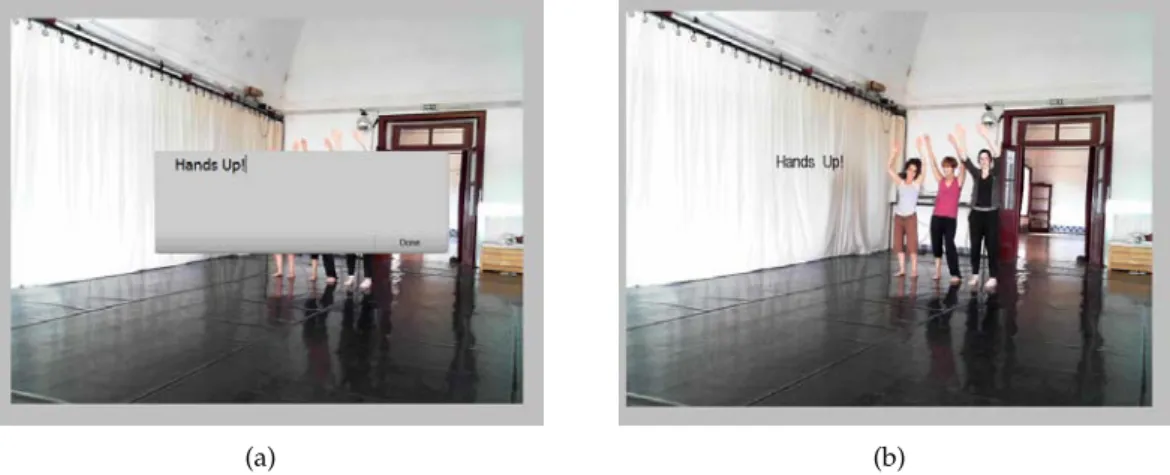
Recorded Live Overlaid with Video Associated with Video Frame Associated with Video Segments Associated with Moving Objects
Telestrator Yes Yes Yes No Yes No
Galatea Yes No Yes Yes Yes No
Marquee Yes Yes No No Yes No
Notelook Yes Yes Yes Yes No No
LEAN Yes No Yes Yes Yes No
Videotater Yes No No Yes Yes No
WaC/M4note Yes Yes Yes Yes No No
CAV Yes No Yes Yes No No
Choreographer’s Notebook
Yes No Yes Yes No No
Ambulant Player
Yes No Yes No Yes Yes
(Manually) Goldman’s
work
Yes No Yes No Yes Yes
(Pre-processing)
Creation-Tool Yes Yes Yes Yes Yes Yes
(Real-time)
2.3
Video Editing
As Dancyger [Dan11] refers in his bookThe Technique of Film & Video Editing, in the first motion pictures, dated from end of the XIX century, there was no editing. The camera recorded an event, an act, or an incident. Many of them were a single short shot. It was with Edwin S. Porter (e.g,The Life of an American Fireman18, 1903, Figure 2.14), D.W. Griffith (e.g.,The Birth of a Nation19, 1915), Sergei Eisenstein (e.g.,Strike, 1924) and Alfred Hitchcock (e.g.,Blackmail, 1929 - initial sound film editing experiments) in the beginning of the XX century, that film editing took the form that is known today. Since these devel-opments and achievements, film editing is a key process in cinematography.
Figure 2.14: First scene of Porter’s film:The Life of an American Fireman.
In theDictionnaire mondial du Cinèma[VBGLS+11] two types of editing are described: the traditional and the virtual. Traditional editing is described as the assembling of ele-ments of film or tape (Figure 2.15(a)), which almost no one does anymore, whereas virtual editing can be described as the editing process using computers and digital technologies (Figure 2.15(b)). Virtual editing is the most common existing method. A consequence of this transformation was the removal of the two chapters about traditional editing from the first edition of Chandler’s bookCut by Cut [Cha04] to the second edition, [Cha12]. In the first edition ofCut by Cut[Cha04], Chandler presents the different techniques of traditional editing, like cutting or splicing on film, as well as the technology used in this type of editing.
Davis [Dav03] and Chandler [Cha04; Cha12] describe three major technological phases of motion picture editing: physical film cutting; electronic videotape editing and dig-ital nonlinear editing. Dancyger [Dan11] defines nonlinear editing as "random-access editing, sourcing shots, scenes, and sounds on an as needed basis". Although film and video editing suffered the revolution of passing from analog- to digital-driven technology [Dan11], still remain a time-consuming, frustrating and tedious tasks [GBCDFGUW00; CLMBSDYC02; RB03; GCSS06; DE06]. The difficulty of learning how to use current
Figure 2.15: Film editing equipment: (a) Old Moviola machine for editing on film20. (b)
Modern Editing Equipment21.
commercial editing software is discussed by Chandler [Cha12]. In addition, Jokela et al [JMK07], in their empirical study about video editing on a mobile context, present as primary users’ motivations for not editing the lack of time and the perception that the editing task was not valuable enough for the trouble. In Jokela’s study, the technical complexity of the editing process was a barrier for some users.
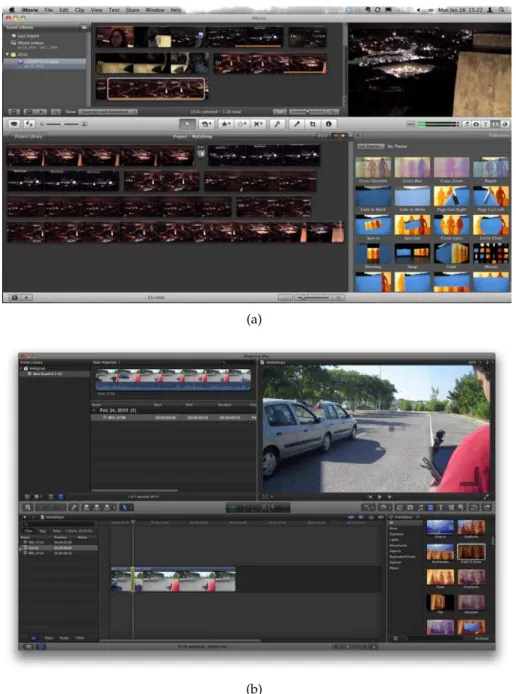
Chandler [Cha12] identifies three commercial systems for professional video edit-ing: Avid Media Composer22, Adobe Premiere Pro23 and Final Cut Pro24. For non-professional use the most common commercial software are: Movie Maker25and iMovie26. Although non-professional applications try to facilitate the editing task, this is mostly achieved by reducing the number of features, when compared with professional systems, as shown in Figure 2.16.
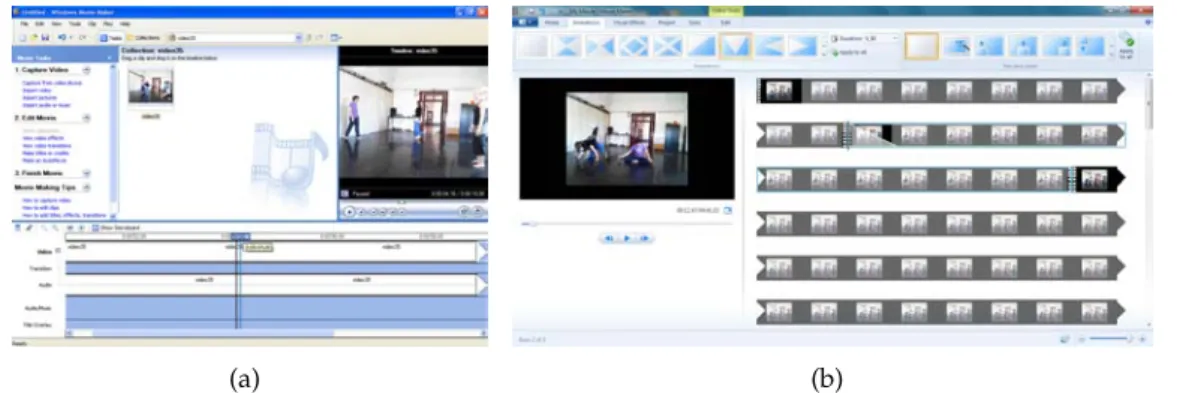
The interface of the video editors are quite similar and the most relevant change, the transformation of a linear timeline in a stacked timeline, i.e., a timeline broken in rows (Figure 2.17), was made in recent versions of non-professional software (since iMovie ’08, in 2007 and Windows Live Movie Maker 2009, in 2009). More recently, as Tablets with integrated cameras become more widely distributed, video editing tools particularly developed for these devices have also appeared. The Samsung S Camera27for Microsoft
Windows 8 Tablets or the iMovie for iPad28 are examples of this reality. Although, they can be considered adaptations of regular video editing applications for Tablet Computers,
20
“J&R”, c2002 by User:Cutterette, at en.wikipedia, used under GFDL, http://www.gnu.org/ copyleft/fdl.html, and Creative Commons Attribution-ShareAlike, http://creativecommons. org/licenses/by-sa/3.0/, licenses.
21
"Edit Bay", c2006 by Josh Miller, at Flickr.com, used under a Creative Commons Attribution-NonCommercial license:http://creativecommons.org/licenses/by-nc/2.0/deed.en.
(a)
(b)
Figure 2.16: Editing Software: professional vs non-professional. (a) iMovie 11. (b) Final Cut Pro X.
their interface was mainly developed for touch input and missed pen-based interactions. It is also interesting to observe that, even though, Microsoft Windows 8 was developed considering Tablet computers [Win], the Windows Movie Maker interface remains the same as for regular desktops.
In addition, it is also possible to find Web-based platforms for video sharing, au-thoring and editing, like the Youtube Editor29, One True Media30 or the already closed
(a) (b)
Figure 2.17: Editing software: linear timeline vs multiple rows.(a) Windows Movie Maker 5.1. (b) Windows Live Movie Maker 2012.
Jaycut31. While these platforms allow the editing of a video stream, they mimic the inter-faces and interactions presented in the commercial applications mentioned above.
Most of the research improvements on digital editing were based on trying to auto-mate the process. Projects like Lienhart’s work [Lie99], which uses both metadata and sound analysis; Hitchcock [GBCDFGUW00], which uses a semi-automatic video pro-cessing approach; Silver [CLMBSDYC02], which uses metadata for automatic editing; Aner-Wolf and Wolf’s work [AWW02], which generates a new video stream based on raw amateur videos and photos of the same event; AVE [HLZ03], which uses video, au-dio and music analysis for automatic editing; Wang and Hirakwa’ work [WH06], which has a semi-automatic approach for composing a new video stream based on object move-ment and camera motion; and EWW [CWB07; WC07], which uses also a semi-automatic approach but using content analysis; are good examples of this philosophy defended and discussed by Davis [Dav03]. However, Dancyger [Dan11] points out that editing is a creative process, which cannot be made by machines, and most of the developments made on storytelling, interactivity and the relation between the storyteller and the au-dience were made in the fields of video games and education. By taking these facts in consideration and adding the fact of the increasing popularity of video sharing platforms, mentioned in section 1.1, it is possible to conclude that providing more familiar and pow-erful interfaces, in order to foster easiness and creativity, is a key issue for digital video editing systems.
The Video Mosaic [MP94] combined paper storyboards with video editing software. The system projected the computer output in a desk and recorded user gestures for in-put commands. In Video Mosaic, one could create a virtual storyboard, print it in pa-per sheets for sharing and adding notes, and digitize the modified papa-per sheets. This last step allowed to add the new notes to the virtual storyboards stored in the system. Later, Goldman [GCSS06; Gol07] also used storyboards for digital video visualization and editing. His work focused on creating schematic storyboards, a single static im-age composed from multiple input frames and annotated using the visual languim-age of
storyboards (outlines, arrows and text), describing the motion in the screen. An interac-tive interface was developed using this schematic storyboard for video visualization and editing. By traversing the paths defined by arrows and frames, one could visualize the content and generate a new video stream.
In the Hitchcock system [GBCDFGUW00; GBSBW01] the interface presented piles of clustered video clips from the raw data, based on color histogram analysis. The piles were displayed by temporal order of the first clip. In addition, the system hides to the user clips that do not present enough quality, like insufficient light or too much motion. The user could select the clip from each pile and drag them into the composition panel and generate the new video stream. In the users studies about the initial Hitchcock interface, the users missed some video control features. In order to solve this issue, a video clip length control based on the keyframe resizing was implemented (Figure 2.18).
Figure 2.18: The Hitchcock system interface [GBSBW01].
The EnhancedMovie [NIKOS04] explored gesture commands for editing tasks. The system uses a camera for gesture detection and a video projection, in order to simulate a large-size display in a desk. The EnhancedMovie interface allowed one to select a video clip, from a set of clips, and define the start and the end points of a new video segment, using particular gestures.
The TextableMovie [VDJ03; VD04] constructs a new video stream while someone is composing a narrative, using text or voice. The video stream is composed by a set of recorded and annotated video clips. The system matched the narrative text with the key-words associated to each video clip and composed, in real-time, an equivalent video nar-rative. The TextableMovie was followed by a more tangible and collaborative approach, presented in Movie Pictures [VADWF05; VI07]. In Movie Pictures, the text narrative was replaced by RFID tokens, each associated with a video clip, and that could be reassem-bled composing a new video stream.
video editing based on active tokens was also exploited. The system was composed by a play-controller, a set of clip-holders (Pocket PCs inside plastic cases) and a set of tran-sition connectors (three base types: minimize, rotate and fade). The clip-holders could be attached to each other, with or without a transition between them, on the left or right sides. A data stream flowed from the rightmost clip-holder to the leftmost clip-holder, until the play controller, placed in the beginning of the sequence. Each clip-holder re-ceived the information from its neighbor and appended information about its own clip and transition. The play-controller sends the information sequence to a desktop, which displayed the final movie on its monitor. In the users’ study, some users missed more complete editing features in the TVE editor, like cut, merge, color correction, cropping or speed control.
The Mobile Video Editor [JKM07] exploited video editing operations in the context of mobile phones. The system used the timeline metaphor present in desktop video editors. The system was separated in different views: gallery view, showing the different video clips; play view, the regular video playback; edit view, allowing to edit a video clip; pre-view pre-view, playback of the video being edited; insert object dialog, for inserting different objects in the clip; and cut view, in order to cut a video clip. Since the cut view could in-crease the complexity of the editing view, it was separated from it. The editing interface was composed by two tracks: the video track and the audio track. The transitions were represented by smaller boxes placed between the visual clips. The mobile phone key-board was used for the different menu tasks, editing and cutting operations. In the two evaluation studies [JKM07; JMK07], the most problematic feature was the video cutting which presented a reduced rate of success.
In order to provide a more fluid video interaction, different research works explored pen-based technology for this task. However, most of them applied this type of technol-ogy to video browsing and navigation, as presented in the next section.
2.3.1 Pen-based Video Interaction and Editing
One of the first proposals that used pen computing to control video content was the Marquee [WP94], which uses a pen-based interface to control a VCR device. An user could control the direction and speed of regular VCR controls (play, pause, backward and forward) by drawing a horizontal line using the stylus. The direction and speed of the video content were controlled by the direction and length of the line. In addition, a stylus tap on the within the control area paused the tape.
The usage of pen-based technology to control or edit video content was also tried in other proposals, such as LEAN [RB03], Zlider [RB05], Videotater [DE06] and the Mobile-ZoomSlider/ScrollWheel [HG08].
![Figure 2.13: Selecting a region for tracking using point and group particles [GGCSS08].](https://thumb-eu.123doks.com/thumbv2/123dok_br/16530474.736280/45.892.294.644.661.951/figure-selecting-region-tracking-using-point-particles-ggcss.webp)
![Figure 2.19: TLSlider interface on LEAN system [RB03]: sinusoidal size depends on the pen pressure.](https://thumb-eu.123doks.com/thumbv2/123dok_br/16530474.736280/53.892.260.677.132.493/figure-tlslider-interface-lean-system-sinusoidal-depends-pressure.webp)
![Figure 2.20: Videotater timeline [DE06]: horizontal and vertical pen gestures are used to join or split video segments.](https://thumb-eu.123doks.com/thumbv2/123dok_br/16530474.736280/54.892.148.699.129.400/figure-videotater-timeline-horizontal-vertical-gestures-split-segments.webp)