2018
UNIVERSIDADE DE LISBOA
FACULDADE DE CIÊNCIAS
DEPARTAMENTO DE INFORMATICA
SISSI – Web Page’s Structure Identification from Syntactic and
Semantic Information
Ana Patrícia Fernandes Salvado
Mestrado em Informática
Dissertação orientada por:
Prof. Doutor Carlos Alberto Pacheco dos Anjos Duarte e Prof. Doutor Luís Manuel Pinto
da Rocha Afonso Carriço
2018
UNIVERSIDADE DE LISBOA
FACULDADE DE CIÊNCIAS
DEPARTAMENTO DE INFORMATICA
SISSI – Web Page’s Structure Identification from Syntactic and
Semantic Information
Ana Patrícia Fernandes Salvado
Mestrado em Informática
Dissertação orientada por:
Prof. Doutor Carlos Alberto Pacheco dos Anjos Duarte e Prof. Doutor Luís Manuel Pinto
da Rocha Afonso Carriço
iii
Acknowledgments
First of all, I would like to thank my supervisors for all the patience, the guidance and help, whenever I need it.
I want to thank my family, especially my parents and brother for the support and constant encouragement throughout the development of this work. Their motivation helped me to stay focused.
I thank those who have been by my side in the last four years, Inês de Matos, João Vicente, Carlos Duarte and Tiago Moucho for being supportive and helpful through these years and for the entertaining when necessary.
I thank to Elgin Akpinar for helping me understand his segmentation tool and for being available to answer all my doubts.
Finally, I want to thank to accessibility experts Dr. Jorge Fernandes and Dra. Cláudia Cardoso, for being available to participate in an interview.
v
Resumo
A WWW (World Wide Web) é uma plataforma que contém uma grande quantidade de informação disponível. Hoje em dia, as pessoas dependem muito da Internet para ajudar nas mais pequenas tarefas do dia-a-dia, como ir às compras, ver o correio eletrónico, falar nas redes sociais ou até no trabalho. Este aumento no uso da Internet foi impulsionado pelo uso de sistemas de gestão de conteúdo, permitindo a utilizadores normais, criarem e gerirem o seu próprio website. Existindo esta quantidade de informação, eventualmente apenas em formato digital, é necessário considerar o seguinte: todas as pessoas são diferentes e podem “ver” a Internet de diferentes perspetivas. Sendo uma plataforma universal, o seu conteúdo deveria ser acessível a todos de maneira igual. Infelizmente, não tem havido muita consideração para com pessoas com necessidades especiais. Pessoas com alguma deficiência, quer seja motora, sensorial ou mental, deveriam conseguir ter a mesma experiência que o resto dos utilizadores. Devido ao facto de estarem condicionados, é preciso ter em conta no desenvolvimento Web, soluções que permitam a essas pessoas terem a mesma experiência de navegação. Por esta razão o conceito de acessibilidade na Web foi crescendo ao longo dos últimos anos. Foram desenvolvidas diretrizes e padrões de modo a que as páginas Web desenvolvidas sejam acessíveis a todos. Para ajudar no desenvolvimento de páginas acessíveis, a tarefa de confirmar se as diretrizes de acessibilidade estavam a ser cumpridas foi automatizada. Uma ferramenta capaz de fazer este tipo de análise é o QualWeb, desenvolvido na faculdade de Ciências da Universidade de Lisboa por um grupo de investigadores, no qual eu colaborei.
Como referido anteriormente, as páginas Web têm cada vez mais conteúdo, pelo que é importante para os seus consumidores conseguir distinguir a informação relevante. Ao ser apresentada uma página a uma pessoa com necessidades especiais, esta pode não ser capaz de fazer a separação de conteúdos, o que pode prejudicar a interpretação da informação.
Com este trabalho pretendo desenvolver um mecanismo capaz de identificar a estrutura de uma página Web, através da sua informação semântica e sintática. Neste caso vou apenas focar-me em menus porque para além de serem um elemento importante nas páginas Web, podem facilitar a navegação para uma pessoa com necessidades especiais.
Para atingir este objetivo, precisei de usar uma ferramenta de segmentação. Dentro de todas as que foram pesquisadas na minha investigação de trabalho relacionado, a melhor foi o VIPS, que relaciona os aspetos visuais da página Web e o código fonte para dividir a página em diferentes secções. O meu capítulo do trabalho relacionado também contém os principais conceitos para entender o que foi desenvolvido, bem como uma investigação de outras ferramentas de avaliação automática da acessibilidade de páginas Web, focando-se mais na que vou utilizar, o QualWeb. Como mencionado também refiro algumas ferramentas de segmentação, descrevendo cada uma delas e mostrando numa tabela as suas características, sendo o VIPS estendido a melhor classificada para o que pretendia.
Depois da análise do trabalho relacionado, fui perceber o funcionamento do VIPS estendido, interpretando os vários passos do algoritmo. Uma das vantagens do VIPS estendido é que para além de fazer a segmentação de uma página, ou seja, dividi-la em diferentes secções, é ainda capaz de categorizar cada secção, atribuindo um papel à mesma. O funcionamento do VIPS estendido é descrito no capítulo 3, bem como a razão do foco na avaliação dos menus de páginas Web e em sistemas de gestão de conteúdos durante o processo de otimização do VIPS estendido.
Inicialmente, avaliei 30 páginas geradas por um sistema de gestão de conteúdos, designado WordPress, e determinei que elementos eu considerava serem menus nessas páginas. Posteriormente, verifiquei se os elementos que eu considerava menus, também eram assinalados pelo VIPS estendido com esse mesmo papel. Os resultados obtidos não foram satisfatórios, o que me levou a melhorar as regras que classificavam as diferentes áreas da página. Após vários testes, cheguei a um resultado satisfatório, que não consegui melhorar mais. Neste ponto, a identificação de menus era bastante positiva, embora o número de falsos positivos também fosse bastante elevado na minha opinião. Com isto em mente, desenvolvi um filtro para detetar os falsos positivos. Através da observação dos resultados de vários testes, pude determinar que vários tipos de elementos eram considerados menus quando não o deveriam ser. Sabendo a tag do elemento posso evitar que elementos com essas tags sejam considerados menus. Desta maneira, os falsos positivos foram reduzidos e resultados foram melhorados ligeiramente.
Estes resultados foram baseados na minha definição de menu e nas observações feitas no conjunto de 30 páginas Web geradas pelo sistema de gestão de conteúdos WordPress, pelo que precisava de validar o mecanismo desenvolvido. Para isto contruí um conjunto de outras 30 páginas Web, composto por 15 de páginas geradas por WordPress e outras 15 não geradas por WordPress. Os resultados obtidos nas 15 páginas geradas pelo WordPress foram iguais aos anteriores, o que é positivo, querendo dizer que as regras desenvolvidas são suficientemente genéricas. Em relação às 15 páginas não geradas pelo WordPress, os resultados superaram as expectativas, porque foram melhores que os anteriores.
Como mencionei, o melhoramento das regras baseou-se na minha interpretação de menu, pelo que foi necessário testar se estas podiam ser consideradas gerais, ou seja, se outras pessoas consideram a mesma definição para menu. Para isto, realizei dois testes: o primeiro entrevistando peritos em acessibilidade e outro através de um questionário a utilizadores comuns. Os resultados obtidos divergiram tanto para peritos como para utilizadores. Um aspeto que foi unânime entre os três peritos entrevistados foi o facto de a definição de menu ser suscetível a interpretações, dependendo por vezes do contexto ou opinião pessoal. Um outro aspeto foi o facto de à medida que a entrevista progredia, mais elementos eram considerados menus ou pelo menos surgia a dúvida se seriam ou não. Não houve um consenso na opinião dos peritos, visto que um deles era muito restritivo, selecionando apenas o menu encontrado no cabeçalho ou rodapé das páginas e outro perito, considerava tudo o que fossem listas como menus.
Em relação aos utilizadores, houve alguns menus selecionados constantemente (menus de navegação) e outros que geraram mais dúvidas, sendo um deles o elemento que contém os ícones das redes sociais.
Após a classificação dos menus estar de acordo com o que pretendia, o próximo passo era implementar o VIPS estendido no QualWeb. Infelizmente, a ferramenta do VIPS estendido que estava a utilizar necessitava do ambiente onde estava implementado (no Eclipse) e portanto perguntei ao responsável pelo desenvolvimento do VIPS estendido se seria possível criar uma versão nova, em que o VIPS seria disponibilizado num Web service e desta maneira seria possível incorporá-lo no QualWeb. Com isto feito, as novas técnicas de acessibilidade, que são aplicadas a menus, puderam ser desenvolvidas. Para validar o desenvolvimento fiz uma análise pericial às 30 páginas Web de treino para conseguir comparar com os resultados das novas técnicas. Através dessa comparação, determinei que as técnicas foram implementadas corretamente.
vii
Abstract
The World Wide Web (WWW) is today a wide spread all-purpose technological platform, with a large quantity of information available, that is supposed to be accessible to everyone. However, this accessibility is not yet a reality. There are some people with disabilities that can’t have the same Web experience as the others. Web designers are becoming more aware of the problem that is the lack of accessible Web pages. The progressive adoption and implementation of specific standards and guidelines on the Web is increasing accessibility, ensuring that everyone has the same Web experience.
These specific standards can be evaluated with Web accessibility evaluation tools, allowing Web designers and developers to evaluate their Web page’s accessibility. With this assessment, it is possible then to change the inaccessible source code.
However, some of those guidelines need semantic knowledge, which is something that has not been implemented in the Web accessibility evaluation tools. With this purpose, my work focuses on developing and implementing a mechanism able to identify the semantic and syntactic structure of a Web page. This mechanism will rely on a segmentation tool, which separates a Web page into regions. The mechanism attributes to each region a role, which semantically represents its usage and purpose on the Web page. With this categorization, the accessibility standards and guidelines can be applied to the right elements.
This document starts with a detailed introduction and goals for this work. Following, a review of the related work already done will be given, which include the concepts to understand the developed work as well as the description of the tools used. Then it will explain in detail the segmentation tool used and the initial analysis made, which was not satisfactory. The improvements to the segmentation tool and the results of each analysis will be presented in the next chapter. Next, the comparison of my evaluation with experts and users evaluations will be given. Finally, the integration of the developed mechanism into the accessibility evaluation tool will be presented, as well as the new developed techniques. At the end, a conclusion will summarize the work done and will include some future work relating to this topic.
ix
Content
Chapter 1 Introduction ... 1
1.1
Motivation ... 1
1.2
Goals ... 3
1.3
Work Plan ... 3
1.4
Document Organization ... 5
Chapter 2 Related Work ... 7
2.1
Web Evolution ... 7
2.1.1 Semantic Web ... 8
2.2
Web Accessibility ... 8
2.2.1 Accessibility Standards ... 8
2.2.2 Web Accessibility Evaluation Tools ... 10
2.2.3 QualWeb ... 12
2.3
Content Management Systems ... 14
2.4
Web Page Segmentation ... 15
2.4.1
Web Segmentation Tools ... 16
2.5
Summary ... 20
Chapter 3 Analysis ... 21
3.1
Extended VIPS ... 21
3.1.1 Extended Visual Block extraction ... 22
3.1.2 Separator detection ... 25
3.1.3 Content structure construction ... 25
3.1.4 Rule Generation ... 26
3.1.5 Role Detection ... 28
3.2
Web Service VIPS ... 28
3.3
Content Management Systems ... 30
3.4
Menus ... 30
Chapter 4 Implementation ... 35
4.1
Rule File Extended VIPS ... 35
4.2
Modifications of the Extended VIPS Rule File ... 37
4.2.1 Second Evaluation of Extended VIPS... 38
4.3
Web Service VIPS Evaluation ... 39
4.4
Summary ... 43
Chapter 5 Evaluation ... 45
5.1
Validation of the Implemented Algorithm ... 45
5.2
Evaluation of my Menu Definition ... 47
5.2.1 Accessibility Experts Analysis ... 47
5.2.2 Users Analysis ... 54
5.3
Summary ... 56
Chapter 6
QualWeb... 59
6.1
WCAG 2.0 Techniques applicable to Menus ... 59
6.2
Integration of Web service VIPS ... 61
6.2.1
Implementation of relevant techniques into QualWeb ... 64
6.3
Validation of WCAG 2.0 Techniques Implementation ... 68
6.4
Summary ... 69
Chapter 7 Conclusion ... 71
7.1
Future Work ... 72
References ... 75
Appendix A ... 77
Appendix B ... 78
Appendix C ... 79
xi
List of Figures
Figure 1 – Code used to test post-processing evaluation ... 10
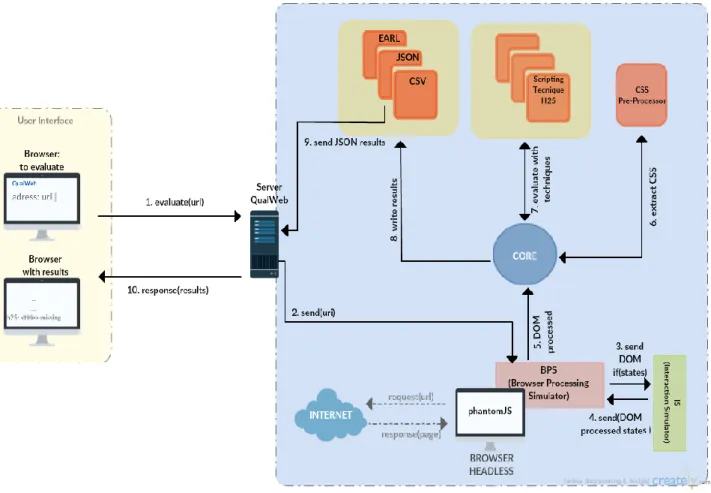
Figure 2 – QualWeb’s Architecture ... 13
Figure 3 - Extended VIPS Architecture. Source: M. E. AKPINAR and Y.
YEŞILADA, “Discovering Visual Elements of Web Pages and Their Roles : Users ’
Perception,” vol. 29, no. 6, 2017. ... 22
Figure 4 – The layout structure and vision-based content structure ... 23
Figure 5 – The Web page example ... 23
Figure 6 – DOM tree Web page’s example ... 24
Figure 7 – Visual element tree of Web page’s example ... 24
Figure 8 – Horizontal separator detection process ... 25
Figure 9 – Output of VIPS segmentation process ... 26
Figure 10 – Rule definition in Jess rule engine ... 27
Figure 11 – Output of VIPS segmentation process with role assignment... 28
Figure 12 – Request call example ... 29
Figure 13 – Response to the request call example ... 29
Figure 14 – Rule definition in NodeJS rule engine ... 29
Figure 15 – Correct menu example, using WAI-ARIA attributes ... 31
Figure 16 – Incorrect menu example ... 31
Figure 17 – Rule file properties ... 36
Figure 18 – List role definition ... 36
Figure 19 – LinkMenu role definition ... 37
Figure 20 – Rules added to the MenuItem role ... 37
Figure 21 – Rule modified for the MenuItem role ... 37
Figure 22 – Rule modifications for the LinkMenu role ... 38
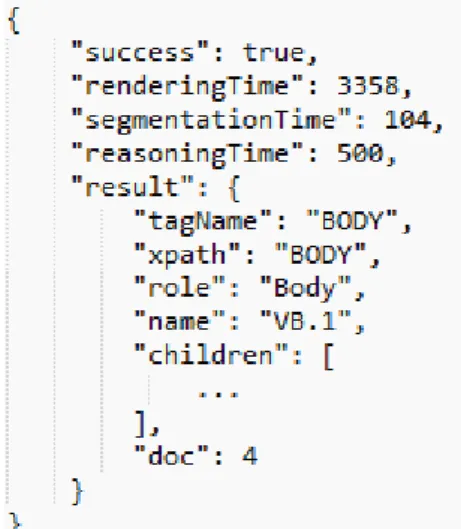
Figure 23 – Example of an element in the JSON response ... 61
Figure 24 – Flowchart of the process of inserting the Web service VIPS algorithm
in QualWeb ... 62
Figure 25 - Flowchart of the process of selecting the menus from the VIPS JSON
response ... 63
Figure 26 – Flowchart of the process of the H97 technique ... 66
xiii
List of Tables
Table 1- Initial Schedule ... 4
Table 2 – Summary of Segmentation Tools ... 19
Table 3 – Extended VIPS first evaluation results ... 32
Table 4 – Extended VIPS second evaluation results ... 39
Table 5 – Web service VIPS results ... 41
Table 6 – Results of the evaluation of new Web pages set with the 2
ndfilters ... 46
Table 7 – Results of the evaluation of new Web pages set with the 3rd filters .... 46
Table 8 – Result comparison of the expert’s evaluations with the Web Service VIPS
with 2
ndfilters ... 49
Table 9 – Result comparison of the expert’s evaluation with the Web Service VIPS
with 3
rdfilters... 51
Table 10 – Chi-square Test of Experts with Web Service VIPS ... 51
Table 11 – Mann-Whitney Test of Experts Consensus with VIPS ... 52
Table 12 – Agreement percentage between Experts’ opinion and Web Service VIPS
by category ... 53
Table 13- Chi-square test of Users with Web service VIPS ... 55
Table 14 - Agreement % between the first group of the survey and the Web service
VIPS by category ... 56
Table 15 – Techniques implemented in QualWeb ... 59
xv
Abbreviations
WWW World Wide Web
CMS Content Management System
W3C World Wide Web Consortium
WCAG Web Content Accessibility Guidelines
HTML HyperText Markup Language
CCS Cascading Slyle Sheets
AJAX Asynchronous JavaScript and XML
XML Extensible Markup Language
JSON Javascript Object Notation
RIA Rich Internet Application
URL Uniform Resource Locator
WAI Web Accessibility Initiative
WAI-ARIA Web Accessibility Initiative Accessible Rich Internet Application
APIs Application Programming Interface
BPS Browser Processing Simulator
IS Interaction Simulator
URI Uniform Resource Identifier DOM Document Object Model
EARL Evaluation and Report Language CSV Comma-separated values
GUI Graphical User Interface
VIPS Vision-Based Page Segmentation DoC Degree of Coherence
PDoC Premitted Degree of Coherence WAfA Web Authoring for Accessibility ACTF Accessibility Tools Framework
1
Chapter 1
Introduction
This chapter summarizes the main concepts that will be discussed throughout the document. It begins with a contextualization of the main topics and its importance. Then, it describes the main goals to achieve, the planning and finally, the document organization.
1.1 Motivation
The WWW (World Wide Web) has grown considerably in the last years, mostly due to a massive increase in the people that use it, about 3.74 billion users, as well as the increasing number of sites that appear every day, totalling over 1.24 billion websites in the world1. One of the main
tools responsible for this growth are CMSs (Content Management Systems). CMSs offer the capability to create, manage and publish a website, even for those users that do not have programming abilities. This is a great advantage, but it introduces some barriers regarding accessibility [1], [2].
Nowadays, people rely on the Web to assist in almost every task that they need to do throughout the day, in their workplace, checking the email, shopping online, communicating in social media, playing for entertainment, and so on. As we need to access a huge amount of information that is becoming computerized, we must consider that no one is equal and different people “see” the Internet from distinct perspectives.
As a free and universal information platform, the Web should be accessed by everyone the same way. Unfortunately, people with special needs have been mostly disregarded. Someone with a disability, such as blindness, or any visual disease, deafness, physical or mental problems, should be able to understand the Web page’s content with the same quality as the rest of the population. Because they are conditioned in the use of the Internet, Web development must consider solutions for them to navigate in the same way as others. For this reason, the concept of Web accessibility has grown through the years. This means that Web pages need to be perceived by everyone, including anyone with special needs.
An organization known as W3C (World Wide Web Consortium) exists to standardize the Web experience, ensuring among other things, that websites are considered accessible to all. This is done by proposing guidelines and patterns, known as WCAG (Web Content Accessibility Guidelines) to develop widely accessible Web pages. Although these guidelines are important and indubitably produce websites more accessible, they might not be enough [3]. These guidelines
2
Chapter 1. Introduction
can be used in the development process or afterward, using Web accessibility evaluation tools to check the conformance of a Web page as well as to identify any changes to improve accessibility. These tools can be manual or automated. Being automated, they have some advantages. They:
don’t need manpower; are objective;
are much faster than a human expert evaluator.
But they also have disadvantages, mainly because their results are not contextualized. They only tell us that the Web page respects the guideline or doesn’t. Sometimes the tool just does not know how to decide, needing human intervention to get a contextualized analysis. There are several types of tools, each of them with different components, interfaces and functionalities. An example of these Web accessibility evaluation tools is QualWeb2, developed in the Faculdade de
Ciências da Universidade de Lisboa, by a research group with which I collaborate. The aim of this tool is to evaluate Web page accessibility, applying the guidelines of WCAG. Performing this automatic analysis can always assist the developers improving a Web page’s accessibility.
Usually, Web pages have different types of content, which could be either relevant or irrelevant to the main topic of the page or to the user. The relevant content is known as the informative content, e.g. menus, or the data. The irrelevant content, on the other hand, is usually called noisy information (e.g. advertisement). As mentioned, every person sees a Web page in his own way. A page presented to a non-disabled user perceives certain spatial and visual cues that can help him divide the page into certain areas that he knows, understands and is familiar with, even when he expects some other format or functionality from that component. For this user, it’s easy to understand the relevance and usefulness of the information he is looking for. In the case of a disabled person, he may not be able to do that separation or to make sense of what he sees or listen. Therefore, it’s much harder for him to understand the whole page. Frequently, this person requires the use of additional tools so he can understand the content of the page, its structure, and the relevant information. Among others, these tools or mechanisms can be a screen reader, braille display or voice browser. Another practice that facilitates the understanding of a page’s content by a disabled person is to include alternative forms of media on the Web page. As an example, if a Web page has a video, it should also have a text or sign language that describes the video, for blind or deaf people to perceive what’s in it.
In addition to the guidelines used by Web page evaluation tools to analyze the accessibility of a page, there is a process that can also improve that evaluation, called Web page segmentation. This process does the separation of content in a Web page, allowing the identification of different regions in the page. In addition to being able to be applied in Web accessibility, it can assist in repairing a Web page or in the identification of relevant information.
Here the challenge is how to automatically identify the different roles of the regions of a segmented page because websites do not follow the same format and structure. So, it is extremely difficult for a mechanism to understand what the content of the HTML tags represents in the Web page (e.g. a menu can use <div> tags) and the relationship between them.
3
Chapter 1. Introduction
1.2 Goals
This work aims to design and develop:
A mechanism able to identify the semantic structure of Web pages through their semantic and syntactic information.
Then, using this mechanism, improve a Web accessibility evaluation tool, namely, QualWeb, through the implementation of WCAG techniques, concerning menus.
To achieve this goal I use a segmentation tool which relates the visual aspect of the Web page to its source code, generating a semantic structure of that Web page. The Web pages used to test and improve the mechanism will be CMS generated. Not only they are based on templates, which can help in patterns identification, but also highly used and with concerns regarding accessibility.
Sometimes the coding sequence of a page doesn’t reflect correctly the visual presentation of the page, e.g., related elements could be next to each other in the source code and apart in the page layout. In the semantic structure obtained it is necessary to understand the roles played by the different regions that compose it. After assigning a role for each of the composing regions it becomes possible to implement WCAG 2.0 techniques that depend on semantic information on QualWeb. In particular in this work, the techniques were addressed to menus.
The main goals of this thesis are:
1. Understand the source code generated by CMS in order to recognize menu patterns produced and their usual elements.
2. Analyse the existing segmentation tools and access the one with better results in extracting a Web page’s semantic structure.
3. Find and improve a mechanism able to correctly attribute menu roles to regions extracted by the segmentation tool.
4. Implement in QualWeb the new techniques incorporating the segmentation tool and the role attribution mechanism.
5. Evaluate the new techniques inserted in QualWeb using a CMS generated Web pages testing set.
6. Analyse the role attribution mechanism with the opinions of regular users and experts.
1.3 Work Plan
This section describes the several tasks needed to be done to accomplish the stated goals. Table 1 contains the task list and the corresponding duration (in months). The first six tasks were performed according to the schedule. To perform task 7, I needed to wait that a new version of the tool I was using was developed. This took about two months to be developed and was only released in the middle of August. Task 10 also took two additional weeks to be done, due to the unavailability of some resources.
4
Chapter 1. Introduction
Table 1- Initial Schedule
T1 – Research on related work: The objective of this first step is to understand what has already been done in this area, how it has been done, existing tools and how they work.
T2 – Test existing tools: This task aim is to understand how the tools that already exist do the segmentation of a Web page.
T3 – Writing the Preliminary Report: After all investigation of the related work and collected information about existing tools, the writing of the preliminary work synthesized the state of that research, as well as defined the goals, the planning, and the work that has been done. T4 – Analyse the performance of the segmentation tool: This task consisted on perceiving how well the segmentation tool performed.
T5 – Improve the mechanism for identifying the semantic and syntactic structure of a Web page: This task consisted on developing an improved mechanism able to identify the semantic and syntactic structure of a Web page.
T6 – Evaluation and validation of the developed mechanism: The objective of this task is to evaluate the mechanisms developed through a series of tests and perceive what could be further improved.
T7 – Implementation of the mechanism into QualWeb: When the mechanisms were according the requirements, it was implemented on the Web page evaluation tool, QualWeb.
T8 – Implementation of the new techniques into QualWeb: Development of the new techniques to be added into QualWeb.
T9 – Validation of the new techniques implementation: After the implementation of the new techniques, an analysis was performed to confirm if the techniques were well implemented. T10 – Comparative analysis with users and experts: This task consisted in evaluating the menu identification mechanism through users’ and experts’ opinion.
T11 – Writing the Thesis: This task occurs after all the previous work been done and reflects the evaluation of the new mechanisms, as well as all the relevant information concerning the development process.
Tasks
Duration (months)
1. Research on related work 2
2. Test existing tools 0.5
3. Preliminary Report 0.5
4. Analyse the performance of the segmentation tool 1.5
5. Improve the mechanism for identifying the semantic and syntactic structure of a Web page
2
6. Evaluation and validation of the developed mechanism 2
7. Implementation of the mechanism into QualWeb 0.5
8. Implementation of the new techniques into QualWeb 0.5
9. Validation of the new techniques implementation 1
10. Comparative analysis with users and experts 0.5
5
Chapter 1. Introduction
1.4 Document Organization
This document has been organized in the following chapters:
Chapter 2 – Related Work: This chapter gives an overall idea of the state of the art in regard to Web page segmentation. It starts with an overview of the Web evolution, taking an in-depth approach to the semantic Web. Next, it will refer Web accessibility standards and tools. Then it will introduce CMSs and one related existing tool. Finally, it mentions the Web page segmentation state of the art and tools;
Chapter 3 – Analysis: This chapter describes the mechanism chosen to segment and classify the Web pages, as well as its design and architecture. It will also approach the reasons for choosing Content Management Systems and the introduction to the menu element;
Chapter 4 – Implementation: This chapter describes the improvements made to the mechanism able to identify the semantic and syntactic information on a Web page, specifically the rule file of the segmentation tool.
Chapter 5 – Evaluation: This chapter compares my menu definition approach and the opinion of experts in accessibility and regular Web users. The chapter also presents the validation of the results obtained.
Chapter 6 – QualWeb: This chapter lists the relevant techniques to this work, and explains the process of the implementation of the new techniques added to the evaluation tool QualWeb, as well as the integration of the new mechanism VIPS into QualWeb. Then a validation of those techniques will be presented.
Chapter 7 – Conclusion: This chapter concludes the work and presents possible future work using the developed mechanism.
1
Chapter 1. Introduction
7
Chapter 2
Related Work
This section will focus on the related work that has been developed mostly in the area of Web segmentation, as well as all the relevant information to understand the content of this document. A small introduction will be given about the concept of the Web and its evolution. Next, concepts related to Web accessibility will be introduced. It will mention the Web accessibility standards, the Web accessibility evaluation tools, and a more detailed description of a specific one. Then, the concept of CMSs (Content Management Systems) is introduced. Finally, an introduction to Web segmentation and a summary of the work done so far is presented. The last section summarizes this chapter.
2.1 Web Evolution
There has been a change in the way developers create Web pages, mainly due to the emergence of new technologies but also because the amount of data placed online every day. Static Web pages have been replaced by dynamic pages, where the user can control and have power over the information in the website, see real-time information, change the content and allow more interaction with other users and websites. Such evolution was only possible because of the improvements of HTML (HyperText Markup Language) and CSS (Cascading Style Sheets), currently in versions 5 and 3 respectively. Apart from these basic languages that already existed in Web1.0 (static Web), other languages and technologies have assisted in the growth of Web2.0 (dynamic Web). On the client side, Javascript or jQuery are used for dynamic content, AJAX (Asynchronous Javascript and XML) for updating the page without having to reload it. On the server side, PHP, Python, Ruby or Perl, are used to output information stored in databases dynamically, therefore allowing Web services and even Web pages, to share part of their information with each other through compatible formats, like XML (Extensible Markup Language) or JSON (Javascript Object Notation).
Within the Web2.0 a new trend has arrived, known as RIA’s (Rich Internet Applications). These kind of applications are no longer static, accordingly to [4], but instead complex applications presenting a similar behavior to desktop applications. The use of scripting languages (e.g. JavaScript, AJAX, etc.) granted such applications a higher complexity. Using these scripting languages means that a Web page can be modified several times, without leaving the browser client side. Consequently, the same URL (Uniform Resource Locator) can correspond to different states of the same page.
8
Chapter 2. Related Work
Web3.0 (semantic Web), already arose and is being discussed. It isn’t a separated Web, although, in fact, it is an extension of the current one, in which information is given a well-defined meaning, better enabling computers and people to work in cooperation [5].
2.1.1 Semantic Web
Currently, the content placed online is user-driven, that is, for people to do something with the information accessed. But at the current pace, it is becoming more and more difficult for a human to manage the available amount of data, and retrieve any useful information from that. With the semantic Web, the idea is to turn the information machine-driven, so that information may be automatically processed by machines, in a way that the information retrieved could be precise and useful to the human. The challenge of the semantic Web is to provide a language that expresses both data and rules for reasoning about the data and that allows rules from any existing knowledge-representation system to be exported to the Web, as it is mentioned in [5]. In [6] they sustain this claim, saying that agents can only perform its tasks when a standard is well established.
2.2 Web Accessibility
It is well known that the Web is in our daily lives and many activities rely on it. If the WWW is universal, this means that it should be accessible to everyone, which is not the case. Some people with a disability, suffer social exclusion due to the difficulty for them to navigate in the Web. This group of people, with special needs, is about 15% of the world’s population3.
With Web dynamics, users and pages themselves can frequently alter their content and consequently, the Web page can be substantially different from what was initially presented. Web page dynamics actually allows the same page to show different content to a user with or without his interaction.
For a disabled person, this is hard to assimilate, and, at the present, the majority of websites aren’t accessible. This is not a problem that has emerged recently, it exists since the Internet’s beginning. Some people aware of it have tried to diminish or find ways to solve this problem. For that reason, the W3C (World Wide Web Consortium) was founded by Tim Berners-Lee in 1994. This consortium develops protocols and guidelines to ensure the growth of the Web, stating that websites that follow those standards could be accessed and visualized by any person or technology4. The W3C has an initiative called WAI (Web Accessibility Initiative) focused on
making the Web accessible to people with disabilities. In the next subsection, I’m focusing on a particular standard from the WAI guidelines and a technical specification published by W3C.
2.2.1 Accessibility Standards
The WAI guidelines are directed to make Web pages more accessible and I’m going to mention one standard I think it is important to my work. I will mention also a technical specification, specialized in dynamic content. The first one, the most used is WCAG 2.0 (Web Content Accessibility Guidelines), which, as the name implies, focuses on making content more accessible, not only for people with disabilities but also to the general user. It has four major
3http://www.who.int/disabilities/world_report/2011/report/en/ Last accessed on November 2016 4https://www.w3.org/ Last accessed on November 2016
9
Chapter 2. Related Work
principles, which are: perceivable, operable, understandable and robust, and within these principles twelve guidelines are inserted5. For each guideline, there are examples of how it should
be implemented, how the guideline could be tested and what is necessary for it to be successful. There are three levels of success, A, AA, AAA, but even the content having the highest level of conformance may not be accessible to all individuals.
WCAG2.0 is divided in four principles, which helps developers address parts of the code: Perceivable – Information and user interface components must be apprehended by
users;
Operable – User interface components and navigation must be operable;
Understandable – Information and the operation of user interface must be understandable;
Robust – Content must be robust enough that it can be interpreted reliably by a wide variety of user agents, including assistive technologies.
Within these principles, as I mentioned, there are guidelines with success criterion, and for a good implementation, some techniques are suggested. These techniques can be implemented in a Web accessibility evaluation tool, and each technique can have three outcomes: pass, fail or warning. The pass and fail results do not need any interpretations because they just respect the standard recommendation. The warning result is more difficult to assess because it could mean that there is some value or element that cannot be evaluated or considered right or wrong. In most cases, the problem is related to the semantic, thus, requiring human intervention. An example of this is the techniques h37 that say: “Using alt attributes on img elements”. An image has an alt attribute, but for this technique to pass, the text on the alt attribute has to describe the image. Often, the evaluator does not verify that just asks the developer to manually inspect the element.
The technical specification that is worth mentioning is WAI-ARIA6 (Accessible Rich
Internet Application), also targeted to making Web content accessible, is specialized in dynamic content and advanced user interface controls. These guidelines have appeared due to the lack of accessible functionalities in some websites, which are difficult for disabled people to use, especially those that rely on screen readers or those who can’t use a mouse. The WAI-ARIA solution pretends to provide a framework so the developers can add attributes to identify features for user interaction, how they relate to each other as well as their state. Also, they describe new navigation techniques to mark regions and common Web structures (e.g. menus, primary content, banner information, etc.). An example of this is the use of WAI-ARIA to identify a region of a page and enable keyboard users to easily move between regions, rather than having to press the <Tab> button several times to get there. It also includes technologies to map controls, Ajax live regions and events to accessibility APIs (Application Programming Interfaces), including custom controls used for rich Internet applications.
WCAG guidelines are focused on helping Web developers, Web accessibility evaluation tool developers and anyone that needs a standard for Web accessibility. In the next subsection, I will discuss the use of these guidelines in Web accessibility evaluation tools, even though content that fully conforms with these guidelines, may not be fully accessible to every person with a disability [3], [7].
5https://www.w3.org/WAI/intro/wcag.php Last accessed on November 2016
10
Chapter 2. Related Work
2.2.2 Web Accessibility Evaluation Tools
The websites accessibility has improved through the years, but it isn’t enough. Many developers are not yet aware of the fact that the code they wrote doesn’t make Web pages accessible for those who have some kind of disability. For many companies it is too expensive or takes too many time to make Web pages accessible, thus, they exclude this step in the development process.
Those who want to evaluate the accessibility of their website have two options, based on users or in experts [4]. The approach based on users is performed by real users, so they can test the website for themselves and verify what is wrong or imprecise, with the website. This could be very confined because the users just evaluate the accessibility of the website based on their own needs. This is very subjective and could not consider a major group of people, with other restrictions or needs. The evaluation based on experts can be done in two ways, manually or automatically [4]. The manual evaluation, as the name says is a manual inspection of the website by an expert developer, thus a more accurate assessment of the implementation of the guidelines is performed, than with the approach described above. Just by itself, this type of evaluation is not enough because humans are error prone. Not to mention that it is a slow process, even though the result is a very detailed assessment. So, it should be combined with other solutions. The automatic approach relies on a framework or a tool that has a software to evaluate accessibility standards. It is much more scalable than the others, but relies mostly on the implementation made of the standards and guidelines, and the knowledge that is embedded. Therefore, to have accessible Web pages, the most used guideline is the WCAG2.0, and being correctly implemented, the results can give an accurate estimative of the accessibility degree of the website. With these results, both users and developers can perceive how accessible the Web page actually is. A user can then decide whether to use or not the page.
Because of the importance of this, there are already some tools online that can perform this automatic evaluation of Web pages, each of them with its functionalities and characteristics. One of the functionalities tested in each tool was the post-processing analysis. This analysis consists on understanding if the evaluation done by the tool is before or after the source code has been processed by the browser. Therefore, to realize if the changes that JavaScript, for instance, does in a page are taken into account or, on the other hand, not considered at all. To perceive this, the code depicted in Figure 1 was created to test the evaluators for post-processing analysis. The objective of this code is to introduce an element image without an <alt> attribute into the HTML, through a JavaScript function. If the evaluator tool detects this fault (an image without an <alt> attribute) it means that the tool does post-processing analysis.
11
Chapter 2. Related Work
I will summarize some of the most important tools that I found and their characteristics: A-Checker7: This evaluator checks HTML pages for conformance with
accessibility standards, not only the two version of the WCAG guidelines but other ones. It has many filters, where it is possible to choose between three levels of conformance (A, AA, AAA), different formats of the report (view by guideline or by line number), and validate code (HTML and CSS). It doesn’t have the option of post-processing. Relative to the input methods, it can receive URL links, file upload and pieces of HTML code. The results can be shown in different tabs - known, likely and potential problems - and if the option to validate HTML or CSS is checked, also shows those tabs. Points out the line of the evaluated element, how to repair and the technique being used.
TAW dis8: This tool analyses Web pages based on the W3C recommendation,
specifically, WCAG guidelines in both versions (WCAG 1.0, WCAG 2.0). It can evaluate not only the HTML and CSS languages but also JavaScript. Using some filters, it is possible to choose between three levels of conformance (A, AA, AAA). It does not have a post-processing analysis option. Concerning the input methods, it only receives URL links. The results are presented tabbed by the four principles of the WCAG 2.0 guidelines. On each tab, ordered by success criteria and technique this tool lists every detected issue, along with the line number and a sign with the evaluated status. Further down, it shows the page code, being a bit difficult to understand how to solve the problems.
Total Validator9: Total Validator, among other things, is an HTML validator
delivered as a desktop application. It considers both versions of the WCAG guidelines (1.0, 2.0) and all levels of conformance (A, AA, AAA). It does not have a post-processing analysis option. It provides the option to upload a file as input and the output can be automatically saved to a file. The code that has been evaluated for each technique is displayed on the output file.
WAVE10: Wave was developed by WebAIM and is a free service. The only form
of input is by URL link. The results are highlighted on the page that is evaluated, and a sidebar with the WAVE detailed results will be shown, allowing the user to select a specific issue that will be automatically shown in the page. The standards used are the W3C, including WCAG and WAI-ARIA, in all levels of conformance. This tool does post-processing analysis. There is also a Chrome plugin available.
AccessMonitor11: This evaluator checks the HTML content through both WCAG
guidelines (1.0, 2.0) and was developed by FCT (Fundação para a Ciência e Tecnologia - Portugal). It does not have a post-processing option. As input methods, it can receive URL links, file upload and pieces of HTML code. In the results page, an accessibility degree is granted, and a summary table with all tests performed by level and their status is displayed. A second table is displayed further
7 http://achecker.ca/checker/index.php 8http://www.tawdis.net/ingles.html?lang=en 9https://www.totalvalidator.com/ 10http://wave.webaim.org/ 11http://www.acessibilidade.gov.pt/accessmonitor/
12
Chapter 2. Related Work
detailing the results, including the code and the respective documentation by WCAG.
A-Tester12: Another evaluator tool, which is based on WCAG 2.0 guidelines and
the level of conformance AA. The input method is a URL link. This evaluator does not have filters nor post-processing option. The presentation of results is very simple, displayed in two sorted tabs, one by the original result and the other by WCAG success criteria. For every issue, it shows two frames, one with the code segment and the other with a page segment highlighted.
Accessibility Developer Tools (Google)13: This tool is delivered as a plugin for
Chrome, developed by Google Accessibility. The page that is evaluated is the browsed page, and the results are shown in a sidebar pane in the Elements tab from the developer tools menu option. It does post-processing analysis, and the guidelines followed aren’t described.
QualWeb14: This tool was developed at FCUL, and it evaluates Web pages
according to WCAG 2.0 guidelines. The input method is a URL link and has the four following filters: delivery context (mobile or desktop), JavaScript pre or post-processing analysis, CSS checking of validation techniques (on or off) and finally, the results presentation method (success criteria or techniques). The resulting area is divided into two sections. The first one is a statistical table showing a summary of the number of techniques that have passed, failed and issued warnings, as well as the total number of elements evaluated. This section also calculates the percentage of a page’s accessibility based on the previous results. The second section describes in detail the technique or criteria that is being evaluated, corresponding code and the outcome (pass, fail or warning), suggesting a way to solve the issue.
No matter how sophisticated these evaluators are, none of them can repair the code that is not compatible with the accessibility guidelines, neither validate the semantic analysis of the techniques, thus, requiring the user to manually check or correct the elements.
In the next subsection the Web accessibility evaluator tool, QualWeb will be described in detail. For the purpose of my thesis, it will be used for testing my work by implementing on it, the developed features.
2.2.3 QualWeb
As mention before, QualWeb [4] is a tool to evaluate the accessibility of a Web page, using specific standards issued by W3C, the WCAG 2.0 guidelines. This assessment will provide an approximated level of accessibility of the page, expressed as a percentage.
The evaluation process starts by providing a Web page URL to the tool. The execution can be customized by choosing:
the delivery context for the analysis (Desktop or Mobile); the CSS content evaluation (On/Off);
12http://www.evaluera.co.uk/
13
https://chrome.google.com/webstore/detail/accessibility-developer-t/fpkknkljclfencbdbgkenhalefipecmb
13
Chapter 2. Related Work
JavaScript evaluation (Pre or Post-Processing);
which presentation method to use (Success Criteria or Technique).
After the process execution, the results of the evaluation are displayed in two sections. In the first one, the total number of evaluated elements is shown, and a percentage of those who had passed, failed or issued warnings. The level of accessibility referred above is calculated based on the percentage of the passed evaluated elements against the total. In addition to this summary, it is also possible to see the techniques in more detail. The second section shows the technique description, the affected element or the lack of it, the status (pass, fail or warning) and shows a piece of the code where the element resides. These guidelines only refer to HTML and CSS tags. The current version of QualWeb implements WCAG 2.0 guidelines and includes 34 HTML and 13 CSS techniques, providing the essential guidelines to check the accessibility of a website.
This framework is composed by three major groups: the evaluator core, the browser processing simulator (BPS) and the interaction simulator (IS). The architecture of QualWeb is depicted in Figure 2
.
Evaluator Core
The BPS (browser processing simulator) receives the URI (Uniform Resource Identifier) of the page that needs to be evaluated and processes it. If the page has more than one state, the DOM (Document Object Model) is sent to the IS (interaction simulator), which simulates the multiple states of the Web page. The IS simulates a new state for any change of the page’s DOM, with JavaScript, for example, without modifying the URL. Then, after all states being simulated,
14
Chapter 2. Related Work
the IS returns them to the BPS for processing. Posteriorly the processed DOM is sent to the core for evaluation. So it’s the DOM that’s evaluated by the core, which assesses the quality of the RIA. A CSS pre-processor is used to obtain all CSS from the page, extracting it from the DOM tree, whether it is internal, external or in-line. Next, the available WCAG 2.0 techniques are used to perform the evaluation. There are three output formats for the results: EARL (Evaluation and Resource Language), JSON and CSV (Comma-separated values). The EARL is a standard format for accessibility reports. The CSV is adequate for statistical purposes. Finally, the JSON format saves all the results so they can be used by web services.
Browser Processing Simulator
This module simulates a Web browser processing through PhantomJS. The PhantomJS is a headerless browser, meaning that it hasn’t a graphical representation, so it is a command-line interface and uses WebKit. WebKit is an open source software, for Web page’s rendering in Web browsers. Therefore, it’s possible to rapidly process Web pages sequentially with this software, promoting large scale evaluations, as it doesn’t need to deal with a GUI (Graphical User Interface).
Interaction Simulator
To cope with RIA’s challenge, an interaction simulator was integrated into QualWeb. This component is responsible for simulating the user’s actions and triggering interactive elements in the page. As a result, the RIA’s different states are obtained in DOM format. To perform this simulation, JQuery is used to interact with the clickable elements (ex.: buttons, divs, inputs, etc.). Through these clickable elements, the program reaches the children states from each state. Then they are processed by BPS, and for every child state, a verification occurs to determine whether that child state has already been processed. If not, the BPS processes the child state and goes to the next. At the end, a graph with all interaction of the RIA states is obtained.
The QualWeb supports three types of evaluation:
E1 – Evaluation performed before the Web browser processing, where both simulators, BPS and IS are turned off. This evaluation is called pre-processing, and it’s the most used by this kind of tools.
E2 – Evaluation performed after browser processing, without considering the different Web page’s states, where the IS is turned off, but the BPS is active. This evaluation is called post-processing and is a type of evaluation less considered by most evaluation tools.
E3 – Evaluation performed after browser processing, considering the different states of the pages, where both IS and BPS are active. Currently, this evaluation is not fully functional.
2.3 Content Management Systems
With the fast evolution of the WWW and the emergence of several website development tools, the number of pages created increased exponentially.
Any person can now create a website and manage it, even without any knowledge about programming or Web development. This is only possible due to the existence of Content
15
Chapter 2. Related Work
Management Systems, called CMSs. There is a great variety available, each one with their functionalities, designs and platforms. Apart from their differences, they all have the same goal: to facilitate the creation, management, maintenance and publishing of websites. Often these tools have default pages, or templates, already structured with specific functionalities and layouts, according to their usage so the user can take advantage of them. These templates are created by Web experts, following certain rules and guidelines, to ensure that they work well and have all the components requested by the users. The user can then take the template and insert his own content, edit it, and managing it as he pleases. Because the user can change the source code, the websites uploaded to the Web, are not only many times incorrectly programmed, but also not according to Web accessibility guidelines.
Additionally, these tools have some advantages. They provide user support, security, additional plug-ins, well defined documentation, and so on. As a consequence, these tools make a Web page more practical and modular, as well as easier for a normal user to manage and maintain.
Some of these tools already implement several WCAG guidelines, as well as WAI-ARIA specifications, so the generated websites can be accessible to all. Besides all the advantages, there is a barrier regarding accessibility as it was mentioned in [1], [2]. The reason for this is that these tools, as mentioned above, allow the user to change the source code of the page, not just to insert content, but to change its structure. In ideal conditions, the generated templates perform well, but when the user modifies the source code without any knowledge, the accessibility of the page can diminish. There is, however, an effort to mitigate this problem as on [8].
There are already many tools to manage content, both on desktop applications and on the Web. For the purpose of this work, I’ll refer just one, known as WordPress15. The reason to
choose this tool is that it is the most used to build websites, in an estimated 29% of the whole Web. A study has been performed in [8] that demonstrates that WordPress is one of the CMS with a large number of accessible Web pages, being other advantage for choosing this CMS. Through Web page segmentation it is possible to segment the page and perform an analysis of each section of the page to classify its role. After this classification, the results can be assessed in a Web accessibility evaluation tool to understand the Web page’s accessibility.
WordPress is a platform with a free version, available on the Web and as a desktop application. To get more functionalities or support to the user it also has a paid option. Initially, this tool was meant for blogging websites, but today, it expanded and serves all purposes. Like other CMSs, it allows the user to create, edit, manage and personalize the content. It uses plugins to create and organize the information and allows the owner to see stats of his website. This tool in particular already has taken steps to improve the accessibility of the Web pages, adopting the WAI-ARIA specifications, as well as the WCAG guidelines. The available templates already use WAI-ARIA attributes and they are reviewed to ensure they are accessible.
2.4 Web Page Segmentation
Web page segmentation is the process of dividing a page into visual and semantically coherent segments, also known as blocks [9].
This division can be based on several approaches [10], such as:
16
Chapter 2. Related Work
Structure - This approach uses only the HTML tags as they are in the Web page source code or in the DOM of the page after browser processing;
Layout – Focuses on the visual properties of the page;
Image – Takes an image of the page and applies techniques of image processing to detect blocks;
Text – Retrieves segments from Web pages based on the text properties, such as excerpt similarity, clustering and so on;
Fixed-length – Removes all the semantic information (e.g. tags) from the page and then uses fixed-length algorithms to segment the Web page;
Hybrid – This uses both structure and layout approaches so it can take advantage of the syntactic and visual information. The hybrid approach can combine any other two approaches from those mentioned above.
Later in this chapter, a review will be given of recent developments in this area and the type of approaches that those segmentation tools use.
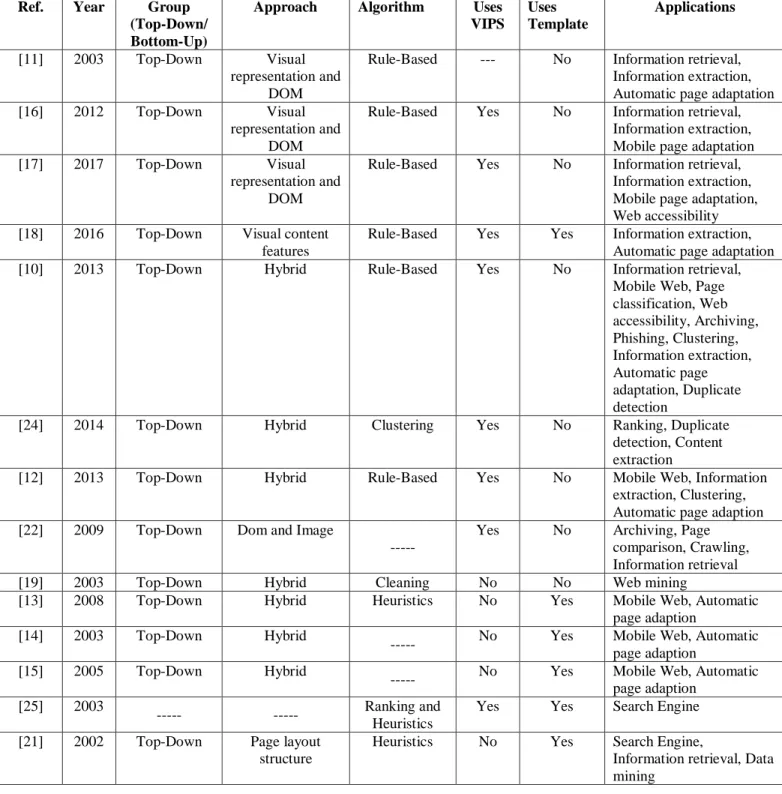
As is described in [9], identifying segments can be very useful for different areas. These areas can be, mobile Web [11], [12], [13], [14], [15], [16], [17], voice Web, Web page phishing, duplicate detection, information retrieval [11], [16], [17], image retrieval, information extraction [11], [12], [16], [17], [18], [19], [20], user interest detection/sense making tasks, visual quality evaluation, Web page clustering [12], [19], [21], caching, archiving [22], publishing dynamic content, semantic annotation and finally, Web accessibility.
The identification of Web page segments can help rearrange the content for it to be properly displayed on small screens, like mobile devices. The information can be filtered by screen readers, thus facilitating the content interpretation for blind users. Even search engines can use segmentation to find implicit information in order to provide better search results, excluding the irrelevant content.
Several segmentation algorithms have already been proposed, which use different techniques: graph based algorithms, ranking algorithms mainly based on PageRank, heuristics-based, rule-heuristics-based, text-heuristics-based, image processing, psychology heuristics-based, machine learning, clustering-based and pattern matching, and some custom algorithms [9]. The only conclusion that can be made, at this point, is that only a few of these algorithms are mostly used, but it doesn’t mean they work better than the others.
These algorithms can be grouped into two groups: top-down page segmentation or bottom-up page segmentation [23]. The top-down page segmentation grobottom-up [10], [11], [12], [16], [17] considers the Web page as a block and divides this block into smaller blocks using different components, obtained throughout the content of the page. The bottom-up page segmentation group considers the leaf nodes of the DOM tree representation as atomic content units and then tries to group these units into coherent blocks.
2.4.1 Web Segmentation Tools
In this subsection, I will revisit the tools that I have searched to understand the evolution state of the Web segmentation development.
D. Cai et al.,2003 proposes in [11] the VIPS (Vision-based Page Segmentation) algorithm, which is one of the most used top-down approaches. This algorithm also serves as a base for other algorithms. The VIPS algorithm is based on the visual representation as well as on the DOM of the page. Its purpose is to extract the content structure of a Web page. This algorithm has three
17
Chapter 2. Related Work
steps: block extraction, separator detection and content structure construction. In the block extraction, the Web page is recursively divided into blocks by using a number of heuristics; in the separator detection, the blocks are put into a pool for visual separator detection; and the last step, the content structure construction, is basically the construction of the Web page structure in a tree. This approach can beneficiate information retrieval, information extraction and automatic page adaptation.
E. Akpinar et al., 2012 proposes in [16] a new version of VIPS algorithm, the extended VIPS, which improves the second step, the visual block extraction. They claim that there are some missing definitions and ambiguities in the algorithm, and if the block structure of a Web page is constructed false, the separators and content structure are constructed false, too. No other changes were made to the algorithm. There is a follow up work developed in [17] to improve even further the extended VIPS, which introduces the role attribution after the segmentation process. Both these approaches can beneficiate information retrieval, mobile device adaptation and information extraction, among others.
P. K. S. Kadam et al., 2016 proposes in [18] the utilization of visual features of a Web page to extract data from the Web pages. To make the system efficient, the authors propose, combining the visual features with the non-visual information, like symbols and tags. The authors approach is based on three steps, the first one uses the VIPS algorithm to extract the content structure of the Web page and construct a tree with visual blocks for each responsive page. The second step consist on locating the information region in that tree, based on the position features. And the third one, is to extract the information records of the data region, based on the layout and appearance characteristics. This work is for data extraction, but a limitation is that it can only process Web pages that just contain one data region.
A. Sanoja et al., 2013 proposes in [10] the Block-o-Matic algorithm, which is an hybrid approach. It analyses the page from the structural perspective using the VIPS algorithm and evaluates the visual information with the Geometric Layout Model. This model considers three aspects: the content, the geometrics and the logic of the page. The segmentation process also has three phases, which are the page analysis, the comprehension and the reconstruction. This tool also allows a manual segmentation. The result of the comparison between the manual and automatic segmentation has to be the same. It is a top-down approach, because it walks through the DOM starting on the root of the tree until it gets to the leaves and it makes decisions along the way.
K. Wah et al., 2014 proposes in [24] a vision-based Web page segmentation algorithm with Gomory-Hu Tree. This approach also starts with the VIPS algorithm to segment the page and then, the number of different blocks is achieved. The content blocks that are retrieved have, not only main content information, but also noisy information, such as advertisement and so on. What it proposes is to find the similarity weight to retrieve the main content of that page using the Gomory-Hu tree.
S. Singhal et al., 2013 proposes in [12] an hybrid Web page segmentation approach, based on VIPS. After processing each node in the DOM tree, it separates the relevant information and assembles coherent regions. This could be helpful to information extraction, Web mobile and clustering, because only the important information is obtained. It is also a top-down approach.
A. Sanoja et al., 2012 proses in [22] another hybrid tool, that implements a modified version of the VIPS algorithm, aiming at enhancing the precision of visual block extraction and the hierarchy construction. It analyses Web pages based on their DOM tree information and their visual rendering, through image segmentation.