Micro-activities for Java Programming
Learning
Mariami Tchutchulashvili [email protected]
Work carried out under the guidance of
Maria João Varanda
Rui Pedro Lopes Manana Khachidze
4
Micro-activities for Java Programming Learning
Master Project Thesis Degree in Information Systems School of Technology and Management
MariamiTchutchulashvili
2
Acknowledgments
I want to express my gratitude towards the ICM project between IPB and Ivane Javakhishvili Tbilisi State University.
I would like to express my gratitude and thanks to my supervisor Professor Maria João Varanda for imparting her knowledge and expertise in this thesis.
3
Abstract
4
Resumo
5
რეზიუმე
ესნაშრომიმიზნადისახავსშეისწავლოსახალიგზები, რომლებიცხელსშეუწყობს
მინიმუმამდე დაიყვანოს ის სირთულეები რომლებსაც სტუდენტები აწყდებიან
პროგრამირების პირველი დისციპლინებს შესწავლისას. დამწყები
პროგრამისტისთვისრთულია სწორადდამარტივადშეიმუშავოს კოდირომელიც
გადაჭრის დასახულ ამოცანას. საჭიროა დიდი ტევადობის აბსტრაქცია და
ამისთვის ხშირი მუშაობა ეხმარება სტუდენტს გაიგოს ალგორითმი, რომელიც
უნდა განხორციელდეს. მნიშვნელოვანია ისიც, რომ მივცეთ სტუდეტს
ავტონომიურობა პრობლემის გადაჭრისას, რათა ის უფრო დამოუკიდებელი
გახდეს. ეს თეზისი დაფუძვნებულია ვებქვესთის სტრუქტურაზე, რათა
შევამოწმოთ წამახალისებელი სტრატეგია ჯავას პროგრამირების სწავლისას და შევაოწმოთ, არის თუ არა ამ სახის სწავლების მეთოდოლოგია კარგი და
ეფექტური. ამისთვის ექსპერიმენტი ჯავას ახალი მეთოდით სწავლებაზე
Contents
1 Introduction ... 1
2 Teaching and Learning Methodologies... 3
2.1 Web-based learning and teaching methodologies ... 5
3 The teacher’s role during the making WebQuest ... 8
4 Related Works ... 10
4.1 THE WEBQUEST EXPERIMENT WITH MIDDLE SCHOOL, HISTORY CLASSES’ STUDENTS ... 10
4.2 WEBQUEST EXPERIMENT IN SCIENCE AREA ... 11
6 The Structure of the Java WebQuest ... 15
7 The Used Technologies ... 23
7.1 Jeliot ... 23
7.2 Java Online Compiler ... 24
7.3 CloudCannon ... 25
8 Learning experiment with Java Collection WebQuest in IPB ... 27
EXPERIMENT 1 ... 27
EXPERIMENT 2 ... 30
9 Analysis of results and possible improvements ... 33
10 Conclusion ... 34
8
Table of Figures
Figure 1: Easy java task with solution. ... 16
Figure 2: Jeliot video: https://www.youtube.com/watch?v=Ix-Lvp-rcV0 ... 17
Figure 3: The assignment after ever ... 17
Figure 5 : Task 1 ... 19
Figure 6 : Task 2 ... 19
Figure 7: Task 3 ... 19
Figure 8: Evaluation table. ... 21
Figure 9: Conclusion table. ... 22
Figure 10:Jeliot... 24
Figure 11: Online compiler ... 25
Figure 12: Managing CloudCannon files ... 25
Figure 13: CloudCannon managing dashboard ... 26
Figure 14. Pre-task results ... 28
Figure 15. Test results (Java collections). ... 29
1
1 Introduction
The Computer Science courses are characterized by being the confluence of three major areas of knowledge, namely the engineering computers, related hardware, operating systems and data communication networks, information systems, that address the concepts of software engineering and databases, and computer science, focusing on languages and programming techniques, among others[16].
For this last area, transversely to higher education institution is well known problem of student success in programming disciplines. Almost all study programs of the Information Technology area include one or two programming courses in the first year and was immediately seen as a challenge by the students. It is difficult for a beginner to structure the thinking in order to achieve complete mapping between the problem to be solved and the program (code) that solves. However, there are students who do not get excited by the
challenge and enter a state of demotivation that hinders learning[17].
This thesis describes activities that seek to increase student engagement in learning and thereby increase the time and effort that students spend in the solution search. The idea is based on learning in a gradual way and for those parts, the student feels his own progress step
by step, and is encouraged to continue[18].
The proposal described in this paper is based on a web platform (accessible from all places that the student attends), presenting the problems of contextualized and interesting way, suggesting the division of short tasks, measurable and resolution with an increasing degree of difficulty, giving immediate feedback of providing the student, possibility of more than one attempt to solve, suggestions for improvement, plus explanations on other solutions, classification obtained and connection to the following learning steps.
2
3
2 Teaching and Learning Methodologies
This thesis is based on WebQuest. A WebQuest is an inquiry-oriented lesson format in which most or all the information that learners work with comes from the web. The model was developed by Bernie Dodge at San Diego State University in February, 1995 with early input from SDSU/Pacific Bell Fellow Tom March, the Educational Technology staff at San Diego Unified School District, and waves of participants each summer at the Teach the Teachers Consortium at The Teacher School in Ojai, California.
Since those beginning days, tens of thousands of teachers have embraced WebQuest as a way to make good use of the internet while engaging their students in the kinds of thinking that the 21st century requires. The model has spread around the world, with special enthusiasm in Brazil, Spain, China, Australia and Holland. (http://www.webquest.org/)
WebQuest are simple web pages, and they can be built with any software that allows you to create websites. Tech-savvy users can develop HTML in Notepad or Notepad++, while others will want to use the templates available in word processing suites like Microsoft Word and Open Office. More advanced web development software, like Dreamweaver and FrontPage, will give you the most control over the design of your WebQuest. WebQuest templates allow educators to get a jump start on the development of WebQuest by providing a pre-designed format which generally can be easily edited. These templates are categorized as "Framed" or "Unframed," and they can have a navigation bar at the top, bottom, left, or right of the content.[8][9]
There are several websites that are specifically geared towards creating WebQuest. Questgarden, Zunal, and Teacherweb all allow teachers to create accounts, and these websites walk them through the process of creating a WebQuest. Open WebQuest is a similar service, although it is based in Greece and much of the website is in Greek. These websites offer little control over design, but they make the creation process very simple and straightforward.
4
WebQuest can be a valuable addition to a collaborative classroom. One of the goals is to
increase critical thinking by employing levels of Bloom’s Taxonomy and Webb’s Depth of
knowledge. This is a goal of common Core and many new state standards for public education. Since most WebQuest are done in small collaborative groups, they can foster cooperative learning and collaborative activities. Students will often be assigned roles, allowing to replay in different positions, and learn how to deal conflict within the group.
WebQuest can be a versatile tool for teaching students. They can be used to introduce new knowledge, to deepen knowledge or to allow students to test hypotheses as part of a final interaction with knowledge. The integration of computers and the internet also increase
students’ competency with technology. By having specific task lists, students can stay on
task. By having specific sources, students can focus on using resources to answer question rather than vetting resources to use which is a different skill altogether.
The classroom tasks can be differentiated depending on skill level or they can be based on collaborative groups for the same level of task. A skill level may have students with learning disabilities working on a basic task to meet the minimum standard of learning skills and gifted students pushing their task to the higher end of learning skill. More commonly, groups are composed of learners of all skill levels and completing the same level of task. This is typically easier because the teacher is only creating one WebQuest, but can cause less student interaction from lower students and less learning from higher students. (https://en.wikipedia.org/wiki/WebQuest).
Kenton Letkeman, creator of a number of excellent WebQuest, says: “With many research
5
WebQuest, special needs students can be given predetermined roles that are very important and make them feel part of the group. Advanced students can explore further and do more than is required. The interest of this type of project generates makes that a reality, rather than a fantasy.”
„All teachers want to see that kind of student growth, so the benefit to them is seeing the
center of gravity of the room move to where the kids are. If you've done the work of preparing a good WebQuest ahead of time (or selecting one made by someone else), you have a more gratifying day, by working with individuals and small groups as a coach rather than having to keep all those eyes on you as the only source of data in the room. Of course, as with all constructivist teaching, there may well be a mismatch between what's learned in a WebQuest and what's measured on standardized tests. Talented teachers are finding ways to hit both targets -- but it's not easy. Several things are needed: some technical, some pedagogical..”– says Bernie Dodge, creator of WebQuest.
2.1 Web-based learning and teaching methodologies
“Newer technologies such as computers and video conferencing are not necessarily better (or worse) for teaching or learning than older technologies . . . they are just different . . . The
choice of technology should be driven by the needs of the learners and the context in which we are working, not by its novelty.” Bates AW. Technology, open learning and distance education. London: Routledge, 1995.
Nowadays, there are many different kind of learning methodologies, one of them is web-based learning. Web based learning also can be different, for example: First when student go to school, in computer lab and gets modularized instruction of learning; Second, when it is distance learning and students from widely geographic areas can be taught simultaneously trough one-way or interactive audio and video technology; Third, when student can learn on their own anywhere, anytime and take exams as needed.
The information and interaction capabilities of the web have led to the development of
6
another websites or documents about the topic you need and you don’t have to waste time of searching information you need.
A “virtual” learning environment (VLE) or managed learning environment (MLE) is an all in
one teaching and learning software package. Functions such as discussion boards, chat rooms, online assessment, tracking of students' use of the web, and course administration are usually combined by VLE. VLEs act as any other learning environment in that they distribute information to learners.
What can be the barriers and the ways that decrease the effect of online learning? Most of the researches show that main problem is technology, for example, poor access, slow
downloading and etc. Sometimes design of the site also make problems, if it’s not user -friendly or easy designed, student just give up and has no motivation to continue. The creators must also take into the view that learners are not only the young students and some
of them are older and don’t know using computers as good as younger students. So the site
must be designed in the way that them get the best out of their learning experience, learners need basic computer skills, support and guidance.
Mostly, web-based learning also includes online assessment. Sometimes it is constrained by the medium in which it is operating. It is very good for marking and giving feedback on assignments such as project or essays.
There are some advantages and disadvantages of online assessment.
Advantages:
Computer marking is an efficient use of staff time.
Students can receive feedback of their performance and assignments
It’s very useful for self-assessments.
Disadvantages:
Most of the online assessments are limited to objective questions
Sometimes it’s difficult to authenticate student’s work
Security can be an issue.
7
school. The main role of teacher is to ensure that learning environment is comfortable for student and he has all the needed stuff here. Of course it is really good way of studying but sometimes it should not be views as the method of choice because of barriers. The technology must therefore be applied appropriately and not used simply because it is available and new or because students and teachers have particular expectations of this means of course delivery.
There are some advantages and disadvantages of web based learning:
Advantages:
Flexibletoyour time.
Lots of resources in many different formats.
Available resources from any location and any time.
Can provide useful resources of supplementary materials.
Efficient way of delivering course materials.
Disadvantages:
Student can feelalone.
Maybe be barriers, like poor access.
Information can vary in quality and accuracy, so guidance and signposting is needed.
8
3
The teacher’s role during the making WebQuest
Teachers tend to emulate the teaching styles or methods they were exposed to both as students and as pre service educators (Carter &Sottile, 2002; Johnson, 1991).
If you are teacher and are making WebQuest for your students, what about you should think at first? It will be fine if you know all your students well and know their background. What they know? Is this WebQuest for beginners or do they already know some basics? How they can find information on the Internet and also how to evaluate information that has been found on the Web? It’s very important to choose the tasks correctly.
But the first part is design the WebQuest. It will be good if we try to design user friendly web interface. Although some WebQuest may be more visually pleasing than others, don’t be deceived by looks. You want something that appeals to students but has substance as well. When students go to the WebQuest they must not be scared or think that there are lots of things to read or to do. We must decide what we want to teach them from this WebQuest and give them right information in correct way. It will be the best way if we give them some information like hints to help them or just advice some websites, video tutorials, articles
where they can find information they need to solve the tasks but don’t force them use our
advices. If we want our Webquest should be useful even when students are at home, we must give them more independence. They must decide themselves what they can use for studying and what will be more useful for them to learn and remember in easy ways. Too many resources can overwhelm students, forcing them to spend more time than necessary completing the assigned task. The WebQuest should offer a reasonable number of possible resources. As soon as student know his role, he must be eager to find information to fulfill the task given to him. Student must discover multiple perspectives on a given issue. Although new material can be covered in the WebQuest, too much detail on an unfamiliar topic may overwhelm many students. In other disciplines, similar judgments will make the WebQuest process more successful9.
One of the most important thing during the making WebQuest is to turn the students motivated. It must be the most useful help from us, to give them some motivation to make them productive. By our WebQuest we must make studying funny and pleasant.
9
knowledge. I think , if we stop them , maybe next time they should not be interested and motivated to participate in this kind of activities and different type of studying.
10
4 Related Works
There are lots of learning experience based on WebQuest and not only in programming. WebQuest is used by Art, Literature, Music, History teachers and they are very glad and happy for these experiences. They use WebQuest not only in universities, in primary, middle or high schools also.
4
.1 THE WEB
Q
UEST EXPERIMENT WITH MIDDLE SCHOOL, HISTORYCLASSES
’
STUDENTSOne of this kind of experiment held on by middle school History teacher for eight-grade boys and girls. It was new experience for them, because they had never used WebQuest for studying before. The teacher just explained the main idea of it and let them do everything themselves. Because no student in the class had ever done WebQuest before, an orientation at the beginning of the activity helped to make the actual computer time go more smoothly. During the computer labs, students were discussing and exposing the key elements of a WebQuest, available resources and strategies of using time correctly. Students had a meaningful task: to assume the role of a person living during the Civil War era. As the teacher was watching all of them, she discovered that some of the students jumped right into the sites that contained primary sources, while others had to visit secondary source sites to find background information. After searching all resources they needed, they completed six journal entries: two written before the Civil War, two during the Civil War and two immediately following the conflict. Students liked this kind of working and they really enjoyed. And as a result, according the instructor, they came away with a stronger understanding of the people who lived during the Civil War.
The teacher says that she is really glad and excited by the result and gives us advice:
“WebQuest can provide the motivation that students need to be engaged in learning, so long as the teacher understands the importance of this activity. As a researcher and former middle school instructor, I was excited to see eighth-grade boys and girls eager to find out what life was like during the Civil War. In addition, many of the students said that they enjoyed the WebQuest process, and one even remarked, "I guess it was pretty fun." If an eighth grader makes a comment like that, the WebQuest can be viewed as a success in the middle school
11
In spite of difference, that this experiment was with middle school students and our WebQuest is for University students, we can say that main idea is the same and hope that Java Collection WebQuest give us the same result.
4
.2 WEBQUEST EXPERIMENT IN SCIENCE AREA
In a high school, which was in new building and was very well supported with technology, the teachers occupied two learning experiments based on WebQuest. Both of the experiments were in Science area: one in social science (history) and second in science (earth science). In
both experiment, they divided students into two groups but for the number of spaces available
in the computer room there was a small difference between the numbers of students in each group.
Experiment
1The study topic in first experiment was “Assassinations of Four American Presidents and Their Impact on the History of the United States”. There were 72 high school students and
they were divided into computer lab and regular classroom. The teacher who held the experiment had more than 20 years of teaching experience. At first students in both of the group did pre-test and the teacher scored it.After pre-test, students in the regular classroom were with teacher, the listened him, took the notes, watched movies and participated in discussions about the given topic. The teacher tried to keep students on tasks during the all class time.
During the same time, students in computer lab did everything through the WebQuest,
without teacher’s stories. The other teacher was also with them, but he just answered student’s questions regarding the topic and assured that students were stayed on tasks. The
students had to do their final product in power point. Their computer proficiency was really high. At the end of experiment students in both group made post-test, that was scored by the teacher.
Result of Experiment 1
12
Experiment 2
The topic of second experiment was geology (rocks and minerals). There were 72 students with good computer skills and ability of using PowerPoint software. The students, like in first experiment were divided into two groups and pre-test was also scored by the teacher.
The students in the regular class listened lectures from teacher, shared samples of rock and minerals and asked questions to the teacher. Meanwhile, the students in the WebQuest group used only web resources, they could browse and print materials from the WebQuest. There was also teacher, but he only helped students with technical problems and answered computer related questions.
In the end of experiment, WebQuest students made oral presentation using the PowerPoint, a post-test identical to the pre-test was administered and scored by the teacher and the researchers conducted unstructured interviews with the teacher (20 min) and eight WebQuest students (10 min each) (Creswell, 2002, p. 206). The researchers transcribed audiotapes of the interviews.
Result of Experiment 2
13
For more clear of results there are interviews with both teacher:
Science Teacher: “From what I saw from the PowerPoint, I think the students were able to find the information. They were finding extra information that we really didn’t have time cover, like some of the rocks and some of the minerals, things like that. So, it did a pretty good job; it was really focused, which I think was one of the big keys of it. The students don’t have the space to wander too much.”
History Teacher: “It was very detailed. I have a counterpart history teacher who teaches another part of the history section for freshmen, and he is right now getting to this topic in
his program, so I told him about the WebQuest. I told him that the WebQuest is very detailed.
We could have gone another day easily, but on the other hand, no one got off task earlier and didn’t wander around the computer lab without any work to do. A lot of times, teachers feel like their class got away from them, but this happens just because kids don’t have enough to
do. The WebQuest kids had a little bit extra advantage over the other kids.”
19 from 20 students were also very pleased and happy for WebQuest experiments and their answers were really positive:
History Student 1: “I thought it was fun—I like to do hands on things, like making a PowerPoint. I like to do something like that—it is fun.”
History Student 2: “I thought it was easier than just being in the classroom because you can
14
Science Student 1: “I didn’t have to sit in a classroom and just listen to the teacher the whole time. I could go around and look for the stuff.”
There was only one negative answer:
Science Student 2: “It was difficult. It was too difficult, I don’t do well hands on with those
things. It was not so fun.”
So, after the two experiment in high school we can say that both, teachers and students enjoyed by the experiments and result was also good.
Maybe in Java Collections WebQuest experiment results were not as good as in this history class experiment in high school, but we can say, that in both experiments students and teachers enjoyed with experiment and it was interesting and new experience for them.
5 Constructing WebQuest For Learning Java
Programming
We decided to make a WebQuest for JAVA for students, who already have some knowledge
and Java basics are not new for them. In this case they can compare which method of learning is better for studying: normal teaching in classes or different type of teaching with more independence and challenges.
What is difference in WebQuest teaching method? At first, teacher doesn’t give students any
knowledge. They start making WebQuest without helps from teacher, find some information, hints and helps which are given in WebQuest and have to study everything themselves. One of the most important difference in WebQuest is that, student have to score himself with very comfortable and flexible table and read the advice proper to his score.
Main objective:
To make student’s learning more independence, enjoy with learning process and get good knowledge.
15 1. Student has knowledge about Java Arrays.
2. Student has knowledge about actions on Java Collections.
3. Student is more independence.
Prerequisites:
Student must have basics of Java. How to define variables, object, class. What is methods and etc.
6 The Structure of the Java WebQuest
WebQuest has 7 essential part: Home, Introduction, Process, Task, Evaluation, Conclusion and Teachers.
Home –It is the typically part of every website. Generally, it is the main page, by which a visitor is navigating to a website from a search engine. In WebQuest, home page is used to
facilitate navigation to other pages on the site. There is also there where the name of the
WebQuest, name of author and some short information about the site is presented. So, maybe it is not the important, but a necessary part of every WebQuest.
Second section of every WebQuest is Introduction. In Java Learning WebQuest Introduction is a really important part because the experiment context is given to the student, which is the basic part of Java Collection. The story is totally different from the normal theory of Java. It is more interesting and makes the student more motivated. It makes the study like playing some funny and adventurous game. To improve WebQuest Introduction, we can enrich it with some interesting photos or videos which are connected with the story. In this way student will be more motivated and studying will not be boring.
16
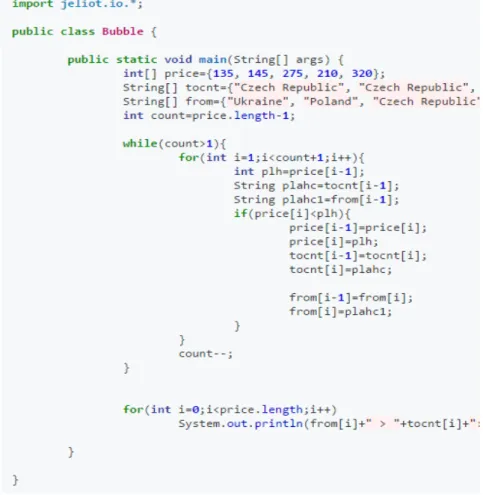
travelling, but instead of this they have to watch some video tutorials about Java collections and Array Lists, watch slideshow how to build Java programs or read some code templates about easy java programs. There is also a link to online compiler, which helps students to test his own solutions easier, without some long and difficult compiler installations. To complete this part Task 0 is described, solved and explained (See Figure 1).
Figure 1: Easy java task with solution.
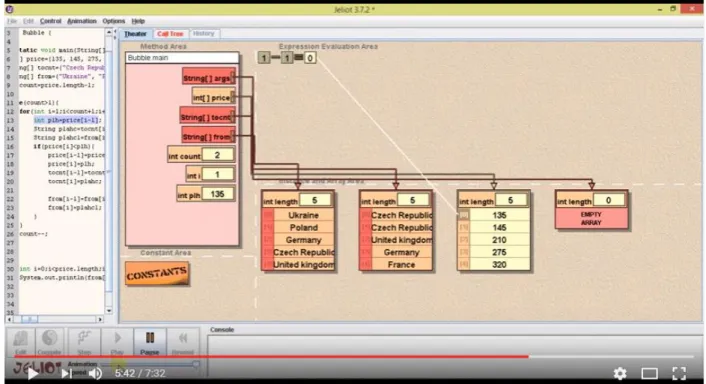
Concerning Task 0 there is also a Jeliot visualization video (See Figure 2), which help student
to analyze how the program code works and how can the following tasks be solved. On this
17
Figure 2: Jeliot video: https://www.youtube.com/watch?v=Ix-Lvp-rcV0
After the Process page, the student has to continue working on Task page. There is some table, with data that must be used by student to make some array lists and collections. We have three tasks and all of them have different difficulty A, B and C parts. Tasks are given in different way, it is like a game. Student has to help to travel agency intern to find some
answers for the clients’ questions. For this help he has to remember all Java basics and also
study new things about Java Collections and write some codes for sorting, use map of list and etc. Each task has some hints and help links, what makes the working easier. After every task, student has to fill some information about time, when he started and finished doing the task and how many attempts he needed for it (See Figure 3). This is automatically sent to a web
page, which allows the teacher to control the student’s performance.
18
There are some motivation quotes from WebQuest Creator that avoids student to give up. In Figure 4 here is an example:
Figure 4: The way tasks are given to student.
Task 1 (See figure 5) asks student to find the cheapest flight. So, what can student learn from
19 Figure 5 : Task 1
Task 2 (See Figure 6) has only two parts: A and B, because it is more difficult than Task 1
and student needs more time to solve it. In A the student has to find all the flights arriving from specific country, he has to use a map of list, what is new experience for him. There is also hints for help, he can use following link for deep his knowledge about map of list https://dzone.com/articles/hashmap-%E2%80%93-single-key-and. In B he must find duplicated elements in array and delete them.
Figure 6 : Task 2
Task 3 is the most difficult and most time consuming (See Figure 7). The student needs the list of flights, sorted by cost in ascending order, and grouped by origin countries. This kind of request makes his work and study more difficult, but if he solves this task, it means that, he has good knowledge in Java Collections and WebQuest helped him.
20
In first task there are four helps. First one just gives the student already done array of flights. Second help gives student advice to use For operator. Third is the template of how can be information encapsulated in objects of a specific class. The fourth hint is the link tohttps://docs.oracle.com/javase/8/docs/api/java/util/Collections.html, where student can read about Class Collections.
In second Task student has only one help, which gives him information about using map of list.
In the third Task student have to work without helps, because he already had enough hints in first and second tasks.
21
Figure 8: Evaluation table.
When the student choose his score for each task, the table sum up his total score automatically.
22
Figure 9: Conclusion table.
23
7 The Used Technologies
7.1 Jeliot
Jeliot is a Program Visualization application, it is based on self-animating data types, the user selects the visualized data objects of the source code, and Jeliot produces the animation automatically. The last version is Jeliot 3. It animates a large set of Java programs and helps you to understand how a Java program is working. Variable, method calls, operations, cycle operators are displayed on a screen as the animation goes on. It allows you to follow step by step the execution of a program. Program can be modified from previously stored code examples or created by scratch. All the visualization is automatically generated and does not need any kind of additional calls. Of course, sometimes there are some problems about understanding things but in most cases Jeliot understand most of Java constructs and it is able to animate them. It supports simple IO, and static method calls from Java libraries that do not return an object. Jeliot runs on virtually any platform, including Windows, Linux, Mac. The only requirement is to have a JRE installed on your system. You can download Jeliot for free (http://cs.joensuu.fi/jeliot). Jeliot3 doesn’t support inner classes and wrappers not the latest concepts introduced in Java 1.5. Jeliot is designed to be a modular platform. At the moment, BlueJ and EJE make use of Jeliot 3 as the visualization of programs developed in them. In Jeliot, there is no limit on the size of the program, however, all the classes shall be in one file. Due to the limited space of the animation frame, visualizing many objects presents a problem
24
Figure 10:Jeliot
7.2 Java Online Compiler
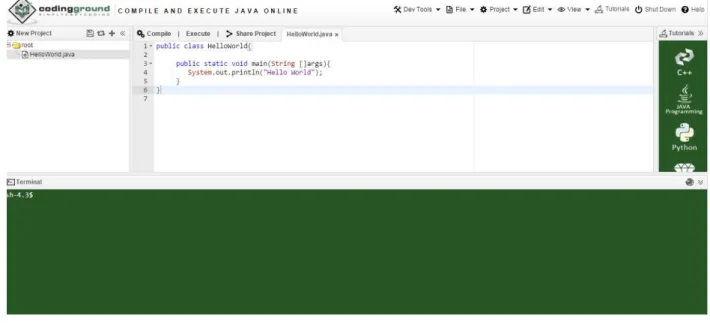
For easier working students use Online Java Compiler (See
Figure11http://www.tutorialspoint.com/compile_java_online.php). It helps to avoid long
and difficult installations of Eclipse or Netbeans.
25
Figure 11: Online compiler
7.3 CloudCannon
For free hosting of WebQuest we use http://cloudcannon.com/, which is a cloud-bases content management system and hosting provider for static websites. As usually, it is used by freelancers, agencies and different teams to deliver CMS editable websites to clients. Most of the features in CloudCannon are backed with Jekyll (static site generator).
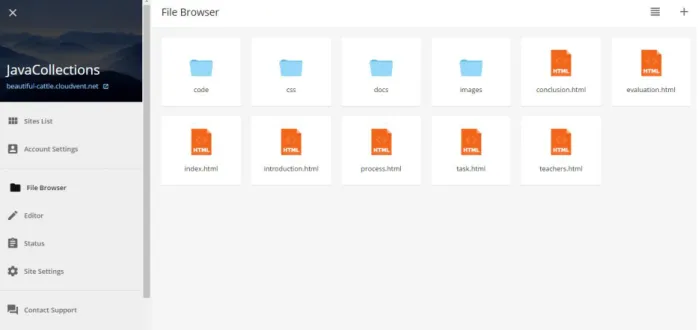
Managing your html files are really easy and pleasant for users. You can create new folders, newfiles or upload them from your computer, GitHub or Dropbox (See Figure 12).
26
Editing is also very comfortably for users. You can edit your content inline with the visual editor. But if you are blogging, have collections or Data files, it’s better to use the distraction -free Content Editor (See Figure 13).
For hosting you have some options, you can create Custom 404 Pages and 301 redirect old URLs, or just use the fast built-in hosting.
After hosting, when the site is ready and checked it gives you custom domain. Mostly with funny names like Java WebQuest domain: http://beautiful-cattle.cloudvent.net/index.html.
27
8 Learning experiment with Java Collection
WebQuest in IPB
EXPERIMENT 1
The application of the WebQuest in the classroom context requires an accurate methodology in order to predict the knowledge construction process, time spent, student’s reaction and so on.
In Java group, students were randomly divided into two groups (A and B).Before starting WebQuest the student made 3 pre-tasks, which were used for checking their Java skills that were scored by the teacher. Unfortunately most of them had not correct answers (See Figure 14).
The defined three pre-tasks were:
1. You should develop a program that receives two integer numbers from the command line and present their sum:
$ java Sum 4 5
(suggestion: use Integer.parseInt(String s))
2. Develop a program that show the message “Hello World” on the screen.
28
Figure 14. Pre-task results
Group A worked with traditional teaching and learning strategy, with teacher, who gave them consisting lecture, some slides and tasks. Teacher answered all of their questions around the topic and also helped in solving tasks. This group did not have access to WebQuest.
Group B followed the WebQuest independently without teacher.There also was supervisor, who gave them some instructions of working with WebQuest and observed how interested they were and how much time they spend for each task. For these students WebQuest was really new and they didn’t know anything about Java Collections.
29
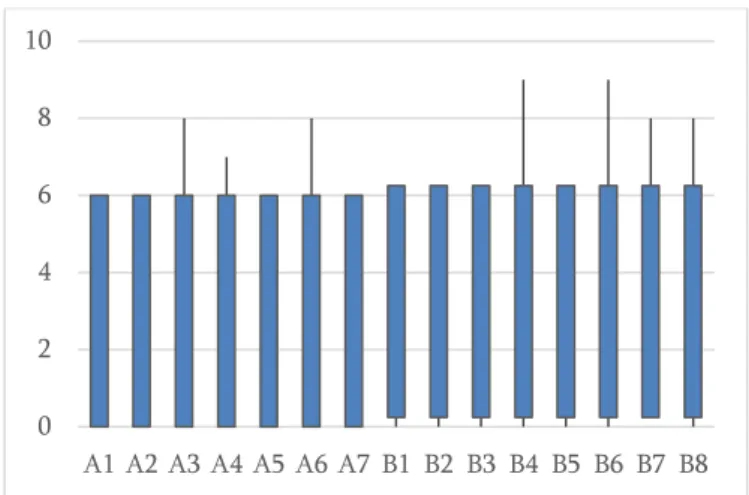
The students did 3-6 submission per each task. But no one managed to finish the first task, so it did not proceed to the following. They had much lower ratings likely to be a first contact with the language (the tests were performed 3 weeks after the beginning of the semester) which revealed some difficulty with the syntax of programs (See Figure 15).
Figure 15. Test results (Java collections).
In this case, the difference between the two groups was not significant.
At the end the students were asked to answer a survey which indicated the degree of agreement with the following statements (Figure 16):
1. The WebQuest is clear and well organized. 2. It was an interesting experience.
3. The story is captivating and helps to accomplish the tasks. 4. The complexity of the tasks is appropriate.
5. The aid given is sufficient. 6. Theaids are useful.
7. It would be useful to adopt the same approach to other topics.
0 2 4 6 8 10
30
Figure 16: Students answers
In general, the students enjoyed the experience, consider that is well organized, that the aid was sufficient and helpful, the complexity was acceptable and would like to repeat the experience for other content.
EXPERIMENT 2
Accordingly the results we decided to make second experiment but after the students had more knowledge of Java. We planned Experiment at the end of semester. In this case we had less time than in first experiment. There was only one group with 10 students and we had not divided them. All of them used WebQuest. Students had only one hour. They already knew
about Java Collections and now it shouldn’t be new theme for them. For second experiment
they had not done any pre or post tasks.
We tried to pay attention to all the student reactions during the WebQuest. The students asked lots of questions to teacher, and he tried to help them and answer all the questions. They used all the helps and hints which are given in WebQuest and watched slides and video tutorials. These tasks were too difficult for them, but in spite of this they felt, that WebQuest was interesting and a good learning experiment.
31
methodology. For make everything clear we had some special questionnaire and made some interviews with students.
Wehad 17 questions:
1. Does the student read the text carefully?
2. Does the student understand the text and he knows what he has to do? 3. It is a new challenge for him. Does he feel uncomfortable with that? 4. Does the student follows the WebQuest with curiosity?
5. Does the student use each help? And how much time is spent in each help? 6. Set a score for each to represent the "helping" degree considering each student. 7. Does he use the information given to perform the task?
8. Does he performs the task correctly? 9. How many of attempts he has? 10.Time spent for each task.
11.Comparing with the first task how difficult was to perform the second one?
12.The second task and third task are more complex: how it was possible to the student to complete the WebQuest?
13.If we change the task order the result would be the same? It would be more difficult to perform task 2 without performing task 1?
14.There are some student suggestions to improve the WebQuest? 15.Was it an interesting experiment?
16.Does it improve the student knowledge? 17.Does it improve the self-study capacity?
Because of, that it was reduced time for second experiment, some questions were not possible to answer. For example: The second task and third task are more complex: how it was possible to the student to complete the WebQuest or Comparing with the first task how difficult was to perform the second one. But there are some interviews with students:
32
Student 2: “It was too difficult for me, because I think I need more knowledge in Java to do
these tasks well. I liked helps and hints which are given in WebQuest, some of information was new for me.”
Student 3: “In spite of, that it was difficult for me and I could not solve tasks, it was
interesting new experience for me and I would like to do it again after I have more knowledge in Java.”
33
9 Analysis of results and possible
improvements
In the first experiment, the results show that there is no improvement that can be attributed to the use of WebQuests. The weak capacity of autonomy of students makes them feel lost when facing the lonely search for a solution. Students feel a certain inertia in the text reading. Even if the information is easily accessible, most students did not have the ability to search, select and use the necessary information. Students did not show ability to concentrate to explore the learning path that was proposed to them. For all this and even though they have found an interesting experience, they felt some difficulty in solving tasks.
From the first experiment we concluded that the WebQuest can’t replace the traditional method of learning, because students who are learning in University are always waiting for
teacher’s support and they are used to ask questions and get answers in easy way and not to find or search themselves.
But, in the second experiment, considering the WebQuest as a complement learning process (the students are not facing the concepts for the first time), the WebQuest is present to the students as a pleasant way to make some regular classes more interesting and funny. Teacher can make WebQuest for one subject and try to make students interested in. So, if they use this approach from time to time they will be used to it and they won’t be surprised, confused and stressed during the WebQuest classes.
Of course WebQuest has its strengths also. It is clear that teachers and textbooks cannot provide all of the information necessary for contemporary problem solving and decision making (Varank 2005). Therefore, current data can be brought into the classroom through the Internet. From this perspective, using WebQuest is anappropriate tool to present this information to students.
34
10 Conclusion
A WebQuest is compared with other teaching-learning methods and does not present a significant advantage in terms of content acquisition. However, there may be advantages in terms of acquisition of horizontal competencies in the sense of autonomy and student systematization capacity. Several studies show a significant improvement in the attitude of the students, an increase of: motivation, self-help, personal development, interpersonal skills, satisfaction, independent thinking, team integration capacity, ability to practical application of knowledge and so on.
35
11
References
1. ^ "WebQuest.org". Department of Educational Technology, San Diego State
University. 2008. Retrieved 2012-03-13.
2. https://en.wikipedia.org/wiki/WebQuest
3. http://www.educationworld.com/Interview with Bernie Dodge
4. http://www.educationworld.com/ Article – “Creating a WebQuest | It's Easier Than
You Think”
5. https://cs.joensuu.fi/jeliot/index.php 6. https://docs.cloudcannon.com/
7. http://www.tandfonline.com/doi/pdf/10.1080/00098650309601993
8. Learning from WebQuests. MartoniaGaskill, Anastasia McNulty and David W. Brooks 2006.
9. “I Guess It Was Pretty Fun”: Using WebQuests in the Middle School Classroom, The Clearing House: A Journal of Educational Strategies, Issues and Ideas, 76:3, 152-155, DOI: 10.1080/00098650309601993. Lipscomb (2003)
10.Web based learning. Judy McKimm, Carol Jollie, and Peter Cantillon 2003
11.Web based Learning and Teaching Technologies: Opportunities and Challenges. Anil Aggarwal, Universityof Baltimore, USA, 2000
12.WebQuest Homepage. Dodge, B. (1995). http://webquest.org/
13.FOCUS: Five rules for writing great WebQuest.
LearningandLeadingwithTechnology, 28(8), pp. 6-9, 58. Dodge, D. (2001).
14.Learning to program-Difficulties and solutions. In International Conference onEngineeringEducation-ICEE (Vol. 2007). Gomes, A., & Mendes, A. J. (2007). https://www.researchgate.net/profile/Anabela_Gomes2/publication/228328491_Learn ing_to_program_-_difficulties_and_solutions/links/02e7e52389017b9984000000.pdf 15.Using webquests to teach content: Comparing instructional strategies. Contemporary
Issues in Technology and Teacher Education, 5(2), pp. 138-148. Strickland, J. (2005).
16. Engenharia Informática, Informação e Comunicações. Figueiredo, A. D. (2004). Obtido dehttp://www.researchgate.net/profile/Antonio_Dias_de_Figueiredo/publication/2582411 49_Engenharia_Informtica_Informao_e_Comunicaes/links/00b4953a17678ce9fb000000.p
36
17. Learning to program-difficulties and solutions. International Conference on Engineering Education–ICEE (Vol. 2007). Gomes, A., & Mendes, A. J. (2007).
https://www.researchgate.net/profile/Anabela_Gomes2/publication/228328491_Learning_
to_program_-_difficulties_and_solutions/links/02e7e52389017b9984000000.pdf