UNIVERSIDADE DE LISBOA FACULDADE DE CIÊNCIAS DEPARTAMENTO DE INFORMÁTICA
DOCUMENT FLOW TRACKING
WITHIN CORPORATE NETWORKS
Tiago Gomes da Silva Mendo
MESTRADO EM SEGURANÇA INFORMÁTICA
UNIVERSIDADE DE LISBOA FACULDADE DE CIÊNCIAS DEPARTAMENTO DE INFORMÁTICA
DOCUMENT FLOW TRACKING
WITHIN CORPORATE NETWORKS
Tiago Gomes da Silva Mendo
Orientador Hyong Kim Co-Orientador Miguel Pupo Correia
MESTRADO EM SEGURANÇA INFORMÁTICA
Resumo
Notícias sobre documentos sensíveis publicados na Internet são cada vez mais frequentes nos cabeçalhos da imprensa de hoje em dia. Em Outubro de 2009, o Manual de Segurança do Ministério da Defesa do Reino Unido, com 2389 páginas, que descreve a totalidade do protocolo militar do Reino Unido relativamente a operações e informações de segurança, foi tornado público por acidente. Este é apenas um caso, mas existem exemplos de fugas de informação em praticamente qualquer área, desde a médica à financeira. Estas fugas de informação podem ter consequências sérias para quem seja afectado por elas, como a exposição de segredos de negócio, danos da imagem de marca ou a aplicação de multas el-evadas por parte de entidades reguladoras. Uma fuga de informação pode ter várias causas, sendo uma delas devido a empregados que expõem documentos sensíveis para o exterior da empresa, de forma não intencional.
Neste trabalho propomos uma solução capaz de rastrear ficheiros numa rede empresarial e detectar situações que podem levar a que um documento sensível se torne público. Fazemos uso de um agente que é instalado nas máquinas que pretendemos monitorizar, que detecta e regista a utilização de ficheiros em operações potencialmente perigosas, como a cópia para um dispositivo amovível ou o envio por correio electrónico como anexo. Essas op-erações são registadas e recolhidas para uma localização central, onde podemos fazer uso de um motor de correlação para encontrar relações entre diferentes cópias de um mesmo ficheiro. Para finalizar, desenvolvemos e avaliámos um protótipo que implementa a solução proposta, provando que pode efectivamente ser usado para detectar fugas de informação.
Palavras-chave: fuga de informação, publicação acidental, rastreio de ficheiros, monitor-ização de ficheiros
Abstract
News about sensitive documents being leaked to the Internet are becoming a commonplace in today’s headlines. In October of 2009, the United Kingdom Ministry of Defense Manual of Security, with 2389 pages, which fully describes the United Kingdom military protocol for all security and counter-intelligence operations, was inadvertently made public. This is only one, but there are examples of information leaks from almost any area, from med-ical to financial. These information leaks can have serious consequences to those affected by them, such as exposing business secrets, brand damaging or large fines from regula-tion entities. An informaregula-tion leak can have multiple causes, being one the employee that inadvertently exposes sensitive documents to the exterior of the company.
In this work, we propose a solution capable of tracking files within a corporate network and detecting situations that can lead to a sensitive document being leaked to the exterior. We resort to an agent installed on the hosts to be monitored that detects and logs the usage of files by potentially dangerous operations, such as copying it to a removable drive or sending it by e-mail as an attachment. Those operations are logged and collected to a central repository, where we make use of a correlation engine to find relationships between different copies of a same file. Finally, we have developed and evaluated a prototype that implements the proposed solution, proving that it can indeed be used to detect information leaks.
Acknowledgments
First, I would like to thank my company, Portugal Telecom, for supporting my presence in this program, as well as my colleagues that took care of the projects I left behind.
I want to thank my advisor, Hyong Kim, for providing me with the vision to guide my thesis to success, and my co-advisor Miguel Pupo Correia, for his promptly availability for my questions.
I cannot forget to mention my MSIT-IS colleagues, that were my full-time friends for the last months and had a vital role to my success on this program.
My parents and sister... I thank them for being so patient with me on these last sixteen months.
Finally, I want to thank my girlfriend, Filipa, for being so understanding. Now, I will make up for being so away.
Contents
1 Introduction 1
1.1 Related work . . . 3
1.2 Contribution . . . 8
2 The information leakage problem 9 2.1 How it occurs . . . 9 2.2 Classes of solutions . . . 12 2.2.1 By goal . . . 12 2.2.2 By architecture . . . 13 3 Design 15 3.1 Overview . . . 15 3.2 Components . . . 16 3.2.1 Host agent . . . 16 3.2.2 Event collector . . . 17
3.2.3 Event correlation engine . . . 18
3.3 Security assumptions . . . 19
4 Architecture 21 4.1 Collecting file information . . . 21
4.1.1 File system modification monitor . . . 22
4.1.3 Spooling monitor . . . 25
4.1.4 E-mail sending monitor . . . 26
4.1.5 Event storage . . . 27 4.2 Correlation of events . . . 28 4.2.1 Filename heuristics . . . 31 4.2.2 Non-atomic operations . . . 32 5 Implementation 35 5.1 Host agent . . . 35 5.1.1 FileSystemWatcher . . . 35 5.1.2 WndProc overriding . . . 37 5.1.3 WMI . . . 37
5.1.4 Visual Studio Tools for Office . . . 37
5.2 Alternative approaches . . . 38
5.2.1 Proxy DLL . . . 38
5.2.2 IAT modification . . . 39
5.2.3 API patching . . . 39
5.2.4 Event Tracing for Windows . . . 39
5.2.5 Redemption library . . . 40 5.3 Correlation engine . . . 40 6 Discussion 41 6.1 Experimental evaluation . . . 41 6.2 Performance evaluation . . . 43 6.3 Privacy . . . 46 6.4 Applicability . . . 46
7 Conclusions and future work 49 7.1 Conclusion . . . 49
List of Figures
2.1 Example of an information leak on an enterprise network . . . 10
2.2 Network-based analysis . . . 13
2.3 Host-based analysis . . . 14
3.1 Host agent integration with the operating system . . . 17
3.2 Event collection using a tree structure . . . 18
4.1 Host agent components . . . 22
4.2 Available attributes from a print job . . . 26
4.3 Saving an event to temporary storage . . . 28
4.4 Sending an event from temporary storage . . . 28
4.5 Undetected file copy via USB pen . . . 30
4.6 Microsoft Word temporary files creation . . . 32
6.1 Functional test action diagram . . . 42
6.2 Detected Microsoft Word temporary files . . . 43
6.3 Performance test 1 results . . . 44
List of Tables
4.1 Typical operating system operations . . . 22
4.2 Information collected by operation type . . . 23
4.3 Events intercepted upon drive connect/disconnect . . . 25
4.4 Information extracted from a print job . . . 26
5.1 Possible values for NotifyFilter . . . 36
6.1 Evaluation test-bed hardware . . . 41
Abbreviations
ACL Access Control List
API Application Programming Interfaces
COM Component Object Model
CPU Central Processing Unit DLL Dynamic-link library
DLP Data Loss Prevention / Data Leak Prevention
DMA Direct Memory Access
EMF Enhanced Metafile
ETW Event Tracing for Windows FTP File Transfer Protocol
GB Gigabyte
Gb/s Gigabit per second
GDI Graphics Device Interface
GHz Gigahertz
GUI Graphical User Interface HTTP HyperText Transfer Protocol
IAT Import Address Table
IM Instant Messaging
IMAP Internet Message Access Protocol IPsec Internet Protocol Security
KB Kilobyte
MB Megabyte
MTA Mail Transfer Agent
P2P Peer-to-peer
PCL Printer Control Language PDF Portable Document Format POP Post Office Protocol
PS PostScript
RPM Revolutions Per Minute
SATA Serial ATA
SSL Secure Sockets Layer
TB Terabyte
TLS Transport Security Layer USB Universal Serial Bus
VoIP Voice over Internet Protocol VSTO Visual Studio Tools for Office
Chapter 1
Introduction
News about sensitive documents being stolen or leaked to the Internet are becoming a commonplace in today’s headlines. In 2007, five laptops containing data about tens of thousands of retirement-plan clients at multiple companies were reported stolen by Towers Perrin [1]. Other companies such as Boeing, Fidelity or even the United States Department of Veterans suffered similar thefts [2].
These leaks were all consequence of intentional actions, but there is a surprisingly increase in the number of situations where the leak was inadvertent. In 2008, the United States Computer Security Institute released its annual Computer Crime and Security Survey for 2008, in which 522 security personnel members from United States corporations particip-ated [3]. The report showed that 44% of the inquired suffered at least one insider incident involving leakage of sensitive information. The amount of news about this type of vulner-ability seems to corroborate the report. In October of 2009, the United Kingdom Ministry of Defense Manual of Security, with 2389 pages, was inadvertently made public [4] [5]. The document fully describes the United Kingdom military protocol for all security and counter-intelligence operations. Ironically, it included instructions on how to deal with in-formation leaks. As more everyday services go online, the problem starts to affect them too. In 2007, it was found that the UPMC Health System had posted on its website the names, social security number and other personal information for nearly 80 patients, without their permission [6]. Some of those entries were online since 2002, making a damage evaluation assessment nearly impossible. Time Warner’s AOL, in 2006, incidentally left a large file on their research web site containing over 19 millions queries made by around 500 thousands users, exposing queries that reveal sensitive information about who did it [7].
The sheer amount of leaked documents might be difficult to account, but one can have an idea visiting WikiLeaks [8], a website that dedicates to the collection of documents with
sensitive information that have leaked to the public. The actual count is around 1.2 million documents.
The consequence of each one of these leaks differs in each situation, but they are well beyond data exposition to the public. First, it depends on the contents of the data, to whom it belongs, and to what it refers. Company business plans are one of their most well kept secrets, since it details their strategy regarding investments, new products, new markets and how they will defend from competitors. These documents are often target of industrial espionage by competitors to gain advantage. Failure to protect that information may take a company out of business. However, it does not directly affects their clients in the sense that their private information is not revealed.
People are normally more concerned about seeing their personal information posted on the Internet, such as which films they have ordered from their Video-On-Demand system, or the balance on their checking account. When that happens, they will likely switch to a competitor, and will spread the word about how bad their old company is. The impact of such negative information is extremely prejudicial to companies, and nowadays it can reach a large number of persons very quickly due to the proliferation of social networks services in the Internet. This kind of publicity has a great impact on the company brand, damaging it for an undetermined period, causing current clients to cease contracts, pushing away new clients, reducing investments by third parties, and possibly affecting stocks, if quoted in a stock exchange.
In addition to the damage directly associated to current and potential clients, there are also regulation entities. These entities specify policies regarding how sensitive information must be treated, and which information is considered sensitive. In heavily regulated en-vironments, such as telecommunications, mistreating client data normally incurs in large fines. Although some companies refrain from disclosing all leaks, there are places where it is mandatory to warn clients if their data has been exposed, such as in the state of California, United States [9] [10].
One of the root causes for these leaks is the need to share information. Often company em-ployees need to share documents and pieces of information amongst them, within a project team in the same room or amongst company branches spread around the world. Sometimes there is the need to share sensitive information with people outside it, but within the context of a professional relationship. Examples are contractors that install services at the client’s home, suppliers who deliver goods at the company such as computer hardware, or lawyers that evaluate the legal impact of a new advertising campaign. Many of these relationships
are supported by electronic means such as e-mail, USB drives or shared folders, but often people misuse them. Reasons are as variable as lack of knowledge on how to define an Access Control List (ACL) for a shared folder or just careless handling of which files are copied to a USB drive that its going to be handed out to a contractor. These exchanges of information between internal and external networks blur the electronic boundaries of the company creating an information management problem, leading, for instance, to situations where employees save a file to a place they think nobody outside the company can access, but that is made public to the Internet by a web server.
The thesis is about detecting inadvertent information leaks in corporate networks. We focus on detecting the leakage right in the computer, assuming they can take place through other venues than only through the network. For that, we make use of an agent installed in the machines to be monitored, that intercepts and logs file operations that have the potential to cause a leak. The monitoring takes place regardless of the file containing sensitive data, thus overcoming possible limitations derivate from the file being misclassified.
1.1 Related work
Various authors have addressed the information leakage problem through electronic formats. In most approaches, the authors assume that the information exit point is the network, specifically at the gateways or bridges between networks such as internal networks and the Internet. The Sensitive Information Dissemination Detection (SIDD) is a multilevel framework focused on detecting exfiltration1from a protected network [11], even if covert
communication is used, such as encryption, modulation by the communication protocol, slight content modifications and stenography tools. It works on the idea that all traffic leav-ing the protected network must pass through it, where it can be compared against a set of signatures of sensitive information. SIDD is a complete framework, in the sense that its building blocks can be used to construct other solutions. For this purpose, it was built as a three-component system: the network-level application identification, the content signature generation and detection, and the covert communication detection.
The network-level identification component purpose is to provide a better work base for the content signature generation (and identification), since it identifies the format of the com-munication and its partial context. Traffic characteristics, such as temporal patterns, sizes 1”Exfiltration” is used by the military as jargon for exiting an area, but is being used also to refer to the
unauthorized publication of data from a computer system to its outside, for instance, to a network different from where it was.
of packets, and inter-arrival packet time are used to match the application against a set of previously identified list of authorized or frequent applications. The content identification process will then retrieve the content from the application traffic and generate the corres-ponding signatures. The limitation of such approach is that sensitive information must be defined a priori which might not be possible with very dynamic information. In addition, it requires the sensitive information to be somehow collected and analyzed by SIDD, again incompatible with a company where the information is scattered around multiple branches, departments, and employees.
Regarding covert communication detection, the authors focused on digital audio medium as covert channels, for instance, using VoIP or Skype2. They use steganalysis3 to detect
modifications of the signal’s properties such as distortion introduced by the hidden inform-ation. This is, however, very prone to false-positives or false-negatives as an ill intentioned person can be as creative as possible when it comes to covert communication.
This is a versatile solution, since it can work as anomaly detection (as described) or as misuse detection. It is also a complete solution, from the perspective that it provides de-tection and prevention, either for inadvertent or deliberate information leaks. Prevention can be enforced using a mechanism that approves or disapproves the information release through the network, after something matched the detection layer. Because it operates at the network-level, it must be placed at the edge of the protected network, for instance at the Internet gateway. The consequence is that it must operate at the high rates at which the traffic flows through the gateway.
A different approach is to resort to deception, being Honeypots one of the most well known methods to achieve this purpose. Its primary objective is not to detect information leaks but can be used as tool to help identify the potential for information leakage, by detecting employees accessing system they should not even know about [12] [13] [14]. This object-ive is traditionally achieved through a vulnerable system placed in the network waiting for someone to access it. The reasoning behind this approach is that no one should be aware of the existence of this system as it does not have any useful function to the company, and neither has any important information. Thus, every access to this system can be considered a potential threat, as no one should have the need to access it. Depending on where it is placed, in the internal or external network, it can detect inside or outside threats, respect-ively.
Although this approach is very effective and has a very low rate of false positives, since 2Skype is a popular software that allows users to make free voice calls over the Internet, using a proprietary
communication protocol.
every access to the honeypot can be considered a potential threat, it still requires the at-tacker to have some level of sophistication to exploit one of its vulnerabilities and success-fully break-in. There may be that some disgruntled employee, or even just curious, wants to get access to sensitive information but does not know how to bypass even a simple ACL mechanism. However, it might browse the network with its computer for shared folders, a task that requires no kind of security knowledge and it is easily achievable using the every-day computer GUI, searching for documents of his interest. Honeytokens are a mechanism based on the same principles as honeypots created to detect these situations [15]. Quoting Lance Spitzner ”Honeytokens are everything a honeypot is, except they are not a com-puter” [16]. Honeytokens are fake information, specially created to look similar to the real information of the environment where it is placed. An example is a bogus medical record entry about a non-existent person inserted in the database that holds the records for all the real patients. Monitoring every access to this entry will raise an alarm every time a person reads this information, in a violation of the patient privacy, and possibly other policies. Honeytokens can take almost every shape possible, such as Microsoft Word file, a user and password pair, or a medical entry, fitting to the environment as needed. Even though they have a great potential to catch unauthorized accesses, it can only detect access to bogus documents, not to the real ones. Our solution mitigates this limitation by allowing monitor-ing of every file, not only honeytokens. Limitmonitor-ing our system to monitor only honeytokens files would make it to a honeytoken-based honeypot.
Another solution based on fake information is the Decoy Document Distributor system or D3, by Bowen et al [17]. Its objective is to detect malicious users that attempt to exfiltrate
sensitive information. The authors classify them as Masqueraders, if impersonating another user, or Traitors, if using their own credentials. D3is in fact a large-scale automated creation
and management system for deploying decoys. These decoys are documents crafted by a set of techniques developed to aid in the detection of the malicious users. Their creation followed a set of properties formalized by the authors with the objective of increasing the likelihood of successfully baiting malicious users with different levels of sophistication. For that purpose, a decoy document can contain a watermark and a beacon. The watermark is an embedded mark in the binary format of the document file to detect when it is open or loaded to memory, but can also be analyzed at an egress point of the network. The beacon is a command embedded in the document with the objective of signaling a remote web site, named SONAR, upon opening of the document. In addition, as backup solution, the contents of the document also contain information that can be monitored. The advantage of such approach is that is works even after the decoy document left the company environment.
Depending of the number of decoys and how they are deployed in the network, this solution could be highly effective in detecting leakage attempts. However, malicious users might already know which files are important and attempt to exfiltrate those files only, completely avoiding the detection system.
None of the previously described solutions are concerned with information leaking through a specific application. Instead, they focus on monitoring documents and information re-gardless of the application that is manipulating it. Capizzi et al takes a different approach, named shadow execution [18]. Shadow execution is a mechanism developed to prevent applications from sending sensitive information over the network, while communicating with third parties, i.e. someone who should not have access to the sensitive information. Examples are programs with automatic updaters that periodically connect to a server on the Internet to check for an updated version of the program, that normally enjoy full access to the user’s personal data. This situation may lead to an information leak if the program author is malicious, or in case there is a bug that inadvertently sends that personal data through the network. The basic idea of shadow execution is to replace the original applica-tion with two copies of the same program. One of those copies is prevented from accessing the network, but has full access to the user’s private information, while the other copy has only access to non-confidential constant data, not related with the user. The latter is al-lowed to communicate with the network, and the response obtained is shared with the copy that has no network access. Although this approach does indeed prevent sensitive inform-ation from leaking to the network, it has a considerable overhead due to the duplicinform-ation of the resources needed to run the application. Another limitation, which our solution does not have, is that it can only be applied to certain, simple, applications. Direct access to sensitive information by the operating system cannot be prevented with this method since there might exist functionalities that are not easily treated as isolate applications that can be duplicated and executed in parallel.
A solution similar to our proposal is the ELICIT system [19]. It is a network-based sys-tem developed for detecting malicious users who operate outside the scope of their duties, potentially violating the company security policy, for instance by accessing sensitive doc-uments. The system consists of four main steps: first, decoders process network traffic and create high-level events. Then a group of detectors, complemented with context informa-tion about the employee organizainforma-tion within the company, issues alerts. These alerts are classified by a Bayesian network into different levels of threat, and finally, that information is presented to security analysts in a GUI. The high-level events mentioned above corres-pond directly to the events captured by our solution, but in this case they are extract from
the network traffic. These events match a set of user actions that, given the right context, can be considered suspect, such as downloading and printing documents that they do not usually access. This context is based on their identity, past activity and organizational con-text. This approach has the potential to reduce the number of events captured and stored from each user, but can be affected by false-negatives, as the user can be careful and avoid detection. One of the techniques employed to improve the quality of contextual information is take advantage of files in users’ public folders or shared file systems.
Contrary to our approach, the ELICIT system extracts the high-level events from the traffic, so it has decoders for the different kinds of traffic. For instance, a file can be transmitted over a network using a large number of protocols, such as HTTP, FTP, or proprietary protocols such as Skype. However, these protocols can be combined with encryption at IP level, with IPsec, or at application level, with SSL, avoiding detection. Their option for the network-based approach was because it would be impractical to instrument every machine with the necessary software, but we believe that depends on how the company workstations are managed. With automated installation procedures and a centralized management it is possible to deploy our software without much effort.
With the exception of Honeypots that can be found as either research or commercial tools, the other solutions were academic efforts that did not result directly in commercial solu-tions. Nevertheless, there are multiple commercial products sold under the Data Loss Pre-vention / Data Leak PrePre-vention (DLP) denomination, among others.
One such solution is the Websense Data Security solution [20]. This solution is com-prised of a set of products focused on specific objectives. The Websense Data Monitor is a network-based solution that identifies and monitors confidential data, providing contextual information on the data being monitored, such as who is accessing it, its destination, and in-depth detail about the data itself. The identification process relies on policy templates that describe the regulated data and contains fingerprints of the sensitive information being protected. A more complete version of it is the Websense Data Protect solution, similar to the one described previously, but capable of preventing the leak from taking place by blocking dangerous actions, such as e-mail sending. Websense Data Discover is agent-less centralized solution that discovers sensitive data placed in public or unprotected network file shares, databases, e-mail servers or other kind of data repositories. Also based on a set of policy templates that help matching documents against the company definition of sensitive information, it searches the network for files with those characteristics, provid-ing the option to automatically protect those files, by encryption, removal or replacement. Although this may effectively prevent some leak from occurring, there is a significant risk
of false positives prejudicing the employee’s tasks. In addition, there is a solution that aggregates the products described above, named Websense Data Endpoint, and a version that interacts with other products from the company for better accuracy and completeness, which is the Websense Data Security Suite.
1.2 Contribution
Most of the previously described solutions for the information leakage problem assume documents will leak through the network, with only Bowen et al [17] taking an additional measure regarding leaks at the host level. In this thesis, we propose a solution capable of tracking files within a corporate network and detect situations that can potentially lead to the file leaking from the protected environment. Instead of assuming the leaks will only occur through the network, we try to account for other situations such as printing and copy-ing the file to removable drives. Followcopy-ing a host-based approach, we place an agent on each host that, without significant overhead, can intercept operating systems events caused by certain operations such as file copying. Gathering these events from multiple hosts that share files among them makes it possible to draw a timeline of the actions done over a spe-cific file, and possible copies that could exist in other hosts from the company. To increase the coverage of our solution, we provide offline monitoring, i.e. we can continue monit-oring even if the machine is taken away from the network. Such solution will not prevent the leak from taking place but will detect it, providing liability and defining responsibility, which could prevent future leaks. Although our solution may detect intentional information leaks, the focus is on inadvertent leaks.
Chapter 2
The information leakage problem
2.1 How it occurs
Before devising a solution for the information leakage problem, one must comprehend how it occurs and what are the reasons that cause such threat. An information leak is said to occur as soon as a piece of sensitive information is made publicly available, even if for a restrict group of people, such as when a laptop is stolen. Although the information is not immediately available to the world, it is in the hands of the thieves that may choose to do anything with it, from destroying it to posting it on a website accessed by millions of people around the world.
The definition of ”publicly available” is normally associated with the information being available to persons outside the company, but it depends on who should have access to the information in the first place. The payment sheet of the company employees should not be public to every employee, just to the human resources department and the employee manager, so if an employee gets hold of a payment sheet of its colleagues, an information leakage has occurred. Although not critical to the company future, it may influence the motivation and performance of the trespassing employee. In this situation, the information did not left the company environment, but it has left its protected environment.
An information leak can take place intentionally or inadvertently. However, an intentional leak might be caused by an inadvertent action, such as leaving a sensitive document ex-posed without the necessary protection mechanisms. From the multiple possible classifica-tion schemes [21] we choose to classify the person who leaks the informaclassifica-tion based on his motivation and access to the information:
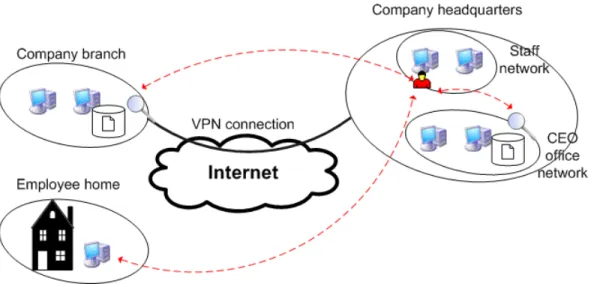
Figure 2.1: Example of an information leak on an enterprise network: An employee ac-cesses unprotected network shares and copies sensitive documents to its home computer.
• Inadvertent insider - user entitled with the access to sensitive information that inad-vertently discloses it, i.e. without the intention to deliver the information to anyone who is not entitled to access it.
• Intentional insider - user entitled with the access to sensitive information that delib-erately discloses it, with the purpose of making it available to someone who cannot access it.
• Malicious insider - user not entitled with the access to the sensitive information, that uses unauthorized methods to gain access to it. An example is shown in Figure 2.1. The intentional insider is sometime referred in the literature as traitor [17]. Both him and the malicious insider might or might not be aware of the security mechanisms protecting the sensitive information. For instance, the malicious user might know that every access to a given protected file is being monitoring by a detecting system and may try to erase that entry, but the intentional insider might not be aware of such protection mechanism.
An example of an inadvertent insider is an employee that saves a sensitive document to a folder accessible by other users of that computer, without knowing those users can read the document. On the other hand, an intentional insider would save the document on a shared folder on purpose, with the objective of sharing the document with other person of his interest. A malicious insider example is an employee that purposely searches for shared folders and tries to get access to them, for instance by brute-forcing the shared folder password.
Many of the leaks caused by inadvertent and intentional insiders are motivated by their duties within the company. The need to share documents with the colleagues to get a task done before its deadline may increase the potential for these leakages to occur. If an employee needs to share a large file with another colleague and has to do it quickly, it is very likely that we will do it in the easiest and quickest manner possible, such as sharing the file folder. Depending on the sophistication of the user, its hurry and the GUI usability [22] [23] [24], he may configure it correctly or not. If the ACL mechanism is too fine-grained or the GUI is cumbersome, the user might choose to leave the share open to everyone or just share an entire drive instead of a single folder to avoid the burden of the configuration. Lending a removable drive, such as a common USB pen, may mean leakage of the entire contents of the device, for instance if the borrower copy its entire contents without the user noticing it. This problem becomes more serious as the capacity of this devices increases. Printing can also be problematic because the printed document can easily be taken home, or taken from the printer tray by a passing employee. Purposely or mistakenly sending information through e-mail or IM software to unauthorized recipients is another situation company face nowadays. That can happen with entire files or just with the clipboard con-tents that may hold sensitive information copied from the original document.
Less obvious situations that can lead to an information leak are hidden fields within docu-ments, such as hidden columns in Microsoft Excel, or comments from the document revi-sion tool from Microsoft Word. Backup and temporary files created by some text editors can also be problematic if left behind after the original file is moved or removed. Edit-ors such as Vi and Microsoft Word create temporary files while editing files, often hidden, which are automatically deleted when the editor quits normally. The problem happens when these editors quit abruptly and leave the temporary files behind, possibly forgotten by the user in a folder that can be shared or on a removable drive.
P2P sharing software can also be blamed for leaking sensitive files to the Internet [22]. P2P software basic functioning is to share files from a particular folder on the host computer that are indexed by the P2P server and made available to other clients who can search for them, much as if it is done by a web search engine, such as Google. There are several manners for sensitive information to be exposed in a P2P network: the client software might automatically share more folders than the user wants; the software may have a bug that unintentionally shares more than it should; or may include malware that exposes the files. Some of them may be blamed on the user: misplaced files or poor organization habits may lead to sensitive files being placed in those shared folders; share large number of files because some P2P reward those who share more [25]; or just laziness on the part of the
user to select specific folders inside his home directory, instead of sharing the entire home directory.
2.2 Classes of solutions
Solutions to deal with this sort of problems can be classified by a number of criteria, but two frequent classification schemes are by goal and architecture.
2.2.1 By goal
Classification by goal refers to the macro objective of the solution, which can be one of these:
• Prevention - the objective is to prevent the information from taking place by mediat-ing the user actions and blockmediat-ing them if necessary. An example of an action with the potential to be blocked is the sending of an e-mail with sensitive documents at-tached. This is the desired solution from the point-of-view of who is responsible by the security of the information, however it has some drawbacks, such as the risk of false positives, i.e. blocking legitimate actions, interfering with the person’s tasks. Blocking of an action requires high level of knowledge about it, thus deep document analysis is a requirement.
• Detection - in this approach the leak takes places but typically, a posteriori detection of the occurrence is provided, although it can be provided in real-time. Detection can be seen as a building block of prevention-based approaches, but also as a way to define responsibility and possibly preventing future occurrences. An example of such approach is to log the user actions, raising an alarm in a security management console if a leak takes place. It is easier to implement than prevention-based solutions since it only needs to log illegal actions and does not need to stop them. This has the advantage of not interfering with the person’s tasks.
• Deterrence - enforced by a contract, such as the company security policy. Normally solutions of this type do not have a technological implementation but it is possible to incorporate detection techniques to raise warnings when a potentially dangerous action is about to occur. Such solution could be implemented in environments with strong privacy regulation that do not allow centralized or permanent data collection
regarding people actions in a computer system. Deterrence-based solutions without enforcing mechanisms are likely to have very limited impact, and may be difficult to determine responsibility [21].
2.2.2 By architecture
Classification by architecture refers to the place where the system enforces its objectives, i.e. where it is deployed and consequently what it is monitoring:
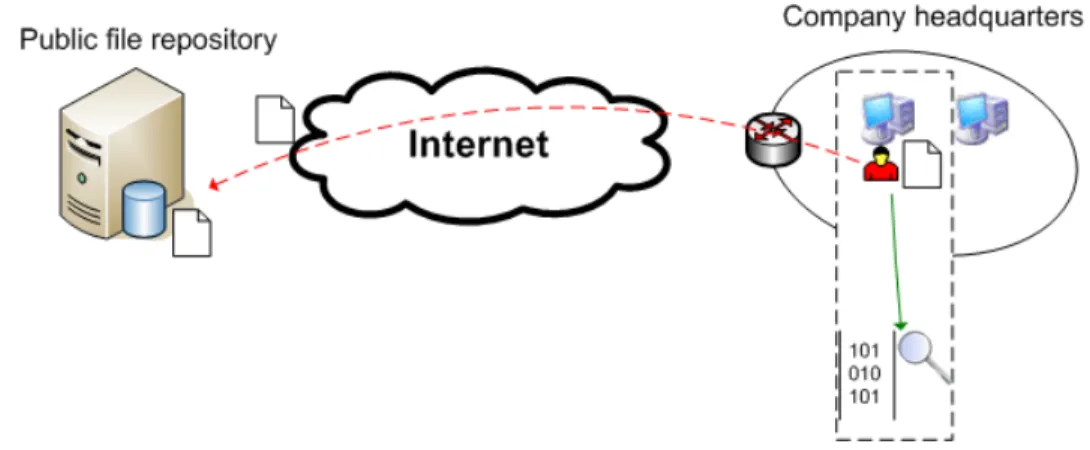
• Network-based - this kind of solution is deployed on the network, monitoring its traffic, as depicted in Figure 2.2. Typically, it is placed on the egress points of the protected network, for instance at the Internet gateway. Without a key escrow sys-tem it cannot analyze traffic encrypted end-to-end, for instance those using SSL or TLS, as it happens in the case of a secure connection to a webmail service. Mak-ing decisions based only on traffic analysis has the drawback of lackMak-ing part of the context where the action took place, potentially increasing positives and false-negatives. One important advantage is that deployment and management are easier because of the smaller number of sites to monitor, although the volume of data to process at each site could be overwhelming.
Figure 2.2: Network-based analysis: A network monitor analyses the Internet gateway traffic for sensitive documents.
• Host-based - instead of being deployed at the network, it is deployed at each target we wish to monitor, as depicted in Figure 2.3. At the limit, it can be installed on every company host. This approach has the advantage of having access to much more information about the action being monitored, providing a detailed context and reducing the chance of false-positives and false-negatives. It can also support offline mode. For instance if installed on a laptop, the user can take it home to
continue his work and still be monitored. Afterwards, the logs can be collected as soon as the laptop reconnects to the company network. This approach has to take in consideration the fact that the host might be controlled by the user, so some measures need to be taken to prevent him from tampering or disabling the monitor.
Figure 2.3: Host-based analysis: An agent installed on the computer monitors file system operations.
Chapter 3
Design
3.1 Overview
We propose a file tracking solution for corporate environments, with the objective of de-tecting information leaks. Tracking a file since it is created right until it is deleted allows a timeline of the actions done over that file to be drawn. Such timeline can provide inform-ation as who created the file, who changed it, if copies were made and to where, if it was printed, sent by e-mail, or even copied to a removable drive. These timeline events mark the critical moments of a file regarding its potential to be exposed to the outside of its protected environment. In case of effective information leak, the timelines of the affected files can be analyzed to find the culprit and assign responsibilities, both technically and legality. To achieve such objective we have designed a monitoring system that logs the relevant actions done over a file within a host, by a user. Those actions are represented by events that are collected by a centralized and trusted entity. Upon collection of those events from multiple sources, they are analyzed, searching for a correspondence that indicates if two separate files are in fact copies of the same file. Finding such relationship is important in order to track down possible copies of a file containing sensitive information that escaped detection when that copy was made.
The main characteristics of our solution are:
• Detection-based - monitors and logs the user actions providing accountability of his actions, allowing a posteriori detection of an information leak and tracking it back to its origin. However, it does not prevent it from taking place.
vision of a document path than would be possible by just looking at the network. This provides accountability for actions that are not network-based, such as printing.
• Focused on inadvertent leaks - this type of threat has a high probability to occur, as every honest user with access to sensitive information has the potential to inadvert-ently expose it, as demonstrated by multiple examples [4] [6] [7].
• Offline support - can monitor file operations even if the host is temporarily discon-nected from the protected network, which is common for laptops.
• Small and unobtrusive fingerprint - does change files in any manner, and does not compete with other applications to access them. Makes extensive use of the API provided by the operating system, avoiding changing its internal functioning.
Although our primary focus is to detect inadvertent leaks, we have developed mechanisms that can also detect intentional leaks, as long as the person who perpetrates it is not aware of the security measures currently in place, or else he will likely bypass them. Detecting all intentional leaks is very improbable given the diversity of methods to exfiltrate information from a network, and the sophistication of some attackers.
3.2 Components
Our solution is composed of three main components: the host agent, the event collector, and the event correlation engine.
3.2.1 Host agent
The host agent component is responsible for the tracking of all relevant operations done at the host intended to be monitored. It sits between user applications and the operating system, capturing information about the interaction files and folders.
Each time the user acts on a file through the GUI of an application, for instance to send an e-mail with an attachment, it is in fact asking the underlying operating system to access a file and do something with it. We have identified a set of actions that can be potentially dangerous as they can be an information leakage venue. From the user point-of-view they are:
• Printing - duplicating a file or a part of it to paper format, allowing it to leave the protected environment file.
• E-mail sending - replicating a file to some recipient(s), possibly to the outside of the protected environment.
• File copying - duplicating a file to a local, remote or removable file system.
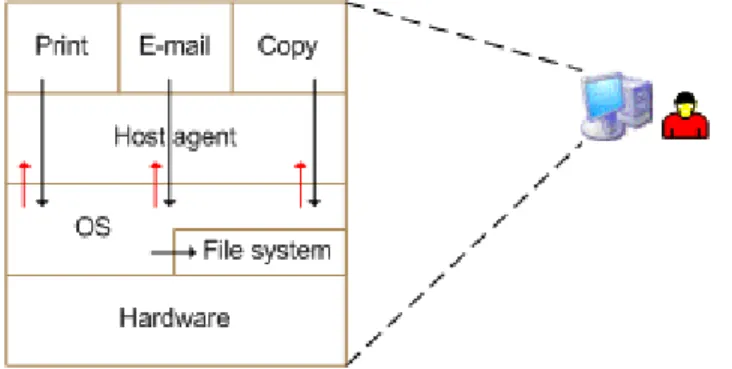
Figure 3.1: Host agent integration with the operating system: the agent is notified by the operating system of any relevant file system operation.
Figure 3.1 shows how the host agent interacts with the operating system and user applica-tions. The instrumentation of these actions should be done in a way that is not obtrusive to the user, regarding performance and usability. However, for deterrence purposes, the user can be made aware of such monitoring. In addition, the agent should satisfy two properties: completeness and integrity.
• Completeness - the agent must capture all the occurrences of the operations it tracks. Failure to comply will mean that a window of opportunity would exist where a file could leak without detection.
• Integrity - the information produced by the agent must not be tampered with. Allow-ing such tamperAllow-ing would enable a malicious user to evade detection.
3.2.2 Event collector
This is the component responsible by permanently storing all the information captured and generated by the agent host. It collects information generated by the agent host and forwards it to a central storage server that stores it securely and permanently, in a database, for later consumption by the event correlation engine.
Because the collected information might be considered sensitive, it must ensure confidenti-ality and integrity while transmitting it to the central storage server. For instance, some files have extensive names that can be auto-explicative and reveal information about its contents or the person who manipulated it.
In some cases, a company may have multiple branches, possibly with different adminis-trative domains. In those situations, it is possible to deploy the event collector in a tree structure. In such setup, each branch or administrative domain would have an event col-lector relaying events to another one, placed higher in the tree, until it reaches the root, as shown in Figure 3.2. This setup scales better than having all monitored hosts connected to a single server, and facilitates the management.
Figure 3.2: Event collection using a tree structure: each branch relays their events to the headquarters.
3.2.3 Event correlation engine
The event correlation engine is the component responsible by the analysis of the events collected by the two other components. It is coupled with the central storage server, taking as input the events stored on its database.
The analysis of those events is based on heuristics derivate from the context where the system is deployed. For instance, in a company with a strong presence of Microsoft Office products it is possible to know in advance some of the characteristics of new files, such as
the file name or file size. The objective of the correlation is to find possible copies of a file, scattered on multiple machines, however that may not always be possible. If the amount of modifications done to one of the copies is too large, it may be very difficult to infer which file it was originated from.
The file characteristics over which the analysis is done are limited to the file name and its size, due to the effort to limit the potential negative impact the agent could have on the host being monitored. Reading the contents of a file being edited by a user could lead to situation where the user wants to move the file and it is prevented from doing it because the agent is currently accessing the file.
3.3 Security assumptions
Given that the host agent is to be installed on machines controlled by the user, we have to ensure that he does not tamper with the agent execution. We assume the user cannot stop the agent execution, or prevent it from sending its logs through the network. This assumption can be enforced segregating their privileges such that the agent executes with a higher privilege than the user, for instance as the machine administrator. In addition, the agent should be executed with a higher priority than that the user processes execute to prevent the situation where an excessive load on the machine causes the agent to miss relevant events. Such load can be due either to the natural usage of the system or to the user introducing load to purposely lead the agent to miss events.
Additionally to ensuring the user cannot tamper with the agent executing, it is recommen-ded to monitor the agent execution with a trusted server. The monitoring can be done with a keep-alive mechanism where the agent periodically sends a message to the trusted server. Failure to send the keep-alive does not necessarily means that the agent execution was tampered, since it may be to a network problem.
Regarding the log transmission, we assume they will eventually be transmitted, i.e. the user can disconnect the machine from the network, but eventually it will be re-connected, and he cannot selectively choose what traffic to transmit or to drop.
Chapter 4
Architecture
We now describe our solution in detail. We describe each component thoroughly, explain-ing the reasonexplain-ing behind the decisions made while buildexplain-ing this solution.
4.1 Collecting file information
Our objective is to provide file-tracking capabilities in corporate environments, but our proposal is not limited to such environment. For our prototype, we assumed a Microsoft environment, based on Microsoft Windows and Microsoft Office. We support our decision on the fact that the statistics, from June 2009, show that around 80% of the companies make use of at least one Microsoft Office product [26]. In addition, companies based on Microsoft Windows XP architecture represent around 90% of the market [27]. We took advantage of this homogeneity by developing components that are specifically aimed at Microsoft Office products.
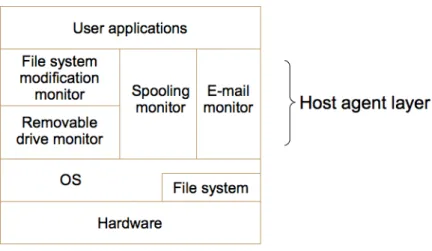
After defining in Section 3.2.1 which high-level actions we wanted to monitor, we decom-posed them to more specific and lower-level actions, and mapped them to the corresponding operating system calls. That decomposition resulted in the following host agent compon-ents, shown in Figure 4.1:
• File system modification monitor
• Removable drive monitor
• Spooling monitor
Figure 4.1: Host agent components. The host agent layer is virtual, since it is implemented as a user-level process.
4.1.1 File system modification monitor
This component is responsible by monitoring some of the operations that can be done over a file in a file system, described in Table 4.1. Most of these operations are also available for directories, but some of them may have a different semantic, as it is the case with open that when applied to a directory typically means entering into the directory, as part of a file system navigation process. If applied to a file, it will open it for further operations, such as reading or changing its contents. Seek is normally associated to the navigation within a single file, and so it has no direct meaning regarding directories.
Operation Description
open opens a file for other operations close closes access to the file create creates a new file
write writes data to a file read reads the file contents seek navigates within a file copy duplicates a file to a new one delete deletes the file
rename renames a file
list lists files in the file system Table 4.1: Typical operating system operations
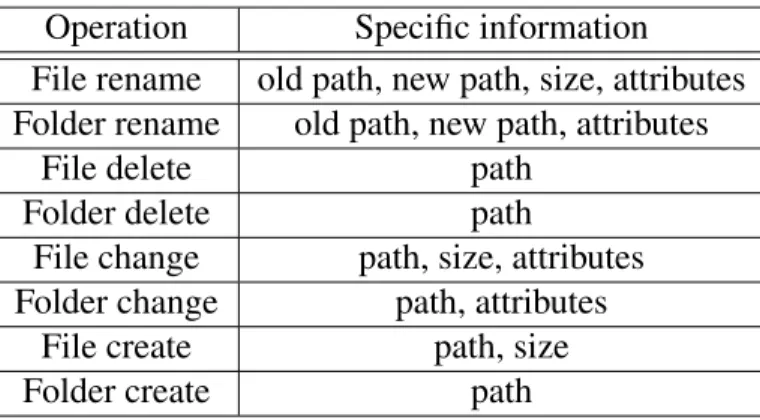
Operation Specific information File rename old path, new path, size, attributes Folder rename old path, new path, attributes
File delete path
Folder delete path
File change path, size, attributes Folder change path, attributes
File create path, size
Folder create path
Table 4.2: Information collected by operation type
There is, however, no need to monitor all of these operations as some of them provide no benefit to our objective. For instance, monitoring file opening would inform that someone was granted access to a file, at least for reading. A user that opens a file can indeed read and copy its contents to another file but it can also memorize it. While we cannot detect the latter in any possible fashion, the former can be detected if we monitor file modification, because the copied contents must be placed somewhere. There is another reason for not to monitor opens or reads, which is performance. These operations are very frequent so instrumenting all calls would create a large overhead, specially for large files that require multiple reads. Consequently, we also excluded the close operation from being monitored. After analyzing the importance of each operation, we concluded that we would only need to monitor create, write, copy, delete and rename. These are the only operations that ef-fectively change a file, so by tracking them we can know if a file was changed, moved, copied to another directory or renamed. While these are common everyday operations, they will define the file timeline and may help in a forensic analysis with the objective of understanding how the information leak took place.
The tracking of these operations is done by hooking a handler to them, which is triggered every time one is executed. When triggered, the handler collects detailed information about the current operation: the current date and time, the user who request it, and other variable information, that depends on the operation. Table 4.2 details what is collected for each operation. For operations that change the path of the file, we save the old and the new path. For the remaining operations, we just save the affected path. The size of the file or folder is also saved every time we detect an operation that has the potential to change it, such as changing its contents. The same applies to file attributes that help understanding the type of file we are dealing with, and if the user is trying to hide it using a file system feature [28].
Our system is designed so that it can monitor any type of file and any folder, but there is no need to monitor the entire hard disk of a host. Operating systems such as Microsoft Windows XP have a large number of files that are used internally and without any kind of control by the user. DLL files are an example of what makes no sense to monitor, amongst others. There is also a performance concern, since that each change made to a file being monitored triggers the execution of our code. Even if the code is very small and with low complexity operations, it still causes some overhead, therefore it should only monitor a limited set of folders. These folders should be chosen so that they cover virtually all the places where a user might create or save files, such as the desktop folder, its home directory and system-wide temporary directories.
Frequently, a user works with files stored not only on his local hard drive, but also at remote drives possibly shared with others. If these drives are known in advance, such as the case with a possible company document repository that is mounted on the workstations at boot time, we can set the file system modification monitor to watch that drive also at boot time. However, there may be the case that the user only mounts the drive when it needs it. Another example of drives mount a posteriori is the ubiquitous USB pens. These issues are addressed by the removable drive monitor component.
4.1.2 Removable drive monitor
This component complements the file system modification monitor by notifying it of changes to the drives accessible by the user. As described in Section 4.1.1, a user can connect new drives to his computer, either local or remote. Examples of local drives are USB pens, portable hard drives, memory card readers, and every device with some sort of storage that can be connected to a computer via USB and mounted as a drive. Given the large amount of devices that can be connected for this purpose, their very small physical size, and their increasing capacity (already measured in TB), these devices are substantial threat. Re-mote drives are common in enterprise environments given the frequent necessity of sharing files between multiple employees. However, these drives can be created for recreational purposes such as sharing music files or pictures from the company last gathering, and be misused by placing there sensitive files.
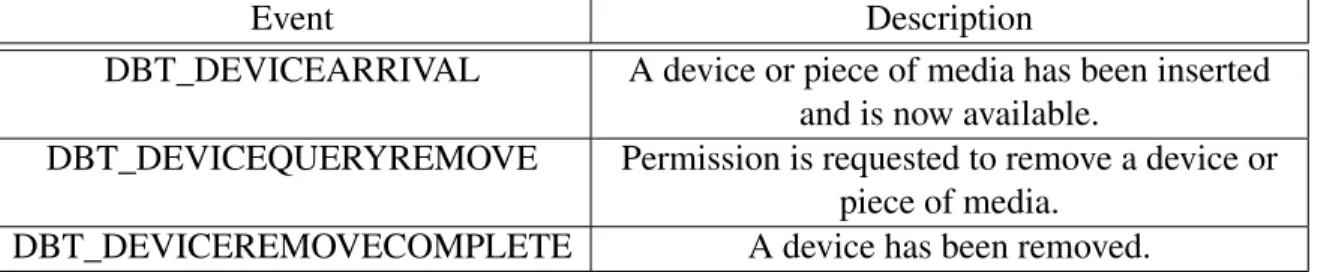
We detect each drive change by intercepting the corresponding operating system events [29]. These events are described in Table 4.3. Upon reception of an event indicating the insertion of a new device, we identify the letter assigned to the recently connected drive, information that is provided in the details of the event. We then add that drive to the list of
Event Description
DBT_DEVICEARRIVAL A device or piece of media has been inserted and is now available.
DBT_DEVICEQUERYREMOVE Permission is requested to remove a device or piece of media.
DBT_DEVICEREMOVECOMPLETE A device has been removed. Table 4.3: Events intercepted upon drive connect/disconnect
folders being monitored by our agent. Despite the letter represents a new drive, it is in fact a folder so it is treated in the same way as other folders. The DBT_DEVICERQUERYOMPLETE event is handled by reconfiguring the agent to stop monitoring that specific folder. The oc-currence of this event presupposes that the user, or an application, requested permission to remove a device. To prevent a possible failure of the removal procedure due to our agent being using it, we stop the monitoring of the drive immediately. Upon reception of the DBT_DEVICEREMOVECOMPLETE event we are assured that it is no longer connected. Failure to receive such confirmation will indicate that the removal was not successfully, so we should continue monitoring it.
4.1.3 Spooling monitor
The spooling monitor detects when a user issues a print request. Although we cannot be certain that unauthorized personnel will read the printed document, we monitor each document being printed to any one of the installed printers. Because the spooling monitor is not associated directly with the printers, but instead with the operating system spooler, it can detect documents being spooled to printers that were not installed at the time the monitor started execution. This monitor subscribes, from the operating system, the event that indicates that a print job was created. Upon reception of one instance of that event, it extracts the values of the attributes described in Table 4.4. Figure 4.2 shows other existent attributes that were not used because they not relevant or they were not common to all spooled jobs. A company that has a good knowledge of the printers it has could take advantage of more specific attributes that could aid in identifying the document or the context where it was printed. However, there is the necessity of previous knowledge about which attributes are to be collected because their semantics must be known in advance.
Figure 4.2: Available attributes from a print job Attributes Job owner Spooled pages Print size Document name Document pages
Table 4.4: Information extracted from a print job
4.1.4 E-mail sending monitor
Sending e-mails with documents attached is one of the many possible venues for inform-ation leakage. Most medium and large size companies have some sort of corporate e-mail infrastructure in place, typically accessible by an e-mail client installed on the employees workstations. Normally, an e-mail sent from one of those workstations will pass through the e-mail client even if it was created outside the client, for instance through a PDF reader or an image processing software. This is not always true, because one may connect dir-ectly to the e-mail server, for instance using the command telnet. However, monitoring the e-mail sending action directly at the e-mail client is a good idea, since it is much simpler to instrument just that program, instead of all possible programs that could trigger the send of an e-mail.
Statistics show that Microsoft Outlook is the most common e-mail client found in the enter-prise market [30], so we developed a monitor specifically for it. This is the only component of the host agent that is limited to specific software, in this case Microsoft Outlook. In ad-dition, this monitor is separated from the other components of the host agent, because it was developed as an application that executes on top of other software, instead of executing directly on top of the operating system.
The detection of an e-mail being sent is achieved by intercepting the Microsoft Outlook event corresponding to that particular action. When the user pushes a button that triggers an e-mail being sent, an ItemSend event is created. Upon capture of that event, we analyze the e-mail searching for attachments. If no attachment is found we do nothing, i.e. we do not record anything about that particular e-mail. However, if at least one attachment is found we extract some information from it, namely the e-mail recipient, the name of file in attachment and its size. This information is extracted from all attachments found in the e-mail.
One could argue that monitoring e-mail attachments is best done at the server, for instance, in the company MTA, but such solution will not be able to detect e-mails sent through another server, which the user may have configured manually.
4.1.5 Event storage
Every piece of information collected by the host agent is relayed to a central storage server, for later analysis. Each captured event is processed, as described in the previous sections, and normalized to a suitable transmission format. Each event is transmitted as a comma separate line. Each type of event is assigned a type that allows the recipient of the message to know how to process the rest of the line, i.e. separate the fields of each event type. This format is easily extendable in case other events are required to be captured and transmitted, as is simple to implement.
At the receiving end, each event is validated accordingly to a number of rules that depend on its type. Some validations are common to every event, such as checking if the timestamp is in the expected format and if the type of the event is known. Then, depending on its type, a specific validation is done to check if all mandatory fields of that event are present. If the event is valid, it is then saved on an input queue on a database, where it will remain until it is consumed by the correlation engine.
During its normal operation, the event collector component gets inputs from the agent host and immediately forwards them to the central storage server. However, the central
storage server might not always be available, for multiple reasons: there can exist some network problem such as partitioning; the storage server can be down; or the target host can be a laptop that lost connectivity temporarily because it was taken home or to company branch. In those situations, the event collector mechanism changes to offline mode and stores whatever data it has to send in the target host hard drive. Later, when the connection to the storage server is reestablished it would send the saved data. Figures 4.3 and 4.4 depict how the components works.
Figure 4.3: Saving an event to temporary storage
Figure 4.4: Sending an event from temporary storage
4.2 Correlation of events
The correlation objective is to find relationships between files, namely if two files are a copy, possibly with minor modifications. For that purpose, we developed a simple correl-ation engine, completely separated from the component that collects events from the host agent. The only requirement of the engine is, at least, to be able to read from the input queue where the events are stored for processing. The correlation engine will consume those events starting by the oldest ones, processing them one by one.
The correlation itself is based on a small set of heuristics that can be enhanced with a better knowledge of the context where the events are collected, and by doing a deeper inspection of files being monitored. Currently, we use only three file attributes and very limited information about the environment. Those attributes are the file name, its size, and the date of the latest modification.
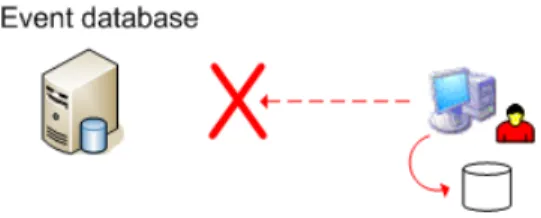
There are two main reasons for why we used a relatively small number of attributes for correlation. One of them is that obtaining more information from the file, such as metadata contained in the file itself, would require a deep knowledge of its format and more intrusive analysis, possibly concurrent with the user trying to access the file. The other is that the correlation process is only supposed to complement the event collection process. In a hypothetical environment where we could be sure that no relevant operation done over a file would evade our system, we would be able to draw a perfect timeline for that file and know exactly when and to where copies were made. There are, however, a number of situations where we could loose track of a file allowing a duplicated to be made without our knowledge. For instance, as depicted in Figure 4.5, file A1 is copied from the hard disk of a computer being monitored to a USB pen, and later that pen is connected to another computer that does not have our agent installed. Using that computer, the user makes a copy of the file to the pen, possibly changing that copy’s name to A2. Connecting back the pen to the first computer, which is being monitored, we havez now three files that are essentially the same: A1 in the hard disk, A1 in the pen, and A2 also in the pen.
—————————————-Figure 4.5: Undetected file copy via USB pen. In the first figure, A is copied to the USB pen and that action is logged. In the second figure, A is duplicated and modified in a computer without the host agent. Then, in the third figure, the USB pen is reconnected to the initial computer and the host agent believes B is not related to A.
Without proper correlation of the events regarding those files, one would be led to think that A2 is an entirely new file. Depending on the amount of change made to the name of the file A2, we could infer that A1 and A2, having the same size, being in the same folder, and having a similar latest modification date are likely to be the same file.
These and other correlations will have more information to work with if done in batch and periodically, instead of in real-time as events arrive. This is due to the fact that is possible for events to be stored locally at offline hosts, such as a laptop taken home for the weekend. It is only after the laptop reconnects to the network, possibly on the next working day, that we can do a thoroughly analysis taking in consideration those events. The period between analyses should be calculated regarding the need to obtain such information. For a normal monitoring situation we can just do the correlation once a day, in the morning, after the employees get back with their laptops used to work at home at night, or we can do it hourly if we are suspicious of someone and we want to do a close monitoring.
4.2.1 Filename heuristics
There are several heuristics that can be developed regarding file names, being one based on the default file name for new files. Microsoft Office tools new files are, depending on how they are created, prefixed with ”New ”. This prefix is usually added while creating empty files, so it can be used to distinguish files that are similar (same name and same size). The importance of distinguishing those files is to prevent that every file once prefixed with ”New ” would be identified as being the same (at least those with very similar size and close in date of modification).
One assumption that we are making is that users will assign their files meaningful names. People identify files by their name so it is only natural to have them change the file name to represent its contents and have some significance. The important part is that a document represents essentially the same for different persons. For instance, the sales report for 2009 will likely have some of those terms in the name, possibly in a different order or separated with spaces instead of hyphens, but the name would be similar even for different versions manipulated by different users. Using a distance function we can measure the degree of similarity of those file names and infer their relationship. Situations where the user renames a file to completely different name are covered by the capture of rename events.
One difficulty is related to temporary files associated with files being edited or open dir-ectly from some applications. Many text editors create a backup of the file being edited in the same directory of the original file, normally adding a prefix or a suffix that clearly identifies it as a backup or temporary file. When that file name is similar to the original one, correlating them is trivial with the help of a string distance function. On the other hand, some applications create those temporary files with random names. Microsoft Word is one of such application, as shown in Figure 4.6. A possible heuristic, although not im-plemented, is to wait until the original file is closed, moment at which the temporary files will be deleted and the most recent will replace the original file. At that moment, we know that those temporary files, that increased size progressively as the user edited them, were related to the original file.
Compressed files are a special kind of file. They may contain multiple other files that are now represented as a single one, although it is likely that they were contained in a folder, potentially with the same name as the compressed file. In the context of the previous example with the USB pen and two computers, one instrumented with our agent and other without, lets assume there is a folder A with multiple files on the USB pen and we know
Figure 4.6: Microsoft Word temporary files creation
which files are inside it. A user can take that pen to the computer without the agent and compress the folder to a file with the same name (suffixed with, for instance, ”.zip”). If, meanwhile, our agent catches the compress file we can try to infer its contents based on its name, by searching the database for directories with the same name (or very similar). Then, we could compare the compressed file size against the size of the files we have logged as being in that directory, assuming a compression ratio based on the file type.
4.2.2 Non-atomic operations
Some of the operations a user can do to a file translate to multiple file system calls, despite only one action is performed. Moving files from folder to folder in a Microsoft Windows environment is executed in a single step at the GUI (and even in the command line using the MOVE command), but our agent detects it as a sequence of four steps: delete source
file, create target file, change target folder, and change target file. The two last steps are the setting of the folder modifications times and file original properties, respectively.
De-pending on how a file is created, i.e. deDe-pending on which application is used, it may gener-ate just a file cregener-ate event or it may also genergener-ate a sequence of file change events, each one indicating a file property being modified. These steps must be treated as a whole since they make no sense as individual events from a information leakage analysis point-of-view.