Departamento de Ciências e Tecnologias da Informação
LeaPhysio – Games Enhanced Physical Rehabilitation
Filipe da Costa Pereira Lourenço
A Dissertation presented in partial fulfillment of the Requirements for the Degree of Master
Engenharia de Telecomunicações e Informática
Supervisor:
Dr. Octavian Postolache, Assistant Professor, ISCTE-IUL
ii
Abstract
In certain areas of the medical sciences, particularly in the field of physiotherapy, there is increasing needs on objective evaluation of the rehabilitation progress that creates new opportunities to the application of the ICT. As part of the new technologies the serious games are ones that can help the patient in the way of motivation that may help during recovery process. The dissertation describes the design, implementation and testing of LeaPhysio – Games Enhanced Physical Rehabilitation system. This system may be used by the physiotherapists and patients during hand and finger rehabilitation process. Using highly interactive games, developed for Leap Motion controller natural user interfaces, it’s possible to assess the patient's performance throughout different physical activities. Through the games, developed in Unity 3D, with controller support, it’s possible to obtain the patient performance data during the various training sessions. All information regarding training the established training plans, results and other data is stored on a remote server. The stored information can be accessed through a mobile application, developed in Android, for the physiotherapist, mobile application that can be also used for configuration of the serious games.
The use of serious games allows the patient with motor impairments, produce a dynamic interaction and a different approach in the execution of traditional exercises in recovery treatment.
The system allows an unlimited number of training sessions to be performed, which can be consulted at any time through the mobile application. In this way, it’s possible to visualize historical values, and to compare the results of the different training sessions, analyzing their evolution.
iii
Resumo
Em certas áreas das ciências médicas, nomeadamente no ramo da fisioterapia, há necessidades crescentes na avaliação objetiva do progresso da reabilitação que cria novas oportunidades para a aplicação das Tecnologias de Informação e Comunicação. Como parte das novas tecnologias, os jogos sérios são aqueles que podem ajudar o paciente no caminho da motivação e no processo de recuperação. Este sistema pode ser usado pelos fisioterapeutas e pacientes durante o processo de reabilitação de mãos e dedos. Usando jogos altamente interativos, desenvolvidos para uma interface de utilizador natural, com suporte do controlador Leap Motion, é possível avaliar o desempenho do paciente em diferentes atividades físicas. Através dos jogos desenvolvidos em Unity 3D, com suporte do controlador, é possível obter os dados de desempenho do paciente durante as várias sessões de treino. Todas as informações relativamente aos planos de treinos estabelecidos, resultados e outros dados, são armazenados em um servidor remoto. As informações armazenadas podem ser acedidas através de uma aplicação móvel, desenvolvida em Android e destinada ao fisioterapeuta, que também pode ser usada para configurar os jogos sérios.
O uso de jogos sérios permite ao paciente com deficiências motoras, produzir uma interação dinâmica e uma abordagem diferente na execução de exercícios tradicionais em tratamento de recuperação.
O sistema permite que um número ilimitado de sessões de treino seja realizado, podendo ser consultado a qualquer momento através da aplicação móvel. Desta forma, é possível visualizar valores históricos e comparar os resultados das diferentes sessões de treino, analisando a sua evolução.
iv
Acknowledgments
Firstly, I would like to express my sincere thanks to my supervisor, Prof. Doctor Octavian Postolache, for all the encouragement, availability and support given during the realization of the dissertation.
To Institute of Telecommunications at ISCTE-IUL, thanks for providing all the material and resources needed to develop this project.
Finally, a big thank you to all my friends, family, girlfriend and college colleagues for their support and constant encouragement.
v
Contents
Abstract ... ii Resumo ... iii Acknowledgments ... iv Contents ... v Figures ... vii Tables ... x List of Acronyms ... xi Chapter 1 – Introduction ... 1 1. Introduction ... 11.1. Motivation and Overview ... 1
1.2. Research Questions and Objectives ... 3
1.3. Research and Planning Method... 4
1.4. Structure of the dissertation ... 5
Chapter 2 – State of art ... 6
2. Overview ... 6
2.1. Serious games and Sensors ... 6
2.2. Information Storage ... 13
2.3. Android Mobile Applications ... 14
Chapter 3 – System Description ... 17
3. Overview ... 17
3.1. Users and Applications ... 17
3.2. LeaPhysio System ... 18
3.3. Leap Motion Controller ... 22
3.4. Others Hardware Components ... 25
Chapter 4 – Serious Games for Physiotherapy ... 29
4. Overview ... 29 4.1. Game Engine ... 29 4.2. First tests ... 31 4.3. The Games ... 33 4.3.1. CollectCube game ... 34 4.3.2. PickaBall game ... 36
4.4. Adapting the games according to the characteristics of the patient ... 38
4.5. Game Feedback ... 40
4.6. Unity Application ... 41
4.7. Data collection ... 46
Chapter 5 – Server Side ... 51
5. Overview ... 51
5.1. Server ... 51
5.2. Database ... 54
vi
Chapter 6 – Mobile Application ... 63
6. Overview ... 63
6.1. Initial Evaluation ... 63
6.2. Structure ... 65
6.3. Design and Implementation ... 68
6.4. Application Main Features ... 74
Chapter 7 – Results ... 79
7. Overview ... 79
7.1. Results ... 79
7.1.1. Hand Motion Analysis Results ... 82
7.1.2. QUIS Results ... 85
Chapter 8 – Conclusions and Future Work ... 92
8. Overiew ... 92
8.1. Conclusions ... 92
8.2. Future work ... 93
References ... 95
Appendix A – Articles ... 99
Appendix B – User Manual ... 111
Appendix C – Technical Manual ... 154
vii
Figures
Figure 1.1 – Flow of the Research Method ... 4
Figure 2.1 – Example of the game VHealthCare ... 6
Figure 2.2 – The Incredible Adventures of the Amazing Food Detective ... 6
Figure 2.3 – Example of using a serious game [12] ... 7
Figure 2.4 – VICON system ... 8
Figure 2.5 – Avatar control in Tux Racer game using sensors [17] ... 9
Figure 2.6 – Example of e-textile system for remote, continuous monitoring of physiological and movement data [20] ... 10
Figure 2.7 – Nintendo Wii Remote ... 11
Figure 2.8 – Microsoft Kinect V2 ... 11
Figure 2.9 – Leap Motion Device ... 12
Figure 2.10 – Serious game developed in Unity 3D [25] ... 12
Figure 2.11 – Pedometer APP ... 14
Figure 2.12 – Runtastic APP ... 15
Figure 2.13 – Google Fit APP ... 15
Figure 2.14 – mHealth APP [33] ... 16
Figure 3.1 – LeaPhysio System Architecture ... 17
Figure 3.2 – Diagram with time flow of the LeaPhysio System ... 19
Figure 3.3 – LeaPhysio Card ... 20
Figure 3.4 – Leap Motion Controller ... 22
Figure 3.5 – Leap Motion interaction zone ... 23
Figure 3.6 – Common usage of LMC by a user ... 24
Figure 3.7 – Flexible size structure to place the Leap Motion Controller ... 25
Figure 3.8 – Acrylic or plastic case for a Webcam ... 26
Figure 3.9 – Example of using Webcam structure with LeaPhysio card ... 27
Figure 3.10 – Computer Monitor, LMC and Webcam platform on the desktop ... 27
Figure 4.1 – Unity 3D Interface ... 29
Figure 4.2 – Example of a script with an object with its attributes and values ... 30
Figure 4.3 – First test performed on Unity with Leap Motion controller ... 31
Figure 4.4 – Example of the LeapMotionCoreAssets project [45] ... 32
Figure 4.5 – First sketch of game development ... 32
Figure 4.6 – Scenarios created in Unity ... 33
Figure 4.7 – Top component of game ... 33
Figure 4.8 – CollectCube Game ... 34
Figure 4.9 – Boxes and cubes of the CollectCube game ... 35
Figure 4.10 – CollectCube game with THEMES thematic ... 35
Figure 4.11 – Boxes and objects of the THEMES thematic ... 36
Figure 4.12 – PickaBall Game ... 36
Figure 4.13 – PickaBall game coin object ... 37
Figure 4.14 – Position of the cubes in the game PickaBall according to the level of difficulty ... 37
Figure 4.15 – Different game scenario depending on the gender of the patient ... 38
Figure 4.16 – Hand configuration for the patient to use in each training ... 39
Figure 4.17 – Graphical representation of hands according gender and age ... 39
Figure 4.18 – Visual feedback when patient earns points ... 41
Figure 4.19 – Stopwatch with green and red color ... 41
viii
Figure 4.21 – Scene for authentication in the Unity application ... 42
Figure 4.22 – Application Welcome Scene ... 43
Figure 4.23 – There are no active trainings ... 43
Figure 4.24 – Scene to give information about next game that will perform ... 44
Figure 4.25 – Lats game score ... 45
Figure 4.26 – End of training session ... 45
Figure 4.27 – Leap Motion controller disconnect ... 46
Figure 4.28 – Hand points that the Leap Motion controller detects ... 47
Figure 4.29 – Data provided by Leap Motion controller ... 47
Figure 4.30 – Data collected by the application ... 48
Figure 4.31 – Rotations made by the user's hand ... 48
Figure 4.32 – Bones of the hand ... 49
Figure 4.33 – Example of data from a file with coordinates referring to the patient’s hands and fingers ... 50
Figure 5.1 – LAMP Architecture System ... 52
Figure 5.2 – Main folder organization on the server ... 52
Figure 5.3 – Content of the fdpf181 folder on the server ... 53
Figure 5.4 – Content of the leaphysioAPP folder on the server ... 53
Figure 5.5 – Content of the leaphysioUNITY folder on the server ... 53
Figure 5.6 – Diagram Database ... 54
Figure 5.7 – Encrypted data from the clinical table ... 57
Figure 5.8 – Request-Response Protocol ... 58
Figure 6.1 – Platforms for mobile application development ... 64
Figure 6.2 – Android Studio ... 64
Figure 6.3 – Data on the relative number of devices with a certain version of the Android platform ... 65
Figure 6.4 – Structure of the functionalities of the physiotherapist in the mobile application 66 Figure 6.5 – Structure of the functionalities of the manager in the mobile application ... 67
Figure 6.6 – LeaPhysio Mobile Application Logo ... 68
Figure 6.7 – LeaPhysio Mobile Application Login Activity Layout ... 68
Figure 6.8 – LeaPhysio Mobile Application Homepage Activity Layout ... 69
Figure 6.9 – LeaPhysio Mobile Application Navigation Drawer Layout ... 69
Figure 6.10 – LeaPhysio Mobile Application Patient Profile Activity Layout ... 70
Figure 6.11 – LeaPhysio Mobile Application Training Patient Profile Activity Layout ... 70
Figure 6.12 – LeaPhysio Mobile Application Score Results Activity Layout with all results 71 Figure 6.13 – LeaPhysio Mobile Application Score Results Activity Layout with average values ... 72
Figure 6.14 – LeaPhysio Mobile Application Score Results Activity Layout with individual result ... 72
Figure 6.15 – LeaPhysio Mobile Application Coordinates Results Activity Layout ... 73
Figure 6.16 – LeaPhysio Mobile Application Coordinates Results Activity Layout with one and two charts ... 73
Figure 6.17 – Hierarchical diagram with the options to select coordinate data in the mobile application ... 74
Figure 6.18 – Reading QRCode in mobile application ... 75
Figure 6.19 – MPAndroidChart library charts [51] ... 75
Figure 6.20 – CBC mode encryption and decryption ... 76
ix Figure 7.1 – Average temperature evolution of hand skin temperature before and after 2 min
training ... 80
Figure 7.2 – Score Evolution for different training durations (IDi volunteer ID) ... 80
Figure 7.3 – Hand’ Average temperature evolution for virtual training game and real training game (LeftHb, LeftHa- temperatures of left hand before and after training, RightHb, RightHa – temperatures of right hand after) for one volunteer ... 81
Figure 7.4 – Left and right hand charts of two participants, with values of Palm Pinch Strength ... 82
Figure 7.5 – Left and right hand charts of two participants, with values of Palm Position Z .. 83
Figure 7.6 – Left and right hand charts of two participants, with values of Palm Velocity X . 84 Figure 7.7 – Left and right hand charts of two participants, with values of Palm Rotation Roll ... 85
Figure 7.8 – Results processed in Excel and mobile application ... 85
Figure 7.9 – QUIS Question 6: Overall reactions to the software ... 87
Figure 7.10 – QUIS Question 6 result ... 87
Figure 7.11 – QUIS Question 7: Screen ... 87
Figure 7.12 – QUIS Question 7 result ... 88
Figure 7.13 – QUIS Question 8: Terminology and system information ... 88
Figure 7.14 – QUIS Question 8 result ... 88
Figure 7.15 – QUIS Question 9: Learning ... 89
Figure 7.16 – QUIS Question 9 result ... 89
Figure 7.17 – QUIS Question 10: System capabilities ... 90
Figure 7.18 – QUIS Question 10 result ... 90
Figure 7.19 – QUIS Question 11: Usability and user interface ... 90
x
Tables
xi
List of Acronyms
3G 3rdGeneration
4G 4thGeneration
ADT Android Developer Tools
AES Advanced Encryption Standard
API Application Programming Interface
APP Application
AR Augmented Reality
CBC Cipher Block Chaining
DB Database
DBMS Database Management System
EHR Electronic Health Record
GUI Graphical User Interface
HCIL Human-Computer Interaction Lab
HTTP Hypertext Transfer Protocol
ICT Information and Communications Technology
IDE Integrated Development Environment
IEEE Institute of Electrical and Electronics Engineers
IR InfraRed
JSON JavaScript Object Notation
LAMP Linux, Apache, MySQL and PHP
LMC Leap Motion Controller
NFC Near Field Communication
OS Operating System
PANAS Positive and Negative Affect Schedule
PHP Hypertext Preprocessor
PPI Pixels Per Inch
QUIS Questionnaire for User Interaction Satisfaction
REST Representational State Transfer
RFID Radio-Frequency IDentification
SDK Software Development Kit
SQL Structured Query Language
SSH Secure Shell
UI User Interface
URL Uniform Resource Locator
USB Universal Serial Bus
VPS Virtual Private Server
1
Chapter 1 – Introduction
1. Introduction
1.1. Motivation and Overview
Medical sciences or health sciences are areas of study related to a life that play a fundamental and essential role in our daily. It has branches in different areas, such as human medicine, biology, nursing, psychology, nutrition, physiotherapy, among others. Over time we have witnessed an exponential evolution of these areas, obtaining results such as:
• New methods for treating diseases are designed and others improved; • New medicines are created to cure diseases;
• Investigation of diseases in constant development;
• Significant improvements in existing resources and equipment compared to the past decade;
• Evolution of health sciences;
The health sciences mainly use some methodological principles and actions [1]:
• Initially a diagnostic phase that serves to analyze the patient's condition and perform clinical exams;
• A phase of updating, indicating medications, performing operations, physical activities, specific therapeutic exercises, among others;
• Finally, a follow-up phase consisting of an exams and tests, clinical evaluation and periodic returns.
In the world around us, there are people with physical and / or motor needs due to various reasons, whether due to an accident in the workplace, a birth problem or due to some age-related constraints. People with these needs in some cases cannot perform daily tasks independently in their daily lives, such as picking up a glass without difficulty, wearing clothes, or even showering. They are tasks easily performed by people without any physical and / or motor limitations, but for people who have these constraints they become complicated or even impossible to execute. These kinds of consequences can restrict personal activities, preventing the person from occasionally participating in the community in which they are inserted or having a negative effect on their daily work.
2 The use of physiotherapy methods performed in specialized clinics becomes an essential means to help people to overcome partially or totally their physical limitations. The execution of physiotherapy exercises as part of physical rehabilitation plan made possible to reduce existing physical limitations of the patient, which leads to a direct impact on the improvement of the performance of tasks carried out by the patient. In a study conducted in the United States [2], with 312 stroke survivors (with a mean age of 63 years old), only 31% performed the exercises associated with their rehabilitation plan. Failure to perform the exercises recommended by specialists in the area conducts to negative consequences for a person's life and may conduct to worse their clinical condition. However, participating in appropriate and repetitive rehabilitation exercises may help people with these limitations try to overcome some of them, but sometimes refer to lack of motivation as a hindrance to performing the exercises regularly [3]. The number of exercises in a therapy session is usually insufficient [4]. One of the solutions to this problem is personal intervention. However, it may not be economically feasible [5] for clinics, mainly due to economic constraints.
The fun that an interactive game applied to physical rehabilitation, can be a key factor to improve the patient performance and a factor in improving their physical limitations.
Through serious games that motivate people with physical limitations to perform rehabilitation exercises, it’s possible to help people improve their lives. There is a growing need to apply current new technologies in certain areas of the medical sciences, particularly in the field of physiotherapy, to achieve better patient rehabilitation outcomes, but also to create new work resources for physiotherapists. Through existing technology, it’s possible to create tools that help professionals during their consultations or create new features to aid performance and understand patients' clinical evolution over time.
By pooling the knowledge of a physiotherapist and computer scientist, it’s possible to create new working tools for physiotherapy based on Virtual Reality (VR) and Augmented Reality (AR). VR or AR scenarios, as part of physical rehabilitation gamification and natural user interface expressed by electronic sensors, creates a different way for performing rehabilitation exercises compared to traditional exercises, helping the patient during physical rehabilitation, plan with increased level of motivation. The usage of VR or AR rehabilitation frameworks made possible to collect and analyze the data associated with execution of the exercises and to present analyzed information in a simple and highly personalized format for the patient that it can be used for biofeedback or for the physiotherapists and medical doctors making decision.
3
1.2. Research Questions and Objectives
The objective of this research is to develop a system that runs serious games characterized by the usage of motion and depth controller (Leap Motion Controller [6]) and VR. Applied to a natural interface technology for the physical rehabilitation of hands and fingers for people with physical and motor limitations. This system aims to introduce metrics to assess the patient's clinical status and improve their physical limitations, complementing traditional rehabilitation systems in the physiotherapy area. The use of serious games in conjunction with the Leap Motion Controller (LMC) and VR allows the patient with physical and / or motor needs, a dynamic interaction and a different approach in the execution of traditional exercises in the treatment of hands and fingers, trying to help with the motivational issue by allowing different activities to be performed repeatedly over a pre-set period.
With this type of technology, it’s possible to create platforms for the patient to use in their rehabilitation plan. As far as the physiotherapist's point of view is concerned, it’s possible for the therapist to configure parameters related to serious games so that they are adaptable to the specific needs of each patient. The results obtained from the use of the games are stored in a data storage system in which they are statistically treated to elaborate metrics that will be used by physiotherapists to evaluate the evolution of the patient during the period of motor rehabilitation, and information reports of rehabilitation sessions on the patient may also be originated in electronic form. The resulting information can be viewed using a mobile application (developed in Android), to be used by professionals in the field of physiotherapy. This project aims to obtain an answer to certain questions, such as:
• LeaPhysio will be a therapy tool for the physical rehabilitation of the hands and fingers?
• Will be possible to develop metrics capable of helping physiotherapists to assess the patient's progress during the period of motor rehabilitation?
• What will be the performance of the LeaPhysio system on finger detection?
• Is it possible to create highly interactive configurable and personalized serious games that will be part of the rehabilitation process and patient motivation?
4
1.3. Research and Planning Method
The research method used in this project is composed of five distinct phases:
• 1st Phase Definition of objectives – In this phase a set of technologies and mechanisms are studied to know its impacts on the rehabilitation of patients in the physiotherapy area. These should guide the research, in which the project must comply;
• 2nd Phase System prototype development – At this stage the different components of the project are developed to compress with the objectives, such as:
▪ System architecture LeaPhysio;
▪ Serious games applied to hand and finger physiotherapy with LMC support, using Unity 3D for its development;
▪ Application for mobile device, developed for Android and intended for physiotherapists, serving as support to see information;
▪ Creation and structure of a database for the storage of information.
• 3rd Phase System prototype implementation – In a sequential structure the different components developed in the previous phase must be implemented to create a project prototype;
• 4th Phase System prototype tests – A set of tests and adjustments to the system is performed to obtain a final prototype;
• 5th Phase Evaluation – Final prototype of the project must be tested and evaluated.
Figure 1.1 – Flow of the Research Method
The 2nd, 3rd and 4th phases are cyclical. At the end of the fifth phase, if the final prototype is in accordance with the objectives defined in the first phase, the project is finalized. If not, it’s necessary to analyze the problem or improvements to be made and to return to the research phase necessary to combat difficulties between the objectives initially defined and the final prototype.
5
1.4. Structure of the dissertation
Chapter 2 includes a literature review on serious games and how the LMC architecture can be used in physical rehabilitation. Chapter 3 describes the entire LeaPhysio system and how it works. The serious games applied to physical rehabilitation are explored in Chapter 4. Chapter 5 describes the implementation of an information system for storing data, mainly expressed by database. Chapter 6 describes the support for physical therapists to create training plans for the various patients and the ability to visualize their results using a mobile application. Chapter 7 considers the experimental results and evaluation performed. Chapter 8 is concerned with conclusions and future work. Lastly, a user manual on system applications and a technical manual explaining the main functions of the applications.
6
Chapter 2 – State of art
2. Overview
This chapter presents the research on serious games and sensors, the reported solution in the literature and the reason for using the LMC. It presents some medical applications on the market and remote data storage solutions.
2.1. Serious games and Sensors
The term Serious Games refers to digital games dedicated to various purposes that are based not only on entertainment and fun but also promote teaching, research, health, among others. Some examples:
• VHealthCare™ [7] (see Figure 2.1) – Is a virtual environment that allows health professionals to practice their skills and learn new techniques. it’s based on a set of tools that can evaluate the competence and knowledge of doctors, nurses, dentists and others;
Figure 2.1 – Example of the game VHealthCare
• The Incredible Adventures of the Amazing Food Detective [8] (see Figure 2.2) – Is a game used to teach children to have a healthy diet.
7 In addition to the traditional use of a game with pure entertainment function, serious games open doors to a new dimension of use, for example, a help of sensors capable of detecting movements. The new generation of games and platforms available on the market have a growing role in the medical sciences, especially in the field of physiotherapy and rehabilitation. An example is the Xbox Fitness game [9], which promotes physical exercise using the Microsoft Kinect device [10]. In a study by Josef Wiemeyer and Annika Kliem [11], they analyze the impact of serious games in terms of prevention and rehabilitation. The authors describe the benefit of serious games by applying three criteria:
• Efficiency and effectiveness of the intervention; • Additional benefits, such as psychological factors; • Quality of study.
They conclude that serious games produce substantial benefits for a part of the patients and that they must be developed to be completely adaptable to the needs of the patient, and it’s necessary to evaluate some configurations of support for motivation through different social systems.
In [12], the authors evaluate a set of commercial games together with a group of physicians to identify whether computer games can help people during Stroke rehabilitation process. They have concluded that games have a lot to offer in terms of patient care, especially well-designed games with a good User Interface (UI) and adaptable to the needs, can promote the movements of the patients' members bringing benefits to a person with stroke. Challenging games where the user is challenged for a certain time to perform certain tasks to obtain a better score are considered interesting in motivational terms (see Figure 2.3).
8 Video games are not just for pure fun or entertainment, they can be used to help people improve their physical and / or motor skills. The virtual reality scenarios are increasingly used through games in various areas of medical sciences and the field of physiotherapy doesn’t escape the rule. This new generation of tools available for use in physiotherapy and rehabilitation has seen an exponential growth over the years. Through this resource it’s possible to perform a rehabilitation treatment in a more fun and perhaps motivating the patient to perform with more commitment the proposed exercises. On the other hand, there are also several games that require many sensors attached to the body, either to detect the movements performed or to perform measurements. This type of sensors can cause some wear and discomfort to the patient, and can lead to a demotivation in the use of the same [13].
Vicon [14] (not used for video games) is developer of motion capture products and services for the Life Science, Entertainment and Engineering industries. The Vicon Biomechanics and Sports Science community encompasses many applications, including research, sports performance and animal science. The analysis of movement for sports performance enhancement or injury prevention, whether clinical, research or educational, requires a fully flexible motion measurement system capable of capturing motion in all environments with minimal set-up (see Figure 2.4).
Figure 2.4 – VICON system
A project by Jack [15], a virtual reality system supported by a computation platform was used for hand rehabilitation in stroke patients. The system uses two devices to allow interaction between the user and the proposed exercises:
• CyberGlove [16], a glove that captures the movement of the hand and recreates the 3D virtual reality scenario;
9 Both gloves are somewhat expensive and may not be accessible to many people with motor limitations or by regular clinics. The use of gloves requires a special configuration in the virtual reality scenario for each patient
R. Unnikrishnan has developed a prototype [17] that focuses on the use of various industrial motion and entertainment sensors along with games to be used in physiotherapy. Using these devices, it’s possible to define a set of movements with different parts of the body, so that it’s possible to control the game. One of the examples given is with the video game Tux Racer [18] (see Figure 2.5), where Microsoft Kinect or Nintendo Wii Remote devices [19] are used to be able to control the game.
Figure 2.5 – Avatar control in Tux Racer game using sensors [17]
The 3D sensors have been identified as an effective and efficient solution for the rehabilitation area because of its potential on patient motion monitoring. We can divide the sensors into two categories:
• Wearable – Sensors that need to be connected to some part of the human body;
• Non-Wearable – Sensors that don’t need to be attached to any part of the body, being placed somewhere so that it’s possible to identify patient-related movements and collect data.
In [20], they note that the development of technologies over the last decade have facilitated the deployment of sensors on the level of the equipment for clinical applications, including rehabilitation. The interest of researchers and clinicians on sensorized equipments has led to a change in the field of usable technology, where new developments and designs of sensors and
10 systems are highlighted. The advance in the field of microelectronics allows the development of small circuits and the possibility of adding many sensors to it, such as gyroscopes or accelerometers (see Figure 2.6).
Figure 2.6 – Example of e-textile system for remote, continuous monitoring of physiological and movement data [20] Sensors such as previously mentioned, for example, Microsoft Kinect, show that they are useful as tools of physical rehabilitation [17]. The fun that the games propose combined with sensing technologies, make possible the development of new training systems for physical therapy, by the psychological motivation of the patient and the extension of the training time with high quality of the performed motion in performing exercises repeatedly. The disadvantage of some motion sensors is that users need to attach them to body limbs or hold them in their hands to detect movements, which can cause discomfort and inconvenience to those who use them. Strategies involving the use of various technologies for people with motor disabilities have been developed for rehabilitation through numerous implementation, VR and serious motion-based games have been used recently for rehabilitation. Exercises range from simple goal-guided movements [21] to learning in the execution of daily tasks. In the market, there are several motion sensors and it’s necessary to analyze and identify the advantages that can bring to the LeaPhysio system, to suit your needs. Some of these sensors are:
• Nintendo Wii Remote (see Figure 2.7): It has been proven to have great success among different age groups when applied in rehabilitation [22]. This device has a built-in accelerometer offering position data (X, Y, Z) and a high-resolution infrared
11 sensor in which it provides data on rotations (Yaw, Pitch, Roll). It doesn’t give great precision in the detection of movements [17] [19].
Figure 2.7 – Nintendo Wii Remote
• Microsoft Kinect V2 (see Figure 2.8): It’s a video game interface with a detection of the human body. It detects changes in infrared light patterns, the coordinates of the body joints being detected. The Software Development Kit (SDK) from Microsoft provides 3D positions for 25 identified and predefined points in the human body. Kinect V1 only detects 20 points [17]. However, the spatial resolution of Kinect limits the accuracy of measuring small segment movements [23], such as fingers.
Figure 2.8 – Microsoft Kinect V2
• Leap Motion (see Figure 2.9): Provides high resolution in detecting small movements. It has been specially designed for hand and finger movements.
12 Figure 2.9 – Leap Motion Device
Since the LeaPhysio system consists of the rehabilitation of hands and fingers, there is a need to have a device that dispenses more attention to this part of the human body, the Leap Motion controller is the most viable solution.
Serious games can be developed using different technologies, such as JAVA, Unity, Blender and C#. Unity [24] is a multiplatform game engine developed by Unity Technologies and used for the development of video games for computers, consoles, mobile devices and websites using languages such as C++ and C#. The Unity is platform that is increasingly used by programmers to develop games due to its powerful game engine.
In [25], Nuno Duarte report a developed a system designed for physical rehabilitation that can be performed in clinics or at home, allowing the physiotherapist to monitor the progress of physical rehabilitation of patients. The system is divided into three components: A mobile application for Android OS devices; An Application Programming Interface (API) and a 3D video game. The last-mentioned component is developed in Unity 3D based on real life conditions along with virtual reality, supported by the Microsoft Kinect sensor for data collection. The 3D video game, can be adapted to the clinical needs of the patient (see Figure 2.10).
13
2.2. Information Storage
In healthcare system, appear increasingly needs to store the data in a DB (Database) allowing a certain amount of structured data to be collected, according with the application.
We can define the implementation of a DB in two aspects: local or remote. The local DB is when it’s inserted in the device itself and remote when it’s located, for example, on a server. In the case of a mobile device that uses the mobile operating system, such as Android OS, it can be used to store data from applications or even to save records created by the application. Currently smartphones contain reasonable amounts of internal memory, but there are certain applications that require a large amount of storage using remote DB’s. Remote servers allow multiple devices to access data in real time, requiring an Internet connection. It’s necessary to evaluate the system requirements to determine the use of a local or remote DB. Some examples of software technologies for database are:
• SQLite [26]: Is an Open Source service allows to create a database and incorporate in several systems. It’s used on thousands of systems and uses Structured Query Language (SQL) syntax. This service is widely used in mobile applications with respect to the local database.
• MySQL [27]: Is a DBMS (DBMS) and uses SQL as an interface. Its features such as portability, compatibility, low demands on hardware features, ease of use among others, makes it one of the most popular in the world. Is also used in many high-profile, large-scale websites, including Facebook, Twitter and YouTube. MySQL is a central component of LAMP open-source web application software stack. LAMP is an acronym for "Linux, Apache, MySQL, Perl/PHP/Python".
Sometimes databases store sensitive and personal data, such as contacts, addresses, names, e-mails, this information must be encrypted for security and privacy, whether at the company level or at the users.
Using a database located on a server, web services and other external services to save resources on mobile devices, open new doors for the development of distributed mobile applications, thus making an opportunity for the medical sciences, namely in the field of physiotherapy and rehabilitation. The possibility for professionals in the field to have a mobile application to consult information stored in the remote database or even to use external services dedicated to the area in question, becomes an auxiliary tool for rehabilitation consultations.
14
2.3. Android Mobile Applications
Android is a Linux-based Open Source Operating System (OS) currently being developed by Google and designed for mobile devices such as smartphones or tablets. It’s one of the most widely used mobile operating systems in the world. According to [28], in May 2017 there were 2 billion active Android OS users (values revealed by Google CEO Sundar Pichai). Being open source software and having lots of people to use, it has stimulated a large community of developers to develop applications to meet the needs imposed by the market. There is free software for the development of applications: Android Studio, Integrated Development Environment (IDE) official; Dedicated SDK; Android Developer Tools (ADT). More and more companies develop applications for this type of platform, its low cost and possibility of customization is one of the main reasons. The Android platform has numerous advantages about applications in the medical sciences [29]. Some examples of medical applications (APP) available on Google Play:
• Pedometer (see Figure 2.11): “Pedometer records the number of steps you took and displays them again along with the number of calories you burned, distance traveled, time spent, and speed per hour.” [30];
15 • Runtastic (see Figure 2.12): “Runtastic uses GPS to map and track sports and fitness activities such as running, jogging, biking and walking. The app rated at 4.5 tracks the progress of cardio exercises (time, distance, altitude change, calories and more) to help you create healthy lifestyle habits and achieve exercise goals.” [31];
Figure 2.12 – Runtastic APP
• Google Fit (see Figure 2.13): “Monitor your activity effortlessly. While walking, jogging or cycling throughout the day, the Android Wear mobile phone or watch automatically records your activity with Google Fit. Get immediate statistics. View real-time statistics of races, walks and bike rides. Google Fit records speed, pace, route, elevation, and more, so you can stay motivated and on track.” [32].
Figure 2.13 – Google Fit APP
16 In [33], Rúben Costa developed an application aimed at mobile devices to be used by professionals in the field of physiotherapy during the rehabilitation sessions with patients. This application is designed to allow communication with an intelligent walker composed of several types of sensors capable to extract information about force and motion during the physiotherapy sessions performed by the patient, where the information is transmitted in real time from the acquisition primary processing and Bluetooth communication module to a mobile device where additional signal processing is performed and the results are presented in personalized way to the health professional (see Figure 2.14).
Figure 2.14 – mHealth APP [33]
In [34], the authors used the sensors available on Android devices to develop an application for wrist rehabilitation. With access from the device to the Internet it’s possible for the therapist to set up the exercises that he considers appropriate to the patient, the results are sent back to the therapist for this evaluation. The work also indicates that the system should self-adapt to the patient. It’s possible to create medical aid applications according to the needs of the system and that is suitable for the medium in question.
17
Chapter 3 – System Description
3. Overview
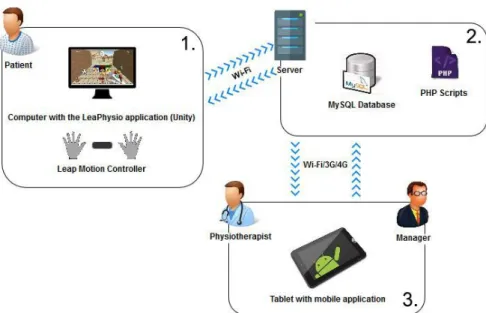
The LeaPhysio system is a set of tools developed for the rehabilitation of hands and fingers for patients with motor activity limitations, allowing the physiotherapist to have access to the results obtained from the serious games performed by patients. Figure 3.1 illustrates the system architecture that is divided into three blocks.
Figure 3.1 – LeaPhysio System Architecture
The first block (block “1”) is dedicated to the patient allowing the access to a set of serious games characterized by natural interaction using LMC. The second block (block “2”) it’s mainly represented by the data server that stores the game results and game settings. The software technologies used on the server side are MySQL and PHP that allows the communication between applications. The last block (block “3”) is expressed by a mobile application associated with patient data management and the health professionals data management. This chapter presents aspects related the operations associated with the LeaPhysio System blocks and the activities associated to the system users.
3.1. Users and Applications
The system has three different types of users: the Manager and Physiotherapist that interact with the system through mobile application that is used to manage the available resources and the Patient that uses the computer application (expressed by a serious game platform) to
18 perform the training session imposed by the physiotherapists as part of the patient training plan.
Two types of applications were developed as parts of the LeaPhysio system:
• Computer Application: Developed in Unity that serves as a serious game platform for Patients to perform their training. The serious game platform provides a set of games, highly interactive and configurable according with the needs of patients. With the LMC, it’s possible to replicate the movement of hands in the application, with a real-world interaction;
• Mobile Application: Developed for Android OS tablets that serves as a working tool for Physiotherapists that allows to manage different physiotherapy sessions and visualize results. The Manager also uses this application to add new physiotherapists to the system.
Both applications require Internet connection to perform database communication, either for data storage in a remote database
Additional details are mentioned for the system users:
• Patient: Is the main user of the LeaPhysio system, and in this case, can be mentioned that the developed system mainly corresponds to the patient under physical rehabilitation needs. The patient represents a single user of the computer application and he is the only one who performs the training created by the user’s physiotherapist; • Physiotherapist: Supervise the patients training and impose the training plan. Using
the mobile application, the physiotherapists insert the patient data and create the training plan and analyze the training results;
• Manager: Presents the rights to manage the physiotherapists data using application.
3.2. LeaPhysio System
Figure 3.2 illustrates a time flow of the use of the LeaPhysio system by its users. The letters of A-H indicate the execution steps. The first step on system usage is carried out by Manager that introduce Physiotherapists data into the system using the mobile application. The registered Physiotherapist through the mobile application, can introduce the Patients data in the system and to include the training plan according to the patient needs. The Patient will executed the prescribed plan including serious game session using the computer application.
19 Figure 3.2 – Diagram with time flow of the LeaPhysio System
When a physiotherapist creates a new patient in the mobile application, it’s recorded that the physiotherapist is responsible for creating training plans to patient, but what doesn’t prevent other physiotherapists in the future to create training for this patient, being only responsible for that training, because in the absence of the physiotherapist responsible due to any circumstance there may be another physiotherapist to accompany the patient. Concluding the patients may be shared between different physiotherapists in the same clinic.
After insertion of a new patient into the system, the patient receives a LeaPhysio card that includes a QRCode. Figure 3.3 shows an example of the card, which allows the patient to log in to the computer application, showing the QRCode of the available Webcam. The use of a QRCode system was considered against others identification technologies such NFC or RFID considering the costs and a capability of this technology to be easily, interconnect with the Unity application.
20 Figure 3.3 – LeaPhysio Card
After a patient is created in the system, the responsibility of the physiotherapist is to analyze the clinical status and to create an individualized training plan. The training plan setup involves the following parameters (A):
• Initial Date: Date for the patient to start the training. The initial date must be equal to or greater than the creation date;
• Final Date: This date is the last day (inclusive) in which the patient can perform the training. The final date must be equal to or greater than the initial date;
• Select Game: What is the serious game that a patient should perform; • Select Game Theme: Thematic of the chosen serious game;
• Duration of the Game: Game time;
• Rest time: Interval time between each game;
• Number of repetitions per training: Number of times the patient should repeat the game;
• Select hands: The hand or hands that the patient should use (LEFT, RIGHT, BOTH); • Difficulty of the Game: Level of difficulty of the game (EASY, MEDIUM, HARD); • Description: Training note;
When a training is created for a patient, the mobile application sends the data to the remote database (B). Afterwards, the patient should access the computer application presenting the QRCode to the webcam, that will read and check the QRCode and check in the DB. If the content belongs to a patient, the patient has successfully logged into the application. The LMC needs to be connected to the computer where the application is installed so the patient can perform the training.
21 The computer application initiates an HTTP request through the corresponding PHP script hosted on the server so that it contacts the MySQL DB and sends the necessary data to the computer application according to the patient who is using it, using an HTTP response (C). If the patient had training and these trainings are between the initial and final training dates, the patient can perform the serious games configured with the parameters of the training in question (D). The application developed in Unity uses LMC to replicate hands and their movements in the game scenario (E). Each training can have a repetition or more, it means that if a certain training has, for example, two repetitions, the patient performs once the serious game with its duration, after completing, has a rest period until the serious game is executed again (F) and after completing his training session ends. A patient may also have more than one active training at the same time, in which case the training repetitions are intercalated, for example, two training (training X and training Y) and both with two repetitions. Initially the patient performs the game X-1 (game corresponding to training X in the first repetition), has the rest time of training Y and after this time performs the game Y-1, after rest time of training X, performs the game X-2, then rest time Y, run the Y-2 game and end the training session.
After finishing the training, the physiotherapist can use the mobile application to change any parameter in the patient's training if necessary and visualize the results obtained (G). The results can be of two types, results in terms of scores and results in terms of coordinates. The scores indicate, for example, how many objects the patient picked up during the game, while the coordinates refer to the hand points that the patient used during the training. The coordinates refer to values related to positions, rotations and speeds of hands and fingers. Finally, in case the physiotherapist deems it necessary, he can generate a report with information about the patient (H), of the exercises already performed and their respective scores. These reports can be generated for the personal use of the physiotherapist or may be delivered to the patient to the inform about his performances during the training.
The execution steps (see Figure 3.2) is repeated several times, either with other trainings or configurations. It’s important that there is a follow-up on the part of the physiotherapist, either at an early phase to explain how serious games are performed or at a later phase to assess the clinical state and evolution of the patient in performing hand movements. The following two subchapters provide information about the hardware components of the implemented system.
22
3.3. Leap Motion Controller
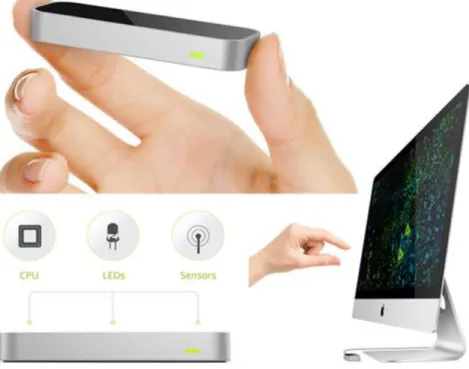
The LMC (see Figure 3.4) [6] is a small device (13 mm x 13 mm x 76 mm) that weights 45g. It’s dual platform (Macintosh/Windows), connects to a computer via USB 3.0 connection and easy to install. The sensor is activated and ready to use when the red lights appear on the top of the device. It can detect the movement of the hands when they are on the device’s field of vision, the movements being recognized by the device and translated into actions associated with the implemented VR. The LMC streams data at a variable acquisition rate of up to 120Hz.
Figure 3.4 – Leap Motion Controller
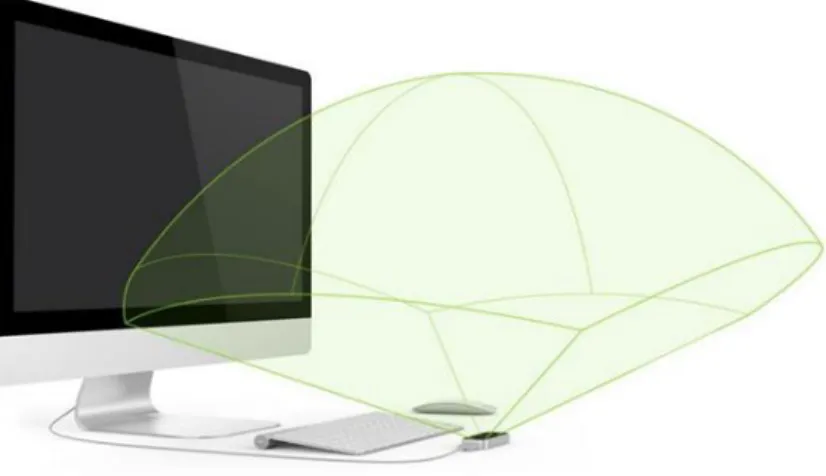
The device is highly sensitive to hand small amplitude movements, due to its ability to map the entire zone over it, being able to detect small movements of the whole hand. The controller senses the upper zone and is sensitive to a range of about one meter (see Figure 3.5). It can simultaneously capture the movement of all fingers, with a sensitivity of 1/1000 mm.
23 Figure 3.5 – Leap Motion interaction zone
It was launched in July 2013 [35] and presents a new way of interacting with the technology presented. It has an APP Store, known as AirSpace [36], in November 2015 the store contains about 230 applications, in which about 45% of applications are free and the rest paid. The applications cover a wide range of areas, games, educational applications, applications dedicated to music among other categories, and there is a growing need for applications dedicated to the field of physiotherapy. According to company reports, the controller uses two monochrome cameras and three IR (infrared) LEDs (wavelengths = 850nm) to rebuild the 3D scene and track the positions of the hands and fingers.
To perform the integration in the system the device SDK was considered. It provides data access through direct hand and finger mapping detection without the need to interpret detection data to locate hands and fingers, making this aspect a great potential in the development of new applications. The low cost of the device (about € 80), a simple setup along with its accuracy, indicates its potential for the evaluation of movement in a 3D space. Independent evaluations used an industrial robotic arm with a point pen, concluding that the mean square error between the position of the point pen and the position measured by the Leap Motion system was < 0.2 mm in static tests and < 2.5 mm in dynamic tests [37]. In another evaluation, a plastic arm model was used, where it was found that the Leap Motion system was accurate to <0.5 mm in statistical conditions [38]. In addition, a recent comparison reported a considerable edge in hopping latency (850 ms) compared to Kinect (170 ms) [39].
Christianne Falcao, Ana Catarina Lemos and Marcelo Soares [40] carried out a study regarding the evaluation of the natural UI of LMC. Graphic designers with experience using Photoshop CS6 software who have never had contact with LMC participated in this study.
24 Participants were asked to perform certain tasks in Photoshop CS6 using LMC to be able to answer certain questions proposed by the team. At the end of the study they concluded that LMC needs adjustments in its gestural interface and in the analysis of hand movements to minimize fatigue and provide a better experience. They indicate that this is a very promising technology, but it’s not ready to replace the traditional mouse and keyboard in the use of graphic software.
This technology holds great promise for the field of rehabilitation since it doesn’t require the patient to wear gloves, which makes it an important factor in the therapy of patients who have undergone hand surgery. The device provides a new way of interacting between the user and the computer, the ability to bring the real world to the digital domain. The main advantages of this sensor compared to other motion sensors, also applied to rehabilitation are:
• Provides natural user interfacing and through remote sensing (no need for the device to be attached to person's body, which can cause discomfort on certain occasions); • The SDK provided for the development of applications;
• Price.
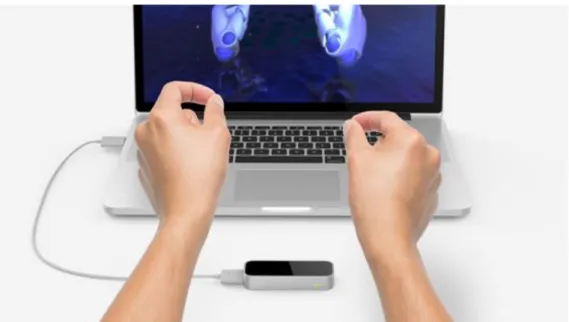
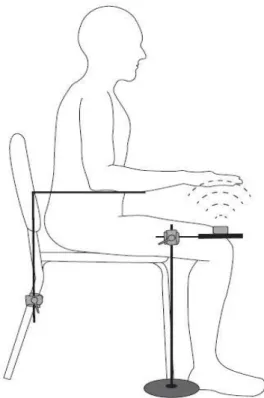
Figure 3.6 illustrates the use of the LMC by a typical user.
Figure 3.6 – Common usage of LMC by a user
In [41], a study was carried out on the use of LMC in the hand rehabilitation process. In the tests performed, an adjustable plate was used to place the LMC (see Figure 3.7).
25 Figure 3.7 – Flexible size structure to place the Leap Motion Controller
It consists of a platform that is supported on the floor along with an adjustable plate, where the LMC is mounted. By adjusting the height of the LMC through the board, it allows it to be under the user's hands so that the controller captures the movements of the hands. This structure against the typical use of the LMC, allows the user to do no extra effort, not needing to raise the arms at a certain time for the LMC to detect the hands, thus avoiding wear and tear on the part of the limbs. For this reason, this type of structure was used for the LeaPhysio system.
3.4. Others Hardware Components
In addition to the LMC, there are other hardware devices that are required to use the LeaPhysio applications:
• Computer and Webcam; • Server;
• Tablet with Android OS.
Computer and Webcam
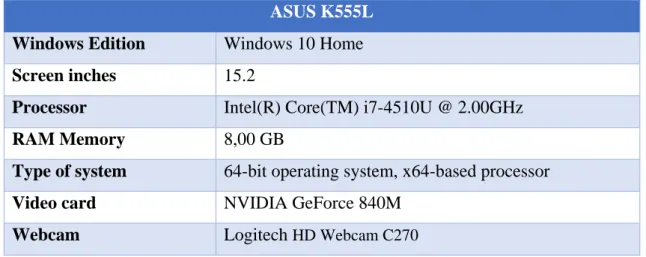
The Unity application is designed for computers running the Windows OS. For its development and testing a portable computer with the following specifications was used:
26 ASUS K555L
Windows Edition Windows 10 Home
Screen inches 15.2
Processor Intel(R) Core(TM) i7-4510U @ 2.00GHz
RAM Memory 8,00 GB
Type of system 64-bit operating system, x64-based processor
Video card NVIDIA GeForce 840M
Webcam Logitech HD Webcam C270
Table 1 – Specifications of the laptop used to test and develop the LeaPhysio System
Clinics should use computers that have similar specifications as above or higher, whether desktop or laptop computer. It’s recommended that there be computers with a good quality image, resolution of 1280 × 720, processor and graphics card higher than those indicated in Table 1, so that it’s possible for the patient to visualize all the components of the game. About Webcam (Logitech HD Webcam C270), it’s an essential component for the application, because it’s through this that the patient logs into the application, showing his QRCode that is embedded in his LeaPhysio card. There are monitors in the market that already comes with a built-in Webcam that can be used by the application, but since the users of the application are patients that are sometimes very limited in terms of movements, using the webcam available on the monitor can cause discomfort, either because the patient exerts an extra effort to raise the arm to show the QRCode or even because the monitor is away from where the patient is sitting. Ideally, an external webcam should be used with the lens turned from the bottom up and available in a frame to place the QRCode at the top and log in, as shown in Figure 3.8.
27 Figure 3.9 – Example of using Webcam structure with LeaPhysio card
The structure consists of an acrylic or plastic box in which the webcam is inside, with its field of view directed to the top of the box and which is connected to the computer via USB. The upper part of the box has signaled the place where the patient should place the QRCode on the LeaPhysio card. Figure 3.9 illustrates the structure as an example for using the LeaPhysio Card.
The monitor of the computer together with the box for the webcam must be housed on a table and LMC, as shown in Figure 3.10. On the other hand, the Leap Motion Controller must be placed on a stand that is lower than the table used for the monitor and webcam, as explained in the previous subchapter.
28
Server
In this implementation was used a Virtual Private Server (VPS) consisting of a virtual machine. This server has its dedicated operating system and the user access rights, that allow him to install any software that is compatible with the operation system. The OS is Linux, where its distribution is Debian 3.2.0-4-amd64. On the server is hosted the MySQL DB, the Apache Web Service to perform HTTP communication between different applications, making use of PHP scripts. Also stored here are files of coordinates resulting from patient training, profile photos of various users and LeaPhysio cards.
Android Tablet
To use the mobile application, a device with the Android OS is required. In the developed LeaPhysio APP is possible visualize charts regarding the results of the training of the patients and due to this reason, the devices that must be used should be android tablets, allowing a better visualization of the information available to the user. The application was developed to run on tablets with version 4.0.4 (Ice Cream Sandwich) or higher, and its target is version 6.0 (Marshmallow).
Three devices were used for the development and testing of the mobile application, one with the minimum version supported by the application (Bq Maxwell Plus), one device with the target version of the application (Nexus 10) and another that was used during some tests (Sony Xperia Z2 Tablet). Figure 3.11 illustrates one of the two devices used, in which it has a seven-inch screen with a resolution of 1024x600 pixels, a total of 170 pixels per inch (ppi).
Figure 3.11 – Tablet Android Bq Maxwell Plus
Future devices used by physiotherapists and managers should be tablets with at least the minimum or higher version of Android OS. The application requires the device to have access to the internet, either through a mobile network (3G, 4G) or Wi-Fi.
29
Chapter 4 – Serious Games for Physiotherapy
4. Overview
The term Serious Game refers to digital games dedicated to serious purposes that are based not only on entertainment and fun but also games that promote teaching, research, health, among others. This chapter introduces the computer application that was developed to be used by the patients, so that they can perform the training previously created by the physiotherapists. This chapter explores how the games were created and adapted to the individual characteristics of each patient.
4.1. Game Engine
The game engine is a key component when developing a video game. Is a computer program or a set of libraries, to simplify the development of video games or applications with real-time graphics. There are several game engines that can be used to develop video games in 2D or 3D, each one has certain features to help the developer in the development, for example, Unity 3D [24] and Unreal Engine [42]. After a critical analysis, was decided to use Unity 3D as a game engine, due to its great rendering capability and the features it offers. Regarding programming languages, it uses C# and JavaScript as primary languages, which makes programming easier because its syntax is like other programming languages that programmers are accustomed to using. Is a very well documented game engine with a powerful Asset Store [43] where it’s possible to download scripts, objects, textures, among others to develop games.
30 Unity 3D offers a simple and intuitive interface to help the user to develop the games has a good integration with the LMC. It was some of the main arguments that led to the choice of Unity 3D as a game engine. The Unity 3D development interface can be personality and organized according to who is developing, as illustrated in Figure 4.1.
• 1. The Scene creator allows the programmer to interact with the objects that are present in the scenario. Allows perform rotations, translations, change its size and apply new textures;
• 2. When the programmer runs the game to see what has already developed is the area where you can see the scenario created in the perspective of the end user. It also has a tab named by Console that is used for debugging processes;
• 3. This area refers to existing objects in the scenario, where it’s possible to remove or add new ones;
• 4. Structure with all the files belonging to the project;
• 5. Finally, we have the Inspector. For each object is possible to perform several operations, for example, associate scripts or create physics processes. Is very useful to visualize the various components associated with each object.
One of the main aspects is the interaction between the scenery and the objects it has. Unity 3D doesn’t have any main script to control all the actions of the game, but several scripts that are behaviors and that can be associated with the various objects. After programming a script, this script must extend the monobehaviour class and it’s ready to be associated with an object, it’s only necessary to drag the script to the object, and this is associated as a component. Through the Inspector tool it’s possible to view the script as a component of the object and if it has, for example, some public variables, is possible to visualize them and to define values for each of them, as illustrated in Figure 4.2.
31 The interaction between objects can be performed in two different ways. The first consists of laws of physics, for example, two objects of equal size and different masses, the one with the greatest weight is thrown from a certain point to the position where the other object is, when colliding with the object that was standing the force exerted on it reacts and its position is altered, and there is a direct interaction between the objects. Another example can be an object that reacts to a certain light by changing its texture color. The second way is that when a given object performs an operation it sends a notification to another object so that it performs a certain function. There are different types of interactions that help make the scenario more real. The version used by Unity to develop the application was 5.5.0f3 (64 bit).
4.2. First tests
Initially it was necessary to understand how the communication between the Unity 3D game engine and the LMC works and for that, the book "Mastering Leap Motion" [44] was used, explaining the main classes of the Leap Motion API and how they can interact with Unity 3D. The book has a small tutorial, which teaches you step-by-step how to create a 3D application so that is possible to replicate hands in the game scenario, Figure 4.3 illustrates the result of the application.
Figure 4.3 – First test performed on Unity with Leap Motion controller
This tutorial was useful for understanding the interaction between the game engine and the LMC. Leap Motion Company provides a Unity 3D project that has several examples [45] to
32 help the developer develop new applications. The project doesn’t only provide examples, it also has different objects that represent hands and arms of different colors, gender and sizes, besides providing several scripts already programmed and ready to be used.
The Unity application developed for this project was built based on this sample project, to be able to take advantage of the resources provided. Figure 4.4 illustrates an example provided in the design, which consists of a room with different color boxes and sizes allowing the hands to interact with them, for example, grabbing cubes and dropping them.
Figure 4.4 – Example of the LeapMotionCoreAssets project [45]
After exploring the examples provided, some tests were done to start developing the first game for the application. Figure 4.5 illustrates the first test to develop one of the future games of the application, using leap motion.
33 The objective of the first test is the user can use both hands to grab the available cubes in the scenario and place them in the red box to gain points. A time counter was then added to the scenario to check how many cubes the user places in the box within a certain amount of time and a message is shown to the user indicating that he scored points when the cube is placed in the box. Figure 4.6 illustrates some scenarios created for use with the game that is intended to be developed.
Figure 4.6 – Scenarios created in Unity
4.3. The Games
CollectCube and PickaBall game were developed for application. There are components that
are similar in both games. The first concerns a countdown so the patient has time to prepare the hands to start playing. This time consists of five seconds for the patient to place their hands over LMC, the application will detect and replicate hands on the scene and their movements. During this time the patient cannot grasp any object, only after the time has elapsed and the playing time to start the count is that the patient is operative to grab objects. The second component is present at the top of each scenario, as shown in Figure 4.7.
![Figure 2.5 – Avatar control in Tux Racer game using sensors [17]](https://thumb-eu.123doks.com/thumbv2/123dok_br/19173162.942072/21.892.268.623.417.752/figure-avatar-control-tux-racer-game-using-sensors.webp)
![Figure 2.6 – Example of e-textile system for remote, continuous monitoring of physiological and movement data [20]](https://thumb-eu.123doks.com/thumbv2/123dok_br/19173162.942072/22.892.210.681.209.560/figure-example-textile-remote-continuous-monitoring-physiological-movement.webp)
![Figure 2.14 – mHealth APP [33]](https://thumb-eu.123doks.com/thumbv2/123dok_br/19173162.942072/28.892.146.745.394.730/figure-mhealth-app.webp)