An Efficient Method for Distributing Animated
Slides of Web Presentations
Yusuke
Niwa,
Shun
Shiramatsu,
Tadachika
Ozono,
Toramatsu
Shintani
DepartmentofComputerScience andEngineering,GraduateSchoolofEngineering,Nagoya Instituteof TechnologyGokiso-cho, Showa-ku, Nagoya,Aichi,466-8555 Japan
Abstract—Attention control of audience is required for suc-cessful presentations, therefore giving a presentation with im-mediate reaction, called reactive presentation, to unexpected changes in the context given by the audience is important. Examples of functions for the reactive presentation are shape animation effects on slides and slide transition effects.
Understanding the functions that realize the reactive pre-sentation on the Web can be useful. In this work, we present an effective method for synchronizing shape animation effects on the Web, such as moving the objects and changing the size and color of the shape objects. The main idea is to make a video of animated slides, called Web Slide Media, including the page information of slides as movie chapter information for synchronization. Moreover, we explain a method to reduce the file size of the Web slide media by removing all shape animation effects and slide transition effects from a Web slide media item, called Sparse Web Slide Media.
We demonstrate that the performance of the system is enough for practical use and the file size of the Sparse Web Slide Media is smaller than the file size of the Web Slide Media.
Keywords—Collaborative tools; communication aids; informa-tion sharing; Web services
I. INTRODUCTION
Presenters require instant manipulation of their presentation material to deal with unexpected contexts, such as the state of their audience, unexpected questions, and the knowledge of the audience. Attention controls that use animations and other effects are effective for dealing with the unexpected contexts. The conventional PowerPoint software, however, does not support instant manipulation of slide objects (i.e., objects on a slide) in the presentation mode. We implemented methods for controlling the attention of the audience members and for adding visual information to the presentation in PowerPoint in our prior research [1], [2]. We implemented a system that provides for the manipulation of slide objects so that users give a reactive presentation. The reactive presentation refers to giving a presentation with immediate reaction to unexpected changes in the context given by the audience. Although the methods for controlling the attention of the audience members were based on functions for manipulating objects on slides in real time during a presentation, the methods did not support giving a remote presentation. In this paper, we describe a reactive presentation system that synchronizes the slides between the presenter and the audience on the Web independently of the distance between them.
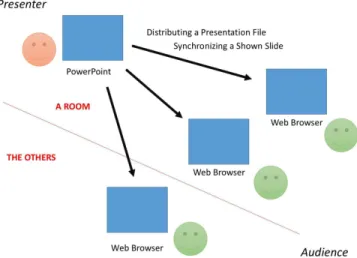
Fig. 1: Web Presentation.
This paper is organized as follows. In Section II, we describe features of the Web presentation support. In Section III, we describe a Web slide media item that is shown on a Web browser. In Section IV, we describe the system architecture of the Web presentation support systems and essential require-ments for reactive presentations. In Section V, we describe the implementation of the system. In Section VI, we describe experimental results for evaluating communication traffic. In Section VII, we discuss the reason for traffic is increasing in the experiment and the ease of configuring the system settings. We conclude this paper in Section VIII.
II. WEBPRESENTATIONSUPPORT
Collaborative presentation support enables us to have a close conversation between a presenter and audience members. Figure 1 shows that a presenter synchronizes the shown slide with the audience members and collects comments from audi-ence members during a presentation. The audiaudi-ence members usually ask questions after the presentation, however, they may want to interrupt the presentation to ask questions.
Web presentation has been widely studied recently. The Web media slides and Silhouette Web Presentation system are useful for supporting presentations on the Web. HTML5 is used for Web presentation [3], [4]. There is a JavaScript library
for publishing multimedia Web contents using HTML5 [5]. Some studies on E-learning have used PowerPoint [6], [7].
In Figure 1, a presenter reuses his/her presentation file for knowledge sharing. Such service allows users to share presentations, documents, videos, and webinars. The service’s goal is to share knowledge online.
The number of Web services to share presentation slides is increasing rapidly. For example, Office 3651is a cloud service provided by Microsoft. iCloud2 is a cloud service provided by Apple. These cloud services provide, respectively, an Office PowerPoint and a Keynote3 on the Web and allow a user to edit a presentation and save the presentation on the cloud. Of course, a user begins a presentation slide show on a Web browser. SlideShare4 is a Web service to share slides.
Presentation applications such as PowerPoint and Keynote provide an abundance of wonderful animations and effects for presentations. However, adding and editing these animations and effects, such as the movements and changing the sizes and colors of the slide objects, are possible only if the applications enable an editing mode. Nevertheless, the slide show mode is better for maintaining the attention of the audience members at the time of the presentation because there is no salient cueing, with the exception of the slide objects, in the slide show mode. The problem is that existing presentation applications (e.g., PowerPoint and Keynote) do not support editing slide objects in the presentation mode. We cannot apply new animations and effects to slide objects when we need to immediately get the attention of the audience members in the presentation mode. For presentation applications, we apply an abundance of animations and effects to objects on slides. It is also beneficial for us to use the rich number of animations and effects in unexpected situations during presentations.
We assume that presenters and audience members should not be specialists of ICT technologies. We design a new presentation support system under the following constraints: 1) the presentation slide should be composed by using ex-isting presentation software, 2) audience members only use Web browsers during presentations, and 3) presentation slides should be shared and reusable on the Web.
A. Reactive Presentation
Although studies on presentation support systems have been conducted for some time, studies about reactive presenta-tion have never been conducted in this previous research. Our focus is to develop a presentation support system that enables us to react to unexpected context changes. We developed a new approach to properly react to requests of audience members during presentations.
We propose a system for manipulating objects on slides in real time during a presentation to give a reactive presentation. Manipulating slide objects, such as moving, zooming, and adding some effects, the presenter guides and maintains the attention of the audience members and communicates infor-mation in visuospatial terms by applying the aniinfor-mations and effects of slide objects reactively.
1http://office.microsoft.com/en-us/home-and-student/ 2https://www.icloud.com/
3http://www.apple.com/iwork-for-icloud/ 4http://www.slideshare.net/
The presenter controls the attention of the audience mem-bers by adding animations and effects to deal with a certain context and reflecting on something in the presentation. When the audience members ask the presenter to explain the topic based on some unexpected conditions that are difficult to prepare for beforehand, the presenter only explains them by speaking or pointing them out.
1) Attention Control: Attention control in presentation is used to guide and maintain the attention of the audience members to crucial parts of slides, and it is effective for dealing with the changing context in a presentation. Attention guiding by means of cueing reduces the extraneous cognitive load of the audience [8].
2) Animations for Attention Control: Focusing on exoge-nous attention [9] by using animations and effects is useful for properly guiding the attention of the audience members. Visually guiding and maintaining their attention by using animations and effects reduces their cognitive load [10].
Animations and effects effectively communicate non-verbal information to the audience [11] by expressing various move-ments, colors, and features for slide objects.
3) Slide Object Manipulation for Instant Attention Control: It is necessary for reactive presentation to allow users to manipulate slide objects in real time in a slide show. A user should be able to manipulate slide objects during a slide show without changing into the edit mode to avoid losing the attention of the audience members. A person’s eye direction and attention are almost entirely consistent [12], [13].
III. WEBSLIDEMEDIA
There are two requirements for inspecting a presentation file on the Web: The file allows users to skip slides and to play animations on slides. To cover the requirements, a presentation file should be Web-friendly content. We solve a visual appearance problem using HTML5 specifications that is supported by many modern Web browsers. To prevent the broken appearance of slides, we convert the presentation file to a video file. Converting to a video file uses PowerPoint functions.
A Web slide media item consists of an original presentation video and chapter information generated by our system. An HTML5-supported Web browser plays a Web slide media with-out browser plugins. A Web slide media item expresses anima-tions and stops the playback with its own chapter information when the playback position reaches each of slide transition ends and animation ends. To solve an operability problem of an animated slide, playback animations, and previewing any slides randomly, we add chapter information to the animated slide.
A. Chapter Information
In this research, we focus on users creating a presentation file with PowerPoint. PowerPoint also has a video output function, but the output file has no chapter information. The presentation software Keynote has a function to save a pre-sentation file as a video file. The function also adds chapter information to the output video file. To add chapter information
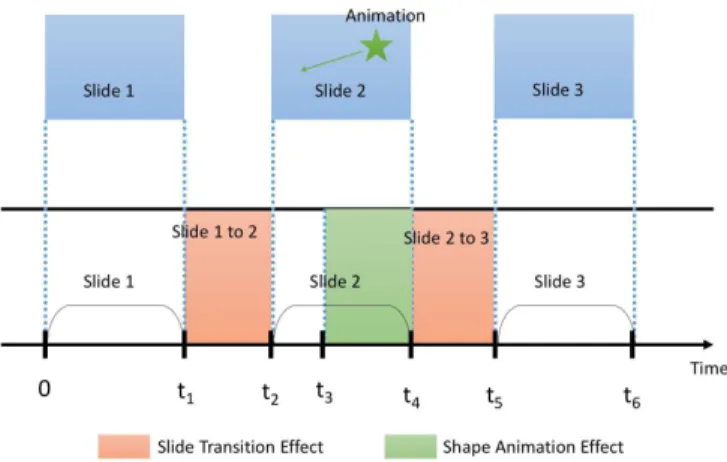
Fig. 2: Chapter Information.
to a video file, a player system detects slide transition and animation ends using the chapter informations.
Chapter information chaps consists of tuples of a times-tamp, a slide number, and an animation number. The chaps
consists of multiple pieces of chapter information, chapi, where i indicates the chapter number. chapi consists of the tuple (t, s, a), where t is the start time of an animation, s is the slide number att andais the animation number.
Using chapter information, a slide transition on a Web slide media item plays the video from a start timet. Figure 2 shows a relationship between slides of a presentation file and a time sequence of Web slide media. In Figure 2, the upper rectangles are three slides. Every slide has a slide transition, andSlide2 has an anmation. The bottom indicates the time series of a Web slide media item. Where the time of the head of the video is zero, the span from 0 to t1 indicates Slide 1 on the video timeline. The span from t1 to t2 is a slide transition from Slide1toSlide2. The span fromt2tot4representsSlide2. The span fromt2tot3represents prior to the beginning of an animation, and the span from t3 to t4 is the animation. The span fromt4tot5is a slide transition fromSlide2toSlide3, and the span fromt5tot6 representsSlide3. It is possible to control slide playback on the video sequence by the beginning and end times of a slide, an animation, and a slide transition. In this case, to previewSlide2 is an alternative on playback from t1 through t2 on the video sequence.
B. Sparse Web Slide Media
In comparison to the original video, generally, the size of the Web slide media tends to become larger. The file size of a Web slide media item created from a rich presentation file is larger than one without animations. The fidelity of animations of a Web slide media item and the file size have a trade-off relationship. In this research, our system enables users to adjust the priority of the relationship. To reduce the file size, users may adjust the resolution of a Web slide media item and the frame rates to lower. Also, removing video frames of slide transitions and animations produces smaller file size.
We called this type of Web slide media Sparse Web Slide Media. Specifically, a sparse Web slide media item consists of frames att1, ..., t6 of the Web slide media. In cases when it is necessary to preview a presentation file or reduce a file size, sparse Web slide media is a useful way.
IV. SYSTEMARCHITECTURE ANDREQUIREMENTS
We describe the design of our collaborative Web presenta-tion support system, called “Silhouette Web Presentapresenta-tion Sys-tem.” The slides for the Silhouette Web Presentation System are called “Web media slides.” Web media slides contain the image contents. In this section, we show our three design goals. Then we explain the three functions that we implemented to achieve a collaborative Web presentation.
A. Design Goals
1) Comment Aggregation: Collecting a comment in real time for a presentation and making a relation between the comment and a shown slide in the presentation prevents this information from becoming disorganized. All comments on a slide should be stored in it automatically to avoid losing valuable opinions.
2) Reactive Presentation: Both presenters and audience members require attention control functions to communicate with each other. It is difficult for audience members to tell the presenter slides they want to watch, because they do not have a proper way to indicate the slides in their mind.
3) Easy to Use: It is not necessary for a presenter to upload a presentation file. Audience members only access a Silhouette audience system on the Web browser and log in with a specific token without downloading the presentation file. A presenter uses an existing presentation software. An audience system is executable for many environments.
B. Functions
1) Automatic Comment Crawler: This function collects comments from the Web and saves the comments into the current slide. The audience members make comments anytime by using Twitter, email, and so forth. The collected comments are displayed on the left side of the presenter’s screen. These comments are saved into the shown slide at that time in the presentation. This function provides the audience members with the ability to ask questions and make comments during the presentation and provides the presenter with the ability to log the comments after the presentation.
2) Slide Synchronization: This function is to synchronize shown slides between a presenter and audience members. A tablet device in the proposed system has two modes: One is a free mode, and the other is a viewer mode. A displayed slide on a device that is set to the viewer mode is synchronized with that on the presenter’s device. A device that is set to the free mode is not synchronized. A user using the device can change the displayed slide. Then, the same slide is displayed on the presenter’s device and the viewer mode devices anytime. The presenter’s device sends synchronous messages to the other devices via a Silhouette hall. The devices that received the synchronous messages redraw their displayed slide based on these messages.
Fig. 3: System Architecture of the Silhouette Web Presentation System.
3) Web Presentation Snippet: To share a presentation slide file, the system has a feature to make a Web snippet and append it to existing Web pages. It is important to note that existing animation effects in the slides are also useful to control the attention of audience members. The slides are converted to Web slide media by the add-in of PowerPoint, WW Media, we developed. A Web slide media item expresses shape animations and slide transitions of the presentation slide file.
C. Architecture
We developed a reactive presentation system called the Silhouette Web Presenter System. An outline of our current system’s architecture is shown in Figure 3. The system consists of three parts: a Silhouette presenter, a Silhouette audience, and a Silhouette hall. A presenter uses the system, and the slides are synchronized to audience members. Additionally, the presenter can reuse the presentation as a Web snippet and append it to any existing Web pages. Web slide media in Figure 3 are HTML5 contents generated from presentation slides, which are used for Web presentations.
V. IMPLEMENTATION
In this section, we describe the implementation of the Silhouette Web Presenter System. The Silhouette Web Presen-ter System consists of three subsystems: a server-side system and two client-side systems. The server-side system, called a Silhouette hall, relays control messages and presentation slides. The first client-side system, called a Silhouette presenter, is used by a presenter. The second client-side system, called a Silhouette audience, is used by an audience member of the presenter.
We given an overview of usage of the Silhouette Web Presenter System. The system identifies a synchronization group by a specific synchronization token. The presenter opens a presentation file in PowerPoint and starts the Silhouette pre-senter. The audience members start each Silhouette audience in their Web browsers. The presenter and audience members set the same synchronization token to their system.
Fig. 4: Distributing Web Slide Media and Synchronizing Current Slide.
Fig. 5: System Diagram of the Silhouette Presenter.
A. Silhouette Hall
A Silhouette hall provides two services. The first is a file storage service over HTTP. The second is a synchronization message relay service over WebSocket. We implemented a Silhouette hall in Node.js5.
Figure 4 shows sequences of distributing a Web slide media item and synchronizing the current shown slide. First, a Silhouette presenter system converts the presentation file into a Web slide media item before the begining of a slide show on PowerPoint, and uploads the Web slide media to the Silhouette hall. The Silhouette hall responds to uploading the animated slide. The Silhouette presenter broadcasts a synchronization message to Silhouette audiences via the Silhouette hall.
Fig. 6: Silhouette Presenter UI.
B. Silhouette Presenter
The Silhouette presenter is based on Microsoft PowerPoint 2013. We developed the system on .NET Framework 4.0 with Visual Studio 2013 C#. As for controlling PowerPoint, we use PowerPoint Object Library6. We describe the structure and functions of our system in this subsection.
Figure 5 shows a system diagram. The system is roughly divided into three parts. The first is the sensor part that detects the user inputs using a mouse or a keyboard. The second is the software part that processes some of the information obtained from the sensor part. The third is the screen part that reflects the results of the processing from the software part. The software part has six components. These components are for dispatching events, manipulating the slide objects, collecting the comments of the audience members, and managing the syn-chronization messages, the main controller, and PowerPoint. The screen part has two layers. The foreground layer displays the control menu of the system, and the background layer displays the PowerPoint slide show.
The Comment Collector is launched on a presenter’s netbook device and collects comments about a presentation. The Comment Collector has three main submodules: a tweet collector for collecting tweets form Twitter, an email collector for collecting emails using IMAP, and a Web-form comment collector for collecting messages posted from a Web form.
The Message Manager sends and receives messages via WebSocket. When the presenter changes a shown slide in the slide show, the message manager creates a change message containing the slide index and sends it to the Silhouette hall. The Silhouette hall relays the messages to all the other Silhouette audiences, that is, Web browsers.
Figure 6 shows a Silhouette presenter’s UI. The bottom-left icons are four function buttons. The top button, whose icon looks like a pen, is a pen function button. Push the button to draw freehand lines via the PowerPoint function. The second, whose icon looks like an arrowhead, is a direct mode function button. Push the button to through the user’s mouse events to PowerPoint directly. The third button, whose icon looks like a balloon, is a comment function button. Push the button to show
5http://nodejs.org/
6http://msdn.microsoft.com/en-us/library/office/ee861525.aspx
Fig. 7: Synchronization of animted slide with Silhouette Pre-senter in Silhouette Audience.
or hide the collected comments. The bottom button whose icon looks like a screen, is a quit function button. Push the button to quit the Silhouette presenter. The bottom-right button, whose icon looks like a wrench, is a setting function button. Push the button to show a setting dialog for the Silhouette presenter. The user can changes the server address and the synchronization token in the dialog.
C. Silhouette Audience
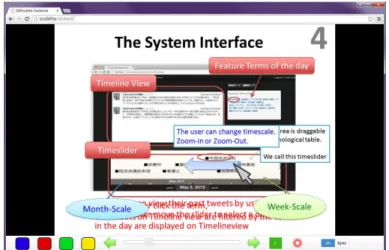
We implemented a system called Silhouette audience that plays Web slide media. Silhouette audience can play Web slide media in a Web browser that supports HTML5. Figure 7 shows the user interface of Silhouette audience. The screen of Silhouette audience shows a presentation slide generated from a Web slide media item. To show the previous or next slide of the presentation, the user clicks the left-arrow button or right-arrow button, respectively. A slider between the left-arrow button and right-left-arrow button indicates the current slide position. The user changes the current shown slide by sliding a circle handle on the slider. The four colored buttons, blue, red, green, and yellow placed on the left beside the right-arrow button are used by a questionnaire feature of the Silhouette presenter. A switch placed on the right beside the left-arrow button indicates synchronization mode, whether the shown slide is synchronized with the Silhouette presenter or not.
D. Web Slide Media Maker Add-in for Presentation Software
In this section, we describe a system that builds a Web slide media item from a presentation file. The system targets a PowerPoint presentation file (PPTX) as the presentation file. The system is developed as a PowerPoint add-in. The develop-ing environments are .NET Framework 4.07 and PowerPoint Object Library (PPOL)8 15.0. PPOL provides PowerPoint automation functions. Ffmpeg9 is a multimedia file converter. Figure 3 shows the system architecture of the add-in. The add-in builds a Web slide media item from a PPTX file. We describe the process of making a Web slide media item.
7https://msdn.microsoft.com/en-us/library/vstudio/w0x726c2(v=vs.100).aspx 8https://msdn.microsoft.com/en-us/library/bb772069.aspx
9https://www.ffmpeg.org/
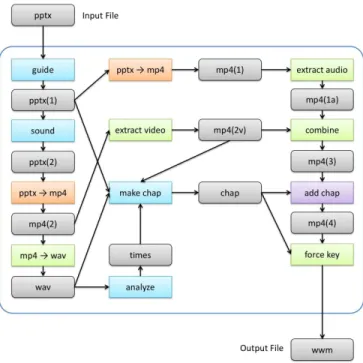
Fig. 8: Add-In Process and Data Flow of Making Web Slide Media
E. Making Web Slide Media
In this section, we describe an add-in process flow of making a Web slide media item. Figure 8 shows the process flow. Users input a pptx file into the add-in and get output as Web slide media wwm. A rectangle is a process. A corner-rounded rectangle is data. An arrow is a data flow. The data that points to a process is an input of the process. The data that is pointed to by a process is an output of the process. A process that has multiple inputs may start when all input data gets to be available. A blue-colored, corner-rounded rectangle is intermediate data. We describe file formats of intermediate files generated by making a Web slide media item.pptx(1)and
pptx(2) are PowerPoint presentation files.mp4(1),mp4(1a),
mp4(2),mp4(2v),mp4(3), andmp4(4)are mp4 files.wavis an audio format wave file.timesis time series.chapis chapter informations. We describe a process flow in the figure.
The process “guide” has an input as a pptx file and an output as a pptx file. The process inserts a sound-effect animation before each slide transition and animation activated by user-click events on the input pptx file and outputs a pptx file as pptx(2). Inserting sound-effect animations uses PowerPoint functions via PPOL.
The process “sound” has an input as a pptx file and an output as a pptx file. The process decompresses the input pptx file using an archiver software 7za10. Next, the process modifies an XML file that contains animation information to append sound effect control information into the sound-effect that is inserted by the process guide. Finally, the process compresses the modified files and outputs a pptx file as
pptx(3).
The process “pptx→mp4” has an input as a pptx file and
10http://www.7-zip.org/
an output as an mp4 file. The process converts the input pptx file to a mp4 file using PowerPoint functions via PPOL.
The process “mp4 → wav” has an input as an mp4 file and an output as a wave file. The process extracts an audio stream from the input file using ffmpeg functions and outputs a wave file. The ffmpeg executing command line is below. A string “path/to/a.mp4” is the input file name, and a string “path/to/b.wav” is the output file name. The command line means that it converts the input file to the output file where the output audio encoding is PCM little endian 16-bit encoded, the sampling rates is 44,100Hz, and the number of audio channels is 2.
ffmpeg -i "path/to/a.mp4" -f wav -acodec pcm_s16le -ar 44100 -ac 2 "path/to/b.wav"
The process “extract video” has an input as an mp4 file, and an output as an mp4 file. The process extracts a video stream from the input file using ffmpeg functions and outputs an mp4 file that has only a video stream and no audio stream. The ffmpeg executing command line is below. A string “path/to/a.mp4” is the input file name, and a string “path/to/b.mp4” is the output file name.
ffmpeg -i "path/to/a.mp4" -f mp4 -vcodec copy -an "path/to/b.mp4"
The process “analyze” has an input as a wave file and an output as a time series. The process analyzes audio wave forms from the input file and gets times when the wave forms rise up.
The process “make chap” has four inputs, a pptx file, an mp4 file, a wav file, and a time series< t0, t1, ..., tn >, and outputs chapter information. The process gets an animation information array< a0, a1, ..., an >from the input pptx file. Next, the process gets a video duration T v and an audio duration T a from the input mp4 file and the input wav file, respectively. Then, the process converts the time series
< t0, t1, ..., tn >into an adjusted time series< t′0, t′1, ..., t′n> using the equation below. Finally, the process merges the an-imation information array< a0, a1, ..., an>and the adjusted time series< t′
0, t′1, ..., t′n >by ninto chapter information.
t′ i=
Tv
Ta
ti
The process “extract audio” has an input as an mp4 file and an output as an mp4 file. The process extracts an audio stream from the input file using ffmpeg and outputs an mp4 file that has only an audio stream. The ffmpeg executing command line is below. A string “path/to/a.mp4” is the input file name, and a string “path/to/b.mp4” is the output file name.
ffmpeg -i "path/to/a.mp4" -f mp4 -vn -acodec copy "path/to/b.mp4"
The process “combine” has two inputs as mp4 files and an output as an mp4 file. The process combines the two mp4 files into an mp4 file using ffmpeg. One of the input mp4 files has only an audio stream, and the other has only a video stream. The ffmpeg executing command line is below. A string “path/to/a.mp4” is the input file name that has only a video stream, a string “path/to/b.mp4” is the input file name that has only an audio stream, and a string “path/to/c.mp4” is the output file name.
ffmpeg -i "path/to/a.mp4" -i "path/to/b.mp4"
Fig. 9: Add-In Process and Data Flow of Making Sparse Web Slide Media
-f mp4 -vcodec copy -acodec copy "path/to/c.mp4"
The process “add chap” has two inputs, an mp4 file and chapter information, and an output as mp4 file. The process appends the chapter information to the mp4 file using MP4Box and outputs an mp4 file. The MP4Box executing command line is below. A string “path/to/a.mp4” is the input mp4 file name, and a string “path/to/b.txt” is the chapter information file name.
MP4Box "path/to/a.mp4" -chap "path/to/b.txt"
The process “force key” has two inputs, an mp4 file and chapter information and an output as an mp4 file. The process converts the input mp4 file with key frames that are pointed out by times included in the chapter information using ffmpeg and outputs an mp4 file. The ffmpeg executing command line is below. A string “path/to/a.mp4” is the input mp4 file name, and a string<times>is an array of a timestamp of the key frames. A timestamp of the key frames is formed by “0:00:00.000.”
ffmpeg -i "path/to/a.mp4" -force_key_frames <times> -f mp4 -vcodec libx264 -r 30
-coder 1 -pix_fmt yuv420p -acodec
libvo_aacenc -ar 44100 -ac 2 "path/to/b.mp4"
F. Making Sparse Web Slide Media
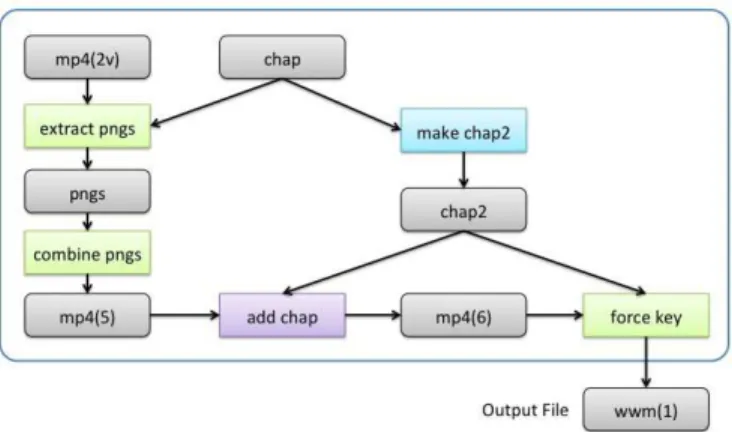
In this section, we describe an add-in process flow of making sparse Web slide media. Figure 9 shows the flow. The process outputs a sparse animated slide using the intermediate files mp4(2v) and chap gotten from making the Web slide media.pngsis a set of multiple png files.mp4(5)andmp4(6) are mp4 files. wave is an audio wave file. chap2 is chapter information. We describe processes and data flows in the figure.
The process “extract pngs” has two inputs, an mp4 file and chapter information, and outputs as multiple png files. The process extracts png files that are pointed out by the chapter information from the input mp4 file using ffmpeg. The ffmpeg executing command line is below. A string “path/to/a.mp4” is the input mp4 file name, a string <time> is an extracting timestamp, and a string “path/to/b.png” is the output png file name. The timestamp of the extracting frames is formed by “0:00:00.000.”
ffmpeg -i "path/to/a.mp4" -ss <time>
-vframes 1 -f image2 -c:v png "path/to/b.png"
The process “combine pngs” has inputs as png files and an outputs as an mp4 file. The process combines the input png files into an mp4 file using ffmpeg. The ffmpeg exe-cuting command line is below. A string “path/to/a%03d.png” is the input png file name, and a string “path/to/b.png” is the output mp4 file name. The “path/to/a%03d.png” contains a file name pattern. The pattern accepts “path/to/a000.png,” “path/to/a001.png,” “path/to/a002.png,” and so on.
ffmpeg -f image2 -framerate 5 -start_number 0 -i "path/to/a\%03d.png" -f mp4 "path/to/b.mp4"
The process “make chap2” has an input as chapter infor-mation for a Web slide media item and an output as chapter information for a sparse Web slide media item.
VI. EVALUATION
We have conducted an experiment to show that the Web presentation system proposed in section V synchronizes the slides at the same time for practical use. We measured the change in processing time and the data traffic in relation to the increase in the number of clients.
We evaluated a comparison of the file size of an original presentation file, a Web media slide file converted from the presentation file, a sparse Web media slide file generated from the Web media slide file, and an mp4 video file generated by the PowerPoint function.
A. Evaluation of Data Traffic
We evaluated the number of audience members within the range of 1 to 7, where the step of increase was at the rate of 1. We changed the slides 200 times and measured the time from when the Silhouette hall receive a change message from the presenter to when the Silhouette server received the message from the server. For experimental purposes, a Silhouette au-dience sent a response message after the Silhouette auau-dience received a change message and also sent a finish message after the image was loaded by the audience.
The relevant specifications of the computer system used in the experiment are outlined below. The presenter system was performed on a MacBook Pro (Late 2013) that had an Intel Core i7 2.3-GHz CPU and a 16.0-GB DDR3 memory. The operating system running on the machine was Windows 7 Professional Service Pack 1. The server system was performed on an iMac (Mid 2010) that had an Intel Core i3 3.2-GHz CPU and an 8.0-GB DDR3 memory. The operating system running on the machine was OS X 10.9.2. The client system was an iPad Air. The operating system running on the iPad Air was iOS 7.0.4, and the Web browser was Safari. These machines were connected to a local network via an 802.11n wireless LAN adapter.
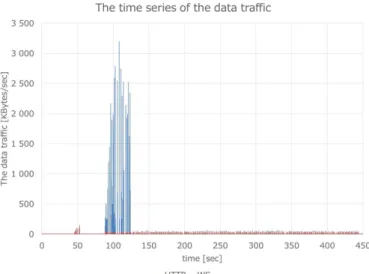
Figures 10 and 11 show the data traffic, where the number of audience members is seven, captured on the server by using Wireshark11. The horizontal axis shows the time series, while the vertical axis shows the total traffic data quantity at the time. Figure 11 shows the data traffic where 85 < t < 130 from Figure 10. The blue graph (HTTP) indicates the data traffic of Web media slides over HTTP. The red graph (WS) indicates the data traffic of synchronization messages over WebSocket. The total size of the data traffic is 32.7 MB.
11http://www.wireshark.org/
Fig. 10: Time Series of Data Traffic.
Fig. 11: Time Series of Data Traffic (85< t <130).
B. Evaluation of Making Web Slide Media
Table I shows the comparison of file size of Web slide media. pptx indicates the original presentation file. file1 has no animations and no slide transitions. file2 has animations and slide transitions. file3 has slide transitions but no animations. file1, file2, and file3 have the same images, shapes, and text. file3 is equal to file2, which excludes all animations. file1 is equal to file3, which excludes all slide transitions. We compared four types of videos: an original mp4 file (mp4), a Web slide media file (wwm), a sparse Web slide media file (wwm2) and a Web slide media file that excluded all slide transitions.
The mp4 video file was generated by PowerPoint with the parameter of a video frame resolution of 720 pixels. wwm, wwm2, and wwm3 were generated by the add-in with parmeters of a video frame resolution of 720 pixels and a video frame rate of 10 frames per second. Generally, slide transitions increase the file size of a wwm. Therefore, we also
TABLE I: Comparision of File Size
Type mp4 wwm wwm2 wwm3 pptx
file1 1,618 2,260 928 2,260 4,693
file2 44,866 10,443 3,235 5,689 4,729
file3 43,788 8,303 1,743 2,260 4,724
TABLE II: Comparision of Rate of Change of File Size
Type mp4 wwm wwm2 wwm3
file1 34.5% 48.2% 19.8% 48.2%
file2 948.7% 220.8% 68.4% 120.3%
file3 926.9% 175.8% 36.9% 47.8%
made a Web slide media file that exlucded all slide transitions of wwm3. It seems that slide transitions significantly increase the file size of a wwm, and excluding slide transitions helps to reduce the file size. In Table I, slide transitions of file3 are disabled because the wwm file size of file3 is equal to that of file1. Table II shows the rate of change of file size between an original presentation file and a Web slide media file. Table III shows the conversion times of making a Web slide media file from an original presentation file. Note that, in Table III, the times of wwm2 are the making times of a sparse Web slide media file from a Web slide media file. Therefore, the actual making time of a sparse Web slide media is the wwm2 time added to the wwm time. And the wwm2 making time is smaller than the one that, excluded slide transitions.
VII. DISCUSSION
A Silhouette audience sends a request to the Silhouette hall to download an image file each time the audience receives a notification of a slide change. The data traffic after 125 seconds is very low (less than 9.805 KBytes/sec) because the Web browser uses an HTTP None-Match header and an HTTP If-Modified-Since header. Moreover, the Silhouette hall reduces the data traffic by HTTP 304 response code if the requested image file is not changed. In Figure 11, the pulses between 40 seconds and 50 seconds occurred when the Silhouette audiences logged in. The Silhouette presenter sent the Web media slides sequentially because the pulses between about 88 seconds and 93 seconds continuously occurred. The pulses between 93 seconds and the end occurred when the Silhouette presenter sent synchronization messages to the Silhouette hall.
Our system is easy to configure for presenters and audience members to synchronize a current slide with a few settings. The following three operations are needed for the synchronization of slides. First, a presenter launches a Silhouette presenter system. Second, the presenter sets a Silhouette hall URL and a specified synchronization token. Third, an audience member accesses the Silhouette audience in a Web browser and logs in with the same token. After the set up, the presenter opens a presentation file and begins the presentation as usual in a PowerPoint slide show. After that, the synchronization of shown slides starts.
The ease of operation is implemented by the following procedures. The Silhouette presenter monitors whether a pre-sentation slide show begins or not. The Silhouette presenter converts the slides to images and sends them to the Silhouette
file2 64.9 215.3 178.4 163.6
file3 26.3 103.9 36.4 45.2
hall when the presentation slide show begins. The displayed slide on the screen of an audience member is synchronized with the presenter. Moreover, a Silhouette audience is exe-cutable in a Web browser supporting HTML5. Since the system does not require special plug-ins due to the use of HTML5, it is easy to introduce and use.
Furthermore, the rich shape animations and effects of the existing presentation software, PowerPoint, are used without special settings. All users use their own PowerPoint program with the Silhouette presenter system. When users begin the slide show mode with their PowerPoint, the Silhouette pre-senter system automatically connects to the Silhouette hall system and the server system and uploads the slide images of the current slide. The audience members browse the slides by using their Web browsers.
Generating HTML snippets enables users to reuse the slides and share them on their Web pages. Users share reusable and re-editable presentation slides for the Web using SlideStack, which was developed in our laboratory. One of the key points of SlideStack is that users control its quality and controllability. When users want to share high-quality slides, they obtain Web slide media, which are animated and controllable Web slides. Web slide media is a new presentation slide format based on MPEG-4 with chapter information. The chapter information contains timing information of the beginning and end of slide transitions and shape animations. Users only need to install the add-on for creating Web slide media and to push the button of the add-on. Then the add-on system generates and upload a special movie containing control information from a current slide.
Existing methods of converting a presentation file into a set of image files, a PDF file, or an HTML file enable a program code to manipulate a shown slide and play back animations. The files, however, have appearance problems regarding animation effects. PowerPoint has a function to output a presentation file as a video file, but the video file has no chapter information. Thus, a video player makes a user seek the slide that the user wants until the slide is shown. We implemented a function that converts a presentation file to a video file and has chapter information. The chapter information indicates when a slide transition effect or a shape animation effect begins in the time sequence of the video. Generally, the Web slide media file size is larger than the original presentation file or the video file. To reduce the file size, we also implemented a function that removes all shape animation effects and slide transition effects from the Web slide media.
VIII. CONCLUSION
We implemented a PowerPoint add-in that builds a Web slide media file from a PowerPoint presentation file. The Web slide media has chapter information. We also implemented a
The Web slide media file size is larger than the original presentation file or the video file. To reduce the file size, we also implemented a function that removes all shape animation effects and slide transition effects from the Web slide media. We called the reduced video sparse Web slide media. We evaluated the file sizes of Web slide media files and sparse Web slide media files. The evaluations show that the file sizes are effective for practical use.
REFERENCES
[1] Yusuke Niwa, Shun Shiramatsu, Tadachika Ozono, Toramatsu Shintani, A Collaborative Web Presentation Support System Using an Existing Presentation Software Proceedings. of the 2014 IIAI 3rd International Conference on Advanced Applied Informatics (IIAI-AAI 2014), pp.80-85, 2014.
[2] H. Yamada, S. Shiramatsu, T. Ozono, T. Shintani, A Reactive Presen-tation Support System based on a Slide Object Manipulation Method, CSCI 2014, Vol.2, pp.46-51, 2014.
[3] V. Triglianos, C. Pautasso, ASQ: Interactive Web Presentations for Hybrid MOOCs, WWW ’13 Companion Proceedings of the 22nd inter-national conference on World Wide Web companion, pp.209-210, 2013. [4] Harsh Alkutkar, Ajinkya Abhyankar, Rushikesh Gawali, Saurabh Gand-hele, Kailash Tambe, Using Microsoft PowerPoint Presentations To Cre-ate HTML5 Based E-learning Courses, International Journal of Scientific & Engineering Research, Vol.3, Issue 11, 2012.
[5] F. Cazenave, V. Quint, C. Roisin, Timesheets.js: tools for web multime-dia, MM ’11 Proceedings of the 19th ACM international conference on Multimedia, pp.699-702, 2011.
[6] Firouz B. Anaraki, ELearning and mLearning at assumption university, 2011 International Conference on eEducation, Entertainment and e-Management (ICEEE), pp.31-34, 2011.
[7] Yen-Shou Lai, Hung-Hsu Tsai and Pao-Ta Yu, ScreenCapturing System with Two-Layer Display for PowerPoint Presentation to Enhance Class-room Education, Educational Technology & Society, Vol.14, pp.69-81, 2011.
[8] F. Amadieu, C. Marine and C. Laimay, The attention-guiding effect and cognitive load in the comprehension of animations, Computers in Human Behavior, Vol.27 pp.36-40, 2011.
[9] H. Pashlar, C. Johnston and E. Ruthruff, Attention and performance, Annu Rev psychol, Vol.52, pp.629-651, 2001.