- 1 -
Shreyash Mukeshkumar Patel
BlueEyes: Assistive technology for visually impaired and blind
people- A Bluetooth
Master's Dissertation [Master in Human Computer Interaction], presented to the Department of Art and Technology da Escola Superior de Educação de Coimbra para
to obtain the degree of Master
Constituição do júri
Presidente: Prof. Doutor Fernando Martins Arguente: Prof. Doutora Ana Rita Teixeira Orientador: Prof. Doutor Joao Orvalho
- 3 -
Acknowledgement
Being one of the final stages of my academic career, I am expressing my acknowledgement the one who supported me the most and gave me possibilities to make this possible: To my parents, without them it was not possible to have had this opportunity, because they always helped me in what I needed and what I did not need. The support of my family was essential, as was the support of my brother which has helped me circumvent various obstacles in my academic life as well as in my personal life. Throughout this course I also own my thanks to my work colleagues, Harsh Thakar, for helping me and for being great colleagues of work and mainly great friends. And also big thanks for my professor Doutor Joao Orvalho and Doutora. Ana Rita Teixeira.
- 5 -
Summary
This report is presented to draw one solution “people to people” (P2P) through the mobile technology that promotes the change in the field of sustainability in relation to the Application system. The HCI interaction field, as the basis for the study of this project, is defined as a multidisciplinary field of knowledge, focusing on the design of computer technology and, in particular, on the interaction between humans and computers.
For the development of this project it was necessary enough research information on the technologies that will be needed to create an application mobile. All this research and design belongs to just one of the various stages of this project that has the base of operations at ESEC.
Key words:
Guidance; beacon; mobility; experience; Invisuais; blind; visual impairments; Smartphone; bluetooth and application.
Abstract
The Human Computer Interaction Field, as basis for the study of this project, is defined as a multidisciplinary field of knowledge, focusing on the design of computer technology and in particular on the interaction between human beings and computers. Therefore, focusing on a technological solution that is not HCI’s business as usual, is nevertheless challenging for both Sustainability in HCI research and HCI in general, by allowing to use old and new technologies effectively, at the service of goal sustainability of urgent and complex socio-environmental problems of modern society.
- 7 -
Table of content
Acknowledgement ... - 3 - Summary ... - 5 - Abstract ... - 6 - Introduction ... - 11 -Project development and overview ... - 13 -
Briefing ... - 13 -
Description and theoretical basis of state of Art ... - 13 -
GPS Way finding Apps ... - 16 -
Openness and transparency ... - 17 -
Due process ... - 17 -
Availability ... - 17 -
Soundscape app ... - 17 -
Beacon-powered Smart Cities ... - 19 -
Tactile and Talking City Maps ... - 19 -
Onyx Beacon ... - 20 -
Internet of thing (IoT) Infrastructure ... - 21 -
Smart glasses to improve mobility for the visually-impaired ... - 21 -
Human-Centered Design Methods in Industry ... - 22 -
The Human Centered Design Philosophy ... - 23 -
The Human-Centered Design Process ... - 24 -
Human centered design workforce in Industry ... - 24 -
Usability ... - 25 -
User centered system design:- ... - 25 -
HCI in industry 4.0 ... - 25 -
Service Analysis and Development:- ... - 29 -
Juliana Marques, 26years, Coimbra ... - 30 -
David Robinson, 35 years, UK ... - 31 -
Competitive Analysis of the Project ... - 31 -
Development of the Concept ... - 34 -
User Task Scenario ... - 35 -
Lender ... - 35 -
Borrower ... - 35 -
Wayfinder ... - 37 -
Be My Eyes – ... - 37 -
Blue eyes Get There Application Project ... - 37 -
Project development ... - 38 -
Description and theoretical basis of work ... - 38 -
Study and test the beacons API ... - 38 -
Create a first draft of the GET THERE application, describing the basic mechanisms of interaction ... - 42 -
Conclusion ... - 53 -
- 9 -
Table of Figure
Figure 1.Worldwide Blind per million populations ... - 13 -
Figure 2. Smart glasses for Blind/Visual Impaired People. ... - 22 -
Figure 3 Human-centered design plan ... - 23 -
Figure 4. Lender accepts... - 36 -
Figure 5 Guide application ... - 42 -
Figure 6 Main menu of the application ... - 43 -
Figure 7 continue menu 2 ... - 43 -
Figure 8 rout to do in menu 2 ... - 44 -
Figure 9 menu 3 ... - 44 -
Figure 10 detail inside menu 3 ... - 45 -
Figure 10 continue in menu 3 ... - 45 -
- 11 -
Introduction
This report is divided into three main parts, namely the previous research, the work developed and the conclusion. The research part includes the themes of the beacons technology, smartphone applications for orientation, and the development of the project on the mobile application for guidance in the city of people with difficulties visual effects. In conclusion, an overall reflection of the work done for the project was made and how this work contributed.
The goal of this project is to help the blind to become aware of the environment where they live, where navigation and the discovery of paths are crucial to ensure their mobility and improve their quality of life. We also know that people with disabilities visual in new environments usually feel totally disoriented and isolated. It is not for the blind to move independently; therefore it is mobility for them. According to the World Health Organization, there are currently 285 million visually impaired people, of whom 39 million are completely blind and 246 million have low visibility deficiencies. Therefore, the goal is to improve inclusion citizens with a new mobility solution to assist the visually impaired on their daily journey, using a smartphone, without the need for special hardware, and Bluetooth technology Low Energy (BLE). Thus, it is proposed a practical scientific research supported by three Living Beacon Laboratories in Coimbra, Caldas da Rania and Tábua. [1]
Another goal is to determine a good architecture model for mobile applications with recognition that take advantage of the Beacons and determine their strengths and limitations for context recognition for real-world settings. These applications will function as a city guide with accurate tracking and context recognition in micro-location on a mobile device with BLE. Each Living Lab network contains beacons iBeacons (Apple) and Eddy stone (Google).
In the city of Coimbra, the live laboratory will be in line SMTUC 5 (25 bus stops and 5 buses) to support the mobility of blind citizens in the city of Coimbra. The system will assist the visually impaired in the proximity of a stop and inform the number of buses and its route. In addition, you can calculate the best route to your destination. In the event of customers will be informed. Blind customers can interact and determine
decisions services of SMTUC (Municipal Transport Services of Coimbra), especially those 7Report of Project | June 2018 which are intended to function. Inside the bus, the blind may have access to more audio of these stops, the current stop, as well as additional information to give and the following, such as changing the route to go to the desired destination. [1]
In the city of Caldas da Rainha, the living laboratory will be on the Bordaliana Route, to support the mobility of blind citizens. This is a cultural route dedicated to Rafael Bordallo Pinheiro, with its giant works of art to integrate an urban street art project. Drawn for walks, the Bordaliana Route offers a longer route, which leads approximately two hours to complete, to see unique toponymic parts, scale and read about episodes of the life of Rafael Bordallo Pinheiro and a little of the history of City. [1]
The entire population, regardless of their social condition or intellectual and physical limitations, access to public transport, which, as a consequence, access to the various spaces of the city. The public transport system must be accessible and offer conditions so that it can be used autonomously by all people, especially those who need special care such as the visually impaired.[2] "For people without disabilities technology makes things easier. For people with technology makes things possible. "(BERSCH aped RADABAUGH, 1993).
Blue-eyed - Beacons and HCI: Making the Invisible Visible
AAC n.º 02/SAICT/2016 - Sistema de Apoio à Investigação Científica e Tecnológica (SAICT) - Projetos de Investigação Científica e Tecnológica (IC&DT)
- 13 -
Project development and overview
BriefingIt was proposed the development of a hybrid mobile application, which, through the use of beacons associated to a living lab in Coimbra, corresponding to line 5 of the SMTUC (having 25 stops and 5 buses), will support the mobility of citizens in the city of Coimbra. The application, integrated into the BlueEyes system, will assist blind people in identifying of buses, the proximity of buses, informing the bus and line. The application should also record the customer's route, time and in order to obtain data for later analysis.
Description and theoretical basis of state of Art
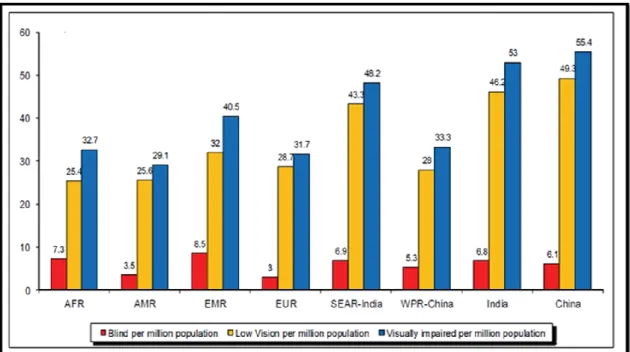
In 2016, the European Blind Union estimated that around 30 million visually-impaired and blind people live in Europe, and back in 2010, the World Health Organization put the global figure at 285 million [3]. In Figure 1, Number of people (in thousand) blind, with low vision and visually impaired per million populations.
Vision function is classified in 4 broad categories, according to the International Classification of Diseases -10 (Update and Revision 2006):
Normal vision
Moderate vision impairment Severe vision impairment Blindness.
Moderate vision impairment combined with severe vision impairment is grouped under the term “low vision”: low vision taken together with blindness represents all vision impairment.
The public transport system is the only possible mobility option for the visually impaired people in smart cities. The use of public transport system by the visually impaired people helps them to seek education, work and social connectivity for the majority of the people and it helps to reduce the financial burden on their families [4]. Computer technology is advancing at exponential speeds, as computing devices are becoming progressively smaller and powerful. The idea that this technology can be embedded in everyday devices, also known as Ubiquitous Computing, is often mentioned in the context of improving healthcare. Visual impairment is term experts use to describe any kind of vision loss, whether it’s someone who cannot see anything at all or someone who has partial vision loss [5].
Visually impaired people confront a number of visual challenges everyday [6], from reading the label on a frozen dinner to figuring out if they’re at the right bus stop. We conducted research to find out more about the various issues that visually impaired people face in other domains. We started by reading some very informative literature about visual impairment and existing technologies that are in place to help some of the problems that visually impaired people face. We conducted in-person interviews with the target population to get first-hand information about the daily challenges they face, how open they were to using technology, and what expectations they had from technology.
- 15 - The use of public transport is vital to the productivity and independence of visually impaired people. Helping visually impaired people use public transport can increase their chances of education and employment and reduce the financial burden on their families [7] [8].
The field of assistive technology (AT), commonly considered to be technology designed for individuals with some form of impairment (or the elderly people), is a vital field expanding at a swift pace since it derives from many disciplines and is mainly driven by technology. Assistive technology for the visually impaired (VI) and Blind people is concerned with “technologies, equipment, devices, apparatus, services, systems, processes and environmental modifications” [9] that enable them to overcome various physical, social, infrastructural and accessibility barriers to independence and live active, productive and independent lives as equal members of the society
There are 285 million visually impaired people worldwide are facing this challenge every day, including blind, partially blind or color blind persons, as well as elderly people with reduced vision.
When you can’t rely on visual signage, daily tasks like navigating complex urban in environments, crossing busy intersections or identifying road names become challenging. And with the speed of city life constantly increasing, it is getting harder for visually impaired people to discover urban centers, and sometimes they avoid these spaces completely.
Inclusivity is a fundamental requirement of any ‘smart city’, so here are some examples of how new technologies and smart city solutions can help visually impaired persons navigate urban sites and fully experience city life. In the smart city planner should get more attention to the utilization of the internet base communication to improve the quality life for visually impaired people. In scientific literature various researcher focusing the Geo- tracker based web and mobile application and some of application described in next sub section:
GPS Way finding Apps
The usage of open outline into engineering arranging is as of now standard in urban arranging, yet introduction route still posture challenges. Particularly in new zones, outwardly debilitated individuals depend on assistive innovations to discover their direction.
The most prominent arrangements are GPS-navigation route applications, for example, Seeing Eye GPS or Blind Square. The client can enter their goal through voice summon or type with the assistance of Voice Over capacity, which is accessible on almost every gadget. The GPS signs can tell clients their area, compute courses and transmit bearings on cell phones by sound or vibration signals.
This enables helps individuals to get from A to B and take part in regular day to day existence. Be that as it may, as accommodating as these applications might be, they are not great. GPS flag can need in precision and does not work inside, making it difficult to explore around prepare stations or strip malls. That is the place brilliant urban areas can swing to signal advances and other situating frameworks.
The point is that this Open Standard will help bring down the hindrance for constructed condition proprietors and computerized route administrations to make their surroundings, items and administrations comprehensive from the beginning as we keep on weaving innovation into our urban areas.
The Way discoverer Open Standard plans to do only that. As the Open Standard creates it will give setting proprietors and computerized route benefits the apparatuses to actualize high caliber, reliable, sound way discovering arrangements. It incorporates an open-source demo application that empowers individuals who download it to utilize BLE reference points to comprehend and actualize the open standard with genuine clients, in genuine settings, continuously.
- 17 - The GPS way discoverer open standard rules are [10]:
Openness and transparency
All the processes related to the Way finder Open Standard development are open to the public. Any individual or organization is invited to participate. There will be a public notice about the periods for public comment. The material of records from meetings and discussions in the Working Groups will be publicly available.
Due process
The Way finder Open Standard is maintained by Wayfindr.org Ltd, which is a nonprofit organization. There will be an ongoing process for testing and revision of the Way finder Open Standard to ensure quality. The process for reviews and updates in the Way finder Open Standard will be well defined.
Availability
The Way finder Open Standard is available to the public at no cost both during its development (e.g. via Working Drafts and minutes) and its final stage (via the Recommendations)
The maintenance of the Way finder Open Standard is done through collaborative decision making in the Working Groups. All views and opinions will be considered and there will be equal treatment to all parties involved in the decision making process. Way finder has significant expertise in audio navigation, having run successful trials in London (in partnership with TFL), Australia, Norway, Spain, and Italy.
Soundscape app
A smart city uses information and communication technology resources, providing more interactivity in order to improve its infrastructure and its public services in general, making that administration, education, health service, public security, and housing and transportation sectors even more connected and efficient. Technology is the starting point for a smart city [11]. Microsoft has released a free IOS app,
Soundscape that gives blind and visually-impaired people 3-D audio cues to help them navigate through cities [12].
Soundscape engages more individuals to investigate their general surroundings through a 3D sound ordeal. The application improves your impression of surroundings as you walk, helping you get where you need to go. Surging between classes, running for espresso with a companion or visiting another city with the family are for the most part regular encounters that could be all the more fulfilling and cause less uneasiness for almost 300 million individuals with locate misfortune around the world.
Microsoft's innovation empowers you to set sound signals at well-known goals and points of interest, and after that utilization 3D sound prompts to enhance your surrounding mindfulness as you advance toward the goal. By just associating a stereo headset, you can investigate the open air world with more freedom. With 3D sound, the sounds are seen as originating from the purpose of intrigue, so the client can manufacture a psychological picture of what's around from the sounds in the earth and the Soundscape application.
Soundscape has a few helpful highlights, including the capacity to keep running out of sight while you utilize different projects, and was intended to be utilized as a part of expansion to other route bolsters strategies, for example, control mutts and sticks. As you walk, Soundscape will enable you to remain mindful of where you are by getting out streets and milestones as you pass them. If anytime you're uncertain of where you are or which street to pick, grasp the telephone level with the best edge confronting the course of intrigue and utilize the catches at the base of the screen to find adjacent streets, orientate yourself to natural points of interest and investigate the spots in front of you.
In San Francisco, Microsoft started working with Lighthouse, a non-benefit association that advances autonomy, equity and independence of individuals who are visually impaired or have low vision [13].
- 19 -
Beacon-powered Smart Cities
Beacon is little transmitters set around structures that send ongoing site data straightforwardly to cell phones. They can be introduced out in the open structures, workplaces or little areas like transport stops.
Beacon send exact area information to cell phones in the territory and work both indoor and open air. However, they can do significantly more than that. Changing in accordance with the particular area needs they can give continuous data about the area of doorways to structures, adjust stage numbers and live data on moving toward transport courses in a station, or data on the closest right hand specialist co-ops. Outwardly weakened individuals with cell phones can be advised by means of vibration or sound.
This sort of responsive innovation enables outwardly hindered individuals to explore complex structures speedier, as well as makes it significantly simpler to design an excursion with open transport, to respond to impermanent changes and to movement freely without depending on outside help. A pilot venture with signal innovations is as of now tried in the city of Warsaw. As a major aspect of the Virtual Warsaw venture, the city has executed guides out in the open structures all around the inside.
Tactile and Talking City Maps
Acquiring proper spatial knowledge is fundamental for orientation and mobility of blind people and tactile maps are considered to be the most appropriate source of information about space [14]. However, one of the main obstacles to their use by the visually impaired is their problematic accessibility because they are not usually immediately available and updated. Therefore, relief embossing is still a result of demanding manual work and relatively costly and time-consuming procedures. Watanabe [15] focused on possibilities of printing tactile maps from Open Street Maps source data – individual maps can be generated using the same microencapsulation technology and starting and finishing points may be added while no more explanatory notes are required. Authors have also explored ways of using 3D printing [16], which
undoubtedly has its merits, yet is highly demanding in terms of technical equipment and financial resources.
Tactile city maps are anything but difficult to peruse and can offer valuable points of interest on separations, building structure, road inclinations and other geographical highlights. Join this with sound parts and you get rich extra data like road and place names and even live transport information.
This creates tactile and talking maps, tailored to the needs of blind people, like the ones developed by the Light House organization. Audio-tactile technology allows the maps to maintain a clean design and provide easily changeable information. The information can be accessed with smart pen and doesn’t rely on the users’ Braille skills.
With the rise of 3D-printing the production of tactile maps is getting much faster, easier and cheaper. This technology allows embossed maps to be printed with architectural diagrams of the current state of buildings within just a few minutes. When cities invest in making the software for topographic maps accessible, visually impaired people will be able to print out up-to-date maps at home before starting a trip.
Onyx Beacon
An initial fleet of 40 Enterprise iBeacons was installed in late May 2015 by the Onyx Beacon technical team on all buses and trolleybuses circulating in Bucharest, Romania on two public transport lines. This moment marks the first phase of deployment in real field conditions for the Smart Public Transport project, an integrated technological solution created by Onyx Beacon.
The solution will use an infrastructure of 500 iBeacons and will guide people with visual disabilities to independently use the public transport network in the Romanian capital area, without having a personal assistant, and without relying on other passengers or the transportation company personnel.
Bucharest is the first city in the world to officially develop a large-scale technological solution for independent guidance and orientation of the visually-impaired people within the public transport network. The Smart Public Transport
- 21 - (SPT) solution designed and delivered by Onyx Beacon is the first in the world to exceed the experimental stage, being based on Bluetooth Low Energy hardware units, and managed by a cloud-based platform that communicates effectively and interactively with mobile devices via a dedicated application that works simultaneously on iOS and Android operating systems. [17]
Internet of thing (IoT) Infrastructure
IoT technologies in real-time embedded operating systems, wireless networks and cloud computing. The positioning can be achieved along with GPS or cellular networks. The information is transmitted or received from the cloud through GSM. The GSM enables GPRS to send and receive information in the form of packet to the cloud. The Application Programming Interface (API) that access information of “things” (timetables of nearby buses) is created. These API are available over the Internet, and allow applications to easily access and perform comparison in the cloud [18].
Smart glasses to improve mobility for the visually-impaired
The Indian Company Ginger Mind Technologies has been chosen as the winner for its prototype glasses featuring a camera which analyses images, facilitates navigation and safety when crossing the road. The glasses guide visually-impaired people with the help of sound and support from an app which is fully accessible and uses beacons. The device uses Bluetooth technology, allowing for more accurate calculation of the distance between people and the mobile device.
Figure 2. Smart glasses for Blind/Visual Impaired People.
The project was chosen as it offers an economic, attractive and accessible product, which provides solutions based on pavements, as called for by groups of people with visual impairment. The challenge was created by the New York City Department of Transportation and Barcelona City Council, via Barcelona Active, the Area of Mobility, the Municipal IT Institute (IMI) and the Municipal Institute for People with Disabilities (IMPD). The aim was to seek a technological solution to help the visually-impaired get around confidently, particularly along streets with curb less pavements [19].
Human-Centered
Design Methods in Industry
Human-centered design is a procedure that begins with the general population you're outlining for and closes with new arrangements that are customized to suit their requirements. Human-centered design is tied in with building a profound compassion with the general population you're planning for; producing huge amounts of thoughts; constructing a bundle of models; sharing what you've made with the general
- 23 - population you're outlining for; and in the end putting your creative new arrangement out on the planet. [21].
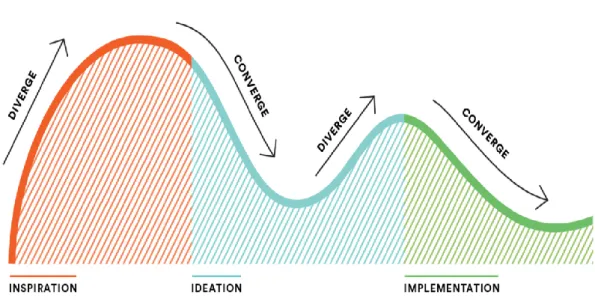
Human-centered design plan comprises of three stages. In the Inspiration Phase you'll gain straightforwardly from the general population you're planning for as you drench yourself in their lives and come to profoundly comprehend their necessities. In the
Ideation Phase you'll comprehend what you realized, recognize open doors for plan,
and model conceivable arrangements. Also, in the Implementation Phase you'll breathe life into your answer, and in the long run, to advertise. Also, you'll realize that your answer will be a win since you've kept the very individuals you're hoping to serve at the core of the procedure. (22) We can see entire the procedure in this photo:-
Figure 3 Human-centered design plan
The Human Centered Design Philosophy
Human-Centered Design is based on considering and acting diversely with a specific end goal to pick up a profound comprehension of our clients and the difficulties
confronting them. As a matter of first importance, it requires a high level of interest and sympathy. A couple of different practices that help this are:
BE OPEN-MINDED:- We all observe and comprehend the world in light of our past encounters, yet it's essential while handling complex issues to be receptive. Go up against your presumptions. As Einstein put it: we can't take care of our issues with a similar reasoning we utilized when we made them.
BE COLLABORATIVE: - Being cooperative doesn't simply mean being gracious or sharing the work stack. Gain from each other, provoke each other, and can't help contradicting each other. By including assorted assessments and ranges of abilities in your group, you'll go to a wealthier comprehension and make more grounded arrangements.
BE ADAPTIVE: - The HCD procedure travels through vulnerability and vagueness to more prominent lucidity. Adjusting to these obstacles with your group will help give clearer bearing. By working through difficulties, you'll draw nearer to significant arrangements and turn out to be better and stronger designers. (31)
The Human-Centered Design Process
The Human-Centered Design process is involved four fundamental stages: Frame, Discover, Design, and Deliver. Groups will move amongst examining and blending data to reframe issues, find new client and market needs, and shape openings and arrangements.
Human centered design workforce in Industry.
Computer coordinated assembling numerous years prior, placing innovation into the frontal area. Endeavors to build up unmanned, completely mechanized processing plants, in any case, have not yet been completely figured it out. By differentiate; the idea of Industry 4.0 is an approach to react to the requirement for fruitful utilization of innovation with human-focus computerization. The point is to put the human into a
- 25 - position where he or she can rapidly settle on the correct choices on creation and handle arranges all the more productively through astutely prepared information. (23)
The human-centered design outline approach explicitly thinks about the recognizable proof of client setting, the particular of client prerequisites and the production of plan arrangements, which are then assessed through Learn systems.
Usability
"Usability is a measure of the viability, proficiency and adequacy, productivity and fulfillment with which indicated clients can accomplish determined objectives in a specific domain." (ISO 9241)
Usability as a result: applications, sites (and robots?) that are usable.
Usability as a procedure: a system or approach (more often than not called "client focused plan").
Usability as an arrangement of procedures: ease of use testing, logical request, heuristic assessment – there are numerous strategies whose point is to enhance convenience.
Usability as a theory: where enhanced ease of use is an esteem that spurs the manner by which items are produced (32)
User centered system design:-
Computer and related gadgets must be planned with an understanding that individuals on account of specific undertakings will need to utilize them in a way that is consistent concerning their work. Also, it is vital to "define style, standards, parts and even mores of human and computer relationship that each side can live with, as computer turn out to be more intricate, more brilliant and more competent," and as we enable them to "go up against self-ruling or semi-independent control of more basic parts of our lives and society"(Miller 2004, p. 34).
HCI in industry 4.0
Industry 4.0 is bringing disturbance to numerous organizations, affecting how clients are locked in, how advancements are utilized and how esteem is made. The outline thinking strategy means
to manage organizations to find the key bits of knowledge and characterize the right game-plan when growing new imaginative items and administrations. (24)
Industry 4.0 has exceedingly clever associated frameworks that make a completely computerized esteem chain. Industry 4.0 is an activity began by the German Government in 2006. The activity will likely digitize the assembling segment keeping in mind the end goal to expand efficiency. The German business is relied upon to put a sum of €40 bn in Industry 4.0 by 2020.
In contrast with Industry 3.0, the conventional enterprises anticipate uncommon level of combination between data, correspondence and assembling frameworks available to them, including:
Ubiquitous broadband, enabling a lot of information to be transmitted between individuals, machines and generation destinations;
Cloud figuring, permitting the moment stockpiling and accessibility of date at any area,
Industry 4.0 can prompt sensor pressed items; associated with the web keeping in mind the end goal to give better items and administrations to their clients. Companies everywhere throughout the world are hoping to significantly expand digitization throughout the following five years. By 2020, the US expects to accomplish 74 percent digitization from the present levels of 32 percent, Asia Pacific to 67 percent from current 36 percent and the Europe, the Middle East and the Africa to 71 percent from current 30 percent.
The US Government has taken a few activities to grasp industry 4.0.
It has fabricated National Network for Manufacturing Innovation (NNMI). This comprises of territorial centers that will quicken advancement and appropriation of front line fabricating innovations for making new, all around focused items.
- 27 - To expand the household fabricating aggressiveness, the National Additive Manufacturing Innovation Institute expects to quicken the selection of added substance assembling and 3D printing advances in the US producing division 'Startup America' - a White House activity to celebrate, rouse, and quicken
high-development business enterprise all through the country.
As per IBEF, the Government of India has set a yearning focus of expanding the commitment of assembling yield to 25 percent of Gross Domestic Product (GDP) by 2025, from 16 percent right now. (29)
Iot, being a standout amongst the most imperative parts of Industry 4.0 for India, is required to catch near 20 percent share in worldwide IoT advertise in the following five years. As per IBEF gauge, the IoT showcase in India is anticipated to develop at a CAGR of in excess of 28 percent amid 2015-2020. Government of India has taken activities, for example, Green Corridors and
'Make in India' (26)
India has various projects to empower development and guarantee the ability pipeline for assembling. Some are settled, and others are very new and extremely inventive. Obviously Industry 4.0 presents colossal openings, and this reality features the requirement for an exceedingly prepared and adaptable workforce and generation limit that can answer the necessities of tomorrow and additionally those of today.
Eric Hoffer (1902-1983), a twentieth century American thinker: "in the midst of progress, students acquire everything of importance; while the scholarly get themselves perfectly outfitted to manage a world that never again exists." This announcement was valid in the twentieth century and is surely evident today. Be that as it may, with the consistently quickening pace of innovation advancement, it will turn out to be progressively apropos later on. India stands prepared for that future:
to take part, as well as to lead! (27)
Review of applying human centered design in industry field report:-
In this point of view, the proposed inquire about work is centered around the plan and advancement of a useful arrangement, they portray the human-centered design
strategies connected in the undertaking, the adjustments we needed to make simultaneously and the difficulties and open doors for applying human-focused plan in a modern situation as a rule. These techniques go for planning items with a high ease of use and a positive client encounter (UX). In any case, in the space of the plan of modern machines, outline is regularly determined by practical prerequisites for the most part disregarding the ease of use and client experience of items. Together with a medium-sized producer of mechanical clothing machines we connected the human-focused outline process in a modern setting. (25)
HCD plan techniques are settled for planning and growing new end-client items. Be that as it may, the advancement of mechanical machines regularly takes after waterfall-like models, concentrating on designing center usefulness of machines, however not putting immense accentuation on convenience and client encounter. Because of the expansion in multifaceted nature and interconnectivity of machines, which are at present being created under the heading 'industry 4.0 we anticipate that there will be a need to concentrate more on the client, the work assignment and the workplace. This new concentration would therefore bring human-focused plan into the previously mentioned space. (24)(25)
In participation with an average sized maker of modern clothing machines we connected the human-focused outline process into this mechanical area. The framework created with regards to our task is a cell phone for the help of critical thinking and upkeep work inside the clothing.
There are a few difficulties while applying the human-focused plan process in the modern setting; we see colossal open doors for human-focused outline techniques in the mechanical setting.
Complex Connected Machines Require Excellent Usability: - Mobile gadgets are incorporated to control machines and 'brilliant items' can impart their state as of now amid the creation.
- 29 - Convenience Issues Inexcusable because of Long Product Life Cycles: - The costs aggregated over this long item time cycle make the foundation of a human-focused outline process in the item advancement a sensible choice.
Strategies Available and Applicable: - When it comes to human-focused plan, there is a colossal collection of entrenched techniques accessible.
New Interaction Technologies in Industry: - With the new association innovations coming into industry, there will be a requirement for interdisciplinary iterative collaboration between engineers, mechanical architects and UX specialists, which will use human-focused outline techniques here.
The human-centered design process demonstrated that the greater parts of the strategies are material and that exclusive minor changes must be made to the known outline techniques. We revealed difficulties and open doors for future outline forms in a modern setting. In light of an ordeal and support the business 4.0 analysts and experts to human-focused outline technique in industry.
Service Analysis and Development:-
In today's world, the science has made our life so easy with the range of inventions, equipment’s and products. But this products or the equipment’s have price depending on their usage and importance, plus there are many products and equipment’s that require large space for storage. People buy this things and make a continuous use or for one time use and later it sits in their house or garage for the rest of the time. Also some of them items are very costly or very large or very rare to find. So the point is, what if this items can be given or taken for rent and this way the owner can make some money out of it and the person who is renting it can make use of it for a little amount of money instead of buying it, making our lives easier.
Brainstorming
The items can be anything for example electronic items, equipments, books, household items, clothes, furniture, vehicles, etc,.
who will be the users?
The users can be anyone who has any of the items that can put up for rent and anyone who has a requirement for such items.
what will be the way of communication? how will the monetary transactions be done?
Investigation and Discovery (Research and investigation)
To begin the research and investigate the concept of RAT, it is very important to understand 'why' this concept. There are many items and products are available in the world market that people buy or like to buy. Many of these are multi-purpose use or single purpose use items. People buy them and make use of them and when their purpose of use is fulfilled the items sits in their storage nor nothing. So basically people invest their hard earned income in such items and when such investments are not used or doesn't give any kind of returns in terms of usability or monetary, the money spent on such items is wasted. It is also a bad investment of money for the people who want an item but only going to use it for just one time or for only single purpose.
On the other hand, with the help of this service one can gain access to any item or space available for rent. As a lender one can earn extra money by listing his or her item or space for rent and as a borrower/renter one can save costs by renting items or spaces all while keeping the wealth in the community and can spend on something nice.
Interviews
Juliana Marques, 26years, Coimbra
She is a student and doing her master in Computer Science. She is a technology admirer and loves to put her hands on the new technologies and gadgets. She buys many items. She has been doing this for the last 3 years and now she has many technology related items and gadgets and now most of these items are staying her
- 31 - collection room and not being used. She does not want to sell them as she loves her gadgets but has no problem for lending it to someone for some time.
David Robinson, 35 years, UK
David lives in London and he came to Coimbra for a week for his business meetings. After finishing his daily meetings he likes to explore the city. When he came to Coimbra, he was not aware of its historic beauty and popularity among tourists so he did not came here prepared as tourist. He says that he loved this place and would like to explore it and take some nice photographs as his memory. At that moment he felt of bringing his DSLR camera with him so he could capture the real photographs of the city as he does not like taking pictures in the mobile phone. When we asked him what if he could borrow a DSLR camera for some time or days for a little amount of money instead of buying a new one. He was very excited to hear that and appreciated the concept.
Competitive Analysis of the Project
In the competitive analysis, the investigation was carried on both the physical sources and digital sources. The physical sources include ads in newspaper, placards in buildings or shops. But it is very difficult to find a lender or a borrower with such sources as people hardly look for such things in newspaper ads or placards placed in shops and buildings. Also people can ask their friends and relatives for their items to lend them for a short period of time but it is very embarrassing for someone to ask someone for their item to borrow as there are chances that they can get negative reply and that can affect their relationship.
While the digital sources seem convincing as it is very easy to connect to people. There are many digital sources like OLX, EBAY Classified, Craigslist, Gumtree. These websites offer renting ads services but they are mostly for vehicles and real estate properties. Generally people don't tend to look for renting other items over these digital sources. But the concept of the service is similar to these sources as it will be available for only renting items where people can list anything anywhere and the renter can find or browse the items for rent in chosen range of area or locality.
Direction and Strategy
In order to put the direction and strategy of our RAT( Rent Any Thing) concept we have used a set of steps to describe the journey of the customers both borrowers and lenders. Also to win the trust of the lenders, we have a guarantee for the safety of the items for the lenders. All the items that will be listed on this platform will be covered by the insurance up to 25000 euro. So the lenders can be rest assured about their items. But the responsibility of the item will be fully on the borrower.
Lenders
Enter the name and details of your item Upload some photos of your items
We will verify your id
Set a rental price, location and availability
Someone wants your item? Click 'Approve Request' Arrange a handover via our messaging service
- 33 -
Confirm transaction completion and we process your payment
BORROWERS
1. To start, request an item or Browse Listings
2. Found what you need? Enter the dates you would like it 3. Enter your digits into our secure payment system
4. The lender approves your request to borrow 5. We process your payment
7. Return the item at a convenient time
8. Go spend the money you saved on something nice
Development of the Concept
It is really very essential to understand the needs, wants and the requirements of the targeted customer for the concept and its development. For this we have to develop the concept completely focusing the customers putting them into the center of the concept. Both the lenders and borrowers play an vital role in the concept. The lenders are the primary sources for the business as they list the range of items to provide the borrowers the options of items they can borrow. What are the needs, wants and requirements of the lender? As a lenders' point of view, the need of the lender is to make use of the extra items that are not on continuous use for them. Their want is to make some extra money from it so to cover the investment made in purchasing the item. Their requirement is the safety of their item from lost, stolen or damage. As a borrowers' point of view, their need is to find or get an item that can fulfill their purpose. Their want is to save money. And their requirement is to find the right item at right cost at convenient place.
- 35 -
User Task Scenario
Lender
David Lee is a 38year old professional photographer. He has been in this profession since he was 24years old. During these years he bought many cameras and equipments like lenses, tripods, flash light tools etc,. So he decides to put up for rent his equipments and for that he visits the RAT website on his computer and creates an account by filling his personal details including his phone number, home address, bank account details and id proof. After finishing this process he uploads the photos and videos, writes the description of the item or items and puts the rental price he wishes to get and the availability. After few days, he receives a request for the camera for rent from Miss Pooja for two days, so he selects the 'Accept Request' option and then they both decides the pickup time through the messaging service of the website. After two days he gets his camera back from Miss Pooja and selects the 'Complete Transaction' option in the website and he receives the rental money in his account.
Borrower
Mrs Amanda Robinson is having a birthday party at her home and she wants a music system for the party, but she does not want to spend a lot of money on just the music system as she is only going to use it for this occasion only. So she visits the RAT website and browses for the music system. She gets many options and then she selects the best suitable for her and wants to book it for the occasion. So she selects the sign up and fills in her personal details including her phone number, bank account details, id proof and address. On the website it take 2mins for verify the id proofs and other details. So after completing the verification process, she selects the 'Request to Rent' option and fills in the details for the duration she intends to rent it for and agrees with the rental price and waits for the lenders approval.
There is also an option for her to negotiate the rental price with the lender through the messaging service. After few time the lender accepts the request and the money from her account gets deducted which confirms that the item is booked for her. She picks
the item form the lender on the day and time agreed between them and she returns the item on the promised day and time.
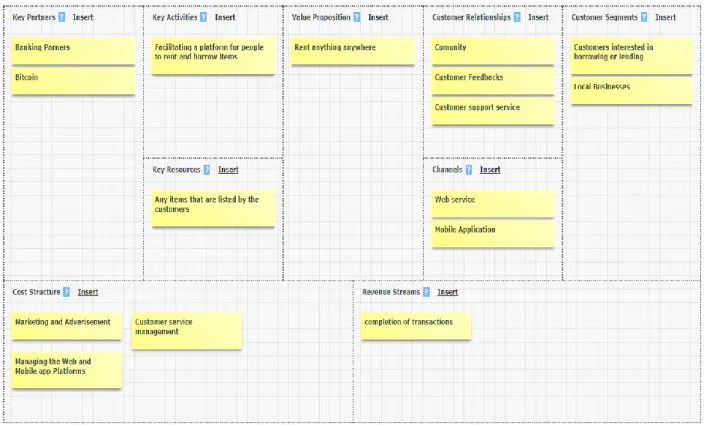
Figure 4. Lender accepts
With this concept one can gain access to any item/space available for rent, right at the fingertips. One can explore the surroundings and discover what is being shared within the community. As a Lender one can earn extra money by listing items for rent. As a Borrower one can save cost by renting items and invest the money in something else. It is very secure in terms of monetary transactions. It also helps connect users among the community marketplace, while sharing top resources and building personal relationships. One can interact and engage with the network through the messaging service of the platform. And most importantly, it is an eco-friendly concept that helps minimize waste and maximize resources used to produce, package and ship items through continuous sharing within the community.
- 37 -
Wayfinder
Application that uses the beacons to assist people with visual impairment use the subway in London. Wayfinder is a system created by USTWO design studio and the Royal London Society for Blind People (RLSB), which uses informed location data beacons via Bluetooth, which locates where the user is, and then generates audio so that it is addressed independently and effectively, avoiding the discomfort of depending on other people. To allow the person to continue listening to the sounds around them while listening to the instructions, the design uses special headphones - bone conduction - that emit vibrations through the intracranial bones. In this way, the visual keep in touch with your environment. The project stands out for the use of Beacons, a technology that is increasingly growing in the market. [33]
Be My Eyes –
Application that brings together volunteers who lend sight to the blind. What connects with volunteers willing to take on the role of being "the eyes of other people "for a moment through a video connection? The user indicates if it is a voluntary or visually impaired. Each time a person needs help, a volunteer you receive a notification, and if you agree to help, the connection between the two parties is established [34], [35].
Blue eyes Get There Application Project
The BlueEyes project, based on the project in London at the subway station, is a mobile application that improves the knowledge of the environment in which the blind live, where navigation and discovery are crucial to ensure mobility and improve quality of life. In this way, we seek to improve the social independence of these citizens, with a new mobility solution to help the blind to move around, using a smartphone, without the need for special hardware and Bluetooth Low Energy (BLE) technology, allowing them to navigate the city regardless. [36.]
The entire population, regardless of their social condition or intellectual and physical limitations, must have guaranteed access to public transport.
Project development
It was proposed the development of a hybrid mobile application that, through the use of beacons associated with a living lab in Coimbra, corresponding to line 5 of the SMTUC (having 25 stops and 5 buses), will support mobility of citizens in the city of Coimbra . The application, integrated into the Blue Eyes Get there application system, will assist the blinds in identifying bus stops, the proximity of near place or street, and informing them of the place and near the street, the place name, the streets. The application should also record the customer's route, place and street address in order to obtain data for further analysis.
Description and theoretical basis of work Study and test the beacons API
The main technology to be used for this project is the Bluetooth Low Energy (BLE) system applied in the Bluetooth 4.0 protocol and above, it has been purposely designed with low power consumption to support the applications and services that require connected devices (smartphones, tablets, laptops) nearby. A BLE beacon is an electronic device that repeatedly transmits a radio signal at intervals; this radio signal carries data that allows each specific beacon to be identified by compatible devices once it is in range. Once the device receives the BLE data, it estimates the beacon distance that is located indicating, in the case of this project, the distance the bus is from the person receiving the signal. When running on a device you can detect the presence of BLE beacons and perform actions depending on the distance and data received.
The BLE signal is transmitted at the 2.4 GHz radio frequency, which means that the signal can be distorted by the interference of specific elements in the environment, such as:
• Metal surfaces that are blocking the path; • Water as absorbent;
- 39 - • Cement and bulletproof glass;
• Overlapping waves at the same frequency; • Sources of electricity also distort the waves.
BLE beacons can be installed indoors and outdoors. Because of the variation of material and design there is no correct way to install them. The most successful installation guides are as follows:
• Place BLE beacons above people's height (up to 2.5 meters) to avoid • Interference in sending data.
• If the ceiling is up to 4 meters high, it can be placed on the same roof. [37] • If there is an arc, place the BLE beacon at the top center of the arc. [37]
• When the ideal position of a beacon interferes with other elements of the site, such as
• Metal objects or the main energy channeling must be placed at least 1 meter from these elements.
• If the BLE headlamp is placed in a corridor below 4 meters wide, place it in the middle of the corridor to cover the entire width equally, otherwise it is recommended and use 2 beacons.
• Place the BLE beacon at ~ 4 meters before any landmarks or points of interest. This should be the case for both the proximity and the trilateration-based approach to the installation. These frames and objects can be, for example:
• Entrance doors; • Escalator; • Stairs; • Elevators;
• Ticket booths.
The iBeacon protocol is a communication format developed and introduced by Apple in 2013 and is based on Bluetooth Low Energy technology. The protocol is compatible with any iOS or Android device that supports Bluetooth version 4.0 or higher. The minimum requirements for the operating system are iOS 7 or Android 4.3 (Jelly Bean) and above. [38]
The Bluetooth signal is open to distortion from different sources, giving the consequences in accurately estimating the distance between a BLE beacon and a device. Depending on the format of beacon used are several parameters that could give an indication of the distance of the location of the device:
• Received Signal Strength Indicator (RSSI): This is an indication of the BLE signal strength measured by a device. RSSI is measured in dBm (Decibel-milliwatts). The higher the RSSI value, the stronger the BLE signal. Based on the RSSI value changes, we can tell if a user is heading close to or away from a BLE headlamp. RSSI values are specific to each beacon manufacturer and based on how they calibrated their BLE beacons (see "Measuring Power or Varying Data" in Section RSSI values as read by smartphones vary between devices, as it also depends on the Bluetooth chip that the device has on the edge.
• Proximity zones: For the iBeacon format only, the area around a beacon is divided into four proximity zones based on RSSI. Immediate, when the device is very close to the beacon at distances of less than 50 cm, when the device is estimated at distances between 50 cm and 3 m from the beacon, when the device is further away or the signal is weak due to distortions, when the distance cannot be estimated primarily because the distance from the BLE beacon is very distant and also due to signal distortions. Proximity zones can be used as filters to trigger content in context. For example, when a device comes into contact with a BLE beacon in the "Next" zone, then content can be fired, whereas when the device is in the "Immediate" zone, a different set of content can be triggered.
- 41 - • Accuracy: This is a parameter in the iBeacon format that indicates only the proximity value measured in meters. This "Accuracy" parameter can be used to differentiate between beacons with the same proximity value. However, the iBeacon documentation suggests that accuracy should not be used to identify the exact distance from a user's device. The reason is that accuracy levels are affected by various sources of signal distortion and may not reflect the actual distance in meters.
Plan the structure of the hybrid application to be developed and its contents, taking as reference applications especially aimed at the blind.
To develop a low fidelity prototype, a simple mockup, I used as a reference some applications as well as a video that explains the usability of the application.
The Bus - Alert application is a bus locator aimed at visually impaired users, which informs the weather forecast where the bus will arrive at the point where the person is. It takes a few touches on the screen to search for the desired line, but to select the line you need to enter the number using the standard keyboard. [39]
Guides application - Guides the user through GPS technology, obtaining its location and taking the user to the sites that he wants to go. Although not the most practical for people with visual difficulties is a good guidance application that allows you to save routes and places that the user frequents more. [39]
Figure 5 Guide application
The principles for the design and interoperability of an IABNNS should involve users in the design, development and validation process in real environment. Users should help identify the location of key points of interest, key features and routes safe and convenient. The route must have segments and reference points defined and be the most accessible. [40]
Create a first draft of the GET THERE application, describing the basic mechanisms of interaction
- 43 - Figure 6 Main menu of the application
Figure 6 shows the initial menu where 4 different menus appear: (1) Where am I?, (2) Set up, (3)Navigation,(4)Exit.
The interaction mode in this app and slide with your finger on the screen, being to the right is equivalent to go down and to the left is equivalent to go up. To select one of the menus or some element makes the double tap.
Figure 7 continue menu 2
After selecting this menu will appear the location of the user through the GPS signal, displaying a map with it.
Also on the same screen if you select SET UP then open the next screen is Maps. Settings, and Return to main screen.
Figure 8 rout to do in menu 2
In the next select the Maps and screen shows the download map, Cancel map, choose a map, delete the maps, and check for updated maps and return to main screen. Get There does not display a map, but tells you where you are and how to get to your destination. Navigational guidance automatically talks to you before and after every intersection. At any time, you can ask Get There to tell you where you are, simply by shaking your mobile device.
Figure 9 menu 3
While select on Navigation there are 4 options available, places, direction, alarm, and return to main screen.
If you are not navigating to a destination, Get There tells you the street you are on, the nearest cross-streets, the distance to the next intersection, and a full description of even unusually-shaped intersections.
- 45 - Figure 10 detail inside menu 3
In the place you can create the place or make list of place or write and read a file. In the create place you can create place by tap of use keyboard and tap to speak.
Figure 10 continue in menu 3
In the next direction you have to first select the direction from where you have to go and it will be reusable when you select once time and save it.
After selecting direction place start from and selecting end place, you can hear and review your full direction.
Figure 11 menu 4
You can set an "alarm" on a location, so that Get There tells you when you are getting close to the location. This feature is especially useful for helping you know when to get off a bus.
Get There is easy to use. It uses only basic touchscreen interactions, but not any
Get There offers navigation in most countries in the world, based on coverage from OpenStreetMap.
In the application Current languages: Arabic, Chinese, Czech, Danish, Dutch, English, Finnish, French, German, Hebrew, Italian, Macedonian, Norwegian, Persian, Polish, Portuguese, Russian, Slovak, Spanish, and Swedish.
Add content to the application, including sound content
The requirements for the design of audio systems based on network navigation systems (IABNNSs) to accommodate visually impaired users as well as users with a wide range of features and capabilities. This recommendation helps design professionals achieve an inclusive environment through IABNNSs to enhance the physical environment by providing auditory information about environments for users. This recommendation does not consider the specialization requirements of deaf or hard of hearing persons. [40]
It is not possible to date the application according to all available languages, but you can not only have English or Portuguese.
Path indications
The audio instruction communications of a beacon shall: • Use the most accessible path;
• Allow users to choose their path;
• Provide information about the type and size of the path; • Inform users of any curve along the way.
Guidance, direction instructions: communicate a change of direction before reaching an environmental resource, for example, "At the next intersection, follow the tactile paving route to the left." [2]
- 47 - Alerts of the location of the next environmental resource: Communicate information about the location of the next environmental resource, for example, "The escalator is the one on the left." [40]
Indication of inputs and outputs
The audio instruction communications of an IABNNS shall: • use the most accessible input and output;
• allow users to choose their input and output;
• provide information on the type, size and configuration of the doors opening; • provide information on the position and type of door opening furniture and operate controls.
Indications of walking paths
The audio instruction communications of an IABNNS shall: • use the most accessible way;
• allow users to choose their way;
• provide information about the type and size of the path; • inform users of any curve along the way.
Indications about escalators The audio instruction communications of an IABNNS must:
• allow the user to locate the escalator; • describe the proximity of the escalator;
• describe the direction of movement of the escalator; • describe the number of escalators in any group;
• Describe the direction of movement of each treadmill in a group; • describe the location of the handrail;
• Where appropriate, indicate the side of the escalator where travelers are; • Describe the relative width / length of the treadmill;
• Describe the next direction of the route as you exit the escalator.
The proximity of an escalator should be given in an audio instruction of 8 ± 1 m of the escalator. [40]
Ladder indications The audio instruction communications of an IABNNS must: • allow the user to locate the ladders;
• describe the proximity of stairs; • describe the direction of the stairs; • describe the number of steps;
• describe the location of a break within stairs; • describe the location of handrails;
• where appropriate, indicate the side of stairs that travelers use to go up and down; • describe the relative width / length of stairs;
• Describe the next direction of the route as you exit the stairs.
NOTE - Describe only the number of steps when less than 12. The proximity of a ladder should be given in an audio instruction 8 ± 1 m from the first step.
Notes on lifts Communications of audio instructions from an IABNNS must: • allow the user to locate the lift;
- 49 - • describe the proximity of the elevator;
• describe the number of elevators;
• describe the location of the call buttons outside the elevator; • Describe the size of the elevator;
• describe the location of call buttons inside the elevator; • indicate which buttons to use to reach different levels;
• Describe the next direction of the route as you exit the elevator.
The proximity of a lift must be given in an audio instruction at 8 ± 1 m from the lift Audible announcements from lifts, for example, the next upcoming elevator, the elevator's travel direction, the inlet and outlet floor, and the position of the opening doors should complement IABNNS audio instruction communications. [40]
Indications on platforms the audio instruction communications of an IABNNS should: • allow the user to locate the appropriate platform for the direction of travel; • describe the proximity of the platform;
• describe the type of platform; • describe the number of platforms; • describe the size of the platform;
• describe the size of the space between the platform edge and the rail-mounted vehicle; • describe any difference between the length of the rail-mounted vehicle and the platform;
• Describe the next direction of the route when leaving the platform.
The proximity of a platform should be given in an audio instruction of 8 ± 1 m from the platform.
Mobile application features
The mobile application features specific to the IABNNS for the built environment should provide accessible, simple, clear, concise, consistent, understandable, and secure instructions and alerts.
The audio instruction communications of an IABNNS that are delivered through a mobile device, the application must:
• use a notification alert before an alert or instruction; • allow user replay;
• enable user search by voice;
• use a completed route notification alert.
Resources used
As a means to accomplish this phase of the BlueEyes project, I used writing and drawing material for designing the application prototype, smartphones, mobile applications (Guide, serving this for personal testing to establish a draft of pros and cons); beacons (to make the Bluetooth connection between the buses.
Global Positioning System - GPS
As with APSs, street guidance is very useful for blind pedestrians, but they are not yet aware of the street name or position in order to reach a particular destination. With the support of a global positioning system (GPS), the user is able to know their position when navigating outdoors, due to the location information provided by satellite. This information is displayed in various smartphone applications, for example Google Maps or dedicated GPS devices (Ruffa et al., 2015). "GPS-based navigation systems are real guidance aids, since satellites provide up-to-date position information regardless of whether or not the pedestrian is in motion" (Giudice, 2008). [36]