Repositório ISCTE-IUL
Deposited in Repositório ISCTE-IUL: 2018-06-06
Deposited version: Post-print
Peer-review status of attached file: Peer-reviewed
Citation for published item:
Raposo, M., Eloy, S., Dias, M. S. & Lopes, M. (2017). Revisiting the city augmented by digital
technologies – SeeARch tool. In Rogério Amoêda, Sérgio Lira, Cristina Pinheiro (Ed.), Proceedings of the 3rd International Conference on Preservation, Maintenace, and Rehabilitation of Historical
Buildings and Structures. (pp. 637-646). Braga: Green Lines Institute for Sustainable Development. Further information on publisher's website:
--Publisher's copyright statement:
This is the peer reviewed version of the following article: Raposo, M., Eloy, S., Dias, M. S. & Lopes, M. (2017). Revisiting the city augmented by digital technologies – SeeARch tool. In Rogério Amoêda, Sérgio Lira, Cristina Pinheiro (Ed.), Proceedings of the 3rd International Conference on Preservation, Maintenace, and Rehabilitation of Historical Buildings and Structures. (pp. 637-646). Braga: Green Lines Institute for Sustainable Development.. This article may be used for non-commercial purposes in accordance with the Publisher's Terms and Conditions for self-archiving.
Use policy
Creative Commons CC BY 4.0
The full-text may be used and/or reproduced, and given to third parties in any format or medium, without prior permission or charge, for personal research or study, educational, or not-for-profit purposes provided that:
• a full bibliographic reference is made to the original source • a link is made to the metadata record in the Repository • the full-text is not changed in any way
1. INTRODUCTION
Cities and their heritage include not only their more noble monuments but also the regular city fabric that characterizes the built environment. Citizens walk daily through areas and ings that go unnoticed although they have a large impact in their daily life. These areas and build-ings are the regular city fabric that go beyond its monumental parts, and provide richness to the heritage and identity to the city’s landscape. Despites this fact, the city´s regular building fabric and particularly, its evolution through time, are not visible to the common citizen or visitor. The large and sudden development of tourism, notably in the western world, turned cites and their architecture into sources of economic investment. We have witnessed the appearance of tourist guides focusing essentially on historical centers and on monumental and author architecture, while the remaining building fabric of the city has been somewhat neglected, despite its historic and cultural interest. It is therefore important to pay attention to the regular city fabric and find strategies to make it more visible to the public.
This work addresses the problem by which regular citizens, while enjoying and living their city, capture information before their bare eyes that cannot fully transmit everything that they might want to know about a particular neighborhood or building. Digital or paper maps and pocket guides provide some degree of detailed information, but they become outdated and usually they focus on a type of media leaving other types, e.g. video, 3D visualization, out.
The aim of our research is to develop tools that enable citizens or city visitors to acquire in real time, relevant and customized information about several aspects of the cities they visit, which
Revisiting the city, augmented with digital technologies: the
SeeARch tool
M. Raposo & S. Eloy
Instituto Universitário de Lisboa (ISCTE-IUL), ISTAR-IUL, Portugal
M. Sales Dias
Instituto Universitário de Lisboa (ISCTE-IUL), ISTAR-IUL, Adene, Portugal
M. Lopes
Instituto Universitário de Lisboa (ISCTE-IUL), ISTAR-IUL, Portugal
ABSTRACT: This paper presents a digital tool that enables the city inhabitants or visitors to acquire in real time, relevant information about several aspects of a given city, augmenting their real experience of the place. We used digital technologies, particularly an in-house developed Augmented Reality (AR) tool referred to as SeeARch,that augments in situ the city exploration experience. This tablet-based AR tool, enables mobile users to recognize the facade of specific buildings and, in real-time, superimpose relevant associated 3D and multimedia information, while visiting the city. The aim of this app is to provide customized information to visitors suiting their own interests and time to visit the city. User satisfaction evaluation tests were performed with a sample of the potential users. The outcomes of such user studies, showed that participants considered that our approach delivers a more detailed knowledge about the city, and is more in-formative, when compared with the normal sight-seeing visits in the city, performed by the same participants.
augments their real experience of the place. We hypothesize that an augmented experience in-creases the engagement and interest towards the city for both citizens and visitors. To demonstrate such hypothesis, we turned to digital technologies based specifically in Augmented Reality (AR), to augment in situ the city touring experience. Following on our prior AR work, e.g.ARch4maps (Gaspar, et al., 2016) (Gomes, 2015), we have designed a mobile AR solution that enables users of a mobile device, to recognize the facade of buildings and register (overlay) over them relevant information, while visiting the city. The app aims at providing customized information to visitors according to their own interests and time to visit the city.
We carried user satisfaction evaluation tests with a sample of the potential users of our app. The outcomes showed that participants considered that our approach delivers a more detailed knowledge about the city and is more informative than the regular walking sight-seeing visits.
This paper is structured in four sections. In section two, we describe related literature work that is in line with our research, notably in the areas of augmented reality applications for architecture and on approaches to present cities to visitors. In section three, we explain each step of the design of the SeeARch app, including the user interaction experience and its main functionalities. Section four presents the satisfaction evaluation studies. The paper ends with a section where we discuss our results and extract some conclusions and topics of further research.
2. STATE OF THE ART
2.1Information on cities
Cultural heritage is a concept that encompasses all material and immaterial elements that ex-press the essence of a society, including their beliefs, their customs and their history. In this paper we focus on the material elements of the cities.
The buildings that make up a city have their own individual history and, when analysed to-gether, their collective memory tell us about the culture of a community. Among the different media that convey information on the heritage and architecture of cities, we highlight books and magazines, as well as guides and maps. In this type of media, content is presented in the form of text, technical drawings, images, diagrams and photographs of buildings and public spaces. Through these documents we are able to understand cities and their historic evolution, fostering the dissemination of culture and knowledge.
With the development of digital technologies, internet and social media have become essential resources for new ways of creating, transmitting and disseminating knowledge. Some authors (Viana, 2010) state that internet has changed the concept of space and time, dematerialising boundaries, given that we increasingly use it to explore cities and buildings without even being in such real places. Additionally, through the use of mobile devices such as smartphones and tablets that have the knowledge of our current mapping position and its surroundings, we can access geo-referenced mapping information about the places we are visiting. This is made possi-ble by the availability in these devices, of built-in global positioning sensors (GPS) and inertia sensors (compass, accelerometer and gyroscope), that correctly map and track a user visiting a real city site (Matos, 2008). The availability of this kind of devices has therefore promoted the development of apps for tourism.
The first impression we have of a given building or of the built environment depends essentially on its appearance. Indeed, the visual stimuli are the first to capture our attention, providing us some information about the object we are facing. Buildings often contain symbols and unique elements carved on their facades, which tell stories and reveal interesting information about their life. Informative signs are sometimes placed next to public spaces and buildings to enable visitors to acquire more information about those places. These signs are nevertheless limited to their size and type of media that they can display. With mobile augmented reality, it is also possible e.g. to use the facades of buildings as optical markers, allowing a user of a mobile device to access additional information of the building. This last possibility is further developed in this paper.
2.2Augmented reality
Augmented Reality (AR) is a technology that increases our cognitive awareness of real spaces by registering in real-time 3D virtual elements, that enhance the information perceived in the real environment, according to Azuma (1997). In an augmented environment, the real and virtual el-ements coexist and are registered and the real-time interaction of the user with such virtual objects is possible (Milgram & Takemura, 1994). Because it combines real with virtual, Azuma (1997) argues that an AR experience must convey the sensation that both realities coexist in the visual space and are complementing each other.
The process of 3D registration in an AR system depends on the ability of the system to capture the image of the real scene through a camera device, via Computer Vision techniques. Then it requires some real-time processing, namely, to compute and track an instantaneous virtual camera model, matching the physical camera of the device, which is then used to project (in real-time), using 3D computer graphics techniques, the virtual information (e.g. a 3D model) stored in scene graph (Amim, 2007). The virtual camera model calculation and tracking can be performed using numerous techniques, requiring the prior placement of 2D visual markers, such as QR codes, on a surface of the real space, or using data from inertia sensors of the device that provide the georef-erenced pose (position and orientation) of the user, or alternatively, by using SLAM – Simulta-neous Location and Mapping techniques, that require a RGB and Depth sensor, and perform 3D scene reconstructing along with tracking of the virtual camera pose.
There are several ways of visualizing AR scenes, depending on how the observer interacts with the supporting technology. According to Tori et al (2006), the visualization can be done both directly or indirectly. In the first case, the user sees the reality through a hand-held device or a head-mounted device. These systems are referred to as "see-through" (optical see-though or video see-though). These "see-through" devices are smartphones or tablets (for hand-held Augmented Reality), optical headsets equipped with small displays (such as the Microsoft HoloLens) or video see-though head-mounted displays, equipped with micro video cameras. Indirect vision occurs when the direction in which the camera is pointed to make the registration does not coincide with the direction of the observer's gaze, i.e., when the user´s display is not aligned with the real scene captured by the camera.
Augmented Reality is used in several fields, like medicine, military operations and entertain-ing. Home video games have become one of the main industries that adopted AR. In the cultural space, these systems are implemented both at an artistic level and at an education level. Several AR apps have also been developed for tourism, architecture design and for the dissemination of architecture knowledge. According to Costa (2015), presenting ideas to clients is a hard task, since regular customers have a difficult time understanding the conventional form of architectural representation. In this context, the company Artefacto SAS developed two applications: Urbasee Project and Urbasee Future (https://urbasee.com/en/), while our research group, Digital Living Spaces, developed a series of AR apps for Architecture, namely, ARch (Lopes, 2014) (Lopes, et al., 2014), ARch4models (Costa, 2015) and ARch4maps (Gomes, 2015) (Gaspar, et al., 2016). This last one combines the knowledge about past architecture with the interests of cultural tour-ism. Other examples exist, allowing the access to touristic information using mobile AR, such as Here City Lens and Wikitude apps. Other apps are more related to explore information about the history of the cities' heritage, such as ARCHEOGUIDE (Vlahakis, et al., 2001), Rewind Cities Lisbon (https://play.google.com/store/apps/details?id=pt.itpeople.rewindcitieslisbon&hl=pt_PT) and Street Museum (http://streetmuseum-ar.com/).
3 SeeARch APP
SeeARch is a mobile app that enables users to acquire relevant information while visiting the city. The app was designed so that users could also obtain advices of what to visit during specific periods that they have available in their schedule. With this technology, a visitor can choose cus-tomized paths to follow through the city and, by pointing his/her mobile device to buildings, the app provides feedback with data about them, under the framework of an AR user experience. By using such app the users are confronted with a new way of looking at the city that invites them to interact with the environment and feel engaged within it. Besides building facades, other elements
of the city, like statues or other monuments, can be augmented with multimedia information such as e.g videos, drawings, text descriptions, photos.
The design of the app encompassed three stages that will be describe in the following sections: i) definition of personas and usage scenarios; ii) definition of user requirements; ii) development; iv) user satisfaction evaluation tests.
3.1Personas, scenarios
Three personas and three usage scenarios were created that include all the situations that were envisaged for the real use of the app. Personas included an architect student, a tourist and a citizen interested in cultural issues. All personas can use a mobile device (smartphone or tablet).
The three developed scenarios include the tourist traveling to a new city, the architecture stu-dent in need to do an assignment about the city and the citizen who wants to acquire more knowledge about the city. In these scenarios, personas have different available periods to visit the city and different goals and motivations.
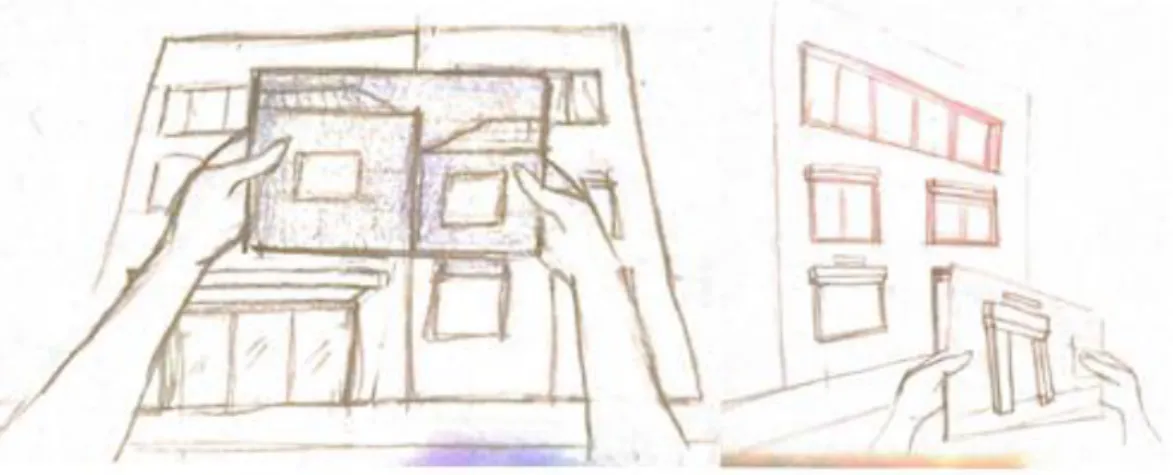
From the scenarios, several low fidelity prototypes, in the form of storyboards, were developed to help the visualization and the design of the user experience of the envisaged interface (Figure 1 to 3).
Figure 1. Low fidelity prototype/story-board where the user sees through AR the buildings that have associated information.
Figure 2. Low fidelity prototype/storyboard with a text box, visible through AR, showing relevant information about a specific object.
Figure 3. Low fidelity prototype - storyboard where the user sees through AR an old photo of the building superimposed on the facade.
3.2User requirements
Usage scenarios, where personas play and use the app to perform a specific task completion, were developed in order to then extract the user requirements to be developed in the SeeARch app, following a standard software engineering life-cycle. This application, benefited from the
prior in-house availability of the mentioned AR apps, namely ARch (Lopes, 2014), ARch4models (Costa, 2015) and ARch4maps (Gomes, 2015). On top of the existing AR framework, we derived from the user requirements, additional functional requirements that did not exist yet. Of these, we only list in this paper the requirements that were actually implemented in the SeeARch app. Other envisaged functionalities, where left for future work and can be seen in Raposo (2016).
From the previously available AR framework, we used the following functionalities:
Augment a map with several 3D buildings visible in the screen that can be then chosen by touch;
Show/hide in the 3D model of a selected building, the construction elements belonging to each of the various design specialities: architecture, structural engineering, infra-structures (water, sewage, electricity network, air conditioning, etc.), interior architec-ture, etc;
Highlight these elements with false colour;
Perform interactively (via touch on the device screen) vertical and horizontal sections on the building.
The new functional requirements are the following:
Start the app with an augmented identification of several locations on the city map; Use as visual markers, several buildings facades, that are approximately planar. Recognize and register in AR several visual markers, during the same interactive
ses-sion, and associate each one with specific multimedia content; Perform Augmented reality visualization:
o Register a selected 3D model in a previously known facade, used as a visual marker;
o Register photographs in a previously known facade, used as a visual marker; Perform Multimedia visualization:
o The multimedia content appears in the middle of the screen, including tech-nical drawings, texts, images, video, etc.
Zoom in / Zoom out and rotate the registered 3D model by using touch.
3.3 AR registration procedure
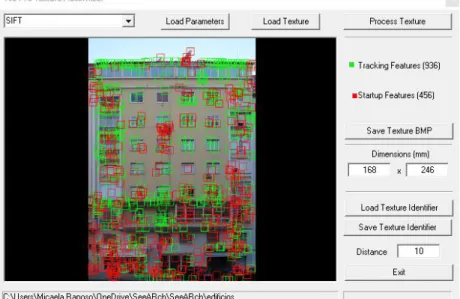
In the current version of the app, AR registration is achieved by using the facade as a visual marker, adopting Computer Vision techniques. The specific functionality that enables a user to prepare a visit, namely by choosing routes and interests, requires geo-referencing and was not implemented in the current prototype. SeeARch uses the well-known SIFT (Scale Invariant Fea-ture Transform) algorithm, which allows the identification of key feaFea-tures in an image based on its grey level contrasts - in this case the features found in the facade of a building. These key features, called Startup Features (for the calculation of the initial virtual camera pose – position and orientation) and Tracking Features (to track the instantaneous virtual camera pose in subse-quent video frames), allows the system to first recognize and then follow the facade through our in-house developed NUTTS (Natural Ubiquitous Texture Tracking System) technology. When the system recognizes a sufficient number of SIFT features in the facade, the registration of the digital content - which consists of a 3D model – occurs, and the model is superimposed over the image captured by the camera of the tablet. To use the SIFT algorithm to recognize a sufficient number of features in a given building façade, it is necessary to pre-process the image of such facade (previously known), by another in-house software toll (Texture Automizer) that finds all SIFT feature descriptors (Figure 4), according to some criteria. The result is a texture, i.e., an image with the features identified (a file with a .NTS extension). This file is uploaded to the system, configuring startup and tracking SIFT features used to, respectively, find and track in real-time the virtual camera pose, enabling AR registration, as mentioned.
Figure 4. The Texture Automizer tool generating the startup (in green) and tracking (in red) SIFT features, required by the NUTTS algorithm to recognize an image as a visual marker.
3.4 Multimedia information
During the AR user experience, the system superimposes onto a given building live video frame, multimedia information related to the specific building, such as photos, drawings, 3D models, videos and text descriptions. In the current prototype, video display is still not implemented. Pho-tos and drawings files are included in the JPEG or PNG format. The digital 3D models can be produced in any 3D modelling software that is able to exchange data with 3D Studio Max. For our user studies, the 3D models were all developed following the BIM methodology (using Revit) since, in addition to the geometric and topological model, we wanted to take advantages of the building construction information included in the model. We then modified the model imported into 3D Studio Max, to include the colour range used in SeeARch and the layers that classify the categories of construction elements to be displayed, namely, Walls, Structures, Infrastructures and Others. The file resulting file is then exported to SeeARch in the OSG format.
3.5Functionalities and User Interface
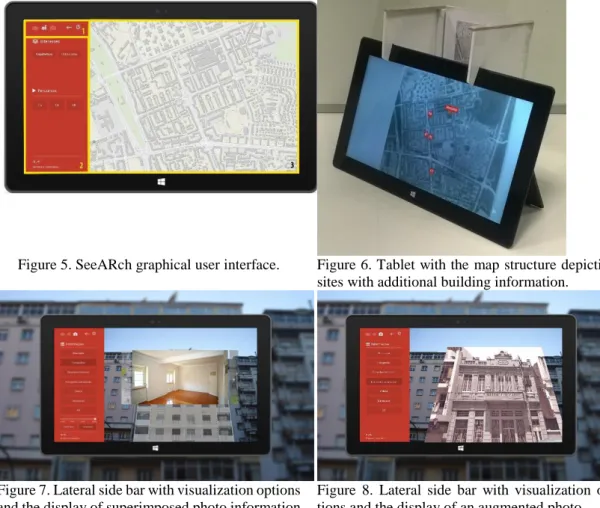
The SeeARch interface was designed for a tablet running Microsoft Windows 10. The interface (Figure 5) provides a quick and intuitive navigation with tactile interaction by using a lateral side bar for menus (Figure 5(2)), which occupies 1/4 of the screen. The central area (Figure 5(3)) is used for the visualization of the information and interaction with the content in the AR environ-ment.
The app starts with the visualization of a map (Figure 6), and on the video frame captured by the tablet camera, the system registers dots in AR. Since Inertia and GPS-based localization is still not used in this prototype, an image version of a map was designed and used at this stage (Figure 6).
Auxiliary icons to go back to the previous menu option or exit the system, are positioned at the top of the side bar (Figure 5(1)). When the map is visible on the screen, the user visualizes a set of circular points that mark the location of each one of the buildings that has additional infor-mation provided to the user. When the user selects one of the circular points a specific menu for that building pops up on the screen, providing the associated multimedia information (Figure 7). The first content to be shown is the digital 3D model, correctly registered in the video frame capturing the facade of the building, which is displayed in a transparent mode.
Later the user can go back to the first screen with the map if he/she wants to visualize another building. After selecting the circular point that refers to a specific building the user can then point the camera to the real building facade. Once the camera is capturing the facade of the real building
in question, such facade is recognized by the vision system, and the digital 3D model is registered in AR, with transparency and overlayed over video frame capturing the real building. The lateral side bar depicts the options for accessing information: "Description", "Photographs", “Aug-mented Photograph” "Technical drawings", “3D”, “Highlights” and "Videos". In each of the op-tions the user can go back and forward by touching in arrows on the sides that allow him/her to change to the next/previous content. If the user choses the “Augmented Photograph” option, a photo is registered on the real building facade, and with the same scale and alignment of the real building (Figure 8). This option brings the extra value of visualizing in AR, not only past history of the space, but also future design projects if they exist.
Figure 5. SeeARch graphical user interface. Figure 6. Tablet with the map structure depicting sites with additional building information.
Figure 7. Lateral side bar with visualization options and the display of superimposed photo information
Figure 8. Lateral side bar with visualization op-tions and the display of an augmented photo.
Figure 9. Lateral side bar with Sections mode ac-tive, while the user is performing interactively a vertical section, on the registered 3D model of the building.
Figure 10. Lateral side bar enabling the previously registered 3D model to be rotated in real-time.
By clicking on the "3D" option, the registered 3D model is no longer transparent, and the user can access other app features, particularly, three visualization modes: Presentation, Sections and
Selection. By sliding the finger through the screen the user changes from one mode to another. With the Section mode, it is possible to make interactive horizontal sections (floor plans) and vertical sections (in both orthogonal directions). To perform a section the user simply slides his/her finger through the center of the screen in the desired direction (Figure 9). In Selection mode, the user can choose to show, hide, or paint the elements - walls, structure, infrastructure, and others – included in the layers that structure the 3D model. The tactile screen enables the interaction with the system using touch.
There is also a set of auxiliary icons in the top right corner of the app, allowing the user to reduce/enlarge and rotate the 3D model, enabling a more complete perception of the building. These features allow direct interaction with the model from several angles and therefore enabling a boarder understanding of the model, when performing a horizontal and vertical section. To zoom in or out the 3D model, the user simply needs to slide his/her finger up or down, respectively. For model rotation, the user may slide the finger to the desired direction, causing the model to be rotated in the X or Y axes (Figure 10). The icons for zoom and rotation are slightly transparent, and when active their color is highlighted. To bring the model to its original position and size the user may click on the icon below the rotation. When the user desires to return to the initial menu, in order to choose another building, for example, he/she clicks on the arrow at the top of the menu, while in the Presentation mode, and the app returns to the specific menu of the building. With a second click, the app goes back to the initial menu where the map is shown and the user can select another building to explore.
4 .USER SATISFACTION EVALUATION
In order to draw conclusions about the acceptance of the proposed app, we performed user satisfaction evaluation tests of the app. These tests aimed at collecting qualitative and quantitative user feedback.
In this section, the results are described and analysed. A total of 10 volunteers participated in the tests. From those 4 were women and 6 were men, aged from 15 to 65. Volunteers were composed by 5 architects or architecture students, 4 residents or regular users and 1 tourist. Tests were car-ried out individually in the Alvalade neighbourhood in Lisbon in July 2014 in front of two build-ings whose multimedia data information was uploaded to the app database. The tests comprised four moments: i) the researcher explained the context of the study and the test to the participant who signed a consent form and answered a preliminary questionnaire; ii) the researcher explained to the participant the use of the tablet, the use of the app and all its features as well as the interac-tive possibilities; iii) the participant took control of the app and explored the prototype by him-self/herself, performing 9 tasks that were suggested by the researcher; iv) the participant answered a final satisfaction questionnaire, that include 23 closed and 2 open questions.
The preliminary questionnaire showed that the vast majority of participants had a good standing of digital technologies (30% had a very good understanding and 50% had a good under-standing). When age of the participants and their understanding of technologies is correlated, we noticed that all the participants up to the age of 50 where included in the 80% group that had a good understanding of digital technologies. The remaining 20% where aged over 50 and had a reasonable or insufficient understanding of digital technologies. Regarding the understanding of 3D modelling and visualization technologies, 50% reported they have a good or very good under-standing, 20% considered this to be reasonable, and the remaining 30% said they had an insuffi-cient or very bad understanding. With regard to prior experience with Augmented Reality, 50% reported they had already used it at least once, 60% said that the AR software they used, was related to obtaining about one city.
After the evaluation, the participants answered a final questionnaire of 19 questions in which they assessed the prototype using a Likert scale of 7 levels. Values 1, 2 and 3 were considered as a negative evaluation, value 4 as neutral and values 5, 6 and 7 as positive.
Regarding the usability of the prototype, participants considered that the use of the app was intuitive (M=5.10, S.D=1.45). Regarding the satisfaction towards the use of the app participants reported that the use of the app makes it easier to understand the buildings and the city (M=6.4, S.D=0.49). Most considered that the app added relevant information about the buildings and the city, while a person is walking around the city (M=6.10, S.D.=1.14). Participants where pleased
with the app, since the visualization of text, multimedia content and 3D models, all registered in AR assists well the understanding of a specific building (M=6.3, S.D.=0.64). To the question of whether the visualization of the augmented building was more informative than the visualization of only its real façade, while they were walking on the street, participants provided a quite positive feedback (M=6.10, S.D.=0.54). Comparing the visualization of the augmented building with the visualization of a touristic book, participants reported that the former is more informative than the later (M=6.8, S.D.=2.99). One participant ranked 4 - neutral rating - and one participant ranked 2 the app in that criteria. To the question whether the app is an alternative to the traditional means of accessing information on cities, participants answered positively (M=6.2, S.D.=0.75). 90% of participants said they had confidence in the information presented by the application.
5. DISCUSSION AND CONCLUSIONS
The SeeARch app was designed as an answer to the problem addressed in this work, that is, the lack of personalized information appropriate for citizens that want to be aware of the cities they are inhabiting or visiting. The work developed by Raposo (2016) and the prototype of the SeeARch app, presented in this paper, represents a new way of looking at the city and be aware of its individual characteristics performing informal sigh seeing walking tours.
The results of the usability and user satisfaction evaluation tests, lead us to conclude that the prototype app had a good acceptance, given that the participants were satisfied with its use and functionalities. Participants also reported that the information provided by the application was very focused on users with some architecture background.
Regarding usability, the application is seen as being intuitive for all users. Nevertheless users ranked the perceptions of the app depending on the user's relationship with digital technologies. Several authors as Nickson (2014) and Boness (2012) state that people learn to cope with tech-nologies, especially when they are confronted with them early in their growth. This can explain why people that when AR emerged were over the age of assimilating technology have less ability and interest to deal with it.
In this paper, we demonstrated that AR technologies allows users access a wide range of infor-mation in addition to what he/she observes in reality, enriching the user knowledge about the space that surrounds him/her. Since it allows a better contact with the city through direct AR interaction, SeeArch increases the user empathy with the city. We this research, we believe that we positively contributed towards the creation of new means of acquiring information about the cities, that is complementary to the traditional means.
5.1Future work
The app designed at ISTAR-IUL and described in this paper accomplished the core concepts developed in Raposo (2016). As for future work we plan to develop the following features with the aim of improving the app:
Use the inertia management unit (GPS, accelerometer, gyroscope, compass) of the mobile device along with the current vision/based tracking, and develop a new hybrid tracking technique, to improve the AR registration performance.
Enable the system to use an existing interactive digital map (e.g. Google maps) that, com-bined with the inertia management unit, allows localizing the user.
Develop new features that are dependent on such hybrid tracking, like recommendation of paths based on the user location and his/her preferences.
Adapt the SeeARch app for other mobile devices, like smartphones (supporting iOS and Android environments), that are more appropriate for outdoor adoption, are lighter than tablets and can be used in a longer walking path.
ACKNOWLEDGMENTS
The authors wish to thank colleagues from ISTAR-IUL for their collaboration in the development of this work and all the volunteers that participated in our user studies. This work was partially
funded by AAL OLA, Organisation Life Assistant (AAL 2014-076) and Marie Curie IRIS (ref. 610986, FP7-PEOPLE-2013-IAPP).
REFERENCES
Amim, R., 2007. Realidade Aumentada Aplicada à Arquitetura e Urbanismo. Rio de Janeiro: Universidade Federal- Dissertação apresentada para obtenção de grau de Mestre.
Azuma, R., 1997. A Survey of Augmented Reality, Malibu,CA: Hughes Research Laboratories. Boness, L., 2012. Science illustrated. [Online]
Available at: http://scienceillustrated.com.au/blog/features/teenage-brains-in-the-digital-world/ [Acedido em 24 Setembro 2016].
Costa, F., 2015. Requalificação de Setúbal Nascente - O Virtual Sobre a Realidade: Estudo de
ferramenta para aumentar maquetas reais. Lisboa: ISCTE-IUL- Dissertação apresentada para
obtenção de grau de Mestre.
Gaspar, F. et al., 2016. ARch4maps : a mobile augmented reality tool to enrich paper maps.. London, Proceedings of the Symposium on Simulation for Architecture and Urban Design (SIMAUD). pp. 179–182.
Gomes, S., 2015. Realidade Aumenta Aplicada nos Mapas de Arquitetura. Lisboa: ISCTE-IUL- Dissertação apresentada para obtenção de grau de Mestre.
Lopes, M., 2014. Realidade Aumentada para Design em Arquitetura. Porto: Universidade do Porto- Dissertação apresentada para obtenção de grau de Mestre.
Lopes, M. et al., 2014. Sistema de Realidade Aumentada para Apoio ao Projeto de Arquitetura, In Atas da EPCG 2014: 21º Encontro Português de Computação Gráfica.
Matos, P., 2008. Visualização de informação geo-referenciada em dispositivos móveis. Lisboa: FFaculdade de Ciências, Universidade de Lisboa- Dissertação apresentada para obtenção de grau de Mestre.
Milgram, P. & Takemura, H., 1994. Augmented Reality: A class os displays on the
reality-virtuality continuum. Japan: ATR Communication Systems Research Laboratories.
Nickson, C., 2014. A Technology Society. [Online]
Available at: http://www.atechnologysociety.co.uk/what-kids-expect-from-internet.html [Acedido em 24 Setembro 2016].
Raposo, M., 2016. SeeARch: ver a arquitetura através das tecnologias digitais. Lisboa: Instituto Universitário de Lisboa (ISCTE-IUL), Dissertação apresentada para obtenção de grau de Mestre.
Tori, R., Kirner, C. & Siscouto, R., 2006. Fundamentos e Tecnologia de Realidade Virtual e
Aumentada. Belém: Livro do Pré-Simpósio.
Viana, J., 2010. Contribuição Metodológica para a Investigação Histórica e Concepção de
Roteiros Hiper-média Participativos e Potenciadores de Novas Vivências do Espaço. Coimbra:
FLUC - Faculdade de Letras Universidade de Coimbra- Dissertação apresentada para obtenção de grau de Mestre.
Vlahakis, V. et al., 2001. ARCHEOGUIDE: first results of an augmented reality , mobile computing system in cultural heritage sites. roceedings of the 2001 Conference on Virtual Reality,