The SmartVision Navigation Prototype for Blind Users
J.M. Hans du Buf, João Barroso, João M.F. Rodrigues, Hugo Paredes, Miguel Farrajota, Hugo Fernandes, João José, Victor Teixeira, Mário Saleiro
International Journal of Digital Content Technology and its Applications Vol.5 No.5, May 2011
The SmartVision Navigation Prototype for Blind Users
1J.M. Hans du Buf,
2,3João Barroso,
1João M.F. Rodrigues,
2,3Hugo Paredes,
1Miguel Farrajota,
3Hugo Fernandes,
1João José,
3Victor Teixeira,
1Mário Saleiro
1, Corresponding AuthorVision Laboratory – Inst. for Systems and Robotics (ISR), University of the
Algarve (FCT and ISE), Faro, Portugal, {dubuf, jrodrig}@ualg.pt
2,
GECAD, Knowledge Eng. and Decision Support Research Group, Inst. of Engineering of
Porto, Portugal, {jbarroso, hugof}@utad.pt
3,
University of Trás-os-Montes and Alto Douro (UTAD), Vila Real, Portugal
doi : 10.4156/jdcta.vol5.issue5.39
Abstract
The goal of the Portuguese project "SmartVision: active vision for the blind" is to develop a small, portable and cheap yet intelligent and reliable system for assisting the blind and visually impaired while navigating autonomously, both in- and outdoor. In this article we present an overview of the prototype, design issues, and its different modules which integrate GPS and Wi-Fi localisation with a GIS, passive RFID tags, and computer vision. The prototype addresses global navigation for going to some destiny, by following known landmarks stored in the GIS in combination with path optimisation, and local navigation with path and obstacle detection just beyond the reach of the white cane. The system does not replace the white cane but complements it, in order to alert the user to looming hazards. In addition, computer vision is used to identify objects on shelves, for example in a pantry or refrigerator. The user-friendly interface consists of a four-button hand-held box, a vibration actuator in the handle of the white cane, and speech synthesis. In the near future, passive RFID tags will be complemented by active tags for marking navigation landmarks, and speech recognition may complement or substitute the vibration actuator.
Keywords:
Vision Aid, Autonomous Navigation1. Introduction
The goal of the Portuguese SmartVision project is to develop and integrate technology into a portable device for aiding blind persons and those with severe visual impairments, about 180 million of which 40-50 million are completely blind. This device must be small, cheap and easy to assemble using off-the-shelf components. It must be extremely easy to carry and use, yet providing all necessary help for autonomous navigation. It should be stressed that the device cannot replace the white cane; it will be an extension of the cane, issuing warning signals when approaching a possible obstacle or when the footpath in front is curved and the heading direction should be adapted. The device cannot employ headphones as these block surround sounds. We assume that the user has adapted to the cane and relies on hearing. In this sense the device is “non-invasive” such that surround sounds and the device's signals, including verbal communications with queries and answers, are integrated in a natural way.
Sighted persons may have some difficulty in imagining the problems which blind persons must deal with almost all of the time, because they take the extremely comfortable efficiency of the visual system for granted. One brief glance suffices to determine the heading direction to a specific goal, to cross a street and to spot possible obstacles, both static ones like loose or missing cobblestones and steps in the pavement, also moving ones like persons and dogs. In a pantry, there is no problem distinguishing between cans of tomatoes and baked beans, even if both have the same size and both are red. Hence, the ultimate goal of the project is to substitute a significant part of the visual system, which is very ambitious.
Even the development of a device which mimics a guide-dog (Am.: seeing-eye dog) is a challenge. Such dogs have been trained to guide their owner around all obstacles and to recognise landmarks like certain shops, going from landmark to landmark, with subtle commands and hints resulting from extensive training. However, even a guide-dog is of little help when its owner needs to go to a location
The SmartVision Navigation Prototype for Blind Users
J.M. Hans du Buf, João Barroso, João M.F. Rodrigues, Hugo Paredes, Miguel Farrajota, Hugo Fernandes, João José, Victor Teixeira, Mário Saleiro
International Journal of Digital Content Technology and its Applications Vol.5 No.5, May 2011
which the dog does not know: its function is reduced to local navigation, negotiating obstacles, footpaths and zebra crossings, that is, if the owner is already familiar with that location. If not, both are lost and the owner must ask passers-by, if there are any. An equivalent of a normal, printed map is required in order to not always have to rely on help by others and improve the autonomy of the user, with or without a dog.
From the above it is clear that we can distinguish three broad but linked applications: (1) local navigation for centering on footpaths etc. and obstacle avoidance, in the immediate surrounding but just beyond the reach of the white cane; (2) global navigation for finding one's way in the centre of the city, in a neighbourhood, or in a shopping centre; and (3) object recognition, not only cans etc. on shelves in a pantry or supermarket, but also outdoor: bus stops, taxi stands, cash machines (ATM) and telephone booths. Also banks, post offices and shops, simply all objects which have a distinct function and which can serve as a landmark for global navigation. Such objects could be recognised by their physical structure (image), by their specific sign, or by some sort of mark like an active RFID tag specifically employed for blind persons.
Below we discuss technological solutions in general (Section 2) and the ones being developed in the project: the prototype (Section 3), GIS and the navigation module (Section 4), the vision module (Section 5), the white cane with passive RFID tags (Section 6) and the interface module (Section 7). We conclude with a discussion in Section 8. It should be stressed that the functionality of the vision module for local navigation is detailed elsewhere [9].
2. Technologies and Infrastructures
Technology can provide solutions to the three broadly-defined applications, even with off-the-shelf hard- and software, but computing power may be a limiting factor in portable and therefore small devices. Another problem is the necessary infrastructure to use the technology, like outdoor GPS and indoor Wi-Fi reception in combination with a GIS, the level of detail of the latter, plus extra infrastructure specifically devoted to blind persons. For example, many railway stations have bands of rippled pavement at the platforms. Such bands can be employed at many other locations to mark the centres of footpaths. If too expensive, are there cheaper solutions? Since most roads are marked by white stripes which reflect light, it is also possible to mark footpaths, for example by reflecting circles a few metres apart. During the day these can be easily detected by a miniature camera, but during the night a small light source is necessary, for example a powerful LED, carried by the user, which flashes every two or three seconds.
A large metro and railway station in Lisbon is equipped with loudspeakers which emit sounds of birds, with different sounds in different areas for global navigation, and most sighted passengers do not even notice the sounds. Spoken messages stored in electronic tags are provided by the “Talking Points” system [14] and the tags can be fixed to anything, from an entry of a building to its elevators, also to bus stops and busses. This system is a commercial one, only providing “turnkey” solutions.
There are many possibilities, but the main question is: how much is a civilised society willing to invest in infrastructure for relatively few users, knowing that the infrastructure will make a tremendous difference for those users. For example, the reflecting circles mentioned above could be substituted by a solar-power driven LED in a small armature with a white-glass cover in the pavement, such that blind persons do not need to carry a light source when it is dark. One armature including a small solar panel, day-night sensor and other electronics might cost a few euro if mass produced. Electronic parts are so cheap that LEDs in special armatures can flash like a temporal barcode, too fast to be noticed by sighted persons, with codes linked to special places like footpath bifurcations and entries of buildings. However, it costs more to drill the holes and mount the armatures, unless the infrastructure is planned in new developments. Also, such armatures provide a solution when it is dark, but what during a sunny day when the temporal barcode cannot be detected?
An equivalent solution is to use RFID tags: passive tags without battery, which are cheap but have a small action radius, and active tags with battery or external (solar) power supply, which are more expensive but have a large action radius. To be useful, passive tags must be drilled into the pavement at rather small distances if the tip of the cane is equipped with a small sensor and the swaying cane should
The SmartVision Navigation Prototype for Blind Users
J.M. Hans du Buf, João Barroso, João M.F. Rodrigues, Hugo Paredes, Miguel Farrajota, Hugo Fernandes, João José, Victor Teixeira, Mário Saleiro
International Journal of Digital Content Technology and its Applications Vol.5 No.5, May 2011
encounter the tags with a reasonable probability (see Section 6). Active tags, on the other hand, are more suitable for marking important landmarks like entries of buildings and shops, with a distance of 5 to 10 metres. Since both passive and active RFID tags emit unique codes, the codes can be stored in a database. Passive tags can be used for local navigation at footpath crossings etc., whereas active ones are better for global navigation, both in- and outdoor: the name of a landmark like a shop in the GIS for position calibration if GPS or Wi-Fi reception is not available. See also Section 3. In principle, GPS and Wi-Fi can also be supplemented by a realtime location tracking system if the user wears an active RFID tag [13], but this solution requires tag readers at many strategic locations.
Concerning object recognition in a supermarket or household pantry, if the blind person is wearing a camera at chest height, perhaps three shelves can be analysed with sufficient optical resolution. But in a supermarket these shelves normally carry the most expensive products, whereas the cheapest ones are on the bottom shelves. In addition, all shelves are cramped with products, because shelf space is money, hence products are not well separated and this hampers object segregation and identification (see Section 5). In a pantry, this problem can be avoided and both top and bottom shelves can be reserved for bigger things which can be easily identified by hand. In any case, it should be possible that a blind person takes an object in his hand, holds it at arm length in front of the camera attached at chest height, and uses a special command to ask the system to identify the object.
An alternative is to label objects with a QR barcode, a square one which can hold more information [1]. A mobile phone with a camera and QR barcode software sends the code to a URL server and receives an audio file, created by text-to-speech, with a description. Of course, this solution can be applied anywhere, software for printing and reading QR barcode labels is freely available, the price is almost nil apart from server and database maintenance, but the labels must always be visible. Instead of putting the labels on the products it is possible to put them on the shelves, provided they are checked on a regular basis and no one puts products at wrong locations. A complication when using a camera at chest height is the long distance between camera and barcode label, which also implies that there may be many labels in the camera's field of view. If a portable computer is used instead of a mobile phone, all software can be integrated and no wireless communications are required (text-to-speech may be required anyway; see Section 7).
For localising few but very important objects, like a bunch of keys at home or a suitcase on a conveyor belt at the luggage claim area of an airport, there already exist good solutions: an electronic label which can be attached to the object and a small hand-held gadget with a push button. Such technology works with ultrasound or radio signals, and the label beeps loudly when the button is pushed. It is rather easy to make a gadget with a few buttons for localising various objects. Here we may assume that blind persons do not put very important objects nor such a gadget at arbitrary locations, but: errare humanum est!
There are other technologies which can be employed, notably ultrasound detectors for spotting possible obstacles at foot- or head-height [10]. An alternative to GPS is Wi-Fi and mobile phone (GSM) localisation by “fingerprinting.” Indoor, Wi-Fi is better than GSM, yielding an accuracy of 2.5-5.4 m, but outdoor GSM is better (75 m), especially in urban areas with a high antenna density [16]. A recent development is Nokia's indoor positioning technology [4] based on DoA (direction-of-arrival), with an accuracy better than 2-5 m. Another technology employs ToA/AoA (time/angle of arrival) with UWB (ultra-wideband), aiming at 10 cm. Pending availability of such advanced technology, one must select what is currently available and integrate this into a working system which is modular, such that future developments can be easily and rapidly adopted. With the current development in localisation technology, good solutions will be available soon and at many locations, both in- and outdoor. Below we describe the components of the SmartVision system. The approach for the Greek project SmartEyes [15] is similar to that of SmartVision, with ongoing collaboration, but SmartEyes’ visual functionality is entirely based on stereo vision for detecting walkable open spaces and obstacles. For other initiatives we refer to [5, 10].
J.M
3. P
T GPS shop and solu posi aski that posi time by t the G rout T for m from syst com T coor Both sign latte loca accu C pass by B read T surr and loca requ M. Hans du Buf, InternPrototype O
The system int S is for outdo pping centre o GPS receptio ution is requir itions, and if t ing a passer-by
the user's sys ition is constan e Wi-Fi recept the GIS server GIS for taking te.
The system co managing all m the user (no tem. Also not mpass which w
The GIS and rdinates to the h GPS and W nals cannot be er are common ation technolo
uracy from the Concerning ha sive tags in th Bluetooth and der will be con The navigation rounding point
location data. al map and its uested data, th
Th João Barroso, Joã national Journal o
Overview
tegrates GPS oor navigation or a university on may not be red such that these cannot b y to bring him stem always h ntly calibrated tion is possibl r, for example g the best or sh onsists of a fe other module ot shown) and t shown are t will be integrate d navigation e SmartVision Wi-Fi are com received the n to both in- a ogy has a spe e ones which a ardware, one sm e pavement, s Wi-Fi is a bu nnected to the n modules ar ts-of-interest ( . To get the GI POIs. The us he navigation m he SmartVision N ão M.F. Rodrigue Tei of Digital Content(in the future n and Wi-Fi m y's administrat
e available in t the user can be located by m to the neares has a global m d using GPS, W e and a signif e in a radius o hortest path to w modules; s es and the com
d takes decisio the speech an ed in the futur Figure 1. Sma modules prov n module, eithe mplemented by SmartVision m and outdoor e ecific accurac are available a mall RFID rea see Fig. 7, and uilt-in compon computer in o e responsible (POIs). They IS data, the Sm ser's position i modules feed Navigation Prototy es, Hugo Paredes, ixeira, Mário Sale t Technology and
e the European mainly for ind tion. However
narrow street n still be ass visual object st landmark wh map with enoug Wi-Fi or RFID ficant distance of a few kilom o a destiny and ee Fig. 1. The mmunications ons about wh nd other inter re. artVision prot vide regular er using GPS y RFID tags module must environments a cy and the n at any moment ader can be pl d the camera i nent of the por order to detect
for route pla connect to the martVision mo is obtained fro
the SmartVisi
ype for Blind Use Miguel Farrajota eiro d its Applications n Galileo equi door, specific r, Wi-Fi acces ts and in bad isted: by acti recognition, a hich is include gh detail along D tags, whatev
has been trav metres. This w d for knowing e central Sma with these. T hat information faces (see Se totype structur updates of in outdoor or and computer rely on RFID and serve to d avigation mo t.
aced in the tip is chest-mount rtable compute active tags att anning and fo e SmartVision odule queries om the locatio ion module w ers a, Hugo Fernande Vol.5 No.5, May
ivalent) and W cally in bigger
s points are st weather. The ive RFID tag and, if all else ed in the GIS. g the planned ver is locally av
versed, the loc way the user ca
g the major lan artVision mod This module al
n the user sho ection 7), nor
re.
the user's cu Wi-Fi in indo r vision, and
tags and com detect specific odules always
p of the white ted. The GPS er. In the futur tached to land or providing i n module and
the GIS serve on modules. A with navigation
s, João José, Vict 2011
Wi-Fi with a G r buildings lik till not ubiqui erefore, a fail-gs with calibr e fails, by the . The basic ide d route. The ac vailable, and e cal map is upd
an always con ndmarks along dule is respons lso receives in ould get from
is the electr urrent geograp oor environme if GPS or W mputer vision. c landmarks. E choose the cane for detec unit is conne re, a second R dmarks. information ab request GIS er in order to g After analysing n instructions. tor GIS. ke a itous -safe rated user ea is ctual each dated nsult g the sible nput m the onic phic ents. Wi-Fi The Each best cting ected RFID bout data get a g the The
The SmartVision Navigation Prototype for Blind Users
J.M. Hans du Buf, João Barroso, João M.F. Rodrigues, Hugo Paredes, Miguel Farrajota, Hugo Fernandes, João José, Victor Teixeira, Mário Saleiro
International Journal of Digital Content Technology and its Applications Vol.5 No.5, May 2011
amount and accuracy of the GIS data stored on the GIS server is critical in order to provide the best instructions.
The vision module provides local orientation instructions by detecting sidewalk borders and possible obstacles in front on the path, for guiding the user safely. It also detects already known landmarks (GIS in the immediate surrounding) in order to confirm encountered POIs and re-calibrate the user's position if GPS or Wi-Fi cannot be received. In addition, this module can be used to detect and recognise objects on demand. The camera used is the Bumblebee2 from Point Grey Research Inc. Being a stereo camera, it is possible to extract disparity information. This information is calibrated in order to estimate the distance between the user and a detected landmark (in the future to be combined with heading information from an electronic compass attached to the camera unit).
Finally, the interface module is the link between the SmartVision module and the user. At the moment it serves two outputs and one input. The two outputs are text-to-speech audio and vibration actuators. The vibration actuators are used for local navigation, i.e., obstacle avoidance and heading direction. The audio interface is used for navigating the menus and providing POI information. The user provides input by using a small four-button device to navigate a simple menu system and to select options. In a future version this can be replaced by speech recognition with pre-defined commands in combination with speech and sound synthesis.
4. GIS and Navigation Modules
Geographic Information Systems (GIS) are widely used as a powerful tool for storing, manipulating, visualising and analysing spatial data. GIS software enables users to view spatial data in a proper format. It also allows for the interpretation of spatial data in a way that is simple to understand by users with special needs, in this case blind persons and those with severe visual impairments.
Given the fact that Wi-Fi is not everywhere available, all or most information required for global navigation must be stored locally on the SmartVision prototype. This way it is possible to have access to the information whatever the scenario, both in- and outdoor, without a need to regularly query the GIS server. The geographic information stored on the prototype is updated when Internet connection is available, through the use of Web services. The information is stored in digital map files, or shapefiles [8], and a MySQL database which holds landmark details. For the distribution of geographic information, the adopted architecture is three-tier client/server [12]. This way, functionalities can easily be shared by multiple applications, the processing can be distributed over powerful servers to achieve performance requirements, and the separation of logical components facilitates management of the database. In our system, the client application, i.e., the SmartVision prototype, handles and provides geographic information to the user. For a detailed description see [2, 8]. Figure 2 illustrates the client/server architecture.
The user triggers the updating of the local map using the interface module. When triggered, the client application sends a request to the Web server, which forwards it to the GIS server. The GIS server then interprets the request and retrieves the spatial data stored in the shapefiles to generate a map. This map is sent back to the Web server, which, in turn, sends it to the client application (i.e., the SmartVision prototype). Examples of mapped locations are listed in Table 1.
In order to manage the data stored in the GIS, the most basic management tasks involved are periodic updates of the database and/or shapefiles by a system administrator. To simplify the task of viewing and editing the raw data present on the GIS server, as well as to reduce the need of specialised staff, a web application is used for content management. This application includes both a front office (web portal) and back office (for content management by a system administrator). This application is available by accessing the Web server. Therefore, the Web server fulfills two roles: content management and data transfer to the SmartVision prototype.
In the case of outdoor locations, our experience indicates that geocoding is best done manually using an aerial view. However this can pose some problems in getting coordinates of some specific points due to photo resolution. GPS is being used to fix those points.
J.M T follo in th N Fig. start effic simi vert the acce C rece com appr 2-5 the l to o calib M. Hans du Buf, Intern The navigation ow, from an in he database are Navigation ins 3. According ting vertex to ciency and im ilar to a graph ices and these GIS of UTAD ess points and Concerning th eption inside b mbination with roximate the u m [4]. Implici localisation by outdoor GPS. brate the user'
Th João Barroso, Joã national Journal o n modules han nitial or actual e transmitted t F Table 1. Acc Ro Number o Car B Cr Gre Spor B structions are g to Ertl [6], t a destination v mplementation h, i.e., the poin e are linked by D campus cou 5 indoor spac he use of Wi-buildings. By u h a triangula user's position itly we assum y Wi-Fi is requ However, if 's actual positi he SmartVision N ão M.F. Rodrigue Tei of Digital Content ndle aspects r l position to th to the user by Figure 2. Thre Examples of Outdoor cess roads Roads oad signs of parking plac r parkings Buildings rosswalks een zones rt facilities Bus stops issued using D this algorithm vertex, and thi simplicity. O nts where a roa y the graph's e unts 53 roads ces, and more a
-Fi, this techn using the calib ation method n with an error e that there ar uested. This s less than thr ion is required Navigation Prototy es, Hugo Paredes, ixeira, Mário Sale t Technology and related to the he chosen des the interface m ee-tier client/se f the locations ces Dijkstra's Sho m is able to ca is algorithm p Obviously, the ad begins, is in edges. See [2, s, 32 zebra cr
are still being nology is also brated location based on th r margin of 7-re at least th7-ree olution provid ree APs are w d. Therefore, i
ype for Blind Use Miguel Farrajota eiro d its Applications computation stiny. In terms module, in ord erver architect s stored in the Indo Office Classroo Lavator Servic Wi-Fi A
ortest Path Fir alculate, in a g rovides a bala e road layer in ntersected and 8] for further rossings, 34 b added. o used to com ns of Wi-Fi ac he APs’ signa -8 m, which is e APs within r des an indoor l within receptio
in the near fut
ers
a, Hugo Fernande Vol.5 No.5, May
of the route t s of functional der to choose a ture. GIS server. oor es oms ries ces APs rst (SPF) routi graph, the sho anced solution n the map is b d ends corresp r details. The c buildings with mpensate for ccess points (A al strengths, s worse than N reception rang localisation sy on range, an ture tests with
s, João José, Vict 2011
that the user m lity, all local P
a desired one.
ing algorithm; ortest path fro n between calc built in a man ond to the gra current versio h entries, 6 W the lack of G APs) in the GI it is possible Nokia´s margi ge, i.e., at the t ystem very sim alternative to h active RFID tor must POIs ; see om a culus nner aph's on of Wi-Fi GPS IS in e to in of time milar o re-tags
J.M will The temp
5. V
T with fron land aspe of h dete and M. Hans du Buf, Intern be conducted se extensions porarily not av Figure 3. ExVision Mod
The Vision mo hin safe bound nt and just bey dmarks or whi ect must still b household item ection, obstaclobject recogn
Th João Barroso, Joã national Journal o d in combinat are required i vailable outdo xample of the
dule
odule provides daries in corrid yond the reach ich can be a d be studied by ms are availabl e detection, de nition; see Fig.Fig
he SmartVision N ão M.F. Rodrigue Tei of Digital Content
tion with visu in any case, i.e oor. e application the GIS s information dors and on p h of the white destiny (bus st using real test le. This modu etection of mo . 4.
gure 4. Vision
Navigation Prototy es, Hugo Paredes, ixeira, Mário Sale t Technology and
ual landmark e., if no or few
of Dijkstra’s S of UTAD c
for local navig paths including
e cane, and kn top, taxi stand t video sequen ule consists of oving persons
n module and
ype for Blind Use Miguel Farrajota eiro
d its Applications
(object) reco w APs are pres
s SPF algorith ampus.
gation: the hea g footpaths (si nown objects w d, cash machin nces, although f four major s or other objec major sub-mo ers a, Hugo Fernande Vol.5 No.5, May
gnition by th sent inside a b hm to path fin ading directio idewalks), pos which may se ne, post office h first results o ub-modules: s cts possibly on
odules.
s, João José, Vict 2011 e Vision mod building or GP nding in part n to keep the ssible obstacle erve as naviga e, etc.). The la on the recogni sidewalk and p n collision cou tor dule. PS is of user es in ation atter ition path urse,
J.M A used loom A or a Rob et al disti for i matr E libra diffe the cam poin show tests lava Fi M. Hans du Buf, Intern Algorithms for d for robot na ming obstacle F An important g a bottle of ketc bust Features), l. [3] claim tha inctiveness an image convol rix-based dete Extensive tests ary, a C/C++ erent views ar objects arrang mera is at reaso nting the came ws examples o s will be cond atory, welcome
igure 6. Typic
Th João Barroso, Joã national Journal o
r path detectio avigation in c has been dete
igure 5. Two goal is to loca chup. To this which is a sc at it outperform nd robustness, lutions and on ector and distri s are being c implementati re used for tra ged on shelve onably short d era, also in com
of shelves in a ducted to recog e desk, furnitu cal views of ho located he SmartVision N ão M.F. Rodrigue Tei of Digital Content on and obstacl corridors [17]. cted and an ob sequences wit ate household purpose we u ale- and rotati ms previously and that it is n the strengths ibution-based onducted with ion. Dependin aining, their fe s [5]. As expe distance, about mmunicating w a pantry and a gnise bigger b ure, plants) and
ousehold item d and recognis
Navigation Prototy es, Hugo Paredes, ixeira, Mário Sale t Technology and
le avoidance a . Figure 5 sho bstacle alert ha
th different pa items, for exa use the well-k ion-invariant i y proposed sch s faster. All th s of the best descriptor – s h many typic ng on the com eatures being ected, the reco t 0.5 m. Of co with the system a refrigerator but important d then outdoor
ms on shelves in sed using the O
ype for Blind Use Miguel Farrajota eiro d its Applications are detailed in ows examples as been genera avements and d ample on shel known algorith interest-point d hemes like SIF his is achieved existing detec simplifying the al household mplexity of e used in realtim ognition rate i ourse, the user m in order to with identifie objects for na r (cash machin n a pantry and OpenSURF so ers a, Hugo Fernande Vol.5 No.5, May
n [9]. These ar s of two sequ ated to inform detected obsta lves in a pantr hm coined SU detector and d FT with respec d by relying o ctors and desc ese methods to objects, using each object, a me for locatin is very good, must be train optimise perfo d objects. In t avigation, first ne, telephone d a refrigerator oftware.
s, João José, Vict 2011
re similar to th uences in whic m the user.
acles. ry, like toothp URF (Speeded descriptor [3]. ct to repeatabi on integral ima criptors – Hes o the essential g the OpenSU a single or a ng and identify provided that ned in holding ormance. Figu the future, sim t indoor (eleva booth, etc.). r which have b tor hose ch a paste d Up Bay ility, ages ssian l. URF few fying t the and ure 6 milar ator, been
J.M
6. W
A the solu emit in th cont inter F Bott T imp nail plas In to fi sway prob alon to sp of th with teste solu incr show7. I
W and inter vers the M. Hans du Buf, InternWhite Cane
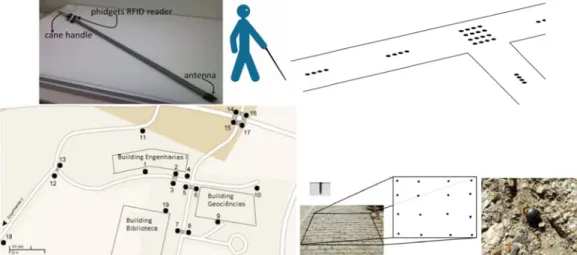
Above, the use main problem ution is to use tting antenna i he very tip of tains a vibrat rface; see Fig.
Figure 7. Top
tom, from left The RFID tag
lementation. T or golf tee, 2 stic encapsulat n experiments find the best l ying of the c bability of “hi ng three parall
pecial events he tags are sto h different tem
ed in combina ution proved to
easing the “hi ws positions o
Interface M
When develop extremely ea rfere with nor sion of the Sm cane, and a sm
Th João Barroso, Joã national Journal o
e and Passiv
e of white mar ms of such ma e passive RFID is at close ran f a cane made tion actuator . 7 (top-left) an p-left: PVC can t: tag clusters a g reader used The passive ta 2.5 cm long an tion [5]. The ta s we tested dif layout. The m cane and the itting” tags w lel lines: two l like fixed obs ored in a smal mporal pattern ation with four o be better, o it rate.” Resul of rectangular tModule
ping a navigati asy to use [11 rmal hearing martVision pro mall hand-hel he SmartVision N ão M.F. Rodrigue Tei of Digital Contentve RFID T
rkers on the p arkers is the n D tags in the ge, less than 1 e of light PVC and close to nd [7]. ne with RFID at a part of UT d is from Phi ags have a wo nd 4 mm wide ags can be eas fferent tag lay main problem distance of with some regulines close to t stacles (trash c l database tog ns. In a secon r-by-four tag a only requiring ts of the tests tag clusters at
ion aid for vis 1]. The interf of surround s ototype emplo ld box with o
Navigation Prototy es, Hugo Paredes, ixeira, Mário Sale t Technology and
ags
avement for a necessity of a pavement, wh 10 cm. Experim C, similar to t the handle w reader and an TAD campus, dgets, mainly orking frequen e, and the ele sily inserted in youts, both in ais the combin the cane's tip ularity. Initial the path borde cans, trees) an gether with eve nd configuratio arrays at bifur additional tes and further d t UTAD campu sually impaire face can only sounds nor th oys speech syn
nly 4 pushbut
ype for Blind Use Miguel Farrajota eiro d its Applications aiding local na light source w hich always r ments were co the ones used was mounted ntenna. Top-rig a tag cluster, a y because of ncy of 135 kH ctronics are fi nto drilled hole a laboratory a nation of the w p to the surfa
ly the tags w ers and one lin nd change of d ent types, and on, a single li rcations etc.; s sts in order to details are desc us and a photo ed users, the u rely on touc he normal use nthesis, a vibr ttons. Each in ers a, Hugo Fernande Vol.5 No.5, May
avigation was when it is dar respond provid onducted with d by blind per the tag reade
ght: layout of and a tag plan previous exp z. The tags ha ixed inside a h es in the pavem and on UTAD walking speed face of the pa ere distributed ne in the centr direction. To t d the cane's vib
ine along the see Fig. 7 (top o optimise the cribed in [7]. F ograph of a tag user interface h h and hearing of the white ration actuator nterface has a
s, João José, Vict 2011
discussed. On rk. An alterna ded that a sig h an RFID ante rsons. The han er with Blueto
the tags on pa nted in the grou perience and e ave the shape
hard and resis ment. Campus, in o d of the user, avement, i.e., d on the path re to alert the this end the co brator is activ path's centre p-right). The la e tags' spacing Figure 7 (bott g. has to be intui g, but it may cane. The ac r in the handl specific use. tor ne of ative gnal-enna ndle ooth aths. und. easy of a stant order , the the hway user odes vated was atter g for tom) itive not ctual le of The
The SmartVision Navigation Prototype for Blind Users
J.M. Hans du Buf, João Barroso, João M.F. Rodrigues, Hugo Paredes, Miguel Farrajota, Hugo Fernandes, João José, Victor Teixeira, Mário Saleiro
International Journal of Digital Content Technology and its Applications Vol.5 No.5, May 2011
speech module is used to guide the user with brief messages, or longer messages but only when intentionally requested by the user. The vibration module is used when very simple instructions like “turn left” or “turn right” are issued.
At the moment the pushbutton box is the only input device to the prototype. Linked to the computer by a simple USB interface, different combinations of the four buttons allow the user to request information and to navigate through a simple menu system [8]. For instance, the user is able to ask for detailed information about the surrounding environment, or only one specific landmark. If available, this information will be provided by the speech module. The speech module consists of a Dynamic Link Library (DLL) which uses the Microsoft speech synthesizer API. This DLL also allows to select the voice and output device, and to control volume and pitch. In spite of providing all necessary or available information for guidance, the audio interface is limited to speech synthesis. In principle, speech recognition can also be employed, but may be less reliable near roads with heavy traffic or at sites with loud music or many talking people.
8. Discussion
In this article we described the current version of the SmartVision prototype, which integrates a GIS with positioning by GPS and Wi-Fi, also computer vision for path, obstacle and object detection. In the near future, active RFID tags will be integrated for landmark detection if GPS and Wi-Fi reception are not possible, as will be an electronic compass in order to know the actual heading direction of the user and to give instructions to correct the direction. The latter is for global navigation because the vision module handles local navigation for negotiating paths and obstacles.
The GIS of UTAD campus [8] has been prepared, but it will be refined and extended by a few indoor locations to test also navigation in big buildings. The visual functions will be extended by stereo vision in order to estimate distances to objects and obstacles, and visual recognition of important landmarks, which extends recognition of household items on shelves etc., is already being explored.
The FCT-funded project SmartVision will terminate mid-2011, but a follow-up project of two years has already been approved. This extension suffices to optimise all modules and to include the newest and best localisation solutions like Nokia's indoor one with a better precision. In addition, extensive field tests are planned in collaboration with ACAPO, the Portuguese association for amblyopes and the blind. The goal is to convert the prototype into a real system which can be assembled and maintained by non-experts, with detailed instructions. This system is coined Blavigator, from blind navigator.
9. Acknowledgements
This research was supported by the Portuguese Foundation for Science and Technology (FCT), through the pluriannual funding of the Institute for Systems and Robotics (ISR/IST) through the PIDDAC Programme funds, and by the FCT project SmartVision: active vision for the blind (PTDC/EIA/73633/2006).
10. References
[1] Hend S. Al-Khalifa “Utilizing QR code and mobile phones for blinds and visually impaired people” In Proc. 11th Int. Conf. on Computers Helping People with Special Needs, Springer, LNCS 5105, pp. 1065-1069, 2008.
[2] José Almeida, Hugo Fernandes, Vitor Filipe, João Barroso “Web platform architecture to support the geographic information system of the University of Trás-os-Montes and Alto Douro Campus” In Proc. Int. Conf. on New Trends in Information and Service Science, pp. 1112-1117, 2009. [3] Herbert Bay, Andreas Ess, Tinne Tuytelaars, Luc Van Gool “Surf: Speeded up robust features”
Computer Vision and Image Understanding, Vol. 110, No. 3, pp. 346-359, 2008.
[4] Fabio Belloni, Ville Ranki, Antti Kainulainen, Andreas Richter “Angle-based indoor positioning system for open indoor environments” In Proc. 6th Worksh. on Positioning, Navigation and Communications, pp. 261-265, 2009.
The SmartVision Navigation Prototype for Blind Users
J.M. Hans du Buf, João Barroso, João M.F. Rodrigues, Hugo Paredes, Miguel Farrajota, Hugo Fernandes, João José, Victor Teixeira, Mário Saleiro
International Journal of Digital Content Technology and its Applications Vol.5 No.5, May 2011
[5] J.M. Hans du Buf, João Barroso, João M.F. Rodrigues, Hugo Paredes, Miguel Farrajota, Hugo Fernandes, João José, Victor Teixiera, Mário Saleiro “The SmartVision navigation prototype for the blind” In Proc. Int. Conf. on Software Development for Enhancing Accessibility and Fighting Info-exclusion (DSAI), pp. 167-174, 2010.
[6] Gerhard Ertl “Shortest path calculation in large road networks” OR Spektrum, Vol. 20, No. 1, pp. 15-20, 1998.
[7] José Faria, Sérgio Lopes, Hugo Fernandes, Paulo Martins, João Barroso “Electronic white cane for blind people navigation assistance” In Proc. World Automation Congress, pp. 1-7, 2010.
[8] Hugo Fernandes, Telmo Adão, Nuno Conceição, Hugo Paredes, Pedro Araújo, João Barroso “Using GIS platforms to support accessibility: the case of GIS UTAD” In Proc. Int. Conf. on Universal Technologies, pp. 71-80, 2010.
[9] João José, Miguel Farrajota, João M.F. Rodrigues, J.M. Hans du Buf “The SmartVision local navigation aid for blind and visually impaired persons” JDCTA: Int. J. of Digital Content Technology and its Application, 2011 (Accepted).
[10] Laehyun Kim, Sehyung Park, Sooyong Lee, Sungdo Ha “An electronic traveler aid for the blind using multiple range sensors” IEICE, Electronics Express, Vol. 11, No. 6, pp. 794–799, 2009. [11] Ryszard Kowalik, Stanislaw Kwasniewski “Navigator - A talking GPS receiver for the blind” In
Proc. Computers Helping People with Special Needs, Springer, LNCS 3118, pp. 446-449, 2004. [12] Zhong-Ren Peng, Ming-Hsiang Tsou “Internet GIS: distributed geographic information services
for the internet and wireless networks” John Wiley & Sons Inc, New Jersey, 2006.
[13] Joseph K. Siror, Liang Guanqun, Kaifang Pang, Sheng Huanye, Wang Dong "Use of RFID for intelligent pre-shipment inspection" JDCTA: Int. J. of Digital Content Technology and its Applications, Vol. 4, No. 8, pp. 242-251, 2010.
[14] Jason Stewart, Sara Bauman, Michelle Escobar, Jakob Hilden, Kumud Bihani, Mark Newman “Accessible contextual information for urban orientation” In Proc. 10th Int. Conf. on Ubiquitous Computing, pp. 332–335, 2008.
[15] Nikolaos Trichakis, Dimitrio Bisias, Styliani Taplidou, Eleni Korkontzila, Leontios Hadjileontiadis “SmartEyes: an enhanced orientation and navigation system for blind or visually impaired people” IEEE Computer Society, CSIDC 2003 Final Report, pp. 1-20, 2003.
[16] Alex Varshavsky, Mike Chen, Eyal de Lara, Jon Froehlich, Dirk Haehnel, Jeffrey Hightower, Anthony LaMarca, Fred Potter, Timothy Sohn, Karen Tang, Ian Smith “Are GSM phones the solution for localization?” In Proc. 7th IEEE Workshop on Mobile Computing Systems and Applications, pp. 20-28, 2006.
[17] Zhengyin Zhou, Tianding Chen, Di Wu, Changhong Yu "Corridor navigation and obstacle distance estimation for monocular vision mobile robots" JDCTA: Int. J. of Digital Content Technology and its Applications, Vol. 5, No. 3, pp. 192- 202, 2011.