Breadcrumbs: Location and Context Aware Mobile
Platform for Story Sharing
César Manuel Nascimento Dias
(Licenciado em Engenharia Informática pela Universidade da Madeira)
Tese Submetida à Universidade da Madeira para a
Obtenção do Grau de Mestre em Engenharia Informática
Funchal – Portugal Setembro 2014
Advisor:
Valentina Nisi, PhD Assistant ProfessorCo-Advisor:
Nuno Nunes, PhD Associate ProfessorWith the current proliferation of sensor equipped mobile devices such as smartphones and tablets, location aware services are expanding beyond the mere efficiency and work related needs of users, evolving in order to incorporate fun, culture and the social life of users.
Today people on the move have more and more connectivity and are expected to be able to communicate with their usual and familiar social networks. That means communications not only with their peers and colleagues, friends and family but also with unknown people that might share their interests, curiosities or happen to use the same social network.
Through social networks, location aware blogging, cultural mobile applications relevant information is now available at specific geographical locations and open to feedback and conversations among friends as well as strangers. In fact, nowadays smartphone technologies aloud users to post and retrieve content while on the move, often relating to specific physical landmarks or locations, engaging and being engaged in conversations with strangers as much as their own social network. The use of such technologies and applications while on the move can often lead people to serendipitous discoveries and interactions. Throughout our thesis we are engaging on a two folded investigation: how can we foster and support serendipitous discoveries and what are the best interfaces for it?
In fact, to read and write content while on the move is a cognitively intensive task. While the map serves the function of orienting the user, it also absorbs most of the user’s concentration. In order to address this kind of cognitive overload issue with Breadcrumbs we propose a 360 degrees interface that enables the user to find content around them by means of scanning the surrounding space with the mobile device.
By using a loose metaphor of a periscope, harnessing the power of the smartphone sensors we designed an interactive interface capable of detecting content around the users and display it in the form of 2 dimensional bubbles which diameter depends on their distance from the users. Users will navigate the space in relation to the content that they are curious about, rather than in relation to the traditional geographical map. Through this model we envisage alleviating a certain
filter. Furthermore this alternative mean of navigating space might bring serendipitous discovery about places that user where not aware of or intending to reach. We hence conclude our thesis with the evaluation of the Breadcrumbs application and the comparison of the 360 degrees interface with a traditional 2 dimensional map displayed on the devise screen. Results from the evaluation are compiled in findings and insights for future use in designing and developing context aware mobile applications.
Narratives Storytelling Stories Breadcrumbs Local-aware Serendipity
R
ESUMO
Com a atual proliferação de dispositivos móveis equipados com sensores, tais como smartphones e
tablets, os serviços cientes da sua localização estão a expandir-se para além da mera eficiência e
das necessidades relacionadas com o trabalho, evoluindo de maneira a incorporar o divertimento, a cultura e a vida social dos utilizadores.
As pessoas hoje em dia, sempre em movimento, estão cada vez mais conectadas e esperam ser sempre capazes de comunicar com os seus amigos e aceder as suas redes habituais. Isto significa a comunicação não só com os seus parceiros, amigos e família mas também com pessoas desconhecidas, que podem vir a partilhar os mesmos interesses, curiosidades ou somente utilizar a mesma rede social.
Através das redes sociais, blogues cientes da sua localização e aplicações móveis de âmbito cultural, as informações relevantes estão agora disponível nos lugares geograficamente específicos e abertos a criticas e conversas entre amigos ou estranhos.
Hoje em dia, as tecnologias smartphone habilitam os utilizadores a partilharem e receberem conteúdos enquanto estão em movimento, conteúdo esse muitas vezes relacionado com uma referência física ou local, envolvendo-se ou sendo envolvido em conversas com estranhos ou numa rede social. A utilização destas tecnologias e aplicações, enquanto em movimento, pode levar as pessoas a encontrar interações e descobertas acidentais.
Ao longo desta tese estamos a desenvolver duas investigações: Como podemos criar e melhorar descobertas acidentais (Serendipity Discoveries) e qual a melhor interface para tal?
De facto, ler e escrever qualquer conteúdo enquanto em movimento é uma tarefa com um esforço cognitivo intensivo. Enquanto um mapa tem como função de orientar o utilizador, pode também, absorver grande parte da sua concentração. De forma a verificar este tipo de subcarga cognitiva, na aplicação Breadcrumbs propusemos uma interface em 360 graus que habilita os utilizadores encontrarem conteúdos à sua volta, percorrendo o espaço circundante com o seu dispositivo móvel. Utilizando uma espécie de conceito em periscópio, aproveitamos assim o poder dos sensores do smarphones e desenvolvemos uma interface capaz de detetar conteúdos à volta do utilizador, apresentando em forma de círculos de duas dimensões, em que o diâmetro desses
dos tradicionais mapas. Através deste modelo prevemos avaliar a subcarga cognitiva gerada, confrontando o tradicional mapa em duas dimensões com o ambiente em três dimensões que rodeia o utilizador, pretendendo também, utilizar este conteúdo como um filtro de navegação. Esta alternativa de navegar no espaço pode vir a trazer descobertas ao acaso (Serendipity
discoveries) sobre lugares que os utilizadores não estão cientes que existam ou, até mesmo, lugares
que não intencionavam em ir.
Concluímos esta tese com a avaliação da aplicação Breadcrumbs e a comparação do conceito de interface de 360 graus com o tradicional mapa em duas dimensões. Os resultados da avaliação são compilados em informação relevante para o futuro desenvolvimento de aplicações cientes do contexto.
P
ALAVRAS
-
CHAVE
Narrativas
Contador de Histórias Histórias
Breadcrumbs
Sistemas cientes do local Serendipity
I want to thank my thesis advisor Valentina Nisi and my co-advisor Nuno Nunes for all the support and guidance during all the stages of this thesis. During all the process they provided me with all the necessary equipment to perform this thesis, being impossible to get it otherwise, thank you so much for the opportunity.
An especial thank to my mother and father that supported my studies during all these years of study, especially my mother that helped me even in the hardest moments.
Thanks so much to my girlfriend that who accompanied me during all the thesis process, giving me support in all the moments.
I thank all my friend that helped me in so many ways, especially Joana Pereira that accompanied me all these years of study.
TABLE
OF
CONTENTS
I. Introduction ... 15
I.1. Project context ... 16
I.2. Motivation ... 17
I.3. Objectives ... 19
I.4. Thesis Structure ... 20
II. Related Work ... 21
II.1. Literature Review ... 22
II.1.1. Context-Aware Ubiquitous Computing ... 22
II.1.2. Importance of Narratives and Storytelling ... 23
II.1.3. Locative Media ... 24
II.1.4. Serendipity ... 25
II.2. Related Work ... 28
II.2.1. InStory: A System for Mobile Information Access, Storytelling and Gaming Activities in Physical Spaces ... 28
II.2.2. Location-bases Storytelling in the Urban Environment. ... 29
II.2.3. Evaluating automatically generated Location-based Stories for Tourists. ... 30
II.2.4. The iLand of Madeira Location Aware Multimedia Stories ... 31
II.2.5. Urban Tapestries: Public Authoring, Place and Mobility ... 32
III. Breadcrumbs System ... 35
III.1. Breadcrumbs System Requirements ... 36
III.1.1. Functional Requirements ... 37
III.1.2. Functional Requirements & navigation model ... 39
III.3. Database Modeling ... 43
III.3.1. Entity-Relationship Model ... 43
III.3.2. Relational Model ... 44
III.4. Breadcrumbs application ... 46
III.4.1. Map-guided Navigation model ... 47
III.4.2. 360º Landscape navigation model ... 52
IV. Study ... 57
IV.1. Study Introduction ... 58
IV.2. Study preparation ... 59
IV.2.1. Participants ... 60
IV.3. Findings ... 61
IV.3.1. Field Study Observations ... 61
IV.3.2. Findings Survey Analysis ... 66
IV.4. Study Conclusion ... 76
V. Conclusion ... 77
V.1. Project conclusion ... 78
V.2. Future work ... 79
V.2.1. The breadcrumbs application ... 79
V.2.2. Breadcrumbs as a serendipity trigger... 80
V.2.3. Future studies ... 80
VI. Referrals ... 81
L
IST OF
F
IGURES
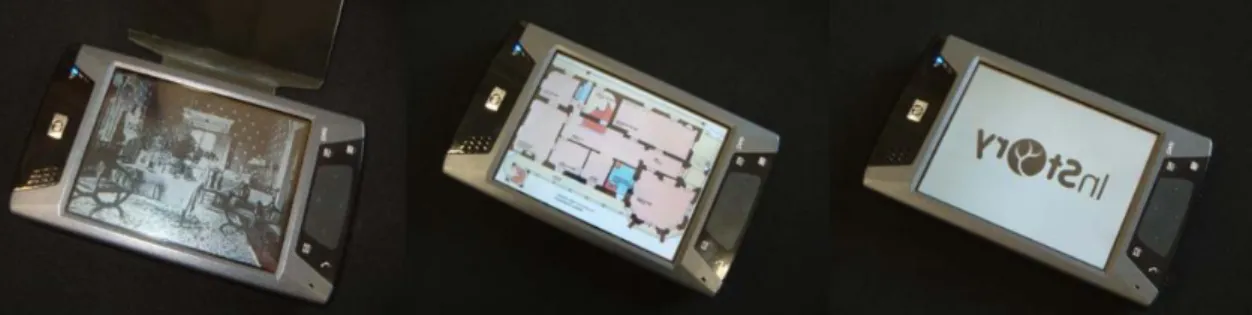
Figure i - In Story Client Interface ... 28
Figure ii - Interactive story element example ... 29
Figure iii - Wikear User Interface [19] ... 31
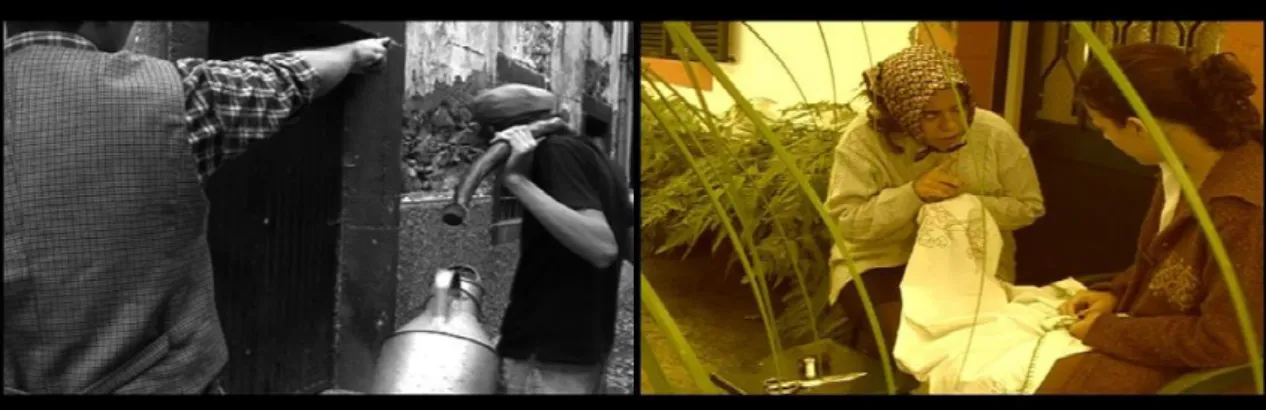
Figure iv - iLand - Story video frame ... 32
Figure v - Urban Tapestries ... 33
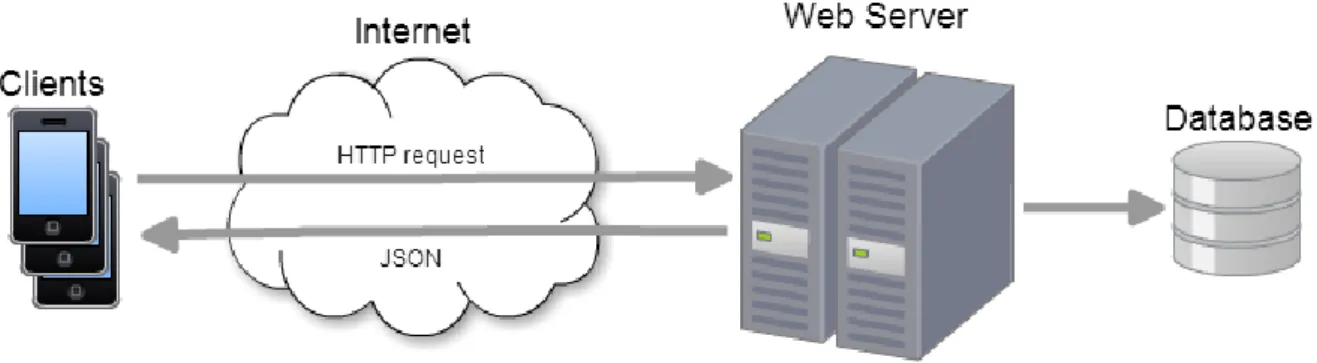
Figure vi - Breadcrumbs Application General Architecture ... 41
Figure vii - Breadcrumbs Application Client Architecture ... 42
Figure viii - Entity-Relationship Model ... 43
Figure ix - Relation Model. ... 44
Figure x - Map-guided Navigation Model. ... 47
Figure xi - Login Screen. ... 48
Figure xii - Map Navigation Screens. ... 49
Figure xiii - Breadcrumbs Visualization Screens. ... 49
Figure xiv - Add Comment Screens. ... 50
Figure xv - Taking Breadcrumbs Picture Screens. ... 50
Figure xvi - Insert Story Screens. ... 51
Figure xvii - Loading and error message box screen. ... 51
Figure xviii - 360º Landscape Navigation Model ... 52
Figure xix - Landscape screen example. ... 53
Figure xx - Landscape screen example 2. ... 54
Figure xxi - Landscape screen example 3. ... 54
Figure xxii - Fallow Screen. ... 55
Figure xxiii - User using the Map Navigation Model. ... 61
Figure xxiv - User using the Map Navigation Model. ... 62
Figure xxv - User using the 360º Landscape Model ... 63
Figure xxvi - User using the 360º Landscape Model ... 64
Table i - Functional Requirements ... 38
Table ii - Functional Requirements & Navigation Models ... 39
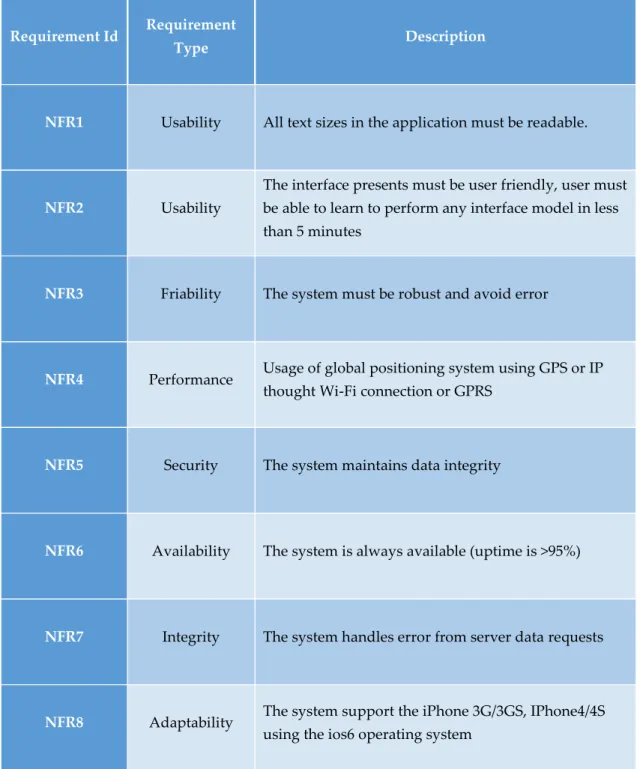
Table iii - Non-functional Requirements. ... 40
I.1. P
ROJECT
C
ONTEXT
With the current proliferation of sensor equipped mobile devices such as smartphones and tablets, location aware services are expanding beyond the mere work and efficiency related needs, evolving in order to incorporate fun, culture and the social life of users. Today people on the move communicate not only with their peers and colleagues, friends and family, but also with unknown people, that might share their interests, curiosities or happen to use the same social network. Through social networks, location aware blogging, cultural mobile applications relevant information is now available at specific geographical locations and open to feedback and conversations among friends as well as strangers. In fact nowadays smartphone technologies aloud users to post and retrieve content while on the move, often relating to specific physical landmarks or locations, engaging and being engaged in conversations with strangers as much as their own social network. The use of such technologies and applications while on the move can often lead people to serendipitous discoveries and interactions. Throughout our thesis we are engaging on a two folded investigation: how can we foster and support serendipitous discoveries and what are the best interfaces for it? Other important aspect, that needs to be taken into account, is the cognitive overload that this types of information system can produce to users. Is important to present a solution that provide users with an intuitive interface so that tasks are completed more efficiently with less cognitive work load and stress.
I.2. M
OTIVATION
Finding and leaving content through a mobile device while roaming the streets of an unknown city, traversing a street, is often done through the help of a digital map, which occupies the screen of the device. While the map serves the function of orienting the user, it also absorbs most of the user’s concentration. Furthermore constantly looking and checking a map while navigating real 3D space can be dangerous or distracting from real features of the space such as cars, streets crossings or monuments. For example, while testing story delivery applications, researchers discovered that users suffered a certain disorientation due to cognitive overload [1][2]. In these situations, the content becomes almost secondary to the navigation act, diminishing the pleasure and the immersion of the user in it, impeding the users to fully relax and enjoy the advantages of serendipitous discoveries and encounters.
In order to address cognitive overload issues and foster pleasurable experiences and serendipitous discoveries we decided to explore alternative options for navigational interfaces. In this thesis we describe Breadcrumbs, a 360 degrees interface that exploits the metaphor of a periscope, enabling the user to find content around them by means of scanning the surrounding space with the mobile device. By using a loose metaphor of a periscope, harnessing the power of the smartphone sensors we designed an interactive interface capable of detecting content around the users and display it in the form of 2 dimensional bubbles which diameter depends on their distance from the users. Users will navigate the space in relation to the content that they are curious about, rather than in relation to the traditional geographical map. By getting closer to the bubble (the content left at that location by another users), the content comes into focus in the form of a picture, text and some audio. Similarly if the users wish to leave their own content at a specific geographical location, they can or upload pictures add text and voice over and geo tag it to the location. Later in time, other people using Breadcrumbs, will be able to retrieve it and add comments to it.
Through Breadcrumbs we are aiming to reduce cognitive load of the users in navigating the space, while preserving the engagement with the content and the immersion in the surrounding environment, supporting the enjoyment of serendipitous discoveries done while engaging with the system. Through this model we envisage not only bypassing a certain cognitive overload generated by having to continuously confront a two dimensional map with the real tree
dimensional space surrounding the user, but also use the content as a navigational filter. The users will direct themselves where there is content they are interested in or drawn to; instead of orientating themselves in the physical space, they orient themselves in the content space. We hypothesised that this alternative mean of navigating space might bring serendipitous discovery about places, discovering locations that the user where not aware of or intending to reach or making contact with people or information they would have not intentionally searched for. In fact, serendipity is by definition “The occurrence and development of events by chance in a happy or beneficial way” [3]. Serendipity as defined above, is a transversal theme, it can occur in several areas from science to photography where relevant discoveries or event occurred accidently. Such theme be further analysed and explained in relation to our application during the unfolding of the thesis.
I.3. O
BJECTIVES
The main objective of this project is to investigate how local-aware mobile applications can provide pleasurable experiences through location specific content and foster serendipitous moments when used to explore real places. We believe that serendipity can improve users experiences during exploration as long as the interface and the application itself does not overload the users cognitive effort. To fulfil our goal we designed and developed Breadcrumbs: a mobile location-aware application that makes use of stories and short narrative in order to foster serendipity towards user’s exploration of urban spaces. The application allows users to explore stories left by locals or tourists in certain places, as well as sharing their one content while on the move. An evaluation study was conducted to assess our goals. In this thesis we will describe the design development and study of such application and its goals. All finding will be discussed, and conclusions drawn, including possible future steps and improvements.
I.4. T
HESIS
S
TRUCTURE
The thesis is structured in five main chapters:
1º Chapter – This chapter is the “Introduction” chapter where the thesis context,
motivation and objectives are described.
2º Chapter – This chapter is the “Related Work” chapter that is divided in two main
sections. Firstly the “Literature Review” section where terms and area of research, such as “Context-Aware Ubiquitous Computing”, “Locative Media” and “Serendipity” are defined. Secondly we have the “State of the Art” section where several relater works in the area of context aware and locative media are reviewed.
3º Chapter – This chapter is dedicated to the implementation of the Breadcrumbs
application, describing the main requirements needed to produce the application prototype. This chapter describes the architecture of the breadcrumbs system, the rationale behind the two different navigation models and in the end a description of the different interfaces of each navigation concept.
4º Chapter – This chapter is where the evaluation study is described. The evaluation of
Breadcrumbs was first designed and conducted. Then the content was analysed and discussed.
5º Chapter – This chapter is dedicated to describe the general conclusion of this thesis
II.
R
ELATED
W
ORK
This chapter is divided into two main sections. Firstly a literature review where I firstly define the terms and areas of research that are relevant to understand the project and position Breadcrumbs in the correct area of study. Secondly a state of the art section, where I review relevant work that has been developed in the area of context aware mobile storytelling and locative media.
II.1. L
ITERATURE
R
EVIEW
This section covers terms and areas of research relevant for the project development, such as “Context-Aware Ubiquitous Computing”, “Locative Media”, Narratives and Storytelling” and “Serendipity” are defined.
II.1.1.Context-Aware Ubiquitous Computing
Portable devices such as laptops, tablets or cell phones that are easily carried in a bag or even in the palm of your hand are getting smaller, lighter and far more powerful. If people are going to interact with these personal devices small enough to always be with them, then these devices should be aware of what is happening around them [4].
B. Schilit in his article defines that one of the challenges of mobile distributed computing is to be able to explore the changing environment using context-aware applications able to detect the context in which they run. Systems such as these can examine and adapt to their environment.[5] In the article “A Survey of Context-Aware Mobile Computing Research” the authors define context as a “set of environmental states and settings that either determine an application’s behaviour or in which an application event occurs and is interesting to the user.” Many researchers attempted to define such contexts by analysing them as Computing context (networks, communications cost, communication bandwidth, nearby resources, displays and workstations), User context (location, people nearby, social situation), Physical context (light, noise level, traffic, temperature) or even time context (day, week, moth, season of the year)[6]. In another definition of context from the article “Towards a Better Understanding of Context and Context-Awareness” the authors define context as “…any information that can be used to characterize the situation of an entity. An entity is a person, place, or object that is considered relevant to the interaction between a user and an application, including the user and applications themselves”.
where, and act as a source of contextual information indices. This context characterisation can help designers to choose and structure the context and search for more relevant contexts. [7] Systems with this capabilities can examine and react to changes to the environment not only user locations but other important things such noise levels, light, communications cost, social situation, network connections and others. B. Schilit categorize context-aware applications in four categories [5] :
Proximate selection: user interface technique that emphasize or make easier to user a nearby located-object.[5]
Automatic Contextual reconfiguration: process removing, altering or adding connections between components duo to context changes.[5]
Contextual information and commands: according to context produces different results. [5]
Context-triggered: rules that specify how Context-aware systems should adapt. [5] From G. Chen and D. Kotz perspective mobile applications can take advantage of context in two ways: [6]:
Active Context – An application automatically changing its behaviour adapting itself to new discovered contexts [6].
Passive Context – The application presents the new or updated context to users or save it future retrieval [6].
The Breadcrumbs application can be defined has as a context-aware application using the context as an active context, as defined by D. Kotz, due to its ability to automatically adapt the information presented to users according the device GPS positon. Moreover, when referring the B. Schilit categories we can associate mainly the Breadcrumbs application to the third category as the application produces different results if used in different contexts.
II.1.2.Importance of Narratives and Storytelling
According to Henrik Schärfe narratives has been one of the favourite tools of man to exchange experiences and viewpoints, for thousands of years. He refers to narratives as “Drawing on essential human cognitive faculties, narration is common to all mankind, in all cultures, at all times, and continues to be explored through every media we have at our disposal and for every communicative aim we can think of” [8].
In the modern days, storytelling tools have gone through huge changes. With the intervention of new mobile context aware technologies, introducing multimedia elements such audio, video, animations and graphics, stories diversified themselves in terms of tools for making and delivering. Although the tools were changing rapidly, stories never lost their purpose. [9]
Today we still rely on stories to make and maintain friendship, share knowledge, curiosity and emotions. Stories are important in our application because they allowed people to discover a place and who traversed it, as well as making and maintaining new friends, as well as leaving a trace and informing people. We believe that the sharing of stories through Breadcrumbs still maintains the story original purpose, but also extends it through the use of mobile context aware technologies and makes stories available to users while on the move, and connects storytellers and readers through its social networks.
II.1.3.Locative Media
Locative media can be defined as a set of technologies and info-communicational processes in which content is associated to specific places. This group of technologies and process are characterized for emitting digital information from a place or object. This locative information can be processed by wireless artefacts, such as, GPS enable mobile devices including phones and laptops.[10]
The “Locative Media” term was used for the first time in an international workshop of artists and researchers by Kalnins and Tuters in 2003. Now the term is a synonym to particular mobile experiences that mix the physical and the virtual world, including mobile media that arguments people experiences in real places.[11]
A workshop at CHI 2007 classified relevant locative media in four categories[11]: 1. Facilitate navigation and way finding[11];
2. Mobile augmented reality applications[11];
3. Application to create information attached to physical places or objects[11]. 4. Application to access information attached to physical places or objects[11].
The Breadcrumbs application in relation to this four locative media categories, will easily be related with the third and the fourth category, due its ability to access and attach stories to a specific place.
II.1.4.Serendipity
On the 28th of January 1754 Horace Wallpole in one of his eighteen hundred letters to Horace Mann coined the word “Serendipity” [12], describing it as a particular kind of discovery [13] giving such name to an accidental sagacity involved in many scientific discoveries[14]. He illustrated the serendipity concept by referring to a Persian folk tale named The Travel and Adventures of three Princes of Serendip [13].
“This discovery indeed is almost what we can call serendipity, a very expressive word, which as I have nothing better to tell you, I shall endeavour to explain to you: you will understand in better by the derivation than by the definition. I once read a silly fairy tale, called The Tree Princes of Serendip: as their highnesses travelled, they were always making discoveries, by accidents & sagacity, of things which they were not in quest of: for instance, one of them discovered that a blind mule in the right eye had travelled the same road lately, because the grass was eaten only on the left side, where it was worse than on the right – now do you understand serendipity?...”[12].
Moreover the Cambridge dictionary defines serendipity as “The lucky tendency to find interesting or valuable things just by chance”[15], other similar definitions of serendipity are proposed in various related study works:
“The gift of finding valuable or agreeable things not sought for”[16].
“The faculty of making fortunate and unexpected discoveries by accident” [17].
“The art of finding what we are not looking for by looking for what we are not finding” [18].
“Serendipity is an experience when people find something that they weren’t expecting to find”[19].
In the last 60 years this notion of accidental and happy discovery has gone from being an arcane word and concept, to being part of the common language [13]. The term serendipity is scattered over many different domains as medical discoveries, corporate settings, creativity and thinking
having all discussed accidentals and serendipitous findings[14]. Even so A. Dias de Figueiredo and Jóse Campos in their “The Serendipity Equations” article refers to serendipity as “one of the less researched concepts in the realm of creativity. One reason that may, to some extent, account for this is that it tends to be regarded as a mere manifestation of conventional creativity, a view that makes its distinctive nature”[16].
In “A Discussion on Serendipity in Creative Systems ”[13] the authors presents some examples that shows how serendipity can influence, in this case, scientific discoveries:
“In 1928, while researching influenza, Fleming noticed an unusual clear patch in a petri dish of bacteria cultures. Subsequent examination revealed that the lid of the petri dish had fallen off (thus invalidating the experiment) and mould had fallen into the dish, killing the bacteria – resulting in the discovery of penicillin”[13]. “In 1948, on returning home from a walk, de Mestral found cockleburs attached to his jacket. While trying to pick them off, he became interested in what made them stick so tightly, and started to think about uses for a system designed on similar principles – resulting in the discovery of Velcro”[13].
“In 1974, Fry was struggling to use pieces of paper to mark pages in his choir book, when he recalled of a colleague’s failed attempts to develop superglue. The colleague had accidentally made a glue so weak that two glued pieces of paper could be pulled apart – this resulted in the discovery of Post-it notes”[13].
The same above mentioned authors categories serendipity accidents in three different types, according to three different dimensions of it: Chance, Sagacity and Value:
Chance: “The serendipity trigger is unlikely, unexpected, unsought, accidental, random,
surprising, coincidental, arises independently of, and before, the result”. [13]
Sagacity: “This dimension describes the attribute, or skill, on the part of the discovery.
(The bridge between the trigger and the result). In many of these examples others had been in the same position and not make the discovery. This skill involves an open mind (an ability to take advantage of the unpredictable); ability to focus-shift; appropriate reasoning techniques; and ability to recognize value in the discovery”. [13]
Reflecting on the Breadcrumbs applications we can infer that the serendipity that arises from the use of the application can have elements of all three dimensions. The stories revealed by the app or the trails the users are suggested to walk can lead to random, surprising or coincidental events, like meeting a friend, discovering a special shop or bar that eventually can become a favourite. Sagacity is an important link between the chance and the Value, users to recognize value from an unexpected, random or coincidental moment need to be connected to it, such as, past experiences or personal preferences. Is very probable that two persons, having the same unexpected event, behave to it differently, due to that, this dimensions is decisive to create Serendipity moments. Value dimension can be considered as the final goal to create Serendipitous moments, were the results have to be useful or happy.
II.2. R
ELATED
W
ORK
In this section will be reporting on several projects related to the area of context aware and locative media.
II.2.1. InStory: A System for Mobile Information Access, Storytelling and
Gaming Activities in Physical Spaces
InStory is a platform for mobile storytelling, information access and gaming activities. Its goal is to define an architecture and implement a system to support interactive cinematographic narratives, offering as well entertaining activities with mobile devices. They address four fundamental problems in this type of systems:
1. Definition of a flexible computational architecture that integrates heterogeneous devices, different media formats and different narratives modes.
2. Information presentation and interaction in heterogeneous devices, when navigating in the real world.
3. Systems support for networks and group management (namely ad-hoc networks and groups that are formed to participate in a given activity).
4. Development of appropriate mechanisms for personalization and collaboration for this new channel of communication.
Figure i - In Story Client Interface
the system. He allows users to contribute with new data to the story threads, permitting the upload of different types of data, including text or images. They consider three main application scenarios divided in three layers (information, special storytelling, spatial games) attempting to provide a compelling experience to users and test the different aspects of the built computation framework.[20]
From the In Story project some suggestions related to the technical part of the breadcrumbs application can be gathered. Especially we were inspired by how the authors resolved the technical issues related to the client and server side. Similarly in the Breadcrumbs application we built a client side, which is responsible to provide the Breadcrumbs experience to users, while the server work as an information repository. Moreover, in The In Story project they intent to create an spatial game like an treasure hunt, this spatial game component can be of interest to add to the Breadcrumb future development, working in parallel with the storytelling to engage users to explore more.
II.2.2. Location-bases Storytelling in the Urban Environment.
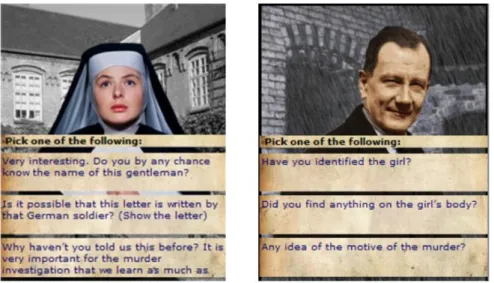
In this article the authors present the research for the design and user experience of a mobile location-based story where users physical surrounding function as a backdrop for fictional storytelling. In order to explore this idea the authors build a prototype system called “Who Killed Hanne Holmgaard?” applied to the city of Aalborg. The project presents its content through a mix of old and new surroundings, making it appropriated for this type of location-based storytelling systems.
To test the user experience the authors gave to users working in pairs a PDA, a headset and a physcal map of the area. Each one of the users plays a different character in the story, unravelling simultaneously the mystery while on the move. The system presents the story through text, image and audio. Users interact with it basically by selecting choices on the screen (see Fig. 1) and moving physically through the city of Aalborg. After the user experience evaluation they proceeded with field trials, this time with five pairs of participants. In the end of the field trials they concluded by interviewing the users . All participants found the storyline interesting expressing high motivation to reach the end, and the use of elements of the physical surrounding linked with the storyline was well received.
The participants encountered some concentration difficulties regarding the quantity of dialogue presented mixed with the noisy environment of the city, making them prefer to focus on the pieces of text displayed. Most participants expected that would have liked to investigate more their surroundings, facilitating face-to-face interactions with partners. [21]
What we valued from this work is the warning about the fact that participant might reported some kind of cognitive overload when trying to concentrate in the stories dialogues in the middle of the city environment. This kind of problem has to be taken in consideration when producing the Breadcrumbs application, since if not taken into consideration, it may also result in a problem for our users.
II.2.3.Evaluating automatically generated Location-based Stories for Tourists.
Using the WikEar System the authors offer tourists who wish to learn about places a sort of tourist guide to explain the surroundings, using narratives. They accomplish this by using cell phone cameras where users are able to interact with a real map creating routes that trigger auto-generated narratives contents. The content of these narratives are mined from georeferenced Wikipedia articles that are presented in audio form through text-to-speech software.[22]
Figure iii - Wikear User Interface [19]
The main aim of this article is to describe a first evaluation of these narratives and also the WikEar interface. They conduct a semi-formal evaluation of the quality of the generated stories and the interaction metaphor with a group of 21 UbiComp conference attendees, answering at the end eight questions ranked with a six-point system. Analyzing the result from the questioners they drawn promising, but not, conclusive results. Nevertheless they found some encouraging positive results indicating some success in their survey methodology.[22]
In this article they describe their challenge to create good quality stories through auto generated content mined from Wikipedia. Similar difficulties may be encountered in the Breadcrumbs application, people will not always create good quality stories, hence it is important to somehow monitor or filter user generated content (Using for example the number of likes or an repost system) to provide to users a better experience unveiling only the most interesting and liked stories to the users.
II.2.4.The iLand of Madeira Location Aware Multimedia Stories
The iLand paper describes Location aware multimedia story project that captures and explore the rich oral culture and traditions of Madeira Island. They take advantage of this tangible heritage to develop a high quality content to be used in a Location aware story delivery platform, to bring a new level of engagement of the audience with the city, and its traditional stories. After deciding to use the city as the project playground they defined what type of experience to build, expanding on the concept of the Location Aware Multimedia Stories (LAMS). They started collecting stories from people, like friends and familiars who are part from the same social network, selecting eight stories for production based on the potential drama.
Figure iv - iLand - Story video frame
After the story production, a pilot study was conducted, helping to find out eventual issues. The pilot was focused in five young adults, where they were asked to try the iLand experience. During the pretest the participants were left to explore the stories on their one, being observed during the way. At the end of the experience it was conducted a semi-structured interview to better understand how users generally felt about the experience.[1]
This article was a useful example on how to collect and value local folk story content, by searching among friends and familiars. Moreover, we looked at the evaluation of the prototype in order to draw a structure of how to evaluate the Breadcrumbs application.
II.2.5.Urban Tapestries: Public Authoring, Place and Mobility
Urban Tapestries is a system build in upon twenty first century networks communications that explores the mobile technologies with geographic information systems from the point of view of peoples everyday lives. To understand this everyday interaction between people they developed and adapted a set of research methods such as experimental ethnography and body storming experiences, enabling them to observe the behaviour emerged from the process of mapping and sharing local knowledge and experiences. With this method they were able to retrieve information about people’s relationships to place, context, time and mobility.
Figure v - Urban Tapestries
Based in this gathered information they build a prototype using a variety of technologies, such as, Mesh Wifi, GPRS, PDAs, mobile phones and spatial annotation systems. The system were tested in the Central London, enabling to observe the kind of content people want to share. They detected a strong desire by users to share knowledge tempered by questions such as, who this knowledge wold be used by and Importance of the knowledge context. They conclude that the research indicates a need for particular communities to explore knowledge shared in and between communities.[23]
This study can be directly related with the Breadcrumbs metaphor, where users will share their knowledge attached in a specific spatial context. Some concern detected by them, can be addressed also in our thesis, regarding the users tempered behaviour to share information, concerned with who the information will be used. Their assumption where there is a need to communities to share knowledge can help us to understand who users will receive the breadcrumbs system concept.
III.1. B
READCRUMBS
S
YSTEM
R
EQUIREMENTS
To support the breadcrumbs system we conducted a functional and non-functional requirements analysis. The production of this requirements followed the needs to produce an application capable of supporting all the tasks required to conduct the study.
This is an important development phase, acting as a foundation for any software. This requirements are the pillar to all the application production granting that in the end all is prepared to realize the necessary tasks.
Duo to the existence of two different navigation models some requirements needed to be differentiated because of the specific functionalities of a certain type of interface perspective. Below we list all the requirements common in both navigation models and, in the end, a table specifying the association of the requirements with the navigation models perspectives from the breadcrumb application.
III.1.1. Functional Requirements
Functional requirements gather the set of functionalities that the application supports and offers to the user [24] In table 1 we list all the functional requirements for the breadcrumbs application:
Requirement
Id Description
FR1 Authentication is required by users via identification and a password to access the system.
FR2 Users create new content to the system by introducing the story title, story narrative and capture the needed photo.
FR3 Users select a story.
FR4 Users visualize a selected story image, story title, story narrative and comments.
FR5 Users identify if they like a specific story.
FR6 Users visualize a story preview.
FR7 Users navigate thought the map.
FR8 Users zoom in and out through the map.
FR10 User visualizes his geographical position in the map.
FR11 Users comment a story.
FR12 Users visualize the stories geographical position in the map.
FR13 Users access the 200m closer stories around them using the mobile phone
compass.
FR14 Users access the preview information the 200m closer stories around them
using the mobile phone compass.
FR15 Users randomly select one of the accessible 200m closer stories around
them.
FR16 Users receive directions to the story location.
III.1.2.Functional Requirements & navigation model
The next table presents the requirements associated with their specific navigation model:
Requirement
Id Map Navigation Model Landscape Navigation Model
FR1 X X FR2 X X FR3 X X FR4 X X FR5 X X FR6 X X FR7 X FR8 X FR9 X X FR10 X FR11 X X FR12 X FR13 X FR14 X FR15 X FR16 X
Table ii - Functional Requirements & Navigation Models
Checking the table II can be observed that 75% of the requirements are common in bought navigation models. These requirements are more related to authentications and information requirements. The other 25% that are dedicated to each navigation model are focused on how the stories must be presented to users until they see their content.
III.1.3.Non-functional Requirements
Non-Functional Requirements are related to the quality service of the functions offered by the system. This qualities characteristics are related to safety, portability, accuracy, reliability, robustness, constraints and others.[24]
Requirement Id Requirement
Type Description
NFR1 Usability All text sizes in the application must be readable.
NFR2 Usability
The interface presents must be user friendly, user must be able to learn to perform any interface model in less than 5 minutes
NFR3 Friability The system must be robust and avoid error
NFR4 Performance Usage of global positioning system using GPS or IP
thought Wi-Fi connection or GPRS
NFR5 Security The system maintains data integrity
NFR6 Availability The system is always available (uptime is >95%)
NFR7 Integrity The system handles error from server data requests
NFR8 Adaptability The system support the iPhone 3G/3GS, IPhone4/4S
using the ios6 operating system Table iii - Non-functional Requirements.
III.2. B
READCRUMBS ARCHITECTURE
The Breadcrumbs application architecture consists mainly of a Client-Server Model applying a Representational State Transfer (REST) style where each instance communicates with the server through an Internet connection. The client side is implemented in the IOS 6 operating system and the server consists of a PHP server, provided with MySQL database.
Figure vi - Breadcrumbs Application General Architecture
To implement the Rest style [25] we used two different frameworks, one for the Client and another for the server. Each framework supports the exchange of resources between the client and the server. In the Client side we used the Objective-C framework named RestKit, making it easier to perform requests/responses actions and also providing an effective object mapping. For the server side we used a PHP web application framework prepared for Restful implementations. This framework follows the Model-view-controller (MVC) framework which is responsible for all the interactions (Insert, Get, Delete and Update) with the MySQL database as well as the responsibility to process all the clients information requests.
The choice for a restful style implementation is primarily due to its practicability in terms of lightweight and easier implementation related to SOAP for example. One of the main counterparts for this style is the security. Measuring the level of security needed for the breadcrumbs system, related primarily to the objectives of the thesis, didn’t give security an important weight.
The client side the Breadcrumbs system is divided in three logical layers, each layer takes a particular responsibility in how the application works.
Figure vii - Breadcrumbs Application Client Architecture
Presentation Layer: This layer consists of Views and View controllers, in the one side the views
are responsible for showing information on screen and receiving user inputs, on the other side the view controllers are responsible for the screen flow and processing the input received from the UIView objects.
Business Layer: This layer is responsible for managing information and executing complex
calculations. This layer works as an intermediary between the presentation and the data layers processing, calculating and managing their information flow.
III.3. D
ATABASE
M
ODELING
In this section we present all the models describing the structure of the MySQL database supporting the breadcrumbs system. The database is responsible for storing all the breadcrumbs system information’s as user’s data. The story contents represented here as breadcrumbs and other relevant information to complement the social side of the application. This model facilitates the comprehension of the database structure, and if needed, alterations to this structure.
III.3.1.Entity-Relationship Model
Figure viii - Entity-Relationship Model
The ER model represents an abstract view of the actual database, presenting all the entities of the system and their relations with each other. Here in this model the entities are represented with yellow squares and their relationships with blue diamonds, and finally the attributes with the green circles. The relationships with a double diamond define a dependency where the comment entity depends on the existence of a breadcrumb (Story contents). Some characteristic related to redundancy were taken into account, focusing in the attributes Number of Likes in
the Breadcrumbs entity which stores the total of likes that a specific breadcrumb gathers and the attribute liked in the visualize relation storing if a user liked an certain breadcrumb. In this case we can notice some redundancy in the two attributes duo to the fact that the total number of likes can be measured counting the number of users that liked the breadcrumb, but this procedure spends a considerable processing resource from the server related to the weight of storing this redundant data.
III.3.2.Relational Model
The image below represents the Breadcrumbs system database relational model. Even if the structure is simple, it complements the necessary requirements for a correct operation of the system. The Relational Model is a Logical Model, describing the database on an abstract level very close to the physical one implemented in the server. The contrasts the ER model (Figure 1) that represents a more conceptual model of the database. This Model consists in a group of relations represented by tables containing a set of attributes and keys that identify the associations between relations. The Database Relation Model (Figure 2) was created with MySQL Workbench and exported to the server thought the PhpMyAdmin platform.
All the Tables and their purpose are described below:
user: responsible for storing all the needed information related to users.
user_breadcrumb: Responsible for storing if a user view and if liked a breadcrumb.
breadcrumbs: Responsible for storing all the story content, positions and image names.
breadcrumb_comment: Responsible for storing store the comments on the
III.4. B
READCRUMBS APPLICATION
The breadcrumbs applications consist of a social networking application where the users have the possibility of sharing stories (Breadcrumbs) in the form of images and text. These shared stories can then be explored by other users using the same application where contents can be commented and evaluated.
The breadcrumbs application is divided in two different navigation models, The first approach is a conventional map-guided application and the second presents the breadcrumbs in a 360 degree landscape view, giving the user a distinct approach in order to explore the geographically spread stories.
III.4.1.Map-guided Navigation Model
The map-guided Navigation Model presents the various stories adding red pins in a map, identifying where the geographic position of each story is. The users can access the story contents by clicking the pins spread in the map without needing to present the same geographical context of the story.
All the screens presented in Figure 5 demonstrates the navigation flow thought the breadcrumbs map-guided Navigation Model. We describe these screens below in detail:
Login screen - This screen behaves as a normal login screen very common in similar
applications. The user inputs a username and password in the respective textboxes and clicks the forward arrow. An activity animation appears while the system validates the inserted user credentials. If everything is correct the application automatically presents the next screen with the stories, if not the user is taken back to the login screen with an error message.
Figure xi - Login Screen.
Map Navigation Screen - Here the user is presented with a map with all breadcrumbs scattered
in their respective geographical position. Each breadcrumb is represented by a clickable red pin. In the bottom left of the screen a group of buttons is placed to control the map visualization type (Map, Satellite and Hybrid) and at the left the button to create new breadcrumbs.
Figure xii - Map Navigation Screens.
Breadcrumb visualization screen – This screen is responsible for presenting the story contents,
first in this particular map-guided navigation model. The user is presented with the image associated with the story, in the bottom of the screen is located a slide bar which when open presents the narrative and the user comments from the story. The heart symbol located right to the narrative indicates if the user likes (in orange) or not (in white) the story, to make like in the breadcrumbs is only needed to click over the hart icon.
When the slide is open in the bottom the user is presents with add comment button. When clicked the screen presents an interface with a textbox and a keyboard to insert it. When ready the user only need to click in the confirm icon, and the screen return automatically to the previews screen state.
Figure xiv - Add Comment Screens.
Breadcrumbs creation Screen - This screen shows the interface responsible for creating the
various story contents. Clicking the photo machine representation icon the user accesses the standard camera interface from the iPhone where she can take a photo and use it. After that the photo machine representation icon will be replaced by the photographed image.
Below there are two textboxes to insert the story title and the respective story content. Selecting this textboxes will make the digital iPhone keyboard appear and the screen will adjust enabling the user to wright content, to restore to normal after writing only is needed to click in the check symbol. To finalize all the story creation process only need to click in the share button.
Figure xvi - Insert Story Screens.
After clicking in Share button the system will dim appearing an activity animations meaning that you shared data is being send to the server. If some error occurs the system will present a message box asking the user to try again.
III.4.2. 360º Landscape navigation model
In this section we present the second navigation model of the breadcrumbs application. In this particular model users have a 360º Landscape interface where content is floating around the user.
Using the compass of the mobile device the users can navigate through the stories around and then chose one to follow. When following a breadcrumb the application shows directions leading the use to the physic context of the story. When the place is reached the user visualizes the stories content. Some interfaces are similar in booth the navigation models such as Login Screen, Breadcrumb visualization screen and at last the Breadcrumbs creation Screen. Above we explain the detailed screens for this navigation model:
Landscape screen – This view appears after users perform the login, here the stories around the
user are represented by white circles. User can interact and visualize the stories using mobile phone compass navigating thought the content like a periscope.
Figure xix - Landscape screen example.
There are several circle sizes, this different sizes as well the circle position in the screen represent the distance of the stories from the device geographic position. The circle reaches the maximum size when a breadcrumb is located less than 200 meter from the user position, enabling the users to preview and interact with the breadcrumb.
Figure xx - Landscape screen example 2.
To interact with the story it is only necessary to center the desire circle in the center of the screen appearing automatically as a small preview of the image inside of the circle as well the distance in matters and the number of likes.
Figure xxi - Landscape screen example 3.
To see more about the story the user can click the circle appearing like a pop up window with some information about the story author, distance and number of likes. There is also the possibility of choosing a random story by shaking the mobile phone appearing automatically as a pop up window. If the users decide that want to follow the story to its place he or she needs to click in the follow button directed for the next view that will give directions to users to reach
Fallow screen – This screen is responsible for leading users to the same geographical position of
the story. It intends to do so by presenting to users a group of clues in form of direction such us arrows and directional lines and image bluer level.
Figure xxii - Fallow Screen.
To help users work around obstacles the button in the top right-hand corner shows a mini map that presents only a satellite image from the device GPS position. When users arrive to the story place the system automatically presents the story content with a similar screen to “Breadcrumb visualization screen.
IV.1.
S
TUDY
I
NTRODUCTION
In this chapter we will describe the evaluation that we designed and carried out in order to test the Breadcrumb application. Through such evaluation we wanted to understand how our application can foster a pleasurable and eventually a serendipitous experience of exploring a space, alleviating the cognitive overload of navigating real space through a map. In order to understand the benefits of a map based interface versus the 360 scanning metaphor we adopted an A/B study where users are tested with two kinds of prototypes and then results are compared. The A model uses the conventional map-guided navigation approach and in the B model a 360º Landscape navigation model approach is utilised.
The study consists mainly in a field study where users are invited to explore the story content that surrounds them through one of the two different navigations models, each user only use one of the models so the results won’t be influenced. Users are asked to find at least three stories and share one new story, being shadowed along the way. During this phase, relevant qualitative information in taken in form of observation notes. After roughly 30 minutes of observations the user is presented with a questionnaire where he/she is asked about the experience.
IV.2. S
TUDY PREPARATION
We prepared the evaluation by defining a protocol made of a loose script of tasks for the users to perform, observations that had to be taken by the researcher, and final survey for the participants to fill out. In order to start testing our protocol we first needed to first introduce some initial content in the system, in the form of short stories or anecdotes. Such story content had to be created and collected and positioned in the respective GPS location. In order to populate the application with content, fifteen stories had been created, some containing real facts and others more fictionalised.
After having manufacture the content content, we proceeded with the pilot test with the tree participants. The pilot test took place in the Penteada University Campus where participants here were asked to use the 360 Navigation model to find at least tree Breadcrumbs and read their content. Then they had to use the Breadcrumbs application to share, if they wanted, a personal story about that place. All the tree tests lasted between fifteen to twenty five minutes, varying according to the time that the participants take to perform all the steps.
In the end all participants filled a survey. This survey, which is presented in the appendix, was divided in five different questions with the intention of probing participants to express themselves about their experience exploring and unveiling the stories.
After the pilot, some minor improvements and bug fixing had to be made to the Breadcrumbs system in order to provide a fluid user experience using the application. Improvements such:
Improve server communication. Improve GPS precision.
Addiction to the interface of missing loading and uploading animations, giving feedback of hidden application activities.
Minor bug fixes, improving system stability.
Analysing the pilot results it resulted that users performed with pleasure all the proposed tasks, so there was no need to change the main study procedures, maintaining them as they were.
IV.2.1.Participants
In order to perform the main study of the application we recruited ten users to test each navigation model type (A: with a two dimensional map and B: with the 360 degrees navigation interface), for a total of twenty participants to perform the whole study. The group was composed of users with ages ranging from eighteen to fifty years old, most of them being familiar with the location where the study was taking place, as they were student or workers from Madeira’s University, around which campus the evaluation took place.
Name Age Nationality Sex Occupation Study
User 1 23 Portuguese Male Student A
User 2 25 Portuguese Male Student A
User 3 22 Portuguese Male Student A
User 4 21 Portuguese Male Student A
User 5 25 Portuguese Male Student A
User 6 27 Portuguese Female Student A
User 7 23 Swedish Male Student A
User 8 24 Portuguese Female Student A
User 9 23 Portuguese Male Student A
User 10 24 Portuguese Male Student A
User 11 38 Portuguese Female Worker B
User 12 22 Portuguese Male Student B
User 13 23 Portuguese Female Student B
User 14 25 Portuguese Male Student B
User 15 26 Portuguese Male Worker B
User 16 25 Portuguese Male Student B
User 17 23 Portuguese Male Student B
User 18 22 Portuguese Male Student B
User 19 24 Portuguese Male Student B
User 20 20 Portuguese Male Student B Table iv - Participants List
IV.3. F
INDINGS
IV.3.1. Field Study Observations
For the study users where invited to use the Breadcrumb application to find and read at least three stories, leaving in the end, if they wanted, a new story through the Breadcrumbs application.
We shadowed each user during in field in order to observe some behaviour patterns that could indicate some serendipitous feelings (surprise, sudden fear or unexpected reactions) Taking notes of such serendipitous cues or other interesting reactions occurring during the experience.
IV.3.1.1.Map Guided Navigation Models Observations
With the classic navigation map model (A) all of the ten users easily understood the Breadcrumbs concept and the navigation paradigm. This result was somehow expected since map navigation models are the most frequently encountered in Location based services, from google maps to restaurant findings.
Figure xxiii - User using the Map Navigation Model.
During the test participants focused mostly on stories close to their geographical position. Only two out of ten participant explored the map looking for stories located in the Funchal City
downtown, even if, in the Map Navigation Model users easily could navigate through more distant stories.
Figure xxiv - User using the Map Navigation Model.
At the end of reading a story, two users felt compelled to share orally with the researcher their own experiences, related to the story and its location. One of the participants (Figure xxiv) referred to the researcher that he passed near the so called “Soul chapel”, one of the stories presented, several times a week and never noticed its existence.
In the end all users were given the opportunity to create their own story content, but not all of them took up the challenge. Only 3 users out of 10 performed this task. It was noted that the users during all the Model A test procedures resist moving from their initial location. This was also true for the story creation task, since to create and share a story it was necessary to move to the place where the event happened, due to this fact few users, 3 out of 10, intended to create their own content in breadcrumbs system.
Map Guided Observations Conclusion
The lack of interest shown by users to move to a different location to find and view the stories can in a certain way compromise the user’s sagacity level and in such way, diminish the ability to recognize value in the discoveries. Looking at the article “A Discussion on Serendipity in Creative Systems”[13] the ability to recognize value in the discovery is a feature of one of the serendipity levels. Users with some connection to the place or to the story, from past experiences, reflect less curiosity to move to the story place (Figure xxiii), staying basically in the study initial location.
IV.3.1.2. 360º Landscape Navigation Model Observations
Generally, from the users general comments we can deduct that Users received well and enjoyed the “Periscope Metaphor” model with the 360 degrees scanning of the surrounding landscape (model B). Compared to previous map model, users required more time to understand and familiarize themselves with the interface since it has more complex interaction paradigm and it is a less familiar interface compared to the simple map, but in the end had more fun with it.
Figure xxv - User using the 360º Landscape Model
With this particular navigation model, participants are forced to move to the specific story location to be able to visualize the content, otherwise the content would not be available to them. Users then, preferred to search around the vicinity for the closest stories, preferring vicinity criteria to others, such story ranking in terms of preferences, preview image or story direction.
While walking towards the story location, participants were constantly looking to the mobile phone’s screen. This kind of action does interfere with the user being able to look around and take in the environment. It can result in cognitive overload where user are constantly looking around and at the screen for directions. It is a feature that must be avoided and the interface must be improved in future versions. When reaching the story place users tried to correlate the place with the image that the interface would show them, commenting that at that moment they were expecting to read the story on the screen.
![Figure iii - Wikear User Interface [19]](https://thumb-eu.123doks.com/thumbv2/123dok_br/19256159.977697/31.892.153.767.109.375/figure-iii-wikear-user-interface.webp)