Bruno Coitos1, Nuno Garrido2 and Carlos Serrão3 1 ISCTE – Instituto Universitário de Lisboa
2 Instituto de Telecomunicações (IT-IUL)
3 Information Sciences, Technologies and Architecture Research Center (ISTAR-IUL) {bmfcc, nuno.garrido, carlos.serrao}@iscte-iul.pt
Abstract. In this work, we describe a prototype that was developed as an
inte-grated system that provides relevant information in an interactive way when in-side of complex buildings, such as museums, hospitals, shopping malls, amongst others. To accomplish this, the system uses an Indoor Location and Tracking System taking advantage of BLE devices and Bluetooth capabilities of mobile devices. This prototype is also composed of an open-source Content Management System (based on Drupal 8), that allows the system operators to upload and manage the information provided to the mobile users, with the pos-sibility of uploading files extracted from BIM tools. The resulting system is af-fordable for Smart Places while being comfortable and interactive for the users.
Keywords: Indoor Location System, Smart Places, Beacon, BIM.
1
Introduction
With the increasing number of people living or working in most cities, there is a growing urge for bigger and more complex buildings to satisfy all their needs, such as hospitals, shopping malls, museums, sports facilities, amongst others [1]. This brings to the managers of buildings, sites, or any other space, the challenge to provide rele-vant information to the users/visitors, and frequently this is done by putting guiding plates which are a limited way to realize this task. If we consider big and complex buildings such as hospitals, it is common for users to get lost and have trouble finding their way around and requiring additional information in multiple formats and lan-guages.
Mobile devices have become ubiquitous to everyone transforming themselves into interaction gateways between the digital and the real world [2]. Therefore, the mobile devices can be a good approach for this quest and a preferable way to display infor-mation of multiple buildings or sites in just one application whilst removing the need for multiple applications with different layouts and behaviors to be installed on the end-user mobile device that could bring discomfort to the user and become a more confusing experience.
Taking this into consideration, we decided to propose and develop an integrated system consisting of two different components: (a) a smart and interactive mobile guiding application (MOG – My Own Guide), that uses an Indoor Location System
(ILS) based on information provided by Bluetooth Low Energy (BLE) beacons and (b) a Content Management System (CMS) module, which gives the building respon-sibles the capability to easily create and modify the information displayed to the
users via the mobile application whilst gathering valuable information about the interaction of the users when inside the building.
Considering that complex buildings, sites or other spaces, can have lots of zones and points of interest, loading all this data into the prototype using only a CMS is not feasible since it is hugely time-consuming. Therefore, we figured it as an opportunity to coordinate our prototype with a tool that could have this information or part s of it, already configured. Nowadays, most modern buildings follow a Building Information Model (BIM) methodology, where is possible to create 3D models of any building or site with information about the building, spaces of the building, such as rooms, and any other information. So, we decided to provide an efficient and fast way for the Smart Place staff to upload files extracted from the BIM tools. This can speed up the data creation process since by using the BIM model, the building responsibles can define the information needed in our prototype, such as the interest zones, groups of interest points and interest points, as well as the location of the beacons in the build-ing and then upload the files to the CMS which in turn can map this information to the objects defined in the data model.
The next section presents a state-of-the-art overview with some approaches to cre-ate a better guidance and visiting experience, targeted for complex buildings and spaces. In section 3 we explain the system prototype architecture that was developed. In the last two sections, we make a brief comparison between our prototype and the ones referred in the state-of-the-art section, and we finish with some conclusions and suggestions for future work.
2
State of the art
In the course of our research, we focused on approaches aimed at the guidance of users inside complex buildings especially shopping malls and museums and prefera-bly those featuring BIM.
One approach we found where BIMs are used was [3], here a BIM tool is used to define emergency paths of buildings that can be extracted and then imported into a firefighters guidance system. This system includes a mobile application in coordina-tion with an ILS, which allows, in emergency situacoordina-tions where the intervencoordina-tion of firefighters is required, support to guiding them through the emergency paths defined in the BIM tool. In addition, the system contains a back-office tool, where firefighters outside the building can also see the location of each one of those inside the building in real time.
In [4], the authors developed a guiding system for museum visitors. In this system, the visitors install a mobile application and answer a couple of questions for profiling purposes that generate a QR code. When the visitor arrives at the museum, museum workers scan the QR code generated by the application and assign visitors a wearable device (Odroid-XU), that must remain with the visitor throughout the visit. This
wearable device will capture what the visitor is seeing, combined with the location of the visitor that is inferred through the sensing of BLE devices signals, the system identifies the piece of art observed and the mobile application provides additional relevant information. This approach is expensive since the museums must guarantee the maintenance and availability of the wearable devices for each visitor, which is hardly practical and affordable.
Another approach focused on enhancing museum visits is [5], where the authors propose the combined use of BLE devices and Wi-Fi areas. In this solution, the mu-seum workers have a web-based tool to manage the information about each piece of art. When the visitor is at the museum, his position is inferred using BLE’s signals and then processed taking advantage of Wi-Fi areas data. The disadvantage of this system is that only supports the Italian language.
As we mentioned in the previous section, we think that it is more comfortable and preferable for the users to have information about several buildings or sites in just one application, so we researched and found [6]. In this work, the authors have not devel-oped the proposed system but the concept is to combine information from a group of museums that belongs to the same district, namely Jongno district in South Korea, since the authors believe this approach could contribute to the attraction of more visi-tors to the museums.
Another approach that we found in our research is [7] where the authors developed a system used to track and guide users of a university campus. To do that, the authors use BIM to define the position of each BLE device inside a building, as well as addi-tional information like the closest stairs. All this information is loaded into the system in order to be read by the algorithm used in the mobile application. Initially, the users select the desired destination and taking in account the current location of the user, in the mobile application, the path inside the building is updated as long as the user is moving, taking in consideration the BLE signals that he is intercepting.
3
MOG Architecture
In this section, we explain the decisions we made about the prototype architecture design and how all the components of this architecture are connected.
The MOG architecture (see Fig. 1) was designed and developed with the objective of giving responsibles of smart and complex buildings a fast and effective way to pro-vide information to the building users without the need to install a specific application for each building, bringing a more practical and comfortable solution that allows ac-cess to information about several buildings in just one application.
Fig. 1. MOG Architecture
3.1 Data Model
In this prototype, we define one central database that is the MOG Database (MD) and another for the Smart Place Database (SPD), one database for each building or site featured. This design was made in order to provide the smart place responsibles with total control over their database and of the contents that are shown to the visiting us-ers. To facilitate the development of this prototype we opted for Firebase [8] that allows fast development since it provides all the services that we needed and a simple way to connect to different databases.
The MOG database is used to store general-purpose high-level information, stored in the “Smart Place” table, about the featured Smart Places but most importantly, to store information about each Smart Place Database in order to establish an interactive connection to them as depicted in Fig. 2.
Fig. 2. MOG database structure
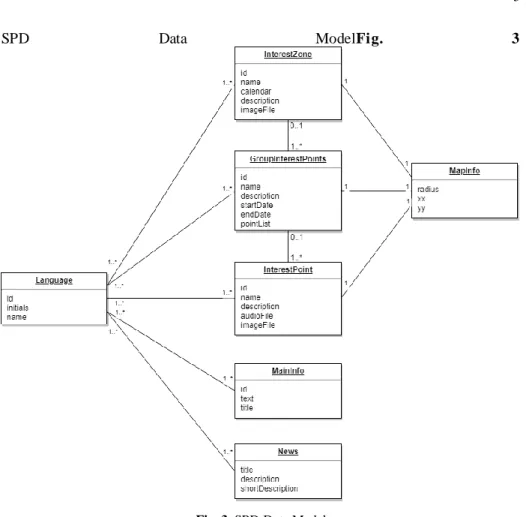
The Smart Place Database is managed by each Smart Place although it must follow the data model in Fig. 3.
SPD Data ModelFig. 3
Fig. 3. SPD Data Model
This data model was designed aiming to satisfy the needs that we identified previ-ously, such as the multilinguistic needs of the museums' visitors.
So, as we mentioned, we created three possible spaces in order to have a more flex-ible prototype, that are the Interest Zones, Groups of Interest Points and Interest Points. Those represent the most relevant information for the mobile applicati on users and can be displayed in a set of languages defined by each Smart Place. Each of these spaces, in order to appear in the Map screen of the application, must have information about its location inside the building, meaning that the Smart Place responsibles must fill the MapInfo for that each space, specifying the pixel coordinates and radius which will be used to draw on the map. This information about the indoor location of each space can be imported to our prototype using the information extracted from the BIM tools.
The MainInfo object is the information that will be shown on the main screen of the application and the News objects will be shown as a list.
On the Mobile Application section, we present more details about the interface of each object displayed to the end-user.
3.2 Building Information Model (BIM)
Building Information Model (BIM) methodology is a collaborative process that con-sists of creating a 3D model of a building providing better building project manage-ment since it allows to have a “documanage-ment managemanage-ment, coordination and simulation during the entire lifecycle of a project” [8].
In this process, it is possible to complement the model with additional information about the building, spaces of the building, such as rooms, and any other information.
For our prototype, since this modeling methodology is growing and most modern buildings construction is based on it, we decided to provide to the building responsi-bles a way to load information extracted from a BIM model. This results in a reduc-tion of the time spent creating informareduc-tion about each interesting zone, group of points and point of interest, for the prototype since it is also necessary to define, for each of them, the position in the map in order to be possible to the mobile use rs to see their location.
So, using this model is possible to define each prototype object information, its building location and also extract the building images, that can, in turn, be used in the mobile application on the Map screen.
3.3 Content Management System (CMS)
As it was mentioned, one of the components of this prototype is the CMS that was developed with the objective of providing to the Smart Places responsibles a way to access and manipulate the data that is stored in their database.
The CMS will guarantee that all the data stored in the database has the correct for-mat and structure to feed the mobile application.
In order to maintain this prototype affordable, we opted by using the open-source Drupal 8 CMS for this prototype since it is customizable and has a huge development and support communities.
So, with Drupal 8 as our CMS we developed a specific module that can be installed in any existing Drupal 8 site. This module will create a new menu tab on the site that will allow the staff to import the data that came from the BIM, configure the available languages, general information of the Smart Place, the zones of interest, groups of interest points, each of the interest points and relevant news to the user.
For this kind of Smart Places, one of the most important information is how the us-ers are interacting and is here, in the CMS, that is possible to visualize some statistical information about this interaction, such as the number of users that entered a zone of interest, the most visited zones and points of interest, the total number of users that entered the Smart Place, and much other detailed information.
So, in the CMS when the person responsible for the management of the content clicks in the new tab of the site, will be redirected to a page where several options are displayed. One of them is “Manage Application Content” that, after clicking on it, allows the user to select the object and language of the information that he wants to
see. After that is displayed a list of objects taking into account the options selected - Fig. 4 shows a list of Interest Points with English as the selected language.
Fig. 4. List of Interest Points
In each object of the list, is possible to click “View” which will open a page with more details where “Edit” and “Delete” options are available (as depicted on Fig. 5).
Fig. 5. Interest Point Info
3.4 Mobile Application
The Smart Places visitors will access the information provided using a mobile appli-cation, so in order to guarantee that the users have relevant information based on their location inside a Smart Place, the mobile application scans for the BLE devices sig-nal, so the users must give permission and enable the access to the device Bluetooth and Location information. This allows the application to read the BLE signals and give to the user, through mobile notifications, access to the Smart Place information.
As mentioned in the previous sections, we designed the system in a way that al-lows a visitor to have access to information about a set of Smart Places in just one mobile application, so we split the application into two views, the Shared View, that
shows information managed in the MOG database, and the Smart Place View, that is managed by the Smart Place staff, that we explain next.
Shared View. The Shared View, that is connected to the MOG database, is what the users see when they open the mobile application and has the general information about each Smart Place that is available in the system. Here is presented to the user a “Welcome Screen” (Fig. 6. ) with the option to see a list of available Smart Places and the option to see his last visits.
Fig. 6. Welcome Screen
If a user clicks in “Smart Places” the mobile application shows a list of available Smart Places in the system with their schedule and address that the user can use to plan their route (see Fig. 7).
Fig. 7. Smart Places List
When one of them is clicked it shows more information about the place, namely the price, schedule, address, rating of the place in the system and the rate that the user gave to that place.
Also, in this screen (see Fig. 8. ) it is possible to click on “See Location” that redi-rects the user to Google Maps showing the address of the place. Another option is to click on “App” that will open the Smart Place View that we explain next.
Fig. 8. Smart Place Info
Smart Place View. In the mobile application when the user accesses this view it con-nects to the database of the chosen Smart Place. In this view, the user has access to the information provided by the Smart Place responsibles.
When a user enters for the first time in this view for a specific Smart Place he will be redirected to a screen where can choose from one of the available languages in that Smart Place. After the language is defined by the user, the application displays the main information of that Smart Place, that can be the history, some facts or any other information as shown in Fig. 9. .
Fig. 9. Smart Place main info
In this view, the user can see the map and the news about the Smart Place as de-picted in Fig. 10. . The news are listed with the title and a short description, but if the user wished to get more detail, he can click and all the information will be displayed.
Fig. 10. Smart Place map and news
The remaining information, such as the interest points, group of interest points and interest zones will only be available when the user intercepts a BLE signal. When this
occurs, the user receives a notification that, after clicking on it, will open the mobile application in a screen showing the desired information (see Fig. 11. ).
Fig. 11. Interest Zone, Group of Interest Points and Interest Point screens
3.5 BLE Devices
In this section, we will approach the BLE devices component. As we already men-tioned, these devices [10] will allow the user to receive notifications and be redirected in the mobile application to the screen with relevant information considering his loca-tion. This allows the creation of a more interactive and immersive environment that will enhance the visiting experience for the user.
As we previously mentioned, in order to have a flexible system we created three possible spaces that are the Interest Zone, Group of Interest Points and Interest P oint, so each BLE device has a Smart Place identifier and the identifier of a space that is sent through Bluetooth signals. These signals are captured by the mobile application that accesses the MOG database to get the information needed to connect to the corre-sponding Smart Place database. After that, the mobile application uses it to connect and get the information of the “space” that the BLE device represents in order to dis-play the relevant information to the user.
4
System comparison and discussion
As mentioned in the State of Art section, we have found some approaches with the aim of responding to the needs of complex buildings, namely those related to guid-ance and contextualized information for their users/visitors.
In this section, we make a comparison between these approaches and ours. First, in the State of Art section, we mentioned a solution that uses BIM to define emergency paths of a building and then this information can be imported to a system and feed a mobile application that can be used by firefighters in rescue missions. This approach is not aimed at enhancing the guidance of building visitors or users, but the result is similar, this means, the resulting system has a mobile application that can guide users , based on BLE devices signal, taking in account information defined in a BIM.
The second and third works mentioned was [2] and [3], and both are aimed at en-hancing the visiting experience of museum visitors. In [2], the approach has some functionalities, like communication to social networks in order to share their experi-ence, that our approach does not. However, this solution is complex and can be too expensive for most museums, while our system was designed and developed aimed at being affordable and simple. The solution proposed in [3] it’s simpler but one disad-vantage is that the users can only see the information in Italian, especially if we think of sites or buildings, in this case, museums, with foreign visitors.
One of the main differentiators of our prototype is the centralization of information from different Smart Places, that can be sites, buildings or any other space. We think this brings benefits to the final users since they can plan and make the most of their visits without the need to install several applications. This concept of centralization was already mentioned in [4] but in this case, the authors propose the development of a centralized system limited to a geographical area, which was not developed, and hence we cannot make a comparison between the technologies.
Table 1. Comparison between proposed solutions
MOG [3] [4] [5] [6]
Centralization ✔ - - - ✔
Multi-Language ✔ - - - ?
Simple and Cheap ✔ ✔ - ✔ ?
ILS ✔ ✔ ✔ ✔ ?
5
Conclusions and future work
We developed a prototype that combines BIM with a Content Management System and a mobile application. Those are complemented with BLE devices to provide smart and interactive information to mobile application users.
This prototype is designed to offer complex buildings staff an appealing and inter-active tool to provide information to their users/visitors while keeping it simple and affordable. Since different buildings have different needs, the prototype database has been designed to meet diverse requirements and to be easily adapted to each building or user profile.
The CMS based on a Drupal 8 module that can be installed in any Drupal 8 site al-lowing the building staff to manage the data displayed to the users with the option to upload data extracted from a BIM tool and also provides important statistics about the interaction of the users inside the building.
The prototype architecture was designed aimed to allow mobile application users to access information, in a common interface for several buildings without the need to install multiple applications.
References
1. “68% of the world population projected to live in urban areas by 2050, says UN”,
https://www.un.org/development/desa/en/news/population/2018-revision-of-world-urbanization-prospects.html
2. “Mobile Devices are a necessity in today’s business world”, https://www.trackvia.com/blog/infographics/mobile-devices-are-a-necessity-in-todays-business-world/
3. Rueppel, U., Marcus Stuebbe, K.: BIM-Based Indoor-Emergency-Navigation-System for Complex Buildings. In: Tsinghua Science and Technology, vol. 13, pp. 362-367 (2008). 4. Alletto, S., Cucchiara, R., Del Fiore, G., Mainetti, L., Mighali, V., Patrono, L., Serra, G.:
An Indoor Location-Aware System for an IoT-Based Smart Museum. In: IEEE Internet of Things Journal, Vol. 3, No. 2, pp. 244-253 (2016).
5. Chianese, A. and Piccialli, F.: Designing a Smart Museum: When Cultural Heritage Joins IoT. In: Eighth International Conference on Next Generation Mobile Apps, Services and Technologies, pp. 300-306 (2014).
6. Bae, E.S. & Im, D.U. & Lee, S.Y.: Smart museum based on regional unified app. In: Inter-national Journal of Software Engineering and Its Applications, Vol. 7, No 4, pp. 157-166 (2013).
7. Carlos Ferreira, J., Resende R., Costa Martinho S.: Beacons and BIM Models for Indoor Guidance and Location. Sensors, Basel (2018)
8. Firebase, Firebase helps mobile app teams succeed, https://firebase.google.com/ 9. Autodesk, Benefits of BIM, https://www.autodesk.com/solutions/bim/benefits-of-bim 10. Konkat, What is a beacon?, https://kontakt.io/beacon-basics/what-is-a-beacon/