TV-Anytime has adopted the User Preference Description Schemes and the Usage History Description Schemes from the MPEG-7 Multimedia Description Schemes specification. Both user preference description schemes and the usage history description schemes can be used to personalize the MobTV service.
INTRODUCTION
The usage history of a user consuming multimedia content is a standard Extensible Markup Language (XML) [7] file, so it can be read and analyzed by any application built on the TV-Anytime standard. The standard personalization part of TV-Anytime is not yet fully implemented in the MobTV project for the following three reasons.
TV-ANYTIME AND MPEG-7
TV-Anytime
- Introduction
- Metadata
- Consumer Metadata
The specific types of actions tracked (ie, the allowed values for the ActionType element) are. SourcePreferences DS is used to specify preferences for the media's source, such as its media or its distributor or publisher.
MPEG-7
- Introduction
- User Interaction
MPEG-7 is composed of five main parts, e.g. the audio part, the video part, the multimedia description schema part, the description definition language part, and the system part. Descriptions of user preferences enable automatic discovery selection and recommendation or recording of multimedia content.
TV-Anytime and MPEG-7
INTERACTIVE BROADCASTING SERVICES
Digital Television
As in the way a computer works, the TV show's information is encoded in a digital stream of ones and zeros. The digital stream takes up much less capacity in the airwaves than the analog stream we have used for many years. In addition to watching more TV programs, digital television brings customers more choice, both in free-to-air and subscription services, higher quality sound, widescreen pictures and exciting new digital text services [6].
Thanks to the personalized program guides, consumers can easily find what they most want to watch. Third and finally, digital television consumers can obtain Internet services through a television set, which then requires connection to a telephone line. Consumers can access the Internet in a way they feel comfortable with, creating new opportunities for education, access to information, shopping and gaming [11].
Some Examples of Digital Broadcasting Services
- TiVo
- Gotuit TV
Gotuit TV uses software that runs on top of the DVR or PVR and works with Video-On-Demand systems. With the existing remote control of a Set-Top-Box (STB) or PVR, viewers can select the program segments in which they are most interested and immediately watch the parts of the recorded program. First, it generates content metadata from various sources and stores it in Gotuit's databases.
Second, Gotuit TV distributes content metadata to Gotuit servers, which are located in content delivery centers. Finally, a software client receives the content metadata and displays it on the TV screen as an index of program segments. The consumers can therefore select whatever programs or segments they want with the help of the STBs or PVR's existing remote control.
Projects Implementing TV-Anytime Standards
- myTV
- UP-TV
- MobTV
The aim of the project UP-TV, Ubiquitous Personalized Interactive Multimedia TV Systems and Services, is an integrated research and development project that develops basic technologies for TV Anytime systems and services. The research questions addressed in this project focus on the identification of media content to be included, the placement of those media items on individual and network media servers, as well as the organization of efficient and convenient access to these media. UP-TV researched the relevant technologies for the TV-Anytime system, developed and integrated a prototype of a scalable, cost-efficient TV-Anytime server system.
This server system is implemented as a cost-effective consumer-type system as well as a scalable server system that makes it possible to support a large number of clients. The developed system makes it possible to build up hierarchies of TV Anytime servers and incorporates reference architectures from the TV Anytime Forum as well as generic APIs, e.g. Java TV API and ATVEF standards. According to the TV-Anytime metadata specifications, user usage history can be generated as an XML file.
PERSONALIZING MOBILE TELEVISION IN FOURTH
Overall System Description
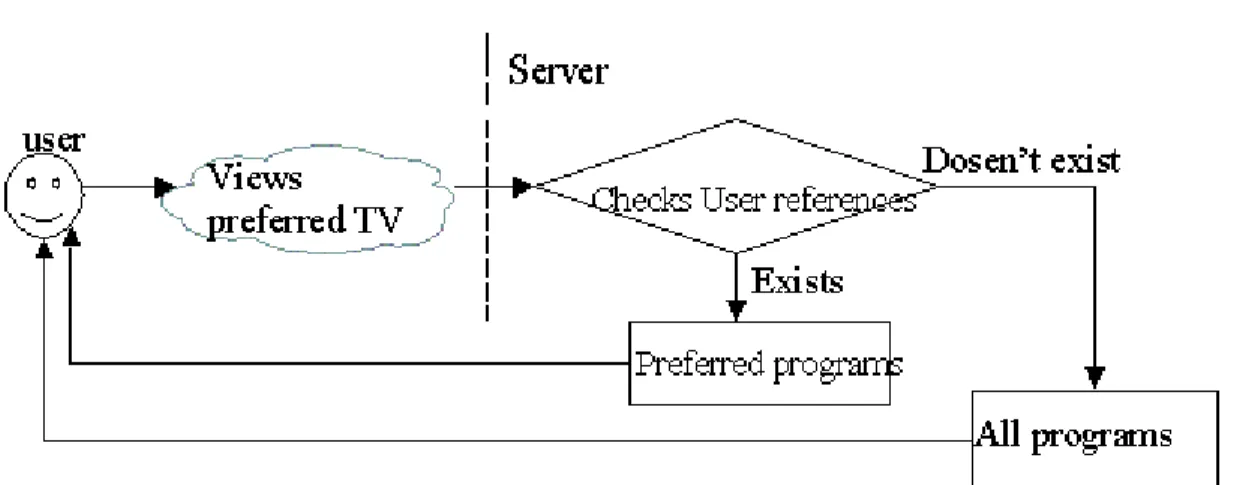
When the user needs to display the application menu, the Usage Preferences are checked first on the server side. The complete list of all available programs is also shown to the user if the standard menu does not satisfy. This way, users are able to use different devices to get the same preference setting without having to configure again.
![Figure 4. Personalization system overall description [32].](https://thumb-eu.123doks.com/thumbv2/9pdfco/19323904.0/36.918.201.760.168.470/figure-4-personalization-system-overall-description-32.webp)
Personalizing System Architecture and User Interfaces
Here, high quality is also the native resolution used when there is not enough bandwidth for broadcast quality. When the customer connects Fujitsu with a DVB tuner and a GPRS phone to the WLAN system, it can receive broadcast quality videos. Given the characteristics of PDAs, it is clear that MPEG-2 cannot be formatted.
When the user is in range of the WLAN base station, medium quality is the optimal resolution and frame rate for PDA clients. When only a GPRS or HSCSD (High-Speed Circuit-Switched Data) connection is available, mobile users can access mobile-quality content. The cropping values should be chosen so that the area of the safe zone is not compromised, which means that we crop: top and bottom 48 pixels, left 32 pixels and right 48 pixels.
![Figure 5. Cropping values and different TV-picture sizes [16].](https://thumb-eu.123doks.com/thumbv2/9pdfco/19323904.0/39.918.211.641.451.790/figure-cropping-values-different-tv-picture-sizes-16.webp)
TV-Anytime User Interaction Description Schemes Adoption
They will be compensated for sharing usage history information with advertisers and content providers, financially or through value-added services [5] [11]. After purchasing usage history, service providers will provide more efficient services to consumers, content providers will improve their content by analyzing usage history, and advertisers can push more desirable ads to the right customers. User can filter, search and select their desired content by setting preferences.
The user can open the preferences settings page to set or modify their settings and the data is stored in the server-side database. They indicate whether or not external parties can access their preferences or usage history [11]. They can still use the User Preferences feature to filter and select TV programs, as this feature is separate from the Usage History feature.
TV-ANYTIME STANDARDS IMPLEMENTATION
Use Case
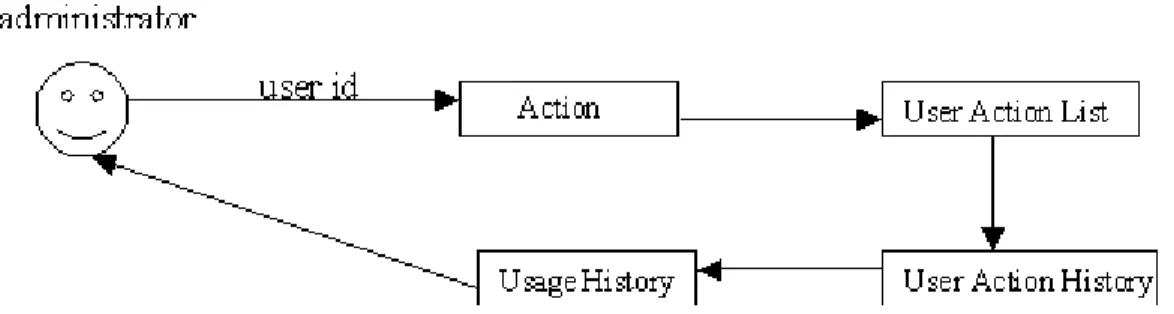
- Administrator Generates Usage History
- User Performs an Action
- User Modifies Preferences Settings
- User Views Preferred TV Guide
- User Requires Normal TV Guide
The performance of the action is saved in the log file in the database for future use. When the server receives a request from an individual user to display the preferred TV guide, it will check the database to see if that user's preference settings are already stored. If the user has set it, TV programs that match the preferences are retrieved from the database and displayed to the user.
The user selects one channel and all available TV programs belonging to this channel are shown.

Server-Side Applications
The Usage History features have nothing to do with the MobTV Project user interface; therefore, those web pages are stored in different URLs than the main website. The user connects to the server with his or her terminal and sets his or her preferences from the web pages. Then he or she can get his or her favorite program guide instead of the usual TV guide.
Using the Usage History web page, the administrator or other trusted third parties can generate a user's usage history for a specific desired observation period.
Log
- Action Type
- Table Description
All broadcast TV programs are captured and stored on the server as a sequence of 5-minute clips. When the user chooses to play a game, this action will be stored in the database. There is no further information about the games that will be saved in the registry, because the game in this project is not very well developed.
Content_id column can be empty because it describes the object ID. When the action types are select object, select program related operation; stop playing a chapter and select auto-generated chapter. The objects, which can be chosen by customers, are series, programs, chapters, live broadcasts of TV channels or reviews. The description consists of the user's IP address and terminal version if the action type is login; search clause if the users used the search; names of operations if the user has selected a program-related operation; name of the game; date the user viewed a day's TV guide; and chapter start time if the user has viewed one automatically generated chapter.
Usage History
- Usage History Functions in MobTV
- Implementation
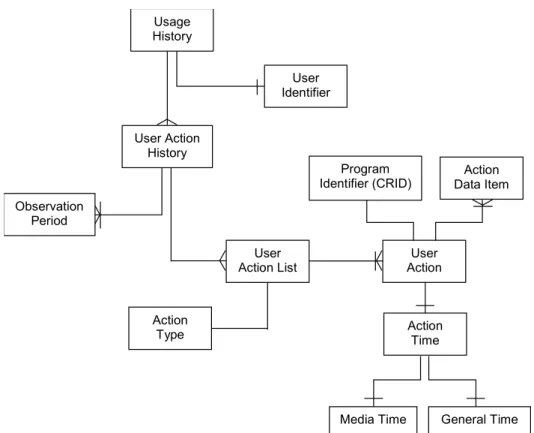
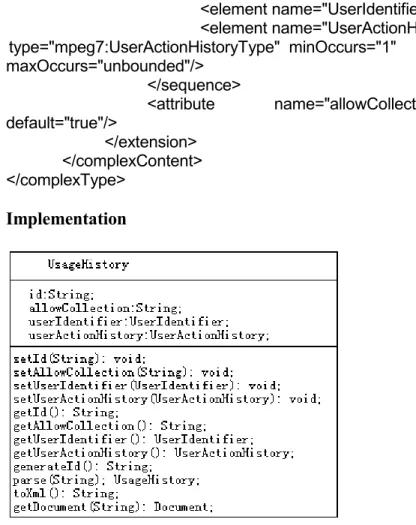
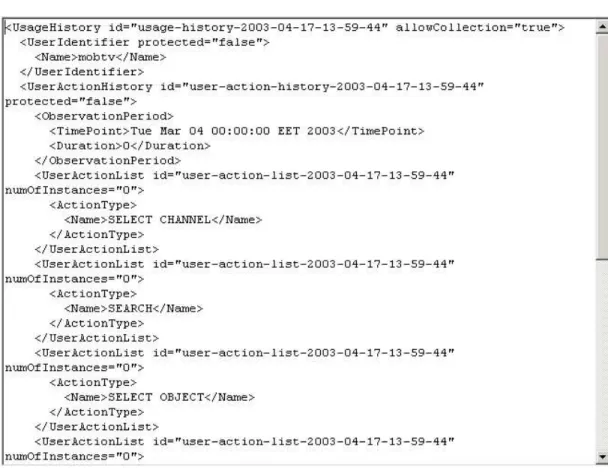
The TV-Anytime specifications define that the default value of this attribute is false, ie, it is not allowed to collect the history unless the user changes his/her status to 'true'. The value of this attribute is the login name of the user whose usage history will be collected. UserActionHistory description schema contains multiple lists of actions performed by the user over an observation period.
Obviously, some UserAction elements may appear in this list if the user selected this function more than once during the observation period. First, the user should be able to decide whether his or her usage information should be collected or not. The UserActionHistory description scheme contains multiple lists of actions performed by the user during one or more, non-overlapping observation periods [21] [31].
User Preferences
- Overview
- Process
After setting the preferences, the user can see a simplified TV guide with his favorite TV channels and favorite TV program categories. If the user has never set the preference settings, the preferred TV guide will be the same as the normal one, which is already in service. When the user changes (he or she has already set the setting) or sets (the first time he or she uses this service) the preference setting, this value will be 'true'.
When the user opens the settings page, they are shown an informational message, telling them what the situation is. Class UriParameterFactory generates the correct Uniform Resource Identifier (URI) based on type of action the user wants to perform. PreferenceEpgData object, it means that the user wants to watch his/her preferred TV guide, method create(PreferenceEpgData, boolean, String) is called and returns a valid EPG URI as a String object; if it is an instance of PreferenceData object, e.g. the user does something with the preference setting, the corresponding setting page will be shown.

Personalization Instructions
- How to Get User Usage History?
- How to Set User Preferences?
7 types of actions are collected, namely Select TV guide Select TV channel Search Select object (series, program, chapter, TV channel live broadcast or review) Select program-related action Stop playing a chapter Select game. Once you have set the preferences, return to the Muut palvelut page and click on Favorite TV Guide.
CONCLUSION
Kinnunen, Recording and Retrieval of Television Broadcasts, Mobile Television for Fourth Generation Networks Project Report, 2003.