Escola de Engenharia Departamento de Inform´atica
Guilherme dos Santos Rodrigues
DevOps - The New Development Process
Universidade do Minho
Escola de Engenharia Departamento de Inform´atica
Guilherme dos Santos Rodrigues
DevOps - The New Development Process
Master dissertation
Master Degree in Computer Engineering
Dissertation supervised by
Ant ´onio Nestor Ribeiro
As result of the disruption caused by the appearance of digital companies with an agile delivery model, there is a need to review the delivery model in organisations. The De-vOps philosophy aims to provide an answer to this problem, bringing all of the individuals responsible for the delivery to work collaboratively, with the support of a set of tools to auto-mate and streamline all of the processes. The objective of this dissertation is to re-evaluate and, consequently, improve the delivery model within Deloitte, proposing an automated process for code analysis, functional tests and deployment of software packages. To this end, a set of cutting-edge tools were analysed and a case study in the context of a real project was built, in order to put into practice the automation of the processes developed.
Keywords: DevOps / Continuous Delivery / Automation
R E S U M O
Resultado da disrupc¸˜ao causada pelo surgimento de empresas digitais com um modelo de entrega ´agil, existe a necessidade de rever o modelo de entrega nas organizac¸ ˜oes. A filosofia DevOps pretende dar resposta a esta problem´atica, aproximando os intervenientes respons´aveis pela entrega, com o apoio de um conjunto de ferramentas que permitem automatizar e otimizar todos os processos. O objetivo deste trabalho passa por reavaliar e, consequentemente, melhorar o modelo de entrega de projetos dentro da Deloitte, propondo para isso uma automatizac¸˜ao dos processos de an´alise autom´atica de c ´odigo, de testes fun-cionais e de criac¸˜ao autom´atica de pacotes de software. Para esse efeito, foram analisadas um conjunto de ferramentas de ´ultima gerac¸˜ao e elaborado um caso de estudo no contexto de um projeto real, de modo a colocar em pr´atica a automatizac¸˜ao dos processos desen-volvidos.
Palavras-chave: DevOps / Entrega Cont´ınua / Automac¸˜ao
1 i n t r o d u c t i o n 1
1.1 Context 1
1.2 Motivation 2
1.3 Objectives 2
1.4 Structure of the Dissertation 3
2 s tat e o f t h e a r t 5 2.1 Waterfall Approach 5 2.1.1 Potential Issues 6 2.2 Agile Approach 7 2.3 DevOps Approach 8 2.3.1 DevOps Principles 9 2.3.2 DevOps Techniques 10 2.3.3 Benefits of DevOps 13 2.3.4 CALMS Framework 14
2.4 The DevOps Tools 15
2.4.1 Requirements 16 2.4.2 Development 17 2.4.3 Testing 18 2.4.4 Deployment 18 2.4.5 Monitoring 19 3 t h e p r o b l e m a n d i t s c h a l l e n g e s 20 3.1 Collaboration between development and operations 20
3.2 Adopting a new set of tools and processes 21
3.2.1 Automated Flows 23 4 p r o c e s s au t o m at i o n d e v e l o p m e n t 28 4.1 Decisions 29 4.1.1 Project Tracking 29 4.1.2 Test Design 32 4.1.3 Documentation 33 4.1.4 Source Management 34 4.1.5 Code Review 35 4.1.6 Code Analysis 36 4.1.7 Functional Testing 37 4.1.8 Continuous Integration 38 iii
Contents iv 4.1.9 Repository Manager 39 4.1.10 Monitoring 40 4.2 Implementation 41 4.2.1 Code Analysis 41 4.2.2 Automated Tests 47 4.2.3 Deployment 54 5 c o n c l u s i o n a n d f u t u r e w o r k 56 5.1 Conclusions 56
5.2 Prospect for future work 57
a l i s t i n g s 61
a.1 main.sh 61
a.2 publish to confluence.sh 64
a.3 update tests.sh 66
Figure 1 Waterfall Approach 6
Figure 2 Agile Approach 8
Figure 3 The First Way: Systems Thinking 9
Figure 4 The Second Way: Amplify Feedback Loops 10
Figure 5 The Third Way: Cultural of Continual Experimentation and
Learn-ing 10
Figure 6 Continuous Improvement Lifecycle 11
Figure 7 Continuous Delivery Benefits 12
Figure 8 DevOps Lifecycle 16
Figure 10 Code Analysis Flow 23
Figure 11 Automated Tests Flow 24
Figure 12 Code Review Flow 25
Figure 13 Deployment Flow 26
Figure 14 Project Tracking - part 1 30
Figure 15 Project Tracking - part2 31
Figure 16 Test Design 32
Figure 17 Documentation 33
Figure 18 Source Management 34
Figure 19 Code Review 35
Figure 20 Code Analysis 36
Figure 21 Functional Testing 37
Figure 22 Continuous Integration 38
Figure 23 Repository Manager 39
Figure 24 Monitoring 40
Figure 25 Code Analysis Flow 41
Figure 26 Commit Message Structure 43
Figure 27 Pre Receive Hook 44
Figure 28 Pre Receive Hook Failure 46
Figure 29 Confluence Page 46
Figure 30 Automated Tests Flow 47
Figure 31 JIRA WebHook 48
Figure 32 Test issue workflow 49
Figure 33 Jenkins build trigger 49
List of Figures vi
Figure 34 Selenium Confluence Page 53
Figure 35 Test Status 53
Figure 36 Deployment Flow 54
Table 1 Major Deployment Phase Tasks and Owners 5
Table 1 Major Deployment Phase Tasks and Owners 6
Table 2 Agile Manifesto 7
Table 3 Requirements Applications 17
Table 4 Development Applications 17
Table 5 Testing Applications 18
Table 6 Deployment Applications 19
Table 7 Monitoring Applications 19
Table 8 Developer vs Operations 21
Table 9 Monitoring Categories 26
Table 9 Monitoring Categories 27
Table 10 DevOps Tools Suite 28
Table 11 Tool Analysis 29
Table 12 Script to clone 42
Table 13 SonarQube quality gate 45
1
I N T R O D U C T I O N1.1 c o n t e x t
As result of the disruption caused by the appearance of companies with an agile delivery model, there is a need to review the delivery model in most organisations.
One of the recent developments in this area, called DevOps [KBS13], aims to strengthen the relationship between the development and operations teams, bringing them to work closer together, aided by a wide variety of tools for requirements, development, testing, deployment and monitoring.
DevOps is not tailored to any particular type of organisation as it can be partially applied on any individual process of the delivery pipeline. However, each company must identify the areas in which the DevOps philosophy could make an impact for both the develop-ment of the software as well as to the business. Some of the common measurable goals are [Wal13]:
• Reduce time-to-market for new features; • Increase overall availability of the product;
• Reduce the time it takes to deploy a software release;
• Increase the percentage of defects detected in testing before production release; • Make more efficient use of hardware infrastructure;
• Provide performance and user feedback to the product manager in a timelier manner. DevOps is, in a nutshell, a movement which aims to achieve better collaboration be-tween the organisational entities of development and operations. This movement stresses collaboration, communication and integration between development and operations teams. Rather than seeing these entities not working well together, DevOps recognises the interde-pendence of software development and IT operations, bearing in mind that the final goal of organisations is to produce quality software and IT services more rapidly, with frequent iterations.
1.2 m o t i vat i o n
For the past several years, competition between organisations has been increasing. The need to assure to the client the quality and timings of the delivery, having in mind a reduced project budget, is of the utmost importance in order to become competitive in a global market.
In order to accomplish this, there is the need to change the current mind-set in the deliv-ery process among organisations and this is where DevOps philosophy comes into place. DevOps is about changing the culture and improving collaboration between development and operations, as well as automating as many of the common jobs in the delivery pipeline. Most of this can be made possible with the creation and exploitation of a set of tools.
There are, according to theIT Revolution Press1
, three main principles in which DevOps is based on:
• Emphasize the performance of the entire system, as opposed to the performance of a specific department (e.g. Development or IT Operations);
• Shorten and amplify feedback loops so that necessary corrections can be continually made;
• Create a culture that fosters continual experimentation, taking risks and learning from failure, and understanding that repetition and practice is the prerequisite to mastery. According to Puppet Labs annual report [PL15], high-performing IT organisations that have embraced DevOps deploy 30 times more frequently with 200 times shorterlead times2 and they have 60 times fewer failures and recover 168 times faster. In every organisation, failures cannot be avoided, but it is clear that with the help of this new DevOps philosophy, aided by the right set of tools, that detecting and recovering from failure are easier to ac-complish, and that can mean the difference between leading the market and getting caught up by the competition.
1.3 o b j e c t i v e s
Having set the initial background, the underlying objectives to this master’s dissertation are the following:
• Describe the development lifecycle of a solution under the DevOps philosophy; • Describe an automated code analysis strategy;
1 http://itrevolution.com
1.4. Structure of the Dissertation 3
• Describe an automated end to end testing strategy from the requirement phase until the software testing;
• Describe a strategy to promote software packages through multiple environments and deployments to production environment;
• Analyse a set of tools, with the intent to support all of the previously enumerated strategies.
After describing the lifecycle, model, strategies and the suite of tools, the final goal is to put all of them in practise. In order to do so, it will be created a demo application to show all of the necessary steps to configure and use the selected tools, simulating a portion of the DevOps flow. The demo will be performed on the Misys core banking application Essence with the following inputs:
• The requirement will be to add a new custom field to a screen; • The field will have business logic behind;
• The code will be analysed, prior to being pushed to the repository;
• An automated test will be triggered in order to validate the functionality of the re-quirement;
• A software package will be built in case the tests finish with success.
Besides the previously enumerated objectives, this dissertation is aligned with Deloitte’s expectations for the near future, which is to bring DevOps culture and techniques to their projects. Therefore, the outcome of this dissertation will contribute with concrete results and a practical use case to prove that this philosophy can bring value to the company, as well as to the developers and testers.
1.4 s t r u c t u r e o f t h e d i s s e r tat i o n This dissertation is organised as follows:
• Chapter 1 - Introduction - sets the initial context, motivation and objectives of this dissertation;
• Chapter 2 - State of the Art - introduces the Waterfall and Agile methodologies, the DevOps philosophy, set of DevOps tools chosen to support the study held by this dissertation in the several phases of a project: requirements, development, testing, deployment and monitoring phases, and the CALMS framework which is used in the DevOps approach;
• Chapter 3 - Problems and its Challenges - presents the problems and challenges that can be encountered when using the DevOps approach;
• Chapter 4 - Development - highlight the main decisions that were taken throughout the dissertation, all of the scripts, jobs and artefacts that were created and the outcome of the flows that were automated;
• Chapter 5 - Conclusion and Future Work - presents the dissertation conclusions and possible future work.
2
S TAT E O F T H E A R T2.1 wat e r f a l l a p p r oa c h
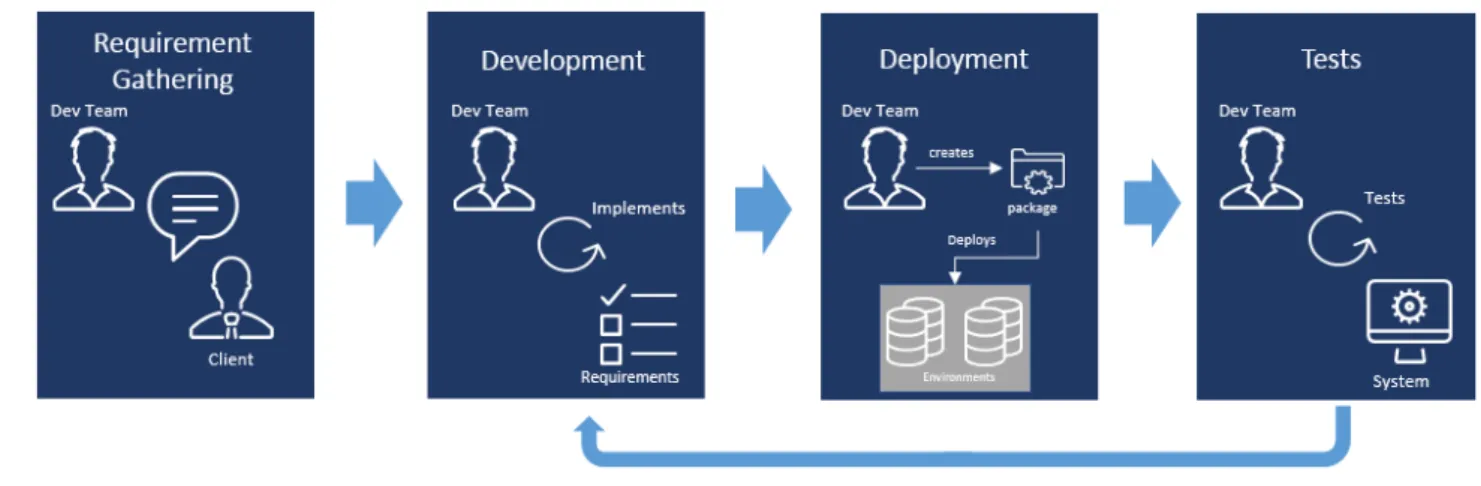
For the past decades, it was almost a certainty to find the traditional Waterfall approach [AD12] being used inside the organisation’s software delivery projects. This approach is mainly based on the following phases [FBK14]:
1. Requirement Gathering: In this initial phase, the development teams are required to promote meetings with the client, note down and detail the list of functionalities and software behaviours to be developed. These requirements can be split up into System and Business Logic Requirements that will eventually be translated into technical requirements.
2. Development: During this phase, the development team converts the Functional and Non-Functional Requirements into a complete information system, it is where the code is actually written.
3. Deployment: The aim of this phase is to produce software packages which will then be deployed to other environments. In Table 3, it is presented the major tasks that compose thedeployment process1
:
Table 1.: Major Deployment Phase Tasks and Owners
Major Tasks Owners
Completing deployment preparations: The team updates the deploy-ment, plan installs, configures, and tests hardware and software com-ponents.
Release Management, Development
Creating operations procedures: The team creates and documents procedures and defines checkpoints to help the operations team mon-itor and maintain the solution.
Release Management, Development
Deploying the solution: The team deploys the core technology and completes site deployments.
Release Management, Development
1 https://technet.microsoft.com/en-us/library/bb497043.aspx
Table 1.: Major Deployment Phase Tasks and Owners
Major Tasks Owners
Stabilising the deployment: Project team and operations work toward a predefined state of completion for the solution.
Project Team Transferring ownership to operations: The team formally hands over
responsibility for the solution to the operations team.
Release Management Closing the Deploying Phase: The team meets the Deployment
Com-plete Milestone requirements and later comCom-pletes post-project re-views with the customer and project team.
Project Team
4. Tests: This is the phase where it is assessed if the functionalities developed and de-ployed in the system matches the initial client requirements. There are multiple levels of testing, from System Integrated Tests2
toUser Acceptance Tests3
and Performance Tests. Based on the tests results, there might be the need to go back to the develop-ment phase to fix bugs and repeat the process.
Figure1sums up the 4 phases that were detailed above.
Figure 1.: Waterfall Approach4
2.1.1 Potential Issues
With the approach that was above described and is presently followed by most companies, there are four major potential drawbacks to it. They are as follows:
2 https://www.techopedia.com/definition/24590/system-integration-testing-sit 3 https://www.techopedia.com/definition/3887/user-acceptance-testing-uat 4 2015 Deloittec
2.2. Agile Approach 7
1. Increased Delivery Time: There is an increased development time because it is not done in batches, which implies that the feedback cycles are also longer. In conclusion, it takes a long time to get results.
2. Complex Deployments: With higher number of requirements to be developed by the team in just a single deployment, the probability of having a higher number of defects is substantially higher as well.
3. Rigid Approach: By having a rigid approach, it actually means that the management team will have a very hard time when performing any scope task. It is extremely difficult to integrate any kind of changes, once the project starts and the scope of it is defined.
4. Increased Risk: The fact of having a scope with a higher number of requirements delivered at once increases the risks of a deployment, as well as increasing the need to perform more complex tests in the system once the deployment is completed.
2.2 a g i l e a p p r oa c h
Early in 2001, and due to the need of discussing alternative development methods from the traditional Waterfall approach that involved heavy preplanning, a group of software developers got together and out of that meeting, the Agile Manifesto5
was created. Table 2 resumes theprinciples6
in which the Agile Manifesto is guided by: Table 2.: Agile Manifesto
Individuals and Interactions over Processes and Tools
Working Software over Comprehensive Documentation
Customer Collaboration over Contract Negotiation
Responding to Change over Following a Plan
Following the manifesto above detailed, the agile methodology [DM14], underlines direct and frequent communication between client and developer through its incremental pro-cesses. The proposed solutions are evolved through communication and collaboration of organizations and teams. Therefore, the key success of agile methodology relies on com-munication among team members and the ability to adapt to rapid changes.
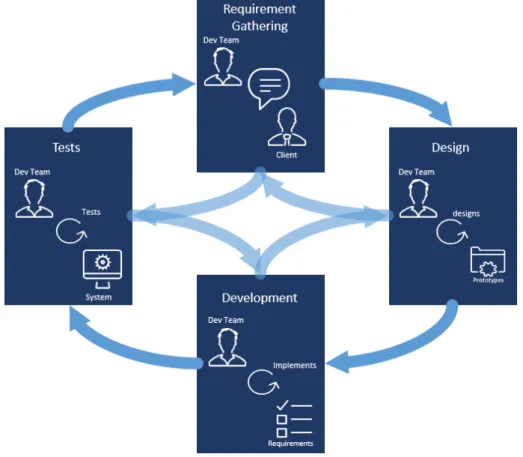
Agile software development includes the notion of iterative cycles, where all of the phases are interconnected, each phase being a feedback mechanism for the others [LS11]. Basically, 5 http://agilemanifesto.org/
it is acknowledge that no phase is ever completed, meaning that all phases can keep evolv-ing. This contrasts with the waterfall schedule, which assumes that each phase reaches a logical conclusion before the next phase is eligible to start.
Figure2illustrates the phases that are comprised in the agile development process.
Figure 2.: Agile Approach7
2.3 d e v o p s a p p r oa c h
The Agile software development has been around for over the last 20 years, and it was the first approach to move away from the traditional Waterfall method by shifting the software development towards a continuous development lifecycle. However, it did not include the operations side, meaning that all of the deployment activities were still Waterfall oriented.
In DevOps, it is intended to extend the continuous development goals that the Agile methodology proposes to continuous integration and releases. In order to perform these continuous releases, DevOps suggests automation of the change, configuration and release processes.
2.3. DevOps Approach 9
Dev is used as a shorthand for developers in particular, but in practice it is even wider and it means that “all the people involved in developing the product”, that include the product, Quality Assurance (QA), and other kinds of disciplines. Ops is a blanket term for systems engineers, system administrators, operations staff, release engineers, DBAs, network engineers, security professionals and various other sub-disciplines and job titles.8
DevOps is, in a nutshell, a movement which aims to achieve better collaboration be-tween the organisational entities of development and operations. This movement stresses collaboration, communication and integration between development and operations teams. Rather than seeing these entities not working well together, DevOps recognises the interde-pendence of software development and IT operations, bearing in mind that the final goal of organisations is to produce quality software and IT services more rapidly, with frequent iterations.
2.3.1 DevOps Principles
As mentioned before, there needs to be a change in the mind-set of the two groups, with the goal of working closer together. The other component to the formula is applying the right framework and tools.
A framework and a set of new tools are needed in this fast pace world to aid both the development and operations teams. The recommended framework and an overview of the most used tools will be explored in more detail in subchapters bellow.
Gene Kim, one of the major contributors to this philosophy, states in theIT Revolution Press9
that there are three principles, also referred as ”ways”, underpinning DevOps: • The First Way emphasizes the performance of the entire system, as opposed to the
performance of a specific silo of work or department — this as can be as large a division (e.g., Development or IT Operations) or as small as an individual contributor (e.g., a developer, system administrator).
Figure 3.: The First Way: Systems Thinking
8 http://theagileadmin.com/what-is-devops/
• The Second Way is about creating the right to left feedback loops. The goal of al-most any process improvement initiative is to shorten and amplify feedback loops so necessary corrections can be continually made.
Figure 4.: The Second Way: Amplify Feedback Loops
• The Third Way is about creating a culture that fosters two things: continual experi-mentation, taking risks and learning from failure; and understanding that repetition and practice is the prerequisite to mastery.
Figure 5.: The Third Way: Cultural of Continual Experimentation and Learning
2.3.2 DevOps Techniques
In order to adopt DevOps there are specific techniques [SC15] that need to be included and mastered. They are as follows:
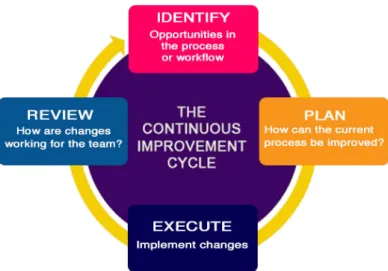
• Continuous Improvement [HF10]: Technique used for identifying opportunities for streamlining work and reducing waste. It is an approach to work systematically to achieve small, incremental changes in processes in order to improve efficiency and quality. Figure6illustrates the lifecycle of this technique, composed of 4 phases:
– Identify - Look out for opportunities in the process; – Plan - Schedule tasks to improve the process; – Execute - Implement changes;
2.3. DevOps Approach 11
Figure 6.: Continuous Improvement Lifecycle10
• Release Planning [JLG+11]: Technique used to defining release roadmaps, project
plans, and delivery schedules, allowing the team to have a common vision about what needs to be achieved.
• Continuous Integration [Vir15]: Technique that indicates that integration should hap-pen at an early stage of the development process, share the changes between the multiple teams and analyse how the environment react to those changes. In addition, it is intended to automate this integration, such that as soon as the system detects changes, it should integrate them into the system to be then automatically built and tested.
• Continuous Delivery [Che15]: Technique used in which teams keep producing valu-able software in short cycles and ensure that the software can be reliably released at any time, meaning that, at any point of time, the system has always the latest working software. Illustrated in Figure7, some of the benefits of this technique are:
– Accelerated time to market - Continuous Delivery allows companies to deliver new software releases to customers more quickly, helping them to stay a step ahead of the competition;
– Improved product quality - With Continuous Delivery technique, developers can have their code immediately tested after performing commit. If the tests find a problem, developers are able to fix it before moving on to another task;
– Reliable Releases - With the improved product quality, the risks associated with a release decreases significantly, and the release process turns out to be more reliable.
Figure 7.: Continuous Delivery Benefits [Che15]
• Continuous Testing [Vir15]: Technique that represents the process of executing auto-mated tests, with the intent of obtaining fast and continuous feedback. As soon as the software is delivered (Continuous Delivery), the system should be able to execute automated tests to validate and provide feedback. In addition, this technique allows the testing process to begin earlier in development lifecycle, thus minimizing the risks of encountering bugs at later stages.
• Continuous Monitoring [Vir15]: Technique which is a direct consequence of some of the one above described. The capability to test early and on a system similar to production allow to monitor various quality parameters throughout and hence ability to react to any issue in timely manner.
2.3.2.1 DevOps Adoption
Adopting DevOps [SC15] is something that requires work on three dimensions: people, pro-cess and technology. However, prior to adopting DevOps, it is nepro-cessary to identify which are the business objectives and the current bottlenecks in the delivery pipeline. Often, there is unnecessary rework being done, because the defects are being uncovered in production, which forces the development to fix them. Also, it is common to have functionalities that are developed for some reasons, which are not required at the exact time they are produced. People are the core of DevOps adoption and need to embrace a new culture, which may not be an easy process because it is not as linear as adopting a process or a tool. The DevOps culture is characterised by a high degree of collaboration across roles, focus on business and trust.
2.3. DevOps Approach 13
It is essential to start identifying bottlenecks in the current implemented processes early on, and break them in order to accelerate delivery. This can be done by working in smaller increments, being one of the agile methodology drivers, which translates in faster feedback loops. When adopting DevOps there are a set of techniques (2.3.2) that need to be taken into consideration.
Technology enables people to focus on high-value creative work while delegating routine tasks to automation. In an initial stage, it is required some additional work and effort but in the long run, these automated tasks can be reused, therefore increasing the efficiency.
2.3.3 Benefits of DevOps
The benefits associated with the practise of DevOps are directly linked with the ones as-sociated with the used techniques (2.3.2). Some of the measurable benefits11 can then be turned into key performance indicators (KPI12
).
• Shorter Development Cycle: DevOps promotes a culture of increased collaboration and communication between the development and operations teams. This translates into shorter timeframes to move from engineering code into executable production code.
• Increased Release Velocity: The shorter development cycle creates increased frequency for release of code into production. What conventionally used to take months from requirements to release is now reduced to daily or hourly release build cycle. This fosters continuous development and deployment, subsequently increasing the value to the business.
• Improved Defect Detection: DevOps builds on top of the agile methodology and, in a sense, it can be considered as extending agile programming. It prescribes to several agile principles such as collaboration, iterative development, and modular program-ming, breaking larger codebases into smaller manageable features. This makes it easier to detect code defects.
• Reduced Deployment Failures and Rollbacks: The benefits gained from faster devel-opment and deployment can be nullified by failed deployment. But software when developed using a DevOps mind-set takes into account an operational point of view as well. This, when combined with improved defect detection, significantly decreases the number of pre and post deployment issues and therefore fewer rollbacks.
11 http://www.logicworks.net/blog/2014/10/measurable-important-benefits-devops/ 12 http://management.about.com/cs/generalmanagement/a/keyperfindic.htm
• Reduced Time-to-Recovery: Even if the likelihood of failures is minimized, failures as a rule are inevitable. When failures do occur, the time to recover to operational efficiency is relatively reduced in a DevOps environment compared to a traditional IT environment. This is primarily due to the efficiencies gained by development team members understanding how operations teams work and vice-versa. Combined with a robust versioning process, rollbacks are made easier.
Looking at the business perspective, those 5 items summarises the benefits. However, there are also some benefits for both the development and operations teams associated with this approach. The fact that there is the intent of automating as much as possible the processes, it assures that human error is minimized as well as allowing the teams to focus on the things that most matter, which is to bring value to the solution, and consequently the client.
2.3.4 CALMS Framework
In the world of DevOps, the framework that is commonly advised to adopt, namely by one of DevOps pioneer, Jez Humble, is the CALMS Framework. It is acknowledged that there are five underlying principles that fully represents the framework:
ulture adaption. utomate what you can.
ean, simple and reliable processes. easuring everything.
haring what matters.
2.3.4.1 Culture
Culture is not something that can be implemented, it is the natural environment that en-compasses the entire development team, including the developers and operations. In this eco-system of people and tools, the culture is a key factor to remove barriers and facilitate collaboration to accomplish both teams and company objectives.
2.4. The DevOps Tools 15
2.3.4.2 Automation
Once the new mind-set is established, it is all about releasing new applications or features at speed while maintaining quality. In order to do this, automation solutions are extremely important. Finding a way to lead all new initiatives with the help automation processes is an assurance that they will be able to easily and constantly scale.
2.3.4.3 Lean
As automation is built, it is essential to maintain every process and tool lean, simple and re-liable. Lean approaches are all about providing increased value to customers or employees, while minimising waste [HMO10] [RTT12]. To accomplish this, lean thinking changes the focus of management from optimising separate technologies and assets, while eliminating waste along entire value streams, allowing companies to respond to changing customer desires with higher quality, lower costs, and with very fast throughput times.
2.3.4.4 Measuring
In a lean organisation, automating everything can sometimes imply that some of the ability to remember and document the work is lost, because if an individual team do not have visibility of the big picture eventually something will go wrong. Measurement is the glue that keeps it all together and, if implemented correctly, it will be possible to analyse and correlate all processes, tools and data together.
2.3.4.5 Sharing
Collaboration between developers and operations is core to a DevOps culture. Being able to share what works, what is causing problems and specifics of overall performance is key. Without sharing, it useless to care about having the right culture, automation adoption, embracing lean and having measurements that work. Sharing is not just reporting facts, it is regular exchanging ideas across teams and helping each other out.
2.4 t h e d e v o p s t o o l s
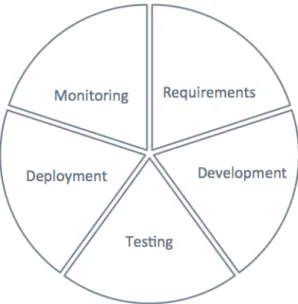
The DevOps Lifecycle is composed of five phases, as seen in Figure8, which have specific tools associated with them and will be detailed individually in the following subchapters. They are as follows: Requirements, Development, Testing, Deployment and Monitoring.
Figure 8.: DevOps Lifecycle
2.4.1 Requirements
Implementing a DevOps approach requires fast iterations, quick feedback cycles, small number of requirements and incremental improvements in real time, so it should be fol-lowed a Scrum13
methodology aided by project tracking tools and also test designing tools. The benefits that are inherited by using these kind of tools are the following:
• Transparency: Business and IT have full visibility over requirements.
• Easier Prioritization: Easier to detect dependencies and prioritize based on business needs.
• Less Complexity: Requirements are broken down into smaller components, easier to manage and deliver.
• Traceability: Clear link between requirements and functionalities delivered.
• User Friendly: User Stories specifications easier to understand by the business and IT. Table 3contains a set of application that are inserted in the Requirements phase, which are used for project tracking, test design and documentation.
2.4. The DevOps Tools 17
Table 3.: Requirements Applications
Project Tracking Test Design Documentation
Jira Zephyr Confluence
Rally Software HP Quality Center Sharepoint
Asana Enterprise Tester
2.4.2 Development
During this phase, it is demanding that the code is delivered more often, faster and with better quality. In order to accomplish this, there is the need of source management tools, version control system tools and code review tools.
The benefits that are inherited by using these kind of tools are the following:
• Minimize Human Error: Through automatic code review over the development, hu-man error is minimized.
• Easier Environment Management: Through automation is easier to control how many environments are present and how they are configured.
• Infrastructure as Code: Environment setup automated allows an easy configuration. • Continuous Delivery: Quick merge and integration of new developments on the main
branch.
Table 4 contains a set of application that are inserted in the Development phase, which are used for source code management, version control, code review and repository man-agement.
Table 4.: Development Applications
Source Code Management
Version Control
System Code Review Repository Manager
GitLab Git Phabricator Artifactory
GitHub Subversion Review Board NuGet
Bitbucket Team Foundation
2.4.3 Testing
During the testing phase, the aim is to have an automated process, reducing human error and optimising the delivery. Every time a set of requirements is ready to evolve, the system executes code analysis and a set of tests to guarantee the consistency and performance of the overall system. If they pass then the process of continuous deployment takes over and evolves it to the next stage.
The benefits that are inherited by using these kind of tools are the following:
• Automatic code review: Automated processes occur every day highlighting what needs to be improved in the code, and blocking commits of breaking code.
• Automatic tests: Automatic execution of test provide the tools to reach an optimal scenario where all lines of code are tested as well as all valid testing scenarios.
• Minimized human errors: Automation provides a scenario where errors can be high-lighted and minimized.
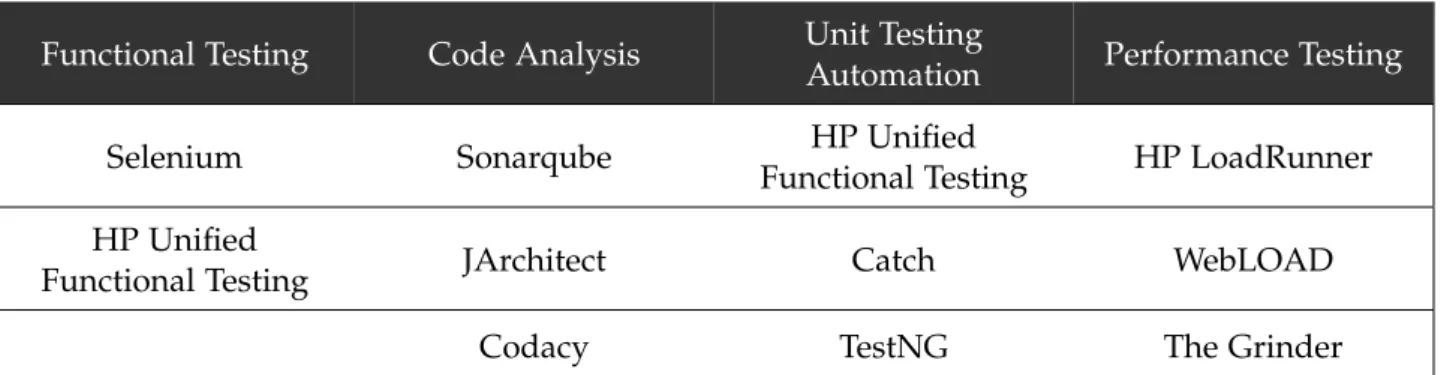
Table5contains a set of application that are inserted in the Testing phase, which are used for functional testing, code analysis, unit testing and performance testing.
Table 5.: Testing Applications
Functional Testing Code Analysis Unit Testing
Automation Performance Testing
Selenium Sonarqube HP Unified
Functional Testing HP LoadRunner
HP Unified
Functional Testing JArchitect Catch WebLOAD
Codacy TestNG The Grinder
2.4.4 Deployment
The aim of this phase it to have a continuous improvement process. A process where environments are configured without human intervention and code is deployed automati-cally. For that purpose, it is required tools for configuration management and continuous integration.
The benefits that are inherited by using these kind of tools are the following:
• Continuous delivery: Quick merge and integration of new developments on the main branch.
2.4. The DevOps Tools 19
• Infrastructure as code: Environment setup automated allows an easy configuration. • Easier environment management: Through automation is easier to control how many
environments are present and how they are configured.
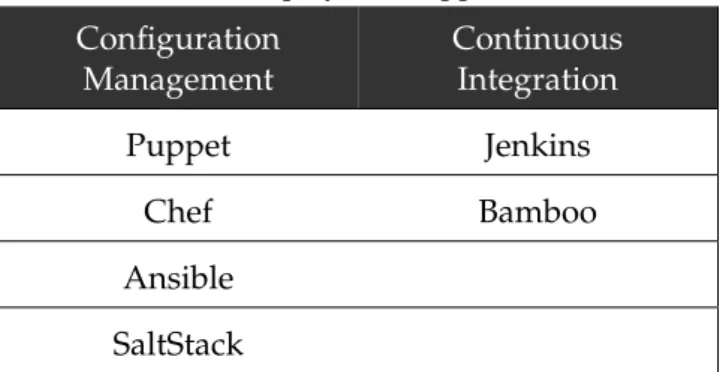
Table6contains a set of application that are inserted in the Deployment phase, which are used for configuration management and continuous integration.
Table 6.: Deployment Applications
Configuration Management Continuous Integration Puppet Jenkins Chef Bamboo Ansible SaltStack 2.4.5 Monitoring
The aim of this phase is to continuously monitor infrastructure and solution in order to create an easy and clean process of status reporting. Is order to accomplish such thing, tools for continuous monitoring and logging are required.
The benefits that are inherited by using these kind of tools are the following:
• Easy and fast reporting: Quick tools in order to check status over environments and solutions.
• Early warning for preventing issues: Early warnings if thresholds are crossed or reached. Allowing prevention actions to avoid issues.
Table7contains a set of application that are inserted in the Monitoring phase, which are used for continuous monitoring and logging.
Table 7.: Monitoring Applications
Continuous
Monitoring Logging
Dynatrace Logstash
New Relic Splunk
3
T H E P R O B L E M A N D I T S C H A L L E N G E SCreating new processes and adopting new behaviours in an effort to meet the business needs to delivering quicker and better software, can sometimes be the source of conflicts among the IT department. On the other hand, these challenges can be addressed and conflicts reduced through embracing DevOps practices. The following are the problems that DevOps philosophy attempts to solve:
• It is a business and cultural problem, since it stresses the collaboration between devel-opment and operations, while aiming to deliver software and services quicker;
• Delivering software and services quicker raises up some technology challenges, mainly since there are a new set of tools and processes which needs to be adopted and mas-tered.
3.1 c o l l a b o r at i o n b e t w e e n d e v e l o p m e n t a n d o p e r at i o n s
One of the current biggest problem in organisations is that the operations teams, or the teams responsible for making infrastructure available to development, do not fully under-stand the needs of the business and may cause delays in the development cycle. In this continuous delivery fashion, business requirements are being introduced at a very rapid pace and, therefore, there is a constant demand for immediate physical and virtual servers. This is a critical part of the delivery process, because if there are any delays, it will have direct impact on task planning.
To minimize this problem, culturally something has to happen to guarantee that everyone knows that both operations and development are part of the same team. There has to be more communication between both teams and try to involve operations team in the earlier phases of the development cycle so they can have visibility of what is coming and anticipate any potential issue. In addition, aiming to deliver new infrastructure by automating it and creating an on demand deployment capability.
Another common problem among the two teams is the lack of cooperation and collab-oration between them. DevOps philosophy is very clear in this point, both teams should
3.2. Adopting a new set of tools and processes 21
work collaboratively and share everything, ideas, goals, workloads and responsibility, with the final goal of delivering high quality software. The biggest challenge is to try and bring the goals of both teams to coexist. While the development team wants to change features, by adding new ones or modifying already existent, operations wants to keep their services running without any disruption. Their goal is system stability, resiliency and availability. Due to multiple and continuous changes, it may be the case that the delivered software is not well written or might contain bugs which will, ultimately, introduce problems on the operations side, and therefore, there is always some resistance from the operations team to any change. Last but not least, the working method of a standard development team is often agile while, on the other hand, the operations team follow more of a static process, a recipe with a set of procedures. Table8sums up what are the differences of both teams.
Table 8.: Developer vs Operations
Development Team Operations Team
Change Stability
Add/modify features Create/enhance services Deploy inconsistent software Motivation to resist change
Agile process Static process
This means that there is big gap between the development and the operations team which can, in the worst case scenario, lead to conflict and inefficiencies. In order to promote better communication between both teams, it is highly advisable that they should be working side by side every single day, also increasing the awareness of what each team is doing and the impacts that the developments might have in the infrastructure and vice versa.
3.2 a d o p t i n g a n e w s e t o f t o o l s a n d p r o c e s s e s
One of the DevOps techniques, Continuous Delivery, proposes to rectify the gap that existed in the Agile methodology between development and operations teams, whereby, code writ-ten and committed to a version control system, will be analysed, tested, built, deployed and installed on the production environment, ready to be consumed by the end-user. Every action apart from the code writing and versioning can be automated, allowing all stake-holders to concentrate their efforts on designing and coding high quality software, rather than worrying with the manual processes of testing, building and deploying. Based on the DevOps lifecycle phases, Figure9illustrates the Continuous Delivery process flow. Although this flow represents the lifecycle of each requirement, which follows a waterfall approach, the fact is that two requirements can be at two different stages of the process, meaning that
there are scenarios where there are new requirements being released into production when, at the same time, others are being developed or tested.
Figure 9.: Continuous Delivery Process Flow1
The biggest challenge lies in the fact that there is the need to master various new tools and processes. However, DevOps encourages everyone to contribute across the chain, meaning 1 Adapted from https://www.ibm.com
3.2. Adopting a new set of tools and processes 23
that a developer can configure deployments or a deployment engineer can add new test cases to the QA repository.
As expected, every organisation must look at this change as an investment. There is an initial phase of analysing the available tools in the market, deciding the DevOps suite, integrating all of the applications and designing and implementing the automated process flows. After this phase, the organisation will begin to take advantage of the benefits that DevOps practises bring, detailed in section2.3.3.
3.2.1 Automated Flows
In this section, it will be illustrated several automated process flows in an abstract way, without going into many detail or selecting any specific tool. The processes that will be illustrated with a sequence diagram are Code Analysis, Automated Tests, Code Review, Deploy-ment and Monitoring.
3.2.1.1 Code Analysis
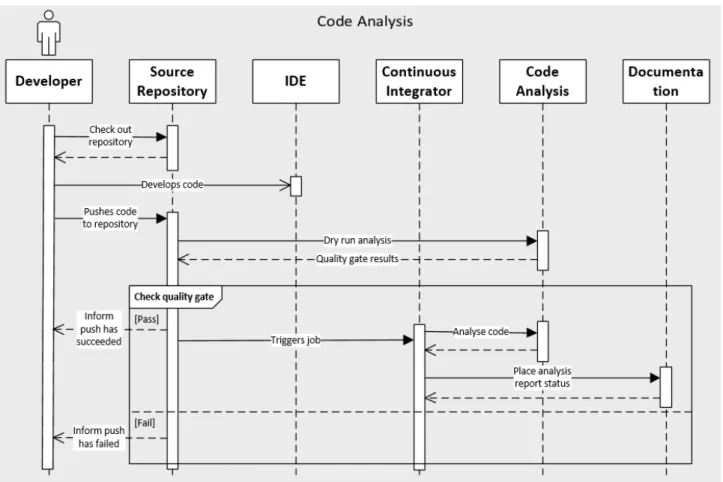
Code analysis is used by developers in their IDEs to catch problems while they are cod-ing, meaning that the code must follow a certain set of rules and pass the defined quality gate. Illustrated in Figure 10, fast incremental code analysis checking can be included in Continuous Integration to catch problems immediately after code has been submitted to the source repository, and deeper analysis checks can also be done to ensure that code will not be deployed with any critical issues or security vulnerabilities.
A successful code analysis should run quickly and provide an easy way to alert develop-ers of any potential issue. The information should be clear and unambiguous, and indicate where, why and how to fix the issue.
3.2.1.2 Automated Tests
Figure 11.: Automated Tests Flow
Tests play a very important role in any organisation and it is where most of the time is being spent. Additionally, in the DevOps philosophy where deployments are made continuously, it is crucial to automate all tests as much as possible and reusing whatever can be reused. Manual testing uses up precious resources and introduces other variable such as the human error.
Illustrated in Figure11, this process allows less time spent worrying about covering all tests scenarios, as well as cutting the costs of having dedicated testers for the job, quickly verifying that any code change still passes the defined tests and lastly reducing drastically the possibility of human error.
3.2. Adopting a new set of tools and processes 25
3.2.1.3 Code Review
Figure 12.: Code Review Flow
Illustrated in figure12, this process should be in every organisation even if it is not auto-mated as it in a DevOps philosophy. Peer code reviewers generally focus on making sure that the code is understandable, maintainable and that it follows all of the organisation’s code conventions. Furthermore, they can also suggest to developers ways to improve the code efficiency as well as how to write it using the best practices.
Code review process is a good way to improve security or reliability, because it usually happens early in development. Therefore, the risk of finding a bug or a security breach at a later stage is very remote. Due to Continuous Delivery, most code changes are small and incremental, making the code review process quicker, especially if the code being reviewed has already passed through a static analysis to filter the most obvious mistakes.
3.2.1.4 Deployment
Illustrated in fugure 13, the deployment process is a central part of Continuous Delivery, since one of the main goals is to be able, at any point of time, to deploy a software package or a simple configuration file to any of the environments. Due to this need, it is required a fast process to create the build packages ready for deployment in any environment. In addi-tion, and only when applicable, the software must pass the quality gate and the automated tests.
Figure 13.: Deployment Flow
3.2.1.5 Monitoring
In a DevOps world nothing is more ubiquitous than the monitoring process, as it adds value to increase awareness during each phase of the delivery pipeline. As it is spread across multiples phases, there is no unique process, but rather a set of primary categories to focus on. Some of these categories are performance, capacity, throughput, SLAs, user metrics and log file analysis, which are detailed below in Table 3.2.1.5.
Table 9.: Monitoring Categories2
Category Description
Performance Analyse page loads, query times, response times and up-load/download speeds.
Capacity Analyse disk space, memory, CPU and bandwidth.
Throughput Analyse the throughput of the web, cache, database, net-work and application layers.
3.2. Adopting a new set of tools and processes 27
Table 9.: Monitoring Categories2
Category Description
SLAs Analyse availability, reliability and security.
User Metrics Analyse registrations, page views, bounce rates and click rates.
Log File Analysis Predictive analytics and pattern recognition.
4
P R O C E S S A U T O M AT I O N D E V E L O P M E N TIn this chapter, it will be discussed the main decisions that were taken along the way, all of the scripts, jobs and artefacts that were created and the outcome of the flows that were automated.
Regarding the suite of tools that will be used to simulate the end to end DevOps flow, Table10summarises it.
Table 10.: DevOps Tools Suite
DevOps Lifecycle Tool Selected Product
Requirements Project Tracking Jira
Requirements Test Design Zephyr
Requirements Documentation Confluence
Development Source Management Bitbucket
Development Code Review Phabricator
Development Repository Manager Artifactory
Testing Code Analysis SonarQube
Testing Functional Testing Selenium
Testing Performance Testing JMeter
Deployment Configuration Management Puppet
Deployment Continuous Integration Jenkins
Monitoring Monitoring Dynatrace
The decisions on which tool to pick for each of the phases of the DevOps Lifecycle were based on three main criteria:
1. Functionalities of each tool;
2. How easy it would be to integrate with the rest of the tools of the suite; 28
4.1. Decisions 29
3. The cost associated with each tool.
During the core of the dissertation, some of these tools will be used in the implementation of the automated flows. The flows that will be implemented will be the automated code analysis process, the automated functional tests process and an automated deployment process to an application server. Finally, this will demonstrate a portion of the tools suite in action, on a real industry use case.
4.1 d e c i s i o n s
The following subsections detail the functionalities of each individual tool that was selected for the DevOps suite. The table below is used to measure the necessity of each documented feature. The contents from Figure14to Figure24were obtained from an analysis conducted by an internal Deloitte project.
Table 11.: Tool Analysis
Symbol Description
Feature is essential
Would be “nice to have” this feature Feature is available
Feature is missing
Feature is partially available
4.1.1 Project Tracking
For project tracking, the selected tool was Jira. Jira is a proprietary issue tracking prod-uct, developed by Atlassian. It provides bug tracking, issue tracking, project management functions among other features. Figures14and15show Jira functionalities in more detail.
4.1. Decisions 31
4.1.2 Test Design
For test design, the selected tool was Zephyr. Zephyr for Jira is a native application that resides in Jira and bring test management capabilities to any Jira project. With this tool, tests can be created and viewed in any Jira project, linked to other issues, executed immediately or as part of a test cycle. ZAPI exposes Zephyr for Jira via REST APIs, which allows to build custom integration with Zephyr for Jira. Figure 16 show Zephyr functionalities in more detail.
4.1. Decisions 33
4.1.3 Documentation
For documentation, the selected tool was Confluence. Confluence is a team collaboration software, developed by Atlassian. In its essence, Confluence can be seen as a wiki, making it very easy to create and edit content. Figure 17show Confluence functionalities in more detail.
4.1.4 Source Management
For source management, the selected tool was Bitbucket. Bitbucket is a web-based hosting service, owned by Atlassian, for projects that use either the Mercurial or Git revision control systems. Figure18show Bitbucket functionalities in more detail.
4.1. Decisions 35
4.1.5 Code Review
For code review, the selected tool was Phabricator. Phabricator is a suite of web-based software development collaboration tools, including the Differential code review tool and the Herald change monitoring tool. Figure 19 show Phabricator functionalities in more detail.
4.1.6 Code Analysis
For code analysis, the selected tool was SonarQube. SonarQube is an open source quality management platform, dedicated to continuously analyse and measure source code quality. Figure20show SonarQube functionalities in more detail.
4.1. Decisions 37
4.1.7 Functional Testing
For functional testing, the selected tool was Selenium. Selenium is a tool used to create ro-bust, browser-based regression automation suites and tests. JUnit is the testing framework that is used, designed to cover all category of tests. Figure21show Selenium functionalities in more detail.
4.1.8 Continuous Integration
For continuous integration, the selected tool was Jenkins. Jenkins is a continuous integra-tion server that can accelerate the software development process through automaintegra-tion. It manages and controls development lifecycle processes such as build, static analysis, tests, packaging and deployment. Figure22show Jenkins functionalities in more detail.
4.1. Decisions 39
4.1.9 Repository Manager
For repository manager, the selected tool was Artifactory. Artifactory integrates with all major continuous integration/deployment and DevOps tools, providing an end-to-end, au-tomated solution for tracking artefacts from development to production staged. Figure 23 show Artifactory functionalities in more detail.
4.1.10 Monitoring
For monitoring, the selected tool was Dynatrace. Dynatrace manages the availability and performance of software applications and the impact on user experience. Figure 24 show Dynatrace functionalities in more detail.
4.2. Implementation 41
4.2 i m p l e m e n tat i o n 4.2.1 Code Analysis
During this code analysis flow, the following applications from the DevOps suite will be used: Jira, Bitbucket, SonarQube, Jenkins and Confluence. The flow illustrated in Figure25 is divided into 4 main steps which will be detailed in the sub chapters below:
• Developer associates a Bitbucket branch to his task in JIRA;
• Developer codes a certain feature and performs any number of commits;
• Developer tries to push his code to the repository and a Bitbucket hook is triggered. The hook performs a dry run to SonarQube to analyse the pushed code. In case of success it calls a Jenkins job to continue the automated flow;
• Jenkins calls SonarQube to generate the analysis report and publishes the report in a Confluence page.
4.2.1.1 Associate Bitbucket branch to a task in JIRA
In this JIRA installation, it is configured to send emails to the issue assignee every time it is created or modified. Therefore, after receiving an email from JIRA informing that a new issue has been opened, the developer logs into JIRA and associates a new Bitbucket branch to that issue. All of the necessary developments to solve the issue will be committed to that branch, and afterwards merged to the master branch.
4.2.1.2 Develops code and commits to branch
After associating the branch, the developer clones that branch to his local machine using the script script to clone.sh. This script has the following structure:
b a s h s c r i p t _ t o _ c l o n e . sh < u s e r n a m e > < p a s s w o r d > < h o s t n a m e > < port > < project > < r e p o s i t o r y >
Table 12.: Script to clone
Input Parameter Description
username User name to authenticate in Bitbucket
password Password for the username provided
hostname Hostname or IP address of the machine where
Bitbucked is installed
port Port number where Bitbucket is listening
project Name of the Bitbucket project
repository Name of the repository being cloned
Following that, the developer creates a new Java project in the IDE in order to start developing and committing his code. In order to guarantee that every developer follows the same commit structure, it should be the company’s best practise to implement a client-side hook for that.
Hooks can be defined as a set of scripts that GIT executes when certain events occur in a repository. They can reside in either local or server-side repositories, and they are only executed in response to actions in that repository.
Local Hooks affect only the repository in which they reside. This means that if a change is performed in a Hook in the local repository, it will not affect other team members that also works with the repository. For this reason, it is very important to maintain Hooks configuration aligned between all the team members. Hooks can be used as a way to implement a certain policies to be followed by all team members. The most known local hooks types are:
4.2. Implementation 43
• pre-commit: This Hook is executed every time a commit event happens, and before GIT asks the developer to insert a commit message;
• prepare-commit-msg: This Hook is called after a pre-commit with the objective of populating the text editor with predefined commit message;
• commit-msg: This Hook is called after commit message has been entered by the developer, and it should be a good place if you want for example to enforce a certain commit message policy, that follows a certain structure;
• post-commit: This Hook is called after commit-msg, and it is only used for notifica-tion purposes, because it will not change the outcome of commit operanotifica-tion.
In this code analysis flow, the commit-msg hook has the following structure:
Figure 26.: Commit Message Structure
4.2.1.3 Pushes code to repository
Whenever the developer decides to push the code to the repository, he can use the IDE or use the script script to push.sh. This script has the same structure described in Table12.
b a s h s c r i p t _ t o _ p u s h . sh < u s e r n a m e > < p a s s w o r d > < h o s t n a m e > < port > < project > < r e p o s i t o r y >
Before being able to push the same changes to the master branch, the developer must first take care of the merging operation between those branches. This push operation on the master branch will trigger a server-side hook. Hooks can be set in order to validate changes performed before a user pushes them into the project repository. The pre-receive hook is executed every time somebody uses git push to push commits to the repository and will accept or reject a push to the repository if certain conditions are fulfilled or not.
To enable the Pre Receive Hook, the user must access the Repository Settings page and select the option ”Hook”. In that page, the user can configure and enable several hooks. After clicking in the edit button for the Pre Receive Hook, the user must configure it. Figure 27 illustrates how the hook can be configured.
Figure 27.: Pre Receive Hook
The Executable file can be set only by Bitbucket system administrator for security pur-poses. However, users can set executable relative if safe mode is enabled. Safe mode can be used by non-privileged users for specifying as executable any script that sysadmin will cre-ate in <bitbucket home>/external-hooks/ directory. Positional arguments will be passed to the selected executable as is, one per line and they should be specified without any quotes.
The main.sh script execute the following subtasks:
• Generate pushed files: First the modified files that are trying to be pushed are gener-ated so they can be analysed by the SonarQube;
• Check the branch: Only the defined branches will be analysed, so a verification of the branch will be performed to check if the analysis will proceed or not;
4.2. Implementation 45
• Create the sonar-project.properties file: The sonar-project.properties is a mandatory configuration file on the root directory of the project that set some parameters of the SonarQube analysis;
• Run SonarQube analysis: The next step is run a SonarQube analysis. This analysis is incremental, which means that only the modified files are analysed. At the end a file is created with the results of the analysis named sonar-report.json. This file presents the list of issues found in the files changed, each one with a level of severity;
• Get the quality gates: The next step is to get the quality gates defined for the project from the SonarQube API. The quality gates includes the limit values for each level of severity and also the actual value of issues found for each severity. The values are saved in a file and will be used to validate the changes;
• Validate the changes: The issues generated by the changes are grouped by severity and added to the actual number issues found (before this changes). So for each severity the sum will be compared to the limits defined in the quality gates file. The script will accept or reject a push performed by the user considering the limit values defined to the project. If the push is successful, a Jenkins job with a SonarQube complete analysis will be triggered. The full shell script can be found in AppendixA.1.
To run SonarQube analysis, it is assumed that previously it was created a new project and associated a quality gate to it. In this case, the quality gate is meant to analyse only Java code and its metrics are reflected in Table13.
Table 13.: SonarQube quality gate
Metric Condition Warnings Errors
Blocker Issues is greater than N/A 1
Critical Issues is greater than 5 10
Info Issues is greater than 250 N/A
Major Issues is greater than 10 25
Minor Issues is greater than 100 200
In case the SonarQube dry run analysis fails, the push will automatically fail as well. Figure 28illustrates one case when this happens, where the developer tried to push some code to the master branch that had 70 out of 25 major issues allowed.
As a Post Receive Hook, it has also been configured in Bitbucked to send an email to a list of recipients whenever someone pushes to the repository. This hook is called Push Email Notifier Hook.
Figure 28.: Pre Receive Hook Failure
4.2.1.4 Runs full code analysis and publishes report in Confluence
In case the Jenkins job gets triggered, it means that the dry run analysis passed with success. This job has two main build steps:
• Issues a complete analysis of the repository to SonarQube who will produce a report with the results;
• Store the reports with the analysis in a Confluence page. The main Confluence page, named SonarQube Analysis will be created in the first execution. For every analysis execution, it will be created a child page and in the attachment the complete issue re-port analysis generated by the SonarQube build step. Figure29illustrates an example of a generated Confluence page.
4.2. Implementation 47
4.2.2 Automated Tests
During this automated tests flow, the following application from the DevOps suite will be used: Jira, Bitbucket, Zephyr, Selenium, Jenkins and Confluence. The flow illustrated in Figure30is divided into 4 main steps which will be detailed in the sub chapters below:
• Tester selects the test issue in JIRA, changing its status to ”Automate Test”, that will trigger a job in Jenkins;
• Jenkins will call a custom jar that will interact with Zephyr through ZAPI to get the information regarding each individual test in the test suite;
• Jenkins will clone the Bitbucket repository where the tests are coded and start its execution;
• Jenkins will publish the evidences of the automated tests in a Confluence page.
Figure 30.: Automated Tests Flow
4.2.2.1 Select issue in JIRA
Having installed the Zephyr plugin for JIRA, it is possible to create an issue of type Test and associate it to an existent issue like a user story or a task. Although the purpose of this
issue in its essence is only for test design, it will be used in this flow as the starting point to the automated tests.
On JIRA’s system administration panel, it can be configured WebHooks, which are user-defined HTTP POST call-backs. They provide a lightweight mechanism for letting remote applications receive push notifications from JIRA, without requiring polling. To register a WebHook in JIRA, it is necessary to provide the following information:
• Name for the WebHook created;
• URL where the callback should be sent;
• Scope of the WebHook, either ”all issues” or a limited set of issues specified by JQL; • Events to post to the URL, either ”all events” or a specific set of events.
Figure31illustrates an example of a WebHook configured in JIRA. In this example, when the status of an issue of type Test is updated to Automate Test in JIRA project DevOps Tese, it triggers a webhook.
Figure 31.: JIRA WebHook
Every issue in JIRA has a workflow associated, and for the Test issue it has been defined the workflow illustrated in Figure32. In this workflow, the WebHook is triggered whenever the issue status changes from Open to Automate Test through transaction Automate Test or from Automate Test to itself through transaction Repeat Test.
4.2. Implementation 49
Figure 32.: Test issue workflow
Due to JIRA limitations, the POST call-back does not support basic authentication re-quired by Jenkins to trigger the build. Therefore, a plugin has to be added to Jenkins, which works as a receiver that will be responsible to trigger the build upon the reception of the request from JIRA. When configuring the job in Jenkins, the same JQL filter used in JIRA WebHook needs to be used, as illustrated in Figure33. There is also the possibility of extracting information from the JIRA issue who triggered Jenkins and store it in variables.
Figure 33.: Jenkins build trigger
4.2.2.2 Retrieve test information
In order to retrieve the necessary information about each test step, it has been developed a custom jar file ZapiJsonParser-1.0.jar that takes the following as input parameters:
• JIRA USERNAME; • JIRA PASSWORD; • JIRA SERVER HOST; • JIRA SERVER PORT; • JIRA ISSUE KEY.
This parser has the purpose of posting a new test execution in JIRA, under the test issue, as well as to generate a file, named Zephyr test info.txt containing information about each individual test step following the structure below (each line in the file corresponds to a test step).
p r o j e c t I D # i s s u e I D # t e s t E x e c u t i o n I D # i s s u e S u m m a r y # i s s u e D e s c r i p t i o n # t e s t S t e p I D # t e s t S t e p E x e c u t i o n I D # t e s t S t e p N a m e # t e s t S t e p D a t a
• projectID: JIRA project identifier; • issueID: JIRA issue identifier;
• testExecutionID: JIRA test execution identifier; • issueSummary: JIRA issue name;
• issueDescription: JIRA issue description; • testStepID: JIRA test step identifier;
• testStepExecutionID: JIRA test step execution identifier; • testStepName: JIRA test step name;
• testStepData: JIRA test step details. 4.2.2.3 Run Selenium scripts
When the Jenkins job is triggered, the Bitbucket branch where the tests are coded gets cloned to the Jenkins workspace. Then, and once the JSON information gets parsed by the jar file, generating a file with information about each test step, a shell script is executed to begin Selenium tests. Since these tests follow JUnit annotations, for each line in the Zephyr test info.txt file, the following maven command is executed:
4.2. Implementation 51
mvn D t e s t = $ t e s t _ s u m m # $ s t e p _ n a m e D p r o j e c t I D = $ p r o j e c t _ i d D t e s t I D = $ t e s t _ i d -D t e s t E x e c I -D = $ t e s t _ e x e c _ i d - -D t e s t S u m = $ t e s t _ s u m m - -D t e s t -D e s c =\ ’ $ t e s t _ d e s c \ ’
- D t e s t S t e p I D = $ s t e p _ i d - D t e s t S t e p E x e c I D = $ s t e p _ e x e c _ i d - D t e s t S t e p D a t a =\ ’ $ s t e p _ d a t a \ ’ t e s t
There are, however, some considerations to bear in mind with this approach. They are as follows:
1. The JIRA issue name must match with the JAVA class name;
2. The JAVA class must have one method with the @Test annotation for each JIRA test step name, and the name must match.
The example below illustrates the necessary skeleton code to execute the test testStep of JIRA issue TestCase. It consists in a login action performed on the Misys core banking system Essence.
public class TestCase {
/**
* Log In test step. *
*/
@Test
public void testStep() {
WebDriver driver = new FirefoxDriver();
driver.manage().timeouts().implicitlyWait(15, TimeUnit.SECONDS); driver.manage().window().maximize();
driver.get("http://localhost:8080/uxp/rt/html/login.html?locale=en-gb ");
//username
setValueById(driver, "username", "myUser");
//password
setValueById(driver, "password", "myPass");
//Sign In button
driver.findElement(By.id("login").click(); }
/**
* Sets element value by ID *
* @param driver WebDriver in focus * @param id Element ID
* @param value Value to be set */
public static void setValueById(WebDriver driver, String id, String value) {
WebElement element = driver.findElement(By.id(id)); new Actions(driver).moveToElement(element).perform(); element.clear();
element.sendKeys(value); }
}
Despite the tests being executed in the machine where Selenium server is running, all tests evidences are stored in Jenkins workspace. For that purpose, a folder called reports get created in each build, containing a PDF file for each JIRA test step with the test evidences, and also a CSV file is generated containing the following information (one test per line):
p r o j e c t I D # i s s u e I D # t e s t E x e c u t i o n I D # t e s t S t e p I D # t e s t S t e p E x e c u t i o n I D # t e s t S t a t u s # p d f P a t h #
• projectID: JIRA project identifier; • issueID: JIRA issue identifier;
• testExecutionID: JIRA test execution identifier; • testStepID: JIRA test step identifier;
• testStepExecutionID: JIRA test step execution identifier; • testStatus: Status of test execution. 0 - Failure; 1 - Success; • pdfPath: Path to PDF file containing test evidences. 4.2.2.4 Publish test evidences
Once the tests have been executed, it is necessary to place the evidences in a Confluence page and update the status of both the test case and test steps in JIRA. For this 2 goals,
![Figure 7 .: Continuous Delivery Benefits [Che 15 ]](https://thumb-eu.123doks.com/thumbv2/123dok_br/17557492.817118/21.892.312.629.169.478/figure-continuous-delivery-benefits-che.webp)