package that is freely available on the Internet and used in the IOP
Advancing Physics
course) to build physics games using Newton’s laws,
expressed as differential equations. Solving systems of differential equations
is beyond most secondary-school or first-year college students. However,
with Modellus, the solution is simply the output of the usual physical
reasoning: define the force law, compute its magnitude and components, use
it to obtain the acceleration components, then the velocity components and,
finally, use the velocity components to find the coordinates.
M
This article features online multimedia enhancements
Introduction
The essence of physics lies in the free creation of concepts, models and theories, like art. But, unlike art, ideas in physics must be matched with experience and have internal coherence. Newtonian theory is usually quoted as a paradigm of scientific theory and its influence has been enormous, both on theoretical aspects and also on practical ones: it is used today by astronomers, aeroplane pilots, aerospace engineers and. . . game developers!
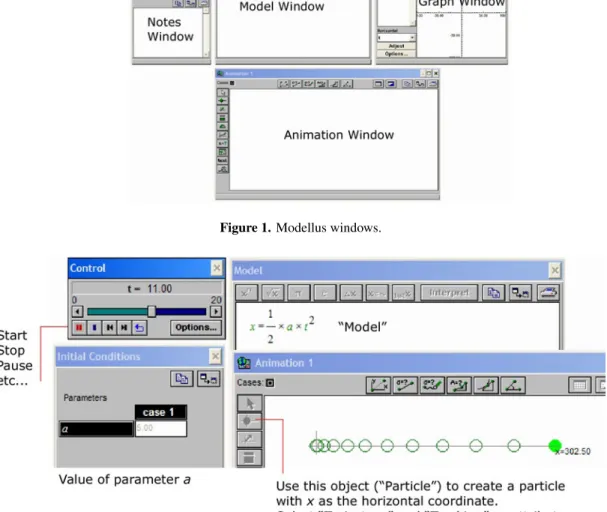
Let’s start the game. . . . Descartes proposed that points in space can be represented by coordinates. Modellus Animations are typically made on a plane using pixel coordinates, x and y, on the Animation Window (see figure 1). The screen size in pixels varies, but a typical screen can have 1024×768 pixels and a Modellus Animation is usually smaller.
Let’s think of a particle as an object with mass but no size—this is a typical physical concept, an abstraction from reality. Students learn in general science courses that the distancedtravelled by an
object with constant acceleration is given by the functiond = 12at2, wherea is the magnitude of the acceleration andt is the independent variable time (t must be measured from the beginning of the motion with constant acceleration and when t=0 the object is at rest).
Instead of using d, we will use the pixel coordinatex to represent the distance travelled. Ifx =0 whent =0,d andx can be made equal in magnitude. This motion can be represented as a Modellus Animation such as in figure 2.
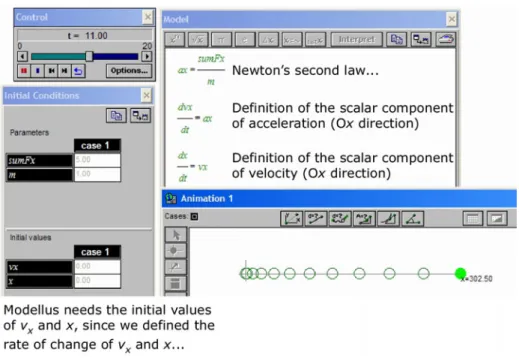
Figure 2 shows a kinematics approach to motion, invented by Galileo (not exactly with this formalism!), before Newton. Newton’s dynamics approach starts with the definition of the net force on the particle and then uses his laws to compute the acceleration (figure 3).
V D Teodoro
Figure 1.Modellus windows.
Figure 2.(a) Write the Model on the Model Window; (b) press the Interpret button; (c) give a value to the parameters; (d) create an object (a Particle in the current example) with the correct properties; (e) press the Start button.
velocity) to attain certain goals, such as controlling the motion of a object to reach a specific position. Newton’s theory states that velocity is the instantaneous rate of change of the position vector (a vector that has its tail at the origin of the reference frame and its head at the current position). For one-dimensional motion, this can be stated as ‘the scalar component of velocity,vx, is the instantaneous rate of change ofx’. Similarly, acceleration is the instantaneous rate of change of velocity. Again, for one-dimensional motion, we can say that ‘the scalar component of acceleration, ax, is the instantaneous rate of change of velocity
vx’. A Modellus model of these statements looks like figure 4.
The model in figure 4 uses instantaneous rates of change to relate velocity and acceleration, and position and velocity. Equations like dx/dt =vx are calleddifferential equations. They establish how one or more variables change. The origin of the term ‘differential’ has to do with the fact that a ‘change’ is a ‘difference’ between a ‘new value’ and an ‘old value’.
Figure 3.A model of motion with constant acceleration: the net force is constant. The model is made with a function of time.
Figure 4.A Newtonian model of a particle with constant acceleration. The model is made using instantaneous rates of change, i.e. differential equations.
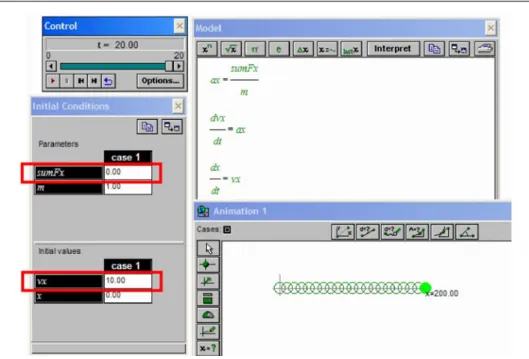
Sometimes, it is very easy to find the solution, i.e. the function that solves the differential equation. For example, if the initial value of the velocity is 10 units and the net force is zero units, the solution isx =10t. Why? Simply because there is no rate of change of velocity. And, since distance changes
V D Teodoro
Figure 5.A particle moving with constant velocity (note that the net force is zero). The model was created with differential equations and it is equivalent to a model with the functionx = 10t.
Figure 6.The Level Indicator was set to control the variablesumFx. This variable is the scalar horizontal component of the net force.
The units used are important, but in this case it is sufficient to say that they must be coherent— if distance is measured in metres (= pixels) and time in seconds, velocity is measured in metres per second and acceleration in metres per second per second.
Figure 7.Getting the feel for the mathematical meaning of inertia.
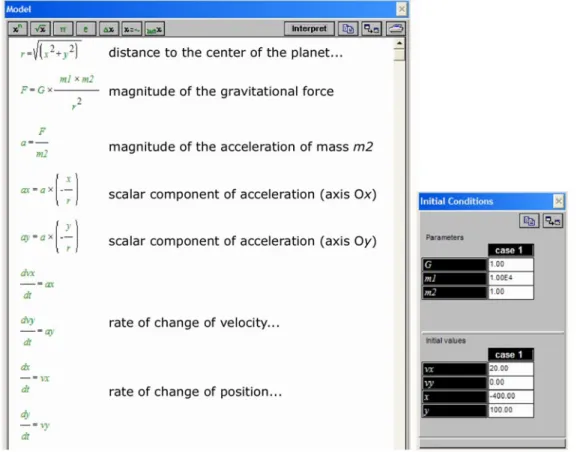
Figure 8.A model (and its initial conditions) to create a gravitational interaction between a fixed planet of mass
V D Teodoro
solution that is equal or almost equal to the symbolic solution in this case and in many more cases. The basic idea in solving differential equations is that a new value of a function (let’s say x) is computed using an algorithm of the type ‘new value = old value + rate of change×time step’. If the time step is conveniently small and the ‘rate of change’ is known, this iterative computation can compute new values of the function as time goes on.
The advantages of using numerical methods to solve differential equations to createinteractive games are evident: by controlling the rate of change, the user can control how something moves on the screen; let’s see a simple example.
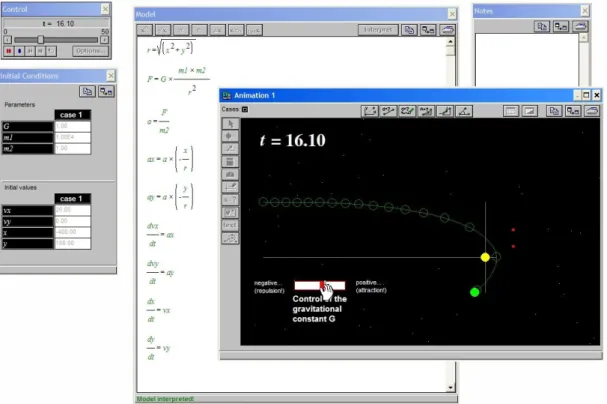
Figure 9.A gravitational game and two trajectories of the moving particle: the first one was a success but the second was a failure: the object was captured by the planet.
Creating an interactive model that
illustrates the law of inertia
Modellus allows different forms of interaction when a model is running. For example, you can place a Level Indicator on the Animation Window, assign it to a parameter and, when the model is running, move a slide to change the value. The example in figure 6 has a Level Indicator to change the variablesumFx.
of a reference frame xOy. Another particle (a spaceship, a satellite, anything you want. . . ) is travelling in the gravitational field created bym1, acted upon by the gravitational force.
The model (see figure 8) starts by computing the distance r between the two particles, then the magnitude of the gravitational force and the
Figure 10.The Animation window can be changed to make the ‘game’ look more realistic. For example, it is very easy to put ‘stars’ as a background, to include text and colour etc. The user can also choose any image (‘gif’ or ‘bmp’ filetype) as the background, as well as a moving object (e.g. the spaceship) or a static one (the attracting body).
initial position of massm2is(100,−400)and it is moving in the Oxdirection with an initial speed of 20 units.
V D Teodoro
careful: it is more difficult than it seems. . . . The ‘game’ can be made more realistic by changing the Animation window (figure 10).
A final word
Physics is a process of creating and testing models about the world. Physical quantities like force, energy, time etc are abstract mathematical concepts that physicists and engineers use to describe and manipulate the world. Playing with models like those above can help students appreciate the way in which models are built, tested and used, particularly those models that use mathematics as the language of Nature.
Modellus is available as a free download from
phoenix.sce.fct.unl.pt/modellus/. The Modellus files for the models shown in figures 2–10 are available from the electronic version of this journal (www.iop.org/journals/physed).
Received 15 July 2004 PII: S0031-9120(04)83355-0 doi:10.1088/0031-9120/39/5/005