THE MITABLE ENGINE FOR MULTI-TOUCH AND
MULTI-USER TABLETOP APPLICATIONS
THE MITABLE ENGINE FOR MULTI-TOUCH AND
MULTI-USER TABLETOP APPLICATIONS
Disserta¸c˜ao apresentada `a Escola Polit´ecnica da Universidade de S˜ao Paulo para obten¸c˜ao do T´ıtulo de Mestre em Engenharia.
THE MITABLE ENGINE FOR MULTI-TOUCH AND
MULTI-USER TABLETOP APPLICATIONS
Disserta¸c˜ao apresentada `a Escola Polit´ecnica da Universidade de S˜ao Paulo para obten¸c˜ao do T´ıtulo de Mestre em Engenharia.
´
Area de concentra¸c˜ao: Engenharia de Computa¸c˜ao
Orientador:
Prof. Dr. Ricardo Nakamura
Mauricio Cirelli
The MiTable Engine for Multi-Touch and Multi-User Tabletop Applications / M. Cirelli. – S˜ao Paulo, 2015. 98 p.
Disserta¸c˜ao (Mestrado) — Escola Polit´ecnica da
Universi-dade de S˜ao Paulo. Departamento de Engenharia de Computa¸c˜ao
e Sistemas Digitais.
1.Tabletops. 2. Frameworks. 3. Interfaces
Natu-rais I. Cirelli, Mauricio II. Universidade de S˜ao Paulo.
Es-cola Polit´ecnica. Departamento de Engenharia de Computa¸c˜ao
Agrade¸co primeiramente aos meus pais, irm˜ao e `a Nathalia. A fam´ılia ´e o principal pilar que sustenta um homem durante toda sua vida e sem eles nada seria poss´ıvel e, tampouco, teria sentido. Eles acreditaram no valor que um mestrado agrega `as nossas carreiras e me apoiaram incondicionalmente durante mais esta trajet´oria.
Em seguida, agrade¸co ao professor Ricardo, pela orienta¸c˜ao, apoio, aux´ılio e intermin´avel
dedica¸c˜ao a este trabalho. N˜ao posso deixar de agradecer, tamb´em `a professora Lucia, que me acompanha desde o in´ıcio da gradua¸c˜ao e ´e grande respons´avel por muito do que consegui profissionalmente e academicamente. Ambos me mostraram a importˆancia que um mestrado acadˆemico tem na vida profissional e hoje sou capaz de colher os bons frutos desta escolha.
Por fim, agrade¸co aos meus amigos Marylia, Eric e Helder pela qualidade excepcional do trabalho que conduzimos juntos durante a gradua¸c˜ao. Aquele trabalho deu a motiva¸c˜ao
A defini¸c˜ao e o reconhecimento de gestos multi-toque s˜ao dois dos maiores desafios encontrados por desenvolvedores de aplica¸c˜oes para tabletops. Ap´os a escolha dos gestos, geralmente ap´os um longo e custoso estudo de usu´ario, os desenvolvedores precisam selecionar ou criar um algor´ıtimo para reconhecˆe-los e integr´a-lo `a aplica¸c˜ao e ao hardware.
Muitas bibliotecas e arcabou¸cos para o reconhecimento de gestos multi-toque foram pro-postos nos ´ultimos anos. Cada um deles buscou endere¸car um dos diversos desafios encontra-dos pelos desenvolvedores quando desenvolvendo prot´otipos e implementando novas aplica¸c˜oes para tabletops, como a integra¸c˜ao entre a camada de aplica¸c˜ao e a interface de hardware. Em uma das etapas de nossa pesquisa, foram identificados quatorze requisitos para tais arcabou¸cos, variando desde o suporte ao multi-toque ao suporte a gestos colaborativos. Entretanto, as propostas anteriores n˜ao conseguiram endere¸car todos os requisitos identificados.
Neste trabalho, n´os apresentamos o MiTable Engine: um arcabou¸co flex´ıvel e configur´avel, criado com o objetivo de atender a todos os quatorze requisitos. Esta proposta pode ser utilizada tanto para suportar aplica¸c˜oes em mesas interativas para diversos usu´arios quanto aplica¸c˜oes para tablets e smartphones.
O MiTable Engine foi constru´ıdo a partir de uma arquitetura de quatro camadas com uma nova proposta de reconhecimento de gestos baseada em pipeline. Nossa proposta ´e capaz de processar diversas entradas de toque simultaneamente com grande desempenho e se torna muito flex´ıvel para personaliza¸c˜oes. O MiTable tamb´em inclui alguns dos algor´ıtmos do estado-da-arte para reconhecimento de gestos al´em de um conjunto de ferramentas para cria¸c˜ao e inclus˜ao de novos gestos nas aplica¸c˜oes.
Gestures definition and recognition are two of the major challenges for tabletop developers. After choosing the gestures, usually after a costly user study, developers must select or create an algorithm to recognize them and integrate it to the main application layer and to the hardware interface layer.
Several multi-touch gestures recognition systems and frameworks were proposed in the past years. Each of them tried to address one of several challenges developers have when prototyping and implementing new tabletop applications and to provide a seamless integration between the hardware interface and the main application. During our research, we identified fourteen requirements for multi-touch frameworks, ranging from supporting multi-touch to collaborative gestures. Although current state of art multi-touch gestures frameworks addresses several of them, there is no unique solution which addresses all the developers needs.
In this work, we present the MiTable Engine: a flexible and configurable multi-touch gestures engine aimed to address all these requirements. The proposed engine is suitable for both large multi-user surfaces and for small single-user tabletops, such as tablets and smartphones.
The MiTable Engine is built on top of a four layers architecture and introduces a novel multi-touch gestures recognition pipeline which can process several multi-touch inputs simul-taneously with high performance and flexibility for customizations. The Engine also includes some of the state-of-art multi-touch gestures recognizers and a set of tools for creating and adding custom gestures to the application.
2.1 Evoluce One . . . 17
2.2 ReacTable . . . 18
2.3 FTIR schematic diagram, from the NUI Group’s Book . . . 19
2.4 Microsoft Surface Table . . . 20
2.5 Examples of gestures classification accordingly to Nygard’s criteria . . . 22
2.6 Lucid Touch: a conceptual sketch . . . 32
2.7 CMate: Collaborative Concept Mapping Application . . . 33
2.8 Participants of the Firestorm experiments . . . 34
3.1 A general architecture for tabletop applications . . . 36
3.2 The Proton’s gestures tablature application . . . 38
3.3 Echtler’s and Klinker’s General Architecture for Tabletop Frameworks . . . 52
4.1 MiTable’s Architecture . . . 59
4.2 MiTable’s Gesture Model . . . 60
4.3 MiTable’s Main Components . . . 61
4.4 MiTable’s Manager . . . 62
4.5 Data Acquisition Flow . . . 63
4.6 Processing Flow . . . 64
4.7 Recognition Layer . . . 66
4.8 Recognition Pipeline Blocks . . . 66
4.9 General Classification Pipeline . . . 69
4.10 Built-in Pre-Processors . . . 70
4.13 Built-in filter classes . . . 75
4.14 Events Notification Layer . . . 77
4.15 Built-in data extraction classes . . . 79
4.16 Gestures Recorder: TUIO Tab . . . 80
4.17 MiTable Gestures Benchmark: Evaluating the $N Algorithm . . . 81
4.18 Single-touch symbolic gestures used in the Proof of Concept Application . . . 82
2.1 Gestures classes and criteria . . . 23
3.1 Kammer et al Criteria . . . 53
3.2 Frameworks Comparison using the proposed Criteria . . . 56
API Application Programming Interface
CLI Command-line interface
CSCW Computer-Supported Collaborative Work
DI Diffusion Illumination
DTW Dynamic Time Warping
FTIR Frustrated Total Internal Reflection
GRANDMA Gestures Recognizers Automated in a Novel Direct Manipulation Architecture
GUI Graphical User Interface
HAL Hardware Abstraction Layer
HCI Human-Computer Interaction
IR Infrared
KNN K-Nearest Neighbours
LDA Linear Discriminant Analysis
NUI Natural User Interface
RFID Radio-Frequency Identification
SDK Software Development Kit
TUIO Tangible User Interface Objects
1 Introduction 14
1.1 Motivation and Objectives . . . 15
1.2 Organization . . . 16
2 Tabletop Interaction 17 2.1 Multi-touch Technologies . . . 18
2.2 Multi-touch Gestures . . . 21
2.3 Collaboration with Interactive Tables . . . 24
2.3.1 Territoriality . . . 27
2.3.2 Orientation . . . 28
2.3.3 Heuristics and Guidelines . . . 29
2.4 Applications of Interactive Tables . . . 32
2.5 Summary . . . 34
3 Gestures Recognition 36 3.1 Formal Gestures Definitions . . . 37
3.1.1 Defining gestures using regular expressions . . . 37
3.1.2 Using logical deduction to recognize gestures . . . 39
3.2 Defining Gestures by Examples . . . 41
3.2.1 Defining Gestures by Example: the GRANDMA recognizer . . . 42
3.2.2 A Nearest Neighbours approach . . . 44
3.3 Multi-touch Gestures Frameworks . . . 51
4 The MiTable Engine 58
4.1 Introduction . . . 58
4.2 MiTable’s Architecture . . . 59
4.2.1 The Hardware Abstraction Layer (HAL) . . . 62
4.2.2 The Recognition Layer . . . 63
4.2.3 The Filtering Layer . . . 75
4.2.4 The Events Notification Layer . . . 77
4.3 The MiTable Tools Package . . . 79
4.3.1 MiTable Gestures Recorder . . . 80
4.3.2 MiTable Gestures Benchmark . . . 80
4.4 Proof of Concept: Brainstorming Application . . . 81
4.5 Proof of Concept: Symbolic Gestures Recognition . . . 82
4.6 Summary . . . 83
5 Conclusion and Future Works 86 5.1 Conclusion . . . 86
5.2 Future Works . . . 89
1
INTRODUCTION
The way humans interact with computers has changed a lot in the past two decades. While during the 90’s, we had basically desktops and some notebooks with which users interact using
mice and keyboards, during the past decade we have seen the mass production of smartphones and tablets, which allows users to interact with in a much more natural way: by touching.
With the recent development of smart televisions, new video-game consoles and interactive tables, users can now interact with these devices without even touching them. Devices such as Kinect1
and LeapMotion2
can detect movements users perform and identify their actions,
generating commands to the applications. Baudisch presented several of these novel interaction techniques in keynotes at important conferences, such as the International Conference on Entertainment Computer 2013 (ICEC ’13) in S˜ao Paulo (BAUDISCH, 2013).
These novel devices are not only providing more intuitive ways of interaction, but are changing the way computers perceive their users. In the 70’s and 80’s, computers perceive users as keyboards. With the introduction of graphical user interfaces and mice, computers
started to perceive users as coordinates on the screen (given by the mice’s pointers). With these novel devices, computers perceive users as humans and try tounderstand their actions, their bodies, their voices and theirgestures.
Although the way computers perceive touch input is not much different than the way they perceive the input from mice (as a set of coordinates on the screen), the way users interact with
computers is completely different and much more natural. The human-computer interaction (HCI) evolved from the Command-line Interfaces (CLI) to the Graphical User Interfaces (GUI) and, now, is moving towards the Natural User Interfaces (NUI) (SEOW et al., 2010), putting together touch devices, computer cameras, movement sensors and other technologies in order
to build a completely new way of interaction.
These new multi-touch based devices have raised several needs from the software point
1
Microsoft Kinect: http://www.xbox.com/en-US/KINECT - accessed at 15th, March, 2014
2
of view. The issues software developers must solve in order to support these new ways of interaction are the main topic of this research and will be further discussed in the following chapters.
1.1
Motivation and Objectives
The movements users perform on the touch surface with their fingers or other tangible objects are calledgestures. These gestures vary from usual tap (to click) or drag (to move) to more complex trajectories with multiple fingers at once, according to what is more natural for the user in order to activate some function in the applications. Chapter 2 discusses in deep details
the definition of gestures and how they are used in tabletop applications.
Although there may be a set of common gestures that we can identify in different applica-tions, each application has a set of unique functions that may be activated differently. While in common GUI applications, these functions are activated by a keyboard shortcut or a menu item, in new NUI applications, these functions may be activated by a very intuitive gesture.
However, as what is intuitive for one user might not be as intuitive for another one, this set of gestures may became very complex and large. Hinrichs and Carpendale (HINRICHS;
CARPENDALE, 2011) studied how differently users may interact with the same application by
using gestures. Their study showed that for a single action, users may perform a different set of gestures. This set of complex gestures must be identified by the application very accurately, in order to execute the right action, and, at the same time, it must be very fast, in order to not
harm the user’s interaction. The discussion of which gesture is more natural for a given task is beyond the scope of this research. However, in order to support these natural interfaces, it is required to develop an accurate and fast recognition system.
Our goal with this research is to develop a novel framework for gestures recognition which can be integrated to tabletop applications in order to enhance the interaction based on
multi-touch gestures and to ease the development of new tabletop applications.
In chapter 3, we review the state of art multi-touch gestures recognition systems and
discuss their strengths and weaknesses, enumerating fourteen requirements for multi-touch gestures recognition systems.
1.2
Organization
This work is organized in four chapters, besides this one. Our goal is to build a gestures engine for tabletop applications. Thus, we start by understanding tabletop interaction and its applications. In Chapter 2, we introduce the definition of gestures, how they are used in
several tabletop applications and scenarios and the underlying hardware technology used in tabletop devices.
The most important task of a gestures engine is to interpret the gestures performed by each user and execute its respective action. In Chapter 3, we review the state of art multi-touch gestures recognition systems and discuss their strengths and weaknesses. The result of this analysis is a set of fourteen requirements for such recognition system which guides the
development of the MiTable Engine.
2
TABLETOP INTERACTION
In this research, we define tabletops as computer devices with an integrated multi-touch surface (a multi-touch sensor). This sensor may be attached to the computer monitor, but it is not
required. Several devices fall into this definition, such as smartphones, tablets, interactive tables, multi-touch notebooks and multi-touch desktops.
Interactive tables are a subtype of tabletops. They are most often table-like shaped artifacts with integrated displays or projections from above or below. They are based on computing devices embedded into them and use an infrastructure of sensors and actuators (GEYER et al.,
2011). The provided interface is similar to smartphones, but with the difference of not having the same physical limitations, allowing more complicated gestures to be performed.
As we are going to discuss in this chapter, users can interact with the device using many different techniques: from voice commands and traditional mice or keyboard to cellphones and other tabletops. However, the most fundamental way to interact with tabletops consists in one or more users controlling the device by making gestures or putting objects into the surface
(calledtangible objects).
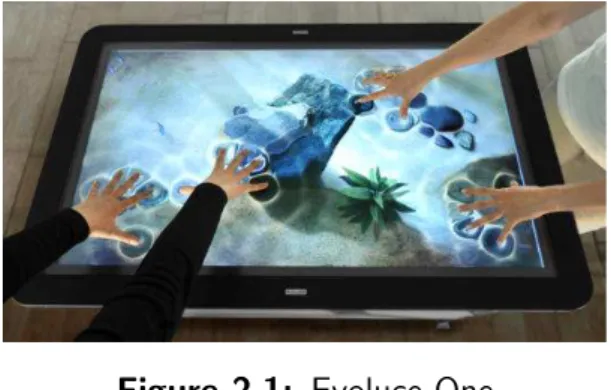
Figure 2.1: Evoluce One
In this chapter we are going to present the current state of art concepts in the tabletop interaction domain from the human-computer interaction perspective. We focus on large
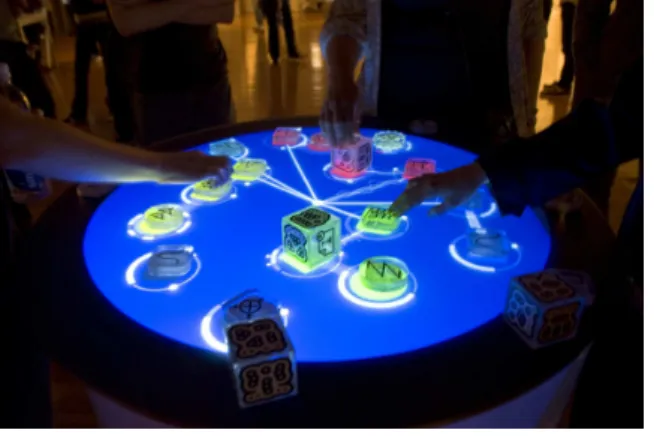
of such devices are the Evoluce One1
(Figure 2.1) and the ReacTable2
(Figure 2.2).
Figure 2.2: ReacTable
We start by briefly describing the most recent and most common multi-touch technologies used in these devices in order to detect when one or more users touch the screen and, then, we go deep into the details of important concepts such as gestures and collaboration on
tabletops and their applications. In the following sections, we have restructured and updated the literature review provided by our previous work (LIOU et al., 2012). These concepts will support the requirements for developing tabletop applications, multi-touch engines and gestures recognizers, as shall be discussed in the following sections and chapters.
2.1
Multi-touch Technologies
In 2009, the NUI Group3
published a book (NUIGroup, 2009) discussing the most common multi-touch technologies. They define multi-touch technology as a set of interaction techniques which allow users to control the application using several fingers. It is worth to note that this definition does not require the fingers totouch the surfaces directly.
Common smartphones and tablets use resistive or capacitive sensors in order to detect
touch inputs. Capacitive sensors detect users input by sensing the human capacitance when the fingers get close to the sensing surface. Only conductive materials and those which have a dielectric different from that of air can be used to touch the surface. On the other hand, resistive touch consists in two flexible sheets coated with a resistive material. One of them
has vertical lines and the other has horizontal ones. When the finger touches the surface, it presses one sheet to the other and a contact is made in the exact point where the finger is located.
1
Evoluce One: http://www.evoluce.com/multitouch-table.htm - accessed at 12th, March, 2014.
2
ReacTable: http://www.reactable.com/- accessed at 12th, March, 2014.
3
However, using these technologies to build large multi-touch surfaces is almost impossible, due to the loss of precision and high costs. For these large devices, other technologies have been proposed and are commercially available, which we are going to briefly describe in this section. Althoughtouchinteraction may suggest that the fingers must actuallytoucha surface,
this is not the case for the most of the current state of art multi-touch technologies for large multi-touch surfaces.
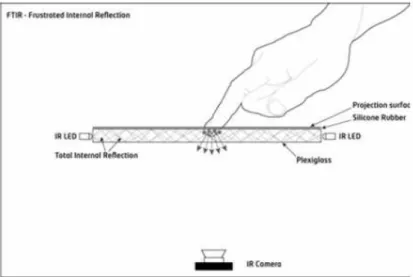
Figure 2.3: FTIR schematic diagram, from the NUI Group’s Book
Frustrated Total Internal Reflection (FTIR) is an optical technique which consists in
de-tecting reflected infrared (IR) signals using an IR camera sensor. In this technique, two IR emmitters generate reflected IR signals inside the touch surface material. When a finger gets close to the surface, it reflects these internal IR signals towards the IR camera sensor (Figure 2.3).
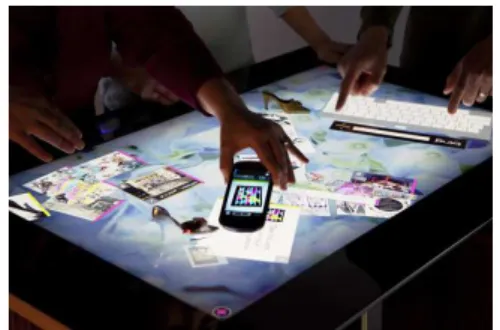
The Diffusion Illumination (DI) is another technique based on IR light. The Infrared light
is shined at the screen from below the touch surface with a diffuser material placed on the top or on the bottom of this surface. When an object touches the surface, it reflects more light than the diffuser material, allowing it to be detected by the camera. This is the technique employed at the Microsoft’s Surface Table (Figure 2.4).
Several authors (MORRIS et al., 2006; HARTMANN et al., 2009; KO et al., 2011) have used computer vision to detect the screen touches, using one or more cameras to capture the
images of users’ hands. Masoodian et al. (MASOODIAN; McKoy; ROGERS, 2007) have also used cameras, but each user has his own privatetouchpad to interact with the system.
Figure 2.4: Microsoft Surface Table
In some applications, there is the need to identify which user each finger belongs to. Marquardt et al. (MARQUARDT et al., 2011) proposed an electronic glove to identify which
user is touching the surface. Their system is also capable to identify if the hand is touching the screen from its front or back and if it is a left or right hand. Hutama et al. (HUTAMA
et al., 2011) employed movement sensors to identify the users and Meyer et al. (MEYER;
SCHMIDT, 2010) used an IR emitter wristband. Puckdeepun et al. (PUCKDEEPUN et al., 2010)
investigated the use of a stylus (pen) and IR accessories in educational interactive boards.
Recently, some new approaches to identify the users by their touch input have been
pro-posed. Holz and Baudisch presented a novel multi-touch surface which is capable of capture the user’s fingerprint while touching the screen. This way, it it possible to identify which user has made which action very accurately (HOLZ; BAUDISCH, 2013).
Regardless of the technology employed by an interactive table, we are going to refer to the detection infrastructure asmulti-touch sensor or, simply,sensor. For simplicity, this definition
considers both electronic devices which are part of the multi-touch sensing system (cameras, sensors, cables and other elements which might be present in a given technique) as their software level drivers and their API’s for a given operating system.
Regarding the software technology, most of these interactive tables come with a Software Development Kit (SDK) and a high-level API in order to support the development of new applications. While some of these toolkits come with a set of predefined basic gestures such
as drag and drop or tap, there are some frameworks which allow the developers to identify their own gestures from the input data.
The Tangible User Interface Objects Protocol (TUIO Protocol) (KALTENBRUNNER et al., 2005) has became the de facto standard protocol to provide touch information from the sensors to the applications and is implemented by most of current state of art interactive
receive information about objects in contact to the screen. The second version of the protocol includes support for many different sensors, such as Radio-Frequency Identification (RFID) readers and accelerometers (KALTENBRUNNER, 2014).
This protocol provides an abstraction of the sensor hardware because any device which is able to detect the position of each finger and track its trajectory is able to report the touch information to the applications using the messages defined in the protocol. While
the ReacTable (JORDA et al., 2007) uses computer vision to detect the tangible objects and fingers, the PQLabs Table4
uses a technique similar to FTIR, both of them implement the TUIO protocol to report the touch events.
In this section we have discussed the most common and important technologies used in multi-touch interactive tables. However, this is definitely not an extensive discussion. Other
multi-touch tabletops have been proposed by Wilson et al. (WILSON; SARIN, 2007) and Dietz et al. (DIETZ; LEIGH, 2001) with their own toolkits and features.
As we could see in this brief introduction, there is not a predominant hardware technology and this field is still under heavy development. From the software perspective, although TUIO protocol has been implemented by several devices, each device comes with its own toolkit for applications development.
For more in depth analysis of multi-touch technologies from the hardware and software
point of view, readers are directed to the NUI Group’s book (NUIGroup, 2009), Hakvoort paper (HAKVOORT, 2009) and Zeitler’s survey (ZEITLER; HUSSMAN, 2009) on multi-touch technologies and toolkits.
2.2
Multi-touch Gestures
In this section we are going to discuss the definition of gestures in the context of interac-tive tables and how they can be classified according to their characteristics from the HCI perspective.
Gestures are the most fundamental way users interact with multi-touch tables. Back to 1986, Rhyne and Wolf defined gestures as hand markings, entered with a stylus or a mouse,
that indicate scope and commands (RHYNE; WOLF, 1986). We may rewrite this definition without the need of a stylus or mouse: gestures are movements users perform with their hands in order to activate an application’s function. This is a very general definition which is applied
4
to several different contexts, such as multi-touch surfaces (HINRICHS; CARPENDALE, 2011), accelerometer-based gestures (WU et al., 2009) and combining hand movements and tangible objects in the screen (JORDA et al., 2007).
With respect to the space in which the gestures are performed, we can classify them into two categories: two-dimensional (the gestures are performed on the touch surface) and three-dimensional (hand gestures are performed freely in the air) (CHEN; FU; HUANG, 2003;
YOON et al., 2001). 3D gestures often use cameras and computer vision techniques to extract
information from the input data. An example of this method is the work by Wilson (WILSON;
BENKO, 2010) that shows the interaction between multiple large screens.
In the context of interactive tables, gestures may also be classified as on the surface or above the surface, with no physical contact, gathering information about one or more hands
and their projections to the touch surface. Strothoff et al. (STROTHOFF; VALKOV; HINRICHS, 2011) use the projection of users hands to control a triangle in a three dimensional virtual space.
According to their semantics, gestures may be classified into two categories: symbolic and direct manipulation gestures (WOBBROCK; MORRIS; WILSON, 2009). The former category contains gestures defined by their trajectory and they represent a context-dependent sign. The
same gestures may have no meaning if performed in other contexts. The latter are the most common gestures for direct manipulation of interface objects, like moving or rotating an image in a picture viewer application (MORRIS et al., 2006) or sharing ideas in a brainstorming activity (CLAYPHAN et al., 2011). They are used in many different applications and, thus, are weakly
dependent on the application’s context.
Nyg¨ard proposed a set of criteria to classify gestures with respect to their shape and trajectory (NYGARD; THOMASSEN, 2010). According to his classification, gestures may belong to three groups: open trajectories, closed trajectories and crossing trajectories. Examples of such gestures are given in Figure 2.5.
Figure 2.5: Examples of gestures classification accordingly to Nygard’s criteria
combining gestures in order to execute a single action in the application (MORRIS et al., 2006). The collaborative interaction will be further discussed in the next section, as it plays a major role in interactive tables.
Finally, gestures may have different meanings when combined in a well-defined sequence (CIRELLI; NAKAMURA, 2014). Atomic gestures are single movements which users perform with their hands in order to activate a single function in the application. Several examples fall into
this category, such as dragging an image around the screen, tapping a button or activating a character’s skill in a game.
Sequential gestures are sets of movements which users must perform with their hands respecting a set of time constraints in a well-defined sequence, in order to activate a single application’s function. As an example of use of this kind of gesture, we may describe the use of
special character’s skill in a game (also known ascombos). Analogously, in traditional devices, such as controller based video-games and computer games, users must perform a sequence of commands in order to activate a character’s special action. Games such as those from the Mortal Kombat and Harry Potter trademarks make heavy use of this kind of interaction. In
gesture-based devices, such asNintendo Wii, we also have games, such asDragon Ball Budokai Tenkaichi 3, which uses several accelerometer-based gestures in a well-defined sequence in order to execute a full special action.
Therefore, sequential gestures are sequences of atomic gestures in which the time con-straints between each gesture in the sequence must be respected. In order to have sequential gestures available in applications, the sensors must report the gesture information (id and
coordinates) as well as the time each event has been detected.
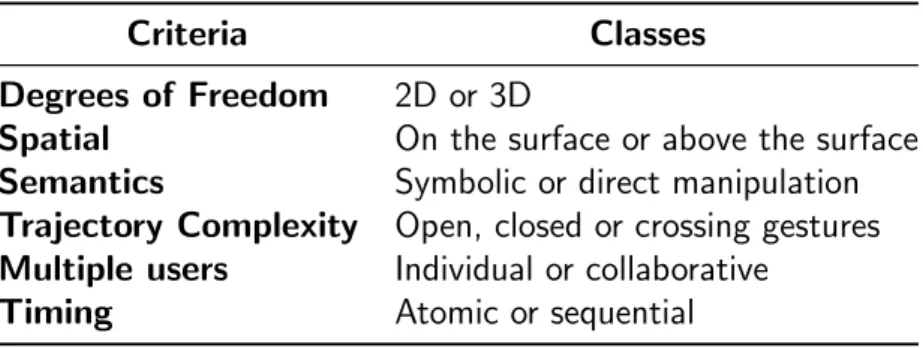
In this section we started with a very generic definition of gestures. Then, we have discussed this concept in the interactive tables domain from different perspectives. Table 2.1 summarizes how different gestures may be classified accordingly to several criteria.
Table 2.1: Gestures classes and criteria
Criteria Classes
Degrees of Freedom 2D or 3D
Spatial On the surface or above the surface Semantics Symbolic or direct manipulation Trajectory Complexity Open, closed or crossing gestures Multiple users Individual or collaborative
2.3
Collaboration with Interactive Tables
Historically, ordinary tables have played an important role in real-time and co-located collabo-ration. In this section we are going to show in deep details how interactive tables can enhance the collaboration mechanism, enhance the content management and integrate paper media to
several other digital devices, such as tablets, smartphones, auxiliary displays and notebooks (WIGDOR et al., 2006).
Accordingly to Tse et al. (TSE et al., 2007) a good collaboration is a consequence of:
• A shared screen
• Users awareness about other users activities
• How people communicate and share ideas through voice commands and gestures
The collaboration in multi-user environments is strictly related to a more general concept:
the Computer-Supported Collaborative Work (CSCW). In this context, Scott et al. (SCOTT;
GRANT; MANDRYK, 2003) classify tabletops in four different categories of CSCW devices:
Digital Desks
Designed to replace the traditional tables, integrating paper and digital media
Workbenches
Users interact with the digital media from a virtual reality environment projected above the table surface
Drafting Tables
For single users, this device has been designed to replace the traditional artist tables
Collaboration Tables
Tabletops designed to support the collaboration and content sharing of small groups
From the software perspective,groupware is another general and important concept related
to CSCW and large interactive tables. Greenberg definesgroupwares ascollaborative softwares. They are computer systems designed to support several people working together in order to achieve the same goal (GREENBERG, 1991).
from a large screen and a more intuitive input. However, the collaboration happens naturally on interactive tables (KRUGER et al., 2003) due to the following unique characteristics of these tabletops (APTED; COLLINS; KAY, 2009):
Collaborative Interaction
Collaborative work is a key activity and shall be focused in small groups
Context of Use
Interactive tables shall be located in shared spaces, suggesting a collaborative work
Orientation
Elements on the screen or surface may assume arbitrary orientations as users may sit around the tabletop
Tabletop Size
There is significant differences between the surface size in the tabletop domain
Human Reach
Due to its big size, sometimes a user may not reach an element on the surface without interfering in other users activities
All of these characteristics suggest collaborative works. Due to the large screen dimensions, an user may not reach an element without asking help for another user. Analogously, due to
the lack of a fixed orientation, users may also need help from a better positioned user in order to understand some content on the screen. Finally, due to the proximity between the users, all of them share the same context of use, stimulating the communication between the participants and helping them to achieve the same goal.
Morris et al. (MORRIS et al., 2006) introduced the concept of cooperative gestures. These
special gestures are also known in literature as collaborative gestures or multi-user gestures. These gestures are defined as a set of gestures performed by two or more users in order to activate a single application’s function.
Note that this is different from the sequential gestures discussed in Section 2.2. Collab-orative gestures must be performed by two or more users, simultaneously or sequentially. On
the other hand, sequential gestures are performed by only one user sequentially.
Collaborative gestures enhance the participation of all users during the collaborative task
work or closing the application. They also ease the content sharing process, enhancing the user’s reach, and improve the social aspects of the collaborative task.
Collaborative gestures are useful and desirable when the result of the action triggered by them affects all the users involved in the gesture. Designing collaborative gestures overlooking this characteristic may sadly harm the user experience. An special attention must be taken when parts of a collaborative gesture are also a valid single gesture for the application. These
situations should be avoided during the design of the gestures vocabulary.
Collaborative gestures may be classified according to six criteria:
Symmetry
A collaborative gesture is said to be symmetric when all participants involved performs the same movements. Otherwise, the gesture is said to be asymmetric.
Parallelism
A collaborative gesture is said to be parallel when all involved users perform a movement at the same time. Otherwise, the gesture is said to be serial or sequential.
Proxemic Distance5
A collaborative gesture is said to be intimate when participants must physically touch each other. It is said to be personal when participants must touch the same digital object. It is said to be social when participants must touch the same display. Finally, it is said to be public when users perform their actions on separated devices (not in the
same display).
Additivity
A collaborative gesture is said to be additive if it is meaningful when executed by only one user, but its effect is amplified as more users perform the same gesture. It is a
special case of symmetric and parallel gestures.
Number of Users and Number of Devices
The complexity of the collaborative gestures increases with the number of users who participate on it. Also, collaborative gestures are simpler when performed on a single and shared display, as users may learn easier from others.
mechanisms for collaboration: territoriality and orientation (TANG, 1991). The first one is related on how people use and share content in the table, while the other describes how content orientation influences the collaboration. Finally, we end this section discussing some heuristics and guidelines for interactive tables software development.
2.3.1
Territoriality
Scott et al. (SCOTT et al., 2004) published a study on how the interactive surface area is used by several users during collaboration. They have found that this space is split into three parts, called territories: the personal territory, the group territory and the storage territory. Each territory has its own functional and spatial characteristics, which we are going to describe in
this section.
2.3.1.1 Personal Territory
In their experiments, they found that people used the space near the borders as their personal and private territories. In these areas, users are able to perform individual tasks, without interfering on other users activities.
Although their name suggests that the personal territories are useful only for individual activities, they play an important role in collaboration. Despite of allowing users to perform their own tasks, they are a safe place to test and experiment new ideas before introducing
them to the rest of the group.
These territories are located in front of their owners, very near to the border of the surface. Thus, their size and quantity depend on the number of participants, the size of the table and the way people are standing (or sitting) around it. The size of these territories are also dependent on the activity being performed: if it is mostly collaborative, the personal territories tend to
shrink; on the other hand, if it is mostly individual, they tend to grow. They found also that people are very opportunistic when disputing territories: they tend to take ownership of as much space as they can.
2.3.1.2 Group Territory
The group territory is all the surface area that is not used by personal territories. In these territories, people share content between the participants, help other users in several tasks and
2.3.1.3 Storage Territory
During their study, authors found that users organize resources into piles around the table.
These piles of resources move around all the surface, from the personal territories to the group territories and vice-versa.
One of the most important characteristic of these territories is the ownership. These territories belong to a respective user if they are over its personal territory. This means that only this user has access to their contents, reserving them for his private purposes. However,
when these piles are near the center of the table, their contents are shared among all users (in the group territory). Thus, the storage territories inherit their ownership from the territory they are located on.
The storage territories are located around the surface and may be replicated, if several users need them at the same time; or destroyed, when their contents are no longer needed. Their shape and size depends directly on the amount of content stored on them.
2.3.2
Orientation
Kruger et al. (KRUGER et al., 2003) studied how orientation influences collaboration in deep details, using a collaborative puzzle application. As with traditional tables, when people stand around it they see the content from different angles.
One idea to solve this problem would be to automatically reorient items on the screen towards the user who is manipulating it (SHEN et al., 2004). Another approach would be to
reorient items on the table automatically towards the border of the screen or towards the nearest personal or group territory (orthogonality). However, they found that these solutions are overly simplistic and do not care about how people actually use orientation during collaboration. They found that orientation plays three major roles in such contexts:
Comprehension
Comprehension is related to easing the understanding of an object on the screen. Orien-tation might be used here to ease reading of texts or to provide an alternative perspective of some content.
Coordination
Analogously, if this object is oriented towards a group of users, then this object belongs to that group territory. It is worth to note that users do not need to tell the others if they are releasing an object or taking ownership of it: it is completely understood by the orientation of that object.
Communication
When people orient an object towards themselves, they are implicitly telling the others that they are starting a personal task, with no intention to communicate. On the other hand, if an user orients an object towards another user (or group), then he is intentionally
starting a communication to that user (or group) about that object.
Authors suggest that the computer system should support freely oriented objects, besides of being capable of automatically reorient items accordingly to the users or their positions on the screen.
2.3.3
Heuristics and Guidelines
After discussing how interactive tables work and how they are used (mainly for collaboration purposes), we are able to enumerate several heuristics and guidelines for tabletops software development. These heuristics may not only guide the applications development, but also give the foundation to some requirements we identified for multi-touch gestures engines, which will
be discussed in further details in Chapter 3.
We start by presenting the most general usability heuristics for systems development,
initially proposed by Nielsen (NIELSEN, 1993), which are clearly applicable for tabletop software development (APTED; COLLINS; KAY, 2009):
1. Visibility of system status
2. Match between system and the real world
3. User control and freedom
4. Consistency and standards
5. Error prevention
6. Recognition rather than recall
8. Aesthetic and minimalist design
9. Help users recognise, diagnose, and recover from errors
10. Help and documentation
Later, a set of heuristics for genericgroupwares have been proposed (BAKER; GREENBERG;
GUTWIN, 2002):
1. Provide the means for intentional and appropriate verbal communication
2. Provide the means for intentional and appropriate gestural communication
3. Provide consequential communication of an individual’s embodiment
4. Provide consequential communication of shared artifacts (i.e. artifact feedthrough)
5. Provide protection
6. Manage the transitions between tightly and loosely-coupled collaboration
7. Support people with the coordination of their actions
8. Facilitate finding collaborators and establishing contact
Some of these heuristics are applicable for tabletop interaction, such as the #6 and #7 (APTED; COLLINS; KAY, 2009). A tabletop groupware developer or engine must handle such heuristics in order to ease the collaborative process.
The study of usability heuristics for collaborative systems continued with the study pub-lished by Scott et al. They suggest some guidelines to enhance the collaboration on tabletops
(SCOTT; GRANT; MANDRYK, 2003):
1. Support interpersonal interaction
2. Support fluid transitions between activities
3. Support transitions between personal and group work
4. Support transitions between tabletop collaboration and external work
5. Support the use of physical objects
7. Consider the appropriate arrangement of users
8. Support simultaneous users actions
In particular, their last recommendation makes a huge impact on how to design tabletop applications and engines, as, differently from other devices, tabletops allow the shared and
simultaneous use of its main input method: the touch surface.
Finally, more recent work has brought several heuristics more specific to tabletop softwares
(APTED; COLLINS; KAY, 2009):
Design independently of table size
This may require to adapt screen objects accordingly to the table size and resolution.
Support reorientation
This heuristic corroborates to what have been discussed in Section 2.3.2. Although some systems are able to automatically change the orientation of objects according to some criteria, it is mandatory to allow the user to reorient them as they want.
Minimize Human Reach
This heuristic also corroborates to what have been discussed in Section 2.3. Due to its big size, it is possible that an user can not reach an object on the screen. Although that may stimulate the collaboration between users and enhance social aspects of the interaction, it may also be prejudicial to the main activity, stalling or delaying the personal
tasks.
Use large selection points
This is directly related to users input. Tabletop interaction is, in general, harmed by the occlusion problem: when an user is typing, tapping or dragging an object, his fingers
usually hide the object which is being manipulated, harming the interaction.
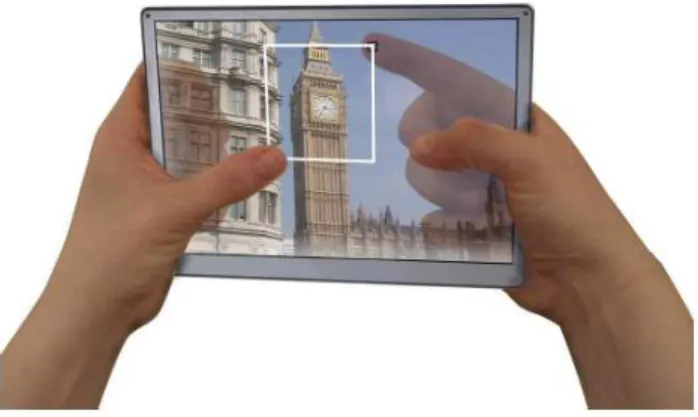
For smartphones and tablets, an interesting approach has been employed at the Lucid
Touch project (WIGDOR et al., 2007): using a back-facing camera, they can draw a lucid shadow of fingers in the main scene. The touch input is, thus, made from two sensor surfaces: one on the back of the main display and another one over it (Figure 2.6).
Manage Interface Clutter and Use Table Space Efficiently
These heuristics are related to the overall organization of screen objects. As in ordinary tables, due to its large size, it is easy to lose control of its content and objects. Ap-plications must allow users to hide or remove screen objects when they are no longer
needed.
Support private and group interactions
This is directly related to the main purpose of collaborative softwares and collaborative tables: to support people sharing their ideas through an intuitive and natural interface.
Figure 2.6: Lucid Touch: a conceptual sketch
According to the authors, these heuristics provide a solid foundation to evaluategroupwares on tabletops. However, they recognize that some of them may not be suitable to a particular
application, such as the free orientation: there might be some applications whose orientation is fixed (e.g. digital desks and drafting tables). It is up to the developers to identify which heuristics are suitable to their applications and ensure they are applied in order to achieve a good collaborative interaction.
In this section we have provided an overview of the most general usability heuristics
be-fore specializing them to the context of interactive tables. These heuristics provide a set of guidelines to tabletop developers in order to support good collaborative interactions. In the following section we shall present several applications of tabletops and how these heuristics are used. Also, as shall be discussed in Chapter 3, these heuristics will support the definition
of requisites to multi-touch engines and frameworks.
2.4
Applications of Interactive Tables
provide. In this section, we will present the most common applications for tabletops, focusing mostly on the collaborative tables. However, this is not intended to be an extensive discussion as the possibilities for tabletop applications are many: from multimodal games (TSE et al., 2007) to biology systems (TABARD et al., 2011).
A tabletop application enhances the physical participation, stimulates reflection and the collaborative affection between the participants (SHAER et al., 2011). Also, collaborative works
may be of several types: planning, intellectual, creation and competition (MCGRATH, 1984). Examples of these applications aremeetings tools,concept mapping,brainstorming and games, respectively.
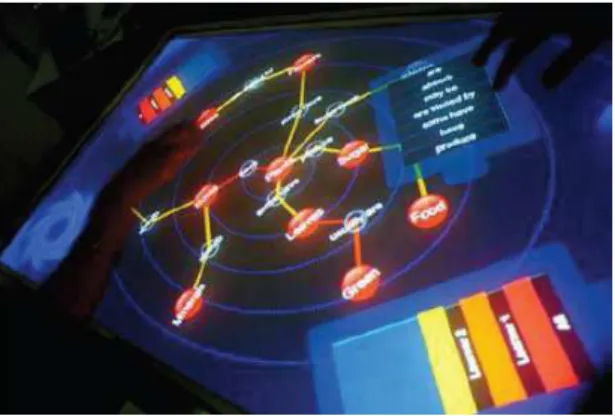
CMate (Figure 2.7) is a concept mapping collaborative application (MALDONADO; KAY;
YACEF, 2010), which has been designed following the heuristics and guidelines discussed
pre-viously (APTED; COLLINS; KAY, 2009; SCOTT; GRANT; MANDRYK, 2003). Authors showed ex-perimentally that collaborativeconcept mapping promotes better acknowledgement and richer concept maps. However, as their application was based on turns, users could not collaborate simultaneously on the tabletop.
Figure 2.7: CMate: Collaborative Concept Mapping Application
Collaborative brainstorming (CLAYPHAN et al., 2011) (Figure 2.8) and meetings manager (HUNTER et al., 2011; GEYER et al., 2011; MASOODIAN; McKoy; ROGERS, 2007) applications have also been proposed. The MemTable, proposed by Hunter et al. is capable of recording
all information generated during the meeting, such as text and speech. In both applications, authors employed physical keyboards to allow the text input.
The text input method is still under discussion in the tabletop interaction community. Despite of existence of some applications which employ physical keyboards and get better results (HARTMANN et al., 2009; HUNTER et al., 2011), there are some studies defending the use of virtual keyboards (KO et al., 2011).
Figure 2.8: Participants of the Firestorm experiments
allows artits to paint a virtual canvas simulating the way they would do to a regular one. The
user selects the brush and the color and the system paints where the user touches using the brush.
Despite of the several examples of collaborative applications for tabletop we have found in our literature review, an important concept is barely covered: the competitiveness on tabletops (GROSS; FETTER; LIEBSCH, 2008). Developing tabletop applications which explores
competitiveness has at least one big challenge to overcome: how to hide information between the competitors? With a single and shared surface, it is very difficult to have privacy. They have found by experimenting that users try to create mimics and eye signals between members of the same team to communicate privately. Another option would be to add other devices to the
interaction, such as tablets and smartphones, creating a multi-modal interaction environment.
In this section, we have briefly presented the most common tabletop applications, which
are mostly collaborative, and we have reinforced that the competitive aspects of tabletops have been barely covered in recent researches, being an open area for further development.
2.5
Summary
In this chapter we have discussed how tabletops are built, from the hardware and software
perspectives. Then, we have discussed what gestures are and how users interact with tabletops using them. We have seen that large tabletops are most often used to support collaborative tasks, although some efforts to support competitiveness on tabletops have also been made.
However, from the software point of view, some questions have not been answered yet, such as:
• How these data is treated to support multi-touch gestures?
• How to support multi-user (collaborative or competitive) interaction with several different users performing different gestures at the same time?
• How to deal with different orientations at runtime?
• How to support different gestures in different territories, as each territory has its own set of possible actions?
Such questions are discussed in Chapter 3, where we are going to discuss how gestures are interpreted by computer programs, calledgestures recognizers. Such programs must overcome these challenges in order to support all tabletop interaction concepts we have discussed in
3
GESTURES RECOGNITION
In this chapter we start the discussion of the main subject of this research: multi-touch gestures recognition. In Chapter 2, we discussed how gestures are used as the main input method for
tabletops and how an application may benefit from a large variety of gestures.
A gestures recognizer is a piece of software that is responsible for interpreting the touch
input provided by the sensors and for generating a gesture event to the application whenever a valid gesture is performed by the users.
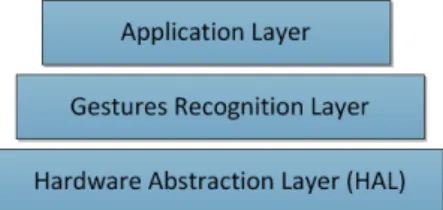
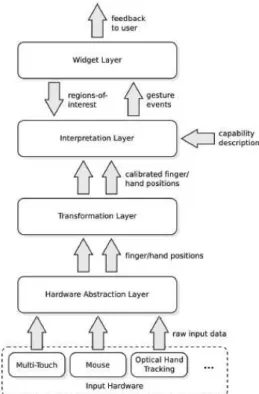
Using the above definition, we can build a general architecture for tabletop applications using three layers (Figure 3.1): the hardware abstraction, which is responsible for getting the touch input from the sensors (e.g. the TUIO protocol API (KALTENBRUNNER et al., 2005));
the gestures recognition, which is responsible for interpreting these data and for generating the gesture event; and the main application, which receives the gesture event and process it according to the application needs.
Figure 3.1: A general architecture for tabletop applications
Previous work showed experimentally that gestures depend on interaction and social con-texts and that many different gestures could be performed in order to activate a single action (HINRICHS; CARPENDALE, 2011). This shows that the gestures set may be larger than the actions set in a given application. Game Designers would say that there might be more verbs
than actions and two or more verbs may be used to perform one action (SCHELL, 2008). Their study provides us two major requirements for gestures recognizers: to be very fast, in order to not harm the interaction; and to be very flexible and accurate, in order to allow a large gestures set to be correctly processed by the applications.
pro-cessing low-level touch events (raw input events from the sensors device drivers): a tedious, complicated and error-prone task which usually delivers a confused and hard to maintain source code (KIN et al., 2012b;SCHOLLIERS et al., 2011;WOBBROCK; WILSON; LI, 2007). This has been the core motivation for developing extensible and flexible gestures recognizers.
In our previous work (CIRELLI; NAKAMURA, 2014), we presented a survey on multi-touch gestures recognition systems. We found two main approaches to build gestures recognizers:
by defining multi-touch gestures formally and, then, using a mathematical or computational method to identify them; or by specifying the gestures by examples and using a pattern recognition technique to identify them among other possible gestures. The former method is discussed in Section 3.1, while the latter is discussed in Section 3.2. We end this chapter in
Section 3.3, presenting a more general architecture for tabletop frameworks and the fourteen requirements for gestures recognition systems we identified during our research.
3.1
Formal Gestures Definitions
In this section we discuss different models for multi-touch gestures and how a recognizer would match the raw input data received from the multi-touch sensor to a meaningful gesture according to the proposed model.
Despite of the differences between these models and their respective interpreters, they share a common characteristic: the developers must describe each gesture used in the application using the same formal model. We present two of the most advanced state-of-art gestures
recognizers that fall into this category: Proton++ (KIN et al., 2012a) and Midas (SCHOLLIERS
et al., 2011). For more examples and a chronological review of such techniques, we direct
readers to our survey (CIRELLI; NAKAMURA, 2014).
3.1.1
Defining gestures using regular expressions
Proton (KIN et al., 2012b), and its evolution, Proton++ (KIN et al., 2012a), are gestures
recognizers based on the formalism of regular expressions. Regular expressions are easy to interpret using finite automata and many modern languages, such as C# and Java, comes with built-in tools to process them, without the need of a specific compiler.
The idea behind Proton is that a gesture is a sequence of touch events. If we represent each touch event (and its properties) by a symbol, then a gesture can be described by a string
unique features which we shall describe in details in this section.
Proton defines each gesture event as a symbol composed of three properties: the action
(touch down, touch move or touch up), the touch identification (id) and the object touched (shape, background or anything). The object touched is obtained from a function that de-velopers must implement and attach to a low-level stream generator. One may have noticed that the action and the touch identification can be obtained directly from the TUIO protocol
(KALTENBRUNNER et al., 2005).
A drag gesture might be defined according to Proton’s notation as: Ds
1M1s∗U1s, which
means that finger 1 touched down a shape followed by a sequence of touch moves on the same shape, ending with a touch up over the same shape.
The Proton’s stream generator captures the input data and generates a string of symbols according to the above notation. Then, the recognition process tries to match this string of symbols against each of the regular expressions that defines each gesture.
The system also cares about the possible ambiguity between different gestures. For
in-stance, thetap gesture may be defined as Ds
1U1s, which would also be matched by the above
drag regular expression. One could fix the drag gesture in order to solve this ambiguity, modifying it to Ds
1M1s+U1s, however, this might be impossible in many cases. In order to
solve ambiguities, the system allows developers to define a score function, which estimates the
confidence degree of a decision.
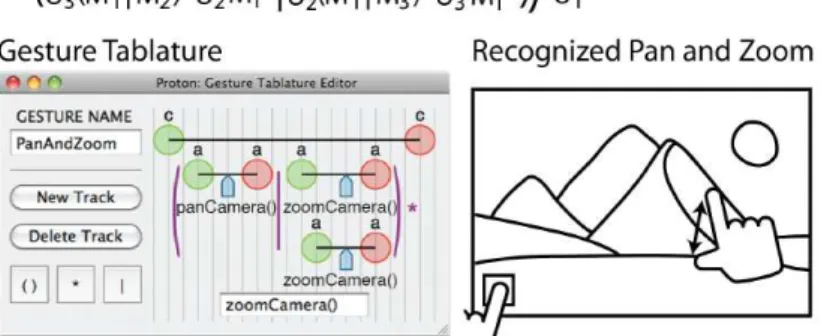
Proton has also other two important features: it comes with a gestures editor inspired in the music tablatures, calledgestures tablature (Figure 3.2), and the possibility to generate events when any part of the regular expression is matched, which is desirable for direct manipulation gestures.
Proton has some limitations: it is defined for single-user applications and it only supports those three properties on each symbol. Proton++ allows developers to define their own properties on each symbol (this requires coding a custom property processor) and plug them into the recognition engine, which overcomes the second limitation. However, the stream
generator still assumes that only one gesture is being performed at once. This makes the system unsuitable for multi-users applications, but very powerful for single-user ones.
Proton and Proton++ have an additional limitation: regular expressions are, by definition, a sequence of symbols from a fixed set (the language’s alphabet), which implies in hard constraints. Using Proton’s notation it is hard to describe the complex trajectories found in many symbolic gestures. To illustrate that, suppose that we have added four direction
properties to the set of symbols: N, S, E and W. We would have problems if we would like to create a gesture that moves towardsN E. Although we could addN E,SE,N W and SW directions, we would fall into the same problem if the trajectory is somewhere betweenN and
N E, for example.
3.1.2
Using logical deduction to recognize gestures
Midas (SCHOLLIERS et al., 2011) is a multi-touch gestures engine which describes gestures as a set of logical rules. These logical rules are processed by a logical inference engine against a set of facts, deciding which gesture has been performed. The main motivation of Midas is to allow the gestures re-usability and extensibility. As gestures are a logical rule, they can be
used to build new gestures.
The facts base consists of all current input detected, called cursor (the moving finger). Each cursor has the following properties: position (x and y coordinates), speed (x and y coordinates), time and id. Note that all these information are obtained directly from the TUIO protocol (KALTENBRUNNER et al., 2005). The rules base consists of the gestures definitions.
An example of a rule to print the X and Y coordinates is given in Listing 3.1 (the Cursor predicate is a core fact).
Listing 3.1: Printing X and Y coordinates using a logical rule
(defrule P r i n t C u r s o r(Cursor(x ?x, y ?y) )
= >
(p r in t o ut t " A cursor is moving at ( " ?x " ," ?y " ) . ") )
gestures:
Temporal Operators
The built-in set of temporal operators includes predicates to compare two facts regarding their timing data. They can be equal to, near (within a tolerance ǫ) by, contained in, before or after each other.
Spatial Operators
The built-in set of spatial operators includes predicates to calculate the distance between
two facts, to check if they are near or inside another fact, regarding their X and Y coordinates.
List Operator
It is common to perform operations against a set of events. Thus, Midas introduced a
special operator to group facts into a list of common facts. The list will contain all facts that follow the given constraints, such as time period and id.
Movement Operators
Using the List Operator, it is possible to create rules to obtain the direction of the movement. For instance, moving up can be defined as an operation on a given list as
all facts ∀i, j :i < j∧listi(y)> listj(y). Moving down, moving left and moving right
are defined analogously and are part of the built-in operators.
One may have noted that the logical inference engine may deduce two or more possible gestures for the same set of facts (inputs). However, Midas solves this ambiguity by allowing developers to definepriorities for each gesture. When two or more gestures are possible to be deduced from the facts base, Midas will chose the one with the highest priority.
The authors provide theFlick Left gesture as an example, which they define as ”an ordered
list of cursor events within a small time interval where all events are accelerated to the left” (Listing 3.2).
Listing 3.2: The Flick Left gesture in Midas notation
(defrule F l i c k L e f t
?e v e n t L i s t[]
<-(ListOf (Cursor (same: id) (within: 500) (min: 5) ) )
(m o v i n g L e f t ?e v e n t L i s t)
= >
One may have noticed that authors definewithin a small time interval as a time interval of 500 units of time (one may assume, by the TUIO specification, that it means 500 milliseconds). However, this also adds a hard constraint to the logical definition. Flick gestures will be ignored if they are slightly slower than this maximum time span, the same way as previously described
techniques. A future development of the Midas language might address this issue usingfuzzy operators, definingvague rules, such asa small time interval. It is also unclear how developers can define complex trajectories by means of the built-in operators and plug them into the proposed recognition engine.
To help developers create custom gestures based on complex trajectories, Hoste et al. have included a gesture spotting algorithm before running the Midas recognition process,
which is, essentially, a pattern matching algorithm based on a set of control points extracted from examples. This gives developers the ability to create logical rules based on the shape of such gestures (HOSTE; ROOMS; SIGNER, 2013). It would also be possible to define a logical rule based on the result of a template matching algorithm and to deny gestures when they
become invalid or if they have been poorly matched.
Midas has also been incorporated to the Mudra multimodal fusion engine, supporting multi-user environments and collaborative gestures (HOSTE; DUMAS; SIGNER, 2011). Finally, Midas declarative approach has been exploited in parallel events processing techniques, providing soft real-time gesture recognition (RENAUX et al., 2012).
Midas is a powerful gestures recognizer, which addresses two important issues seen on other recognizers: modularization (reuse of logical rules) and composition (defining new gestures
using previously defined ones), which helps developers to build their custom set of gestures for their applications.
3.2
Defining Gestures by Examples
In this section we are going to discuss a different approach to build multi-touch gestures recognizers. This new approach can be seen as the dual of the formalisms one: while the formalism approach defines how users must perform gestures for a given application (users must reproduce the gestures model), defining gestures by examples lets users define the gestures
they want to use in such application.
This technique is also known as user-defined gestures (WOBBROCK; MORRIS; WILSON,
examples is an old idea: back to 1991, when touch surfaces were starting to get developed in academic researches and were far away from the mainstream market we have today, Rubine proposed GRANDMA: a model to recognize single-touch gestures from a set of examples (RUBINE, 1991). In this section, we discuss both techniques. For additional techniques and
the chronological evolution of user-defined gestures researches, we direct readers to our survey (CIRELLI; NAKAMURA, 2014).
3.2.1
Defining Gestures by Example: the GRANDMA recognizer
In his paper, Rubine presents the GRANDMA (Gestures Recognizers Automated in a Novel Direct Manipulation Architecture) algorithm and is one of the first to use the term gestures
recognizer to name the part of the software which is responsible to identify the gestures performed by users. As alluser-defined gestures techniques which have been proposed so far, the recognition is done in two steps: training and classification. These are the fundamental concepts of any machine learning technique for pattern classification.
GRANDMA models a gesture by its trajectory in the two dimensional plane, which means that each gesture is a single sequence of (x, y, t)points, ignoring points which are less then 3
pixels away from the previous one. Then, it extracts a set of 13 features (properties) from a given gesture, which should be able to distinguish different gestures properly:
Sin (f1) and Cosine (f2) of the gesture’s initial angle:
f1 =cos(α) = √ (x2−x0) (x2−x0)2+(y2−y0)2
f2 =sin(α) = √ (y2−y0) (x2−x0)2+(y2−y0)2
The length (f3) and the angle (f4) of the gesture’s bounding box diagonal:
f3 = p
(xmax−xmin)2+ (ymax−ymin)2
f4 =arctg(xymaxmax−−yxminmin)
The distance (f5) between the first and last points:
f5 = p
(xlast−x0)2+ (ylast−y0)2
Sin (f6) and Cosine (f7) between the first and last points:
f6 =sin(β) = (ylastf5−y0)
f7 =cos(β) = (xlast−x
0)
f5
The gesture length (f8):
Let ∆xp = (xp+1−xp) and ∆yp = (yp+1−yp), then:
f8 =Ppp=0−2 p
∆x2
Sum of transversal angles (f9, f10 and f11):
Let θp =arctg(
∆xp∆yp−1−∆xp−1∆yp ∆xp∆xp−1+∆yp−1∆yp
), then:
f9 =Ppp=1−2θp
f10 =Ppp=1−2|θp|
f11 =Ppp=1−2θ2p
The maximum speed squared (f12):
Let ∆tp =tp+1−tp, then:
f12 =max( ∆x2
p+∆y
2
p
∆t2
p ), p∈[0, p−2]
The gesture duration (f13):
f13 =tp−1−t0
These features can be combined in a 13-dimensional feature vectorf and for each possible classificationc, the training process consists on finding the best feature weights (wc) with the
associated bias (wc,0) for that class, accordingly to Equation 3.1:
γc =wc,0+ F X
i=1
wc,ifi (3.1)
This matrix of weights (a 13-dimensional vector of weights for each class c) is calculated during the training step, from the set of examples provided by the users (or developers), using
the classicLinear Discriminant Analysis (LDA) technique.
The classification process is as simple as finding the class c which maximizes γc from
Equation 3.1.
The last step in the GRANDMA’s classification process is the rejection of poorly classified gestures. Given a gesture g classified as i among the C classes, the estimated probability of a correct classification is given by Equation 3.2. If the estimated a posteriori probability is smaller than0.95, then the gesture is rejected and discarded.
P(i|g) = PC 1
−1
j=0 exp(γj −γi)
(3.2)
Rubine also discusses the possibility of rejecting gestures using the Mahalonobis distance, which measures how far a sample is from its respective class mean. However, he understands
that this criteria may reject correct classified gestures.
finger trajectory independently and, then, combines the results to classify the unknown gesture (using a Decision Tree, for example). In this case, one would need more features to identify gestures with different number of fingers.
From this very first approach one may have noted that building a gestures recognizer which learns from a given set of examples is a challenging task: it is required to understand some machine learning techniques and to find features which allow unknown gestures to be
classified properly. However, once one build such recognizer, the effort involved in creating a gesture-based application is drastically reduced. This is the main motivation for further development ofuser-defined gestures recognizers.
3.2.2
A Nearest Neighbours approach
We continue our investigation onuser-defined gestures recognizers by discussing the $-Family
of touch gestures recognizers. This family of recognizers has been developed since the release of the $1 recognizer in 2007 (WOBBROCK; WILSON; LI, 2007). These algorithms share a common approach: they are based on the K-Nearest Neighbours (KNN) technique, which consists in defining a distance measure between the unknown gesture and those which have
been previously added to the system during thetraining step1
.
$1 employs the Average Euclidean Distance (also known as path distance) as a distance measure (Equation 3.3) between a gesture g in the gestures base and the unknown gesture
t. From this distance function, one may derive the $1’s similarity measure between these
gestures, normalized to the[0,1]interval (Equation 3.4)2
.
d(t,g) =
PN
i kti−gik
N (3.3)
S(t,g) = 1− d(t,g)
0.5∗√size2+size2 (3.4)
Different sensors may sample touch-inputs at different rates, generating a different number of touch-points per trajectory. We have discussed previously that GRANDMA does not care about the sensors capabilities and extracts exact 13 different features from the sequences of
(x, y, t) coordinates. $1 introduces a new approach: it re-samples each trajectory in order to have a set of N touch points per sequence of (x, y) coordinates. This process is done for
1
Some authors do not consider that such recognizers have a proper training step, as there is no parameters tuning process. Most often, this step is just a pre-processing phase.
2
eachsample gesture during the pre-processing phase and repeated for each unknown gesture during theclassification phase. For a given number of points per trajectory N, the algorithm performs following steps (Listing 3.3):
1. Calculate the trajectory length (sums of distances between one point to the next one)
2. Divides the obtained distance by N −1, obtaining the mean distance d¯
3. From the first to the last point, it interpolates the trajectory such as the distance between each pair of points is d¯.
Listing 3.3: Resampling algorithm proposed by $1
public static List<Point> R es a mp l e(List<Point> points, int n)
{
// gets the mean d i st a n ce between points in the new t r a j e c t o r y
double I = P a t h L e n g t h(points) / (n - 1) ;
double D = 0.0;
List<Point> o l d T r a j e c t o r y = new List<Point>(points) ;
List<Point> n e w T r a j e c t o r y = new List<Point>(n) ;
n e w T r a j e c t o r y.Add(o l d T r a j e c t o r y[0]) ;
for (int i = 1; i < o l d T r a j e c t o r y.Count; i++)
{
Point pt1 = (Point) o l d T r a j e c t o r y[i - 1];
Point pt2 = (Point) o l d T r a j e c t o r y[i];
double d = D is t an c e(pt1, pt2) ;
if ((D + d) >= I)
{
double qx = pt1.X + ((I - D) / d) * (pt2.X - pt1.X) ;
double qy = pt1.Y + ((I - D) / d) * (pt2.Y - pt1.Y) ;
Point q = new Point(qx, qy) ;
n e w T r a j e c t o r y.Add(q) ;
o l d T r a j e c t o r y.Insert(i, q) ;
D = 0.0;
}
else
{
D += d;
}