Int. J. Human-Computer Studies 68 (2010) 22–40
Can inspection methods generate valid new knowledge in HCI?
The case of semiotic inspection
Clarisse Sieckenius de Souza
a, Carla Faria Leit
ao
˜
a,, Raquel Oliveira Prates
b,
S ´ılvia Am
elia Bim
a,c, Elton Jos
e da Silva
daDepartamento de Inform
atica, PUC Rio, R. Marquˆes de S. Vicente 225, 22451-900 Rio de Janeiro, RJ, Brazil
bDepartamento de Ciˆencia da Computac
-ao, UFMG, Av. Antonio Carlos 6627, 31270-010 Belo Horizonte, MG, Brazil˜
cDepartamento de Ciˆencia da Computac
-ao, UNICENTRO, R. Presidente Zacarias 875, 85015-430 Guarapuava, PR, Brazil˜
dDepartamento de Computac
-ao, UFOP, Campus Morro do Cruzeiro, 35400-000 Ouro Preto, MG, Brazil˜
Received 29 September 2008; received in revised form 8 May 2009; accepted 21 August 2009 Communicated by Prof. E. Motta
Available online 28 August 2009
Abstract
HCI evaluation methods tend to be proposed and used to verify the interactive qualities of specific systems and design strategies. A discussion about the scientific merits of such methods to advance knowledge in HCI as a field is very rare, although much needed. This paper shows that, under certain conditions, inspection methods can be safely used in scientific research in HCI and extend their advantages beyond the territory of professional practice. Taking the Semiotic Inspection Method (SIM) as an example, we argue that its interpretive results are objective, can be validated, and produce scientific knowledge comparable to that generated by more widely accepted methods.
&2009 Elsevier Ltd. All rights reserved.
Keywords:Semiotic engineering; Evaluation method; Semiotic Inspection Method; Scientific application; Technical application; Communicability
1. Introduction
Interface inspections are widely used in HCI professional practice. When it is difficult to recruit users or deadlines are approaching rapidly, experts are often called in to evaluate the quality of interaction supported by a system’s interface. Heuristic evaluation (Nielsen and Molich, 1990; Nielsen, 1994) and cognitive walkthroughs (Lewis et al., 1990; Spencer, 2000; Blackmon et al., 2002) are well known inspection methods. Although valuable in the industry, the results of inspection methods are generally considered and explicitly referred to asexpert opinions. This has probably contributed to the perception that inspection methods are questionable when used to produce and validatescientific
knowledge. Empirical experiments and analytical evalua-tions based on predictive models have been much more widely accepted in this context. Even when backed by theory, most inspection methods are frequently disregarded because they can produceinterpretationsof reality, knowl-edge that cannot be generalized to predict how users interact with computer-based systems.
This paper shows that, under certain conditions, inspec-tion methods can be safely used in scientific research in HCI and extend their advantages beyond the territory of professional practice. Taking the Semiotic Inspection Method (SIM) as a case, we argue that its interpretive results are objective, can be validated, and produce scientific knowledge comparable to that generated by more widely accepted methods.
SIM is a semiotic engineering method (de Souza et al., 2006; de Souza and Leitao, 2009) with which inspectors can˜ analyze the communicability of interactive computer-based artifacts. It can be used technically, with the purpose of www.elsevier.com/locate/ijhcs
1071-5819/$ - see front matter&2009 Elsevier Ltd. All rights reserved. doi:10.1016/j.ijhcs.2009.08.006
Corresponding author. Tel.: +55 21 3527 1618; fax: +55 21 3527 1132.
E-mail addresses:[email protected] (C.S. de Souza),
[email protected] (C.F. Leitao), [email protected] (R.O. Prates),˜
improving a particular product’s interface, and scientifi-cally, with the purpose of discovering new knowledge to advance the state of the art in HCI.
We begin, in Section 2, with an overview of semiotic engineering and the definition of key concepts for under-standing the method. Then, in Section 3, we describe SIM steps and procedures. In Section 4 we present a detailed illustration of how SIM is used to analyze interaction with a Cascading Style Sheets editor and to generate knowledge that transcends the limits of this particular application. In Section 5 we discuss SIM results with an emphasis on their validity. Finally, in Section 6 we present our conclusions.
2. Semiotic engineering and communicability
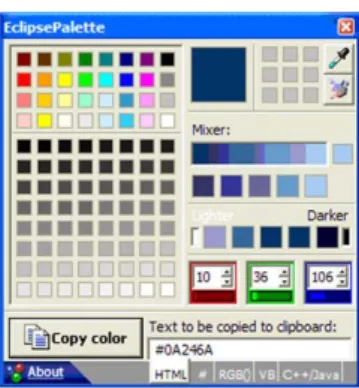
Semiotic engineering is a semiotic theory of HCI (de Souza, 2005). It views human–computer interaction as a special case of computer-mediated human communication. A system’s interface is a message sent from designers to users about the designers’ vision, how their product meets the users’ needs, and what benefits and value it can ultimately bring to the users’ lives. A special characteristic of the designers’ message is that it isperformative—it enacts and unfolds its content as users interact with it. Through interaction, the performative message reveals to users even the communicative principles that must be used to communicate back with the system in order to achieve various goals and effects. For example, EclipsePalettes is ‘‘a color palette and screen color capture program designed not only for web designers, but Visual Basic, C++, C#, and Java developers as well.’’ (http://www.greeneclipse. com/eclipsepalette.html). In Fig. 1 we see its full interface, a small 282294 window with no menus, a few push buttons and tabs (e.g. the ‘HTML’ tab, the ‘RGB( )’ tab, and the ‘VB’ tab at the bottom right corner of the window), an input/output text box (showing the HTML code of the dark blue color on the large square form on top of the window), manual controls for RGB values input, and numerous ‘palette swatches’, as the designers call them, for selection and drag-and-drop operations.
As it stands statically in Fig. 1, EclipsePalette’s interface communicates some of the designers’ intent, but not all of it. In its designers’ own words, EclipsePalette ‘‘features a drag-and-drop interface, as well a color mixer, and manual
color adjustment tools. You can select colors from a pre-built palette, or build your own custom palette. Also, EclipsePalette stays next to your clock, saving space and reducing clutter.’’ ( http://www.greeneclipse.com/eclipsepa-lette.html) The entirety of the designers’ message can only be grasped if the userinteractswith the program, exploring the behavior and affordances of interface controls. Interac-tion will eventuallytell users the meaning of and , and help them see the value of the program in practice.
Because most of the designers’ communication through the interface is meant to tell users about how and for what purposes to communicate with the system, in semiotic engineering interactive systems are defined as metacommu-nication artifacts. A central concept for the theory is communicability, ‘‘the distinctive quality of interactive computer-based systems that communicate efficiently and effectively to users their underlying design intent and interactive principles’’ (Prates et al., 2000, p. 32). In our terms, efficient and effective communication is simply communication that is organized and resourceful (efficient), and achieves the desired result (effective).
Communication is achieved through signs. A sign has been defined as anything that someone can take to stand for something else in some respect or situation (Peirce, 1992, 1998). The definition underlines the fundamental role of theinterpreterin establishing what constitutes a sign. On the one hand, going back to Fig. 1, the unlabeled grey sections at the bottom of the EclipsePalette window may be taken as signs by one user but not by another. For example, one user may take them to stand for drop-down areas, just like other grey rectangles in the interface (see the different palette swatches in the figure), whereas another user may not see any signification in the unlabeled grey sections (which, in fact, are no more than decoration).
are indeed different from the intended ones survive long periods of interaction—the difference may even go undetected forever. For example, because when users click the ‘2’ box on top of the interface window they typically exit programs, they may infer that the way to exit programs in general is to click on ‘2’. Some programs will capture the event, show a proper exiting dialog, and terminate normally. Other programs, however, will terminate in exceptional conditions. They may, for instance, leave intermediary object representations in the computer memory, occupying a considerable amount of space. In this case, the user’s interpretation of ‘2’ as ‘exit the program’, although pragmatically fit for the user’s purpose, is different from the designers’ intent and potentially harmful for the operating system and the program. The user, however, may never realize the difference.
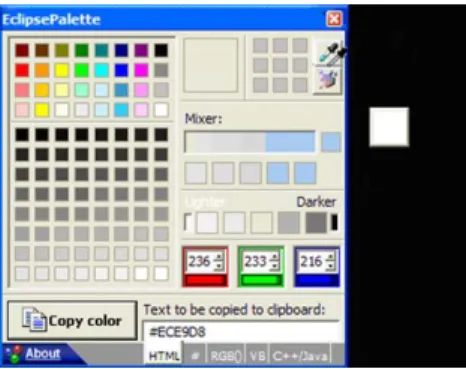
Interpretation, in Peircean Semiotics, is described as a process where interpreters assign meanings to signs by virtue of habitual associations or hypothetical reasoning, called abduction (Peirce, 1992, 1998). The role of interpretation in communication is further explored by Eco (1976), whose theory sheds light on critical aspects of HCI. According to Eco, communication is a process in which humans explore a variety of signification systems to produce signs (which may belong to such systems or not) and achieve an unlimited range of goals and effects. A signification system is the result of regular and culturally-established associations between expressions and contents. So, for example, the designers of EclipsePal-ette use different signs to communicate their intent that users will pick colors of objects displayed on the entire screen (and not just in the program’s interface window). On their website, they say explicitly that EclipsePalette is a ‘‘screen color capture program’’. Through the program’s interface, they use the eyedropper icon as a metaphor for making the user indicate the color she wants to use (she picks a drop of the desired color). The small size of EclipsePalette’s interface plays an important role in communicating the fact that the user can (and should) work with colors outside the interface, on the rest of the screen. As shown in Fig. 2, as soon as the eyedropper tool is activated (by pressing the button with the eyedropper icon on it), the cursor takes the form of an eyedropper and
a colored square box appears outside the limits of the program interface. The color of the square box is the same as that of the area under the tip of the eyedropper. As the user moves the cursor, the square box moves too, changing its color according to the color of the region under the tip of the eyedropper. If the user places the tip outside the limits of the EclipsePalette window (even if accidentally), the color of that screen region will bepickedas well. So, by ‘prompting’ the user to explore the screen with the cursor, and giving instant feedback on color selection and color coding, the designers of this program are communicating their interactive intent through interaction itself.
The signs used by EclipsePalette designers are drawn from different signification systems. On their website, they use English text. On the interface they also use English text on labels and tool tips (e.g. the tip for the ‘Copy color’ button discussed above), but their main signification sources are visual signs. They also combine visual signs from different systems. The tool for selecting colors is represented by the image of an eyedropper, which is itself a metaphor of the intended meaning of the tool. And the possibility of picking colors anywhere on the screen is represented by a combination of the behavior of the eyedropper and square box compound and the small size of the program’s interface window. Notice that whereas the signification of color selection is already a convention in graphic editor interfaces, the signification of screen color capture possibilities contains novel ingredients. And the interpretation of novelty always involves abductive reason-ing processes.
An important aspect of abduction is that unlike deduction and induction it contains (and relies on) self-correction procedures. Abductive inference starts with a fact, for example: when the user clicks on ‘2’ in the EclipsePalette window, the program interface is closed. The user may then take this fact to be the result of a hypothetical rule: if one clicks on ‘2’, then one exits the program. This hypothetical rule is tested against immedi-ately available evidence, for example: after clicking ‘2’, not only is the program interface closed, but it also does not figure on the list of active program windows that show up when one cycles through active programs pressing Alt+Tab in the Windows operating system interface. The success of few tests may lead the user to conclude that the hypothetical rule is true, and that a click on ‘2’ causes EclipsePalette to terminate.
The rule will typically persist until counterfactual evidence is encountered. For example, the user may realize that after clicking on ‘2’, the EclipsePalette logo still shows on the system tray ‘‘next to the clock, saving space and reducing clutter.’’ This self-correcting step in the user’s abductive chain will not only bring the user’s meanings closer to the designer’s intent, but it will possibly lead to further meaningful hypotheses about how EclipsePalette works and how it can be used (e.g. EclipsePalette can start automatically when Windows is started, to have it always at hand).
In this semiotic perspective, meaning, as we see, is a process rather than an abstract concept. It is impossible to predict the exact path that each individual will follow to achieve a satisfactory (but not necessarily correct) interpretation of a given sign. The interpretive process is halted for pragmatic reasons (e.g. lack of resources, lack of need, and lack of interest) and resumed if and when needed. Hence, using predictive methods to investigate the communicability of interactive artifacts, or aiming to find predictive principles as a result of research, contradicts the essence of the phenomenon under investigation. In other words, empirical evidence of how designers express what they mean through interface signs and of how users interpret such signs in various contexts cannot be general-ized and transformed into interpretivelaws. Although there are interpretive trends stemming from the very cultural conventions at the origin of signification systems (Eco, 1976), communication processes produce signs that are especially expressive precisely because they contradict aspects of the signification system where they originate (e.g. jokes and irony can communicate the opposite of what is being said), or because they are completely innovative signs (i.e. they do not belong to any established significa-tion system, and thus signify something perceived as different from everything else). Cultural conventions therefore indicate expressive and interpretive probability in communication, but they do not constrain commu-nicativepossibilities.
The aim of semiotic engineering inspections is to investigate communicative possibilities with reference to the theoretical foundations presented above. Our goal is to produce a detailed account of how systems designers communicate their design to systems users through inter-face and interaction signs. Given this account, researchers may decide which related HCI phenomena can be consistently investigated with predictive methods and models associated with other scientific theories and paradigms.
Before we proceed to present the Semiotic Inspection Method, it is important to recall very briefly the original definition of sign types often invoked by HCI researchers and professionals: icons, indices, and symbols. These types, or sign classifications, were established in view of three universal categories in Peircean phenomenology (Peirce, 1992, 1998, pp. 145–159). Phenomena of the first category, plainly calledfirstness, are perceived in and of themselves as a unary quality independent of anything else. The experience offirstness is usually identified with our senses and feelings. Phenomena of the second category are perceived asbinaryrelations. The experience ofsecondness is usually identified with sensorial or mental associations (e.g. spatial and temporal co-occurrence, affective associa-tion, cause and effect, etc.). Finally, phenomena of the third category are perceived asmediatedrelations, forming a triple {a,b,w} whereais related tobby means ofw. The experience of thirdness is usually identified with mental operations such as learning and interpretation (e.g. the
English word ‘cat’ is related to ‘a particular class of felines’ by mediation of linguistic rules known to English speakers). Simplified definitions of these categories often state that: firstness is the category of sensorial experience; secondness is the category of associative experience; and thirdnessis the category of reasoning and conventions.
Icons, indices and symbols are different types of signs defined in terms of which phenomenological category associated with the referred object is evoked by the representation being used. Icons are signs that evoke the firstness of the referent object, some quality that impacts our senses and signifies the object by virtue of perceptual properties. In HCI icons are usually said to ‘resemble’ their referent object. This definition, however, excludes many other sign instances that Peirce defines as icons.Indices, in their turn, are signs that evoke the secondness of the referent object and signify the object by virtue of immediate associations. For example, the representation may take the form of the effect caused by the referent object (consider using a slender body silhouette to represent a weight-control diet), the location of the referent object (consider using a church to represent a religious service), etc. Finally, symbols are signs that evoke the thirdness of the referent object and signify the object by virtue of mediated associations and relations. The repre-sentation stands for its referent object because there are conventions, regulations or inferential rules supporting the signification of the latter by the former (consider using a gift to signify appreciation, using certain clothes and manners to signify psychological attitude or social status, etc).
Icons, indices, and symbols are fundamental sign classes in Semiotics. Semiotic egineering, however, has its own specific object of investigation, namely the designer–user metacommunication through computer-based artifacts. Thus, it requires sign classes rooted in this specific semiotic phenomenon. In other words, semiotic engineering sign classes should help investigators analyze the nature, the structure, the process, the effects, and the conditions of computer-mediated human communication where one communicating party (the designers) is speaking through the very message being communicated (the systems inter-face and all the interactive patterns it supports). For this reason, in semiotic engineering we use three different sign classes:staticsigns,dynamicsigns, andmetalinguisticsigns. The classification refers to the interactive conditions that express the representation of the sign and thus enable its signifying structure.
Dynamic signs are those whose representation is in motion regardless of users’ actions or whose representation unfolds and transforms itself in response to an interactive turn. They can only be entirely actualized over time, and lose their substance outside the temporal dimension. For example, the sign used by EclipsePalette designers to signify color selection across the entire display screen is a dynamic one. The snapshot in Fig. 2 represents only a momentary state of the actual sign that represents the possibilities envisioned by the designers. As explained when discussing the behavior of the eyedropper tool, the designers’ communication is achieved by coupling the eyedropper shape to the cursor, keeping a square box at constant distance from the cursor as it moves across the display, and painting the square box with the same color as that of the region under the eyedropper tip. Together, these featuresrepresentcolor selection possibilities, and they can only be fully achieved and perceived over time.
Finally, metalinguisticsigns, as their name suggests, are signs that represent other static, dynamic, or metalinguistic signs. Representations of metalinguistic signs depend on the separation between two representational levels: one where the action is performed and the other where information, instructions, descriptions, or explanations aboutthe action are provided. These levels may be accessed by specific types of interaction (e.g. pressing a certain key to get help), or they may be co-present in the same space and time (e.g. there may be embedded tips in the interface to help the user interact with the system). In EclipsePalette, for instance, when the user clicks on the ‘About’ link, a dialog box is opened and the user can ask for help. Help communication involves signs like the ones shown in Fig. 3. Signs like ‘type the actual RGB values’, ‘sliders below the boxes’, ‘color swatches’, and the like are metalinguistic because they represent interactive elements and actions that belong to a separate level of interaction.
The users experience with interactive systems is deeply affected by the way in which designers combine static, dynamic, and metalinguistic signs in order to communicate their vision to users. The content of metacommunication thus achieved can be paraphrased by an instantiation of a metacommunication template (de Souza, 2005) with which designers essentially tell users the following:
‘‘Here is my understanding of who you are, what I’ve learned you want or need to do, in which preferred ways, and why. This is the system that I have therefore designed for you, and this is the way you can or should use it in
order to fulfill a range of purposes that fall within this vision.’’
In the next sections of this paper, we will show how these concepts are used in different steps of a semiotic engineer-ing inspection method and the kinds of results that can be achieved with it.
3. An overview of the Semiotic Inspection Method
The primary purpose of SIM is to evaluate the communicability of interactive computer artifacts. SIM focuses on user interface meanings expressed by design, and takes the perspective of metacommunication senders. In other words, it is centered on the emission of the metacommunication message. Another Semiotic Engineer-ing Method, the Communicability Evaluation Method (Prates et al., 2000; de Souza and Leitao, 2009) comple-˜ ments SIM and focuses on thereception of the metacom-munication message by users.
As is typical of HCI inspection methods, SIM does not require an observation of users interacting with the system. Rather, the method helps inspectors anticipate the kinds of consequences that design choices may bring about when users interact with the system. It can be carried out by a single inspector or a group of inspectors.
In both technical and scientific contexts of use, SIM is remarkably epistemic. By inspecting the efficiency and effectiveness of the designers’ communicative strategies, the analyst using it to improve the design of a specific product will increase his technical knowledge of how well (and/or in which interactive contexts) different means and modes of expression communicate design intent. Likewise, HCI researchers using it to identify and explore different kinds of potential communication with/through computer tech-nology will increase their scientific knowledge with an enriched account of their object of study, and/or with formulations of new research questions and challenges related to it.
SIM is an interpretive method applied in five core steps. The first three steps are iteratively carried out, and the last two steps can be carried out in one pass each. In all the five steps the inspector is analyzing signs, but the class of signs under analysis and the analytic operations in each step are substantially different. The first three stepsdeconstructthe design message by means of a strictly segmented analysis of distinct classes of signs, whereas the last two steps reconstruct the design message by integrating and inter-preting deconstructed signs into an overall designer-to-user communication schema.
Denzin and Lincoln, 2000). Preparation and validation are general methodological steps. The real essence of SIM is what happens in its five core steps, shown in Fig. 4:
Step 1-the analysis of metalinguistic signs; Step 2-the analysis of static signs; Step 3-the analysis of dynamic signs; Step 4-a comparison of the designers’ metacommunica-tion message generated in the previous steps; and Step 5-a final evaluation of the inspected system’s communicability.Preparation is carried out in four sub-steps. First, the inspector defines the purpose of the inspection, given the specific context where the method is being used. In scientific contexts, researchers must choose an application instance that serves the purpose of investigation. In technical contexts the application is given. The second step is to do an informal inspection of the system in order to define the intended focus of the evaluation. The analyst reads summarized project documentation or promotional material associated with the object of inspection (websites, information on the product’s package, quick guides, and the like). The third step is to navigate through the system, tracing evidence to confirm the intended users of the system and the top-level goals and activities that the system supports. Finally, in the fourth step, knowing the purpose of the analysis, the interlocutors involved in communication, what contexts are significant, and what types of effects communication should achieve, the inspector elaborates inspection scenarios 1 that provide
the necessary contextual structure required for analyzing communication.
In technical contexts of use, where the main purpose of inspection is typically to inform and improve the profes-sional design and development of a specific system, the first preparation step typically involves conversations with its designers and developers. Talking to other stakeholders, like the system’s owners and members of the user population, will give the inspector additional interpretive clues to be used in the core steps of the method. In scientific contexts of use, however, where the main purpose of inspection is typically to identify and explore HCI research issues, talking to the various stakeholders may be more useful for triangulating SIM results. Instead, the first preparation step should produce a clear statement of research goals, as well as a careful examination of how SIM results can contribute in achieving them. The other three preparation steps are the same in both technical and scientific contexts of use.
After preparation, come the five core steps of the method. As already mentioned, the first three of these steps correspond to a segmented analysis of signs—each step focuses on a single class of signs (metalinguistic, static, and dynamic). These steps are alsoiterative because given the very wide spectrum of possible interactions that systems usually enable, inspectors are likely to encounter in core step 3—while analyzing dynamic signs— metalin-guistic or static signs that escaped him in previous steps. This will cause him to go back to core step 1 or 2 to revise Fig. 4. The five core steps of the semiotic inspection method.
1
Based on the definition of Carroll (1995), these scenarios are narratives about one or more characters and a set of focused activities that will be
(footnote continued)
his findings in those steps. At the end of each of these steps, the inspector must be able to express his segmented interpretation by filling out an instance of the metacom-munication schema shown on page 5.
Theanalysis of metalinguistic signsis achieved when the inspector finishes his examination of all the metalinguistic signs encountered while running various interactive possi-bilities related to the inspection scenario. The input for this step, as shown in Fig. 4, is the collection of signs appearing in online and offline documentations, as well as online instructions, explanations, warnings and error messages, tips, and the like. The output of this step is an instantiated version of the metacommunication template, based solely on meanings expressed by metalinguistic signs.
The template may have gaps and ambiguities in it. For example, by relying solely on metalinguistic signs the analyst may not be able to produce a clear characterization of who the designers think the users are. Many help systems and online documentation resources focus almost exclusively on how-to instructions, omitting important information about why the system was built in one way instead of another, what user needs the designers were trying to meet, what benefits the users are expected to have if they adopt the system, etc.
Theanalysis of static signsis achieved when the inspector finishes his examination of all the static signs encountered while running various interactive possibilities related to the inspection scenario. The input for this step, as shown in Fig. 4, is only motionless elements appearing statically and persistently on various screens and dialogs of the system. The output is an instantiated version of the metacommu-nication template, based on meanings expressed by static signs only.
Again, the analyst may not be able to complete or disambiguate his interpretation of the designers’ message by looking solely at static signs. For example, some meanings may only be communicated by dynamic signs. The analyst should rely on the method to be able to isolate his reading and interpretation of each class of signs. So, even if preceding steps have led him to complete and consistent interpretations of extensive portions of the designers’ metacommunication message, he must start anew at each of the three deconstruction steps of the method and reinterpret systematically the signs that contribute to the instantiation of the corresponding metacommunication template. This is crucially important for achieving the reconstruction steps appropriately.
The analysis of dynamic signs is achieved when the inspector finishes his examination of all the dynamic signs encountered while running various interactive possibilities related to the inspection scenario. The input for this step, as shown in Fig. 4, is a collection of signs whose representation unfolds over time. The output is an instantiated version of the metacommunication template, based solely on meanings expressed by dynamic signs.
Once again the analyst may find gaps and ambiguities resulting from his segmented analysis. The effort of reading
and interpreting dynamic signs as units, separable from the backdrop of metalinguistic and static signs that concur-rently integrate the whole of a system’s interface, is crucially important.
In core step 4, we collate and compare the results of segmented metacommunication analysis. This is one of the key steps of the method because in it the analyst can capture important elements for the final step of analysis. First, the analyst must decide whether the templates instantiated at the end of each step are consistent with each other. In other words, the analyst must look for communication conveyed by one class of signs that is contradicted by communication conveyed by another. Second, the analyst must detect if gaps in the instantiated template at the end of one step are filled out by meanings represented in the instantiated template of another step. If they are not, the emission of metacommunication is incomplete by design, and the analyst must investigate what effects are achieved by such incompleteness. Third, the analyst must examine the distribution of metacommu-nication message components across sign classes. Message components appearing in all three templates of segmented analysis achieve redundancy and mutual reinforcement in communication. Message components appearing in a single template rely heavily on the users’ ability to identify and interpret the corresponding class of signs appropriately.
Other kinds of results can be achieved in addition to the ones just mentioned. Specific domains of applications (e.g. computer games), specific kinds of technologies (e.g. mobile devices), or specific user populations (e.g. users with motor skills disorder) may prompt the analysts to examine specialized dimensions while comparing meta-communication produced by different classes of signs. For example, communication achieved through metalinguistic signs may require more screen space and multiple object manipulations than is possible in mobile devices. Likewise, if the purpose of the system is to challenge users, some kinds of communication may be intentionally ambiguous. Also, motor skills disorders usually mean that physical interaction with the system is costly. Therefore, the role of static signs for accessibility purposes may be different than in interfaces designed for the average user.
In core step 5, we finallyevaluate the communicability of the systemby reconstructing a unified metacommunication message. This allows the analyst to assess the adequacy, the costs and the benefits of communicative characteristics, and the strategies identified in previous steps. This is the time to evaluate the effects of inconsistencies, gaps, and lack of redundancy in metacommunication, if found in step 4. It is also the time to detect the adequacy of commu-nicative strategies for special domains of application, special technologies, and special user populations, for instance.
system. The analyst’s account of the system’s metacommu-nication in this final core step of the method is thusnew knowledge. Hence the epistemic nature of SIM alluded to at the beginning of the current section. The analyst learns new facets and possibilities of metacommunication every time he inspects a new system. At this step, the analyst also uses his background to frame his systematic interpretation. In doing so, he unveils unknown associations between phenomena or gives new meanings to already known problems.
In professional practice and technical contexts of applica-tion, this characteristic of the method is an important asset, because it continually expands the competence of the analyst. New analytic dimensions, opportunities, challenges, effects, elements, and contextual factors involved in the semiotic engineering of human–computer interaction are constantly added to the analyst’s stock of knowledge.
In research practice and scientific contexts, new knowl-edge generated at the fifth core step of the method can only be added to the stock of knowledge in the discipline after validation. We adopt validation procedures and criteria used by qualitative research methods in general (Cresswell, 2009; Denzin and Lincoln, 2000) and proceed to a triangulation of results. In this final step, we can use endogenous and/or exogenous sources. Endogenous sources refer to the same design artifact or artifacts that share the same domain model. That is, we can triangulate our interpretation with what other analysts and inter-preters, in different kinds of contexts, say about the same artifact as we are inspecting, or about artifacts of the same sort. Exogenous sources refer to design artifacts that do not share the same domain model, yet share certain relevant design features. That is, the artifacts whose interpretations are being triangulated can do completely different things, but they must have something in common that is directly related to the interpretation we are trying to validate.
The goal in triangulation is to promote diversity in the conditions of knowledge discovery and to expose our findings to contradiction. Commonly used diversification techniques include: having different analysts use the same method and contrast their results; using different methods to analyze the same data; and invoking different theories to explain (aspects of) the findings. Findings are validated when triangulation procedures generate consistent (although diverse) knowledge. When inconsistent inter-pretations are found, interpretation processes start again. In other words, self-correction takes place as part of ongoing abductions. New hypotheses are formulated and the analyst engages in a new series of abductive inferences. As was the case in step 5 of SIM itself, triangulation procedures adopted to validate the results of interpretive methods continually expand the analyst’s stock of knowl-edge, but now in a different direction. Whereas in step 5 the analyst gains new knowledge about analytic dimensions, opportunities, challenges, effects, elements, and contextual factors involved in the semiotic engineering of human–
computer interaction, in the final validation step the analyst gains new knowledge about his own process of interpretation and how this process is connected to other processes of knowledge discovery. Triangulation with exogenous sources is a particularly powerful means of, both, validation and knowledge discovery. It forces the analysts to frame problems in more abstract terms and to explore invariants across diverse (yet related) contexts.
In Section 4 we report a case study where SIM was used for scientific purposes. For sake of conciseness and legibility, only the relevant findings and results in each step will be presented, along with selected illustrations of supporting evidence.
4. Case study
The case study reported below was carried out for scientific purposes in order to illustrate all the steps and sub-steps involved in SIM. The primary object of this study was Simple CSS (SCSS), a Cascading Style Sheet editor freely distributed by HostM.com (http://www.hostm. com/css/). SIM was jointly applied to SCSS by two inspectors (two of this paper’s co-authors). Inspections were carried out in August–September, 2008.
4.1. Preparation
Sub-step a—Purpose of the inspection: The research context where the inspection of SCSS was carried out is an investigation of how a system’s feedback is commu-nicated to users, what kinds of signs are used, what interpretations they trigger, how these interpretations relate to the system’s semantics. Feedback is a critical element in human–computer interaction. It supports all users’ interpretations and decisions about interactive goals and opportunities, and to a very large extent determines novice users’ learning cycle.
Sub-step b—Informal inspection of a chosen system: SCSS was chosen for a number of reasons. First, it supports a specification task, which represents a particu-larly interesting case for semiotic analysis. Second, it figures on the list of CSS editors recommended by W3C in their official Cascading Style Sheets page (http://www. w3.org/Style/CSS/). Third, as its name suggests,SCSSis a simple tool, which is easy to learn with only a few interactions. And, last but not the least, the object of specification supported by SCSS (a style sheet) causes distinctive visual effects on other objects (web pages viewed with a browser) that constitute the ultimate target of the user’s activity.
non-professional web developers to use CSS technology by concentrating on the definition of styles, rather than on the codification of the CSS files required for appropriate visualization of HTML pages with web browsers. Style definition is easily carried out with point and click interaction. CSS codification is automatically generated bySCSSwhen the user presses a button.
There are many aspects to evaluate in the SCSS interface, but given our context of research we decided to focus on feedback signs generated after style-defining actions. In other words, we are examining feedback presented by the system when the user defines that the font family of text tagged with op4 is ‘Verdana’, for instance, but we are not examining feedback presented by the system when the user saves a project or deletes a style. Our inspection scenario includes the characterization of a non-professional web developer and expands the social context of use, so that we can plausibly accommodate what seems to be a contradiction—being a ‘casual’ web developer (which is the only reason why a user would choose a tool that does not support CSS code editing), and having a good reason to go through the trouble of using CSS technology instead of styling text spans directly into the HTML code.
Sub-step d—Scenario of the inspection: The inspection scenario elaborated by inspectors was the following:
‘‘Valerie teaches English Composition in a Community College. The College has its own web server and requires that teachers and students use it to host their school-related websites. Valerie has a lot of experience using the Internet for professional and personal purposes, and she has even managed to learn HTML by herself. Lately, she has read a number of articles about the advantages of using Cascading Style Sheets (CSS), especially as a substitute for frames. She was surprised to learn that people with impaired sight, for example, can use their own CSS to view a page designed with different CSS. Because she has a student with severe sight problems, she is motivated to use CSS in the English Composition website. The problem is that she doesn’t have much time to learn CSS syntax, but her friend Oscar says she shouldn’t worry. Simple CSS is an easy-to-use CSS editor. She can use it without having to learn CSS code. So, Valerie downloadsSimple CSSand starts using it to build the new website. She doesn’t expect to find difficulties. Her pages typically have a header, a left menu, and a main area. She hopes that she can use CSS to give the pages a uniform look, and also allow students with sight problems to use their own CSS to read the pages.’’
4.2. SIM steps
Step 1: The analysis ofmetalinguistic signs allows us to segment metacommunication and identify important ele-ments in the designers’ discourse aboutSCSS. Because we
are focusing on feedback issues, we will only present metacommunication message contents that are related to this focal point.
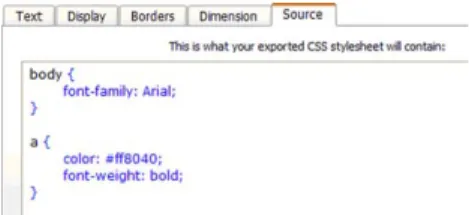
Online documentation in HostM.com web site is very scarce. Minimal ‘how-to’ instructions are given on the Simple CSS documentation page, and the Simple CSS overview page talks more about the advantages of CSS (ten lines of text) than the advantages of SCSS (six lines of text). Also, tool tips are not used on screen. However, error messages and dialogs in general tend to be a little more informative. Because ‘point and click’ definitions typically do not cause errors and follow-up dialogs are not needed, metacommunication achieved with metalinguistic signs is virtually non-existent. The only exception is the content of the ‘Source’ tab, shown in Fig. 5. Although the signs on screen take the same form as other static signs (which will be discussed shortly), they are truly metalinguistic.
The label on top of the text area says: ‘This is what your exported CSS style sheet will contain’. In the text area we see CSS code, including color-coded syntax. This is theonly explicit representation of CSScodificationto be found in all interactions with SCSS. Thus, the designers’ message is clear: style definitions are not to be made by writing CSS code. The Source tab contents are just ancillary informa-tion about the effects of users’ interacinforma-tions with the rest of the interface.
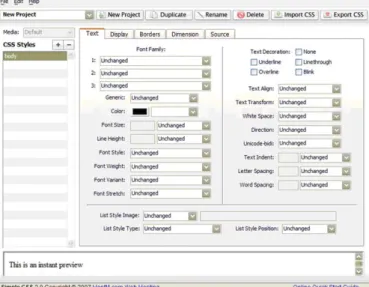
Step 2: The analysis of SCSS static signs is more interesting and informative for our research purposes. In Fig. 6 we see a screen shot ofSCSSmain screen. The ‘point and click’ style of interaction is clearly communicated. The values for a style being defined are typically selected from a list of pre-defined options (appearing in drop-down lists or presented as labeled check boxes). There are very few instances in all style-defining tabs where the user has to type in text. In Fig. 6, next to ‘List Style Image’, at the bottom of the tab, there is a disabled text entry box. If the selected value is set to ‘URL’ instead of ‘Unchanged’ (the default value), the box is enabled and the user must type in the URL where the list style image is to be fetched. The most important static sign for the purposes of this study is shown at the bottom of the screen. In a scrollable area the system communicates that ‘This is an instant preview’ of the selected style (as currently defined, we anticipate). At this point, the whole spectrum of commu-nication achieved by this sign is hardly evidenced. Because all style-definition parameters are set to ‘unchanged’ values, the previewed text is really a representation of ‘unstyled’ text tagged byobody4in HTML. If parameter
‘1:’ of ‘Font Family’ is set to ‘Courier’, in the preview area the user will see ‘‘This is an instant preview’’. However, this sort of communication is only fully conveyed through synchronous changes in elements during interaction, with the support of dynamic signs.
Another curiosity of static signs analysis is that until the user chooses a non-default value to define a style, the user does not see any metalinguistic signs in the text area of the ‘Source’ tab. The CSS source content is null. This particular communication is difficult to understand for a novice, especially if the user has already selected a number of styles (for example, ‘body’, ‘h1’, ‘h2’, ‘p’ and ‘a’, as shown in Fig. 7). Why shouldn’t she see syntax like ‘body { }; h1 { }; h2 { }; p { }; a { };’? The only feedback the system communicates is the list of five styles on the left-hand side of the screen. They are there, inSCSS. Will they be there in HTML pages if a CSS file is generated (exported)? At this point, metacommunication about feedback is confusing. It will only become clearer when we examine dynamic signs.
Step 3: The analysis of dynamic signs yields even more interesting results. We realize that the preview area supports crucially important feedback communication. In addition to confirming the effectiveness of the user’s decisions (as exemplified with the font family change mentioned while discussing SCSS static signs), this sign also achieves a metalinguistic purpose. For instance, if the user does not know the meaning of a given parameter value—say, ‘monospace’ or ‘cursive’ for the ‘generic’ font
family definition—the instant preview sign actually demon-strates the meaning of the value. The problem is that certain value changes cause no change in the preview text. At this stage of analysis the lack of metalinguistic signs explaining CSS technology becomes hampering. Although the text preview sign supports productive communication in many cases, in other cases they are totally ineffective. For example, if a particular parameter value is set to ‘inherit’ (a context-sensitive style rule), the preview text (whose context, or scope, is always just local to the style) shows a very misleading representation of what the style may look like on a web page.
Although dynamic signs in SCSSsupport the ‘trial and error’ strategy illustrated with EclipsePalette in Section 2, miscommunication gets in the way of the user’s learning process. First, the CSS code feedback in the Source tab proves to be open for certain kinds of editing operations like ‘select’, ‘cut’, and ‘clear’. So, once the user learns the regular correspondences between style definitions estab-lished interactively and the code showing in the Source tab, she may well choose to change certain definitions by editing the CSS code directly. For example, suppose that she discovers that she has made a mistake using the ‘inherit’ value in the definition of a given style, and she wants to eliminate certain features from the parent style and transfer it to the child style. This is a simple cut and paste operation on the code, which is actually much more laborious to carry out with ‘point and click’ interaction. Because she can select the parent style features in the Source tab text area and cut it, she may think that a direct code editing strategy will work and help her be more efficient. She will be surprised, however, to see that unlike in other cases the text preview sign does not reflect the editing just made. Even more surprisingly, although she can manage to position the cursor where she wants to paste the portion she cut, ‘paste’ commands are completely ineffective, both through menu selections and shortcut keys. The system is communicating that something is going wrong. But the real surprise comes when the user clicks on another tab after having cut portions of the CSS code and then returns to the Source tab. The code has been restored to its previous stage—the text she cut out of the parent style definition is back into place. In other words, the Source tab should contain output-only signs, but some input–output features are signified in it.
Although this dynamic feedback problem might be considered an easy-to-fix programming bug, there is more to it than meets the eye as we will see in the next steps. We take this problem to communicate serious design ambiguity that relates both to system feedback signs, on the one hand, and to a poor definition of who the users are (in our terms, a poor definition of the designers’ interlocutors in metacommunication).
Step 4: As we collate and compare metacommunication conveyed by metalinguistic, static and dynamic signs, focusing on system feedback messages, we notice that the simplicity of SCSS may have come at the expense of Fig. 6. Main screen of Simple CSS.
consistency. In the first core step of analysis, metalinguistic signs suggest that CSS codification is not a topic of designer-to-user metacommunication. Style codification is replaced with style definition, and we are led to believe that CSS code is completely irrelevant for designers and users of SCSS. As we move to the analysis of static signs, we realize that although there seems to be appropriate feedback for communication about style definitions in the instant preview area at the bottom of the screen, CSS code is introduced as a topic of conversation. In fact, the sign used to communicate this idea is of the same class as other signs communicating style-definition conversations—an inter-facetab.
Although this topic of conversation appears during static signs analysis, there aren’t other signs communicating how users can engage in conversation about CSS codification (no links to CSS tutorials, no code-related dialogs or menus, no hints about what the user can do with the code or about the purpose of showing it). In other words, there is no redundancy in this respect between static and metalinguistic signs, and metalinguistic communication is poorly distributed (and arguably poorly expressed as well). In the subsequent stage of analysis, dynamic signs help the users learn CSS code by, first, observing systematic cause–effect relations between synchronized interactive style definitions and code appearing in the Source tab, and, second, making generalizations from observed situa-tions. Here, dynamic signs complement metalinguistic communication consistently. The efficacy of feedback expressed in the Source tab is arguably more significant than that of the feedback expressed in the instant preview area (although possibly not more meaningful or under-standable to the user). For example, whereas values like ‘inherit’ have no synchronized expression in the instant preview area, they have very clear expression in the CSS code area. Although users may not know what ‘inherit’ really means on styled HTML documents, they can see that the definition has been made. Possibly, some curious users will build dummy HTML pages to test hypothetical meanings of ‘inherited’ styles, following an abductive line of reasoning.
Furthermore, as seen above, certain editing operations are allowed in the CSS code text area. However, only one or two attempts are necessary for the user to realize that user-system conversations about CSS code are virtually non-existent. On the one hand, the system helps users to learn some CSS coding by communicating style-definition feedback with three interrelated kinds of signs: icons (instant text preview), indices (cause–effect associations between parameter setting and instant text preview, on the one hand, and CSS code, on the other), and symbols (CSS grammar and coding). But on the other hand, not many users can do it in SCSS with the code they have learned. In other words, some dynamic and static feedback signs are pointing in directions that are incongruent with the designers’ message expressed through metalinguistic signs.
Step 5: At the final communicability evaluation step of analysis, we notice that designers have apparently been unable to decide whether they were talking to users who will or will not (want to) learn CSS code. In our scenario, Valerie, the central character, may eventually learn the basics of CSS coding and be tempted to edit it directly. However, if she tries to do it in SCSS, she will be frustrated.SCSS leverages the users’ knowledge but does not give them the opportunity to benefit from itwithinthe scope of interactions it supports.Expert SCSSusers have to interact with the system very much in the same ‘point and click’ style as novices. And, if they want to reap the benefits of their learning, they must use another CSS editor.
At this stage, the analyst is led to frame the problem in broader terms, generating new knowledge not only about SCSSbut also about HCI design in general. The presence of feedback signs evoking thirdness is the origin of the miscommunication we detected. Therefore, it is tempting to eliminate them from the interface and communicate feedback through signs evokingfirstness (in this case the visual appearance of styles) andsecondness(in this case the systematic associations between parameter value changes and synchronized visual appearance changes). The problem is, as we have already mentioned, that certain signs of secondness, namely indices, breakdown because they have no visual effect out of context.
On closer examination the problem, however, is con-siderably more complex. Theiconchosen to represent styles is not adequate to the task. The way it signifies styles is by assuming that the selected style is applied exactly to the scope of ‘This is an instant preview’ (like this: ostyle4 This is an instant previewo/style4). This choice of firstnessis misleading in a number of cases. For example, whenop4is styled as a justified paragraph, the quality of justification cannot be perceived within the scope of ‘This is an instant preview’. The same is true for otable4 and many other HTML tags, especially those referring to structures (like lists and divisions, for example). A more appropriateiconwould be a default HTML page contain-ing at least the most frequently used tags. Only then would the preview text really communicate aspects offirstness in the referent object of this representation. But the object of the iconic representation is, in fact, a cascading code (HTML code structurally linked to CSS code).
object’ (a fixed sentence whose appearance changes when certain values are set). But the sentenceis notthe ultimate object that the user wants to affect, and in addition it cannotexpress the whole range of effects caused by ‘point and click’ actions performed by the user. Certain para-meter values do not affect the appearance of the sentence. A strict ‘what you see is what you get’ style of feedback would require the choice of a prototype object that is a good metaphorical representation of generic HTML pages. Because this metaphor is difficult to find, SCSS designers have chosen a metonymical representation (they use one part to represent the whole). But the metonymy may lead users to make wrong inferences about the meaning of style definitions that the prototype object cannot represent. So, using only signs of firstness and secondness is a risky strategy for metacommunication about referent objects that are in fact specifications for other objects. Specification tasks are fundamentally sym-bolic in nature, and can only be achieved through signs of thirdness.
SCSSdesigners have realized the importance of signs of thirdness in the task they want to support. They show the Source code of the CSS file in the interface. However, they do not allow users to use thirdness signs to communicate desired specifications back to the editor. Through their style of metacommunication, they helpSCSSusers learn a considerable share of CSS codification, but in order totest their learning anduseit productively in style sheets tasks, users must move to another program. Thus, SCSS becomes a transition tool, a scaffold, something to be used and left behind as soon as users gain some expertise. We do not know if this is the designers’ intent, but according to our analysis, this is what they are communicating.
In technical contexts of use, the findings achieved with SIM may be useful to redesignSCSS. They stimulate the designers to think about communicative strategies related to feedback. Moreover, by bringing semiotic knowledge to bear in the analysis of sign classes (associated with Peirce’s definitions of firstness, secondness, and thirdness), these findings may also generate knowledge for scientific research about system feedback requirements and possibilities. Specifically, SIM findings suggest that a combination of iconic, indexical, and symbolic feedback signs referring to thesamereferent object or action may be more epistemic to the users(i.e. they may help users gain new knowledge and skills). In order to validate this suggestion and turn it into legitimate scientific contribution, we must triangulate SIM results with other endogenous or exogenous sources (see page 8) of knowledge related to the results we achieved with SIM.
4.3. Triangulation
We triangulated SIM results with empirical evidence provided by both endogenous and exogenous sources. The endogenous source was web material content aboutSCSS itself and other freely distributed CSS editors (users’ opinions, FAQ’s, publicity, and the like). The exogenous
source was the result of a semiotic inspection of a portion of Google Groups (http://groups.google.com.br). We used discourse analysis techniques (Seidman, 1998) to analyze Web material content, and used SIM to inspect Google Groups. We now highlight only the main results of endogenous and exogenous triangulation.
A discourse analysis of web material about SCSS and other equivalent CSS editors, provided concrete evidence that noviceSCSSusers initially like the editor but do not find it as useful once they have reached a certain level of technical knowledge. We also found evidence that designers of equivalent CSS editors think that users should be able to manipulate CSS code directly, even if they know very little about it when they start to use the editor. Here are excerpts of discourse providing such evidence (under-line shows especially expressive portions of the evidence). The first three show us SCSSusers’ perspectives, and the last two tell us the perspectives of the designers of similar editors about the users’ abilities and expectations.
‘‘Simple CSS is a great little application from the folks at Hostm.com It is more aimed at the beginners to CSS as it allows you to pic [sic] from a list of common elements and style them with ease, you can also make your own just as easily. The application is free so it’s worth checking out.’’[2]
‘‘Not all selector attributes or properties are available, limited options and customization, when they called it Simple CSS they meant exactly that; it’s simple and therefore limited, it’s a little buggy at times, not the best or ideal tool for complex or elaborate projects, good tool for beginners to learn with but not all that useful after that[y].’’[
3
]
‘‘I use a lot of CSS in my website design. This app works as listed and is easy to use.
If it had a preview function like CSS Edit has I would rate it higher.
It doesn’t work directly on CSS files, it imports them and then you have to export them to CSSy’’[
4
]
{From the developers of EclipseStyle}‘‘Sure, a few style sheet generators are out there, and they are perfectly fine, if you never want to make any changes, already know the names and values of all of the CSS attributes, and love working with a grid of 100 lists. EclipseStyle puts other style sheet editors to shame with its features such as a preview window, intuitive tabbed interface, and much more. It even includes an introduction to style sheets if you are unfamiliar, as well as complete tutorials and references to the EclipseStyle interface. EclipseStyle also features a code window for seeing what your style looks like in good old CSS code, [y] ‘‘[
5
]
2
http://nobledesigns.org/main/workflow-and-productivity/7-applications-to-make-developing-on-a-pc-easier.
3
http://www.download.com/Simple-CSS/3000-2068_4-10349478.html? hhTest=1.
4
http://www.versiontracker.com/dyn/moreinfo/macosx/25884&page=2. 5
{From the developers of A Style} ‘‘A Style is a visual CSS editor.
CSS (Cascading Style Sheets) allows to separate the representation definitions of such structured documents as HTML, XHTML, XML from their content, which is an effective principle in the design of web sites. Key features: * Visual easy-to-use interface; * Graphic tree-type view of attachment files and the CSS structure; * Grouped view of properties and selectors; * Automatic selection and grouping of CSS selectors from a markup language document; *Source CSS, HTML, XML highlight code editor’’[6]
The semiotic inspection of Google Groups was carried out in September–October of 2008 by three authors of this paper, those that were not involved in the inspection ofSCSS. The focus of their inspection, like that ofSCSS, was the system feedback for user actions. For practical purposes, we decided to constrain our analysis to the context of a crucial short-time activity in Google Groups: the configuration of the group by the group owner. This activity has the advantage of allowing inspectors to investigate feedback about certain group communication processes (e.g. what feedback does the system show to users if messages they post are visible to anyone in the Internet compared to being visible by only a limited group of users), without requiring that they participate in actual group discussions for a long period of time. Also, the activity is directly comparable with the specification tasks examined with SCSS.
The analysts carried out their inspection separately but discussed their findings together in order to produce an enriched and integrated conclusion about Google Groups communicability, in the last step of SIM. Their separate analyses were per se an internal triangulation of results. Nevertheless, they looked for further validation of their conclusions among evidence spontaneously provided by users in theGoogle Groups Help Forum.
The inspection scenario was the following:
‘‘Walter is a teacher in the Telecomm Department. He is preparing his term course that starts within a few days. A colleague from the Computer Science Depart-ment comDepart-mented that she had a good experience using Google Groups to support class discussions and distribute extra material to the students. Walter decides to try and do the same. Because he has never usedGoogle Groups, he plans to create a new group, with all students in his class (whose emails he already knows), but not to publicize the group and launch its activities till he has finished designing the main web pages and uploading course material for the first 4 weeks of class. In this way he will be able to explore
Google Groups beforehand, and make sure that the system will really help him work online with the students. If all goes well, he will tell the students about
the online group on their first day of classes. Only then he will publicize the group and launch the activities.’’
The semiotic inspection showed that Google Groups communicability is problematic especially because of insufficient or occasionally inconsistent explanations and feedback about the meaning of interface signs. We illustrate communicability problems with only two in-stances of miscommunication. One has been selected among the results achieved at the end of step 5 in SIM, and the other has been selected from the results achieved while triangulating SIM results with endogenous sources of knowledge aboutGoogle Groups.
First, when creating a group, users are told that they can invite members. When the group owner invites a member, an invitation message is sent to this person. Static and dynamic signs in the interface lead group owners to believe thatthey are sending a message to the invitee and writing the invitation text (see Fig. 8), although metalinguistic signs hint discretely to something different. The duplicity of grammatical subjects in such phrases as ‘{YOU}Invite members by email’, ‘{YOU} Enter email addresses’ and ‘{YOU} Write invitation message’ versus ‘GOOGLE GROUPS will automatically include the group’s name, description, and address in the email’ creates confusion aboutwhois actually writing and sending the invitation to members. The metalinguistic (explanatory) sign at the bottom of Fig. 8 communicates thatGoogle Groupsacts as a mediator between the owner of the group and the members, but the static signs on screen (text box labels and links) support the interpretation that the owner is sending communication directly to the invited members (‘write an invitation message’).
The owners cannot preview the invitation message, and they would very probably be surprised to read what it says. Not only does the text unexpectedly introduce the Google Groups perspective on what the group owner is doing (see the reported speech style of the message content below), but it also communicates the possibility that the invited member is a victim of electronic abuse (which of course would not be part of the message sent by the owner). This note of suspicion about the group owner is
Fig. 8. Source Who is inviting the group members?
6
not in tune with the otherwise friendly and trustful tone of interaction between group owner andGoogle Groups. The message sent when the user presses the ‘Invite members’ button shown at the bottom of Fig. 8 is the following (formatting and URL’s abbreviated for lack of space):
[email protected] has invited you to join the SERG-Group1 group with this message:
Hi, I’d like to invite you to be part of this new group. Here is the group’s description:
This group is created to test how the system works. – –Google GroupsInformation– –
You can accept this invitation by clicking the following URL:
http://groups.google.com/[y] – –If This Message Is Unwanted– –
If you feel that this message is abuse, please inform the Google Groupsstaff
by using the URL below. http://groups.google.com/[y]
Lack of feedback (like a preview of Google Group’s message to members) reinforces the owner’s belief thatheis communicating with his invitees, in the terms he chooses. Actually, without feedback, owners may never realize that Google Groupsis saying something else in their behalf (and something else about them). Because their role in the system is not that of a regular member—they are the owner—they do not have access to the members interface, view, and experience of the system.
These and other metacommunication inconsistencies regarding feedback were found when the three analysts collated and compared the metacommunication templates reconstructed in steps 1, 2 and 3 of SIM (the analysis of metalinguistic, static, and dynamic signs). Analysts also found feedback problems with decisions regarding the configuration of group privacy and communication struc-ture. Their findings led them to conclude that lack of feedback and/or inconsistent metacommunication in Goo-gle Groupsmay lead to important communication break-downs among members of groups supported by this system. In particular, because group owners do not really know the extent and consequences of their decisions, the inspectors concluded that they may inadvertently cause considerable sociability problems for the group.
At the triangulation step, inspectors found an eloquent piece of evidence of the extent of miscommunication in this system’s interface. When they examined Google Groups Help Forum, they found a message from a user asking what she should do to attach a ‘how-to’ page to the invitation she was sending to her friends. The answer she got clearly points to how inconsistent the users’ interpretation of interface signs may be compared to the system’s semantic model. The answer says:
‘‘You cannot attach anything to an Invitation to a Google group. You actually do not sen[d] the Invitations, you request that Google Groups sends them, so you act[ua]lly
never see the invitations e-mails and so cannot attach anything to them.’’7
Insufficient feedback and inconsistency between signs can cause yet more trouble. For example, when creating a group, users can decide whether the group is private, public, or restricted. Explanations about what these terms mean are provided on screen, but static, dynamic, and metalinguistic signs generated in the sequence of interac-tion may be inconsistent with the user’s choices. We found evidence of the bewilderment experienced by users who did not spot this inconsistency. A user posted the following message inGoogle Groups Help Forum 8:
‘‘I thought that in a restricted group, one had to have a password and name (email address) in order to get into a restricted Google group. I am an owner of the India 101 Peace Corps 2008 Google group. After telling everyone in our PC group to join, that it was restricted and safe to put private information there, I found while checking on things at my sisters place in Seattle, that all I had to do was look up Google groups, and then type in India 101 and the site opens right up. No password, no restricted Google group, one feels very vulnerable, misled, and distrustful. Now I have to alert everyone and shut it down. [y]’’
Moreover, the inability to anticipate how the owner’s decision will affect other members and non-members leads users to think about laborious strategies to test the meaning of group configuration parameters. Two posts in the Help Forum explicitly address this point. One user asks:
‘‘Can someone tell me what the email delivery option ‘Users decide where their replies are sent’ means? I would test it but I’d like to avoid spamming the group with my test emails.’’9
Another user reports the strategy he used to test how private his group was:
‘‘I have a ‘‘private’’ group, that is, I have set all the access options to be most private. I have uploaded a file. When I view this file on my computer, when logged in with my Google account, I get a very long URL in the browser. If I send that URL to my wife, who is neither logged in nor a member, she can see the contents of the file, at least for some time.’’10
These and otherGoogle Groups, triangulation results not only reinforced the inspectors’ conclusions about issues with
7http://groups.google.com/group/Managing-Your-Group/browse_ thread/thread/1cfeaab1b20eeebc/6352b2372ed26734?lnk=gst&q=inviting# 6352b2372ed2673.
8
http://groups.google.com/group/Google-Groups-Basics/topics. 9
http://groups.google.com/group/Managing-Your-Group/browse_thread/ thread/d22ce18542a3171f/83c42e173870a2c0?lnk=gst&q=Users+decide+ where+their+replies+are+sent#83c42e173870a2c0
10