Designing online help systems for reflective
users
Milene Selbach Silveira
Faculdade de Informática, PUCRS Av.Ipiranga, 6681, Prédio 30, Bloco 4 90619-900, Porto Alegre, RS, Brazil [email protected]
Simone Diniz Junqueira Barbosa, Clarisse Sieckenius de Souza Departamento de Informática, PUC-Rio
R.Marquês de São Vicente, 225 22453-900, Rio de Janeiro, RJ, Brazil
[email protected], [email protected]
Abstract
Empirical studies have revealed that most users are dissatisfied with current help systems. One of the causes for many of the problems found in help systems is a lack of coupling between the process for creating online help and the human-computer interaction design of the application. In this paper, we present a method for building online help based on design models according to a Semiotic Engineering approach. We argue that there may be important benefits to the users if designers communicate their design vision, and we also point at the need to change current design practices to encourage creative and intelligent use of computer applications. We show how this proposal opens a direct communication channel from designers to users, and we hope this will contribute to introducing this new culture.Keywords: online help systems; Semiotic Engineering; HCI design; design models
1
Introduction
How can we help designers build online help for a computer application? And how can we ensure that it will adequately tell users what to do with the application, what the application is for, why certain design decisions were made, and so on? Typical online help systems don’t help their users much. Although popular user interface design guidelines point to the need for carefully provid-ing users with adequate help content [18, 31], users are still dissatisfied or have trouble with current help sys-tems [6, 26]. The reasons for this inefficiency may lie in inadequate design processes, in lack of time or planning, in excessive confidence on the intuitiveness of a fail-proof interface, or even in a naïve acceptance of current standards [26].
Most help systems focus on operational information based on task models. They present users with “how to” information, implicitly accepting the “paradox of the active user” [5], and embrace the vision that online help is to be used only as a last resource when users don’t know what else to do. The result is what is known as “fail-proof” interfaces, in which users’ actions are
con-strained in order to avoid mistakes, and in which users are never informed about “why” (or “why not”) the ap-plication behaves in a certain way.
Opposite to the desire to create fail-proof user inter-faces, we find Adler & Winograd’s views that attempt-ing to build idiot-proof technology underestimates or hinders the users’ intelligence and creativity to learn and transform software according to their needs [1]. In accor-dance with their view, we believe that the role of the online help system is to open new possibilities and give users resources to understand and go beyond the de-signer’s original ideas, taking most advantage of the technology. Users would be motivated to move from an “active” attitude to a more “curious and creative” one. In this view, the construction of the online help system becomes a critical step in the design of human-computer interaction (HCI). We want to give users access to mini-malist and strategic information to encourage creative and intelligent use of computer artifacts.
message that designers tell users what they have inter-preted as being the users’ needs and preferences, what the answer for these needs is and how they implemented their vision as an interactive system. In Semiotic Engineering, online help is an essential application component. This is where designers will explicitly “speak” to the users, re-vealing how the application was built, how it can be used and for what purposes.
This paper describes a model-based method for online help system design, stemming from Semiotic Engineering and driven by two main pillars: communicability [21] and the rhetorical layering technique used in the minimalist approach [11]. In order to illustrate our approach, the design of a real application’s help system is presented as a running example.
2
A Semiotic Engineering View of
Online Help
According to the Semiotic Engineering theory, help systems are a distinguished meta-message from designers to users [9]. In this case, the designer is explicitly saying what he believes are the users’ problems or tasks, what he thinks is the best solution for them, and how he intends to make it available for practical use. To this theory, it is essential that users understand the designers’ message so that they may better use and take advantage of the appli-cation.
The help system is a privileged communication re-source. Typically, help design focuses on designer-to-user communication of extensive help content, including keyword searches as the only means for users to express their doubts. In our approach, we provide users with an additional communicative resource: the ability to express specific doubts situated in the immediate interaction context. The idea is to promote a novel perspective on online help design and usage: Users should be able to express more precisely their doubts and needs, and de-signers should be able to anticipate such doubts and needs, and to organize their response accordingly.
The major problems users report with respect to exist-ing help systems are [14]:
• help systems don't provide the specific
informa-tion desired;
• help information is not available when needed; • help information is not accurate or is incomplete;
and
• it is difficult to switch between the help system
and the application.
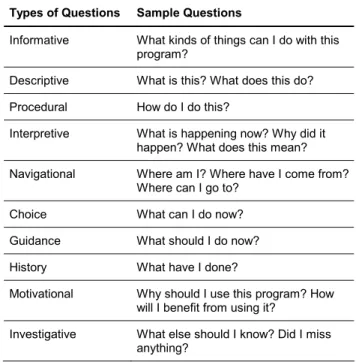
When asking for help within an application, users have specific doubts that they need to clarify. The fre-quent users’ doubts are summarized in Table 2 [3, 30].
Types of Questions Sample Questions
Informative What kinds of things can I do with this
program?
Descriptive What is this? What does this do?
Procedural How do I do this?
Interpretive What is happening now? Why did it
happen? What does this mean?
Navigational Where am I? Where have I come from?
Where can I go to?
Choice What can I do now?
Guidance What should I do now?
History What have I done?
Motivational Why should I use this program? How
will I benefit from using it?
Investigative What else should I know? Did I miss
anything?
Table 1: Taxonomy of Users’ Frequent Doubts.
A large body of research has been developed in an at-tempt to effectively help users overcome these problems and attain their goals, i.e., acquire the desired information [7, 8, 12, 13, 15, 16, 17, 23, 27, 28, 33]. Our research draws on communicability evaluation [21] and the layer-ing technique used in minimalist documentation [11] to build on existing research and propose a novel approach to online help design.
2.1 Comunicability evaluation
In the communicability evaluation method [21], utter-ances are used to characterize users’ reactions when a communicative breakdown occurs during interaction. It is argued that these breakdowns occur when the user cannot perceive the designers’ intended affordances. A commu-nicative breakdown is an indication that the designers have failed in conveying their message through the appli-cation interface.
The utterances used in communicability evaluation are:
• Where is? • What now? • What’s this? • Oops!
• Where am I? • What happened? • Why doesn’t it? • Looks fine to me. • I can’t do it. • I can do otherwise. • Thanks, but no, thanks. • Help!
By observing users’ behavior during interaction, evaluators assign communicability utterances to the breakdown situations they identify from interaction “symptoms”. The communicability utterances were elaborated as an attempt to evoke the users’ apparent doubts during interaction, precisely at the moment of breakdown. Our work aims to provide users with access to similar expressions to represent their actual doubts during interaction. In the approach described in this pa-per, users can express themselves using a set of prede-fined utterances whenever they experience a communica-tive breakdown during interaction.
It may be argued that many applications already pro-vide access to specific help information by means of expressions such as What’s this?. This is typically af-forded by specific interface elements, such as pop-up menus, for instance. The ideas presented here extend this approach to all levels of help content, providing relevant, context-sensitive information at varying granularity.
2.2 Levels of affordances
In order to further help designers to organize help content, we also examine in detail the role of affordances in Semiotic Engineering. In de Souza, Prates & Carey [10], we see that the designer has fostered a successful communication with users when they can perceive the intended application affordances. The authors classify affordances in three levels: operational, tactical, and strategic.
Affordances at the operational level are related to the immediate and individual actions that users need to per-form. They are closely related to the interactive codes employed in the application, i.e., the concrete user inter-face. We may consider questions such as What’s this? as being answered at this level.
Tactic-level affordances are related to a plan, or se-quence of actions, for executing a certain task. In general terms, information at this level answers questions such as How?
Finally, there are strategic-level affordances, which
are related to conceptualizations and decisions involved in certain problem-solving processes and in the embed-ded technology. Information at this level typically an-swers questions of the kind of Why?
2.3 Using communicability utterances in help
design
In this section, we will analyze the relation between each communicability utterance, the corresponding com-municative breakdown as indicated by certain symptoms [21], the affordance level in which it occurs, and the kinds of help response to be designed. Our goal is to gain insights for designing coherent help systems that provide content at various levels, and for designing consistent access for each piece of content.
Oops!
Oops! occurs when the user realizes he/she has just done something wrong, and wants to reverse the previous action(s). The help response should be either operational or tactical, depending on the complexity of the steps to be performed. For instance, a single Undo would be consid-ered an operational response, whereas a sequence of interaction steps that lead to the desired state would be tactical.
Where is?
The problem here is that the user has an idea of what he/she needs, but cannot find the corresponding interface element. The help response should be, at first, opera-tional: it should tell the user where the element is. It may be necessary to actually show where the element is, de-pending on the interaction steps required for accessing it. In this case, the response is considered tactical, showing how the user may reach the element.
It is important to note that, in the case of this utter-ance, the user must specifically describe or identify the element he/she is querying about, since its location is unknown. It is possible that the user does not know the specific name or expression the designer chose to refer to the element, so we should be aware of this problem and provide a variety of synonyms for the terms employed throughout the application.
an element the user cannot find in the interface, he/she would further utter Where is? in order to find out the location of (operational) and/or interaction steps required for accessing (tactical) the element.
What now?
This utterance occurs in two different situations:
(i) when the user has carried out a few interaction steps but does not know how to proceed with the task at hand; or
(ii) when the user needs to perform a task that he/she cannot even formulate in terms of the available in-terface elements.
In the first case (i), the response should be opera-tional, showing the user what to do (what the next step is). If the user utters What now? again, in this context, the response should become tactical, showing the user how to do what is needed.
In the second case (ii), the response would be strate-gic, presenting to the user the tasks the application was designed to support, from a user’s perspective, i.e., using the terms he/she should be familiarized with, according to the corresponding domain.
What’s this?
The user utters What’s this? when he/she needs a de-scription of an interface element or its usage. The re-sponse should be, at first, operational, describing the element. If the user wants further information, such as how, where, and when the element is used, we have an-other What’s this?, this time at a tactical level, describing the element’s usage. In many cases, both levels can be presented at once, saving users’ an additional interaction step.
Another usage of What’s this? may occur when the user has heard about some application object or function-ality, but could not identify or locate it. In this case, the access to the utterance would be like the one for Where is?, in which the user is prompted for additional input.
What happened?
This utterance occurs when the user performs an ac-tion expecting a response, and he/she gets another re-sponse, or no response at all. The corresponding help content should be both operational and tactical: It should reveal what happened, and how it resulted from the pre-vious interaction steps.
Why doesn’t it?
Why doesn’t it? occurs when a user retries an opera-tion more than once, because he/she is convinced that he/she is doing the right thing. The response should be both tactical and strategic. It should show the conse-quences of the interaction steps taken, and why they provide those results.
I can’t do it.
I can’t do it. could be accessed from a piece of help content, whenever the user fails in following procedural instructions. The response should be presented at a tacti-cal level, guiding the user through the preconditions necessary for that task to be performed. It may also pre-sent operational instructions, at a finer level of interaction detail.
Help!
This utterance gives access to a traditional facet of the help system, when uttered within the application inter-face. Moreover, it can also be uttered within the help system itself, and in this case, it should provide informa-tion about all kinds of help that are available to users. In this context, it can be used again to ask when and how to access the various portions of the help system.
Unused communicability utterances
Some of the existing communicability utterances are inadequate for accessing help information. For instance, the user would never utter I can’t do it., but rather ask How do I do this?. The utterances I can do otherwise (missing of affordance) and Thanks, but no, thanks. (dec-lination of affordance) wouldn’t probably be uttered either, because the user would have successfully com-pleted his/her task.
Additional help utterances
In addition to the communicability utterances selected for accessing help content, we need new utterances to convey the users’ frequent doubts that are not addressed by communicability, like procedural and motivational doubts.
Due to the fact that user interfaces have become in-creasingly more flexible, we also need some information to convey more than one way to achieve a single goal, e.g. how different user interface elements may be used to achieve a goal. We do so by providing a response to the question Is there another way to do this?.
pro-pose a few other utterances: Where was I? Why should I do this? What is this for? Who is affected by this? On whom does this depend? Who can do this? Following is a description of the breakdowns they intend to solve, and the levels at which they function.
Where was I?
This breakdown occurs when the user needs to retrace his/her previous steps in order to understand the state in which he/she currently is. The response should be at both the operational level, with an identification and a descrip-tion of the previous steps, and at the tactical level, with an identification of larger tasks that may comprise these steps.
Why should I do this? What is this for?
These utterances could be accessed from a piece of help content, whenever the user doesn’t understand the reasons underlying certain instructions or the utility of a certain task. The response — for both of them — should be presented at a strategic level, revealing the designer’s perspective on that topic.
These utterances are particularly important to Semi-otic Engineering, because the designer can use them to explicitly state his/her rationale of the application.
For instance, Why should I do this? could be used from within a piece of help content previously accessed via a tactical What’s this?. In this situation, the user would want to know not only what a task is and how to perform it, but also its importance within the application as a whole.
Who is affected by this? On whom does this depend? Who can do this?
These utterances may occur when work processes and roles are modeled, and roles are responsible for interde-pendent tasks. The response may be considered opera-tional, listing the roles affected by the selected task.
How do I do this?
When the user does not know how to perform a cer-tain task in an application, he/she may utter How do I do this? and provide additional input in order to obtain the corresponding help information. The response should be presented at a tactical level, describing how he/she should proceed. Typically, it consists of step-by-step instruc-tions.
Within this help context, users may utter How do I do this? again, in case an instruction isn’t clear. If, on the other hand, he/she tries to perform the operation and
doesn’t succeed, it is a case of I can’t do it.
Is there another way to do this?
This utterance comprises both I can do otherwise and Thanks, but no, thanks. In this case, the response is both tactical and strategic. For each alternative path of interac-tion, it should present the steps required to perform the task (tactical), and the motivation for following that path (strategic).
This utterance is also characteristic of our Semiotic Engineering approach, since it allows the designer to explicitly convey his/her design decisions and intentions.
As presented earlier, some utterances can be accessed immediately from the user interface, such as What’s this? and What happened?. Others, however, require additional input, such as Where is? and How do I do this?. More-over, some utterances may occur from within the help system itself, such as Why should I do this?, for example.
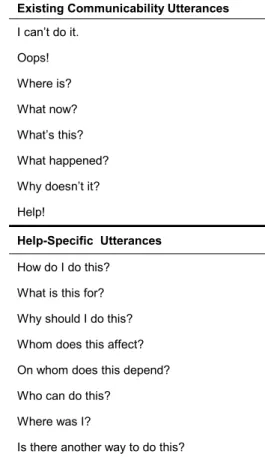
Table 2 presents the whole set of utterances we will use for designing our help system.
Existing Communicability Utterances
I can’t do it.
Oops!
Where is?
What now?
What’s this?
What happened?
Why doesn’t it?
Help!
Help-Specific Utterances
How do I do this?
What is this for?
Why should I do this?
Whom does this affect?
On whom does this depend?
Who can do this?
Where was I?
Is there another way to do this?
Table 2: Final set of utterances for accessing help content.
rele-vant help response, and designers have an organizing principle directly driven by the communicative break-downs they intend to circumvent or solve.
2.4 Minimalism and the layering technique
Because the proposed help expressions allow users to focus on a specific doubt, designers need now to elabo-rate help content to address each one of these doubts. This allows for shorter, more focused help responses. This idea is in line with the minimalist approach to in-structional material [4].
Inspired by the layering technique [11], we allow us-ers to access minimal pieces of help content about a cer-tain user interface element or task. From this help con-tent, users may, depending on their needs, access further help material and then on to as much further information as required.
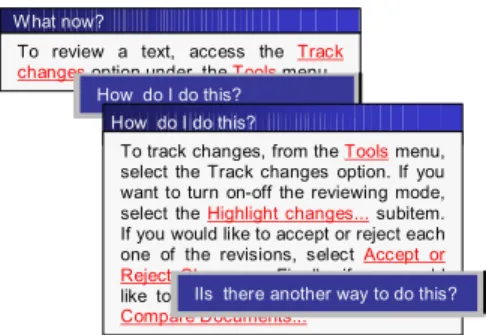
A simple example illustrating minimalist responses and the recurring use of expressions upon these is shown in Figure 1. This is a fictitious example, based on some help content found in Microsoft Word®, as a response to help requests about ‘tracking changes’.
To review a text, access the Track changes option under the Tools menu. W hat now?
How do I do this? How do I do this?
To track changes, from the Tools menu, select the Track changes option. If you want to turn on-off the reviewing mode, select the Highlight changes... subitem. If you would like to accept or reject each one of the revisions, select Accept or Reject Changes... Finally, if you would like to compare two documents, select Compare Documents...
IIs there another way to do this?
Figure 1: Help responses and their recurrence.
Combining the layering technique and the communi-cability utterances for accessing help content allows de-signers to solve many context-sensitive doubts, i.e., doubts regarding their immediate and contextual needs. However, this approach is somewhat limited when users have major gaps in understanding the application. In this case, we need a more traditional standalone help module.
In the standalone help module, it is possible to find related information about the domain and the application as a whole, as well as usage scenarios. It is through the standalone help module that designers may convey their global design vision in a consistent way, and address general understanding issues, such as the application domain, advantages and disadvantages of using the apli-cation, and provide content from a tutorial perspective. Because most research on help systems addresses some of the major design issues of standalone help modules, in
this paper we will focus only on the local (contextual-ized) help.
3 Building online help systems from
HCI design models
In our approach for designing online help [32], we propose that the designer’s vision — to be sent to users through the help system — be captured during the design and development processes. This knowledge elicitation (capturing the designers’ knowledge about the applica-tion designed and developed by themselves) is based on questions for the designers, classified into three major topics. From the designers’ point-of-view:
• What are the users’ problems/needs?
• What is the best solution for these problems?
And what are the alternatives?
• How was this made available for operational
use?
These questions summarize our conclusions after re-lating the aforementioned users’ most frequent doubts, research about available technical literature (taxonomies for online help systems [29], context-sensitive help [16, 33], help for the web [7, 23, 28], and user-system dia-logues [8, 12, 13, 15, 17, 27]) and practice in the design and development of online help systems for groupware applications on the web.
Each topic can be extended into subtopics, whose an-swers constitute the semantic dimension of the message from designers to users about the application. These are:
1. What are the users’ problems and needs?
• What is the application domain?
• What is the nature of work in this domain? • Who are the actors?
• What role do they carry out? • What tasks do they do?
2. What are the best solutions for these problems and needs?
• What is the application?
• How will this technology affect the domain? • What is possible to do with it (What are the
sup-ported users’ goals)?
• What is the application useful for?
Regarding the technology
• What computational environment is presumed
for the full operation of the application?
• What does the user need to know in order to use
this application?
Regarding the supported activities
• What activities (tasks) can be carried out in the
application environment?
• What are the available options in the current
ver-sion?
3. How can all of this be put to operational use?
Regarding the HCI Analogy
• What is the basic computer–human interaction
analogy used?
Regarding the tasks
• What does each task mean? • How can/must users do that? When?
• Where in the application can users do this task? • How can users do and undo (parts of) tasks? • Why is it necessary to do this or that task?
• Examples of performing the task (scenarios) • Who is or isn’t affected by a task or part of a
task?
• What do we do after finishing a task? Until when
can we do that?
• How do we know if we have (successfully)
fin-ished the task?
Given an actual context of interaction, the user must be able to answer:
• What can I do now? • Where am I? • Where can I go? • Where did I come from? • What happened?
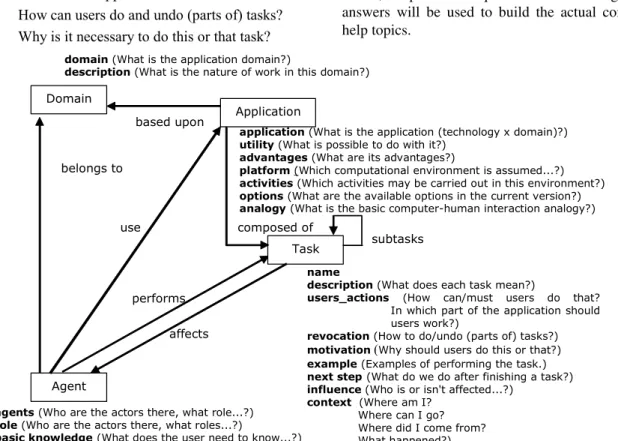
We can analyze these questions from four different perspectives: Domain, Tasks, Agent (inspired by [34]) and Application. These perspectives are used to define our help model (Figure 2). The expressions in boldface represent the corresponding help information. In paren-theses, we present the questions for the designers, whose answers will be used to build the actual content of the help topics.
Domain
Agent
Application
Task
domain (What is the application domain?)
description (What is the nature of work in this domain?)
agents (Who are the actors there, what role...?) role (Who are the actors there, what roles...?)
basic knowledge(What does the user need to know...?)
application(What is the application (technology x domain)?) utility (What is possible to do with it?)
advantages (What are its advantages?)
platform (Which computational environment is assumed...?) activities (Which activities may be carried out in this environment?) options (What are the available options in the current version?) analogy (What is the basic computer-human interaction analogy?)
name
description (What does each task mean?)
users_actions (How can/must users do that? In which part of the application should users work?)
revocation (How to do/undo (parts of) tasks?) motivation (Why should users do this or that?) example (Examples of performing the task.) next step(What do we do after finishing a task?) influence (Who is or isn't affected...?)
context (Where am I? Where can I go? Where did I come from? What happened?) based upon
belongs to
use composed of
performs
affects
subtasks
In this model, we find the answers to the described questions. The entities’ attributes become the answers to the preceding questions, which are listed under each corresponding entity. The questions of a contextual na-ture are generated at execution time, according to the task and the actual application state.
After comparing the proposed help model with exist-ing HCI design models, we realized that some of the information necessary for developing help systems is already present in well-known design models. As such, instead of building a distinct model specifically for help design, we propose to use the HCI design models as a starting point, and extend them with additional informa-tion that we deem valuable for help design.
In HCI design processes, many designers use models to represent interactive solutions in such a way as to support their reflection and decision-making process. Perhaps the most widely used models are the task mod-els, but we also find references to user, domain, presenta-tion, and dialogue models, among others [20, 22, 24, 25].
Puerta [24] remarks that from the design models we may derive answers to several questions, which would guide the design team throughout the development proc-ess. Among these questions, we cite:
• Who are the users of the user interface?
• Which tasks do users perform using the
inter-face?
• To which domain objects does the interface need
to give access?
• How the user interface components are presented
to each user?
• Which commands and actions can the user
exe-cute in the interface?
Although this information is essential for the applica-tion design, we claim that they are not enough for design-ing the online help system. In addition to these functional issues, we need to provide information about the de-signer’s vision of the application, as described earlier in this section. In particular, we need resources to answer:
• What is the nature of work in the application
domain?
• How will this technology affect the domain? • Why is it necessary to do this task or perform
that action? Whom will it affect? On whom does it depend?
• Why this or that interaction path is preferred?
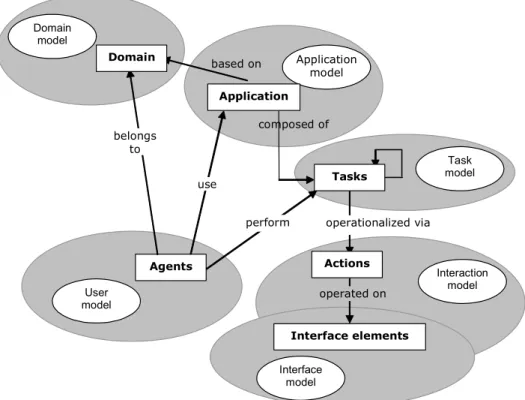
Domain model
Application model
User model
Interaction model
Interface model
Task model
Agents
Application based on
composed of
Actions
operationalized via
operated on Domain
Tasks
Interface elements belongs
to
use
perform
Figure 3: Help model and the corresponding design models.
Most of these models —domain, task, and user mod-els, as well as part of the interaction model— are inde-pendent of the specific technology in which the system will be developed. The user interface model and the part of the interaction model that represent the operationaliza-tion of the tasks, however, will depend on both the user interface style and implementation platform.
Designers build these models during diverse phases of the HCI design process. Figure 4 illustrates a generic schema of the design lifecycle, and in which phase(s) each model is built.
Analysis and early design
Interaction design User interface specification
Domain model
Application model
User model
Interaction model
Interface model Task
model
Figure 4: Design models used during the each phase of the design process.
The distinction between the domain, application, user and task models is clear cut. But the distinction between the interaction and the interface model needs further
clarification. It is possible to model tasks by means of their realization in the user interface (“to do X, click on the Y button”). But what if the technology or the user interface style changes? Although many important deci-sions regarding interaction were made, designers will have to elaborate everything again to address the new technological environment. This work assumes that the technology-separable aspects of the interaction will be represented in the interaction model [2], whereas the concrete realization of the user interface is left to the interface model.
to minimize undesirable effects?
In projects that do not follow a sound model-based development process, help designers must face additional problems: The information necessary for building help is not captured when it is first available, and the help sys-tem is built only at the end of the process. That way, not only do help designers lack time to elaborate the help content, but also they are not told the rationale underlying design decisions that may affect how they should tell users how to use the system.
We now describe the information comprised in each model, highlighting (in boldface) the information that is essentially driven towards help system construction.
Domain model
This model contains information related to the appli-cation domain, focused on its description, the nature of work performed, and the information elements (domain signs1) that belong to it.
Application model
This model represents the application being designed. The focus here lies in the application description, its utility, advantages, supported activities, alternative courses of action, and the application signs. Besides, it encompasses the roles users may play in this application, and for each role, the tasks related to it, and the necessary basic knowledge.
Task model
This model comprises information related to the tasks users may perform. For each possible task, we represent its description, utility, reason why it should be per-formed (from the designer’s point of view), its parent task (considering a hierarchical task decomposition), the op-erator2 that connects it to the following task, which estab-lishes in which way it should be executed, the task’s pre-conditions, and the related domain and application signs.
User model
In this model, we represent information related to the targeted application users. For each user we represent his name, the roles he may play, and his profile, which
1
A sign is a technical semiotic term that is usually taken to mean “something that stands for something else for someone”. In this sense, every piece of data represented in a computer application is a sign to the designer, and every user interface element is a sign both to the designer and to the user(s).
2
The operators considered in this version are those proposed in [20].
cates the way in which he would like to interact with the application.
Interaction model
This model represents the possible forms of interac-tion with the applicainterac-tion, that is, how to effectively per-form a certain task in the application. For the execution of each task there may be alternative courses of actions. For each alternative, there is the reason why it should be executed (from the designer’s point of view), its precondi-tion(s), the indication whether it is the preferred alterna-tive (from the designer’s point of view) and the actions necessary for its execution. For each action, there is the default value, as well as the way to undo it, besides the operator that connects it to the next action.
Interface model
This model is composed of information about the in-terface elements of the application. For each element, we represent its type, the values it may assume, its default value, its location at the user interface, and the related domain and application signs.
4 A method for developing online help
In this section we describe the steps in designing an online help system in a model-based design:
(i) HCI design model construction, taking into ac-count specific help issues;
(ii) automatic generation of draft help content; (iii) content refinement and recurrence specification; (iv) standalone help module construction;
(v) connection of help access points to the interface elements;
(vi) preliminary testing and usage analysis during communicability evaluation; and
(vii) help content refinement or redesign.
3
Application
Model + help User
Model + help
Interaction Model + help
Interface Model + help Task
Model + help
Model-based design
Layering and refining help
Help draft
Help draft
Help draft
Local help + recurrences
Creation of standalone help module
Help draft Standalone
help module Domain
Model + help
Help content refinement and
redesign
Help content generation
Connection to interface elements
Analysis and user testing
Figure 5: Steps used to build online help systems.
. To illustrate our approach, we will describe portions of an application we designed and developed for support-ing the volunteer work in a nongovernmental organiza-tion [19]. The module we have chosen for illustraorganiza-tion is the Bulletin Board, in which volunteers and employees of this organization may post and verify announcements related to their work or to the organization as a whole. These announcements may be classified according to different topics or divisions within the organization, such as: Administration, Events, Meetings, and so on.
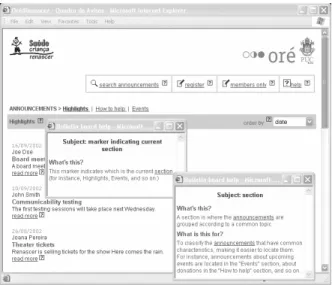
Figure 6 illustrates a usage scenario in the actual ap-plication, in which a member of the organization has looked for help about a section marker.
Figure 6: Help request and response.
4.1 Representing help content in HCI design
models
As an example, consider a piece of the domain model illustrating a couple of domain signs in our case study:
DOMAIN SIGN Marker indicating cur-rent section {
DESCRIPTION (This marker indi-cates which is the current sec-tion (for instance, Highlights, Events, and so on.))
PURPOSE (To quickly indicate the current section.)
}
DOMAIN SIGN section {
DESCRIPTION (A section is where the announcements are grouped according to a common topic.) PURPOSE (To classify the an-nouncements that have common characteristics, making it eas-ier to locate them. For in-stance, announcements about up-coming events are located in the “Events” section, about dona-tions in the “How to help” sec-tion, and so on.)
}
and a piece of the task model:
TASK Provide the required informa-tion {
TASK PARENT(Create an announce-ment)
OPERATOR (sequence) SEQUENCE (1)
… }
TASK Confirm the operation {
TASK PARENT(Create an announce-ment)
OPERATOR (sequence) SEQUENCE (2)
… }
4.2 Generating draft help text using
tem-plates
For each element–expression combination, a minimal-ist response is designed. In order to generate a draft of this response, we have created a help content template associated to each expression. This template is instanti-ated with information from the different HCI design models. For instance, for the What’s this? expression, the content comes directly from the description of the related (domain or application) sign, which is represented in the corresponding (domain or application) model (Figure 7).
Response: description(<sign>)
What’s this?
Figure 7: Schema for generating a response for the question What’s
this? about a domain or application sign.
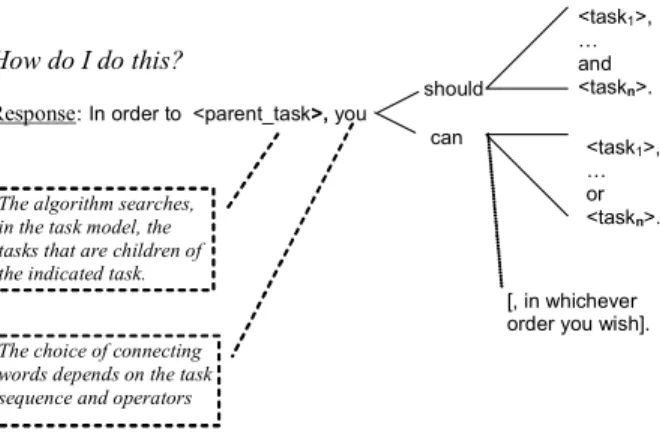
The expression How do I do this? requires a more elaborate template, related to the procedure(s) for per-forming task (Figure 8).
should
Response:In order to <parent_task>, you can
<task1>,
… and <taskn>.
<task1>,
… or <taskn>.
The choice of connecting words depends on the task sequence and operators
[, in whichever order you wish]. The algorithm searches,
in the task model, the tasks that are children of the indicated task.
How do I do this?
Figure 8: Schema for generating a response for the question How do I do this? about a task.
From the information contained in the models and these templates, a draft of the candidate help responses is generated for each pair expression–element (where ele-ment may be a sign, task, alternative courses of actions, and actions). The help designer then selects which re-sponses she will actually include in the application.
Let us consider the marker next to the name of the current section (“Highlights”). A sample response gener-ated from the database is obtained as follows:
(i) What kind of element is this? This marker is a domain sign.
(ii) What are the expressions related to this kind of element? The expressions related to (domain) signs are: What’s this?, What is this for?, and
Where is…?
Taking as an example the expression What’s this?, and using the aforementioned template, the descrip-tion element was retrieved from the domain sign com-ponent, resulting in the following draft answer:
This marker indicates which one is the current section (for in-stance, Highlights, Events, and so on).
In order to create an announce-ment you should provide the re-quired information and confirm the operation.
4.3 Layering and refining help and creation
of standalone help module
Based on the interviews with users, domain analysis, and so on, the designer selects those elements about which she believes users may have doubts or which she would especially like to explain or describe to users, and the expressions that will be used to access the corre-sponding help content.
As soon as these element–expression pairs are se-lected, the generated draft responses undergo a refine-ment process, in which technical communication special-ists shape the text to better communicate the designer’s message to users. Having done that, each help response is analyzed by the designer to verify the possible recurrence points it may comprise. These points indicate the ele-ments in the response to which further help expressions and content may be associated. This content may, in turn, contain additional recurrence points, and so on, deepen-ing the help content about certain interrelated topics.
In our example, the draft text of the selected re-sponses was refined and analyzed with the purpose of finding possible recurrence points. For instance, in the response to the expression What’s this?:
This marker indicates which is the current section (for in-stance, Highlights, Events, and so on.)
the designer verified a reference to another domain sign, in this case section. She selected this word as a recurrence point within the response, and associated the expressions What’s this? and What is this for? to it.
The template for What’s this? of a domain sign is:
description(<sign>); and the template for the
expression What is this for? is: purpose(<sign>). Thus, the response to What’s this? is:
A section is where the announce-ments are grouped according to a common topic.
And the response to What is this for?:
To classify the announcements that have common characteris-tics, making it easier to locate them. For instance, announce-ments about upcoming events are located in the “Events” section, about donations in the “How to
help” section, and so on.
It is important to note that, whenever possible, help responses are generated and refined beforehand and em-bedded in the application as static information, instead of being dynamically generated. This solution avoids execu-tion delays in processing the possible expressions and responses for each element, and makes it possible to manually refine the generated draft responses, so that the manner of speech will seem natural and the communica-tion will be more efficient.
Jointly with the layering and refinement of the help messages, the standalone help module may be created. In its most basic form, this module should contain help information about the domain and the application, as well as an explanation about how different kinds of help work (standalone and local). The domain and application por-tions of this module may be built and refined pari passu the construction and refinement of local help content. Afterwards, part of the local help content may also be included in the standalone module.
4.4 Connection to interface elements
Having refined the local help content, the expressions and their corresponding responses may be made available through the user interface, associated to the elements which, according to the help designer, may raise some kind of user doubt. This is achieved by adding a trigger or link to the corresponding help expressions and content. In our case study, the graphics designer created a symbol to function as a link to local help requests. The chosen symbol was an interrogation mark within a square, such as ?, placed next to the user interface element associated to the help expression.
4.5 Analysis and user testing
Having built the application prototype, the local help system and the standalone help module, the design team should carry out some preliminary testing in order to verify whether the expressions and the corresponding responses are consistent, as well as the general help in-formation. Every connection to help should be tested, as well as every recurrent point within the responses.
by the analysis interviews.
To better observe interaction during testing and to be able to capture the problems that may occur in help us-age, it is interesting that the help designer be present during observations, so that she may focus specifically on help issues. She may not only observe problems in ac-cessing help expressions and in understanding their re-sponses, but also find out user difficulties that hadn’t been anticipated (and therefore had no associated help), or whose responses did not address the user’s current problem. In our case study, this step made it possible to determine problems in the help content and in accessing help. These problems were grouped into three classes: help content, “declining” help, and help culture.
Help Content. During testing, the help designer ob-served users having problems in situations unanticipated by her, which meant that the corresponding help was inadequate or altogether missing.
“Declining” Help. When a user, after many fruitless attempts to use the searching mechanism, made a local help request, she read the explanation, spontaneously said she understood it, but even so she decided to do some-thing different from what was said in the help content, which made it impossible to carry out the task defined in the test scenario.
Help Culture. Most users didn’t access help, inde-pendently of their experience with the application or in using computers. There isn’t a culture of asking for online help when you are in trouble. Few were those who asked for help and, when they did, some of them closed the help window before there was time for them to have read the help information. Only one user actually read the help text and followed what the explanation suggested.
5 Conclusion
In this paper, we have shown why, in Semiotic Engi-neering, online help system is an essential part of an application. It is through help that the designer can di-rectly communicate with the application users, revealing the reasons underlying her design and how users may make better use of it. In this approach, model-based de-sign is of utmost importance, for it makes it possible to maintain the consistency between the design products built at each phase. This allows the designer to create and convey a cohesive message to users, in order to increase their chances of making sense of her message.
The users may also express their doubts more directly using one of the available local help expressions during interaction. The response will be a fragment of the
de-signer’s point of view and rationale when designing the application. Moreover, users may delve deeper into the help content from the recurrence points available at each help response, in an indefinitely long chain of associa-tions driven by their local needs. This process is associ-ated to some fundamental concepts in semiotic theory, namely semiosis and abduction.
In addition to all technical and theoretical efforts, we should also pay attention to introducing changes in the way users perceive help. As a rule, users access help only as a last resort [5]. They may have had frustrating experi-ences in the past, or not even understand what help is for. We have argued that this perception is motivated by the attempt to design fail-proof interfaces, instead of convey-ing to users strategic information to encourage creative and intelligent use of computer artifacts. By adopting a Semiotic Engineering perspective for designing user interfaces and help systems, and thus opening a direct communication channel from designers to users, we be-lieve our approach is a first step towards the introduction of a new culture for using help systems and computer artifacts.
By following a model-based approach, the cost of ex-tending current design practices to design help according to our view is reduced. In order to further increase the benefits of our work, our students at PUCRS and PUC-Rio are working on software tools for aiding the design of online help.
Acknowledgements
The authors would like to thank PUCRS, PUC-Rio, and CNPq for supporting their research. They also thank the Semiotic Engineering Research Group at PUC-Rio for invaluable discussions that have contributed to this work.
References
[1] P. Adler, T. Winograd. Usability: Turning
tech-nologies into tools. Oxford University Press,
1992.
[2] S.D.J. Barbosa, C.S. de Souza, M.G. de Paula, M.S. Silveira. Modelo de Interação como Ponte entre o Modelo de Tarefas e a Especificação da Interface. In Simpósio Brasileiro de Fatores
Humanos em Sistemas Computacionais,
Fortale-za, 2002. pp.27-39.
Human-Computer Interaction: toward the year 2000. Morgan Kaufmann Publishers, Inc, San Francis-co, 1995.
[4] J.M. Carroll (ed.) Minimalism Beyond the
Nurn-berg Funnel. The MIT Press, Cambridge, 1998.
[5] J.M. Carroll, M.B. Rosson. Paradox of the Ac-tive User. In: J. Carroll Interfacing Though: Cognitive Aspects of Human-Computer Interac-tion. Cambridge, MA: The MIT Press, 1987. pp.80–111.
[6] I. Ceaparu, J. Lazar, K. Bessiere, J. Robinson, B. Shneiderman. Determining Causes and Severity of End-User Frustration. Technical Report, HCIL-2002-11, CS-TR-4371, UMIACS-TR-2002-51, 2002.
[ftp://ftp.cs.umd.edu/pub/hcil/Reports-Abstracts-Bibliography/2002-11html/2002-11.pdf, visited in March, 2004]
[7] L. Chamberland. Componentization of HTML-Based Online Help. In Proceedings of the Seven-teenth Annual International Conference on
Computer Documentation, ACM Press,
pp.165-168. 1999.
[8] J. Chu-Carrol, S. Carberry. Collaborative Re-sponse Generation in Planning Dialogues. Com-putational Linguistics, 3, 1998. pp.355-400. [9] C.S. de Souza. The Semiotic Engineering of
Human-Computer Interaction. The MIT Press,
Cambridge, 2005.
[10] C.S. de Souza, R. Prates, T. Carey, T. Missing and Declining Affordances: are these appropriate concepts?. Journal of the Brazilian Computer
Society, Number 1, Volume 7, July 2000.
pp.26-33.
[11] D.K. Farkas. Layering as a Safety Net for Mini-malist Documentation. In J.M. Carroll (ed.)
Minimalism Beyond the Nurnberg Funnel. The
MIT Press, Cambridge, 1998. pp.247-274. [12] B. Hansen, D. G. Novick, S. Sutton.Systematic
Design of Spoken Prompts. In Proceedings of
CHI´96, ACM Press, 1996. pp.157-164.
[13] W. L. Johnson, A. Erdem,. An Interactive Expla-nation of Software Systems. Automated Software Engineering, 4, 1997. pp.53-75.
[14] G. Kearsley. Online Help Systems: design and
implementation. Norwood: Ablex Publishing
Corporation. 1988.
[15] S. Kedar, C. Baudin, L. Birnbaum, R. Osgood,
R. Bareiss. Ask How it Works: An Interactive Intelligent Manual for Devices. In Proceedings
of the INTERACT’93 and CHI’93, ACM Press,
1993. pp.171-172.
[16] M. Marx, C. Schmandt. MailCall: Message Pres-entation and a Navigation in a Nonvisual Envi-ronment. In Proceedings of CHI´96, ACM Press, 1996. pp.165-172.
[17] V. O. Mittal, J. D. Moore. Dynamic Generation of Follow on Question Menus: Facilitating Inter-active Natural Language Dialogues. In
Proceed-ings of CHI´95, ACM Press, 1995. pp.90-97.
[18] Nielsen, J. Usability Engineering. Cambridge, MA: Academic Press. 1993.
[19] ORÉ, Projeto. In: http://serg.inf.puc-rio.br/ore, 2002.
[20] F. Paternò. Model-Based Design of Interactive Applications. Springer-Verlag, Londres, 1998. [21] R.O. Prates, C.S. de Souza, S.D.J. Barbosa. A
Method for Evaluating the Communicability of User Interfaces. ACM Interactions, Jan-Feb 2000. pp.31–38.
[22] J. Preece, Y. Rogers, E. Sharp, D. Benyon, S. Holland, T.Carey. Human-Computer Interaction. Addison-Wesley, Reading, 1994.
[23] M. Priestley. Task Oriented or Task Disoriented: Designing a Usable Help Web. In Proceedings
of SIGDOC 98, ACM Press, 1998. pp.194-199.
[24] A. Puerta. The Mecano Project: Comprehensive and Integrated Support for Model-Based Inter-face Development. In J. Vanderdonckt (ed)
Computer-Aided Design of User Interfaces.
Presses Universitaires de Namur, Namur, 1996. pp.19-25.
[25] A. Puerta. A Model-Based Interface Develop-ment EnvironDevelop-ment. IEEE Software, 14(4), July/August, 1997. pp.41-47.
[26] H. Purchase, J. Worrill. An empirical study of on-line help design: features and principals.
International Journal of Human-Computer Stud-ies 56, 2002. pp.539-567.
[27] B. Raskutti, I. Zukerman. Generating Queries and Replies during Information-Seeking Interac-tions. International Journal of Human-Computer Studies, 47, 1997. pp.689-734.
Conference on Computer Documentation, ACM Press, 1998. pp.23-28.
[29] A. W. Roesler, S. G. McLellan. What Help Do Users Need? Taxonomies for On-line Informa-tion Needs & Access Methods. In Proceedings
of CHI´95, ACM Press, 1995. pp.437-441.
[30] A. Sellen, A. Nicol. Building User-Centered On-line Help. In B. Laurel. The Art of
Human-Computer Interface Design. Addison-Wesley,
Reading, 1990. pp.143-153.
[31] B. Shneiderman. Designing the User Interface: Strategies for Effective Human-Computer
Inter-action, 3rd edition. Reading, MA:
Addison-Wesley, 1998.
[32] M.S. Silveira, S.D.J. Barbosa, C.S. de Souza. Augmenting the Affordance of Online Help
Content. In Proceedings of IHM-HCI 2001, Springer-Verlag, Lille, 2001. pp.279-296. [33] M. E. Sleeter. OpenDoc - Building Online Help
for a Component-Oriented Architecture. In
Pro-ceedings of SIGDOC 96, 1996. pp.87-94.
[34] G. C. van der Veer, M. van Welie. Groupware
Task Analysis. Tutorial Notes for the CHI99