76
COMPARISON OF THE MOST POPULAR OPEN-SOURCE GIS SOFTWARE IN THE FIELD OF LANDSCAPE ECOLOGY
SZEMÁN ISTVÁN1
1University of Debrecen, Department of Landscape Protection and Environmental Geography,
Debrecen, 4032, Egyetem tér 1. E-mail: [email protected]
Received 2 March 2012; accepted in revised form 21 December 2012
Abstract
GIS (Geographic Information System) software is a very useful tool in modern landscape ecology research. With its help data can be obtained which can - after processing - help to understand and demonstrate the processes taking place in the landscape. Since direct environmental measurements and sampling from a large area are, in many cases, difficult or even impossible, modelling with GIS tools is very important in the workflow of landscape research and landscape analysis. In this article we review the best known open source GIS systems and geographic information tools with possibilities for landscape ecology application. Furthermore we will introduce all the basic concepts that are associated with these open source software programmes. We provide a comparative analysis of the most widely used open source GIS applications, where, through a specific example, we will examine how these tools are used to produce basic landscape metric indicators. We will examine those functions of the programmes that are necessary to produce a complete thematic map, and finally we will emphasize various other important functions of the software to give adequate information for those users who choose open source code GIS tools, for financial reasons or otherwise, to complete a landscape ecology analysis. Our opinion is that this type of comparison is much more informative than those done by proprietary software, because these latter are all based on a basic data library, and therefore yield similar results (proj4, gdal/ogr, jts/geos, etc.) to their ‘paid’ competitors. This examination is timely, as these programmes have been gaining popularity over the last 20 years thanks to their continuous development, their independence from any platform, and their compatibility with most data formats.
Keywords: open source, FOSS4G, QGIS, GRASS, landscape ecology
1. The significance of open source
77
Table 1. List of FOSS (Free and Open Source) Software Licenses
Licence Software
GNU-GPL e.g.: Grass, QGIS, GvSIG, Mapbender, PostGIS, GeoServer, AveiN
LPGL e.g.: MapNik, MapGuide
MIT e.g.: GDAL/OGR, Proj4, MapServer BSD e.g.: OpenLayers
MPL e.g.: MapWindow
In order to standardize the GIS data, the OGC (Open Geospatial Consortium) was created in 1994 by the OGC (Open Geospatial Consortium) where 420 governmental, non-profit and research organizations work together with the open standards of GIS data processing and data sharing (the organization is characterized by decisions based on consensus). In 2008, the OGC signed a cooperation agreement with the OSGeo Foundation (The OSGeo - Open Source Geospatial Foundation - a non-profit organization whose mission is to support open source geospatial software development, and promote its widespread use). Currently, there are 21 projects supported by the foundation, which has made it possible for users to solve the majority of compatibility issues (Siki, 2009). The method is simple; it is not a new data format that is defined; instead the data interchange standards were adapted to make the software available to everyone and formats readable for all users. If the above data encoding standards defined by open technical documentation are used,
the
applications can easily cooperate with other open source solutions.2. Summary of literature
The following is an overview of the context in which the open source GIS applications appear in the national and the international literature and the authors who have already tried to group these programmes according to some kind of system, or to evaluate them. In the article entitled ‘Free and Open Source Software for Geoinformatics - Present Status and Future Prospects’, 2006, Venkatesh Raghavan describes the relationship between FOSS4G projects and the OsGeo Foundation. In his view, there is a clear need for global initiatives such as OsGeo since it can provide an incentive to GIS software development.
78
database and digital map making through specific examples, related of course, to environmental modelling (EMM).
The State of Open Source GIS’ by Paul Ramsey organizes the open source GIS applications by programming languages. His work helps the user navigate in the world of open source software, since it presents the best-known programmes and programme libraries, but does not address the applicability of this type of software (Ramsey, 2007). A study analyzing the possible uses of open source GIS software entitled ‘Assessment of Open Source GIS Software for Water Resources Management in Developing Countries’ was published by the European Community, JRC (Joint Research Centre) in 2008. The study’s authors formulate a recommendation to the Community on which GIS software to use for the EU WKMP (Water Knowledge Management Platform) programme. Out of 31 examined programmes, 17 were finally installable in the given configuration, and four of them satisfied all expectations. In conclusion, they recommend the use of QGIS.
Stefan Steiniger also published his article, entitled ‘An Overview on Current Free and Open Source Desktop - GIS Developments’ in 2008, which is perhaps the most detailed piece of work I have come across. It not only presents, but also compares, the open source GIS tools on several criteria, e.g. area of use, licensing, development environments, etc- (Steiniger, 2008).
Wen-Chieh (Jeffrey) Wang, Jia-Liang Yang and Ya-Yun Lin published the article ‘Open-source Versus Proprietary GIS on Landscape Metrics Calculation: A Case Study’ about a comparison of the GRASS GIS r.le module and the FRAGSTATS (also open source) software at an OSGeo conference in 2008. The article guides the reader through the methodology of landscape metrics data acquisition procedures, while also compares the above programmes regarding the production of stain-, class- and landscape-level data. The authors of the article mention the FRAGSTATS programme as the best raster landscape analysis software and formulate a recommendation to the GRASS developers in their conclusions. It is proposed that they should elaborate and develop a vector-based data acquisition process similar to the Patch Analyst module by ArcGIS, so it would be even more advantageous to use an application based on these changes.
79
use in education in 2010. He summarizes the ‘abilities’ of each programme in a table.
One can only occasionally find domestic literature mentioning open source GIS software but it is certainly a step forward that QGIS software has been presented as an alternative to Arc View in most universities where GIS is taught (e.g. Debrecen, Szeged, Pécs, Budapest University of Technology etc.). As a help for users, Hungarian language documentation is already available for QGIS and GRASS GIS, the majority of which has been created by teachers in the departments and the students studying there (e.g.
www.agt.bme.hu
).3. Free GIS software
There are numerous desktop GIS applications on the OSGeo website which vary considerably in terms of usability. Some of them are only used to display maps, but there are applications that enable complex spatial analysis (vector and raster analysis) and typically geostatistical ones, as well (e.g.: OpenGeoDa, although this application is not currently supported by the OSGeo projects; however, it is still very useful). Perhaps the downside of open source is this diversity, which, of course, is not always desirable, since it can isolate potential developer’s resources, can prevent the establishment of a uniform structure and can separate the features which are most valuable for the given task. In this section, we present the most widely used GIS applications according to various chosen criteria, without aiming for complexity.
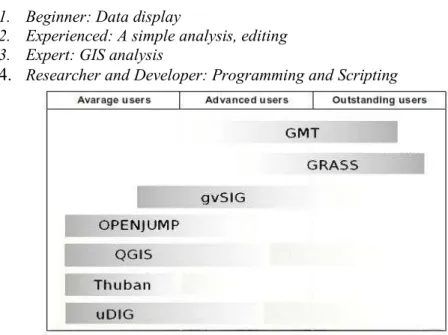
Gary Sherman, in his work GIS Desktop (Sherman, 2001), attempts to organize these sets of software (or libraries) based on how well the individual applications meet users’ needs. He separates three user types (or levels):
1. Average user, who only uses GIS software to display information. 2. Advanced user, who uses GIS applications to edit maps and display data. 3. Outstanding user, who also performs complex spatial analysis.
80 1. Beginner: Data display
2. Experienced: A simple analysis, editing 3. Expert: GIS analysis
4.
Researcher and Developer: Programming and ScriptingFig. 1. Software according to the users’ profile (according to Sherman, 2001)
Table 2.Various GIS applications, grouped by usability Name of
Application Release Date User Profile1 Programme Language Raster/Vector Grass 1982 expert &
researcher C, Tcl/Tk, Python raster and vector
QGIS 2002 from beginner to researcher C++, Qt4, Python mainly vector
SAGA 2001 from beginner to researcher MS Visual C mainly raster
uDIG 2004 from beginner to researcher JAVA mainly vector
OpenJump 2002 from beginner to researcher JAVA vector and raster
ILWIS Open 1984 from beginner to researcher MS Visual C raster and vector
gvSIG 2003 from beginner to researcher JAVA mainly vector
MapWindow 2005 from beginner to researcher C++, .Net raster and vector
81
In Table 3, which was also prepared following Hay and Steiniger, the key features of each application are compared, using one of the best known GIS applications, ArcGIS 9.x.
Table 3. Comparing some open source applications with the ArcView software Main
Functions Grass QGIS ILWIS UDIG SAGA Open-Jump Window GvSIG Map- View
Arc-Data Display ● ● ● ● ● ● ● ● ●
Digitizing ● ● ● ● ● ● ● ● ●
Editing,
Updating ● ● ● ● ● ● ● ● ●
Integration with Other
Programmes ● ● ● ● ● ● ● ● ●
Presentation
Map ● ● ● ● ● ● ● ● ●
Diagram ● ● ● - ● ○ - - ●
Plot R-stat. ● ● - ● ○ - - ●
Tables ● ● ● ● ● ● ● ● ●
Analysis
Vector ● ● ● ● ● ● ○ ● ●
Raster ● Grass ● JGrass ● Sextante ● Sextante Spatial analyst
Statistics R-stat. R-stat. ● JGrass ● Pirol-Jump raster Sextante only ●
Importing
GPS Data ● ● ● ○ ● ○ ● Mobile pilot ●
Customiza-tion (scripts, API1 etc.)
API, Python
, Perl API,
Python ILWIS scripts Groovy API, Python API, Jython API, .Net Jython Python API, ● functionality provided, ○ functionality provided by software plug-in (i.e. an extension). See also www.spatialserver.net/osgis/ for details.
1 API: Application Programming Interface
ESRI ArcGIS ArcView 9.x: we only assessed the standard functionality and not the functionality that comes with extensions requiring additional purchases.
82
Table 4. Different tribes use different tools; programming languages used by Open Source GIS software
“Tribes” Software
C++ Mapserver, GRASS GIS, QGIS, OGR/GDAL, Proj4, PostGis Java Udig, OpenJump, gvSIG
Web MapBender, OpenLayers .Net MapWindow
4. Landscape Ecology application
83
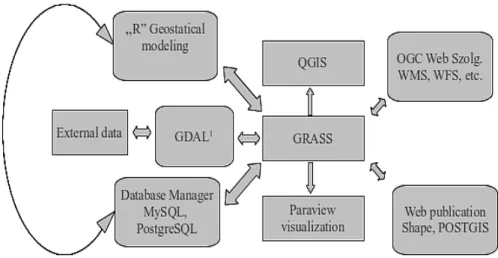
Fig. 2. GIS Architecture Model
1GDAL: Geospatial Data Abstraction Library
84
5. Methods
As detailed below, the software mentioned above were compared, based on their usability in solving a particular landscape ecological problem. The comparison was made with software installed on a specific configuration, namely an Intel 2.2 GHz 64-bit instruction set computer processor and 4GB of RAM (DDR2) memory. The operating system was also an open source one, a Debian-based Linux Mint 12, which is currently the most widely used operating system among Linux system users, based on surveys carried out by Distrowatch (Distrowatch is a website which provides news, popularity rankings, and other general information about various Linux distributions.). On this operating system, the free version of ILWIS can only run virtually but this did not affect the operation of the software, according to our observations. The GvSig only runs with the ia32-libs package (runtime libraries for the ia32/i386 architecture) with a 64-bit environment. In the comparative test the above mentioned SAGA GIS 2.0.7., QGIS 1.7., GRASS 6.4., GvSIG 1.11. and OPENJUMP 1.5.1 versions were examined, as well as ILWIS 3.0.
From the above chart/table we did not include in our test MAPWINDOW software, due to its windows only compatibility, nor UDIG software, because of its inability to provide complete results beyond its mapping capabilities; however its geospatial toolbox (jGrass:http://code.google.com/p/jgrasstools/) development is progressing in the right direction. Since we do not compare all of the available open source field informatics software in our research study, the results are subjective, but have the potential to provide us with key information. The first problem is how to present the thematic maps with the appropriate projection, the second is to determine some basic landscape metric measures, such as the PD (patch density) index, where the number of landscape ecological patches was determined per km2
85
complete their tasks without getting lost in the different functions of the system. The fewer steps it requires to get to the desired result, the more effective the software.
From our experience with the available vector data the landscape metrics results could be achieved in the following six steps: 1. Generating a vector grid; 2. Calculating the area and perimeter data of patches; 3. Adding polygon centroids; 4. Converting polygons to polyline; 5. Calculating the number of points in grid cells; 6. Calculating line length in grid cells. We measured these steps closely in our “click test”; afterwards we summarized the results in a table for easy and clear comparison. We considered measuring the time required for the process, but in our opinion the results obtained are not necessarily relevant since it should also be considered whether the software is used by a beginner or an experienced user. For our work, we downloaded the CORINE 2000 land cover data in vector format at the European Environment Agency’s website (©EEA, 2009).
(online:
http://www.eea.europa.eu/themes/landuse/interactive/clc-download
).6. Comparing programmes based on their applications
The first problem is the display of the map with the projection set so that the various land use categories are shown in different colours.
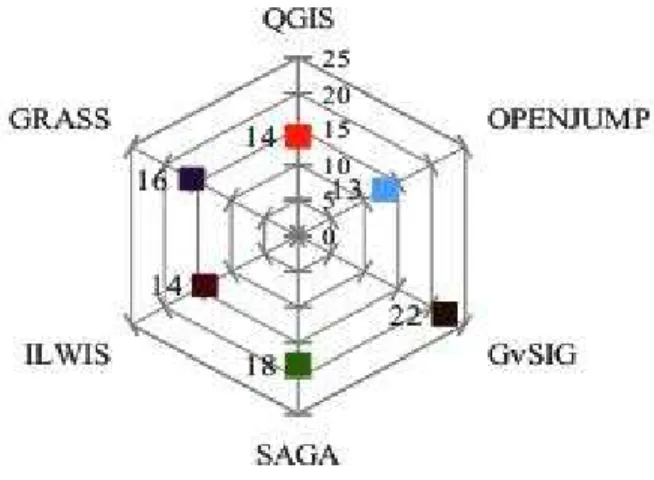
With the QGIS application, this can be achieved in a total of 14 steps to reach display, including the thematic map and setting the projection system. The process is a little different with GRASS GIS, as we must create a Location with a map set inside (a map set or work area) with the Location wizard (Bugya, 2010). In this process GRASS allows the user to specify the projection system where the projection can be set by a variety of different methods. We selected the HD72/EOV projection and set the map based on the EPSG code (23700). Following the above steps, data can be added to the map set in 10 steps with the import option of the file menu (raster, vector, 3D raster, database table). It is enough to follow these steps once; subsequently we just need to select the map set in which we would like to work. In this way, producing the display takes just six clicks, including opening. Then we started ILWIS with Wine Windows programme loader. It takes 7 steps to open the map and colour in unique values but we must define the projection system which is also a seven-step process. (Create in File menu - Coordinate system-cord.system projection - OK - projection - EOV Hungary - OK) so we can reach the desired appearance in 14 steps (Nijmeijer, 2001).
86
ellps = WGS84 + datum = WGS84 + units = m + no_defs + towgs84 = +57.01, -69.97, -9.29 - (Cimmery, 2010). Select item ‘set coordinate reference system’ in section ‘Proj4-Projection’ from the modules and enter the above sub-dimensions. This takes 6 clicks. The vector file can be loaded with the load-vector option and displayed by clicking on the data tab, taking 5 clicks in all. Colouring according to the CLC codes in the CODE_00 column of the attribute table can be achieved in at least 7 clicks. Thus, SAGA takes at least 18 steps to achieve the desired result (note, however, that the programme works quite quickly). GvSIG opens the vector file and defines the projection in 12 steps and then processes the thematic presentation in 22 steps between the features of the layer on the following path: properties - symbols - categories - unique value - classification field - code_00 – colour selection - add all - apply – accept (Alfaro, 2005). The projection management of OPENJUMP is not very advanced, and the programme does not provide an opportunity to choose between the coordinate systems; we must install a separate plug-in that can be found on the internet as cs.conf; however, we can still only set a WGS 84 projection on our layer. Work - data sets – selecting Ersi shape file - OK! Layer Properties - Style – select style - thematic maps - Thematic representation (select attribute) - classification methodology (single value) - selecting a colour scheme and then - OK, making a total of 13 steps.
Fig. 3. The result of the ‘click test’ carried out on the open source software involved in the comparison (display-projection set).
87
polygon; we then need to draw a vector grid, which consists of one acre squares. The polygons must be transformed into a line and the length of the resulting grid must be measured in the unit areas of the grid. The PD (patch density) is the number of landscape ecology patches (land use categories) per hectare number. We must count the polygons in a similar way but the transformation into a line is omitted here; instead we generate central areas (point vector layer) and make the programme calculate these areas.
We can create the grid with the following plug-ins:
- mmqgis (
http://michaelminn.com/linux/mmqgis/
), - qmarxan (http://www.aproposinfosystems.com
) or - Ftools (http://www.ftools.ca/
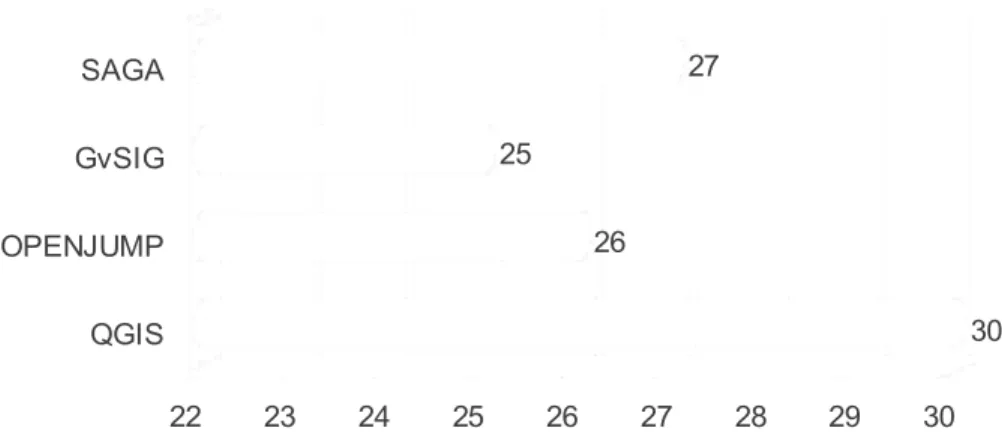
).If we wish to obtain the area and the perimeter data describing the shapes of landscape ecology patches, we can do this by ‘Geometric tools’ within the Ftools toolkit. The surface centrals (PD calculations) and the line lengths (ED calculations) in the grid polygons can also be calculated with the previously mentioned Ftools module. With the QGIS software, generating the two landscape metrics data mentioned above and the polygon geometric data takes 30 steps altogether (Siki, 2009).
Openjump and GvSIG both include the SEXTANTE module; therefore the above operations can be carried out in very similar fashion with the two programmes. OPENJUMP is a little more advanced since it has proprietary data analysis tools that make the process simpler. It is possible to create the grid with SEXTANTE. The problem with the operation of the in-built script is that the layer range cannot be set, so the xmin, xmax, ymin and the ymax values must be entered manually with the coordinate removing tool (this takes a considerable amount of time). These values mark the limits of the layer. The size of the grid must be entered here, too. From this point of view, it is easier to use OPENJUMP because SEXTANTE allows the removal of the range from the layer when generating a raster-grid and the pixels can be converted into polygons with the programme’s built-in raster tool. (Note: SEXTANTE can also convert the formats but does not return the correct result when transforming them into a rastergrid-polygon, nor does it polygonize the cells.) We can also find vector-raster conversions among the SEXTANTE scripts, where we can transform our vector file into a raster. To run the analysis on a full map (100 km2), we would need stronger hardware. I tested the raster categories
88
Table 5. The table below shows how many steps are required for each programme to reach the desired result.
Operation QGIS OPENJUMP ILWIS GRASS GvSIG SAGA
Generating Vector Grid 1ha cells
5 steps mmqgis1,
qmarxan2 or
Ftools3
7 steps (create raster grid and convert to
vector)
Only line grid can genarate4
3 steps (plus entering the values)
3 steps with sextante
(create graticule)
5 steps (plus entering the
values)
Calculating area and perimeter data of patches
4 steps with
Ftools 3 steps with Jump Tools
2 steps with Statistics
10 steps in
attribute table 4 steps with Sextante
4 steps Shapes polygons
Adding polygon
centroids with Ftools 3 steps 3 steps with Sextante 5 steps Only 2 steps 3 steps with Sextante
4 steps Shapes polygons Polygons to polyline 6 steps including CRS settings, Ftools
3 steps with
Sextante 5 steps Only 2 steps 3 steps with Sextante Shapes lines 4 steps
Calculating number of points in grid cells
6 steps
with Ftools 3 steps with Sextante -
Only with rasterized vector 3 steps with Sextante 5 steps Shapes points Calculating line
lengths in grid cells with Ftools 6 steps
7 steps with settings in extensions-aggregation
- Only with rasterized vector
9 steps with Geoprocess toolbox (Spatial Join)
5 steps with Table calculator for
shapes
All steps: 30 steps 26 steps - - 25 steps 27 steps
1 MMQGIS - is a set of Python plug-ins for manipulating vector map layers in Quantum GIS (QGIS). 2 Qmarxan - is a set of simple-to-use tools developed by our very own Marxan trainer, Trevor Wiens,
of Apropos Info Systems. The tool was developed to create Marxan input files within QGIS, allowing users to do all of the GIS work for Marxan analyses easily.
3 fTools - analysis and management tools for spatial data. fTools is a comprehensive suite of analysis
and data management tools that extend the functionality of Quantum GIS without the need for additional libraries or tools.
4 The ‘Add Graticule’ option does not work in the free version.
The required data can be defined in 27 steps with SAGA GIS. In particular, it is the operational speed and the low resource requirements of the programme that should be emphasized. It is probably the best software for vector data analyses. It is also very promising that the SEXTANTE toolbox is already available among the QGIS extensions, and this includes SAGA scripts, as well. Some basic operations can be made with ILWIS software, too, but it mainly helps the user in hydrological landscape analysis within the raster analysis.
89
mentioned. However, among raster tools, the Landscape patch analysis and the Landscape structure analysis are perfect plug-ins for raster data analysis. Certainly, such an analysis is not a simple task, since the vector must first be transferred into a raster, and then the plug-in must be conFig.d with the r.li.setup command (Baker, 1992). Both the new sampling area and the sampling frame must be set and it is also necessary to select the monitor to display the results using the d.mon command (x0, x1 etc.). After these settings, the raster analysis devices are ready to use (Baker, 2001).
Fig. 4. Number of steps involved in the detailed vector data analysis process
Output e.g.: Diversity metrics; Landscape metrics:
Richness: 22
Patch Richness Density: 0.01
Relative richness: 220
Shannon index: -282.65
Simpson index: -2722.04
Modified Simpson index: -7.91
Shannon uniformity index: -122.76
Simpson uniformity index: -3024.49
Modified Simpson unif. index -3.44QGIS OPENJUMP GvSIG SAGA
22 23 24 25 26 27 28 29 30
30 26
25
(The data above are not only applicable in the Zemplén Mountains, but were calculated based on a 100 km2 CORINE2000 sample.)
7. Conclusions
The clear disadvantage of the closed-source code is the dependency on the vendor - the so-called vendor-lock - and the fact that the user cannot perform any expansions on the programme which differ from basic functionality. Manufacturers often apply a change in format as a means of coercion to encourage the purchase of new licenses. OpenSource GIS applications represent an appropriate alternative in landscape ecological research as there are many hidden data analysis and data display features. These programmes are familiar with most of data formats, and are compatible with them, so their widespread use would be justified. Their operation is not too complex and their graphical surface is user-friendly. Selecting the appropriate software environment, of course, depends on the nature of the research and data availability. We have seen what the best raster and vector data analysis programmes are, and which applications can only be used for visual data display. We have concluded from the results that the GvSIG and the SAGA software are the hardest to use when completing the presentation of the thematic maps and fitting them into the projection system, whereas all the other programmes are far more “user-friendly” from this point of view. The difference, above all, arose from the number of steps required to fit it into the projection system. Furthermore, we have acquired landscape metrics data from vector data; hence we only compared the different software’s vector data analyzing capabilities. The GRASS programme, which is one of the oldest open source applications in this field (Wang et al. 2008) of study needs some development, but its raster tools are capable of completing far more operations than similar modules of any other software which we used in our research study. ILWIS unambiguously concentrates on a specific field of study, and its development primarily focuses on hydrologic examination qualities. OPENJUMP and GvSIG use the SEXTANTE plug-in, which enables them to reduce by 4-5 the number of steps needed to create the desired results. The advantages of the QGIS software, compared to the other programmes is that its plug-ins, both the GRASS and the SEXTANTE tools, are accessible from the programme; furthermore it has SAGA scripts that are available in the 1.7 version. For the above mentioned reasons, we absolutely recommend the use of open source code software, as the programmes all possess the same functions as their purchased competitors. New technologies quickly appear and become available in open source GIS software. Developers consult through the World Wide Web, exchange experience and give each other advice, which naturally results in continuous quality improvement.
91
Acknowledgements
This paper was supported by the TÁMOP-4.2.2/B-10/1-2010-0024. The project is co-financed by the European Union and European Social Fund.
References
Alfaro, A.A.A. – Rico, G.C. (2005): gvSIG: Open source solutions in spatial technologies. In: Proceedings of GISPLANET 2005, Estoril.
Baker, W.L. (2001): The r.le programs: a set of GRASS programs for the quantitative analysis of landscape structure. Department of Geography, University of Wyoming.
Baker, W.L. – Cai, Y., (1992): The r.le programs for multiscale analysis of landscape structure using the GRASS geographical information system. Landscape Ecology, pp. 291–302.
Cimmery, V. (2007-2010): SAGA User Guide,updated for SAGA version 2.0.5. Inst of Geography, University of Hamburg, Hamburg, Germany.
Csorba, P. – Szabó, Sz. – Csorba, K. (2006): Tájmetriai adatok tájökológiai célú felhasználása, Földrajzi
tanulmányok Dr. Lóki József tiszteletére, Debrecen, pp. 24-34.
Dobos, E. – Holndonner, P. (2011): Metaadatbázisok soknyelvű kereshetőségének lehetőségei az INSPIRE direktíva alapján talajtani adatbázisokban. A Miskolci Egyetem Közleményei, A sorozat, Bányászat82:35-40.
Hengl, T. – Gruber, S. – Shrestha, P.D. (2003): Digital terrain analysis in ILWIS – lecture notes and user guide.
Jolma, A. – Ames, D.P. – Horning, N. – Racicot, A. – Sutton, T. (2008): Free and open source geospatial tools for environmental modelling and management. In: A.J. Jakeman, A.A. Voinov, A.E. Rizzoli and H.C. Serena (Editors), Environmental Modelling, Software and Decision Support. Elsevier, Amsterdam, pp. 163-180.
Nijmeijer, R. – Haas, A. – Dost, R.J.J. – Budde P.E. (2001): Ilwis 3.0 academic user’s guide. ITC, Enschede.
Siki, Z. (2009): Open Source Geospatial Solutions Used in a Productive Environment, Presentation, CASCADOSS Workshop Discussions and GRASS Course, 27-30 January 2009.
Siki, Z. (2009): Open Source Geographic Information Programs in Hungarian, Land Surveyor Day, 4 November 2009, Szolnok.
Sherman, G.E. (2008): Desktop GIS: Mapping the Planet with Open Source Tools. The Pragmatic Programmers LLC.
Steiniger, S. – Bocher, E. (2009): An overview on current free and open source desktop GIS developments. International Journal of Geographical Information Science, pp. 1345–1370. Steiniger, S. – Hay, G.J. (2009): Free and open source geographic information tools for landscape
ecology. Ecological Informatics4:183-195.
Tomor, T. (2010): Az INSPIRE irányelv bevezetése és gyakorlati alkalmazása az e-környezetvédelem területén. Az elmélet és a gyakorlat találkozása a térinformatikában – Térinformatikai konferencia és szakkiállítás, Debrecen, 2010. ISBN 978-963-06-9341-7, pp. 241-248. Vogel, K. – Blumenrath, S. – von Haaren, C. – Lipski, A. (2007): Nature conservation in a farm
management system for sustainable agriculture. In: Proceedings of 18th ECLAS, Conference 2007, Belgrade, pp. 205-217
Wang, W-C. – Yang, J-L. – Lin, Y-Y. (2008): Open-source versus proprietary GIS on landscape metrics calculation: A case study. Proceedings of the academic track of the 2008 Free and Open Source Software for Geospatial (FOSS4G) Conference and GISSA Conference, Cape Town, South Africa, pp. 41-45.
Internet sources:
Bugya T. (2010): Handbook of the GRASS Geographic Information System 2010. Available from: http://mek.oszk.hu/html/vgi/kereses/keresesuj.phtml?tip=temak&fotema=termesz
(downloaded in 2012)
©EEA (2009): CORINE 2000 Land Cover Data.
Available from: http://www.eea.europa.eu/themes/landuse/interactive/clc-download (downloaded in 2012)
FSF (2008a): Free Software and the GNU Operating System.
Available from: http://www.fsf.org/about/ (downloaded in 2012) FSF (2008b): Categories of Free and Non-Free Software.
Available from: http://www.fsf.org/licensing/essays/categories.html (downloaded in 2012) Siki Z. (2009): QGIS Program Users’ Guide 2009. Available from: www.agt.bme.hu (downloaded in
2012)
Stallman P. (2007): Why Open Source misses the point of Free software, online: http://www.gnu.org/philosophy/open-source-misses-the-point.html (downloaded in 2012) Szabó G. (2010): Quantum GIS Felhasználói kézikönyv 2010. Available: www.agt.bme.hu
(downloaded in 2012)