January
|
2015
PM
José Carlos Vieira da Silva
MASTER IN INFORMATICS ENGINEERINGColor Measurement Using
a Smartphone Applied
to Madeira Wines
CO-SUPERVISOR
Mon-Chu Chen
SUPERVISOR
José Carlos Marques
José Carlos Vieira da Silva
MASTER IN INFORMATICS ENGINEERINGColor Measurement Using
a Smartphone Applied
to Madeira Wines
Color Measurement Using a Smartphone Applied to Madeira Wines
José Carlos Vieira da Silva
Jury composition:
, Professor Karolina Baras
, Professor José Carlos Marques
, Professor Yoram Chisik
March 2015
i
RESUMO
A visão computacional é uma área que usa técnicas para adquirir, processar, analisar
e perceber imagens do mundo real de modo a produzir informação numérica ou simbólica na
forma de decisões [1].
Este projeto tem como objetivo utilizar a visão computacional para analisar uma
amostra de vinho Madeira e caraterizá-la pela sua cor (vinhos doces ou secos, novos ou
envelhecidos têm uma cor específica).
Utiliza-se técnicas de comparação de histogramas para analisar as imagens captadas
de uma amostra num recipiente especial criado para este propósito.
A análise da cor de uma amostra de vinho através de uma imagem obtida a partir de
um smartphone pode ser difícil. A imagem captada pode ser influenciada por vários fatores
tais como, a iluminação, o que está por trás da amostra (fundo da imagem) devido às várias
posições em que a imagem pode ser obtida (diferente captar a imagem contra uma parede ou
contra o chão).
Através do uso de novas tecnologias como a impressão 3D, foi possível criar um
protótipo que visa controlar o efeito de fatores ambientais externos na imagem captada.
Os resultados alcançados deixam bons indícios para futuros trabalhos. Apesar de ser
necessário efetuar mais testes, os primeiros realizados tiveram uma taxa de sucesso na
ordem dos 80% a 90% de resultados corretos.
Este relatório documenta o desenvolvimento deste projeto e todas as técnicas e
iii
PALAVRAS-CHAVE
Visão-computacional
Vinho Madeira
Cor
Smartphone
Impressão 3D
v
ABSTRACT
Computer vision is a field that uses techniques to acquire, process, analyze and
understand images from the real world in order to produce numeric or symbolic information in
the form of decisions [1].
This project aims to use computer vision to prepare an app to analyze a Madeira Wine
and characterize it (identify its variety) by its color. Dry or sweet wines, young or old wines
have a specific color.
It uses techniques to compare histograms in order to analyze the images taken from a
test sample inside a special container designed for this purpose.
The color analysis from a wine sample using an image captured by a smartphone can
be difficult. Many factors affect the captured image such as, light conditions, the background
of the sample container due to the many positions the photo can be taken (different to capture
facing a white wall or facing the floor for example).
Using new technologies such as 3D printing it was possible to create a prototype that
aims to control the effect of those external factors on the captured image.
The results for this experiment are good indicators for future works. Although it’s
necessary to do more tests, the first tests had a success rate of 80% to 90% of correct results.
This report documents the development of this project and all the techniques and steps
vii
KEYWORDS
Computer-vision
Madeira Wine
Color
Smartphone
3D Printing
ix
ACKNOWLEDGEMENTS
I want to thank all of those that somehow influenced me or helped me through the
development of this project.
Professor José Carlos Marques and Professor Mon-Chu Chen for all the orientation on
this project.
To all my colleagues that always helped me when I needed most. Special thanks for
all the chemistry colleagues that helped me with the wines and all the tests on the lab.
To Madeira Wine Company for all the samples provided under the IMPACT II project.
To my family, especially my parents that always supported me since the beginning of
my studies.
A special thanks to Marisa for always encouraging me to do this project and for being
xi
INDEX
1
Introduction ... 1
1.1 Motivation ... 2
1.2 Goals ... 2
1.3 Document Organization ... 2
2
State of the art ... 5
2.1 Color measurement ... 5
2.2 Wine color measurement ... 6
2.2.1 Related work... 7
3
Domain research ... 9
3.1 Madeira wine ... 9
3.1.1 Madeira Wine color ... 9
3.2 Digital cameras ... 10
3.2.1 Components and Technical Details ... 10
3.2.1.1 Sensor ... 10
3.2.1.2 Camera Resolution ... 11
3.2.1.3 Capturing Color ... 11
3.2.1.4 Exposure and Focus ... 12
3.2.1.5 Lenses ... 13
3.2.1.6 Storing Digital Photos ... 13
3.2.2 Smartphone cameras ... 13
3.3 Color ... 14
3.3.1 Human Color Perception ... 14
3.3.2 Representing Color ... 16
3.3.2.1 Color models/spaces ... 16
3.3.2.1.1 RGB... 16
3.3.2.1.2 L*a*b* ... 17
3.3.2.1.3 HSV ... 17
3.4 3D Printing ... 18
3.4.1 Impact of 3D printing in industry ... 19
3.5 iOS Development ... 21
3.6 Histogram ... 23
4
Implementation ... 25
4.1 Initial approach ... 25
xii
4.2 3D prototypes... 27
4.2.1 Blackbox ... 28
4.2.1.1 Blackbox assembly ... 30
4.2.2 Recipient Cover ... 33
4.2.3 Lessons learned ... 34
4.3 System Architecture... 36
4.3.1 System Requirements ... 36
4.3.1.1 Functional requirements ... 36
4.3.1.2 Non-functional requirements ... 36
4.3.2 Use Case Diagram ... 37
4.3.3 Class Diagram ... 38
4.3.4 Interface prototypes ... 39
4.3.4.1 Main Screen ... 40
4.3.4.2 Varieties Screen ... 41
4.3.4.3 Base Samples Screen ... 42
4.3.4.4 New Base Sample Screens... 43
4.3.4.5 New Test Screen ... 45
4.3.4.6 Results Screen ... 45
4.3.5 Final Interface and evolution... 46
4.3.6 Lessons learned ... 49
4.4 Software ... 49
4.4.1 Version 1 ... 49
4.4.2 Version 2 ... 52
4.4.3 Version 3 ... 54
4.4.4 Version 4 ... 56
4.4.5 Final improvements ... 57
4.5 Logo ... 58
4.6 Splash screen ... 58
5
Tests and results ... 59
5.1 Procedure ... 59
5.1.1 Step 1 ... 60
5.1.2 Step 2 ... 61
5.1.3 Step 3 ... 62
5.2 Results Analysis ... 63
6
Conclusions ... 67
7
Future work ... 69
8
References ... 71
xiii
9.1 Appendix 1 – Image size tests ... 74
9.2 Appendix 2 – Image comparison flowchart ... 76
xv
FIGURE LIST
Figure 2.1 - Color picker example ... 5
Figure 2.2 - ColorMeter - iOS App [3] ... 6
Figure 2.3 - Shimadzu UV-2600 UV-VIS spectrophotometer [6] ... 7
Figure 3.1 - Madeira Wine color variations [8] ... 9
Figure 3.2- CCD sensor [9] ... 10
Figure 3.3 - Bayer Sensor interpolation [10] ... 11
Figure 3.4 - Bayer filter pattern [11] ... 12
Figure 3.5 - RAW image [12] ... 12
Figure 3.6 - Smartphone camera sensors [14] ... 14
Figure 3.7 - How the human eye sees color [19] ... 15
Figure 3.8 - RGB cube representation [21] ... 17
Figure 3.9 - CIELAB coordinate system [22] ... 17
Figure 3.10 - HSV Color model mapped to a cylinder [24] ... 18
Figure 3.11 - Google SketchUp overview ... 19
Figure 3.12 - Ultimaker Original 3D Printer ... 19
Figure 3.13 - 3D printing in industry [28] ... 20
Figure 3.14 - 3D laser printing [30]... 20
Figure 3.15 - CNC machining waste material [31] ... 21
Figure 3.16- iOS Development overview [33] ... 22
Figure 3.17 - XCode Overview [34] ... 23
Figure 3.18 - Histogram example [36] ... 23
Figure 4.1 - Red rule and pallet ... 25
Figure 4.2 - Red rule and pallet, different angle ... 25
Figure 4.3 - Paper prototype ... 28
Figure 4.4 - Captured image without controlling flash light ... 28
Figure 4.5 - First 3D Blackbox prototype ... 29
Figure 4.6 - Blackbox 3D model ... 29
Figure 4.7 - 3D printer producing the Blackbox ... 30
Figure 4.8 - Blackbox pieces as printed ... 31
Figure 4.9 - Drawing the Blackbox faces on paper ... 31
Figure 4.10 - Interior padding ... 32
Figure 4.11 - Blackbox, final build ... 33
Figure 4.12 - Quartz recipient and original cover... 33
Figure 4.13 - Quartz recipient and cork ... 34
Figure 4.14 - Soft plastic cover ... 34
Figure 4.15 - 3D model for soft plastic cover ... 34
Figure 4.16 - Use Case Diagram ... 37
Figure 4.17 - Class Diagram ... 38
xvi
Figure 4.19 - Main screen, settings menu prototype ... 40
Figure 4.20 - Varieties screen prototype ... 41
Figure 4.21 - New variety screen prototype ... 41
Figure 4.22 - Base samples screen prototype ... 42
Figure 4.23 - Base samples screen prototype, delete sample ... 42
Figure 4.24 - New base sample, screen prototype ... 43
Figure 4.25 - New base sample, use photo screen prototype ... 43
Figure 4.26 - New base sample, select variety screen prototype ... 44
Figure 4.27 - Name new base sample, screen prototype ... 44
Figure 4.28 - Results screen prototype ... 45
Figure 4.29 - Blackbox covering top buttons ... 46
Figure 4.30 - Home Screen, final version ... 47
Figure 4.31 - Home screen, Settings final version ... 47
Figure 4.32 - Varieties Screen, Final version ... 48
Figure 4.33 - Base samples Screen, final version ... 48
Figure 4.34 - Captured image with controlled flash light ... 50
Figure 4.35 - Image comparison, with flash (left image) and without flash light (right image) 51 Figure 4.36 - Processing feedback ... 56
Figure 4.37 - App logo ... 58
Figure 4.38 - App splash screen ... 58
Figure 5.1 - Preparing a sample to test ... 60
Figure 5.2 - Inserting the test cell in the Blackbox prototype ... 61
Figure 5.3 - Testing a sample... 62
xvii
TABLE LIST
Table 3.1 - The visible light spectrum ... 15
Table 4.1 - RGB and HSL values for rule in Figure 4.1 and Figure 4.2 ... 26
Table 4.2 - RGB and HSL values for color pallet in Figure 4.1 and Figure 4.2 ... 26
Table 4.3 - Comparison between object and palette lines in Figure 4.1 and Figure 4.2 ... 26
Table 4.4 - Test inside home, normal light conditions ... 51
Table 4.5 - Test inside home, artificial light conditions ... 52
Table 4.6 - Test inside home, dark environment ... 52
Table 4.7 - Image Size vs Test Time ... 57
xix
ACRONYMS
3D – Three-Dimensional
CCD - complementary coupled device
CNC – Computer Numerical Control
HSL - Hue, Saturation, Luminance Color Model
HSV – Hue, Saturation, Value Color Model
iOS – iPhone Operating System
JPEG - Joint Photographic Experts Group
LAB (CIElab) – A color space defined by the Commission Internationale de l'Eclairage
LCD – Liquid Crystal Display
OS X - Macintosh Operating System X
RGB – Red, Green, Blue Color Model
1
1 INTRODUCTION
Smartphones are really popular nowadays. Their extraordinary processing power is
increasing continuously making them a powerful tool for many purposes other than just make
calls.
Engineers developed some ingenious applications and we can simply grab our
smartphones out from our pockets and analyze if a mole is cancerous or not, or we can
measure our heart rate. All of this is made using the camera on our smartphones together with
some computational algorithms.
Expensive machines can be replaced by these much cheaper devices that we can take
everywhere. Although, in some cases smartphones need to evolve more to be more accurate,
and it will be difficult to someone to trust a smartphone instead of a machine worth thousands
of euros.
Android and iOS are the most used systems in the smartphones world. Both have their
pros and cons but iOS is known by is stability and quality.
Currently Madeira Wine is being measured / characterized by its color at the University
of Madeira through the project IMPACT II (MADFDR-01-190-FEDR-000010) financed through the Regional Development Institute, under the program ‘+ Conhecimento (INTERVIR +)’. Dry or sweet wines, young or old have a specific color. This work is being done by Professor José
Carlos Marques from the Chemistry Department at the University of Madeira and is the base
for this project.
We can notice the sweetness and distinguish the wines using our senses. When we
smell or taste, we can tell if a glass of wine compared to another one is sweeter or not because
we can feel the sugar contained in the wine. Also, only looking at a glass of wine, by the color
we can tell the sweetness as dry wines are lighter than sweet wines.
Using the senses to identify something is tricky because the human beings don’t have all the senses developed in the same way, also, it may require some practice and previous
knowledge related to Madeira Wine.
Although on the lab we can distinguish the wines, this option is not available to general
public, and even to professionals it requires some time to analyze the retrieved data.
There were 102 billion app downloads in 2013 with perspective to grow. It’s a high
2 number of app downloads to be used on the lab is not known, but it’s expectable to be a
sizeable portion. It has potential to grow [1].
The choice of a smartphone app to perform advanced experiments may be useful, as
almost everyone has a smartphone nowadays.
1.1 Motivation
Being able to reproduce the functions of an expensive laboratory machine in a smartphone is a difficult challenge with lots of limitations but is also a great opportunity to develop something new.
This can bring the opportunity for the wineries to test their wines to see if it fits within the standards expected for that wine.
Madeira Wine is known worldwide. Associate new technologies to this product can
open doors to new opportunities, new markets.
Typical Madeira Wine consumers are older adult people, something like this project
can cause curiosity in other persons to buy the wine if a more commercial version of the app
reaches the regular consumer.
The idea of grabbing the smartphone, take a picture and get the variety of the wine can
lead to some changes in the fermentation process and in the quality control procedures.
1.2 Goals
This project intends to:
Prepare an app for a smartphone to identify a Madeira wine by the color.
1.3 Document Organization
This document is divided in seven main chapters.
The first chapter is the introduction were a brief description of the problem and the goal
3 The second chapter, the State of Art, describes how the problem is currently solved.
Some related works are also stated on this chapter.
On the third chapter, there is a domain research that includes all the relevant data for
this project. There are some notions about Madeira Wine, digital cameras, smartphone
cameras, color, 3D printing, developing for iOS and the notion of Histogram.
The fourth chapter is the implementation of the project. It describes all the steps and
procedures, how the idea was generated and evolved during the execution of the project. It
has also all the details about how the software was created and how it works. Contains also
the origin of the ideas for the App logo and splash screen.
On the fifth chapter, there is the description of the test procedure, the test results and
their analysis.
Chapter 6 is the conclusions for this project and report and an overall overview of the
work that was done.
Chapter 7 presents some ideas for future work. They can be implemented if the app is
5
2 STATE OF THE ART
Although there is no related work (known to date) regarding the use of smartphones to
specifically measure wine color, they can be used to measure color from anything in a photo
using one of the many apps available built for this purpose.
Specifically related to wine color, there are some works that used other platforms to do
that function.
2.1 Color measurement
There are many mobile and desktop applications to measure color. Most of them work
the same way, the user clicks on some point of the test image and the software calculates and
displays the result using RGB, HSV, LAB, or other color models.
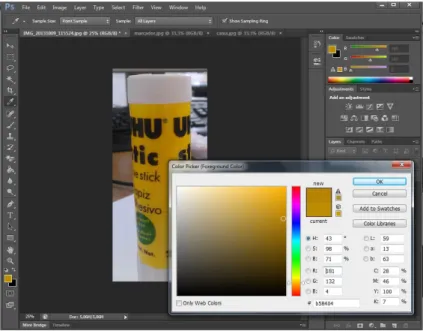
The following example in Figure 2.1, demonstrates the use of Adobe Photoshop to pick
the color values using different color representations from a clicked point.
Figure 2.1 - Color picker example
For mobile platforms, there are many more applications to measure color than there is
for other devices such as laptops. This market is growing as more and more smartphones are
reaching the market. For example, iOS app ColorMeter in Figure 2.2 displays the color of some
6
Figure 2.2 - ColorMeter - iOS App [3]
2.2 Wine color measurement
Wine color measurement is a specific area where color measurement techniques are
applied.
Some work has been made in this area to predict the color of wine from grapes [4], to
ensure quality control [5] and in University of Madeira with the Madeira Wine color
characterization for example.
Wine color is very important for the perception of quality and is a useful indicator for
issues related to wine development and fermentation.
It’s important to keep color variations controlled. People expect some kind of wine to be from a certain color. If the color variation is big, the consumers will be sceptic about that
7 Color monitoring is also useful to document the effect of fermentation variables on wine
color [5]. For example, when the new fermentation techniques are tested.
2.2.1 RELATED WORK
This work of establishing color standards and improve wine fermentation techniques
analyzing the color, applied to Madeira Wines, is being made at University of Madeira.
Two different techniques are used to try to define a color for each wine brand using
Ultraviolet–visible spectroscopy using the Glories method (measuring the absorbance at 420
nm, 520 nm and 620 nm) or by the CIElab method (using full Ultraviolet-visible spectrum).
The equipment used in this process, Shimadzu, model spectrophotometer UV-vis 2600
presented in Figure 2.3 is an expensive and complex machine.
This methods require practice and specific formation and competences because the
retrieved data is complex, so, only experienced technicians are able to perform those tests.
9
3 DOMAIN RESEARCH
This chapter covers some concepts that are highly important to understand this project.
Madeira Wine, digital cameras, smartphone cameras, color, 3D printing, developing for iOS
and the notion of Histogram are essential topics.
3.1 Madeira wine
Madeira Wine is a fortified wine produced in Madeira Island, Portugal.
This wine is available in different sweet/dry variations [7]. The grapes varietals define
the wine:
•
Sercial – A white wine grape that is used to produce a dry style of Madeira.•
Verdelho – A white wine grape used to make a semi-dry variation of Madeira.•
Bual - A white grape that makes a semi-sweet Madeira.•
Malmsey – A white grape that typically registers sweet when made into Madeira.Another varietal is Tinta Negra, a red grape which is the most common in the island.
This one has the particularity of being able to produce sweet, sweet, dry and
medium-dry wines according how the producers conduct the fermentation process.
3.1.1 MADEIRA WINE COLOR
The different variations of Madeira have different characteristic colors.
Dry wines have a light yellow color, medium-dry a golden color, medium-sweet a dark
gold to brown color and finally sweet wine have a brown color has noticed in Figure 3.1.
10
3.2 Digital cameras
Digital cameras work like a conventional camera. It has a series of lenses that focus
light to create an image of a scene. The difference is that instead of focusing the light onto a
piece of film, it focuses onto a semiconductor device that records light electronically. The
computer then breaks the electronic information to digital data.
3.2.1 COMPONENTS AND TECHNICAL DETAILS
This section covers some of the most important components and technical details
about digital cameras.
3.2.1.1 Sensor
The image sensor as the one presented in Figure 3.2 is used by most cameras and is
named Complementary Coupled Device (CCD). Its function is to convert light into electrons.
Simplifying, these sensors are a 2D array of thousands or millions of tiny cells.
Figure 3.2- CCD sensor [9]
Once the sensor converts the light into electrons, it reads the accumulated charge of
each cell in the image.
11
3.2.1.2 Camera Resolution
The resolution is the amount of detail that the camera can capture and it’s measured in pixels. The more pixels it has, the more detail can capture, and, consequently, the larger the
pictures can be without becoming blurry.
Resolution can vary from 256x256 to 4064x2704. Professional cameras can capture
over 16 million pixels or 20 million pixels for large-format cameras.
Common cameras usually have a minimum resolution of 640x480. It’s an ideal size for e-mailing pictures or posting to a website.
3.2.1.3 Capturing Color
The sensor cells are colorblind, only keep track of the total intensity of the light that
strikes their surface. Most sensors use filtering to look at light in its three primary colors. Once
the three colors are captured, they are combined to create the full spectrum.
Highest quality cameras use three sensors, each with a different filter. The light is
directed to the different sensors that respond only to one of the primary colors. The advantage
is that the camera records each of the three colors at each pixel location but it’s an expensive
solution.
A more economical solution to record the primary colors is to place a permanent filter
called color filter array over each individual sensor cell.
By breaking up the sensor into a variety of red, green and blue pixels, using
interpolation, that means, look at the other pixels in the neighborhood of a sensor and make a
guess about the color at that central location it’s possible to get the color for all pixels. Figure
3.3 demonstrates the interpolation, which neighbor pixels are used to calculate the color.
12 The most common pattern of filters is Bayer filter pattern. It alternates a row of red and
green filters with a row of blue and green filter. As seen in Figure 3.4, there are as many green
pixels as there are blue and red combined. This is due to the higher sensitivity the human eye
has to green color.
Figure 3.4 - Bayer filter pattern [11]
The advantages of this method are that only requires one sensor and all the color
information (red, green and blue) is recorded at the same moment. This means smaller equipment’s and less costs.
Digital cameras use demosaicing algorithms to convert a mosaic into an equally sized
mosaic of true colors as the one in Figure 3.5.
Figure 3.5 - RAW image [12]
Each colored pixel can be used more than once, its true color can be determined by
averaging the values from the closest surrounding pixels.
3.2.1.4 Exposure and Focus
All cameras, digital or not, have to control the amount of light that reaches the sensor.
13
Aperture:The size of the opening in the camera. It’s an automatic procedure in most
digital cameras, but, some allow manual adjustment to give professionals more control
over the final image.
Shutter speed:The amount of time that light can pass through the aperture.
These two elements work together to capture the amount of light needed to make a
good image. In photographic terms, they set the exposure of the sensor.
3.2.1.5 Lenses
Digital cameras have one of four types of lenses:
Fixed-focus, fixed-zoom lenses: Used on disposable cameras and inexpensive film cameras.
Optical-zoom lenses with automatic focus: Similar to the video
camcorder lens. Has automatic focus, but it may not have manual focus.
They change the focal length of the lens rather than just magnifying the
information that hits the sensor.
Digital Zoom: The camera takes the central pixels from sensor and
interpolates them to make a full-sized image.
Replaceable lens system: These are similar to the replaceable lenses on
a 35mm camera. Some digital cameras can use 35mm camera lenses.
3.2.1.6 Storing Digital Photos
Most digital cameras have LCD screens that allow to see the picture immediately.
Storing images requires a lot of memory. Most cameras use JPEG file format for storing
pictures allowing to choose quality settings, for example, medium or high quality.
To make the most of their storage space, most digital cameras use data compression
to make the files smaller [13].
3.2.2 SMARTPHONE CAMERAS
14 All of them work with the same basis, a sensor and a lens. This hardware is basically
the same found on regular digital cameras, but they have the particularity of being really small
as shown in Figure 3.6 [14].
Figure 3.6 - Smartphone camera sensors [14]
The process to capture an image is the same. The light enters the camera via the lens
onto the sensor. There, in the sensor, sensible areas record light electronically and then the
computers converts this information to digital data [13].
These cameras, similarly to digital cameras, usually capture color using RGB that is a
color model that uses the three primary colors (red, green, blue) that is also the color model
used in displays [15].
3.3 Color
Color is a rich and complex experience, is the vision system responding differently to
different wavelengths of light [1].
3.3.1 HUMAN COLOR PERCEPTION
To describe colors is necessary to know how people respond to them. Human
perception of color is a complex context of: illumination, memory, object identity and emotion.
All of these aspects can influence the perception of color [1].
When light hits an object, some of it is absorbed and the remaining is reflected. The
wavelengths that are absorbed and reflected depend on the object. The reflected ones,
15 The visible spectrum is a portion of the electromagnetic spectrum that can be detected
by the human eye, typically called visible light. A typical human eye responds to wavelengths
from about 400-700nm [17]. Table 3.1 relates the color names to their wavelengths.
Table 3.1 - The visible light spectrum
COLOR WAVELENGTH (NM)
RED 625-740
ORANGE 590-625
YELLOW 565-590
GREEN 520-565
CYAN 500-520
BLUE 435-500
VIOLET 380-435
The following graphic in Figure 3.7 is a good resume for how the human eye works for
the reflected wavelengths.
A higher resolution image for better reading can be consulted in Appendix 3 – How the
Eye Sees in Color.
16 This example can be applied for any object of any color.
Very concisely, the light waves hit the light-sensitive retina at the back of our eye. Then
the cones that are one type of photoreceptor, tiny cells in the retina that respond to light, are
stimulated. The resulting signal is transmitted through the optic nerve to the visual cortex of
the brain, which processes the information returning the perceived color.
Humans have three different cone types, which allows them to discern color better than
most mammals, but, plenty of animals have better vision capabilities.
Many fish and birds have four type of cones, enabling them to see ultraviolet light than
the human eye cannot perceive.
3.3.2 REPRESENTING COLOR
Color can be represented in many forms. A standard system is required to talk about
color. Simple names are insufficient because people can associate a large variety of colors
with a given name.
3.3.2.1 Color models/spaces
There is a large variety of color models or spaces, which means, how we can represent
a color in some scale. Some examples more relevant to this work are RGB, CIELAB and HSV
and are presented in this document.
3.3.2.1.1 RGB
RGB is a color model that uses the three primary colors (Red, Green and Blue) that
can be mixed to make all the other color. It is widely used throughout computer graphics and it’s common to find a large amount of existing software routines since it’s been used for many years [19].
17
Figure 3.8 - RGB cube representation [20]
3.3.2.1.2 L*a*b*
L*a*b* is one of the color space representations used in the Chemistry lab to represent
wine colors. L* represents the difference between light (L*=100) and dark (L*=0). A* represents
the difference between green (-a*) and red (+a*), and b* represents the difference between
yellow (+b*) and blue (-b*). Figure 3.9 represents the CIELAB coordinate system.
Figure 3.9 - CIELAB coordinate system [21]
This color model can be useful to manipulate images, as the luminance is separate from the color information, however it’s not very simple to use because it’s not intuitive for most people [21].
3.3.2.1.3 HSV
HSV stands for Hue, Saturation and Value. Hue is expressed in a number from 0 to
360 degrees. Red starts at 0, Yellow at 60, Green at 120, Cyan at 180, Blue at 240 and
Magenta starts at 300. Saturation is the amount of Grey (0% to 100%) in the color and Value
(or Brightness) works in conjunction with saturation and describes the brightness from 0% to
18 HSV can be represented as a cylinder as shown in Figure 3.10.
Figure 3.10 - HSV Color model mapped to a cylinder [23]
Different software use different scales, so, for this particular case, the OpenCV library
used to calculate and compare histograms on the app has a range of 0 to 179 for Hue and 0
to 255 for Saturation and Value [24].
3.4 3D Printing
3D Printing may sound like something new, something that appeared in the last two or
three years. Actually, this notion appeared around 1980 when Chuck Hull created technology
to print 3D objects from digital data [25].
The Boom of 3D Printing occurred recently, around two or three years ago as many
brands released their domestic 3D printers to the market. With prices around 2000€ for the cheapest printers, it’s not a technology available to everyone. Another problem it’s the time that is needed to print an object that can go from a few minutes to hours or days depending on
the complexity and the resolution of the model.
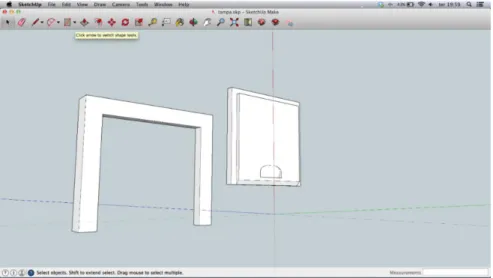
To create an object to print, it requires a 3D modeling software like Google SketchUp
(Figure 3.11) that is a free and quite simple tool to use. Other options are available, but for an
19
Figure 3.11 - Google SketchUp overview
There are many different brands of 3D printers on the market today, but the most
common ones for domestic use work with a filament to feed an extruder that melts it down and
deposit it layer by layer to create the object like the printer shown in Figure 3.12.
Figure 3.12 - Ultimaker Original 3D Printer
3.4.1 IMPACT OF 3D PRINTING IN INDUSTRY
For many years 3D printing has been an expensive technology, only available to larger
enterprises.
With the costs for lower end plastics printing machines increasingly cheaper, this
20 For example, the automotive industry has benefit from this technology as exemplified
in Figure 3.13. Non-functional prototype can be built to test purposes, but, nowadays, the technology evolved in such a form that it’s being used to make production parts. It allows to produce parts that would be difficult and expensive to build without 3D printing. This reduces the cost of building to a fraction. For example, one car project can cost 100.000€ less using 3D printing [26]. There are also benefits in terms of time. Usually it’s faster to build a 3D
prototype and print it than waiting for a factory to build it.
Figure 3.13 - 3D printing in industry [27]
The tendency is to build printers that work with other materials, such as titanium and
stainless steel for example. Although their cost is bigger than conventional plastic printers for
now, they already exist and their evolution happens every day. Also, pieces made of metal are
stronger that the plastic ones, allowing industries to make more effective tests with their
prototypes.
Typically, these printers use layers of metal particles that the laser melts down to create
the pretended object as the Figure 3.14 demonstrates.
21 These printers are an alternative to CNC machining. They not only allow to create more
complex parts, as they also reduce the wasted materials as shown in Figure 3.15.
Figure 3.15 - CNC machining waste material [31]
Both CNC and 3D printing have their pros and cons. CNC is more complex but it’s a
more mature technology but at the moment it’s better to build production parts. Sometimes 3D
printing may require a few attempts to reach a good print result [30].
3D printing will have an important role in people’s life in the next years. It’s a path to explore at the moment for many reasons such as, fast prototyping, reduced waste of materials
and reduced costs.
3.5 iOS Development
To create iOS apps, the programmer as well as having knowledge of Objective-C must
have certain tools required to create and test them [31]:
Mac computer running OS X 10.8 (Mountain Lion) or Later
XCode
iOS SDK (included in XCode)
iPhone (Optional, XCode provides the tools needed to test the app)
Figure 3.16 represents an overview on the development sequence, from the interface
build to coding and testing. The test can be made using the inbuilt simulator or using a physical
22
Figure 3.16- iOS Development overview [32]
Objective-C is not a difficult programming language to learn. Like other languages,
there are plenty of examples online that the programmer can follow and adapt to his concept.
The structure of an iOS project may be very complex at the beginning, but the user can
easily learn following some tutorials found online.
XCode is Apple’s integrated development environment (IDE) that includes a source Editor, graphical user interface editor, and many other features. It can be downloaded for free
from App Store.
Figure 3.17 illustrates an example of XCode interface.
The functionalities are easy to find and the organization of the interface is customizable,
allowing the user to change it according to its preferences.
To build a user interface the editor simplifies that work, the user can pick and drag any
23
Figure 3.17 - XCode Overview [33]
3.6 Histogram
A histogram (Figure 3.18) is a graphical representation, similar to a bar chart, which
organizes a group of data points into specified ranges. Condenses the data series into an
easily interpreted visual by taking many data points and grouping them into ranges or bins [34].
25
4 IMPLEMENTATION
Although this project has a specific goal, to identify a Madeira Wine by the color, there
was not a path to follow at the beginning of it.
The first thing to do was to know more about this wine, its characteristics and why the
color is different between varieties of wine. The color of the Madeira Wine is directly related
with its sugar content and fermentationprocess. Sweeter wines are darker than dry wines.
As the idea is to use a smartphone to take a photo and measure the color of a wine
sample, the first tests were some photos of random objects standing on a table to simplify the
process and understand how the project could start, how color could be measured.
4.1 Initial approach
The first tests were very important for the project development.
Pallets of colors were printed and put side by side with an object to take a photo. Then
RGB + HSL values for both the object and paper were taken from random positions using a
regular desktop software to identify which pallet line has a color more similar to the object.
It was clear that light was affecting the photos. The same object (a red rule) has different colors. The red in Figure 4.2 is brighter that the red in Figure 4.1. Light variations are one of the constraints of this project. Also, the quality of the smartphone camera wasn’t the
best, some colors seemed different than in real object and focus was not good.
26 For the color analysis, the first step was to grab RGB value from a random position for
the rule from both Figure 4.1 and Figure 4.2. This value was also converted to HSL Range.
The collected data is present in Table 4.1.
Table 4.1 - RGB and HSL values for rule in Figure 4.1 and Figure 4.2
R G B H S L
Figure
4.1 148 46 46 239 117 103
Figure
4.2 121 32 42 236 140 72
The next step was to grab a RGB value from a random position from each line of the
palette presented also in Figure 4.1 and Figure 4.2. These values are also converted to HSL
and presented in Table 4.2.
Table 4.2 - RGB and HSL values for color pallet in Figure 4.1 and Figure 4.2
Palette Line R G B H S L
Figure 4.1
1 137 51 70 231 110 88
2 115 51 56 237 93 78
3 150 57 41 6 137 90
4 168 80 39 13 150 97
Figure 4.2
1 150 66 88 230 93 102
2 103 50 63 230 83 72
3 143 58 58 0 101 95
4 149 65 48 7 123 93
Comparisons were made between the RGB and HSL values for the pallet and the
object such as RGB distance, HSL distance and Hue difference in order to understand which
of this comparisons was the most accurate. The results are available in Table 4.3.
Table 4.3 - Comparison between object and palette lines in Figure 4.1 and Figure 4.2
Palette Line Distance RGB Distance HSL Difference H
Figure 4.1
1 37,42993454 34,36568055 -5
2 24,35159132 47,39198244 1
3 38,301436 230,7227774 -230
4 67,24581771 224,6196786 -223
Figure 4.2
1 46,56178691 25,65151068 -9
2 48,27007354 46,88283268 -9
3 17,69180601 239,6685211 -239
27 The formula used to calculate the distance using a tridimensional system is:
𝑑3𝑎𝑏= √(𝑥𝑏− 𝑥𝑎)2+ (𝑦𝑏− 𝑦𝑎)2+ (𝑧𝑏− 𝑧𝑎)2
The Hue difference is just the subtraction of the two Hue values from the pallet and the
object.
The results were not accurate because the RGB values vary a lot. For the Figure 4.1
the pallet corresponding line was color number 2 and for the Figure 4.2 it was number 3. This
means two different matching results for two different photos from the same example.
Using only one metric to describe the difference between the images is not enough.
The more metrics are calculated, the more accurate will be the comparison. Taking as
reference only the RGB distance, HSL distance or Hue difference is not conclusive.
This same results happened for other test photos. The light variations in the images
were evident.
4.1.1 LESSONS LEARNED
Using a cheap android smartphone was not getting very accurate data, it was decided
that an iPhone would be a more reliable smartphone with a quality camera, and as there is not so many different versions of the iPhone it’s a better device to focus the app development, because different camera hardware’s affect the photos and there is hundreds of Android
devices on the market.
To avoid light influence, the environment in which the photo is taken must be controlled. That’s easily done in the lab by the sophisticated machines that are used in the original project to measure wine colors. The wine stands in a quartz recipient inside the machine fully protected
from external light sources.
This inspired the creation of a piece of hardware that could be used to take a photo
avoiding light influence.
4.2 3D Prototypes
The two prototypes created are the recipient that covers the container with the wine
sample and the container cover.
28
4.2.1 BLACKBOX
Blackbox is the name given to the piece of hardware used to cover the iPhone and the
recipient. This device prevents the light influence on the tests as all interior remains full dark
being only affected by the controlled flash light and is built to fit an iPhone 4s.
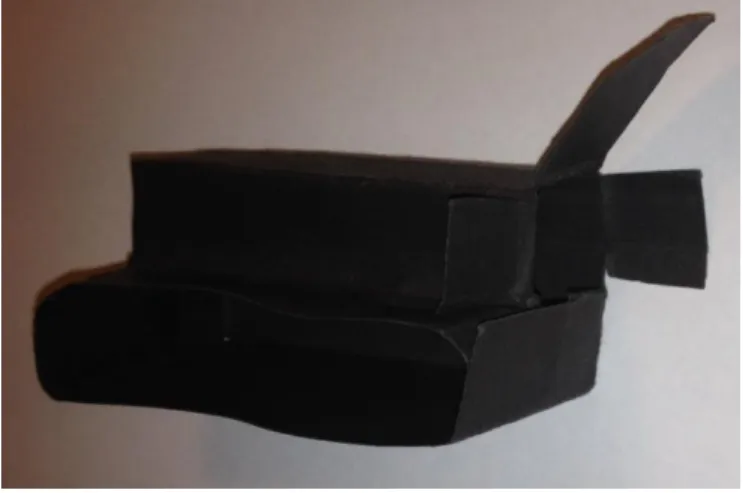
The first prototype in Figure 4.3 was made of paper, only to understand if the concept
would work.
The first tests were made by simply putting a recipient with wine in the prototype and
then take a photo to see if some pattern was found in the photos. All the photos had the same
characteristics as presented in Figure 4.4. The upper part was white because of the flash
influence and the exact same bottom part of each photo was a clear image of the liquid inside
his container.
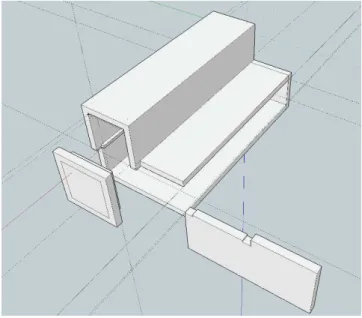
29 After achieving this results, from the paper prototype a 3d model (Figure 4.5) was built
in the computer and then produced using a 3d printer (Ultimaker Original).
Figure 4.5 - First 3D Blackbox prototype
The prototype in Figure 4.6 is the evolution of the first one presented in Figure 4.5.
For this new version, some size adjustments were made to make the iPhone fit with precision inside it so it won’t move. Upgrades, such as the sliding cover that is more practical that the cover from the previous model and the inclusion of a padded interior that provides a
better stability to the iPhone inside the 3D model.
30
4.2.1.1 Blackbox assembly
The printed blackbox (Figure 4.6) is composed by 3 pieces, the box, the top cover and
the sliding cover for the test cell compartment.
The first step is to print all the pieces that compose the Blackbox and that are all
contained in the 3D model presented on Figure 4.6.
Each piece has to be printed individually. On Figure 4.7 the printer is producing the
main part of the Blackbox prototype. The top is printed as a separate part because the printer
would take more time and more filament to print a suspended part like that one as it would
need to print a support structure inside the Blackbox. It would be difficult to clean the excess
material inside the prototype and the quality would not be the same. It would be also more
difficult to cover the interior with all the padding if it was built in one piece.
Figure 4.7 - 3D printer producing the Blackbox
After finishing printing the pieces it’s necessary to remove the excess material left by the printer as demonstrated in Figure 4.8. This is easily done using a knife. This only happens
with the main component of the Blackbox. It’s the result of accelerating the printing speed to a
value that guarantees quality and a small build time. As the printer is a little more accelerated,
31
Figure 4.8 - Blackbox pieces as printed
The next step is to cut the pieces for the padded interior as presented in Figure 4.10.
The material used is the furniture self-adhesive vinyl protections used at home to
prevent scratches on the floor caused by the move of furniture. This can be bought precut in
small pieces or in A4 size that we can cut to fit the size we want, like in this case.
It’s easy to draw all the Blackbox faces on the paper as represented in Figure 4.9. Another option is to get the measurements from the 3D model and draw the faces on the paper.
Figure 4.9 - Drawing the Blackbox faces on paper
The interior will be padded in all faces, except the one that has a little space for the
32
Figure 4.10 - Interior padding
After apply the padding to the prototype, it’s necessary to add some glue to the parts to put them together.
The final step is to put the sliding cover on the prototype, fill the interior with paper and
then use a spray can of black ink to paint all the exterior. The prototype interior must be
protected so the ink doesn’t blur the inside of it were the wine recipient is placed.
It’s necessary to apply about 4 layers of ink, depending on the ink quality. To know if the prototype is correctly painted, the iPhone must be introduced in the prototype with the flash
light on in the same position as if it was to run a test. If there is no light coming from the interior, the prototype is ok, if not, it’s necessary to add another layer of ink and test again.
The choice of the black color comes from the fact that it is the best color to isolate light
from something.
33
Figure 4.11 - Blackbox, final build
4.2.2 RECIPIENT COVER
During the evolution of the work, when it was decided the recipient to be used, that is
the same actually used to perform the wine lab tests (Figure 4.12), it was noticed that the cover
used is not designed to completely seal the liquid inside. This created a problem, because
each time we wanted to test another wine, during the process of removing or inserting the
recipient inside the hardware prototype the wine spills.
The first piece created to efficiently cover the recipient was made of cork that was cut
to fit the size of the recipient (Figure 4.13). This solution works, but it causes a large pressure
on the recipient that is made of fragile Quartz glass and there is the risk of breaking it.
34
Figure 4.13 - Quartz recipient and cork
To avoid the problem of the pressure done by the cover on the walls of the recipient,
and making use of a soft filament to use on the 3D printer, it was created a 3D Model (Figure
4.15) of a cover that tries to avoid or disperse the forces done on the recipient using a layer
shape, instead of a single face.
The advantages of a 3D printed cover (Figure 4.14) against the cork one, is that the
printed one is faster to build, more durable and all of them will always have the same
dimensions. Once the dimensions of the model are adjusted, the printed covers will always fit
the recipient (unless a problem occurs during the printing process), while those made of cork
are built by hand and will not be consistent. It will be difficult and slower to have two covers
with the exact same dimensions using cork.
4.2.3 LESSONS LEARNED
3D printing is valuable for projects like this. It’s a fast way of producing pieces of hardware so we can easily test some modifications and even build the final product with some
quality.
Figure 4.14 - Soft plastic cover
35 The most complicated step may be the 3D modeling, dominating the software. In this
case it was used the Google SketchUp to build the models that is a simple program to use but
that provides all the tools needed to a project like this.
Some techniques were learned during the execution of the work. The blackbox for example, had to be printed in two pieces because the printer doesn’t perform well in suspended parts. Although it could print as one piece, this could reduce the precision, and this two piece
configuration makes easier the process of padding the interior.
There are some modifications to do on the printer settings to print both the cover for
the recipient and the Blackbox. This custom settings will improve the print quality, for example
the fill density on the Blackbox faces is increased to build a more solid object. For the recipient
cover, the settings are also changed because the soft filament requires specific parameters, it
is more difficult to find a correct set of settings to print using this filament because the flexibility
of the material requires a higher temperature and a lower printing speed in order to print with
quality.
The following settings can be changed on the Cura Printing Software on the Top Menu
Expert-> Switch to full settings-> Basic.
Blackbox:
Shell thickness: 1,2
Fill density: 40
Printing speed: 50
Printing temperature: 200
Recipient Cover:
Shell thickness: 0.8
Fill density: 15
Printing speed: 20
Printing temperature: 220
The average time to print all the pieces for the blackbox is around 4 hours. It’s possible to do it faster, but the quality can be affected if the speed is increased or the fill density is
lowered.
For the recipient cover the printer will take around 11 minutes. This piece doesn’t allow any change to the printer settings. The soft filament requires the settings above, otherwise it won’t print an acceptable object.
All these settings are for the Ultimaker Original 3D printer, the model used in this
36
4.3 System Architecture
This section describes the architecture behind the system. It contains the system
requirements, the interface prototypes, their evolution and the class diagram.
The definition of the system architecture only came up later during the execution of the
work. Some of the elements presented on this section were create after the development to
explain the project functionalities.
4.3.1 SYSTEM REQUIREMENTS
As this was an investigation project, at the beginning the requirements were too vague,
the only known requirement was to build an app to identify a Madeira Wine by its color.
After the initial tests the project started to take some course, although, this was a step
by step progress, it continued to evolve.
When the tests reached a moment where the app combined with the hardware piece
started to produce some results, an idea of the system started to be defined which lead to a
list of requirements that had to be implemented in Madeira Wine Analyzer.
4.3.1.1 Functional requirements
FR1. Identify a Madeira Wine by its color.
FR2. Display the results for the analysis made previously made in chronological order.
FR3. Delete a test result from the system.
FR4. Display the list of all Madeira Wine Varieties saved in the system.
FR5. Add or remove varieties of Madeira Wine.
FR6. Display the list of all the base samples saved on the System.
FR7. Set or remove base (known) samples on the system.
FR8. The base samples and Wine Varieties must be set by the user to calibrate the
system.
4.3.1.2 Non-functional requirements
37 NFR2. The system must be independent when analyzing the data after capturing the
image.
NFR3. The size of the captured sample images must be 600x800px.
NFR4. The results must be displayed in a 0-100% scale which indicates the degree of
similarity to that variety.
NFR5. The previous result must appear in reverse chronological order (most recent
first).
NFR6. The user must have feedback of the current status of testing process.
NFR7. The test time must be as short as possible.
NFR8. The application must start with a splash screen.
4.3.2 USE CASE DIAGRAM
This use case diagram was created to represent the actions that the user can perform
on this system.
38
4.3.3 CLASS DIAGRAM
This class diagram in Figure 4.17 represents the core of the app, the structure of the project, the main class, attributes and operations.
This app didn’t begin its development with the class diagram as it would be in a normal project. The idea evolved from the beginning and several changes were made. There wasn’t an ideas that could be the main focus to develop all the usual structures used in software
development.
What is tried here, is to demonstrate the main idea behind the app, as said above.
39
4.3.4 INTERFACE PROTOTYPES
The interface prototypes came up when the software functionalities were defined and
a better interface was necessary, because the interface used to develop the app until this step
was a draft, a set of buttons, labels and texts to test if the created concept was working. During
the development, the interface was not a priority, because, when a new functionality was
tested, it was added a button or another interface element to test if the concept was working.
With several modifications happening to the software structure, it was not necessary to
spend too much time in interface design. As expected, with all the modifications that were
made to the interface during the development, the final version only came up on the final stages
of the app development.
Following, there is the detailed description of all the interfaces and their functionalities.
This prototypes were created using FluidUI, a browser-based prototyping tool used to
design mobile touch interfaces.
This software also allows to navigate between the interface prototypes building links
between them using the buttons as it was in a real use. This allows to test the navigation and
40
4.3.4.1 Main Screen
On the main screen presented in Figure 4.18 and Figure 4.19, the user has access to
the previous tests he made, to the system settings and a direct connection to a new test.
Each entry on the table is composed by the result from the test, a name given to that
sample for identification purposes, and the date and time that the test was made, that can be
relevant for some studies.
Figure 4.19 - Main screen, settings menu prototype Figure 4.18 - Main screen
41
4.3.4.2 Varieties Screen
On the varieties screen (Figure 4.20 and Figure 4.21), the user has access to all the
varieties he added to the system, has the possibility to add a new one or remove an existing
variety sliding a variety to the left (usual gesture to delete an entry from a list on iOS).
Figure 4.20 - Varieties screen prototype
42
4.3.4.3 Base Samples Screen
This screen (Figure 4.22 and Figure 4.23) presents to the user all the known samples
he added to the system, indicating the variety that they belong to. Its functionalities are similar
to the ones presented on Home Screen. The user can delete a line from the list by sliding a
sample to the left, or can add a new one using the New Base Sample functionality.
Figure 4.22 - Base samples
43
4.3.4.4 New Base Sample Screens
This interface allows the user to create a new base sample. It starts by taking a photo
of a wine sample (Figure 4.24), then the user accepts the image if valid (Figure 4.25).
Figure 4.24 - New base sample, screen prototype
44 After capturing an image, the user names the sample (Figure 4.27) and then selects
from a list of varieties the one that matches that sample (Figure 4.26).
Figure 4.27 - Name new base sample, screen prototype
45
4.3.4.5 New Test Screen
To create a new test, the interface is the same as the one to add a new Base Sample.
The user also enters the interface that has the inbuilt camera as shown in Figure 4.24,
accepts the captured image if valid as Figure 4.25 demonstrates and adds a name again as
he does for a new Base Sample in Figure 4.27.
After all these steps, the app calculates the matching variety and then presents the
result in the next interface.
4.3.4.6 Results Screen
In this screen presented in Figure 4.28, the results are presented as percentage. This
demonstrates how likely a sample is of a variety.
46
4.3.5 FINAL INTERFACE AND EVOLUTION
After building the app with the new interface configuration, it was clear that it has some
usability problems. The location of some icons and links makes difficult to use the app when
operating with the 3D Prototype.
On the main screen, the location of the new test button/link is covered by the Blackbox
as demonstrated in Figure 4.29 when the iPhone is inserted on it, so this functionality went
down to the bottom bar as well the settings button.
Figure 4.29 - Blackbox covering top buttons
In order to keep some consistency in the app and facilitate the access to all functions,
47 This solution is much “cleaner” than the previous one, it has better appearance and makes the entire navigation easier.
Figure 4.30 - Home Screen, final version
48 On the Base Samples screen, Figure 4.33, the changes had the same basis, access
the functionality when the device is inserted on the prototype, so the new base sample button
went down to the bottom bar.
The Varieties Screen, Figure 4.32, although it doesn’t require to use the prototype, it was decided to use the same configuration as the other screens to keep consistency between
them, so the new variety button went down to the bottom bar.
Figure 4.33 - Base samples Screen,
49
4.3.6 LESSONS LEARNED
The process of building the architecture for this project was not the usual one in
software engineering.
The project didn’t had a specific path to follow at the beginning. It was not possible to build use cases, class diagrams, or even write the full list of requirements before start
developing the app.
The architecture was defined during the execution of the project and it was not defined
until the end of it. The development was based on programming a functionality, testing,
modifying if necessary and add new ones as new ideas were occurring during the
implementation.
The interface prototypes were also built as the project evolved and new functionalities
were added.
Has a consequence of the continuous development, the class diagram that is another important element in software engineering, wasn’t also built before starting the development. In this document is presented a version of the class diagram containing the main classes to
demonstrate the structure behind the app.
4.4 Software
The smartphone application is built to run on iPhone using iOS 7.x and was also
evolving continuously during the project as new features where created.
4.4.1 VERSION 1
The first version of the software created has its origin in the first tests made with all the
objects and color palettes.
The functionalities where very simple. It only allowed to take a photo and then click in
some point of the image so the software could print out the RGB values for that point and also
the average RGB value for the whole image. This test was made with wine and the paper
prototype created. The photos were taken inside home with artificial light, in full dark, and
50 One of the first steps to do before test for RGB values was to control the flash light
intensity. Using full flash, the upper half becomes white, and the lower half had the wine color.
After controlling the flash light intensity, the colour of the wine in the image became
more clear as demonstrated in Figure 4.34 in comparison with the image without controlling it
presented in Figure 4.4 that has a predominance of the white color induced by the flash light.
Figure 4.34 - Captured image with controlled flash light
51
Figure 4.35 - Image comparison, with flash (left image) and without flash light (right image)
Clicking in some point and retrieve its color information for comparison purposes is not
enough, the images have many color variations because of the flash light and the shadow of
the container. The average RGB values for all the image are more precise, and, with this test,
we can notice from Table 4.4, Table 4.5 and Table 4.6 that the values don't change significantly
in all the different spaces, proving that the Blackbox prototype was working.
Some differences for the average RGB values between tests for the same sample at
this stage could be errors introduced from the paper prototype. This prototype was not very
stable, the recipient and the smartphone were moving inside it and affecting the results. This
problem was corrected when the 3D printed one was adjusted to perfectly fit both the iPhone
4S and the recipient.
Table 4.4 - Test inside home, normal light conditions
R G B
TEST 1 181 131 14
TEST 2 182 132 14
TEST 3 180 130 14
TEST 4 181 131 14
52
Table 4.5 - Test inside home, artificial light conditions
R G B
TEST 1 181 131 14
TEST 2 181 132 14
TEST 3 181 131 14
TEST 4 181 131 14
TEST 5 181 131 14
Table 4.6 - Test inside home, dark environment
4.4.2 VERSION 2
The second version is an improvement of how the color is measured and introduces
the image comparison methods.
After being able to measure the average RGB values on version 1, on this second
version it was recommended to find a more complete method to analyze the images. Following
Professor Mon-Chu recommendations to explore histograms, the next step was to do some
research on how they could be used to compare images.
The research quickly revealed a solution. There is a library that can be used to compare
images using Histograms that is called OpenCV [36].
R G B
TEST 1 181 131 14
TEST 2 181 130 14
TEST 3 181 131 14
TEST 4 180 130 14
53 OpenCV uses a series of comparison methods to measure the degree of similarity
(d(H1 and H2)) between two Hue-Saturation histograms (H1 and H2) generated from two
images. These four metrics are:
Correlation:
𝑑 (𝐻1, 𝐻2) = ∑ (𝐻𝐼 1(𝐼) − 𝐻̅̅̅̅)(𝐻21 (𝐼) − 𝐻̅̅̅̅)2 √∑ (𝐻𝐼 1(𝐼) − 𝐻̅̅̅̅)1 2∑ (𝐻𝐼 2(𝐼) − 𝐻̅̅̅̅)2 2
Were
𝐻̅𝑘 = 𝑁 ∑ 𝐻1 𝑘(𝐽) 𝐽
and 𝑁 is the total number of histogram bins.
Chi-Square:
𝑑 (𝐻1, 𝐻2) = ∑(𝐻1(𝐼) − 𝐻𝐻1(𝐼)2(𝐼))2 𝐼
Intersection:
𝑑 (𝐻1, 𝐻2) = ∑ min (𝐻1(𝐼), 𝐻2(𝐼)) 𝐼
Bhattacharyya distance:
𝑑 (𝐻1, 𝐻2) = √1 − 1
√𝐻1𝐻2̅̅̅̅̅̅̅𝑁2∑ √𝐻1(𝐼) ⋅ 𝐻2(𝐼) 𝐼
For correlation and intersection, the higher the metric, the more accurate the match.
For Chi-Square and Bhattacharyya distance, the less the result, the better the match.
Starting from the base code from this library, this version was able to compare an image
from a photo captured at the moment with some previous selected and saved images, giving
as result the image that is most similar considering all the four methods.
This method is more accurate, because it uses four different metrics to analyze the
![Figure 2.2 - ColorMeter - iOS App [3]](https://thumb-eu.123doks.com/thumbv2/123dok_br/15682990.626000/29.893.328.609.118.613/figure-colormeter-ios-app.webp)
![Figure 3.7 - How the human eye sees color [18]](https://thumb-eu.123doks.com/thumbv2/123dok_br/15682990.626000/38.893.320.614.713.1102/figure-human-eye-sees-color.webp)
![Figure 3.14 - 3D laser printing [30]](https://thumb-eu.123doks.com/thumbv2/123dok_br/15682990.626000/43.893.246.693.819.1079/figure-d-laser-printing.webp)
![Figure 3.15 - CNC machining waste material [31]](https://thumb-eu.123doks.com/thumbv2/123dok_br/15682990.626000/44.893.260.675.188.499/figure-cnc-machining-waste-material.webp)
![Figure 3.16- iOS Development overview [32]](https://thumb-eu.123doks.com/thumbv2/123dok_br/15682990.626000/45.893.166.773.116.478/figure-ios-development-overview.webp)
![Figure 3.17 - XCode Overview [33]](https://thumb-eu.123doks.com/thumbv2/123dok_br/15682990.626000/46.893.137.833.134.529/figure-xcode-overview.webp)